VISUAL
COMMUNICATION
7/29/2018
What isVisual Communication ?
■ Visual communication is basically described as communication through the use of
visual aids. It is communication through means that can be seen read or looked upon
■ It is the most effective method of communication available.
■ In the modern age there are tools that aid the process of visual communication for
people that are far apart from each other.
7/29/2018
Visual Aids :
■ Visual communication is done through visual aids.Visual aids are essential because
they help the audience to understand the information being put across.
■ Visual aids are essential because they help the audience understand the information
being put across.
■ They can do a large role in convincing the audience being addressed.
■ There are different types of visual communications used in business and they all
depend on the use of visual aids.
7/29/2018
Importance:
■ Increase audience interest
■ Illustrate key point
■ Increase impact of message
■ Help listeners retain information
■ Presenting ideas without depending on notes
7/29/2018
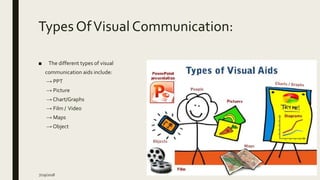
Types OfVisual Communication:
■ The different types of visual
communication aids include:
→ PPT
→ Picture
→ Chart/Graphs
→ Film / Video
→ Maps
→ Object
7/29/2018
PPT(Power Point Presentation)
■ PowerPoint has the potential to be an extremely powerful tool, especially to the
image-driven audience this series of essays has been discussing.
■ Microsoft PowerPoint is probably now the most commonly used form of visual aid.
Used well, it can really help you in your presentation
7/29/2018
Some GuidelinesTo Make PPT:
7/29/2018
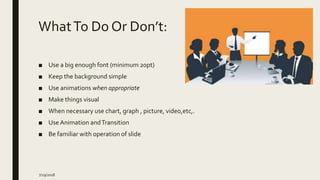
WhatTo Do Or Don’t:
■ Use a big enough font (minimum 20pt)
■ Keep the background simple
■ Use animations when appropriate
■ Make things visual
■ When necessary use chart, graph , picture, video,etc,.
■ Use Animation andTransition
■ Be familiar with operation of slide
7/29/2018
Continue…
■ Don’t make it so small you can't read it (hello,hello,hello)
■ Don’t use a fussy background image
■ Don't over-do the animation - it gets distracting
■ Don’t use endless slides of bulleted lists that all look the same
■ Don’t use multiple colour in slide background
7/29/2018
Any Question???
7/29/2018
ThankYou
7/29/2018

Visual communication using ppt

  • 1.
  • 2.
    What isVisual Communication? ■ Visual communication is basically described as communication through the use of visual aids. It is communication through means that can be seen read or looked upon ■ It is the most effective method of communication available. ■ In the modern age there are tools that aid the process of visual communication for people that are far apart from each other. 7/29/2018
  • 3.
    Visual Aids : ■Visual communication is done through visual aids.Visual aids are essential because they help the audience to understand the information being put across. ■ Visual aids are essential because they help the audience understand the information being put across. ■ They can do a large role in convincing the audience being addressed. ■ There are different types of visual communications used in business and they all depend on the use of visual aids. 7/29/2018
  • 4.
    Importance: ■ Increase audienceinterest ■ Illustrate key point ■ Increase impact of message ■ Help listeners retain information ■ Presenting ideas without depending on notes 7/29/2018
  • 5.
    Types OfVisual Communication: ■The different types of visual communication aids include: → PPT → Picture → Chart/Graphs → Film / Video → Maps → Object 7/29/2018
  • 6.
    PPT(Power Point Presentation) ■PowerPoint has the potential to be an extremely powerful tool, especially to the image-driven audience this series of essays has been discussing. ■ Microsoft PowerPoint is probably now the most commonly used form of visual aid. Used well, it can really help you in your presentation 7/29/2018
  • 7.
    Some GuidelinesTo MakePPT: 7/29/2018
  • 8.
    WhatTo Do OrDon’t: ■ Use a big enough font (minimum 20pt) ■ Keep the background simple ■ Use animations when appropriate ■ Make things visual ■ When necessary use chart, graph , picture, video,etc,. ■ Use Animation andTransition ■ Be familiar with operation of slide 7/29/2018
  • 9.
    Continue… ■ Don’t makeit so small you can't read it (hello,hello,hello) ■ Don’t use a fussy background image ■ Don't over-do the animation - it gets distracting ■ Don’t use endless slides of bulleted lists that all look the same ■ Don’t use multiple colour in slide background 7/29/2018
  • 10.
  • 11.