1
IS 41248 CloudComputing
Virtualization
Faculty of Computing, SUSL
2.
2
Outline
▪ Cloud Computing
▪Virtualization
▪ Server without virtualization
▪ Hypervisor Type
▪ Hypervisor implementation approaches
▪ Vmware ESXI
▪ CITRIX XEN SERVER
▪ Ubuntu KVM
▪ Virtualization vs Cloud Computing
Faculty of Computing, SUSL
3.
3
Learning Outcomes
▪ Atthe end of the session you will be able to :
Learning Outcome Description At the end of Today’s
session
ILO 01 Understand the
foundations, evolution,
and concepts of cloud
computing
Will be fully completed
Faculty of Computing, SUSL
4.
4
Cloud Computing
Cloud computingis a style of computing in
which dynamically scalable and usually
virtualized computing resources are provided as
a service over the internet.
Cloud computing use:
▪ Request resources or services over the
internet (or intranet)
▪ Provides scalability and reliability of a data
center
Faculty of Computing, SUSL
Characteristics
5.
5
Characteristics
▪ On demandscalability
•Add or subtract processors, memory,
network bandwidth to your cluster
•(Be billed for the QoS / resource usage)
▪ Virtualization and virtual systems & services
•Request operating system, storage,
databases, databases, other services
Faculty of Computing, SUSL
7
Virtualization
▪ Creation ofa virtual version of hardware using
software.
▪ Runs several applications at the same time on a single
physical server by hosting each of them inside their
own virtual machine.
▪ By running multiple virtual machines simultaneously, a
physical server can be utilized efficiently.
▪ Primary approaches to virtualization
▪ Platform virtualization Ex : Server
▪ Resources virtualization Ex : Storage, Network
Faculty of Computing, SUSL
9
Virtualization
▪ Hypervisor playsan important role in the virtualization
scenario by virtualization of hardware. It provides
support for running multiple operating systems
concurrently in virtual servers created within a physical
server.
Faculty of Computing, SUSL
10.
10
Virtualization
▪ The virtualizationlayer is the software responsible for
hosting and managing all VMs. The virtualization layer
is a hypervisor running directly on the hardware.
▪ Example: VMWare, Xen, KVM
Faculty of Computing, SUSL
11.
11
Virtualization
Name Creator HostCPU Guest CPU Host OS Guest OS License
bhyve FreeBSD x86-64 x86-64 FreeBSD FreeBSD, OpenBSD,
GNU/Linux …
BSD
DOSBox
Peter Veenstra,
Sjoerd,
community help
Any x86, ARM
Linux, Windows,
Mac OS X, BeOS,
FreeBSD, Solaris,
QNX, IRIX,
AmigaOSymbian, …
Internally emulated
DOS shell; classic PC
booter games, …
GPL
Hyper-V (2012) Microsoft
x86-64 + hardware-
assisted
virtualization (Intel
VT-x or AMD-V …
x86-64, (up to
64 physical
CPUs)
Windows 8/8.1 &
Windows Server
2012 (R2)
w/Hyper-V role,
Microsoft Hyper-V
Server
supported drivers for
Windows NT,
FreeBSD, Linux (SUSE
10, RHEL 6, CentOS 6)
…
Proprietary
VirtualBox
Innotek, acquired
by Oracle
Corporation
x86, x86-64, Intel
VT-x, AMD-V
x86, x86-64
Windows, Linux,
Mac OS X x86,
Solaris, FreeBSD,
eComStation
DOS, Linux, Mac OS X
Server, FreeBSD,
Haiku, OS/2, Solaris,
Syllable, Windows.,
GPL version 2; full
version with extra
enterprise features is
proprietary:
Windows
Virtual PC
Connectix &
Microsoft
x86, x86-64 with
Intel VT-x or AMD-V
x86 Windows 7
Windows XP,
Windows Vista,
Windows 7, …
Proprietary
(generally free for
non-comm.)
VMware Server VMware x86, x86-64 x86, x86-64 Windows, Linux
Same as VMware ESX
Server
Proprietary
Adapted from: http://en.wikipedia.org/wiki/Comparison_of_platform_virtualization_software
Faculty of Computing, SUSL
12.
12
Server without virtualization
▪Only one OS can run at a
time within a server.
▪ Under utilization of
resources.
▪ Inflexible and costly
infrastructure.
▪ Hardware changes
require manual effort
and access to the
physical server.
Hardware
CPU Memory NIC DISK
Operating System
Multiple Software
Applications
Faculty of Computing, SUSL
13.
13
Server without virtualization
▪Can run multiple OS
simultaneously.
▪ Each OS can have different
hardware configuration.
▪ Efficient utilization of
hardware resources.
▪ Each virtual machine is
independent.
▪ Save electricity, initial cost to
buy servers, space etc.
▪ Easy to manage and monitor
virtual machines centrally.
Faculty of Computing, SUSL
14.
14
Hypervisor Type
Full virtualization
▪Enables hypervisors to run an
unmodified guest operating
system (e.g. Windows 2003
or XP).
▪ Guest OS is not aware that it
is being virtualized.
▪ E.g.: VMware uses a
combination of direct
execution and binary
translation techniques to
achieve full virtualization of
server systems.
Faculty of Computing, SUSL
15.
15
Hypervisor Type
Para virtualization
▪Involves explicitly modifying
guest operating system (e.g.
SUSE Linux Enterprise Server
11) so that it is aware of
being virtualized to allow
near native performance.
▪ Improves performance.
▪ Lower overhead.
▪ E.g.: Xen supports both
Hardware Assisted
Virtualization (HVM) and
Para-Virtualization (PV).
Faculty of Computing, SUSL
16.
16
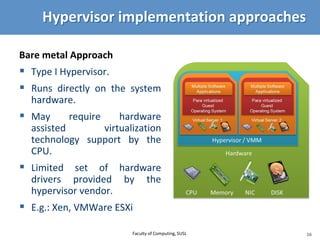
Hypervisor implementation approaches
Baremetal Approach
▪ Type I Hypervisor.
▪ Runs directly on the system
hardware.
▪ May require hardware
assisted virtualization
technology support by the
CPU.
▪ Limited set of hardware
drivers provided by the
hypervisor vendor.
▪ E.g.: Xen, VMWare ESXi
Faculty of Computing, SUSL
17.
17
Vmware ESXI
▪ BareMetal Approach.
▪ Full virtualization.
▪ Proven technology.
▪ Used for secure and robust
virtualization solutions for
virtual data centers and cloud
infrastructures.
▪ Takes advantage of support
for hardware assisted
virtualization for 64-bit OS on
Intel processors.
Faculty of Computing, SUSL
18.
18
CITRIX XEN SERVER
▪Open source; bare metal.
▪ Offers both Hardware Assisted
Virtualization (HVM) and Para-
Virtualization (PV)
▪ Needs virtualization support in the
CPU for HVM.
▪ Xen loads an initial OS which runs
as a privileged guest called
“domain 0”.
▪ The domain 0 OS, typically a Linux
or UNIX variant, can talk directly to
the system hardware (whereas the
other guests cannot) and also talk
directly to the hypervisor itself. It
allocates and maps hardware
resources for other guest domains.
Faculty of Computing, SUSL
19.
19
Ubuntu KVM
▪ Kernelbased virtual machine
(Kernel Based VM)
▪ Open source.
▪ Kernel-level extension to Linux.
▪ Full virtualization.
▪ Supports full virtualization and
hence does not need hardware
assisted virtualization support
in the CPU.
20.
20
Virtualization vs CloudComputing
▪ Main fundamental difference between these:
▪ Virtualization is software that manipulates
hardware and provides a layer to present a
consistent interface; whereas cloud
computing is a service / collection of services
that runs on top of that layer (i.e., on the
virtual machine).
Faculty of Computing, SUSL
21.
21
Virtualization vs CloudComputing
▪ You can also argue that:
•Cloud computing is the delivery of services, using
shared computing resources, software or data,
on-demand through via Internet.
•Whereas virtualization is more a lower level
interface unseen by the users.
▪ A confusion is “virtualization as a service” – i.e.
where the cloud basically provides virtual machines
and operating system of the particular type
requested that the users then writes code for. (tends
to be a type of IaaS)
Faculty of Computing, SUSL