
Virtual Memory
Management
Content
1. Virtual Memory
2. Virtual Address Space
3. Shared Library
4. Demand Paging
5. Virtual Memory Table
6. Page Fault
7. Page Replacement
8. Page Replacement Algorithm
Virtual Memory
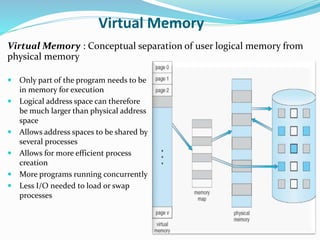
Virtual Memory : Conceptual separation of user logical memory from
physical memory
 Only part of the program needs to be
in memory for execution
 Logical address space can therefore
be much larger than physical address
space
 Allows address spaces to be shared by
several processes
 Allows for more efficient process
creation
 More programs running concurrently
 Less I/O needed to load or swap
processes
Virtual Address Space
 Virtual address space–logical view of how process is stored in
memory
 Usually start at address 0, contiguous addresses until end of space
 Meanwhile, physical memory organized in page frames
 MMU must map logical to physical
 Virtual memory can be implemented via:
 Demand paging
 Demand segmentation
Virtual Address Space (cont.)
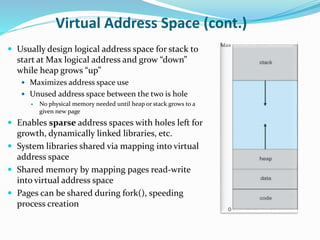
 Usually design logical address space for stack to
start at Max logical address and grow “down”
while heap grows “up”
 Maximizes address space use
 Unused address space between the two is hole
 No physical memory needed until heap or stack grows to a
given new page
 Enables sparse address spaces with holes left for
growth, dynamically linked libraries, etc.
 System libraries shared via mapping into virtual
address space
 Shared memory by mapping pages read-write
into virtual address space
 Pages can be shared during fork(), speeding
process creation
Shared Library
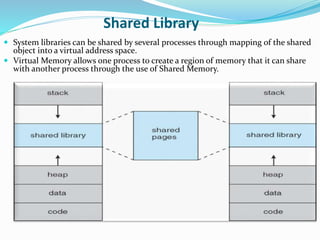
 System libraries can be shared by several processes through mapping of the shared
object into a virtual address space.
 Virtual Memory allows one process to create a region of memory that it can share
with another process through the use of Shared Memory.
Demand Paging
 Could bring entire process into memory
at load time Or bring a page into
memory only when it is needed
 Less I/O needed, no unnecessary I/O
 Less memory needed
 Faster response
 More users
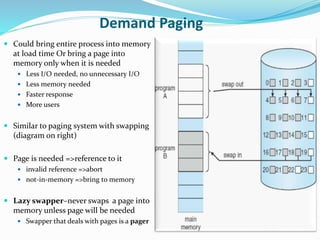
 Similar to paging system with swapping
(diagram on right)
 Page is needed =>reference to it
 invalid reference =>abort
 not-in-memory =>bring to memory
 Lazy swapper–never swaps a page into
memory unless page will be needed
 Swapper that deals with pages is a pager
Virtual Memory Table
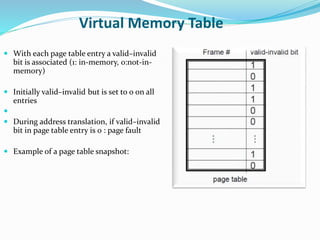
 With each page table entry a valid–invalid
bit is associated (1: in-memory, 0:not-in-
memory)
 Initially valid–invalid but is set to 0 on all
entries

 During address translation, if valid–invalid
bit in page table entry is 0 : page fault
 Example of a page table snapshot:
Page Fault
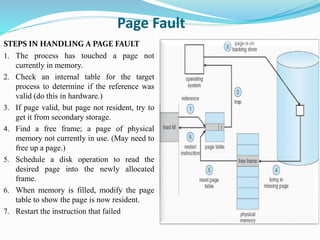
STEPS IN HANDLING A PAGE FAULT
1. The process has touched a page not
currently in memory.
2. Check an internal table for the target
process to determine if the reference was
valid (do this in hardware.)
3. If page valid, but page not resident, try to
get it from secondary storage.
4. Find a free frame; a page of physical
memory not currently in use. (May need to
free up a page.)
5. Schedule a disk operation to read the
desired page into the newly allocated
frame.
6. When memory is filled, modify the page
table to show the page is now resident.
7. Restart the instruction that failed
Page Replacement
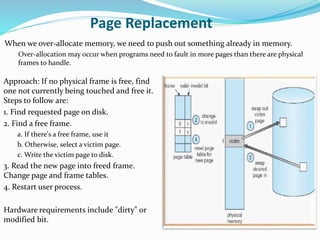
Approach: If no physical frame is free, find
one not currently being touched and free it.
Steps to follow are:
1. Find requested page on disk.
2. Find a free frame.
a. If there's a free frame, use it
b. Otherwise, select a victim page.
c. Write the victim page to disk.
3. Read the new page into freed frame.
Change page and frame tables.
4. Restart user process.
Hardware requirements include "dirty" or
modified bit.
When we over-allocate memory, we need to push out something already in memory.
Over-allocation may occur when programs need to fault in more pages than there are physical
frames to handle.
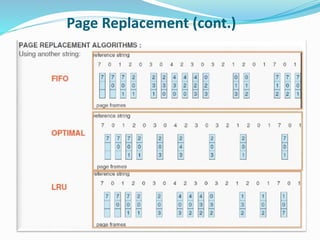
Page Replacement Algorithms
When memory is over allocated, we can either swap out some process, or overwrite some
pages.
Which pages should we replace ? <--- here the goal is to minimize the number of faults.
FIFO
 Conceptually easy to implement; either use a time-stamp on pages, or organize on a queue.
(The queue is by far the easier of the two methods.)
OPTIMAL REPLACEMENT
 This is the replacement policy that results in the lowest page fault rate.
 Algorithm: Replace that page which will not be next used for the longest period of time.
 Impossible to achieve in practice; requires crystal ball.
LEAST RECENTLY USED ( LRU )
 Replace that page which has not been used for the longest period of time.
 Results of this method considered favorable. The difficulty comes in making it work.
 Implementation possibilities:
 Time stamp on pages - records when the page is last touched.
 Page stack - pull out touched page and put on top
Page Replacement (cont.)
Questions?

Virtual Memory Management

  • 1.
  • 2.
    Content 1. Virtual Memory 2.Virtual Address Space 3. Shared Library 4. Demand Paging 5. Virtual Memory Table 6. Page Fault 7. Page Replacement 8. Page Replacement Algorithm
  • 3.
    Virtual Memory Virtual Memory: Conceptual separation of user logical memory from physical memory  Only part of the program needs to be in memory for execution  Logical address space can therefore be much larger than physical address space  Allows address spaces to be shared by several processes  Allows for more efficient process creation  More programs running concurrently  Less I/O needed to load or swap processes
  • 4.
    Virtual Address Space Virtual address space–logical view of how process is stored in memory  Usually start at address 0, contiguous addresses until end of space  Meanwhile, physical memory organized in page frames  MMU must map logical to physical  Virtual memory can be implemented via:  Demand paging  Demand segmentation
  • 5.
    Virtual Address Space(cont.)  Usually design logical address space for stack to start at Max logical address and grow “down” while heap grows “up”  Maximizes address space use  Unused address space between the two is hole  No physical memory needed until heap or stack grows to a given new page  Enables sparse address spaces with holes left for growth, dynamically linked libraries, etc.  System libraries shared via mapping into virtual address space  Shared memory by mapping pages read-write into virtual address space  Pages can be shared during fork(), speeding process creation
  • 6.
    Shared Library  Systemlibraries can be shared by several processes through mapping of the shared object into a virtual address space.  Virtual Memory allows one process to create a region of memory that it can share with another process through the use of Shared Memory.
  • 7.
    Demand Paging  Couldbring entire process into memory at load time Or bring a page into memory only when it is needed  Less I/O needed, no unnecessary I/O  Less memory needed  Faster response  More users  Similar to paging system with swapping (diagram on right)  Page is needed =>reference to it  invalid reference =>abort  not-in-memory =>bring to memory  Lazy swapper–never swaps a page into memory unless page will be needed  Swapper that deals with pages is a pager
  • 8.
    Virtual Memory Table With each page table entry a valid–invalid bit is associated (1: in-memory, 0:not-in- memory)  Initially valid–invalid but is set to 0 on all entries   During address translation, if valid–invalid bit in page table entry is 0 : page fault  Example of a page table snapshot:
  • 9.
    Page Fault STEPS INHANDLING A PAGE FAULT 1. The process has touched a page not currently in memory. 2. Check an internal table for the target process to determine if the reference was valid (do this in hardware.) 3. If page valid, but page not resident, try to get it from secondary storage. 4. Find a free frame; a page of physical memory not currently in use. (May need to free up a page.) 5. Schedule a disk operation to read the desired page into the newly allocated frame. 6. When memory is filled, modify the page table to show the page is now resident. 7. Restart the instruction that failed
  • 10.
    Page Replacement Approach: Ifno physical frame is free, find one not currently being touched and free it. Steps to follow are: 1. Find requested page on disk. 2. Find a free frame. a. If there's a free frame, use it b. Otherwise, select a victim page. c. Write the victim page to disk. 3. Read the new page into freed frame. Change page and frame tables. 4. Restart user process. Hardware requirements include "dirty" or modified bit. When we over-allocate memory, we need to push out something already in memory. Over-allocation may occur when programs need to fault in more pages than there are physical frames to handle.
  • 11.
    Page Replacement Algorithms Whenmemory is over allocated, we can either swap out some process, or overwrite some pages. Which pages should we replace ? <--- here the goal is to minimize the number of faults. FIFO  Conceptually easy to implement; either use a time-stamp on pages, or organize on a queue. (The queue is by far the easier of the two methods.) OPTIMAL REPLACEMENT  This is the replacement policy that results in the lowest page fault rate.  Algorithm: Replace that page which will not be next used for the longest period of time.  Impossible to achieve in practice; requires crystal ball. LEAST RECENTLY USED ( LRU )  Replace that page which has not been used for the longest period of time.  Results of this method considered favorable. The difficulty comes in making it work.  Implementation possibilities:  Time stamp on pages - records when the page is last touched.  Page stack - pull out touched page and put on top
  • 12.
  • 13.