Virtual Memory Management
Demand paging
Mrs.T.Jeya Asst.professor, Dept of CS
Background
 Virtual memory – separation of user logical
memory from physical memory:
 Only part of the program needs to be in memory for
execution.
 Logical address space can therefore be much larger
than physical address space.
 Allows address spaces to be shared by several
processes.
 Allows for more efficient process creation.
 More programs running concurrently.
 Less I/O needed to load or swap processes.
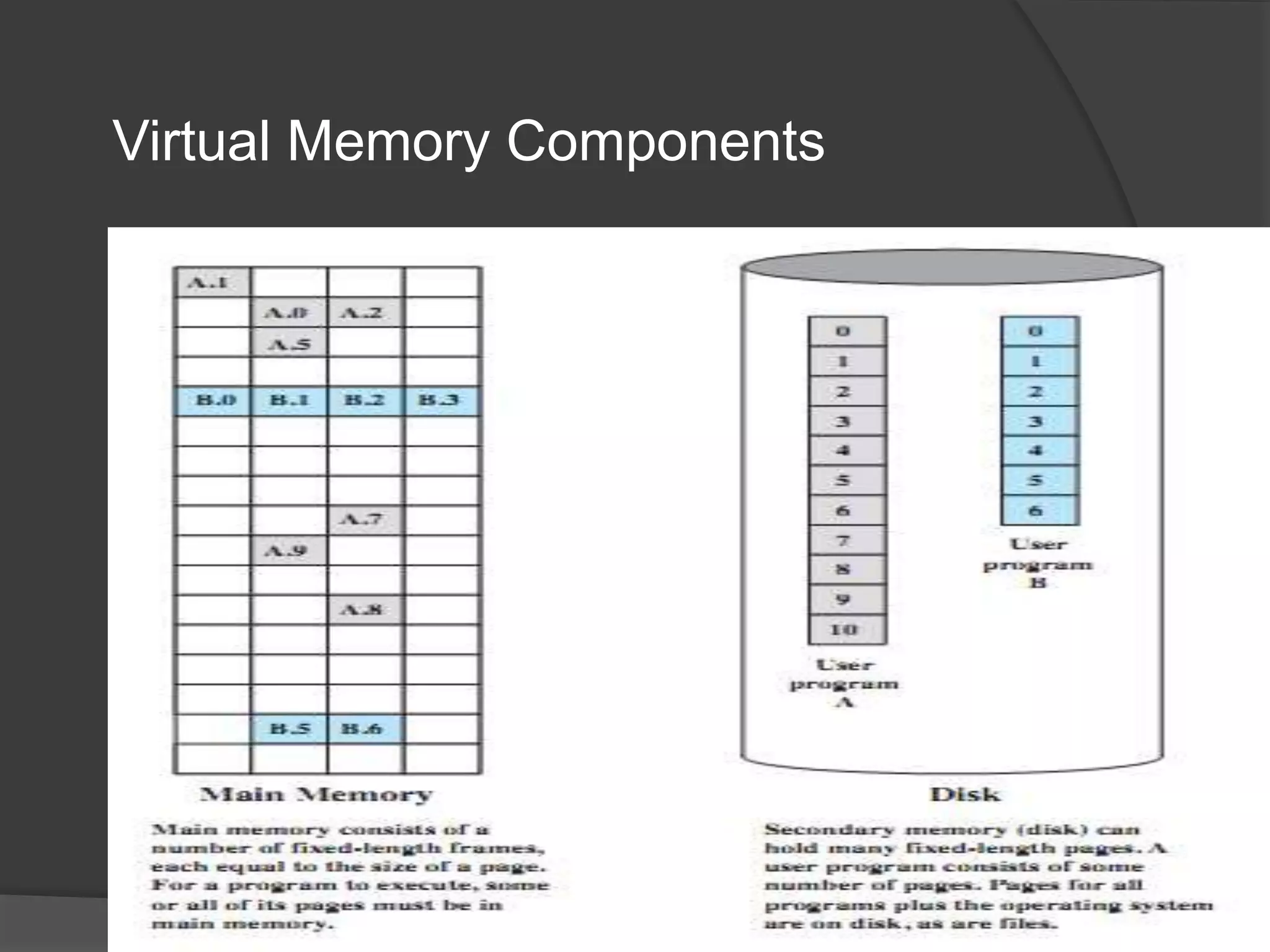
Virtual Memory Components
A. Frank - P. Weisberg
Background
 Virtual address space – logical view of how
process is stored in memory:
 Usually start at address 0, contiguous addresses until
end
of space.
 Meanwhile, physical memory organized in page
frames.
 MMU must map logical to physical.
 Virtual memory can be implemented via:
 Demand paging
 Demand segmentation
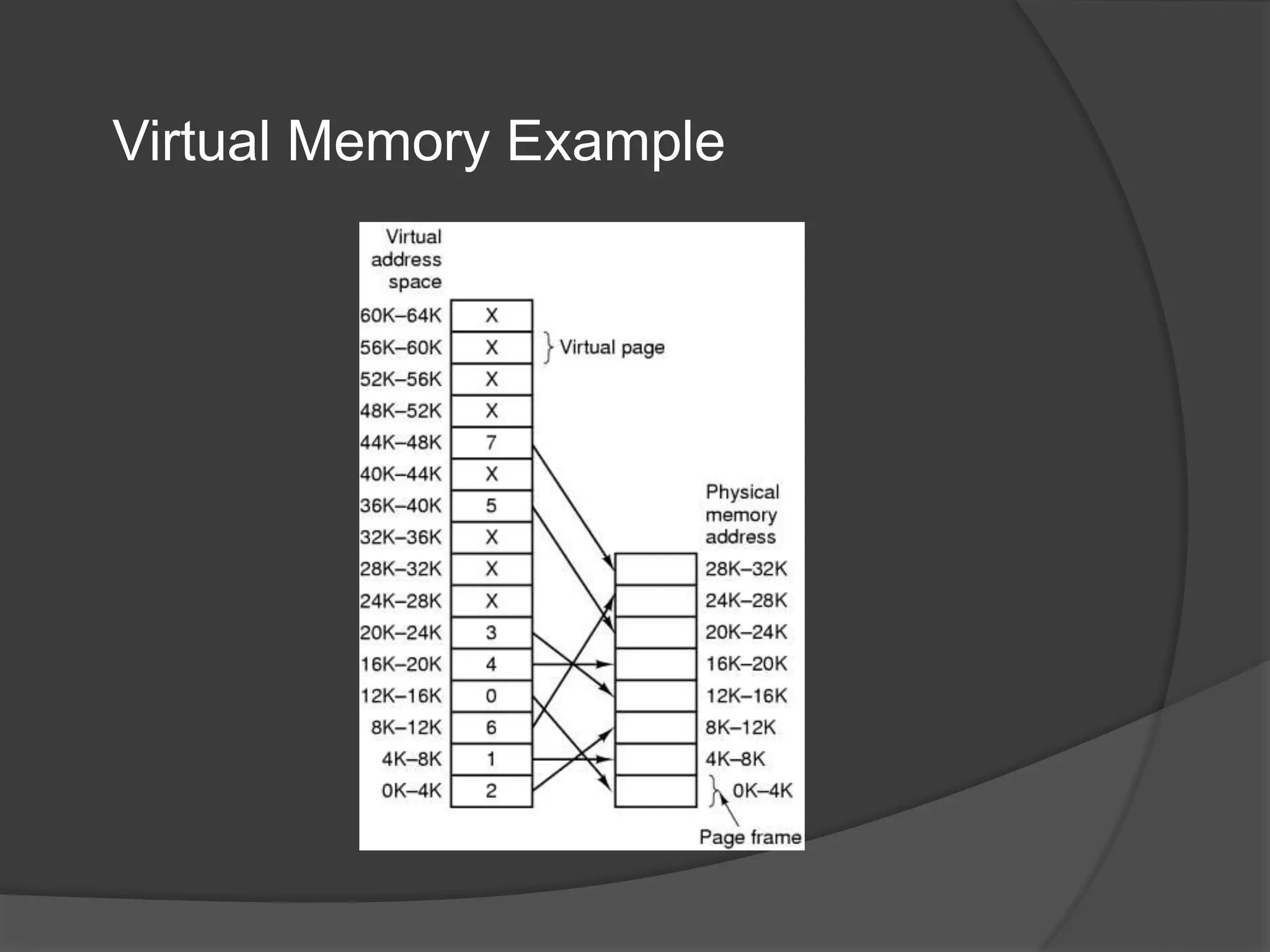
Virtual Memory Example
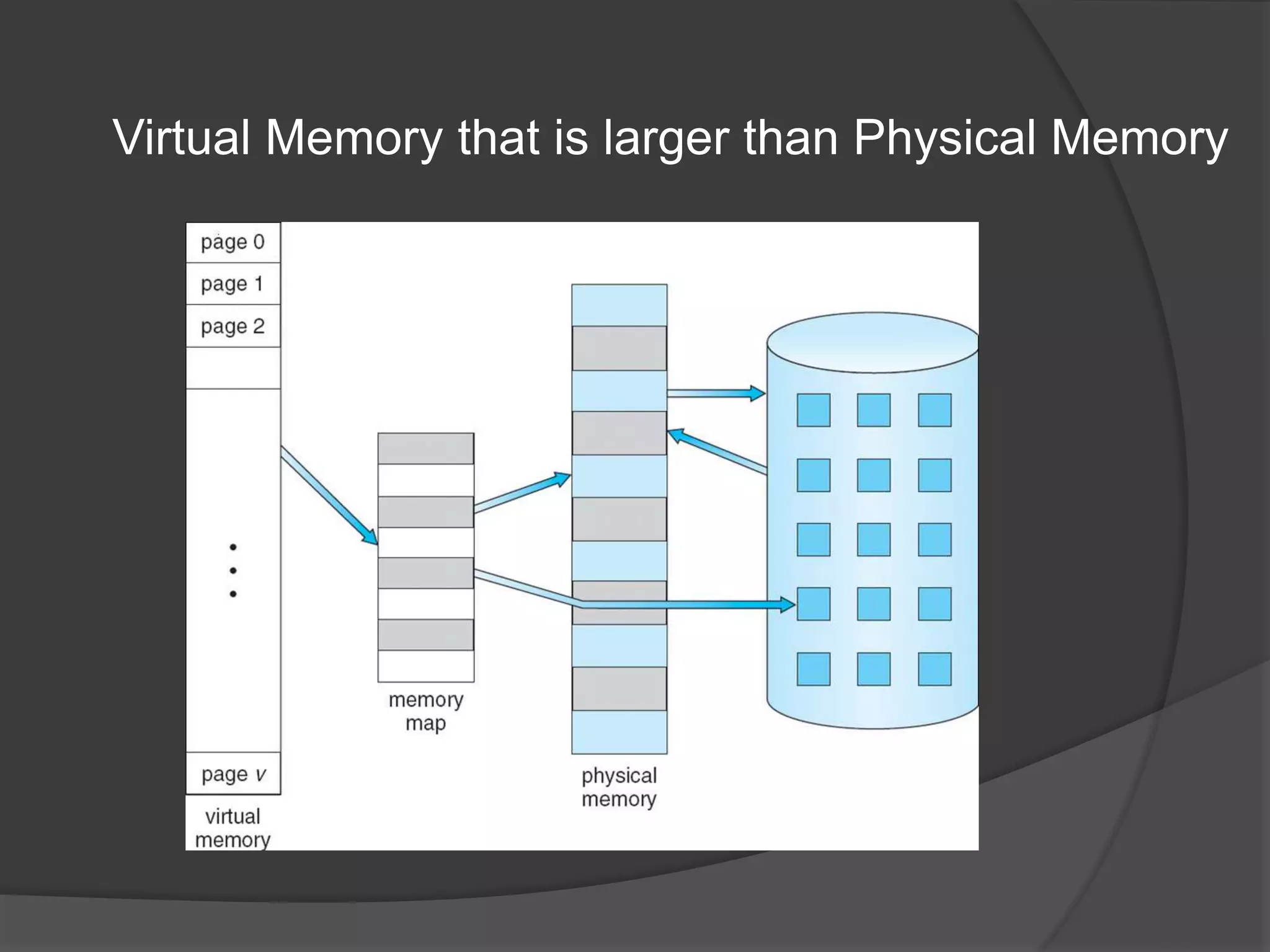
Virtual Memory that is larger than Physical Memory
Advantages of Partial Loading
 More processes can be maintained in main
memory:
 only load in some of the pieces of each process.
 with more processes in main memory, it is more
likely that a process will be in the Ready state at
any given time.
 A process can now execute even if it is larger
than the main memory size:
 it is even possible to use more bits for logical
addresses than the bits needed for addressing the
physical memory.
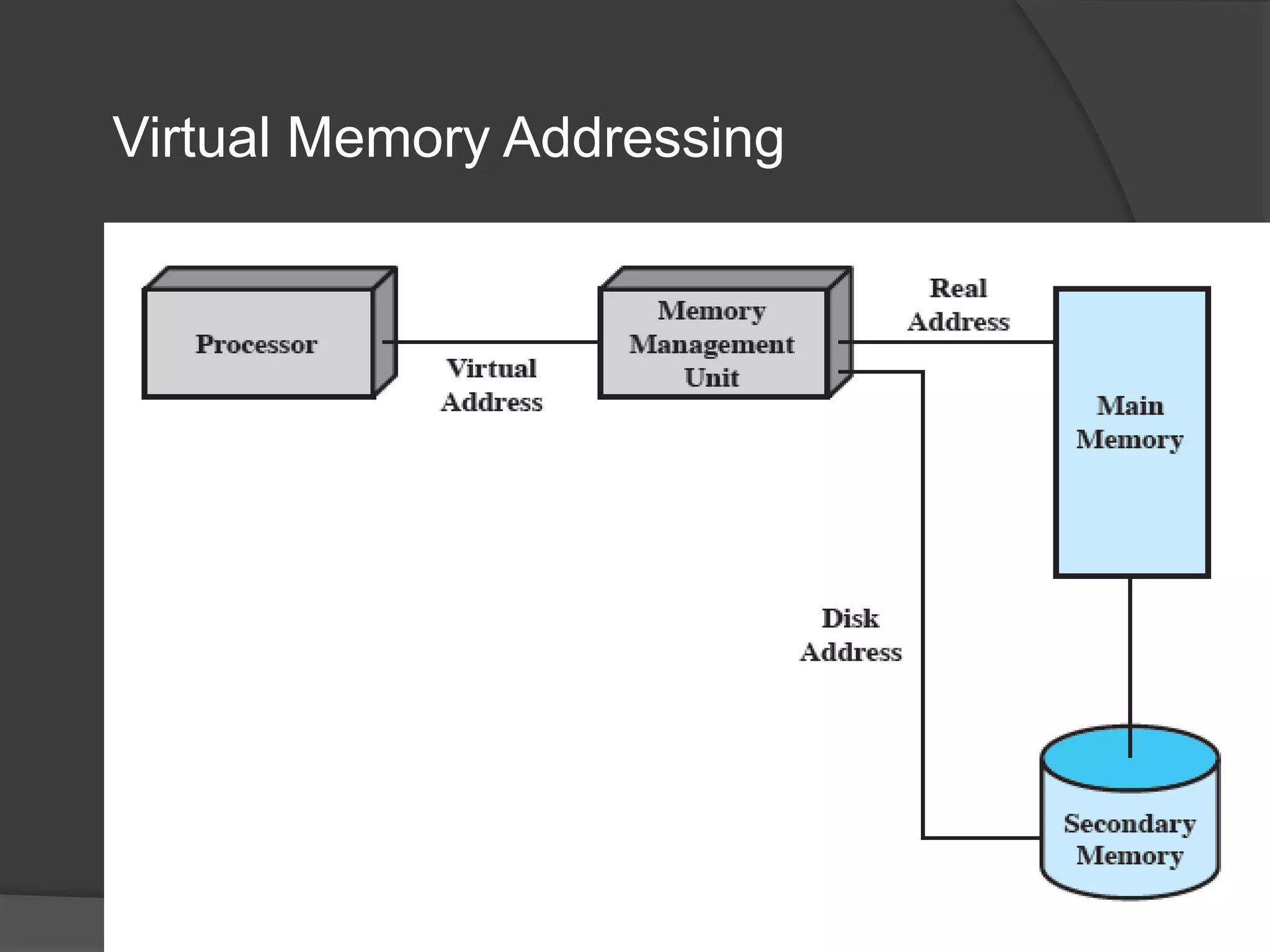
Virtual Memory Addressing
A. Frank - P. Weisberg
Virtual-address Space
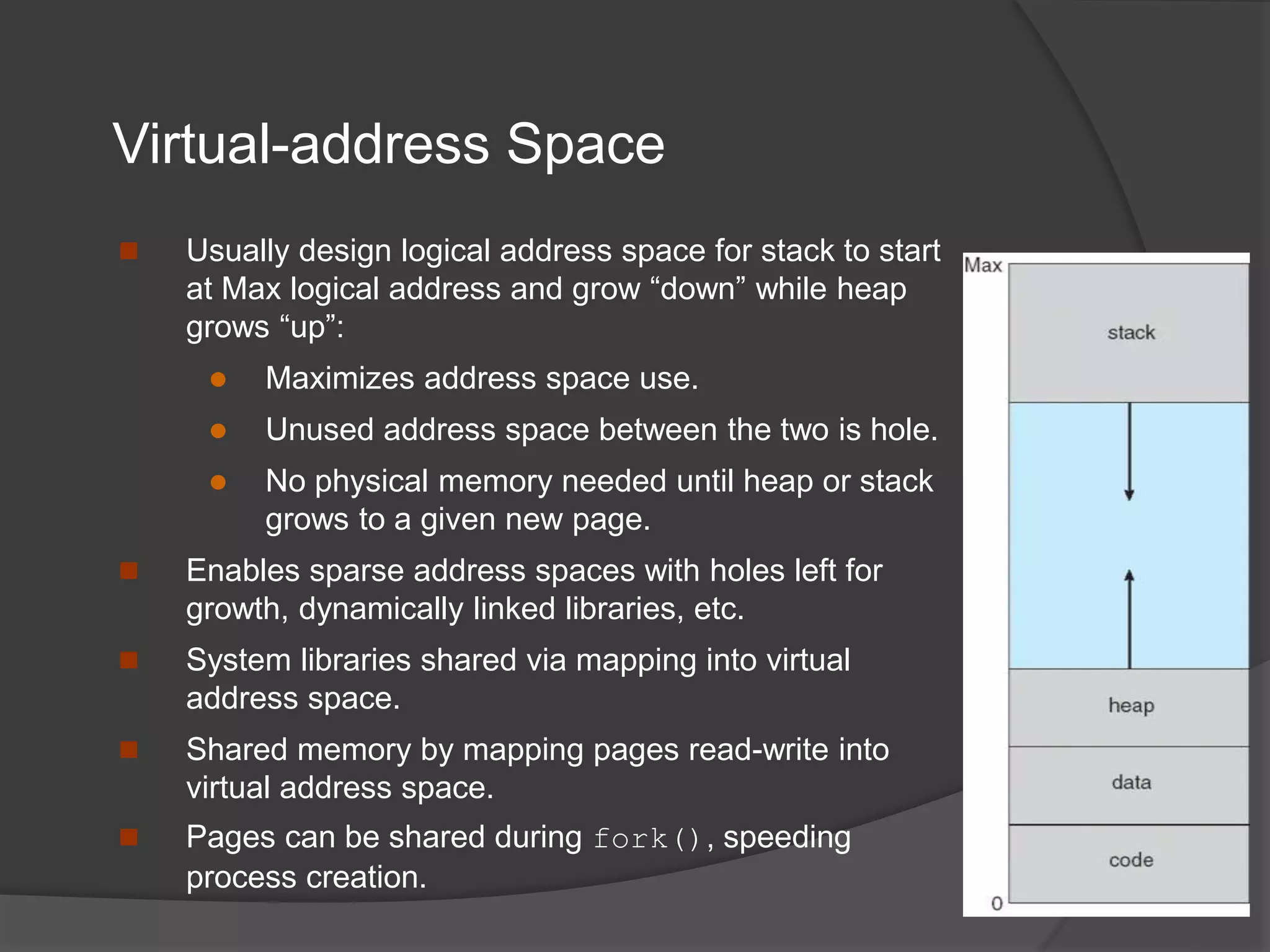
 Usually design logical address space for stack to start
at Max logical address and grow “down” while heap
grows “up”:
 Maximizes address space use.
 Unused address space between the two is hole.
 No physical memory needed until heap or stack
grows to a given new page.
 Enables sparse address spaces with holes left for
growth, dynamically linked libraries, etc.
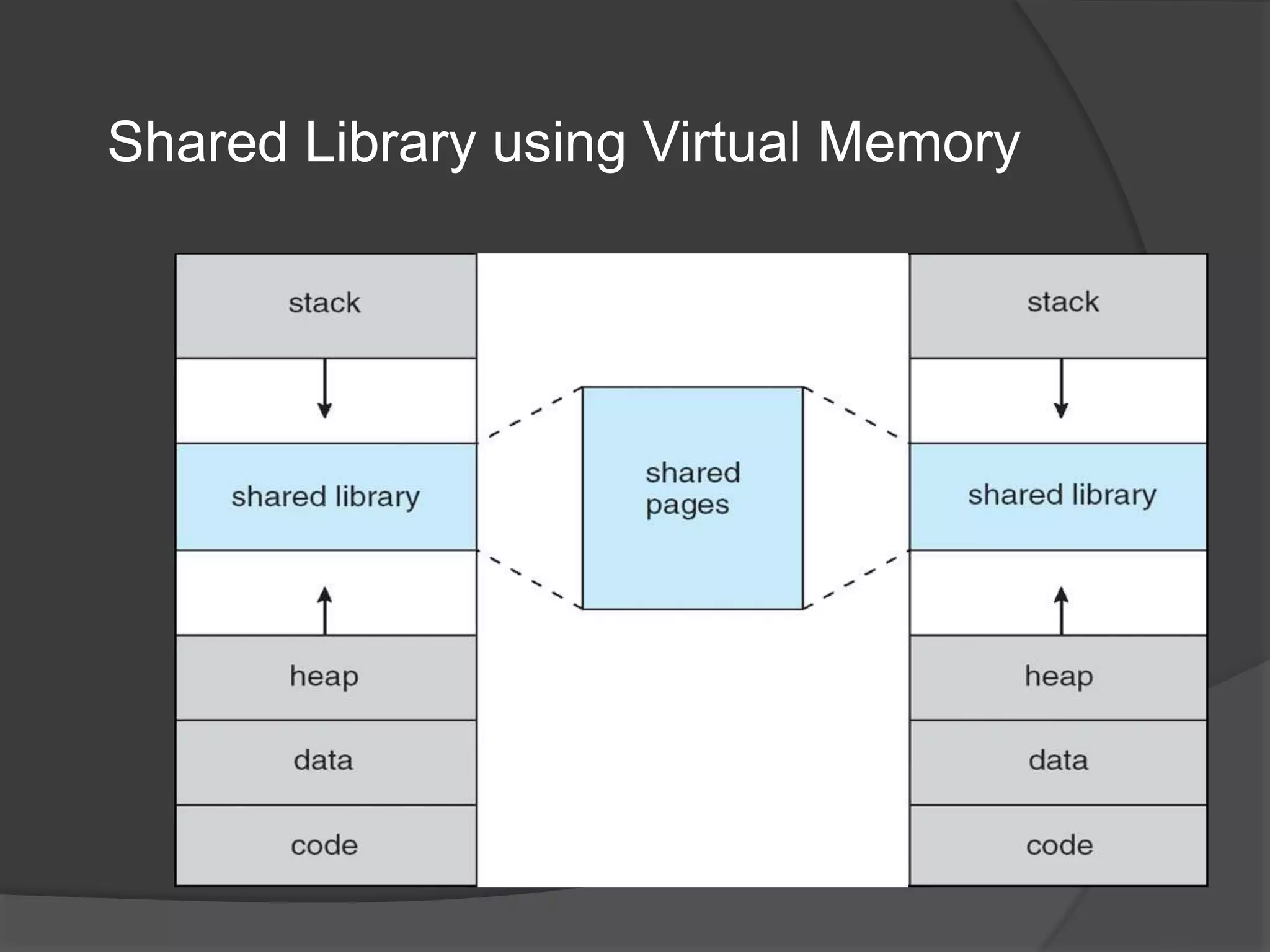
 System libraries shared via mapping into virtual
address space.
 Shared memory by mapping pages read-write into
virtual address space.
 Pages can be shared during fork(), speeding
process creation.
Shared Library using Virtual Memory
Demand Paging
 Bring a page into memory only when it is
needed:
 Less I/O needed, no unnecessary I/O
 Less memory needed
 Faster response
 More users
 Page is needed  reference to it:
 invalid reference  abort
 not-in-memory  bring to memory
 Similar to paging system with swapping.
 Lazy swapper – never swaps a page into
memory unless page will be needed; Swapper
that deals with pages is a pager.
Basic Concepts
 With swapping, pager guesses which pages will be
used before swapping out again.
 Instead, pager brings in only those pages into
memory.
 How to determine that set of pages?
 Need new MMU functionality to implement demand paging.
 If pages needed are already memory resident:
 No difference from non demand-paging.
 If page needed and not memory resident:
 Need to detect and load the page into memory from storage:
○ Without changing program behavior.
○ Without programmer needing to change code.
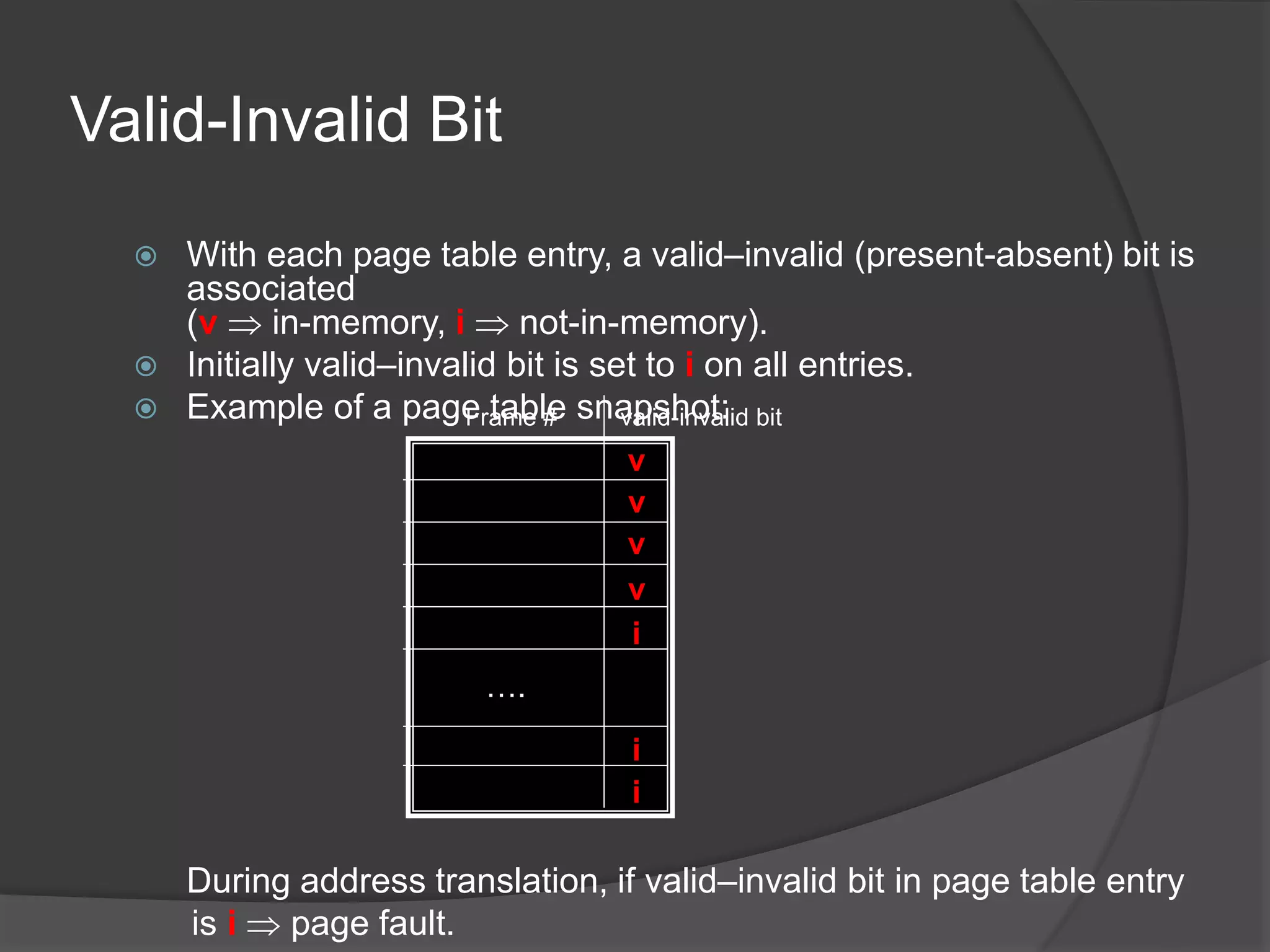
Valid-Invalid Bit
 With each page table entry, a valid–invalid (present-absent) bit is
associated
(v  in-memory, i  not-in-memory).
 Initially valid–invalid bit is set to i on all entries.
 Example of a page table snapshot:
During address translation, if valid–invalid bit in page table entry
is i  page fault.
v
v
v
v
i
i
i
….
Frame # valid-invalid bit
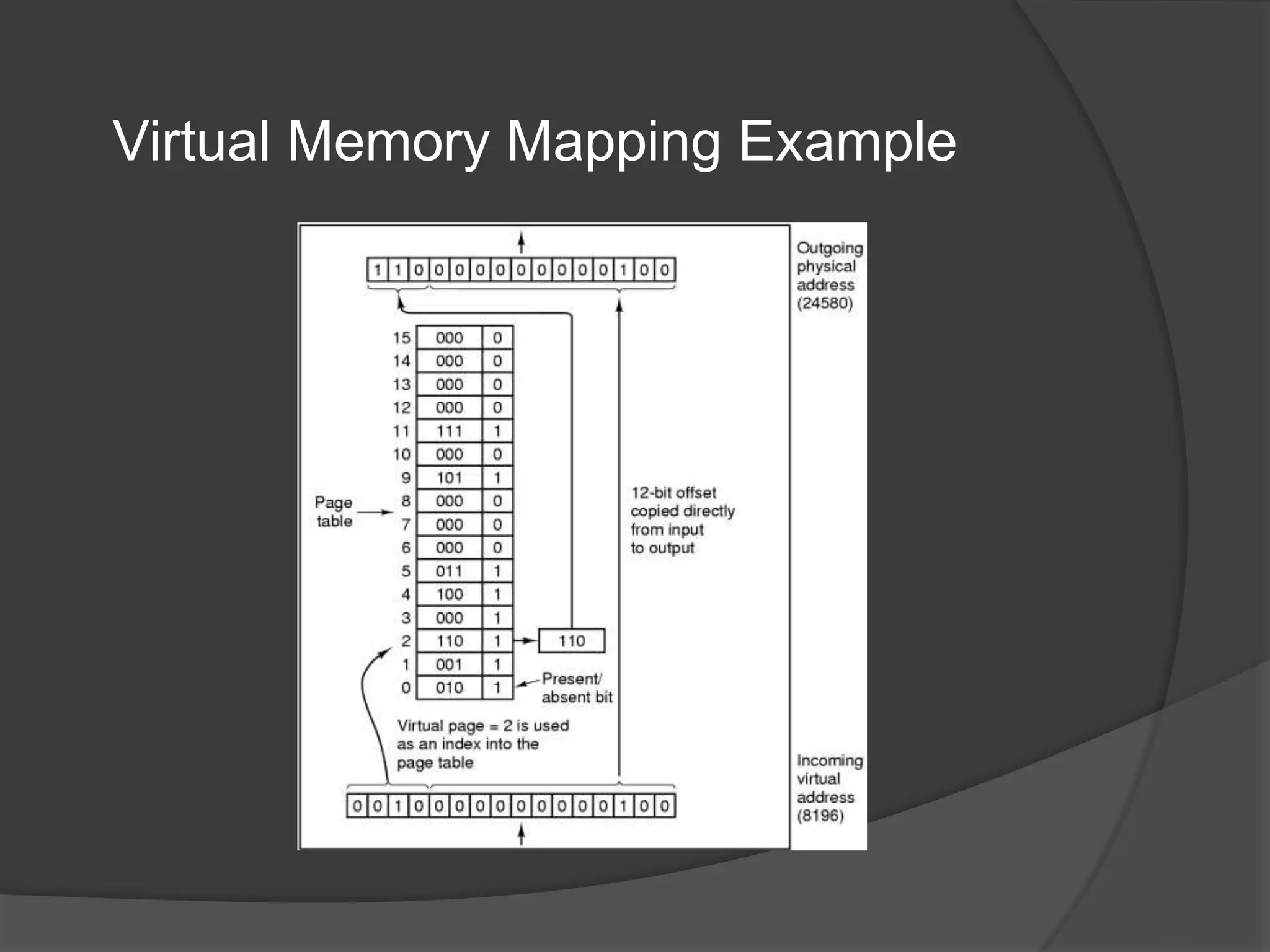
Virtual Memory Mapping Example
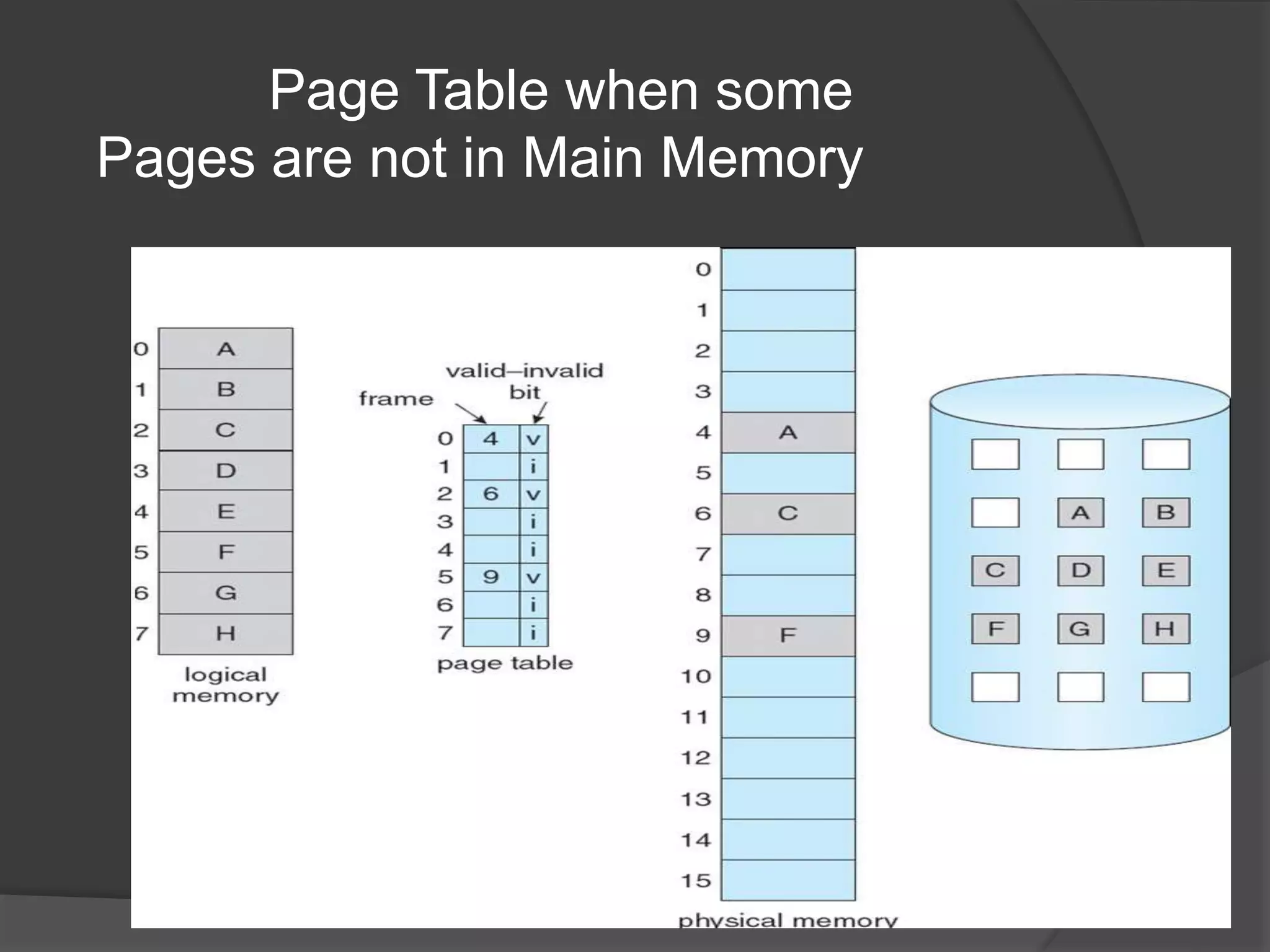
Page Table when some
Pages are not in Main Memory
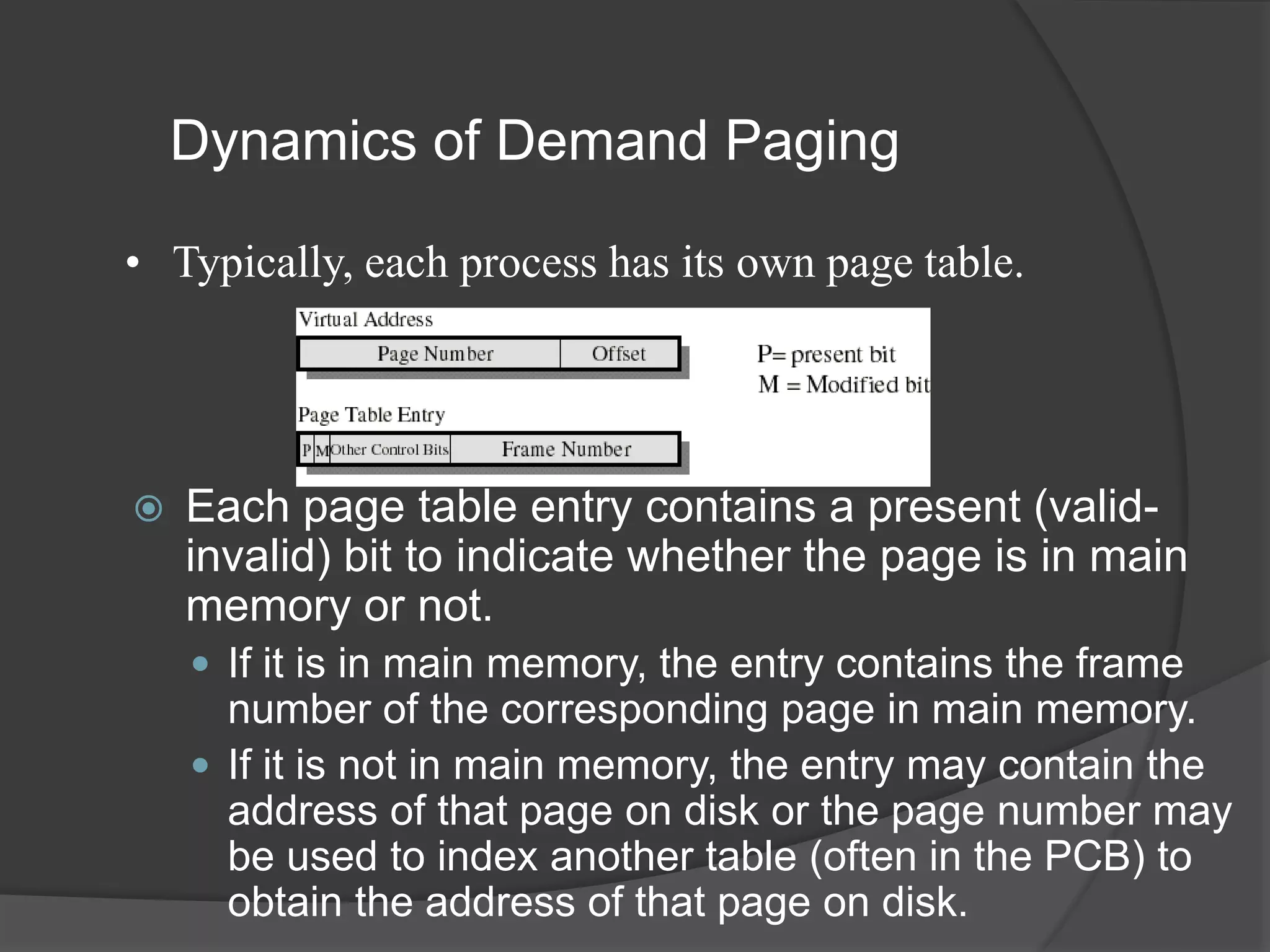
Dynamics of Demand Paging
 Each page table entry contains a present (valid-
invalid) bit to indicate whether the page is in main
memory or not.
 If it is in main memory, the entry contains the frame
number of the corresponding page in main memory.
 If it is not in main memory, the entry may contain the
address of that page on disk or the page number may
be used to index another table (often in the PCB) to
obtain the address of that page on disk.
• Typically, each process has its own page table.
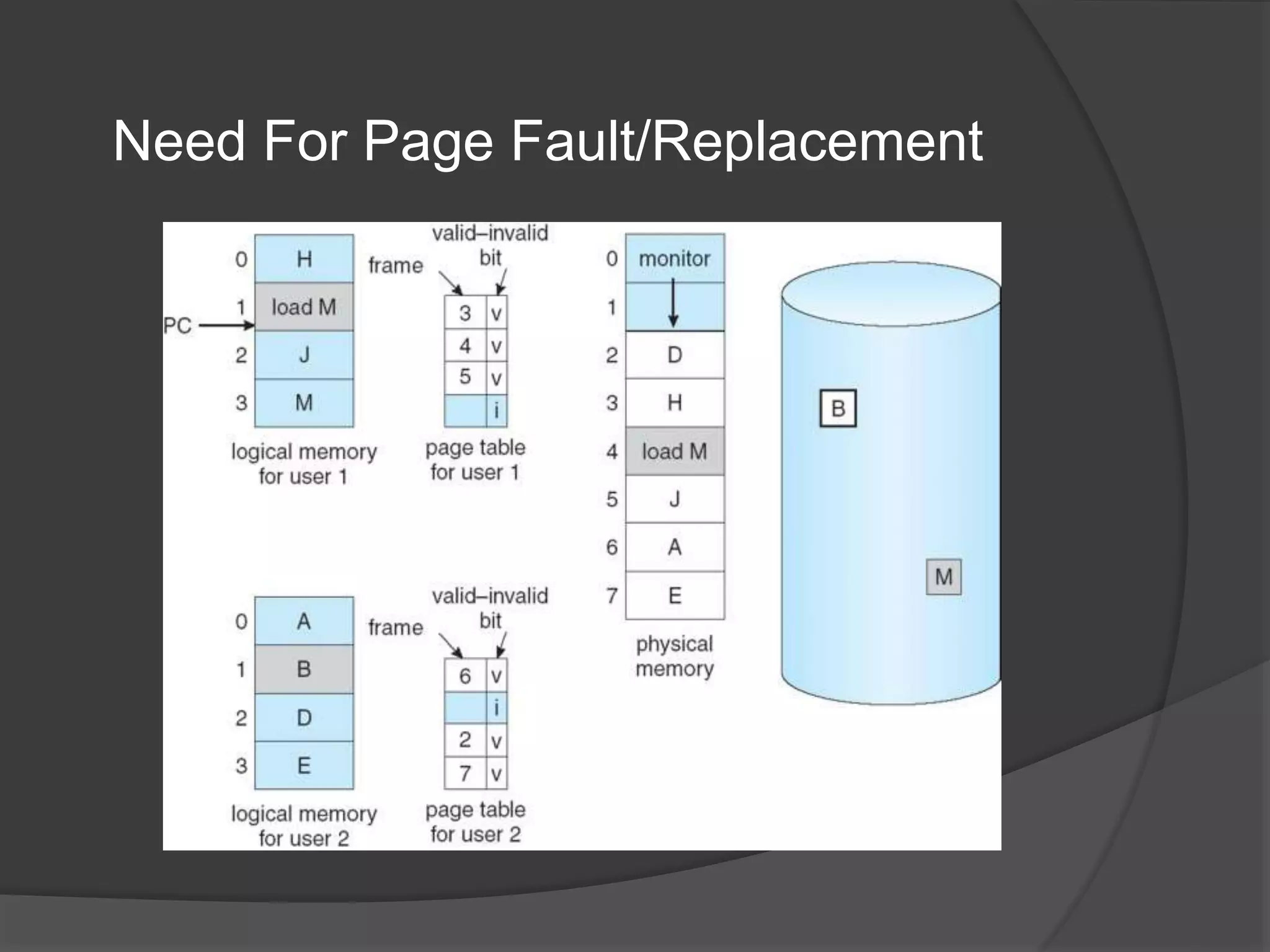
Need For Page Fault/Replacement
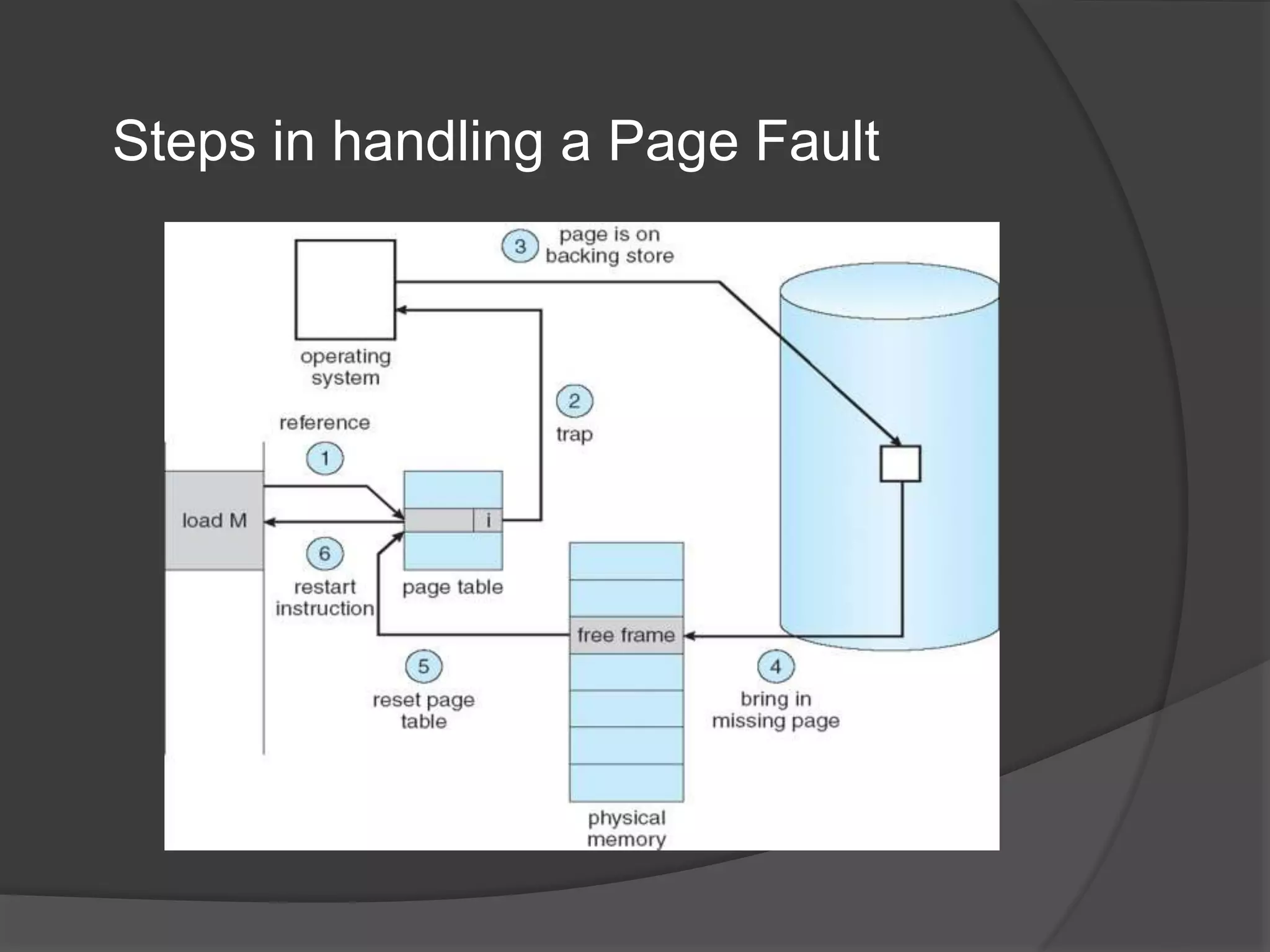
Steps in handling a Page Fault
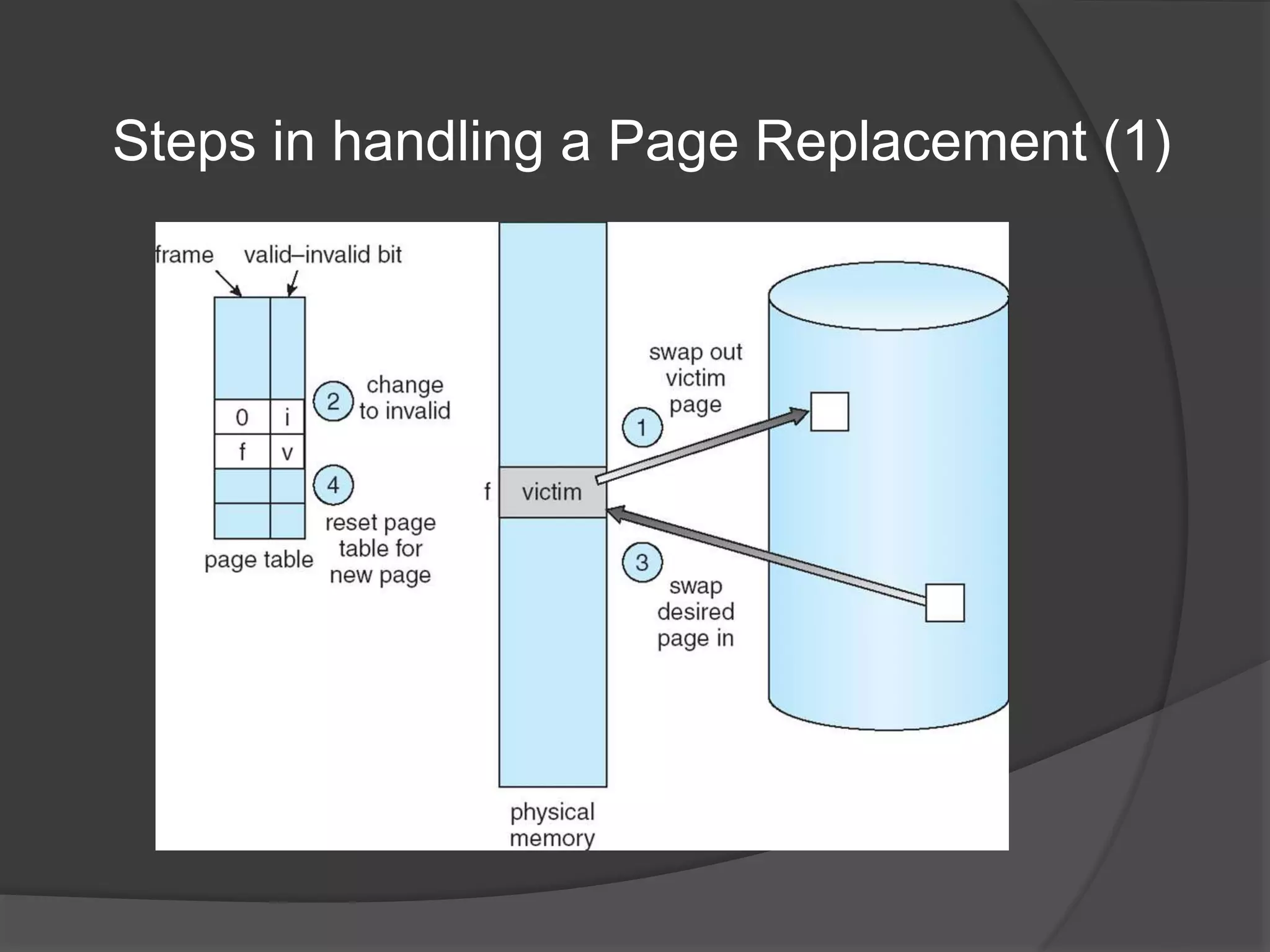
Steps in handling a Page Replacement (1)
Aspects of Demand Paging
 Extreme case – start process with no pages in memory:
 OS sets instruction pointer to first instruction of process,
non-memory-resident -> page fault.
 And for every other process pages on first access.
 This is Pure demand paging.
 Actually, a given instruction could access multiple pages -
> multiple page faults:
 Consider fetch and decode of instruction which adds 2 numbers
from memory and stores result back to memory.
 Pain decreased because of locality of reference.
 Hardware support needed for demand paging:
 Page table with valid/invalid bit.
 Secondary memory (swap device with swap space).
 Instruction restart.
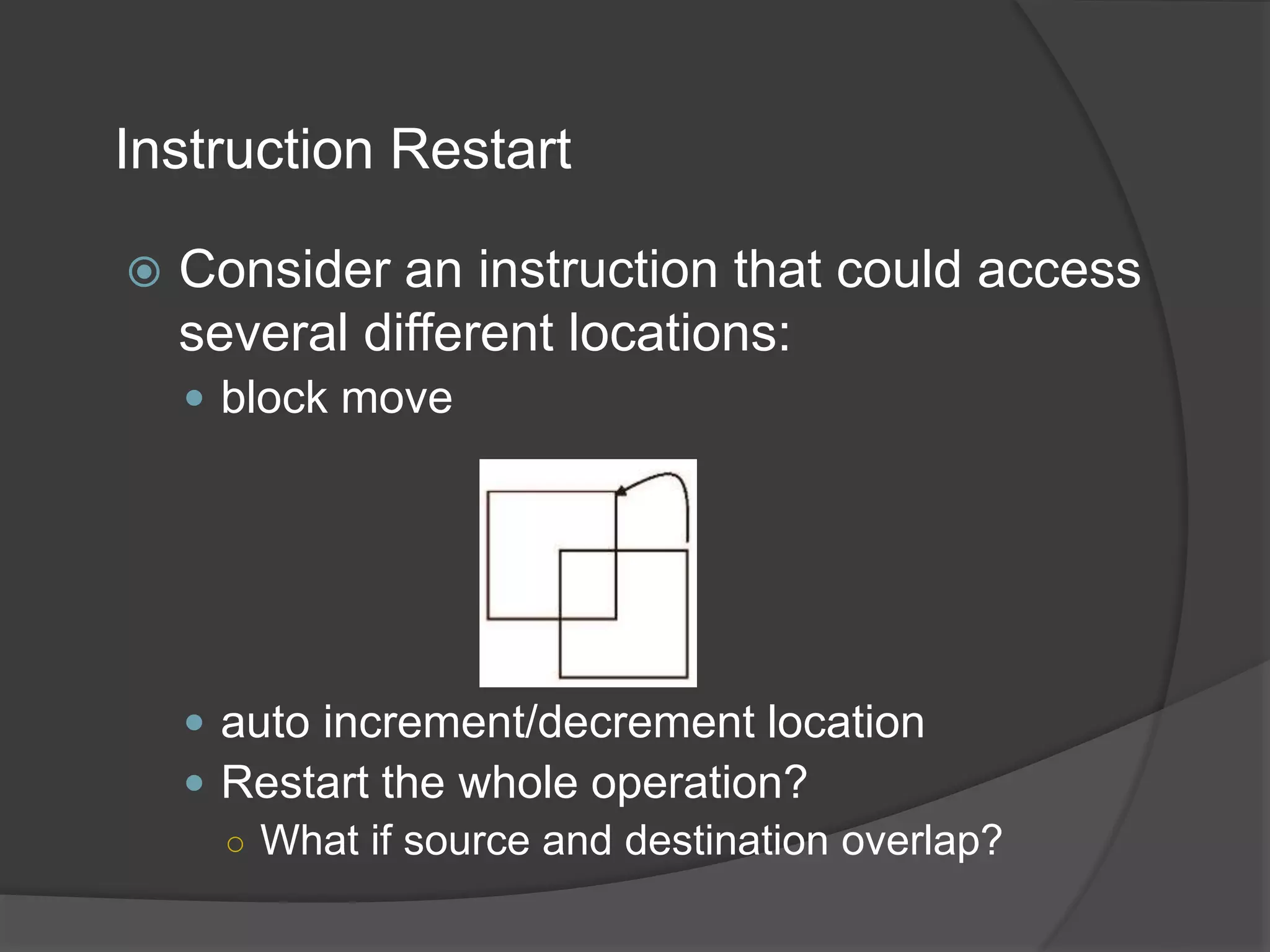
Instruction Restart
 Consider an instruction that could access
several different locations:
 block move
 auto increment/decrement location
 Restart the whole operation?
○ What if source and destination overlap?
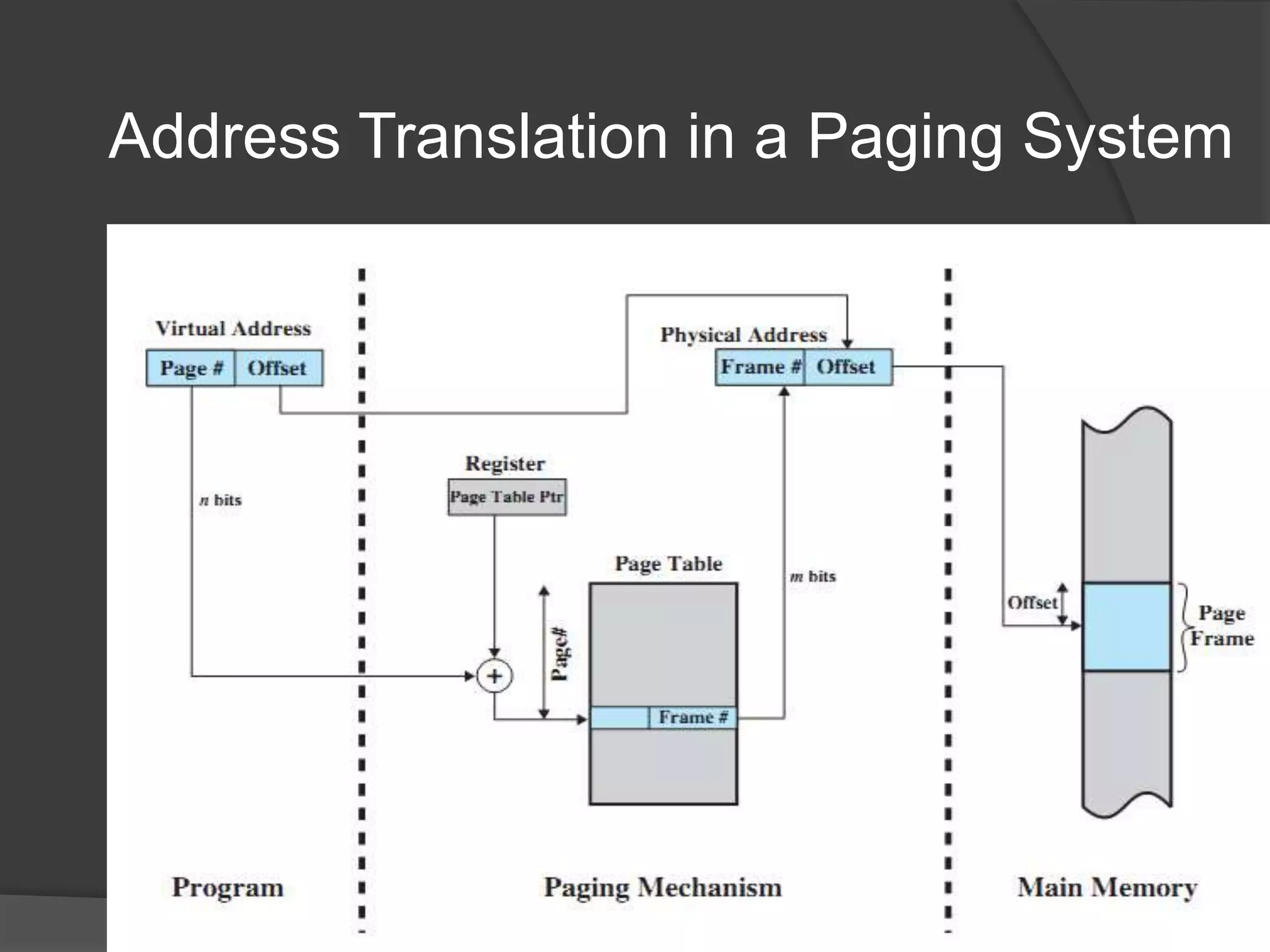
Address Translation in a Paging System
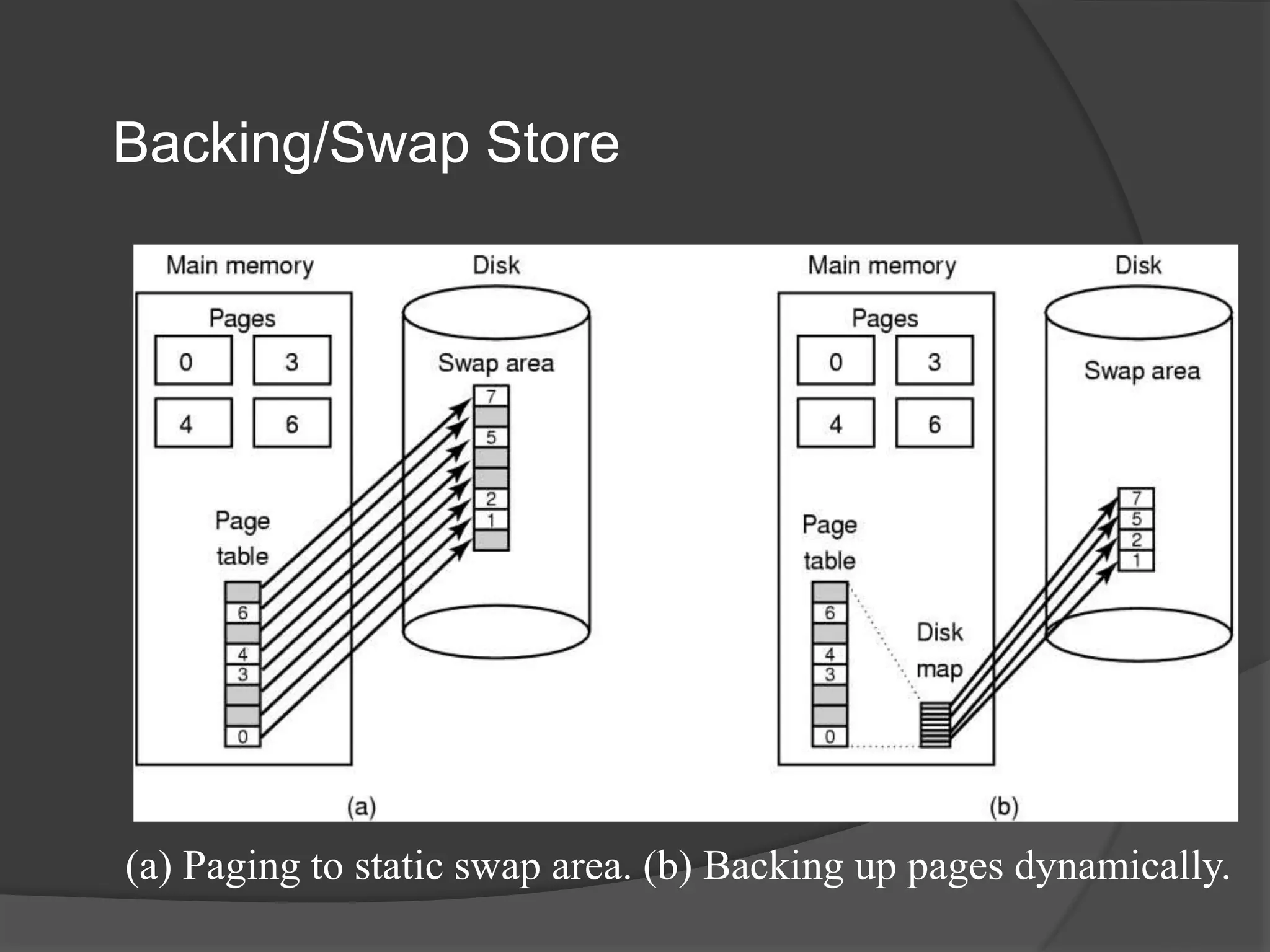
Backing/Swap Store
(a) Paging to static swap area. (b) Backing up pages dynamically.
Performance of Demand Paging
 Three major activities:
 Service the interrupt – careful coding means just several hundred
instructions needed.
 Read the page – lots of time..
 Restart the process – again just a small amount of time
 Page Fault Rate 0  p  1
 if p = 0, no page faults.
 if p = 1, every reference is a fault.
 Effective Access Time (EAT) –
EAT = (1 – p) x memory access
+ p x (page fault overhead
+ [swap page out]
+ swap page in
+ restart overhead)
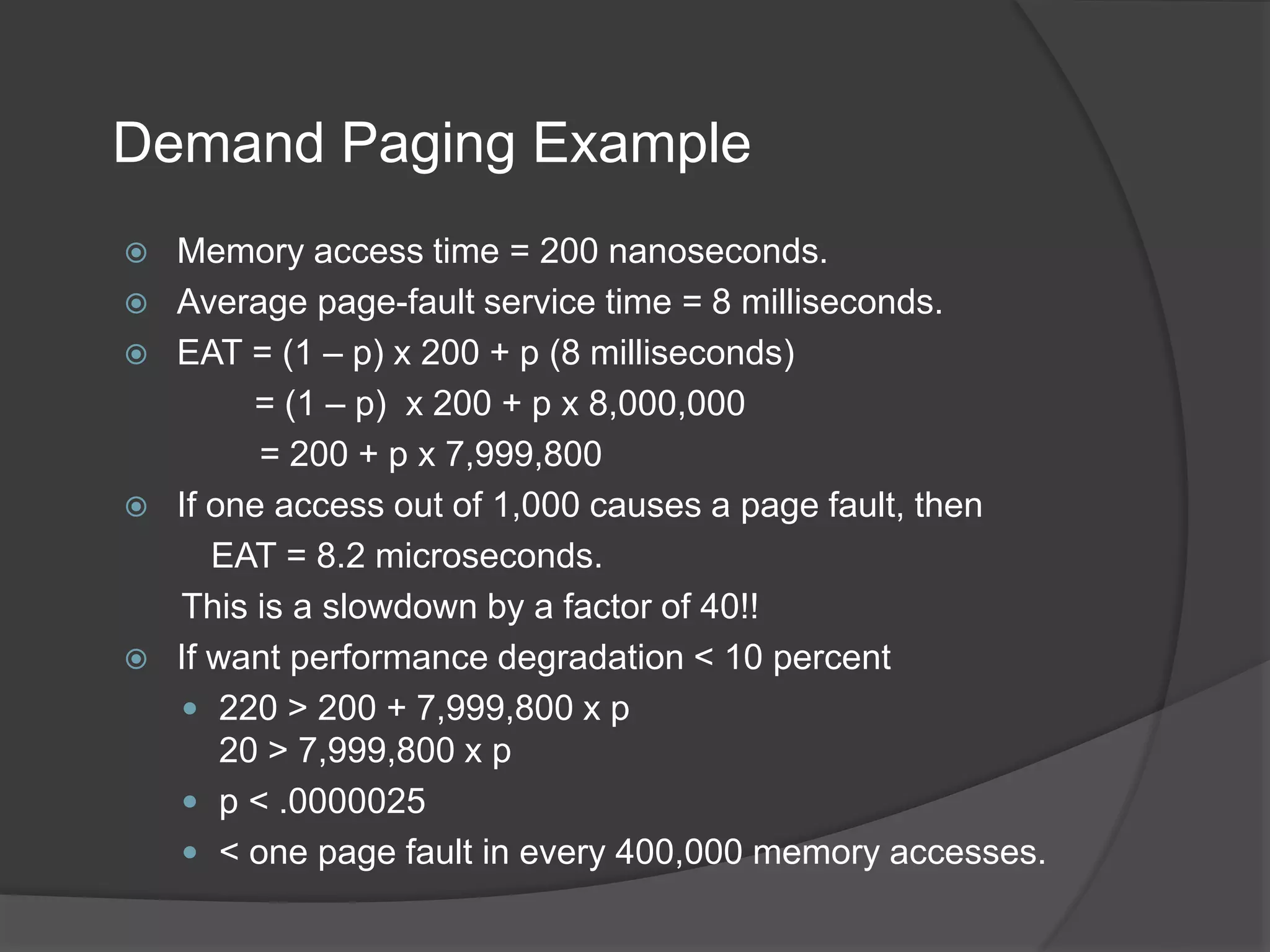
Demand Paging Example
 Memory access time = 200 nanoseconds.
 Average page-fault service time = 8 milliseconds.
 EAT = (1 – p) x 200 + p (8 milliseconds)
= (1 – p) x 200 + p x 8,000,000
= 200 + p x 7,999,800
 If one access out of 1,000 causes a page fault, then
EAT = 8.2 microseconds.
This is a slowdown by a factor of 40!!
 If want performance degradation < 10 percent
 220 > 200 + 7,999,800 x p
20 > 7,999,800 x p
 p < .0000025
 < one page fault in every 400,000 memory accesses.

Virtual memory - Demand Paging

  • 1.
    Virtual Memory Management Demandpaging Mrs.T.Jeya Asst.professor, Dept of CS
  • 2.
    Background  Virtual memory– separation of user logical memory from physical memory:  Only part of the program needs to be in memory for execution.  Logical address space can therefore be much larger than physical address space.  Allows address spaces to be shared by several processes.  Allows for more efficient process creation.  More programs running concurrently.  Less I/O needed to load or swap processes.
  • 3.
    Virtual Memory Components A.Frank - P. Weisberg
  • 4.
    Background  Virtual addressspace – logical view of how process is stored in memory:  Usually start at address 0, contiguous addresses until end of space.  Meanwhile, physical memory organized in page frames.  MMU must map logical to physical.  Virtual memory can be implemented via:  Demand paging  Demand segmentation
  • 5.
  • 6.
    Virtual Memory thatis larger than Physical Memory
  • 7.
    Advantages of PartialLoading  More processes can be maintained in main memory:  only load in some of the pieces of each process.  with more processes in main memory, it is more likely that a process will be in the Ready state at any given time.  A process can now execute even if it is larger than the main memory size:  it is even possible to use more bits for logical addresses than the bits needed for addressing the physical memory.
  • 8.
    Virtual Memory Addressing A.Frank - P. Weisberg
  • 9.
    Virtual-address Space  Usuallydesign logical address space for stack to start at Max logical address and grow “down” while heap grows “up”:  Maximizes address space use.  Unused address space between the two is hole.  No physical memory needed until heap or stack grows to a given new page.  Enables sparse address spaces with holes left for growth, dynamically linked libraries, etc.  System libraries shared via mapping into virtual address space.  Shared memory by mapping pages read-write into virtual address space.  Pages can be shared during fork(), speeding process creation.
  • 10.
    Shared Library usingVirtual Memory
  • 11.
    Demand Paging  Bringa page into memory only when it is needed:  Less I/O needed, no unnecessary I/O  Less memory needed  Faster response  More users  Page is needed  reference to it:  invalid reference  abort  not-in-memory  bring to memory  Similar to paging system with swapping.  Lazy swapper – never swaps a page into memory unless page will be needed; Swapper that deals with pages is a pager.
  • 12.
    Basic Concepts  Withswapping, pager guesses which pages will be used before swapping out again.  Instead, pager brings in only those pages into memory.  How to determine that set of pages?  Need new MMU functionality to implement demand paging.  If pages needed are already memory resident:  No difference from non demand-paging.  If page needed and not memory resident:  Need to detect and load the page into memory from storage: ○ Without changing program behavior. ○ Without programmer needing to change code.
  • 13.
    Valid-Invalid Bit  Witheach page table entry, a valid–invalid (present-absent) bit is associated (v  in-memory, i  not-in-memory).  Initially valid–invalid bit is set to i on all entries.  Example of a page table snapshot: During address translation, if valid–invalid bit in page table entry is i  page fault. v v v v i i i …. Frame # valid-invalid bit
  • 14.
  • 15.
    Page Table whensome Pages are not in Main Memory
  • 16.
    Dynamics of DemandPaging  Each page table entry contains a present (valid- invalid) bit to indicate whether the page is in main memory or not.  If it is in main memory, the entry contains the frame number of the corresponding page in main memory.  If it is not in main memory, the entry may contain the address of that page on disk or the page number may be used to index another table (often in the PCB) to obtain the address of that page on disk. • Typically, each process has its own page table.
  • 17.
    Need For PageFault/Replacement
  • 18.
    Steps in handlinga Page Fault
  • 19.
    Steps in handlinga Page Replacement (1)
  • 20.
    Aspects of DemandPaging  Extreme case – start process with no pages in memory:  OS sets instruction pointer to first instruction of process, non-memory-resident -> page fault.  And for every other process pages on first access.  This is Pure demand paging.  Actually, a given instruction could access multiple pages - > multiple page faults:  Consider fetch and decode of instruction which adds 2 numbers from memory and stores result back to memory.  Pain decreased because of locality of reference.  Hardware support needed for demand paging:  Page table with valid/invalid bit.  Secondary memory (swap device with swap space).  Instruction restart.
  • 21.
    Instruction Restart  Consideran instruction that could access several different locations:  block move  auto increment/decrement location  Restart the whole operation? ○ What if source and destination overlap?
  • 22.
    Address Translation ina Paging System
  • 23.
    Backing/Swap Store (a) Pagingto static swap area. (b) Backing up pages dynamically.
  • 24.
    Performance of DemandPaging  Three major activities:  Service the interrupt – careful coding means just several hundred instructions needed.  Read the page – lots of time..  Restart the process – again just a small amount of time  Page Fault Rate 0  p  1  if p = 0, no page faults.  if p = 1, every reference is a fault.  Effective Access Time (EAT) – EAT = (1 – p) x memory access + p x (page fault overhead + [swap page out] + swap page in + restart overhead)
  • 25.
    Demand Paging Example Memory access time = 200 nanoseconds.  Average page-fault service time = 8 milliseconds.  EAT = (1 – p) x 200 + p (8 milliseconds) = (1 – p) x 200 + p x 8,000,000 = 200 + p x 7,999,800  If one access out of 1,000 causes a page fault, then EAT = 8.2 microseconds. This is a slowdown by a factor of 40!!  If want performance degradation < 10 percent  220 > 200 + 7,999,800 x p 20 > 7,999,800 x p  p < .0000025  < one page fault in every 400,000 memory accesses.