Chapter -
Five
Virtual
Memory
Outlin
e
• Introduction
• Virtual memory
• Page fault handling
• Virtual memory basic
policy
• Page replacement
algorithms
Chapter
objectives
• To describe the benefits of virtual
memory system
• To explain the concepts of demand paging,
page-replacement algorithms, and
allocation of page frames.
Introductio
n
• So far, we separated the programmer’s view of
memory from that of the operating system using a
mapping mechanism.
• We have also seen protection and sharing of
memory between processes.
• we also assumed that a user program had to be
loaded completely into the memory before it could
run.
• Problem : Waste of memory, because a program
only needs a small amount of memory at any
given time.
• Solution : Virtual memory; a program can run with
only some of its virtual address space in main
memory.
Principles of
operation
• The basic idea with virtual memory is to create an
illusion of memory that is as large as a disk (in
gigabytes) and as fast as memory (in nanoseconds).
• The key principle is locality of reference ; a
running program only needs access to a portion
of its virtual address space at a given time.
• With virtual memory, a logical (virtual) address
translates to:
– Main memory (small but fast), or
– Paging device (large but slow), or
– None (not allocated, not used, free.)
5
A virtual
view
Backgroun
d
• Virtual memory – separation of user
logical memory from physical memory.
– Only part of the program needs to be in memory
for execution.
– Logical address space (program) can therefore be
much larger than physical address space.
– Allows address spaces to be shared by
several processes.
– Allows to share files easily and to implement
shared memory.
– Allows for more efficient process creation
Virtual memory can be implemented via:
– Demand paging
– Demand segmentation
Background
…
• In many cases, the entire program is
not needed, for example:
– Programs often have codes to handle unusual
error conditions. This code may not be
executed.
– Arrays, lists, and tables are often allocated
more memory than they actually need.
• An array may be declared 100 by 100, but you may use
only 10 by 10
– Certain options and features of a program may
be used rarely.
• Even in those cases where the entire
program is needed, it may not all be needed
at the same time.
Virtual Memory That is Larger Than Physical
Memory
• The ability to execute a
program that is only
partially in memory would
have many benefits.
– A program would no longer
be constrained by the
amount of physical memory
that is available.
– Since each user program
could take less physical
memory, more programs
could run
at the same time,
which increases CPU
utilization and system
throughput
– Less I/O would be needed
to load or swap each user
Demand
Paging
• Bring a page into memory only when
it is needed.
• Pages that are never accessed are thus
never loaded into physical memory.
– Less I/O needed
– Less memory needed
– Faster response
– More users
• Page is needed  reference to it
– invalid reference  abort
– not-in-memory  bring to memory
Transfer of a Paged Memory to Contiguous Disk
Space
Valid-Invalid
Bit
Frame # vali
1
1
1
1
0
⁝
0
0
• With each page table entry a valid–invalid bit is
associated (1  in-memory, 0  not-in-memory)
• Initially valid–invalid but is set to 0 on all entries.
• Example of a page table snapshot.
d-invalid bit
page table
• During address translation, if valid–invalid bit in
page table entry is 0  page fault.
Page Table When Some Pages Are Not in Main
Memory
Page
Fault
• If there is ever a reference to a page, first reference
will trap to OS  page fault
• OS looks at another table to decide:
– Invalid reference  abort.
– Just not in memory.
• Get empty frame.
• Swap page into frame.
• Reset tables, validation bit = 1.
• Restart instruction: Least Recently Used
– block move
– auto increment/decrement location
Steps in Handling a Page
Fault
Virtual
memory…
• Virtual memory system can be implemented as an
extension of paged or segmented memory
management or sometimes as a combination of both.
• In this scheme, the operating system has the ability
to execute a program which is only partially
loaded
in memory.
Missing pages
• What happens when an executing program
references an address that is not in main memory?
• Here, both hardware (H/W) and software (S/W)
cooperate and solve the problem:
16
Missing
pages…
• The page table is extended with an extra bit,
present. Initially, all the present bits are
cleared (H/W and S/W).
• While doing the address translation, the MMU
checks to see if this bit is set.
• Access to a page whose present bit is not set
causes a special hardware trap, called page
fault (H/W).
• When a page fault occurs the operating system:
– brings the page into memory,
– sets the corresponding present bit, and
– restarts the execution of the instruction (S/W).
• Most likely, the page carrying the address will be
on the paging device,
17
Page fault handling—by
words
• When a page fault occurs, the system:
marks the current process as blocked (waiting
for a page),
finds an empty frame or make a frame empty in
main memory,
determines the location of the requested page
on paging device,
performs an I/O operation to fetch the page to
main memory
triggers a “ page fetched’’ event (e.g., special form
of I/O completion interrupt) to wake up the
process.
Page fault handling—by
picture
Basic
policies
• The operating system must make
several decisions:
– Allocation — how much real memory to allocate
to each ( ready) program?
– Fetching — when to bring the pages into
main memory?
– Placement — where in the memory the fetched
page should be loaded?
– Replacement — what page should be removed
from main memory?
Allocation
Policy
• In general, the allocation policy deals
with conflicting requirements:
– The fewer the frames allocated for a program,
the higher the page fault rate.
– The fewer the frames allocated for a program,
the more programs can reside in memory;
thus, decreasing the need of swapping.
– Allocating additional frames to a program
beyond a certain number results in little or only
moderate gain in performance.
– The number of allocated pages (also known
as resident set size) can be fixed or can be
variable during the execution of a program.
Fetch
Policy
• Demand paging
– Start a program with no pages loaded; wait until it
references a page; then load the page (this is the most
common approach used in paging systems).
• Request paging
– Similar to overlays, let the user identify which pages are
needed (not practical, leads to over estimation and also
user may not know what to ask for.)
• Pre-paging
– Start with one or a few pages pre-loaded. As pages
are referenced, bring in other (not yet referenced)
pages too.
• Opposite to fetching, the cleaning policy deals
with determining when a modified (dirty) page
should be written back to the paging device.
Placement
Policy
• This policy usually follows the rules about paging
and segmentation discussed earlier.
• Given the matching sizes of a page and a
frame, placement with paging is
straightforward.
• Segmentation requires more careful
placement, especially when not combined
with paging.
• Placement in pure segmentation is an important
issue and must consider “free” memory
management policies.
• With the recent developments in non-uniform
memory access (NUMA) distributed memory
multiprocessor systems, placement becomes a
What happens if there is no free
frame?
• Page replacement – find some page in
memory, but not really in use, swap it
out.
– algorithm
– performance – want an algorithm which
will result in minimum number of page
faults.
• Same page may be brought into
memory several times.
Performance of Demand
Paging
• For most computer systems, memory access
time ranges from 10 to 200 nanoseconds
• Page Fault Rate 0  p  1.0
– if p = 0 no page faults
– if p = 1, every reference is a fault
• Effective Access Time (EAT)
EAT = (1 – p) x memory access
+ p (page fault overhead
+ [swap page out ]
+ swap page in
+ restart overhead)
Replacement
Policy
• The most studied area of the memory
management is the replacement policy or
victim selection to satisfy a page fault:
– FIFO—the frames are treated as a circular list;
the oldest (longest resident) page is replaced.
– LRU—the frame whose contents have not been
used for the longest time is replaced.
– OPT—the page that will not be referenced again
for the longest time is replaced (prediction of the
future; purely theoretical, but useful for
comparison. )
– Random—a frame is selected at random.
Page
Replacement
• Prevent over-allocation of memory by
modifying page-fault service routine to
include page replacement.
• Use modify (dirty) bit to reduce overhead of
page transfers – only modified pages are
written to disk.
• Page replacement completes separation
between logical memory and physical
memory
– large virtual memory can be provided on a
smaller physical memory.
Need For Page
Replacement
Basic Page
Replacement
1. Find the location of the desired page on
disk.
2. Find a free frame:
- If there is a free frame, use it.
-If there is no free frame, use a page
replacement algorithm to select a victim frame.
3. Read the desired page into the (newly)
free frame. Update the page and frame
tables.
4. Restart the process.
Page
Replacement
Page Replacement
Algorithms
• Want lowest page-fault rate.
• Evaluate algorithm by running it on a
particular string of memory references
(reference string) and computing the
number of page faults on that string.
• In all our examples, the reference string
is 1, 2, 3, 4, 1, 2, 5, 1, 2, 3, 4, 5.
Graph of Page Faults Versus The Number of
Frames
First-In-First-Out (FIFO)
Algorithm
• The frames are treated as a circular list;
the oldest (longest resident) page is
replaced.
• The OS maintains a list of all pages currently
in memory, with:
– the page at the head of the list the oldest one
and
– the page at the tail the most recent arrival.
• On a page fault, the page at the head is
removed and the new page added to the tail
of the list.
First-In-First-Out (FIFO)
Algorithm…
• 4
frames
• Reference string: 1, 2, 3, 4, 1, 2, 5, 1, 2, 3, 4, 5
• 3 frames (3 pages can be in memory at a time per
process)
1
2
3
2
3
4
• FIFO Replacement – Belady’s
Anomaly
– more frames  less page faults
1 4
2 1 9 page faults
3 2
1 5
2 1 10 page faults
3 2
4 3
1
FIFO Page
Replacement
FIFO Illustrating Belady’s
Anamoly
Optimal
Algorithm
• Replace page that will not be used for longest
period of time.
• 4 frames example
1, 2, 3, 4, 1, 2, 5, 1, 2, 3, 4, 5
• How do you know this?
• Used for measuring how well your algorithm
performs.
1
2
3
4
6 page
faults
4 5
Optimal Page
Replacement
The Second Chance Page
Replacement
algorithm
• A simple modification to FIFO that avoids the
problem of throwing out a heavily used page is to
inspect the R bit of the oldest page.
-If R0, then the page is both old and unused, so it
is replaced immediately.
- If R1,
– the bit is cleared,
– the page is put onto the end of the list of pages, and
– its load time is updated as though it had just
arrived in memory. Then the search
continues.
• The operation of this algorithm is called
second chance.
42
 Suppose a page fault occurs at time 20. Oldest page is
A=>, Check for R bit.
• If A has the R bit cleared, it is evicted from memory.
• If R bit set to 1, A is put onto the end of the list and its
“load time” is reset to the current time (20). R is also
cleared.
43
Least Recently Used (LRU)
Algorithm
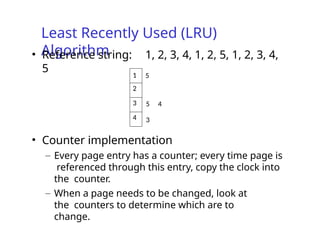
• Reference string: 1, 2, 3, 4, 1, 2, 5, 1, 2, 3, 4,
5
• Counter implementation
– Every page entry has a counter; every time page is
referenced through this entry, copy the clock into
the counter.
– When a page needs to be changed, look at
the counters to determine which are to
change.
1 5
2
3 5 4
4 3
LRU Page
Replacement
LRU Algorithm
(Cont.)
• Stack implementation – keep a stack
of page numbers in a double link
form:
– Page referenced:
• move it to the top
• requires 6 pointers to be changed
– No search for replacement
Use Of A Stack to Record The Most Recent Page References
LRU Approximation
Algorithms
• Reference bit
– With each page associate a bit, initially = 0
– When page is referenced bit set to 1.
– Replace the one which is 0 (if one exists). We
do not know the order, however.
• Second chance
– Need reference bit.
– Clock replacement.
– If page to be replaced (in clock order) has
reference bit
= 1. then:
• set reference bit 0.
• leave page in memory.
• replace next page (in clock order), subject to same
rules.
Second-Chance (clock) Page-Replacement
Algorithm
Counting
Algorithms
• Keep a counter of the number of references
that have been made to each page.
• LFU Algorithm: replaces page with
smallest count.
• MFU Algorithm: based on the argument that
the page with the smallest count was
probably just brought in and has yet to be
used.
Allocation of
Frames
• Each process needs minimum number
of pages.
• Example: IBM 370 – 6 pages to handle
SS MOVE instruction:
– instruction is 6 bytes, might span 2 pages.
– 2 pages to handle from.
– 2 pages to handle to.
• Two major allocation schemes.
– fixed allocation
– priority allocation
Fixed
Allocation
• Equal allocation – e.g., if 100 frames and 5
processes, give each 20 pages.
• Proportional allocation – Allocate according to the
size of process.
si  size of process
pi S   si
m  total number of
frames  m
m  64
si  10
s2  127
S
s
ai  allocation for pi

i
137
 64  5
137
2
a  127
 64  59
1
a 
10
Priority
Allocation
• Use a proportional allocation scheme
using priorities rather than size.
• If process Pi generates a page fault,
– select for replacement one of its frames.
– select for replacement a frame from a
process with lower priority number.
Global vs. Local
Allocation
• Global replacement – process selects a
replacement frame from the set of all
frames; one process can take a frame
from another.
• Local replacement – each process selects
from only its own set of allocated frames.
operating system virtual memory and logical memory

  • 1.
  • 2.
    Outlin e • Introduction • Virtualmemory • Page fault handling • Virtual memory basic policy • Page replacement algorithms
  • 3.
    Chapter objectives • To describethe benefits of virtual memory system • To explain the concepts of demand paging, page-replacement algorithms, and allocation of page frames.
  • 4.
    Introductio n • So far,we separated the programmer’s view of memory from that of the operating system using a mapping mechanism. • We have also seen protection and sharing of memory between processes. • we also assumed that a user program had to be loaded completely into the memory before it could run. • Problem : Waste of memory, because a program only needs a small amount of memory at any given time. • Solution : Virtual memory; a program can run with only some of its virtual address space in main memory.
  • 5.
    Principles of operation • Thebasic idea with virtual memory is to create an illusion of memory that is as large as a disk (in gigabytes) and as fast as memory (in nanoseconds). • The key principle is locality of reference ; a running program only needs access to a portion of its virtual address space at a given time. • With virtual memory, a logical (virtual) address translates to: – Main memory (small but fast), or – Paging device (large but slow), or – None (not allocated, not used, free.) 5
  • 6.
  • 7.
    Backgroun d • Virtual memory– separation of user logical memory from physical memory. – Only part of the program needs to be in memory for execution. – Logical address space (program) can therefore be much larger than physical address space. – Allows address spaces to be shared by several processes. – Allows to share files easily and to implement shared memory. – Allows for more efficient process creation Virtual memory can be implemented via: – Demand paging – Demand segmentation
  • 8.
    Background … • In manycases, the entire program is not needed, for example: – Programs often have codes to handle unusual error conditions. This code may not be executed. – Arrays, lists, and tables are often allocated more memory than they actually need. • An array may be declared 100 by 100, but you may use only 10 by 10 – Certain options and features of a program may be used rarely. • Even in those cases where the entire program is needed, it may not all be needed at the same time.
  • 9.
    Virtual Memory Thatis Larger Than Physical Memory • The ability to execute a program that is only partially in memory would have many benefits. – A program would no longer be constrained by the amount of physical memory that is available. – Since each user program could take less physical memory, more programs could run at the same time, which increases CPU utilization and system throughput – Less I/O would be needed to load or swap each user
  • 10.
    Demand Paging • Bring apage into memory only when it is needed. • Pages that are never accessed are thus never loaded into physical memory. – Less I/O needed – Less memory needed – Faster response – More users • Page is needed  reference to it – invalid reference  abort – not-in-memory  bring to memory
  • 11.
    Transfer of aPaged Memory to Contiguous Disk Space
  • 12.
    Valid-Invalid Bit Frame # vali 1 1 1 1 0 ⁝ 0 0 •With each page table entry a valid–invalid bit is associated (1  in-memory, 0  not-in-memory) • Initially valid–invalid but is set to 0 on all entries. • Example of a page table snapshot. d-invalid bit page table • During address translation, if valid–invalid bit in page table entry is 0  page fault.
  • 13.
    Page Table WhenSome Pages Are Not in Main Memory
  • 14.
    Page Fault • If thereis ever a reference to a page, first reference will trap to OS  page fault • OS looks at another table to decide: – Invalid reference  abort. – Just not in memory. • Get empty frame. • Swap page into frame. • Reset tables, validation bit = 1. • Restart instruction: Least Recently Used – block move – auto increment/decrement location
  • 15.
    Steps in Handlinga Page Fault
  • 16.
    Virtual memory… • Virtual memorysystem can be implemented as an extension of paged or segmented memory management or sometimes as a combination of both. • In this scheme, the operating system has the ability to execute a program which is only partially loaded in memory. Missing pages • What happens when an executing program references an address that is not in main memory? • Here, both hardware (H/W) and software (S/W) cooperate and solve the problem: 16
  • 17.
    Missing pages… • The pagetable is extended with an extra bit, present. Initially, all the present bits are cleared (H/W and S/W). • While doing the address translation, the MMU checks to see if this bit is set. • Access to a page whose present bit is not set causes a special hardware trap, called page fault (H/W). • When a page fault occurs the operating system: – brings the page into memory, – sets the corresponding present bit, and – restarts the execution of the instruction (S/W). • Most likely, the page carrying the address will be on the paging device, 17
  • 18.
    Page fault handling—by words •When a page fault occurs, the system: marks the current process as blocked (waiting for a page), finds an empty frame or make a frame empty in main memory, determines the location of the requested page on paging device, performs an I/O operation to fetch the page to main memory triggers a “ page fetched’’ event (e.g., special form of I/O completion interrupt) to wake up the process.
  • 19.
  • 20.
    Basic policies • The operatingsystem must make several decisions: – Allocation — how much real memory to allocate to each ( ready) program? – Fetching — when to bring the pages into main memory? – Placement — where in the memory the fetched page should be loaded? – Replacement — what page should be removed from main memory?
  • 21.
    Allocation Policy • In general,the allocation policy deals with conflicting requirements: – The fewer the frames allocated for a program, the higher the page fault rate. – The fewer the frames allocated for a program, the more programs can reside in memory; thus, decreasing the need of swapping. – Allocating additional frames to a program beyond a certain number results in little or only moderate gain in performance. – The number of allocated pages (also known as resident set size) can be fixed or can be variable during the execution of a program.
  • 22.
    Fetch Policy • Demand paging –Start a program with no pages loaded; wait until it references a page; then load the page (this is the most common approach used in paging systems). • Request paging – Similar to overlays, let the user identify which pages are needed (not practical, leads to over estimation and also user may not know what to ask for.) • Pre-paging – Start with one or a few pages pre-loaded. As pages are referenced, bring in other (not yet referenced) pages too. • Opposite to fetching, the cleaning policy deals with determining when a modified (dirty) page should be written back to the paging device.
  • 23.
    Placement Policy • This policyusually follows the rules about paging and segmentation discussed earlier. • Given the matching sizes of a page and a frame, placement with paging is straightforward. • Segmentation requires more careful placement, especially when not combined with paging. • Placement in pure segmentation is an important issue and must consider “free” memory management policies. • With the recent developments in non-uniform memory access (NUMA) distributed memory multiprocessor systems, placement becomes a
  • 24.
    What happens ifthere is no free frame? • Page replacement – find some page in memory, but not really in use, swap it out. – algorithm – performance – want an algorithm which will result in minimum number of page faults. • Same page may be brought into memory several times.
  • 25.
    Performance of Demand Paging •For most computer systems, memory access time ranges from 10 to 200 nanoseconds • Page Fault Rate 0  p  1.0 – if p = 0 no page faults – if p = 1, every reference is a fault • Effective Access Time (EAT) EAT = (1 – p) x memory access + p (page fault overhead + [swap page out ] + swap page in + restart overhead)
  • 26.
    Replacement Policy • The moststudied area of the memory management is the replacement policy or victim selection to satisfy a page fault: – FIFO—the frames are treated as a circular list; the oldest (longest resident) page is replaced. – LRU—the frame whose contents have not been used for the longest time is replaced. – OPT—the page that will not be referenced again for the longest time is replaced (prediction of the future; purely theoretical, but useful for comparison. ) – Random—a frame is selected at random.
  • 27.
    Page Replacement • Prevent over-allocationof memory by modifying page-fault service routine to include page replacement. • Use modify (dirty) bit to reduce overhead of page transfers – only modified pages are written to disk. • Page replacement completes separation between logical memory and physical memory – large virtual memory can be provided on a smaller physical memory.
  • 28.
  • 29.
    Basic Page Replacement 1. Findthe location of the desired page on disk. 2. Find a free frame: - If there is a free frame, use it. -If there is no free frame, use a page replacement algorithm to select a victim frame. 3. Read the desired page into the (newly) free frame. Update the page and frame tables. 4. Restart the process.
  • 30.
  • 31.
    Page Replacement Algorithms • Wantlowest page-fault rate. • Evaluate algorithm by running it on a particular string of memory references (reference string) and computing the number of page faults on that string. • In all our examples, the reference string is 1, 2, 3, 4, 1, 2, 5, 1, 2, 3, 4, 5.
  • 32.
    Graph of PageFaults Versus The Number of Frames
  • 33.
    First-In-First-Out (FIFO) Algorithm • Theframes are treated as a circular list; the oldest (longest resident) page is replaced. • The OS maintains a list of all pages currently in memory, with: – the page at the head of the list the oldest one and – the page at the tail the most recent arrival. • On a page fault, the page at the head is removed and the new page added to the tail of the list.
  • 34.
    First-In-First-Out (FIFO) Algorithm… • 4 frames •Reference string: 1, 2, 3, 4, 1, 2, 5, 1, 2, 3, 4, 5 • 3 frames (3 pages can be in memory at a time per process) 1 2 3 2 3 4 • FIFO Replacement – Belady’s Anomaly – more frames  less page faults 1 4 2 1 9 page faults 3 2 1 5 2 1 10 page faults 3 2 4 3 1
  • 35.
  • 36.
  • 37.
    Optimal Algorithm • Replace pagethat will not be used for longest period of time. • 4 frames example 1, 2, 3, 4, 1, 2, 5, 1, 2, 3, 4, 5 • How do you know this? • Used for measuring how well your algorithm performs. 1 2 3 4 6 page faults 4 5
  • 38.
  • 39.
    The Second ChancePage Replacement algorithm • A simple modification to FIFO that avoids the problem of throwing out a heavily used page is to inspect the R bit of the oldest page. -If R0, then the page is both old and unused, so it is replaced immediately. - If R1, – the bit is cleared, – the page is put onto the end of the list of pages, and – its load time is updated as though it had just arrived in memory. Then the search continues. • The operation of this algorithm is called second chance. 42
  • 40.
     Suppose apage fault occurs at time 20. Oldest page is A=>, Check for R bit. • If A has the R bit cleared, it is evicted from memory. • If R bit set to 1, A is put onto the end of the list and its “load time” is reset to the current time (20). R is also cleared. 43
  • 41.
    Least Recently Used(LRU) Algorithm • Reference string: 1, 2, 3, 4, 1, 2, 5, 1, 2, 3, 4, 5 • Counter implementation – Every page entry has a counter; every time page is referenced through this entry, copy the clock into the counter. – When a page needs to be changed, look at the counters to determine which are to change. 1 5 2 3 5 4 4 3
  • 42.
  • 43.
    LRU Algorithm (Cont.) • Stackimplementation – keep a stack of page numbers in a double link form: – Page referenced: • move it to the top • requires 6 pointers to be changed – No search for replacement
  • 44.
    Use Of AStack to Record The Most Recent Page References
  • 45.
    LRU Approximation Algorithms • Referencebit – With each page associate a bit, initially = 0 – When page is referenced bit set to 1. – Replace the one which is 0 (if one exists). We do not know the order, however. • Second chance – Need reference bit. – Clock replacement. – If page to be replaced (in clock order) has reference bit = 1. then: • set reference bit 0. • leave page in memory. • replace next page (in clock order), subject to same rules.
  • 46.
  • 47.
    Counting Algorithms • Keep acounter of the number of references that have been made to each page. • LFU Algorithm: replaces page with smallest count. • MFU Algorithm: based on the argument that the page with the smallest count was probably just brought in and has yet to be used.
  • 48.
    Allocation of Frames • Eachprocess needs minimum number of pages. • Example: IBM 370 – 6 pages to handle SS MOVE instruction: – instruction is 6 bytes, might span 2 pages. – 2 pages to handle from. – 2 pages to handle to. • Two major allocation schemes. – fixed allocation – priority allocation
  • 49.
    Fixed Allocation • Equal allocation– e.g., if 100 frames and 5 processes, give each 20 pages. • Proportional allocation – Allocate according to the size of process. si  size of process pi S   si m  total number of frames  m m  64 si  10 s2  127 S s ai  allocation for pi  i 137  64  5 137 2 a  127  64  59 1 a  10
  • 50.
    Priority Allocation • Use aproportional allocation scheme using priorities rather than size. • If process Pi generates a page fault, – select for replacement one of its frames. – select for replacement a frame from a process with lower priority number.
  • 51.
    Global vs. Local Allocation •Global replacement – process selects a replacement frame from the set of all frames; one process can take a frame from another. • Local replacement – each process selects from only its own set of allocated frames.