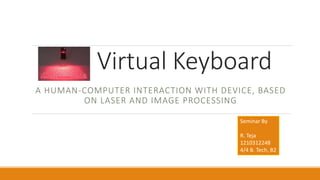
Virtual Keyboard
A HUMAN-COMPUTER INTERACTION WITH DEVICE, BASED
ON LASER AND IMAGE PROCESSING
Seminar By
R. Teja
1210312248
4/4 B. Tech, B2
About Virtual Keyboard
 What is Virtual Keyboard
 Why is Virtual Keyboard
 Modules in Virtual Keyboard
 How it works in general
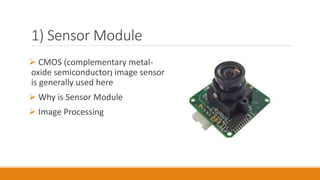
1) Sensor Module
 CMOS (complementary metal-
oxide semiconductor) image sensor
is generally used here
 Why is Sensor Module
 Image Processing
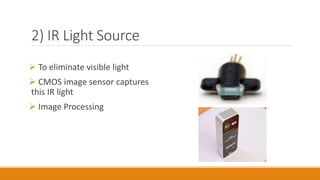
2) IR Light Source
 To eliminate visible light
 CMOS image sensor captures
this IR light
 Image Processing
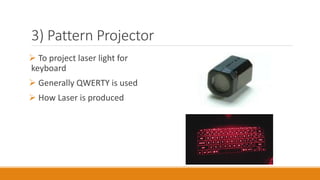
3) Pattern Projector
 To project laser light for
keyboard
 Generally QWERTY is used
 How Laser is produced
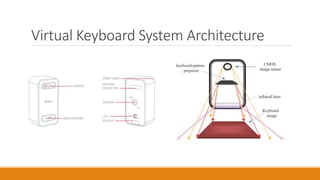
Virtual Keyboard System Architecture
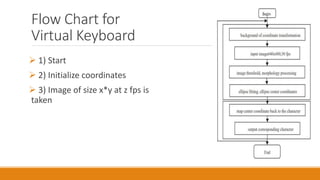
Flow Chart for
Virtual Keyboard
 1) Start
 2) Initialize coordinates
 3) Image of size x*y at z fps is
taken
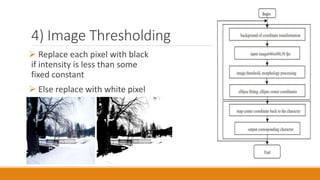
4) Image Thresholding
 Replace each pixel with black
if intensity is less than some
fixed constant
 Else replace with white pixel
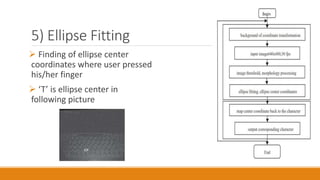
5) Ellipse Fitting
 Finding of ellipse center
coordinates where user pressed
his/her finger
 ‘T’ is ellipse center in
following picture
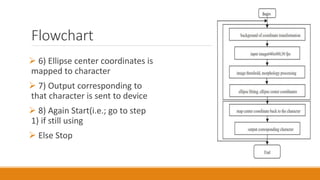
Flowchart
 6) Ellipse center coordinates is
mapped to character
 7) Output corresponding to
that character is sent to device
 8) Again Start(i.e.; go to step
1) if still using
 Else Stop
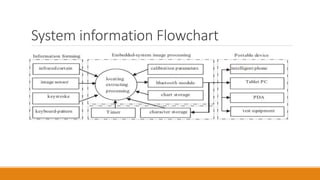
System information Flowchart
Advantages
 Portability
Can be used in less or no light areas
 Flexibility
 Speed
 Less noise
 Less force is enough
 Water proof
 Low maintenance
 High security
 No driver software necessary (plug-and-use)
Disadvantages
 High cost
 Visible light may distract laser light
 Hard to use for beginners
 Flat surface necessary
Conclusion
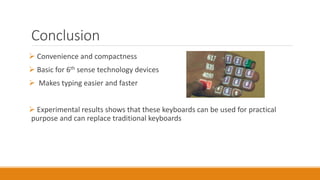
 Convenience and compactness
 Basic for 6th sense technology devices
 Makes typing easier and faster
 Experimental results shows that these keyboards can be used for practical
purpose and can replace traditional keyboards
Thank You

Virtual keyboard

  • 1.
    Virtual Keyboard A HUMAN-COMPUTERINTERACTION WITH DEVICE, BASED ON LASER AND IMAGE PROCESSING Seminar By R. Teja 1210312248 4/4 B. Tech, B2
  • 2.
    About Virtual Keyboard What is Virtual Keyboard  Why is Virtual Keyboard  Modules in Virtual Keyboard  How it works in general
  • 3.
    1) Sensor Module CMOS (complementary metal- oxide semiconductor) image sensor is generally used here  Why is Sensor Module  Image Processing
  • 4.
    2) IR LightSource  To eliminate visible light  CMOS image sensor captures this IR light  Image Processing
  • 5.
    3) Pattern Projector To project laser light for keyboard  Generally QWERTY is used  How Laser is produced
  • 6.
  • 7.
    Flow Chart for VirtualKeyboard  1) Start  2) Initialize coordinates  3) Image of size x*y at z fps is taken
  • 8.
    4) Image Thresholding Replace each pixel with black if intensity is less than some fixed constant  Else replace with white pixel
  • 9.
    5) Ellipse Fitting Finding of ellipse center coordinates where user pressed his/her finger  ‘T’ is ellipse center in following picture
  • 10.
    Flowchart  6) Ellipsecenter coordinates is mapped to character  7) Output corresponding to that character is sent to device  8) Again Start(i.e.; go to step 1) if still using  Else Stop
  • 11.
  • 12.
    Advantages  Portability Can beused in less or no light areas  Flexibility  Speed  Less noise  Less force is enough  Water proof  Low maintenance  High security  No driver software necessary (plug-and-use)
  • 13.
    Disadvantages  High cost Visible light may distract laser light  Hard to use for beginners  Flat surface necessary
  • 14.
    Conclusion  Convenience andcompactness  Basic for 6th sense technology devices  Makes typing easier and faster  Experimental results shows that these keyboards can be used for practical purpose and can replace traditional keyboards
  • 15.