Department of Presented By:
MCA Siddhartha Sadhukhan
And
Siddhartha Banerjee
Introduction
 A virtual keyboard allows a user to communicate with
computer.
 Virtual keyboard is a technological breakthrough.
 Virtual keyboard is well suited with today’s computer
trend.
 Easy for bi- or multi-lingual users .
 Modern virtual keyboards display a projection of a
image of a keyboard and allow type on it.
 The Virtual Keyboard is not restricted to the QWERTY
touch-typing paradigm.
Overview
 An optical virtual keyboard was invented and patented by
IBM engineers in 1992.
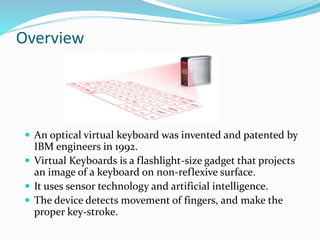
 Virtual Keyboards is a flashlight-size gadget that projects
an image of a keyboard on non-reflexive surface.
 It uses sensor technology and artificial intelligence.
 The device detects movement of fingers, and make the
proper key-stroke.
Modules
The virtual keyboard system comprise of three module:
 The sensor module:
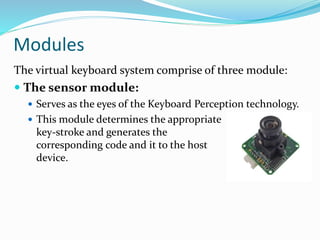
 Serves as the eyes of the Keyboard Perception technology.
 This module determines the appropriate
key-stroke and generates the
corresponding code and it to the host
device.
 IR-light source
 Emits invisible infrared beam.
 The Infrared Light Source emits a beam of infrared light
and overlap the area on which keyboard
is projected.
 This helps in recognizing the hand
movements and the pressing of keys.
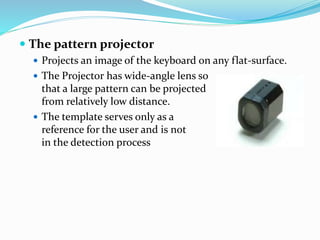
 The pattern projector
 Projects an image of the keyboard on any flat-surface.
 The Projector has wide-angle lens so
that a large pattern can be projected
from relatively low distance.
 The template serves only as a
reference for the user and is not involved
in the detection process
Working Mechanism
 Step 1: A image of a keyboard is projected.
 Step 2: An infrared plane of light is generated just above
the projection keyboard.
 Step 3: Finger movement breaks the infrared plane and
reflects light beam which is picked up by a CMOS chip.
Other Types of VKB
 Canesta
 Projection of a keyboard.
 Allow work on that projection.
 Small in size.
 Kitty
 Developed at the University of California
in Irvine.
 Wearable "virtual" keyboard.
 Using spiraling, printed-electric circuit wires that
wrap around the fingers detects key-stroke.
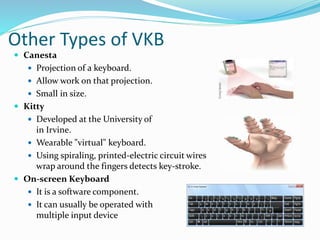
 On-screen Keyboard
 It is a software component.
 It can usually be operated with
multiple input device
 Advantages
 Can be projected on any non-reflective surface.
 Create low noise.
 Not restricted to the QWERTY touch-typing paradigm.
 Highly portable.
 Free from hardware based key-logger.
 Disadvantages
 Hard to use.
 Very costly.
 The room where we use vkb should not be very bright.
 Without the feel of the keys slowing you down and possibly
even creates a inaccurate document.
 The IR light is affected by sunlight.
 Alignment needed between IR transmitter and IR detector.
References
 https://en.wikipedia.org/wiki/Computer_keyboard
 https://en.wikipedia.org/wiki/Virtual_keyboard
 https://en.wikipedia.org/wiki/Projection_keyboard
 http://www.howtechnologywork.com/virtual-laser-keyboard/
 http://www.extremetech.com/extreme/51958-canesta-says-virtual-
keyboard-is-reality
 https://www.siggraph.org/s2003/conference/etech/everyday.html
 http://electronics.howstuffworks.com/gadgets/travel/virtual-laser-
keyboards.htm
 http://www.virtual-laser-devices.com/demo.asp
Any Question ?
Thank
you

Virtual Keyboard

  • 1.
    Department of PresentedBy: MCA Siddhartha Sadhukhan And Siddhartha Banerjee
  • 2.
    Introduction  A virtualkeyboard allows a user to communicate with computer.  Virtual keyboard is a technological breakthrough.  Virtual keyboard is well suited with today’s computer trend.  Easy for bi- or multi-lingual users .  Modern virtual keyboards display a projection of a image of a keyboard and allow type on it.  The Virtual Keyboard is not restricted to the QWERTY touch-typing paradigm.
  • 3.
    Overview  An opticalvirtual keyboard was invented and patented by IBM engineers in 1992.  Virtual Keyboards is a flashlight-size gadget that projects an image of a keyboard on non-reflexive surface.  It uses sensor technology and artificial intelligence.  The device detects movement of fingers, and make the proper key-stroke.
  • 4.
    Modules The virtual keyboardsystem comprise of three module:  The sensor module:  Serves as the eyes of the Keyboard Perception technology.  This module determines the appropriate key-stroke and generates the corresponding code and it to the host device.
  • 5.
     IR-light source Emits invisible infrared beam.  The Infrared Light Source emits a beam of infrared light and overlap the area on which keyboard is projected.  This helps in recognizing the hand movements and the pressing of keys.
  • 6.
     The patternprojector  Projects an image of the keyboard on any flat-surface.  The Projector has wide-angle lens so that a large pattern can be projected from relatively low distance.  The template serves only as a reference for the user and is not involved in the detection process
  • 7.
    Working Mechanism  Step1: A image of a keyboard is projected.  Step 2: An infrared plane of light is generated just above the projection keyboard.  Step 3: Finger movement breaks the infrared plane and reflects light beam which is picked up by a CMOS chip.
  • 8.
    Other Types ofVKB  Canesta  Projection of a keyboard.  Allow work on that projection.  Small in size.  Kitty  Developed at the University of California in Irvine.  Wearable "virtual" keyboard.  Using spiraling, printed-electric circuit wires that wrap around the fingers detects key-stroke.  On-screen Keyboard  It is a software component.  It can usually be operated with multiple input device
  • 9.
     Advantages  Canbe projected on any non-reflective surface.  Create low noise.  Not restricted to the QWERTY touch-typing paradigm.  Highly portable.  Free from hardware based key-logger.  Disadvantages  Hard to use.  Very costly.  The room where we use vkb should not be very bright.  Without the feel of the keys slowing you down and possibly even creates a inaccurate document.  The IR light is affected by sunlight.  Alignment needed between IR transmitter and IR detector.
  • 10.
    References  https://en.wikipedia.org/wiki/Computer_keyboard  https://en.wikipedia.org/wiki/Virtual_keyboard https://en.wikipedia.org/wiki/Projection_keyboard  http://www.howtechnologywork.com/virtual-laser-keyboard/  http://www.extremetech.com/extreme/51958-canesta-says-virtual- keyboard-is-reality  https://www.siggraph.org/s2003/conference/etech/everyday.html  http://electronics.howstuffworks.com/gadgets/travel/virtual-laser- keyboards.htm  http://www.virtual-laser-devices.com/demo.asp
  • 11.
  • 12.