
VIRTUAL KEYBOARD
By
N.JAYAPRAKASH
12S11D6505
INTRODUCTION
 A virtual keyboard is actually a key-in device, roughly a
size of a fountain pen, which uses highly advanced laser
technology.
 Virtual Keyboard is just another example of today’s
computer trend of ‘smaller and faster’.
 Many alternate forms like speech recognition, hand
writing recognition devices had come.
 The new virtual keyboard technology uses sensor
technology and artificial intelligence to let users work on
any surface as if it were a keyboard.
 The software and hardware part recognizes the
typed characters and pass it to the computer.
 Virtual Keyboard, being a small, handy, well-
designed and easy to use application, turns into a
perfect solution for cross platform multilingual text
input.
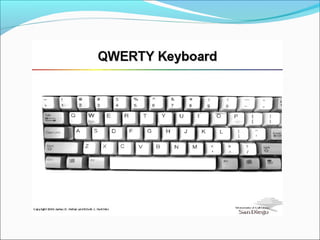
QWERTY KEYBOARD
QWERTY is the most common keyboard layout on
English-language computer and typewriter keyboards.
The most common keyboards are:
101-key Enhanced keyboard
104-key Windows keyboard
82-key Apple standard keyboard
108-key Apple Extended keyboard
INSIDE KEYBOARD
The processor in a keyboard has to understand
several things that are important to the utility of the
keyboard, such as:
Position of the key in the key matrix.
The speed at which to transmit the typematics.
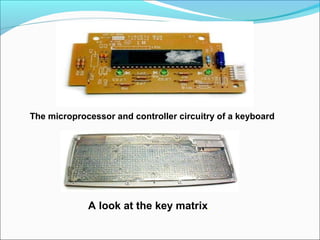
The microprocessor and controller circuitry of a keyboard
A look at the key matrix.
VIRTUAL KEYBOARD
Virtual keyboard is just another example of today's
computer trend of smaller and faster.
Virtual Keyboard uses sensor technology and artificial
intelligence to let users work on any surface as if it
were a keyboard.
Virtual Devices have developed a flashlight-size
gadget that projects an image of a keyboard on any
surface and let’s people input data by typing on the
image.
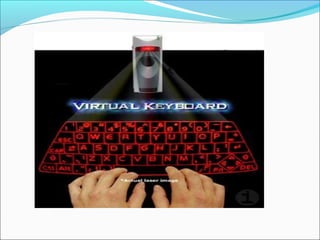
The Virtual Keyboard uses light to project a full-sized
computer keyboard onto almost any surface, and
disappears when not in use.
The device detects movement when fingers are
pressed down.
VIRTUAL KEYBOARD TECHNOLOGY
This system comprises of three modules:
1. The sensor module
2. IR-light source and
3. The pattern projector
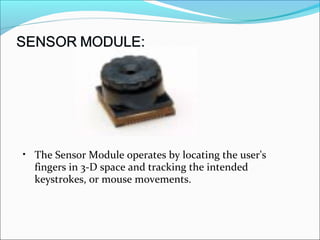
• The Sensor Module operates by locating the user's
fingers in 3-D space and tracking the intended
keystrokes, or mouse movements.
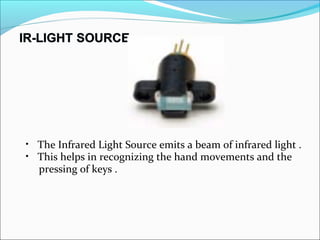
• The Infrared Light Source emits a beam of infrared light .
• This helps in recognizing the hand movements and the
pressing of keys .
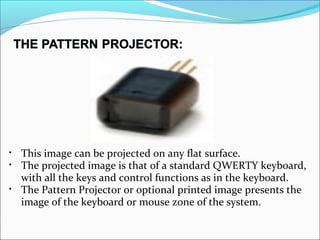
• This image can be projected on any flat surface.
• The projected image is that of a standard QWERTY keyboard,
with all the keys and control functions as in the keyboard.
• The Pattern Projector or optional printed image presents the
image of the keyboard or mouse zone of the system.
APPLICATIONS OF VIRTUAL KEYBOARD
Foreign character sets.
Touch screens.
Bypass key loggers.
Mobility impairments.
Advantages
Portability
Speed of text accuracy
Alternative keyboard layouts
Flexibility
Lack of need for flat or large typing space
Disadvantages of virtual keyboard
 Tactile feel
 Space
 Dirty screens
CONCLUSION
Virtual keyboard uses sensor technology and artificial
intelligence to let users work on any surface as if it
were a keyboard.
Projection keyboards or virtual keyboard claim to
provide the convenience of compactness with the
advantages of a full blown QWERTY keyboard.
Thank you

Virtual Keyboard Technology

  • 1.
  • 2.
    INTRODUCTION  A virtualkeyboard is actually a key-in device, roughly a size of a fountain pen, which uses highly advanced laser technology.  Virtual Keyboard is just another example of today’s computer trend of ‘smaller and faster’.  Many alternate forms like speech recognition, hand writing recognition devices had come.  The new virtual keyboard technology uses sensor technology and artificial intelligence to let users work on any surface as if it were a keyboard.
  • 3.
     The softwareand hardware part recognizes the typed characters and pass it to the computer.  Virtual Keyboard, being a small, handy, well- designed and easy to use application, turns into a perfect solution for cross platform multilingual text input.
  • 4.
    QWERTY KEYBOARD QWERTY isthe most common keyboard layout on English-language computer and typewriter keyboards. The most common keyboards are: 101-key Enhanced keyboard 104-key Windows keyboard 82-key Apple standard keyboard 108-key Apple Extended keyboard
  • 5.
    INSIDE KEYBOARD The processorin a keyboard has to understand several things that are important to the utility of the keyboard, such as: Position of the key in the key matrix. The speed at which to transmit the typematics.
  • 6.
    The microprocessor andcontroller circuitry of a keyboard A look at the key matrix.
  • 8.
    VIRTUAL KEYBOARD Virtual keyboardis just another example of today's computer trend of smaller and faster. Virtual Keyboard uses sensor technology and artificial intelligence to let users work on any surface as if it were a keyboard. Virtual Devices have developed a flashlight-size gadget that projects an image of a keyboard on any surface and let’s people input data by typing on the image.
  • 9.
    The Virtual Keyboarduses light to project a full-sized computer keyboard onto almost any surface, and disappears when not in use. The device detects movement when fingers are pressed down.
  • 11.
    VIRTUAL KEYBOARD TECHNOLOGY Thissystem comprises of three modules: 1. The sensor module 2. IR-light source and 3. The pattern projector
  • 12.
    • The SensorModule operates by locating the user's fingers in 3-D space and tracking the intended keystrokes, or mouse movements.
  • 13.
    • The InfraredLight Source emits a beam of infrared light . • This helps in recognizing the hand movements and the pressing of keys .
  • 14.
    • This imagecan be projected on any flat surface. • The projected image is that of a standard QWERTY keyboard, with all the keys and control functions as in the keyboard. • The Pattern Projector or optional printed image presents the image of the keyboard or mouse zone of the system.
  • 15.
    APPLICATIONS OF VIRTUALKEYBOARD Foreign character sets. Touch screens. Bypass key loggers. Mobility impairments.
  • 16.
    Advantages Portability Speed of textaccuracy Alternative keyboard layouts Flexibility Lack of need for flat or large typing space
  • 17.
    Disadvantages of virtualkeyboard  Tactile feel  Space  Dirty screens
  • 18.
    CONCLUSION Virtual keyboard usessensor technology and artificial intelligence to let users work on any surface as if it were a keyboard. Projection keyboards or virtual keyboard claim to provide the convenience of compactness with the advantages of a full blown QWERTY keyboard.
  • 19.