VIRTUAL KEYBOARD
Presented by: 
G. Jaya Krishna 
(10091a0535)
Introduction 
Qwerty keyboard 
Virtual keyboard 
Modules of Virtual keyboard 
System Architecture 
Advantages 
Drawbacks 
Applications 
Conclusion
Introduction 
 A virtual keyboard is a projection keyboard that is projected and touched on 
any surface. 
 In a virtual keyboard, camera tracks the finger movements of the typist to get 
the correct keystroke. 
 The software and hardware part recognizes the typed characters and pass it 
to the computer.
Qwerty keyboard 
 QWERTY is the most common keyboard layout on English-language 
computer. 
 The processor in a keyboard has to understand several things that are 
important to the utility of the keyboard, such as: 
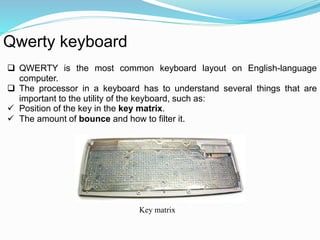
 Position of the key in the key matrix. 
 The amount of bounce and how to filter it. 
Key matrix
Virtual keyboard 
 Virtual Keyboard is just another example of today’s computer trend of 
"smaller and faster“. 
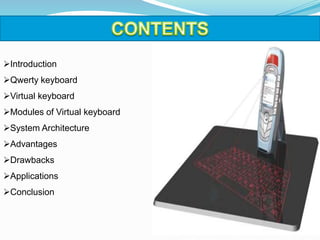
 Virtual Keyboard uses sensor technology to let users work on any surface 
as if it were a keyboard. 
 The keyboard is projected optically on a flat surface and, as the user 
touches the image of a key, the optical device detects the stroke and sends 
it to the computer.
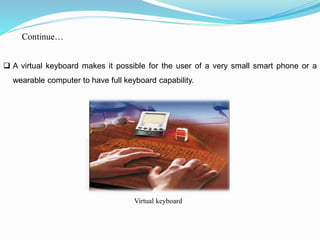
 A virtual keyboard makes it possible for the user of a very small smart phone or a 
wearable computer to have full keyboard capability. 
Virtual keyboard 
Continue…
Modules of Virtual Keyboard 
The Virtual Keyboard system comprises of three modules:- 
 The pattern projector 
 IR-light source 
 The sensor module
Technologies used: 
 In one technology, the keyboard is projected optically on a flat surface and, 
as the user touches the image of a key, the optical device detects the stroke 
and sends it to the computer. 
 In another technology, the keyboard is projected on an area and selected 
keys are transmitted as wireless signals using the short-range Bluetooth 
technology.
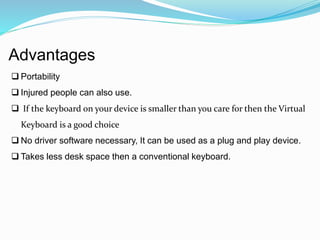
System Architecture 
Virtual-keyboard demonstration-system 
setup
Advantages 
 Portability 
 Injured people can also use. 
 If the keyboard on your device is smaller than you care for then the Virtual 
Keyboard is a good choice 
 No driver software necessary, It can be used as a plug and play device. 
 Takes less desk space then a conventional keyboard.
Drawbacks 
 It is very costly. 
 The room in which the virtual keyboard is used should not be very bright so 
that the keyboard is properly visible. 
 Virtual keyboard is hard to get used to. Since it involves typing in thin air, it 
requires a little practice. Only people who are good at typing can use virtual 
keyboard efficiently.
Applications 
 High-tech and industrial Sectors. 
 Used with Smart phones. 
 As computer/PDA input. 
 Gaming control.
Conclusion 
 Virtual keyboard uses sensor technology and artificial intelligence to let 
users work on any surface as if it were a keyboard. 
 Projection keyboards or virtual keyboard claim to provide the convenience 
of compactness with the advantages of a QWERTY keyboard.
Virtua lkeyboard

Virtua lkeyboard

  • 1.
  • 2.
    Presented by: G.Jaya Krishna (10091a0535)
  • 3.
    Introduction Qwerty keyboard Virtual keyboard Modules of Virtual keyboard System Architecture Advantages Drawbacks Applications Conclusion
  • 4.
    Introduction  Avirtual keyboard is a projection keyboard that is projected and touched on any surface.  In a virtual keyboard, camera tracks the finger movements of the typist to get the correct keystroke.  The software and hardware part recognizes the typed characters and pass it to the computer.
  • 5.
    Qwerty keyboard QWERTY is the most common keyboard layout on English-language computer.  The processor in a keyboard has to understand several things that are important to the utility of the keyboard, such as:  Position of the key in the key matrix.  The amount of bounce and how to filter it. Key matrix
  • 6.
    Virtual keyboard Virtual Keyboard is just another example of today’s computer trend of "smaller and faster“.  Virtual Keyboard uses sensor technology to let users work on any surface as if it were a keyboard.  The keyboard is projected optically on a flat surface and, as the user touches the image of a key, the optical device detects the stroke and sends it to the computer.
  • 7.
     A virtualkeyboard makes it possible for the user of a very small smart phone or a wearable computer to have full keyboard capability. Virtual keyboard Continue…
  • 8.
    Modules of VirtualKeyboard The Virtual Keyboard system comprises of three modules:-  The pattern projector  IR-light source  The sensor module
  • 9.
    Technologies used: In one technology, the keyboard is projected optically on a flat surface and, as the user touches the image of a key, the optical device detects the stroke and sends it to the computer.  In another technology, the keyboard is projected on an area and selected keys are transmitted as wireless signals using the short-range Bluetooth technology.
  • 10.
    System Architecture Virtual-keyboarddemonstration-system setup
  • 11.
    Advantages  Portability  Injured people can also use.  If the keyboard on your device is smaller than you care for then the Virtual Keyboard is a good choice  No driver software necessary, It can be used as a plug and play device.  Takes less desk space then a conventional keyboard.
  • 12.
    Drawbacks  Itis very costly.  The room in which the virtual keyboard is used should not be very bright so that the keyboard is properly visible.  Virtual keyboard is hard to get used to. Since it involves typing in thin air, it requires a little practice. Only people who are good at typing can use virtual keyboard efficiently.
  • 13.
    Applications  High-techand industrial Sectors.  Used with Smart phones.  As computer/PDA input.  Gaming control.
  • 14.
    Conclusion  Virtualkeyboard uses sensor technology and artificial intelligence to let users work on any surface as if it were a keyboard.  Projection keyboards or virtual keyboard claim to provide the convenience of compactness with the advantages of a QWERTY keyboard.

Editor's Notes