PRESENTING BY
T.RUPESH MOULI
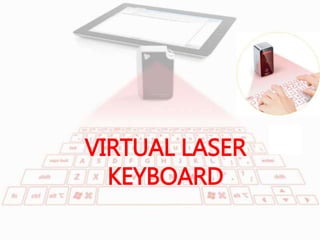
VIRTUAL LASER
KEYBOARD
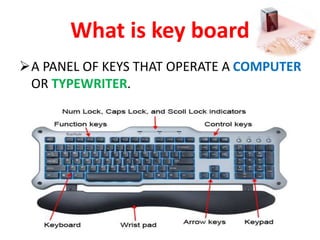
What is key board
A PANEL OF KEYS THAT OPERATE A COMPUTER
OR TYPEWRITER.
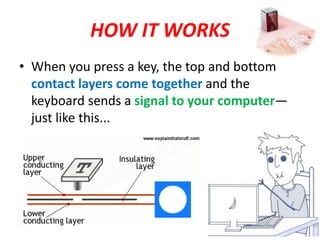
HOW IT WORKS
• When you press a key, the top and bottom
contact layers come together and the
keyboard sends a signal to your computer—
just like this...
VIRTUAL
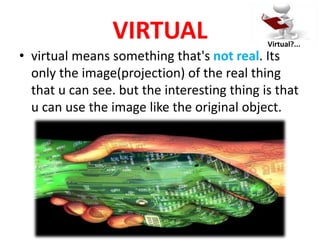
• virtual means something that's not real. Its
only the image(projection) of the real thing
that u can see. but the interesting thing is that
u can use the image like the original object.
Virtual?...
BEGINNING….
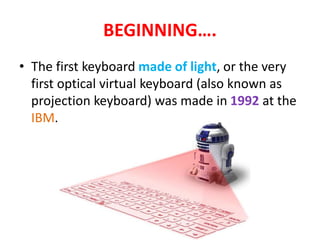
• The first keyboard made of light, or the very
first optical virtual keyboard (also known as
projection keyboard) was made in 1992 at the
IBM.
INTRODUCTION
 A virtual keyboard actually is a key-in device, roughly a
size of a fountain pen, which uses highly advanced laser
technology.
 The new virtual keyboard technology uses sensor
technology and artificial intelligence to let users work on
any surface as if it were a keyboard.
 In a virtual keyboard camera tracks the finger
movements of the typist to get the correct keystroke.
 The software and hardware part recognizes the typed
characters and pass it to the computer.
Virtual keyboard technology:-
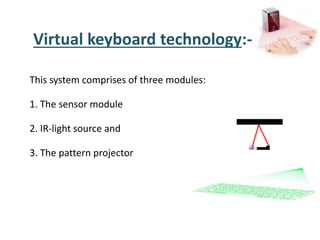
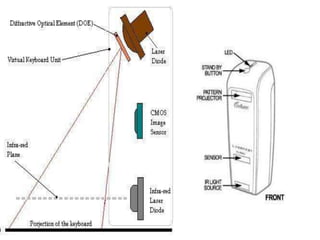
This system comprises of three modules:
1. The sensor module
2. IR-light source and
3. The pattern projector
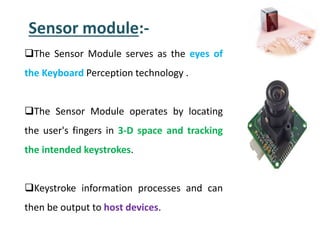
Sensor module:-
The Sensor Module serves as the eyes of
the Keyboard Perception technology .
The Sensor Module operates by locating
the user's fingers in 3-D space and tracking
the intended keystrokes.
Keystroke information processes and can
then be output to host devices.
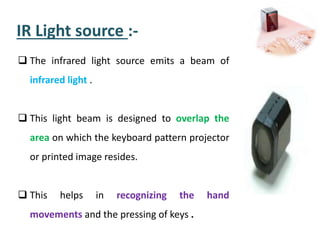
IR Light source :-
 The infrared light source emits a beam of
infrared light .
 This light beam is designed to overlap the
area on which the keyboard pattern projector
or printed image resides.
 This helps in recognizing the hand
movements and the pressing of keys .
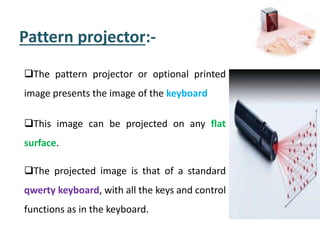
Pattern projector:-
The pattern projector or optional printed
image presents the image of the keyboard
This image can be projected on any flat
surface.
The projected image is that of a standard
qwerty keyboard, with all the keys and control
functions as in the keyboard.
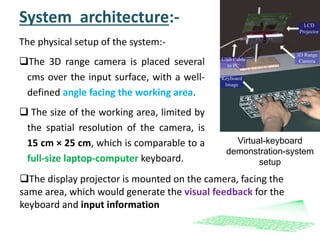
System architecture:-
The physical setup of the system:-
The 3D range camera is placed several
cms over the input surface, with a well-
defined angle facing the working area.
 The size of the working area, limited by
the spatial resolution of the camera, is
15 cm × 25 cm, which is comparable to a
full-size laptop-computer keyboard.
Virtual-keyboard
demonstration-system
setup
The display projector is mounted on the camera, facing the
same area, which would generate the visual feedback for the
keyboard and input information
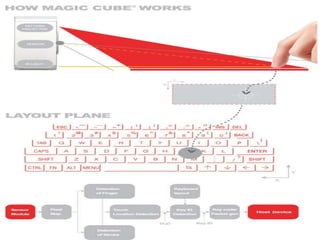
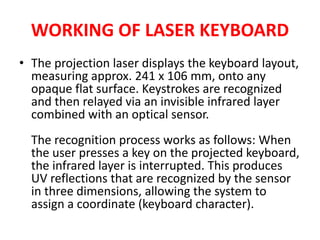
WORKING OF LASER KEYBOARD
• The projection laser displays the keyboard layout,
measuring approx. 241 x 106 mm, onto any
opaque flat surface. Keystrokes are recognized
and then relayed via an invisible infrared layer
combined with an optical sensor.
The recognition process works as follows: When
the user presses a key on the projected keyboard,
the infrared layer is interrupted. This produces
UV reflections that are recognized by the sensor
in three dimensions, allowing the system to
assign a coordinate (keyboard character).
SEARCHING…..
• Projection Keyboard Innovation:
Electronic Perception Technology
• The 'projection keyboard' is made possible through the incorporation of the
3DElectronic Perception Technology (EPT). This innovation enables everyday
devices to "see" the world around them so they can perceive and interact with it.
The EPT tracks your finger movements and translates them into keystrokes in the
device.
Different from traditional digital cameras that record images in 2 dimensions so
humans can see, EPT collects images the way that machines need to see in 3
dimensions. With the integration of Celluon's technology in small, low cast,
computer chips, virtually any kind of electronic device can perceive and interact
with its immediate environment.
Future applications of this technology might include automobiles that can see and
avoid obstacles before an accident occurs, video games that sense the player's
movements without the need for a controller, and even home security systems that
can easily recognize the difference between a member of the household and an
intruder. Just imagine the new possibilities in an era in which machines and devices
are no longer "blind“ !

virtual laser keyboard

  • 2.
  • 3.
  • 4.
    What is keyboard A PANEL OF KEYS THAT OPERATE A COMPUTER OR TYPEWRITER.
  • 6.
    HOW IT WORKS •When you press a key, the top and bottom contact layers come together and the keyboard sends a signal to your computer— just like this...
  • 7.
    VIRTUAL • virtual meanssomething that's not real. Its only the image(projection) of the real thing that u can see. but the interesting thing is that u can use the image like the original object. Virtual?...
  • 8.
    BEGINNING…. • The firstkeyboard made of light, or the very first optical virtual keyboard (also known as projection keyboard) was made in 1992 at the IBM.
  • 9.
    INTRODUCTION  A virtualkeyboard actually is a key-in device, roughly a size of a fountain pen, which uses highly advanced laser technology.  The new virtual keyboard technology uses sensor technology and artificial intelligence to let users work on any surface as if it were a keyboard.  In a virtual keyboard camera tracks the finger movements of the typist to get the correct keystroke.  The software and hardware part recognizes the typed characters and pass it to the computer.
  • 10.
    Virtual keyboard technology:- Thissystem comprises of three modules: 1. The sensor module 2. IR-light source and 3. The pattern projector
  • 12.
    Sensor module:- The SensorModule serves as the eyes of the Keyboard Perception technology . The Sensor Module operates by locating the user's fingers in 3-D space and tracking the intended keystrokes. Keystroke information processes and can then be output to host devices.
  • 13.
    IR Light source:-  The infrared light source emits a beam of infrared light .  This light beam is designed to overlap the area on which the keyboard pattern projector or printed image resides.  This helps in recognizing the hand movements and the pressing of keys .
  • 14.
    Pattern projector:- The patternprojector or optional printed image presents the image of the keyboard This image can be projected on any flat surface. The projected image is that of a standard qwerty keyboard, with all the keys and control functions as in the keyboard.
  • 15.
    System architecture:- The physicalsetup of the system:- The 3D range camera is placed several cms over the input surface, with a well- defined angle facing the working area.  The size of the working area, limited by the spatial resolution of the camera, is 15 cm × 25 cm, which is comparable to a full-size laptop-computer keyboard. Virtual-keyboard demonstration-system setup The display projector is mounted on the camera, facing the same area, which would generate the visual feedback for the keyboard and input information
  • 17.
    WORKING OF LASERKEYBOARD • The projection laser displays the keyboard layout, measuring approx. 241 x 106 mm, onto any opaque flat surface. Keystrokes are recognized and then relayed via an invisible infrared layer combined with an optical sensor. The recognition process works as follows: When the user presses a key on the projected keyboard, the infrared layer is interrupted. This produces UV reflections that are recognized by the sensor in three dimensions, allowing the system to assign a coordinate (keyboard character).
  • 18.
  • 21.
    • Projection KeyboardInnovation: Electronic Perception Technology • The 'projection keyboard' is made possible through the incorporation of the 3DElectronic Perception Technology (EPT). This innovation enables everyday devices to "see" the world around them so they can perceive and interact with it. The EPT tracks your finger movements and translates them into keystrokes in the device. Different from traditional digital cameras that record images in 2 dimensions so humans can see, EPT collects images the way that machines need to see in 3 dimensions. With the integration of Celluon's technology in small, low cast, computer chips, virtually any kind of electronic device can perceive and interact with its immediate environment. Future applications of this technology might include automobiles that can see and avoid obstacles before an accident occurs, video games that sense the player's movements without the need for a controller, and even home security systems that can easily recognize the difference between a member of the household and an intruder. Just imagine the new possibilities in an era in which machines and devices are no longer "blind“ !