Manual Camera Controls
Goals for Today
 Understand why having manual control
is important in Videography
 Understand different formats that
cameras can shoot in
Importance of Manual
Control
 Who camcorders are built for:
 Consumer level cameras are built for
someone who knows little about
videography
 They usually have little by way of manual
controls
 Full control is important in order to be
professional
 Caveat: The problem with Camera fan-
boys
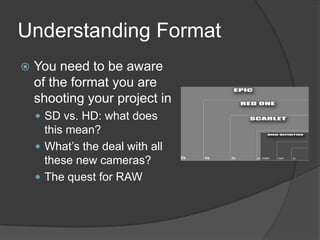
Understanding Format
 You need to be aware
of the format you are
shooting your project in
 SD vs. HD: what does
this mean?
 What’s the deal with all
these new cameras?
 The quest for RAW
Camera Research Exercise
 Look for One or Two of the following
cameras. What are the different
specifications of them
 Red Scarlet-X
 Phantom HD
 Sony FS-700
 Arri Alexa
 Canon C500
 Blackmagic Cinema
 Compare and Contrast
Understanding Format
(cont.)
 Other things that you need to consider:
 Interlaced vs. Progressive shooting
○ Videopia
 The frame rate of the camera
○ 60i – Good for shooting broadcast
○ 30p – Good for web delivery
○ 24p – The film look
 The pixel aspect ratio of the camera
○ Use if you want to shoot in a widescreen format
○ Some cameras do not have the ability to do a true
widescreen format
 Compression
○ Office Max vs. B & H
 Demonstration of how to set up the video signal
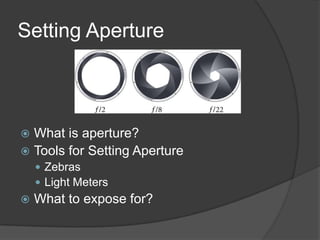
Setting Aperture
 What is aperture?
 Tools for Setting Aperture
 Zebras
 Light Meters
 What to expose for?
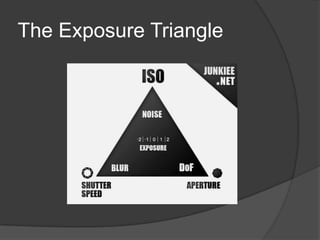
The Exposure Triangle
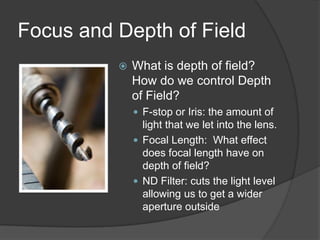
Focus and Depth of Field
 What is depth of field?
How do we control Depth
of Field?
 F-stop or Iris: the amount of
light that we let into the lens.
 Focal Length: What effect
does focal length have on
depth of field?
 ND Filter: cuts the light level
allowing us to get a wider
aperture outside
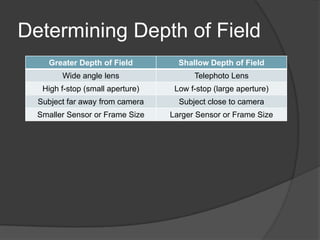
Determining Depth of Field
Greater Depth of Field Shallow Depth of Field
Wide angle lens Telephoto Lens
High f-stop (small aperture) Low f-stop (large aperture)
Subject far away from camera Subject close to camera
Smaller Sensor or Frame Size Larger Sensor or Frame Size
What should DOF be?
 What should you have it be for:
 Landscapes
 Interviews
 Narrative films
 Evaluate Depth of Field
 Gangs of Ballet
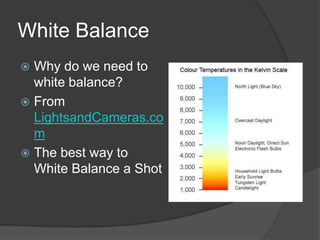
White Balance
 Why do we need to
white balance?
 From
LightsandCameras.co
m
 The best way to
White Balance a Shot
Tripod Usage
Demonstration
 Advantages and Disadvantages of using
a tripod for your project
 Differences between types of tripods
 Using the base plate on your tripod
 How to set-up/break-down
Other Camera Controls
 Focus
 The best method for focusing on a subject
 Gain
Exercise: Getting to Know your
Camera
 Activity: Get into a group and locate the
following from 4 different cameras
 Focus Control
 White Balance
 Iris or F-Stop
 ND Filter
 Gain
 Sound Control
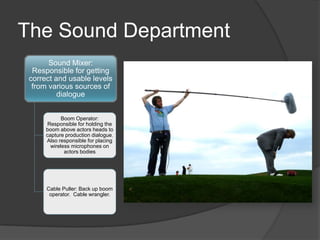
The Sound Department
Sound Mixer:
Responsible for getting
correct and usable levels
from various sources of
dialogue
Boom Operator:
Responsible for holding the
boom above actors heads to
capture production dialogue.
Also responsible for placing
wireless microphones on
actors bodies
Cable Puller: Back up boom
operator. Cable wrangler.
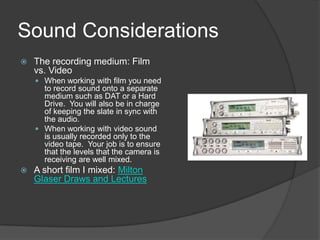
Sound Considerations
 The recording medium: Film
vs. Video
 When working with film you need
to record sound onto a separate
medium such as DAT or a Hard
Drive. You will also be in charge
of keeping the slate in sync with
the audio.
 When working with video sound
is usually recorded only to the
video tape. Your job is to ensure
that the levels that the camera is
receiving are well mixed.
 A short film I mixed: Milton
Glaser Draws and Lectures
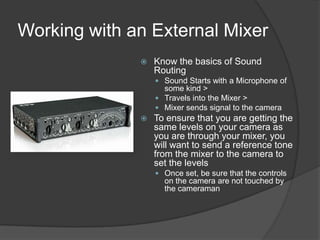
Working with an External Mixer
 Know the basics of Sound
Routing
 Sound Starts with a Microphone of
some kind >
 Travels into the Mixer >
 Mixer sends signal to the camera
 To ensure that you are getting the
same levels on your camera as
you are through your mixer, you
will want to send a reference tone
from the mixer to the camera to
set the levels
 Once set, be sure that the controls
on the camera are not touched by
the cameraman
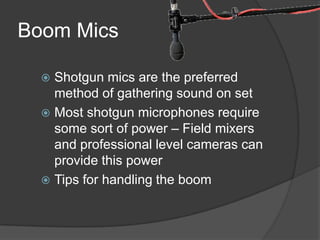
Boom Mics
 Shotgun mics are the preferred
method of gathering sound on set
 Most shotgun microphones require
some sort of power – Field mixers
and professional level cameras can
provide this power
 Tips for handling the boom
Lavaliers
 Two Main types of Lavaliers: Wired and
Wireless
 Wired: Good for sit down interviews – no
worries about radio interference
 Wireless: Good because of portability. Allows
you to follow characters around as well as get
clear sound from wide shots
 Watch out for:
 Clothing Noise
 Improper Placement
 Radio Interference
Overall Sound Advice
 Pay Attention to it!
 Avoid using the on-camera microphone
 If you use an external microphone, be
sure and monitor your sound at all times
 The last thing you want is to realize that you
have no audio!
Class Exercise
 Get into your group of 4
 Take a camera, tripod, and audio setup
 Make up an idea for a documentary
 Capture at least 3 20-second interviews
in locations around the school
 Return to review the footage
Narrative Shot Sequencing
 Plan ahead
 Spend a few moments planning out a
storyboard for your sequence. This will
ensure that you have story that will make
sense once you edit it together
 Think about video sequencing: From the
Storyguide
Narrative Shot Sequencing
(cont.)
 Shoot for the edit
 Try to vary the framing and composition of the shots
that you are trying to edit together
 It is easier to edit with locked off shots – avoid
handheld shots
 When a character is moving, have them leave frame
– this enables you to cut to wherever you like
 Obey the 30° rule – two shots should be at least 30°
apart from each other to avoid jump cuts
 The more shots that you use, the more visually
interesting the story will be
 Shoot a given action from a couple of different
angles, this will give you more options in the edit.
Discuss Project 1
 Pre-production discussion
 Parameters of Assignment

Video Production: Manual Camera Controls

  • 1.
  • 2.
    Goals for Today Understand why having manual control is important in Videography  Understand different formats that cameras can shoot in
  • 3.
    Importance of Manual Control Who camcorders are built for:  Consumer level cameras are built for someone who knows little about videography  They usually have little by way of manual controls  Full control is important in order to be professional  Caveat: The problem with Camera fan- boys
  • 4.
    Understanding Format  Youneed to be aware of the format you are shooting your project in  SD vs. HD: what does this mean?  What’s the deal with all these new cameras?  The quest for RAW
  • 5.
    Camera Research Exercise Look for One or Two of the following cameras. What are the different specifications of them  Red Scarlet-X  Phantom HD  Sony FS-700  Arri Alexa  Canon C500  Blackmagic Cinema  Compare and Contrast
  • 6.
    Understanding Format (cont.)  Otherthings that you need to consider:  Interlaced vs. Progressive shooting ○ Videopia  The frame rate of the camera ○ 60i – Good for shooting broadcast ○ 30p – Good for web delivery ○ 24p – The film look  The pixel aspect ratio of the camera ○ Use if you want to shoot in a widescreen format ○ Some cameras do not have the ability to do a true widescreen format  Compression ○ Office Max vs. B & H  Demonstration of how to set up the video signal
  • 7.
    Setting Aperture  Whatis aperture?  Tools for Setting Aperture  Zebras  Light Meters  What to expose for?
  • 8.
  • 9.
    Focus and Depthof Field  What is depth of field? How do we control Depth of Field?  F-stop or Iris: the amount of light that we let into the lens.  Focal Length: What effect does focal length have on depth of field?  ND Filter: cuts the light level allowing us to get a wider aperture outside
  • 10.
    Determining Depth ofField Greater Depth of Field Shallow Depth of Field Wide angle lens Telephoto Lens High f-stop (small aperture) Low f-stop (large aperture) Subject far away from camera Subject close to camera Smaller Sensor or Frame Size Larger Sensor or Frame Size
  • 11.
    What should DOFbe?  What should you have it be for:  Landscapes  Interviews  Narrative films  Evaluate Depth of Field  Gangs of Ballet
  • 12.
    White Balance  Whydo we need to white balance?  From LightsandCameras.co m  The best way to White Balance a Shot
  • 13.
    Tripod Usage Demonstration  Advantagesand Disadvantages of using a tripod for your project  Differences between types of tripods  Using the base plate on your tripod  How to set-up/break-down
  • 14.
    Other Camera Controls Focus  The best method for focusing on a subject  Gain
  • 15.
    Exercise: Getting toKnow your Camera  Activity: Get into a group and locate the following from 4 different cameras  Focus Control  White Balance  Iris or F-Stop  ND Filter  Gain  Sound Control
  • 16.
    The Sound Department SoundMixer: Responsible for getting correct and usable levels from various sources of dialogue Boom Operator: Responsible for holding the boom above actors heads to capture production dialogue. Also responsible for placing wireless microphones on actors bodies Cable Puller: Back up boom operator. Cable wrangler.
  • 17.
    Sound Considerations  Therecording medium: Film vs. Video  When working with film you need to record sound onto a separate medium such as DAT or a Hard Drive. You will also be in charge of keeping the slate in sync with the audio.  When working with video sound is usually recorded only to the video tape. Your job is to ensure that the levels that the camera is receiving are well mixed.  A short film I mixed: Milton Glaser Draws and Lectures
  • 18.
    Working with anExternal Mixer  Know the basics of Sound Routing  Sound Starts with a Microphone of some kind >  Travels into the Mixer >  Mixer sends signal to the camera  To ensure that you are getting the same levels on your camera as you are through your mixer, you will want to send a reference tone from the mixer to the camera to set the levels  Once set, be sure that the controls on the camera are not touched by the cameraman
  • 19.
    Boom Mics  Shotgunmics are the preferred method of gathering sound on set  Most shotgun microphones require some sort of power – Field mixers and professional level cameras can provide this power  Tips for handling the boom
  • 20.
    Lavaliers  Two Maintypes of Lavaliers: Wired and Wireless  Wired: Good for sit down interviews – no worries about radio interference  Wireless: Good because of portability. Allows you to follow characters around as well as get clear sound from wide shots  Watch out for:  Clothing Noise  Improper Placement  Radio Interference
  • 21.
    Overall Sound Advice Pay Attention to it!  Avoid using the on-camera microphone  If you use an external microphone, be sure and monitor your sound at all times  The last thing you want is to realize that you have no audio!
  • 22.
    Class Exercise  Getinto your group of 4  Take a camera, tripod, and audio setup  Make up an idea for a documentary  Capture at least 3 20-second interviews in locations around the school  Return to review the footage
  • 23.
    Narrative Shot Sequencing Plan ahead  Spend a few moments planning out a storyboard for your sequence. This will ensure that you have story that will make sense once you edit it together  Think about video sequencing: From the Storyguide
  • 24.
    Narrative Shot Sequencing (cont.) Shoot for the edit  Try to vary the framing and composition of the shots that you are trying to edit together  It is easier to edit with locked off shots – avoid handheld shots  When a character is moving, have them leave frame – this enables you to cut to wherever you like  Obey the 30° rule – two shots should be at least 30° apart from each other to avoid jump cuts  The more shots that you use, the more visually interesting the story will be  Shoot a given action from a couple of different angles, this will give you more options in the edit.
  • 25.
    Discuss Project 1 Pre-production discussion  Parameters of Assignment