



Better Listings with Video Tips, Tricks and Tech Michael Cutlip Director of Technology Services MA Association of REALTORS®
marealtor.net/mcutlip/web_video.pdf Better Listings with Video
Michael Cutlip MAR Technology Director Email - mcutlip@marealtor.com Google Talk - mike.cutlip    Better Listings with Video
Better Listings with Video Course Outline Food for thought Examples Equipment Files and formats Best Practices Editing programs and the demo Storing video online Distribution The future and open Q&A
Food for Thought 98% of all MA home buyers used the Internet at some point in the process 85% ranked Internet as “very useful” in the home search   75% ranked real estate agent as “very useful”
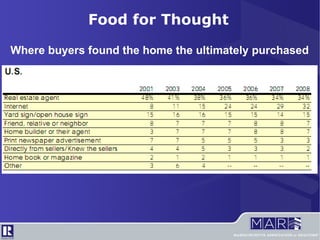
Food for Thought Where buyers found the home the ultimately purchased
Food for Thought Method of home purchase
Food for Thought Value of website features (Massachusetts)
Gain distinction with video In 2007 only 15% of agents in MA use video to market homes. Only 9% nationally. (NAR) Better than virtual tours Better context for home's layout REALTOR® can show & talk about home's features REALTOR® can showcase themselves Embed video in your own website or blog Google includes video in normal search Food for Thought
Examples
Cameras and More Camcorder / Digital Camera / Webcam / Phone Standard / High Definition DV tape / Flash memory / Hard Drive / Mini DVD Lenses Inputs / Outputs Audio and Microphones Tripods / Steadycams / Image Stabilization Equipment
Compression Render / export video Terms: Width, Height, Bit Rate, Frame Rate File Types MPEG / MP4 MOV WMV FLV Use  www.MediaConverter.org  to change formats Files and Formats
Getting Video to the Computer Making the Connection Firewire USB Flash Memory
Quick tips for better videos De-clutter the home Open windows and turn on all lights Know your equipment Plan ahead with a basic script or outline Use a tripod for steady pans Use a “steadycam” for smooth walk-throughs http://littlegreatideas.com/steadycam/ Wide angle lenses http://magneticlenses.com/ http://www.hdhat.com/camerakit.html Best Practices
Quick tips for better videos Avoid zooming in and out Use a hand held mic or video voiceover: try not to use built-in camera microphone Want high-end audio? Get a “battery-powered wireless lavalier mic”:  http://tinyurl.com/lzznlk Use subtitles for descriptions and emphasis Use music for mood:  http://www.jamendo.com Get to the point Convey as much information as possible Be in the video / work with a partner or seller Best Practices
A Demonstration
Video Editing Software Windows Movie Maker – Included in XP / Vista iMovie – included in Mac Jaycut – www.Jaycut.com Vegas – Advanced editing Software
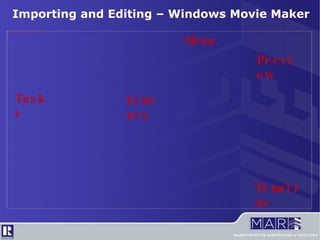
Importing and Editing – Windows Movie Maker Tasks Preview Timeline Library Menu
Importing and Editing – Windows Movie Maker Menu Bar File menu to open, save projects and export movies Tools menu contains all common tasks Tools -> Options -> Advanced -> Aspect Ratio to switch between normal and widescreen Clip menu contains options for imported videos Play menu controls the timeline
Importing and Editing – Windows Movie Maker Task Window Quick access to common features Add video, photos and music to the library Add effects, transitions and text to your video “ Finish” and export your video for the web
Importing and Editing – Windows Movie Maker Preview Window See the video as it's created Play, pause and rewind the timeline Split a clip into 2 parts Save a snapshot of the current video frame
Importing and Editing – Windows Movie Maker Movie Timeline See the timing of all elements in the movie Change start / end of video clips and photos See and adjust timing of text and voiceovers
Youtube.com Acceptable for commercial use “ Chapter” capable editing Zipvo.com Integrates with MLSPIN Real estate specific Wellcomemat.com Videographer community Real estate specific Storing and Sharing Online
Embedding on a Website Must get the “embed” code Copy the embed code Paste code into “HTML view” of your website editor Some blogs can import directly from Youtube Storing and Sharing Online
Live Video Qik.com – Stream live video from cell phone Ustream.tv – Stream live video from webcam The Future Questions?
marealtor.net/mcutlip/web_video.pdf Better Listings with Video

Video For The Web

  • 1.
    Better Listings withVideo Tips, Tricks and Tech Michael Cutlip Director of Technology Services MA Association of REALTORS®
  • 2.
  • 3.
    Michael Cutlip MARTechnology Director Email - mcutlip@marealtor.com Google Talk - mike.cutlip  Better Listings with Video
  • 4.
    Better Listings withVideo Course Outline Food for thought Examples Equipment Files and formats Best Practices Editing programs and the demo Storing video online Distribution The future and open Q&A
  • 5.
    Food for Thought98% of all MA home buyers used the Internet at some point in the process 85% ranked Internet as “very useful” in the home search 75% ranked real estate agent as “very useful”
  • 6.
    Food for ThoughtWhere buyers found the home the ultimately purchased
  • 7.
    Food for ThoughtWhere buyers found the home the ultimately purchased
  • 8.
    Food for ThoughtMethod of home purchase
  • 9.
    Food for ThoughtValue of website features (Massachusetts)
  • 10.
    Gain distinction withvideo In 2007 only 15% of agents in MA use video to market homes. Only 9% nationally. (NAR) Better than virtual tours Better context for home's layout REALTOR® can show & talk about home's features REALTOR® can showcase themselves Embed video in your own website or blog Google includes video in normal search Food for Thought
  • 11.
  • 12.
    Cameras and MoreCamcorder / Digital Camera / Webcam / Phone Standard / High Definition DV tape / Flash memory / Hard Drive / Mini DVD Lenses Inputs / Outputs Audio and Microphones Tripods / Steadycams / Image Stabilization Equipment
  • 13.
    Compression Render /export video Terms: Width, Height, Bit Rate, Frame Rate File Types MPEG / MP4 MOV WMV FLV Use www.MediaConverter.org to change formats Files and Formats
  • 14.
    Getting Video tothe Computer Making the Connection Firewire USB Flash Memory
  • 15.
    Quick tips forbetter videos De-clutter the home Open windows and turn on all lights Know your equipment Plan ahead with a basic script or outline Use a tripod for steady pans Use a “steadycam” for smooth walk-throughs http://littlegreatideas.com/steadycam/ Wide angle lenses http://magneticlenses.com/ http://www.hdhat.com/camerakit.html Best Practices
  • 16.
    Quick tips forbetter videos Avoid zooming in and out Use a hand held mic or video voiceover: try not to use built-in camera microphone Want high-end audio? Get a “battery-powered wireless lavalier mic”: http://tinyurl.com/lzznlk Use subtitles for descriptions and emphasis Use music for mood: http://www.jamendo.com Get to the point Convey as much information as possible Be in the video / work with a partner or seller Best Practices
  • 17.
  • 18.
    Video Editing SoftwareWindows Movie Maker – Included in XP / Vista iMovie – included in Mac Jaycut – www.Jaycut.com Vegas – Advanced editing Software
  • 19.
    Importing and Editing– Windows Movie Maker Tasks Preview Timeline Library Menu
  • 20.
    Importing and Editing– Windows Movie Maker Menu Bar File menu to open, save projects and export movies Tools menu contains all common tasks Tools -> Options -> Advanced -> Aspect Ratio to switch between normal and widescreen Clip menu contains options for imported videos Play menu controls the timeline
  • 21.
    Importing and Editing– Windows Movie Maker Task Window Quick access to common features Add video, photos and music to the library Add effects, transitions and text to your video “ Finish” and export your video for the web
  • 22.
    Importing and Editing– Windows Movie Maker Preview Window See the video as it's created Play, pause and rewind the timeline Split a clip into 2 parts Save a snapshot of the current video frame
  • 23.
    Importing and Editing– Windows Movie Maker Movie Timeline See the timing of all elements in the movie Change start / end of video clips and photos See and adjust timing of text and voiceovers
  • 24.
    Youtube.com Acceptable forcommercial use “ Chapter” capable editing Zipvo.com Integrates with MLSPIN Real estate specific Wellcomemat.com Videographer community Real estate specific Storing and Sharing Online
  • 25.
    Embedding on aWebsite Must get the “embed” code Copy the embed code Paste code into “HTML view” of your website editor Some blogs can import directly from Youtube Storing and Sharing Online
  • 26.
    Live Video Qik.com– Stream live video from cell phone Ustream.tv – Stream live video from webcam The Future Questions?
  • 27.