B usiness  Video 101   User’s guide for creating  employee-generated video communication
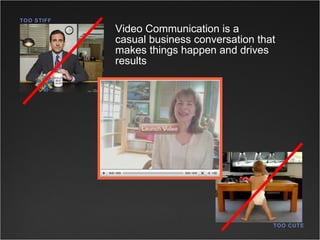
Video Communication is a  casual business conversation that makes things happen and drives results TOO STIFF TOO CUTE
Video is easy to create and the quality is better than ever. Webcam Flip Cam The $2,000 investment toward better-quality videos When to hire a  professional crew Some choices for creating a video:
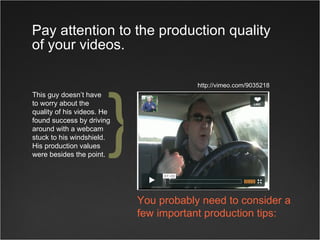
Pay attention to the production quality of your videos. This guy doesn’t have  to worry about the  quality of his videos. He found success by driving around with a webcam stuck to his windshield. His production values were besides the point. http://vimeo.com/9035218 You probably need to consider a few important production tips: }
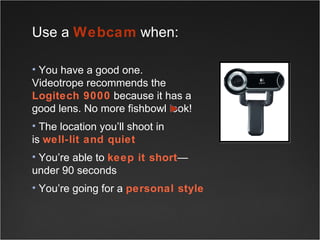
Use a  Webcam  when: You have a good one.  Videotrope recommends the  Logitech 9000  because it has a good lens. No more fishbowl look! The location you’ll shoot in  is  well-lit and quiet You’re able to  keep it short —under 90 seconds You’re going for a  personal style
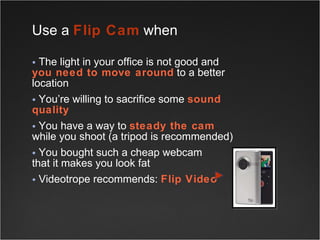
Use a  Flip Cam  when  The light in your office is not good and  you need to move around  to a better location You’re willing to sacrifice some  sound quality You have a way to  steady the cam   while you shoot (a tripod is recommended) You bought such a cheap webcam  that it makes you look fat Videotrope recommends:  Flip Video
Consider upgrading to higher-quality equipment and working with professional sources when: You’re the boss  and want your videos  to have a more professional look You  wanna be  the boss You are  in charge of communications You think of your videos as  films   The  $2,000 investment   toward better quality videos when you want and need to look better.
Employees want to learn how to use video  as  part of their job You’re on the road  on a regular basis There’s access to  someone who can  edit your videos  for a more professional look When is  $2,000  worth it?
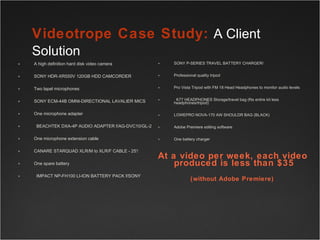
A high definition hard disk video camera  SONY HDR-XR550V 120GB HDD CAMCORDER  Two lapel microphones SONY ECM-44B OMNI-DIRECTIONAL LAVALIER MICS  One microphone adapter   BEACHTEK DXA-4P AUDIO ADAPTER f/AG-DVC10/GL-2  One microphone extension cable CANARE STARQUAD XLR/M to XLR/F CABLE - 25'/ One spare battery   IMPACT NP-FH100 LI-ION BATTERY PACK f/SONY SONY P-SERIES TRAVEL BATTERY CHARGER/ Professional quality tripod Pro Vista Tripod with FM 18 Head Headphones to monitor audio levels   K77 HEADPHONES Storage/travel bag (fits entire kit less headphones/tripod) LOWEPRO NOVA-170 AW SHOULDR BAG (BLACK) Adobe Premiere editing software  One battery charger At a video per week, each video produced is less than $35 (without Adobe Premiere)   Videotrope Case Study:  A Client Solution
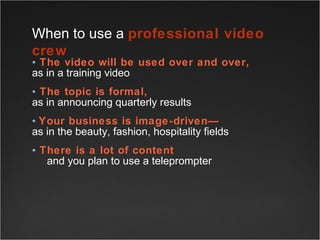
The video will be used over and over,   as in a training video The topic is formal,   as in announcing quarterly results Your business is image-driven— as in the beauty, fashion, hospitality fields There is a lot of content    and you plan to use a teleprompter When to use a  professional video crew
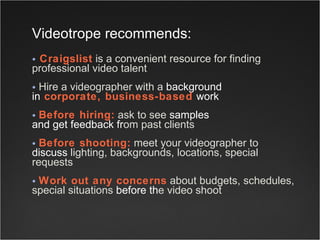
Craigslist  is a convenient resource for finding professional video talent  Hire a videographer with a  background   in  corporate, business-based  work   Before hiring:  ask to see  samples  and get feedback fr om past clients  Before shooting:  meet your videographer to  discuss  lighting, backgrounds, locations, special requests Work out any concerns  about budgets, schedules, special situations  before th e video shoot Videotrope   recommends:
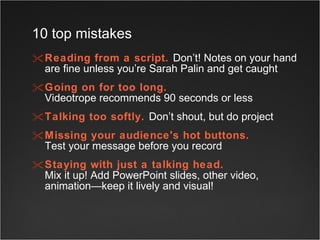
Reading from a script.   Don’t! Notes on your hand are fine unless you’re Sarah Palin and get caught Going on for too long.   Videotrope recommends 90 seconds or less Talking too softly.   Don’t shout, but do project Missing your audience's hot buttons.   Test your message before you record  Staying with just a talking head.   Mix it up! Add PowerPoint slides, other video, animation—keep it lively and visual!  10 top mistakes
Ignoring appearance basics. Lightly powder anything that shines and  smooth anything rumpled  Better yet, hire a hair/makeup artist (Craigslist).  (Goes for men too.) AVOID:   overly-patterned clothing, shiny fabric, go easy on the bling unless it’s really your style  10 top mistakes
Selecting a poor location to shoot. You may need to experiment with different locations before you hit upon the best  one   Aim for a quiet location without ambient noise  Look for simple backgrounds and  overall soft, even lighting.  A room with a door  that closes for privacy is recommended   AVOID:   dark locations, heavy shadows, too-bright sunlight, overhead lighting  10 top mistakes
Coming across overly formal.   Even in a business context, webcam videos are fine if you are sincere and straightforward  Not being timely.  Your video is competing for attention with CNN. Make sure the content is current  Choosing the wrong media for the message.   Video is great for motivation, excitement, connection. It is not great for data.  If your message fits in an excel spreadsheet,  then maybe that’s where it belongs 10 top mistakes
Videotrope is this needs to be written For more information Videotrope.com 623-999-1234 About Videotrope

Videotrope PowerPoint

  • 1.
    B usiness Video 101 User’s guide for creating employee-generated video communication
  • 2.
    Video Communication isa casual business conversation that makes things happen and drives results TOO STIFF TOO CUTE
  • 3.
    Video is easyto create and the quality is better than ever. Webcam Flip Cam The $2,000 investment toward better-quality videos When to hire a professional crew Some choices for creating a video:
  • 4.
    Pay attention tothe production quality of your videos. This guy doesn’t have to worry about the quality of his videos. He found success by driving around with a webcam stuck to his windshield. His production values were besides the point. http://vimeo.com/9035218 You probably need to consider a few important production tips: }
  • 5.
    Use a Webcam when: You have a good one. Videotrope recommends the Logitech 9000 because it has a good lens. No more fishbowl look! The location you’ll shoot in is well-lit and quiet You’re able to keep it short —under 90 seconds You’re going for a personal style
  • 6.
    Use a Flip Cam when The light in your office is not good and you need to move around to a better location You’re willing to sacrifice some sound quality You have a way to steady the cam while you shoot (a tripod is recommended) You bought such a cheap webcam that it makes you look fat Videotrope recommends: Flip Video
  • 7.
    Consider upgrading tohigher-quality equipment and working with professional sources when: You’re the boss and want your videos to have a more professional look You wanna be the boss You are in charge of communications You think of your videos as films The $2,000 investment toward better quality videos when you want and need to look better.
  • 8.
    Employees want tolearn how to use video as part of their job You’re on the road on a regular basis There’s access to someone who can edit your videos for a more professional look When is $2,000 worth it?
  • 9.
    A high definitionhard disk video camera SONY HDR-XR550V 120GB HDD CAMCORDER Two lapel microphones SONY ECM-44B OMNI-DIRECTIONAL LAVALIER MICS One microphone adapter   BEACHTEK DXA-4P AUDIO ADAPTER f/AG-DVC10/GL-2 One microphone extension cable CANARE STARQUAD XLR/M to XLR/F CABLE - 25'/ One spare battery   IMPACT NP-FH100 LI-ION BATTERY PACK f/SONY SONY P-SERIES TRAVEL BATTERY CHARGER/ Professional quality tripod Pro Vista Tripod with FM 18 Head Headphones to monitor audio levels   K77 HEADPHONES Storage/travel bag (fits entire kit less headphones/tripod) LOWEPRO NOVA-170 AW SHOULDR BAG (BLACK) Adobe Premiere editing software One battery charger At a video per week, each video produced is less than $35 (without Adobe Premiere) Videotrope Case Study: A Client Solution
  • 10.
    The video willbe used over and over, as in a training video The topic is formal, as in announcing quarterly results Your business is image-driven— as in the beauty, fashion, hospitality fields There is a lot of content and you plan to use a teleprompter When to use a professional video crew
  • 11.
    Craigslist isa convenient resource for finding professional video talent Hire a videographer with a background in corporate, business-based work Before hiring: ask to see samples and get feedback fr om past clients Before shooting: meet your videographer to discuss lighting, backgrounds, locations, special requests Work out any concerns about budgets, schedules, special situations before th e video shoot Videotrope recommends:
  • 12.
    Reading from ascript. Don’t! Notes on your hand are fine unless you’re Sarah Palin and get caught Going on for too long. Videotrope recommends 90 seconds or less Talking too softly. Don’t shout, but do project Missing your audience's hot buttons. Test your message before you record Staying with just a talking head. Mix it up! Add PowerPoint slides, other video, animation—keep it lively and visual! 10 top mistakes
  • 13.
    Ignoring appearance basics.Lightly powder anything that shines and smooth anything rumpled Better yet, hire a hair/makeup artist (Craigslist). (Goes for men too.) AVOID: overly-patterned clothing, shiny fabric, go easy on the bling unless it’s really your style 10 top mistakes
  • 14.
    Selecting a poorlocation to shoot. You may need to experiment with different locations before you hit upon the best one Aim for a quiet location without ambient noise Look for simple backgrounds and overall soft, even lighting. A room with a door that closes for privacy is recommended AVOID: dark locations, heavy shadows, too-bright sunlight, overhead lighting 10 top mistakes
  • 15.
    Coming across overlyformal. Even in a business context, webcam videos are fine if you are sincere and straightforward Not being timely. Your video is competing for attention with CNN. Make sure the content is current Choosing the wrong media for the message. Video is great for motivation, excitement, connection. It is not great for data. If your message fits in an excel spreadsheet, then maybe that’s where it belongs 10 top mistakes
  • 16.
    Videotrope is thisneeds to be written For more information Videotrope.com 623-999-1234 About Videotrope

Editor's Notes

  • #7 Flip cam
  • #13 Selecting a poor location to shoot. Aim for a place without background noise, with simple background and overall soft lighting. A room with a door that closes for privacy is recommended.