Submitted by
Nidhi Sharma
8503
Msc-it(3rd sem)
A text

editor is one of the most essential tools
provided with the Linux operating system.
With an editor, you can create and modify text files
that have a variety of applications:
 System files
 Shell programs
 Documents
 Mail messages
Basically, editors enable you to
insert, delete, move, and search text ranging from
individual characters to thousands of lines.
 Two of the most popular editors for Linux system
are emacs and vi.
•

VI editor is a basic text editor that is an
acronym of
‘ visual editor’ and was originally written by Bill
Joy in 1976.
•Basically there are three types of editors
available in UNIX; these are named as ‘ed’ ‘ex’
and ‘vi’.
• The ‘ed’ is a line editor and is just like EDLIN
program in DOS.
• The ‘ex’ editor is an advanced version of ‘ed’
that is more user friendly comparative to ‘ed’.
• The ‘vi’ is a screen editor and compared to ‘ed’
or ‘ex’ it is quite better.
There are following way you can start using vi
editor:
Command

Description

vi

Create a unnamed file.

vi filename

Creates a new file if it already does not exist,
otherwise opens existing file.

vi -R filename Or view Opens an existing file in read only mode.
filename

vi +n filename

Where n represents the line number where
vi will place its cursor in filename.
•Command

mode: This mode enables you to perform
administrative tasks such as saving files, executing
commands, moving the cursor, cutting (yanking) and
pasting lines or words, and finding and replacing. In this
mode, whatever you type is interpreted as a command.
•Insert

mode: This mode enables you to insert text into
the file. Everything that's typed in this mode is interpreted
as input and finally it is put in the file
•.
•Ex mode: In ‘ex’ mode the user is permitted to give
commands at the last line known as command line .This
mode prompts the user to file handling like as saving the
file or exit the editor with or without saving the file.
Command

Description

i

insert text before cursor, until <Esc> hit

I

insert text at beginning of current line,
until <Esc> hit

a

append text after cursor, until <Esc> hit

A

append text to end of current line ,
until <Esc> hit

o

open and put text in a new line below
current line, until <Esc> hit

O

open and put text in a new line above
current line, until <Esc> hit
Command

Description

:w

Saves file and remains in editing
mode

:x or zz

Saves file and quits editing mode

:wq

Saves file and quits editing mode

:q

Quits editing mode

:q!

quits the file without saving changes
to exit from the editor.
Command

Description

b

Beginning of previous word

w

Beginning of next word

e

End of current/next word

0(Zero)

Beginning of line

$

End of line

(

Beginning of current/previous sentence

)

Beginning of next sentence

{

Beginning of current/previous paragraph

}

End of current paragraph
Command

Description

h

left one space

j

down one line

k

up one line

l

right one space
Command

Description

x
Nx

delete single character under cursor
delete N characters, starting with character under cursor

X

Deletes the character before the cursor location.

dw
Ndw

delete the single word beginning with character under
cursor
delete N words beginning with character under cursor.

d^

Deletes from current cursor position to the beginning of
the line.

d$

Deletes from the current character to the end of the line.

dd
Ndd

delete entire current line
delete N lines, beginning with the current line;
e.g., 5dd deletes 5 lines

dg

Deletes all the line from the current one to the end of the
file.
Moving sections of text around in a file basically requires
three steps:
1)
“Yank” the text into a buffer.
2)
Move the cursor to where you want to insert the text.
3)
Place the text from buffer at the new location.
Command

Description

yy

yank (copy) a line

2yy

yank 2 lines

yw

yank word

y$

yank to end of line

p

put (paste) the clipboard after cursor

P

put (paste) before cursor
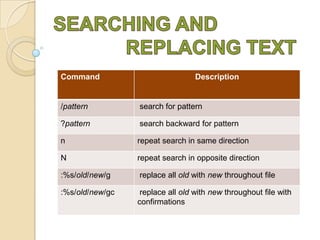
Command

Description

/pattern

search for pattern

?pattern

search backward for pattern

n

repeat search in same direction

N

repeat search in opposite direction

:%s/old/new/g

replace all old with new throughout file

:%s/old/new/gc

replace all old with new throughout file with
confirmations

Vi editor

  • 1.
  • 2.
    A text editor isone of the most essential tools provided with the Linux operating system. With an editor, you can create and modify text files that have a variety of applications:  System files  Shell programs  Documents  Mail messages Basically, editors enable you to insert, delete, move, and search text ranging from individual characters to thousands of lines.  Two of the most popular editors for Linux system are emacs and vi.
  • 3.
    • VI editor isa basic text editor that is an acronym of ‘ visual editor’ and was originally written by Bill Joy in 1976. •Basically there are three types of editors available in UNIX; these are named as ‘ed’ ‘ex’ and ‘vi’. • The ‘ed’ is a line editor and is just like EDLIN program in DOS. • The ‘ex’ editor is an advanced version of ‘ed’ that is more user friendly comparative to ‘ed’. • The ‘vi’ is a screen editor and compared to ‘ed’ or ‘ex’ it is quite better.
  • 4.
    There are followingway you can start using vi editor: Command Description vi Create a unnamed file. vi filename Creates a new file if it already does not exist, otherwise opens existing file. vi -R filename Or view Opens an existing file in read only mode. filename vi +n filename Where n represents the line number where vi will place its cursor in filename.
  • 5.
    •Command mode: This modeenables you to perform administrative tasks such as saving files, executing commands, moving the cursor, cutting (yanking) and pasting lines or words, and finding and replacing. In this mode, whatever you type is interpreted as a command. •Insert mode: This mode enables you to insert text into the file. Everything that's typed in this mode is interpreted as input and finally it is put in the file •. •Ex mode: In ‘ex’ mode the user is permitted to give commands at the last line known as command line .This mode prompts the user to file handling like as saving the file or exit the editor with or without saving the file.
  • 6.
    Command Description i insert text beforecursor, until <Esc> hit I insert text at beginning of current line, until <Esc> hit a append text after cursor, until <Esc> hit A append text to end of current line , until <Esc> hit o open and put text in a new line below current line, until <Esc> hit O open and put text in a new line above current line, until <Esc> hit
  • 7.
    Command Description :w Saves file andremains in editing mode :x or zz Saves file and quits editing mode :wq Saves file and quits editing mode :q Quits editing mode :q! quits the file without saving changes to exit from the editor.
  • 8.
    Command Description b Beginning of previousword w Beginning of next word e End of current/next word 0(Zero) Beginning of line $ End of line ( Beginning of current/previous sentence ) Beginning of next sentence { Beginning of current/previous paragraph } End of current paragraph
  • 9.
    Command Description h left one space j downone line k up one line l right one space
  • 10.
    Command Description x Nx delete single characterunder cursor delete N characters, starting with character under cursor X Deletes the character before the cursor location. dw Ndw delete the single word beginning with character under cursor delete N words beginning with character under cursor. d^ Deletes from current cursor position to the beginning of the line. d$ Deletes from the current character to the end of the line. dd Ndd delete entire current line delete N lines, beginning with the current line; e.g., 5dd deletes 5 lines dg Deletes all the line from the current one to the end of the file.
  • 11.
    Moving sections oftext around in a file basically requires three steps: 1) “Yank” the text into a buffer. 2) Move the cursor to where you want to insert the text. 3) Place the text from buffer at the new location. Command Description yy yank (copy) a line 2yy yank 2 lines yw yank word y$ yank to end of line p put (paste) the clipboard after cursor P put (paste) before cursor
  • 12.
    Command Description /pattern search for pattern ?pattern searchbackward for pattern n repeat search in same direction N repeat search in opposite direction :%s/old/new/g replace all old with new throughout file :%s/old/new/gc replace all old with new throughout file with confirmations

Editor's Notes

  • #2 http://www.worldtimzone.com/res/vi.htmlhttp://www.developerdrive.com/2012/06/5-differences-between-c-and-java-objects-and-classes/
  • #5 http://www.people.imise.uni-leipzig.de/nab.raj.roshyara/vi_commands.pdfhttp://www.cs.colostate.edu/helpdocs/vi.html