vi editor basics
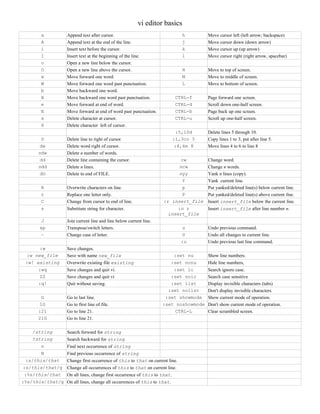
a Append text after cursor. h Move cursor left (left arrow; backspace)
A Append text at the end of the line. j Move cursor down (down arrow)
i Insert text before the cursor. k Move cursor up (up arrow)
I Insert text at the beginning of the line. l Move cursor right (right arrow, spacebar)
o Open a new line below the cursor.
O Open a new line above the cursor. H Move to top of screen.
w Move forward one word. M Move to middle of screen.
W Move forward one word past punctuation. L Move to bottom of screen.
b Move backward one word.
B Move backward one word past punctuation. CTRL-f Page forward one screen.
e Move forward at end of word. CTRL-d Scroll down one-half screen.
E Move forward at end of word past punctuation. CTRL-b Page back up one screen.
x Delete character at cursor. CTRL-u Scroll up one-half screen.
X Delete character left of cursor.
:5,10d Delete lines 5 through 10.
D Delete line to right of cursor. :1,3co 5 Copy lines 1 to 3; put after line 5.
dw Delete word right of cursor. :4,6m 8 Move lines 4 to 6 to line 8
ndw Delete n number of words.
dd Delete line containing the cursor. cw Change word.
ndd Delete n lines. ncw Change n words.
dG Delete to end of FILE. nyy Yank n lines (copy).
Y Yank current line.
R Overwrite characters on line. p Put yanked/deleted line(s) below current line.
r Replace one letter only. P Put yanked/deleted line(s) above current ilne.
C Change from cursor to end of line. :r insert_file Insert insert_file below the current line.
s Substitute string for character. :n r
insert_file
Insert insert_file after line number n.
J Join current line and line below current line.
xp Transpose/switch letters. u Undo previous command.
~ Change case of letter. U Undo all changes to current line.
:u Undo previous last line command.
:w Save changes.
:w new_file Save with name new_file :set nu Show line numbers.
:w! existing Overwrite existing file existing :set nonu Hide line numbers,
:wq Save changes and quit vi. :set ic Search ignore case.
ZZ Save changes and quit vi :set noic Search case sensitive
:q! Quit without saving. :set list Display invisible characters (tabs)
:set nolist Don't display invisible characters.
G Go to last line. :set showmode Show current mode of operation.
1G Go to first line of file. :set noshowmode Don't show current mode of operation.
:21 Go to line 21. CTRL-L Clear scrambled screen.
21G Go to line 21.
/string Search forward for string
?string Search backward for string
n Find next occurrence of string
N Find previous occurrence of string
:s/this/that Change first occurrence of this to that on current line.
:s/this/that/g Change all occurrences of this to that on current line.
:%s/this/that On all lines, change first occurrence of this to that.
:%s/this/that/g On all lines, change all occurrences of this to that.
vi Detailed Reference
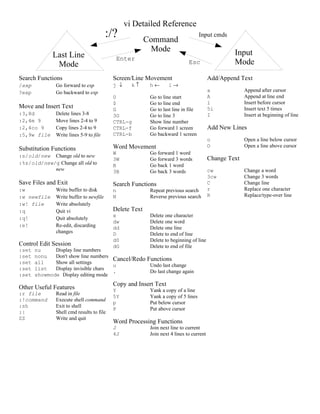
Search Functions
/exp Go forward to exp
?exp Go backward to exp
Move and Insert Text
:3,8d Delete lines 3-8
:2,4m 9 Move lines 2-4 to 9
:2,4co 9 Copy lines 2-4 to 9
:5,9w file Write lines 5-9 to file
Substitution Functions
:s/old/new Change old to new
:%s/old/new/g Change all old to
new
Save Files and Exit
:w Write buffer to disk
:w newfile Write buffer to newfile
:w! file Write absolutely
:q Quit vi
:q! Quit absolutely
:e! Re-edit, discarding
changes
Control Edit Session
:set nu Display line numbers
:set nonu Don't show line numbers
:set all Show all settings
:set list Display invisible chars
:set showmode Display editing mode
Other Useful Features
:r file Read in file
:!command Execute shell command
:sh Exit to shell
:| Shell cmd results to file
ZZ Write and quit
Screen/Line Movement
j ↓ k ↑ h ← l →
0 Go to line start
$ Go to line end
G Go to last line in file
3G Go to line 3
CTRL-g Show line number
CTRL-f Go forward 1 screen
CTRL-b Go backward 1 screen
Word Movement
W Go forward 1 word
3W Go forward 3 words
B Go back 1 word
3B Go back 3 words
Search Functions
n Repeat previous search
N Reverse previous search
Delete Text
x Delete one character
dw Delete one word
dd Delete one line
D Delete to end of line
d0 Delete to beginning of line
dG Delete to end of file
Cancel/Redo Functions
u Undo last change
. Do last change again
Copy and Insert Text
Y Yank a copy of a line
5Y Yank a copy of 5 lines
p Put below cursor
P Put above cursor
Word Processing Functions
J Join next line to current
4J Join next 4 lines to current
Add/Append Text
a Append after cursor
A Append at line end
i Insert before cursor
5i Insert text 5 times
I Insert at beginning of line
Add New Lines
o Open a line below cursor
O Open a line above cursor
Change Text
cw Change a word
3cw Change 3 words
C Change line
r Replace one character
R Replace/type-over line
Last Line
Mode
Command
Mode Input
Mode
:/?
Enter
Esc
Input cmds

Vi reference

  • 1.
    vi editor basics aAppend text after cursor. h Move cursor left (left arrow; backspace) A Append text at the end of the line. j Move cursor down (down arrow) i Insert text before the cursor. k Move cursor up (up arrow) I Insert text at the beginning of the line. l Move cursor right (right arrow, spacebar) o Open a new line below the cursor. O Open a new line above the cursor. H Move to top of screen. w Move forward one word. M Move to middle of screen. W Move forward one word past punctuation. L Move to bottom of screen. b Move backward one word. B Move backward one word past punctuation. CTRL-f Page forward one screen. e Move forward at end of word. CTRL-d Scroll down one-half screen. E Move forward at end of word past punctuation. CTRL-b Page back up one screen. x Delete character at cursor. CTRL-u Scroll up one-half screen. X Delete character left of cursor. :5,10d Delete lines 5 through 10. D Delete line to right of cursor. :1,3co 5 Copy lines 1 to 3; put after line 5. dw Delete word right of cursor. :4,6m 8 Move lines 4 to 6 to line 8 ndw Delete n number of words. dd Delete line containing the cursor. cw Change word. ndd Delete n lines. ncw Change n words. dG Delete to end of FILE. nyy Yank n lines (copy). Y Yank current line. R Overwrite characters on line. p Put yanked/deleted line(s) below current line. r Replace one letter only. P Put yanked/deleted line(s) above current ilne. C Change from cursor to end of line. :r insert_file Insert insert_file below the current line. s Substitute string for character. :n r insert_file Insert insert_file after line number n. J Join current line and line below current line. xp Transpose/switch letters. u Undo previous command. ~ Change case of letter. U Undo all changes to current line. :u Undo previous last line command. :w Save changes. :w new_file Save with name new_file :set nu Show line numbers. :w! existing Overwrite existing file existing :set nonu Hide line numbers, :wq Save changes and quit vi. :set ic Search ignore case. ZZ Save changes and quit vi :set noic Search case sensitive :q! Quit without saving. :set list Display invisible characters (tabs) :set nolist Don't display invisible characters. G Go to last line. :set showmode Show current mode of operation. 1G Go to first line of file. :set noshowmode Don't show current mode of operation. :21 Go to line 21. CTRL-L Clear scrambled screen. 21G Go to line 21. /string Search forward for string ?string Search backward for string n Find next occurrence of string N Find previous occurrence of string :s/this/that Change first occurrence of this to that on current line. :s/this/that/g Change all occurrences of this to that on current line. :%s/this/that On all lines, change first occurrence of this to that. :%s/this/that/g On all lines, change all occurrences of this to that.
  • 2.
    vi Detailed Reference SearchFunctions /exp Go forward to exp ?exp Go backward to exp Move and Insert Text :3,8d Delete lines 3-8 :2,4m 9 Move lines 2-4 to 9 :2,4co 9 Copy lines 2-4 to 9 :5,9w file Write lines 5-9 to file Substitution Functions :s/old/new Change old to new :%s/old/new/g Change all old to new Save Files and Exit :w Write buffer to disk :w newfile Write buffer to newfile :w! file Write absolutely :q Quit vi :q! Quit absolutely :e! Re-edit, discarding changes Control Edit Session :set nu Display line numbers :set nonu Don't show line numbers :set all Show all settings :set list Display invisible chars :set showmode Display editing mode Other Useful Features :r file Read in file :!command Execute shell command :sh Exit to shell :| Shell cmd results to file ZZ Write and quit Screen/Line Movement j ↓ k ↑ h ← l → 0 Go to line start $ Go to line end G Go to last line in file 3G Go to line 3 CTRL-g Show line number CTRL-f Go forward 1 screen CTRL-b Go backward 1 screen Word Movement W Go forward 1 word 3W Go forward 3 words B Go back 1 word 3B Go back 3 words Search Functions n Repeat previous search N Reverse previous search Delete Text x Delete one character dw Delete one word dd Delete one line D Delete to end of line d0 Delete to beginning of line dG Delete to end of file Cancel/Redo Functions u Undo last change . Do last change again Copy and Insert Text Y Yank a copy of a line 5Y Yank a copy of 5 lines p Put below cursor P Put above cursor Word Processing Functions J Join next line to current 4J Join next 4 lines to current Add/Append Text a Append after cursor A Append at line end i Insert before cursor 5i Insert text 5 times I Insert at beginning of line Add New Lines o Open a line below cursor O Open a line above cursor Change Text cw Change a word 3cw Change 3 words C Change line r Replace one character R Replace/type-over line Last Line Mode Command Mode Input Mode :/? Enter Esc Input cmds