The “ vi “ Text Editor


Alessandro Manfredi                     Lug Roma 3 - http://www.lugroma3.org
?


Alessandro Manfredi   The “ vi “ Text Editor   Lug Roma 3 - http://www.lugroma3.org
Roadmap
              • Yes, I’m going to convince you to use this tool
              • Who, What, When, Where, Why
              • How to
              • Examples & Training


Alessandro Manfredi                 The “ vi “ Text Editor   Lug Roma 3 - http://www.lugroma3.org
Once Upon a Time ...

                           The 5 ‘w’


Alessandro Manfredi          The “ vi “ Text Editor   Lug Roma 3 - http://www.lugroma3.org
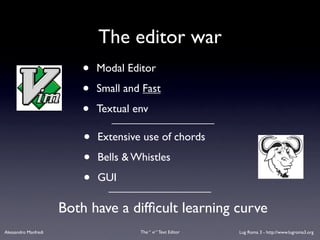
The editor war
                          •   Modal Editor

                          •   Small and Fast

                          •   Textual env

                          •   Extensive use of chords

                          •   Bells & Whistles

                          •   GUI

                      Both have a difficult learning curve
Alessandro Manfredi                    The “ vi “ Text Editor   Lug Roma 3 - http://www.lugroma3.org
And the winner is ...


       POSIX ( IEEE 1003 – ISO/IEC 9945 )
                      SUS ( IEEE & The Open Group )
    ( that means there is no actual winner, you can use whatever you want
   but since vi is part of the standard you should really know how to use it )


Alessandro Manfredi                The “ vi “ Text Editor   Lug Roma 3 - http://www.lugroma3.org
Wait, I never missed anyth using ...
                                                • gedit
                                                • kate / kwrite
                                                • nano
                                                • joe
                                                • oowriter
                                                • notepad
                                                • ... whatever
Alessandro Manfredi    The “ vi “ Text Editor          Lug Roma 3 - http://www.lugroma3.org
So why ? ( running into where )


                 • Again, IT IS PART OF THE STANDARD
                 • That means you find it everywhere
                      including BSD*, Mac Os X, Solaris, HP-UX,
                      AIX, Windows with SFU, your microwave
                      oven (if it’s posix-compliant), etc.


Alessandro Manfredi                  The “ vi “ Text Editor   Lug Roma 3 - http://www.lugroma3.org
Other strong reasons
                        (that you will probably ignore)

       • Really powerful editor
          • Complex tasks with few keystrokes
          • Effective regex support
       • Makes you damned fast
                                              (especially with touchtyping)

       • You can never raise hands from keyboard
       • Someone says modal editing increase productivity
Alessandro Manfredi               The “ vi “ Text Editor      Lug Roma 3 - http://www.lugroma3.org
What (the jargon file says..)

              vi: /V-I/, not, /vi:/, never, /siks/, n. [from ‘Visual
              Interface’] A screen editor crufted together by Bill Joy for
              an early BSD release. Became the de facto standard Unix
              editor and a nearly undisputed hacker favorite outside of
              MIT until the rise of EMACS after about 1984.

              Tends to frustrate new users no end, as it will neither take
              commands while expecting input text nor vice versa [... ]


Alessandro Manfredi                   The “ vi “ Text Editor   Lug Roma 3 - http://www.lugroma3.org
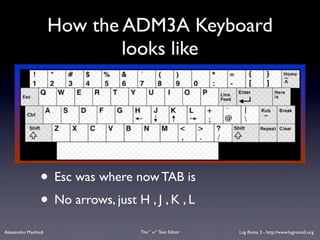
How the ADM3A Keyboard
                              looks like


                 • Esc was where now TAB is
                 • No arrows, just H , J , K , L
Alessandro Manfredi                 The “ vi “ Text Editor   Lug Roma 3 - http://www.lugroma3.org
Clones
           • Vim           Any clone extends the basic ‘vi’
           • Elvis         program with addictional functions
                           but all of them share the common
           • nvi           mode and subset of commands you
           • gvim          are (hopefully) going to learn
           • bvi           hint: try $which vi
           • calvin
           • lemmy, elwin, winvi, ...
Alessandro Manfredi           The “ vi “ Text Editor   Lug Roma 3 - http://www.lugroma3.org
How to ...


Alessandro Manfredi     The “ vi “ Text Editor   Lug Roma 3 - http://www.lugroma3.org
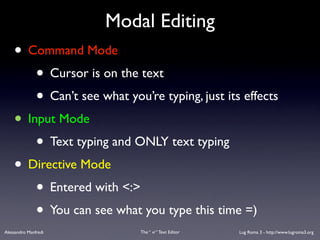
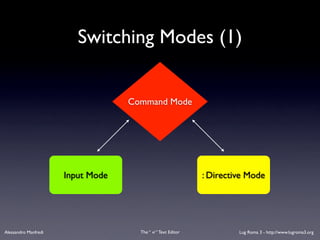
Modal Editing
    • Command Mode
        • Cursor is on the text
        • Can’t see what you’re typing, just its effects
    • Input Mode
        • Text typing and ONLY text typing
    • Directive Mode
        • Entered with <:>
        • You can see what you type this time =)
Alessandro Manfredi         The “ vi “ Text Editor   Lug Roma 3 - http://www.lugroma3.org
Switching Modes (1)


                                   Command Mode


                      Input Mode                              : Directive Mode


Alessandro Manfredi                  The “ vi “ Text Editor            Lug Roma 3 - http://www.lugroma3.org
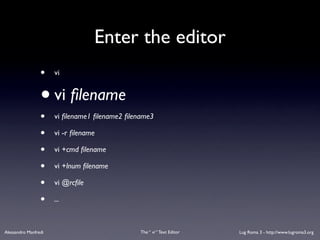
Enter the editor
                 •    vi


                 • vi filename
                 •    vi filename1 filename2 filename3

                 •    vi -r filename

                 •    vi +cmd filename

                 •    vi +lnum filename

                 •    vi @rcfile

                 •    ...


Alessandro Manfredi                            The “ vi “ Text Editor   Lug Roma 3 - http://www.lugroma3.org
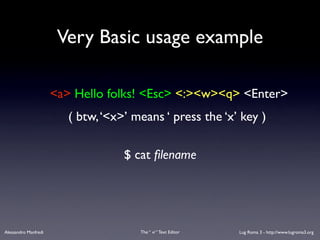
Very Basic usage example

                      <a> Hello folks! <Esc> <:><w><q> <Enter>
                         ( btw, ‘<x>’ means ‘ press the ‘x’ key )

                                    $ cat filename


Alessandro Manfredi                    The “ vi “ Text Editor   Lug Roma 3 - http://www.lugroma3.org
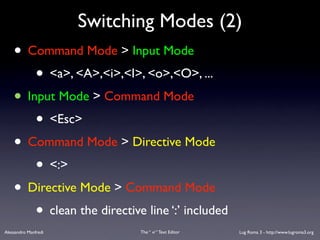
Switching Modes (2)
    • Command Mode > Input Mode
        • <a>, <A>,<i>,<I>, <o>,<O>, ...
    • Input Mode > Command Mode
        • <Esc>
    • Command Mode > Directive Mode
        • <:>
    • Directive Mode > Command Mode
        • clean the directive line ‘:’ included
Alessandro Manfredi          The “ vi “ Text Editor   Lug Roma 3 - http://www.lugroma3.org
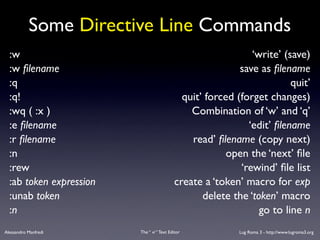
Some Directive Line Commands
  :w                                                          ‘write’ (save)
  :w filename                                               save as filename
  :q                                                                    quit’
  :q!                                        quit’ forced (forget changes)
  :wq ( :x )                                   Combination of ‘w’ and ‘q’
  :e filename                                                 ‘edit’ filename
  :r filename                                   read’ filename (copy next)
  :n                                                    open the ‘next’ file
  :rew                                                     ‘rewind’ file list
  :ab token expression                     create a ‘token’ macro for exp
  :unab token                                     delete the ‘token’ macro
  :n                                                            go to line n
Alessandro Manfredi      The “ vi “ Text Editor            Lug Roma 3 - http://www.lugroma3.org
Alessandro Manfredi   The “ vi “ Text Editor   Lug Roma 3 - http://www.lugroma3.org
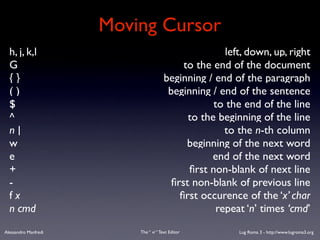
Moving Cursor
  h, j, k,l                                           left, down, up, right
  G                                         to the end of the document
  {}                                   beginning / end of the paragraph
  ()                                    beginning / end of the sentence
  $                                                to the end of the line
  ^                                          to the beginning of the line
  n|                                                  to the n-th column
  w                                          beginning of the next word
  e                                               end of the next word
  +                                          first non-blank of next line
  -                                      first non-blank of previous line
  fx                                       first occurence of the ‘x’ char
  n cmd                                             repeat ‘n’ times ‘cmd’
Alessandro Manfredi       The “ vi “ Text Editor         Lug Roma 3 - http://www.lugroma3.org
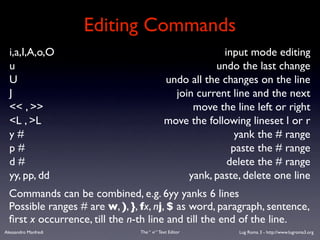
Editing Commands
  i,a,I,A,o,O                                             input mode editing
  u                                                     undo the last change
  U                                          undo all the changes on the line
  J                                            join current line and the next
  << , >>                                          move the line left or right
  <L , >L                                    move the following lineset l or r
  y#                                                         yank the # range
  p#                                                        paste the # range
  d#                                                       delete the # range
  yy, pp, dd                                      yank, paste, delete one line
  Commands can be combined, e.g. 6yy yanks 6 lines
  Possible ranges # are w, ), }, fx, nj, $ as word, paragraph, sentence,
  first x occurrence, till the n-th line and till the end of the line.
Alessandro Manfredi             The “ vi “ Text Editor       Lug Roma 3 - http://www.lugroma3.org
Examples
                      ( and Training )


Alessandro Manfredi        The “ vi “ Text Editor   Lug Roma 3 - http://www.lugroma3.org
The % and the ‘ . ‘ commands


      •%              , in command mode is the block range
                 •     match things like vdDASFgvfd(sdf,rgae,##,adSDf)


      • ‘ . ‘ , just repeat the last command
                 •     consider that ‘ <i> [type text] <Esc> ‘ is still a command


Alessandro Manfredi                       The “ vi “ Text Editor   Lug Roma 3 - http://www.lugroma3.org
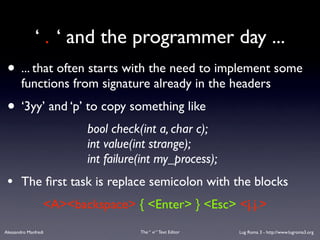
‘ . ‘ and the programmer day ...
 • ... that often starts with the need to implement some
        functions from signature already in the headers
 • ‘3yy’ and ‘p’ to copy something like
                         bool check(int a, char c);
                         int value(int strange);
                         int failure(int my_process);
 •      The first task is replace semicolon with the blocks
                  <A><backspace> { <Enter> } <Esc> <j.j.>
Alessandro Manfredi                 The “ vi “ Text Editor   Lug Roma 3 - http://www.lugroma3.org
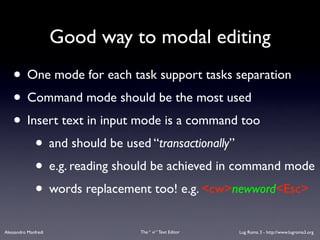
Good way to modal editing
    • One mode for each task support tasks separation
    • Command mode should be the most used
    • Insert text in input mode is a command too
        • and should be used “transactionally”
        • e.g. reading should be achieved in command mode
        • words replacement too! e.g. <cw>newword<Esc>
Alessandro Manfredi             The “ vi “ Text Editor   Lug Roma 3 - http://www.lugroma3.org
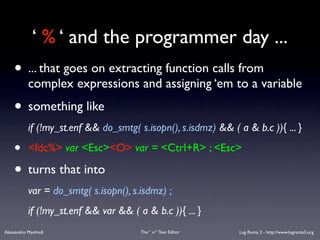
‘ % ‘ and the programmer day ...
    • ... that goes on extracting function calls from
           complex expressions and assigning ‘em to a variable
    • something like
           if (!my_st.enf && do_smtg( s.isopn(), s.isdmz) && ( a & b.c )){ ... }

    •      <fdc%> var <Esc><O> var = <Ctrl+R> ; <Esc>

    • turns that into
           var = do_smtg( s.isopn(), s.isdmz) ;
           if (!my_st.enf && var && ( a & b.c )){ ... }
Alessandro Manfredi                    The “ vi “ Text Editor   Lug Roma 3 - http://www.lugroma3.org
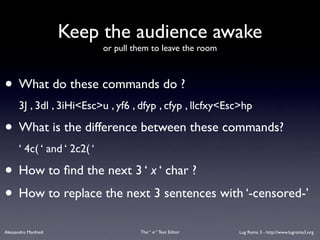
Keep the audience awake
                             or pull them to leave the room


• What do these commands do ?
      3J , 3dl , 3iHi<Esc>u , yf6 , dfyp , cfyp , llcfxy<Esc>hp

• What is the difference between these commands?
      ‘ 4c( ‘ and ‘ 2c2( ‘

• How to find the next 3 ‘ x ‘ char ?
• How to replace the next 3 sentences with ‘-censored-’
Alessandro Manfredi                   The “ vi “ Text Editor   Lug Roma 3 - http://www.lugroma3.org
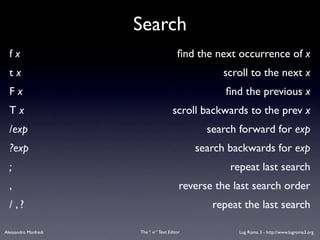
Search
  fx                                      find the next occurrence of x
  tx                                                scroll to the next x
  Fx                                                 find the previous x
  Tx                                    scroll backwards to the prev x
  /exp                                           search forward for exp
  ?exp                                         search backwards for exp
  ;                                                   repeat last search
  ,                                        reverse the last search order
  / ,?                                            repeat the last search

Alessandro Manfredi   The “ vi “ Text Editor            Lug Roma 3 - http://www.lugroma3.org
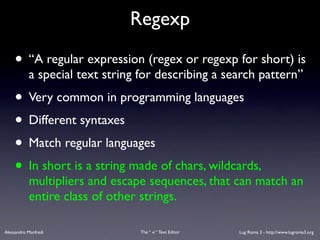
Regexp

    • “A regular expression (regex or regexp for short) is
           a special text string for describing a search pattern”
    • Very common in programming languages
    • Different syntaxes
    • Match regular languages
    • In short is a string made of chars, wildcards,
           multipliers and escape sequences, that can match an
           entire class of other strings.

Alessandro Manfredi              The “ vi “ Text Editor   Lug Roma 3 - http://www.lugroma3.org
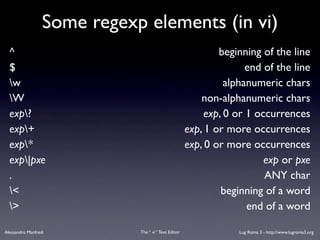
Some regexp elements (in vi)
  ^                                                           beginning of the line
  $                                                                  end of the line
  w                                                            alphanumeric chars
  W                                                      non-alphanumeric chars
  exp?                                                    exp, 0 or 1 occurrences
  exp+                                               exp, 1 or more occurrences
  exp*                                               exp, 0 or more occurrences
  exp|pxe                                                               exp or pxe
  .                                                                      ANY char
  <                                                           beginning of a word
  >                                                                 end of a word

Alessandro Manfredi          The “ vi “ Text Editor                Lug Roma 3 - http://www.lugroma3.org
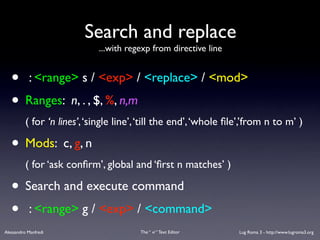
Search and replace
                             ...with regexp from directive line


   • : <range> s / <exp> / <replace> / <mod>
   • Ranges: n, . , $, %, n,m
          ( for ‘n lines’, ‘single line’, ‘till the end’, ‘whole file’,’from n to m’ )

   • Mods: c, g, n
          ( for ‘ask confirm’, global and ‘first n matches’ )

   • Search and execute command
   • : <range> g / <exp> / <command>
Alessandro Manfredi                      The “ vi “ Text Editor    Lug Roma 3 - http://www.lugroma3.org
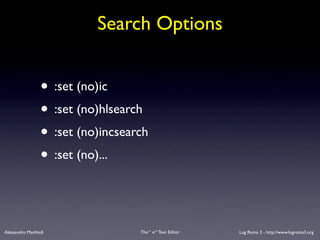
Search Options


                 • :set (no)ic
                 • :set (no)hlsearch
                 • :set (no)incsearch
                 • :set (no)...


Alessandro Manfredi                The “ vi “ Text Editor   Lug Roma 3 - http://www.lugroma3.org
More Directive Line Commands

                 • :map key cmd
                 • :unmap key
                 • :[n,m]w filename
                 • :!shcmd
                 • :r shcmd
                 • :sh
Alessandro Manfredi                  The “ vi “ Text Editor   Lug Roma 3 - http://www.lugroma3.org
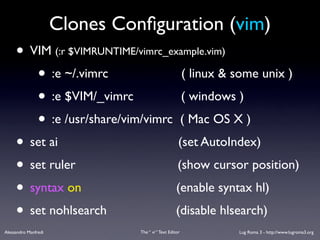
Clones Configuration (vim)
     • VIM (:r $VIMRUNTIME/vimrc_example.vim)
        • :e ~/.vimrc               ( linux & some unix )
        • :e $VIM/_vimrc            ( windows )
        • :e /usr/share/vim/vimrc ( Mac OS X )
     • set ai                      (set AutoIndex)
     • set ruler                   (show cursor position)
     • syntax on                   (enable syntax hl)
     • set nohlsearch             (disable hlsearch)
Alessandro Manfredi             The “ vi “ Text Editor   Lug Roma 3 - http://www.lugroma3.org
Keep in mind that ...

           • Be good at modal editing means
                      think complex commands ... fast!
           • Learn with practice!
           • Don’t read these slides again and again! But ...

Alessandro Manfredi              The “ vi “ Text Editor   Lug Roma 3 - http://www.lugroma3.org
What’s next ?
      • Use vimtutor !
      • Build your own reference, at first with few
             commands, then improve that when you need it.
      • Don’t practice as an exercise, use the editor when
             you need to edit texts.
      • Don’t be surprised if you will find yourself
             typing :wq even when not using vi


Alessandro Manfredi              The “ vi “ Text Editor   Lug Roma 3 - http://www.lugroma3.org
Q? /(& A)?/


Alessandro Manfredi      The “ vi “ Text Editor   Lug Roma 3 - http://www.lugroma3.org
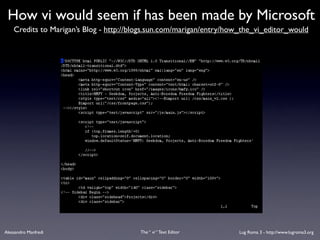
How vi would seem if has been made by Microsoft
    Credits to Marigan’s Blog - http://blogs.sun.com/marigan/entry/how_the_vi_editor_would


Alessandro Manfredi                      The “ vi “ Text Editor      Lug Roma 3 - http://www.lugroma3.org
Online References
  •      Wikipedia
                                                               http://en.wikipedia.org/wiki/vi
  •      The vi lovers homepage
                                                                http://thomer.com/vi/vi.html
  •      Why do those nutheads use vi?
                                      http://www.viemu.com/a-why-vi-vim.htm
  •      Vi Reference Manual
                                                   http://drumlin.thehutt.org/vi/
  •      (Book) O'REILLY - Learning the vi Editor, Sixth Edition
                                            http://www.oreilly.com/catalog/vi6/


Alessandro Manfredi                   The “ vi “ Text Editor              Lug Roma 3 - http://www.lugroma3.org

The "vi" Text Editor

  • 1.
    The “ vi“ Text Editor Alessandro Manfredi Lug Roma 3 - http://www.lugroma3.org
  • 2.
    ? Alessandro Manfredi The “ vi “ Text Editor Lug Roma 3 - http://www.lugroma3.org
  • 3.
    Roadmap • Yes, I’m going to convince you to use this tool • Who, What, When, Where, Why • How to • Examples & Training Alessandro Manfredi The “ vi “ Text Editor Lug Roma 3 - http://www.lugroma3.org
  • 4.
    Once Upon aTime ... The 5 ‘w’ Alessandro Manfredi The “ vi “ Text Editor Lug Roma 3 - http://www.lugroma3.org
  • 5.
    The editor war • Modal Editor • Small and Fast • Textual env • Extensive use of chords • Bells & Whistles • GUI Both have a difficult learning curve Alessandro Manfredi The “ vi “ Text Editor Lug Roma 3 - http://www.lugroma3.org
  • 6.
    And the winneris ... POSIX ( IEEE 1003 – ISO/IEC 9945 ) SUS ( IEEE & The Open Group ) ( that means there is no actual winner, you can use whatever you want but since vi is part of the standard you should really know how to use it ) Alessandro Manfredi The “ vi “ Text Editor Lug Roma 3 - http://www.lugroma3.org
  • 7.
    Wait, I nevermissed anyth using ... • gedit • kate / kwrite • nano • joe • oowriter • notepad • ... whatever Alessandro Manfredi The “ vi “ Text Editor Lug Roma 3 - http://www.lugroma3.org
  • 8.
    So why ?( running into where ) • Again, IT IS PART OF THE STANDARD • That means you find it everywhere including BSD*, Mac Os X, Solaris, HP-UX, AIX, Windows with SFU, your microwave oven (if it’s posix-compliant), etc. Alessandro Manfredi The “ vi “ Text Editor Lug Roma 3 - http://www.lugroma3.org
  • 9.
    Other strong reasons (that you will probably ignore) • Really powerful editor • Complex tasks with few keystrokes • Effective regex support • Makes you damned fast (especially with touchtyping) • You can never raise hands from keyboard • Someone says modal editing increase productivity Alessandro Manfredi The “ vi “ Text Editor Lug Roma 3 - http://www.lugroma3.org
  • 10.
    What (the jargonfile says..) vi: /V-I/, not, /vi:/, never, /siks/, n. [from ‘Visual Interface’] A screen editor crufted together by Bill Joy for an early BSD release. Became the de facto standard Unix editor and a nearly undisputed hacker favorite outside of MIT until the rise of EMACS after about 1984. Tends to frustrate new users no end, as it will neither take commands while expecting input text nor vice versa [... ] Alessandro Manfredi The “ vi “ Text Editor Lug Roma 3 - http://www.lugroma3.org
  • 11.
    How the ADM3AKeyboard looks like • Esc was where now TAB is • No arrows, just H , J , K , L Alessandro Manfredi The “ vi “ Text Editor Lug Roma 3 - http://www.lugroma3.org
  • 12.
    Clones • Vim Any clone extends the basic ‘vi’ • Elvis program with addictional functions but all of them share the common • nvi mode and subset of commands you • gvim are (hopefully) going to learn • bvi hint: try $which vi • calvin • lemmy, elwin, winvi, ... Alessandro Manfredi The “ vi “ Text Editor Lug Roma 3 - http://www.lugroma3.org
  • 13.
    How to ... AlessandroManfredi The “ vi “ Text Editor Lug Roma 3 - http://www.lugroma3.org
  • 14.
    Modal Editing • Command Mode • Cursor is on the text • Can’t see what you’re typing, just its effects • Input Mode • Text typing and ONLY text typing • Directive Mode • Entered with <:> • You can see what you type this time =) Alessandro Manfredi The “ vi “ Text Editor Lug Roma 3 - http://www.lugroma3.org
  • 15.
    Switching Modes (1) Command Mode Input Mode : Directive Mode Alessandro Manfredi The “ vi “ Text Editor Lug Roma 3 - http://www.lugroma3.org
  • 16.
    Enter the editor • vi • vi filename • vi filename1 filename2 filename3 • vi -r filename • vi +cmd filename • vi +lnum filename • vi @rcfile • ... Alessandro Manfredi The “ vi “ Text Editor Lug Roma 3 - http://www.lugroma3.org
  • 17.
    Very Basic usageexample <a> Hello folks! <Esc> <:><w><q> <Enter> ( btw, ‘<x>’ means ‘ press the ‘x’ key ) $ cat filename Alessandro Manfredi The “ vi “ Text Editor Lug Roma 3 - http://www.lugroma3.org
  • 18.
    Switching Modes (2) • Command Mode > Input Mode • <a>, <A>,<i>,<I>, <o>,<O>, ... • Input Mode > Command Mode • <Esc> • Command Mode > Directive Mode • <:> • Directive Mode > Command Mode • clean the directive line ‘:’ included Alessandro Manfredi The “ vi “ Text Editor Lug Roma 3 - http://www.lugroma3.org
  • 19.
    Some Directive LineCommands :w ‘write’ (save) :w filename save as filename :q quit’ :q! quit’ forced (forget changes) :wq ( :x ) Combination of ‘w’ and ‘q’ :e filename ‘edit’ filename :r filename read’ filename (copy next) :n open the ‘next’ file :rew ‘rewind’ file list :ab token expression create a ‘token’ macro for exp :unab token delete the ‘token’ macro :n go to line n Alessandro Manfredi The “ vi “ Text Editor Lug Roma 3 - http://www.lugroma3.org
  • 20.
    Alessandro Manfredi The “ vi “ Text Editor Lug Roma 3 - http://www.lugroma3.org
  • 21.
    Moving Cursor h, j, k,l left, down, up, right G to the end of the document {} beginning / end of the paragraph () beginning / end of the sentence $ to the end of the line ^ to the beginning of the line n| to the n-th column w beginning of the next word e end of the next word + first non-blank of next line - first non-blank of previous line fx first occurence of the ‘x’ char n cmd repeat ‘n’ times ‘cmd’ Alessandro Manfredi The “ vi “ Text Editor Lug Roma 3 - http://www.lugroma3.org
  • 22.
    Editing Commands i,a,I,A,o,O input mode editing u undo the last change U undo all the changes on the line J join current line and the next << , >> move the line left or right <L , >L move the following lineset l or r y# yank the # range p# paste the # range d# delete the # range yy, pp, dd yank, paste, delete one line Commands can be combined, e.g. 6yy yanks 6 lines Possible ranges # are w, ), }, fx, nj, $ as word, paragraph, sentence, first x occurrence, till the n-th line and till the end of the line. Alessandro Manfredi The “ vi “ Text Editor Lug Roma 3 - http://www.lugroma3.org
  • 23.
    Examples ( and Training ) Alessandro Manfredi The “ vi “ Text Editor Lug Roma 3 - http://www.lugroma3.org
  • 24.
    The % andthe ‘ . ‘ commands •% , in command mode is the block range • match things like vdDASFgvfd(sdf,rgae,##,adSDf) • ‘ . ‘ , just repeat the last command • consider that ‘ <i> [type text] <Esc> ‘ is still a command Alessandro Manfredi The “ vi “ Text Editor Lug Roma 3 - http://www.lugroma3.org
  • 25.
    ‘ . ‘and the programmer day ... • ... that often starts with the need to implement some functions from signature already in the headers • ‘3yy’ and ‘p’ to copy something like bool check(int a, char c); int value(int strange); int failure(int my_process); • The first task is replace semicolon with the blocks <A><backspace> { <Enter> } <Esc> <j.j.> Alessandro Manfredi The “ vi “ Text Editor Lug Roma 3 - http://www.lugroma3.org
  • 26.
    Good way tomodal editing • One mode for each task support tasks separation • Command mode should be the most used • Insert text in input mode is a command too • and should be used “transactionally” • e.g. reading should be achieved in command mode • words replacement too! e.g. <cw>newword<Esc> Alessandro Manfredi The “ vi “ Text Editor Lug Roma 3 - http://www.lugroma3.org
  • 27.
    ‘ % ‘and the programmer day ... • ... that goes on extracting function calls from complex expressions and assigning ‘em to a variable • something like if (!my_st.enf && do_smtg( s.isopn(), s.isdmz) && ( a & b.c )){ ... } • <fdc%> var <Esc><O> var = <Ctrl+R> ; <Esc> • turns that into var = do_smtg( s.isopn(), s.isdmz) ; if (!my_st.enf && var && ( a & b.c )){ ... } Alessandro Manfredi The “ vi “ Text Editor Lug Roma 3 - http://www.lugroma3.org
  • 28.
    Keep the audienceawake or pull them to leave the room • What do these commands do ? 3J , 3dl , 3iHi<Esc>u , yf6 , dfyp , cfyp , llcfxy<Esc>hp • What is the difference between these commands? ‘ 4c( ‘ and ‘ 2c2( ‘ • How to find the next 3 ‘ x ‘ char ? • How to replace the next 3 sentences with ‘-censored-’ Alessandro Manfredi The “ vi “ Text Editor Lug Roma 3 - http://www.lugroma3.org
  • 29.
    Search fx find the next occurrence of x tx scroll to the next x Fx find the previous x Tx scroll backwards to the prev x /exp search forward for exp ?exp search backwards for exp ; repeat last search , reverse the last search order / ,? repeat the last search Alessandro Manfredi The “ vi “ Text Editor Lug Roma 3 - http://www.lugroma3.org
  • 30.
    Regexp • “A regular expression (regex or regexp for short) is a special text string for describing a search pattern” • Very common in programming languages • Different syntaxes • Match regular languages • In short is a string made of chars, wildcards, multipliers and escape sequences, that can match an entire class of other strings. Alessandro Manfredi The “ vi “ Text Editor Lug Roma 3 - http://www.lugroma3.org
  • 31.
    Some regexp elements(in vi) ^ beginning of the line $ end of the line w alphanumeric chars W non-alphanumeric chars exp? exp, 0 or 1 occurrences exp+ exp, 1 or more occurrences exp* exp, 0 or more occurrences exp|pxe exp or pxe . ANY char < beginning of a word > end of a word Alessandro Manfredi The “ vi “ Text Editor Lug Roma 3 - http://www.lugroma3.org
  • 32.
    Search and replace ...with regexp from directive line • : <range> s / <exp> / <replace> / <mod> • Ranges: n, . , $, %, n,m ( for ‘n lines’, ‘single line’, ‘till the end’, ‘whole file’,’from n to m’ ) • Mods: c, g, n ( for ‘ask confirm’, global and ‘first n matches’ ) • Search and execute command • : <range> g / <exp> / <command> Alessandro Manfredi The “ vi “ Text Editor Lug Roma 3 - http://www.lugroma3.org
  • 33.
    Search Options • :set (no)ic • :set (no)hlsearch • :set (no)incsearch • :set (no)... Alessandro Manfredi The “ vi “ Text Editor Lug Roma 3 - http://www.lugroma3.org
  • 34.
    More Directive LineCommands • :map key cmd • :unmap key • :[n,m]w filename • :!shcmd • :r shcmd • :sh Alessandro Manfredi The “ vi “ Text Editor Lug Roma 3 - http://www.lugroma3.org
  • 35.
    Clones Configuration (vim) • VIM (:r $VIMRUNTIME/vimrc_example.vim) • :e ~/.vimrc ( linux & some unix ) • :e $VIM/_vimrc ( windows ) • :e /usr/share/vim/vimrc ( Mac OS X ) • set ai (set AutoIndex) • set ruler (show cursor position) • syntax on (enable syntax hl) • set nohlsearch (disable hlsearch) Alessandro Manfredi The “ vi “ Text Editor Lug Roma 3 - http://www.lugroma3.org
  • 36.
    Keep in mindthat ... • Be good at modal editing means think complex commands ... fast! • Learn with practice! • Don’t read these slides again and again! But ... Alessandro Manfredi The “ vi “ Text Editor Lug Roma 3 - http://www.lugroma3.org
  • 37.
    What’s next ? • Use vimtutor ! • Build your own reference, at first with few commands, then improve that when you need it. • Don’t practice as an exercise, use the editor when you need to edit texts. • Don’t be surprised if you will find yourself typing :wq even when not using vi Alessandro Manfredi The “ vi “ Text Editor Lug Roma 3 - http://www.lugroma3.org
  • 38.
    Q? /(& A)?/ AlessandroManfredi The “ vi “ Text Editor Lug Roma 3 - http://www.lugroma3.org
  • 39.
    How vi wouldseem if has been made by Microsoft Credits to Marigan’s Blog - http://blogs.sun.com/marigan/entry/how_the_vi_editor_would Alessandro Manfredi The “ vi “ Text Editor Lug Roma 3 - http://www.lugroma3.org
  • 40.
    Online References • Wikipedia http://en.wikipedia.org/wiki/vi • The vi lovers homepage http://thomer.com/vi/vi.html • Why do those nutheads use vi? http://www.viemu.com/a-why-vi-vim.htm • Vi Reference Manual http://drumlin.thehutt.org/vi/ • (Book) O'REILLY - Learning the vi Editor, Sixth Edition http://www.oreilly.com/catalog/vi6/ Alessandro Manfredi The “ vi “ Text Editor Lug Roma 3 - http://www.lugroma3.org