

Pure Digital Since 1983


                  UX for a Mobile-Age Audience

                                         Krysta Stone
                                          @krystastone

                                       Marti Gukeisen
                                            @UXmarti
Intro | We Have Entered the “Mobile Age”

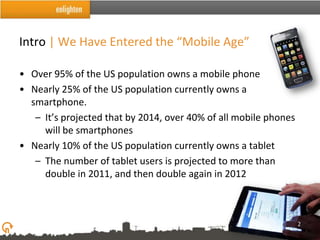
• Over 95% of the US population owns a mobile phone
• Nearly 25% of the US population currently owns a
  smartphone.
   – It’s projected that by 2014, over 40% of all mobile phones
     will be smartphones
• Nearly 10% of the US population currently owns a tablet
   – The number of tablet users is projected to more than
     double in 2011, and then double again in 2012


                                                                  2
Outline

• Intro
• Influence of iPad in UX
• The Mobile vs. Desktop War is Over
• Omniscient Innovation
• It Shouldn’t Feel Like Homework
• What Does it All Mean?


                                       3
Pure Digital Since 1983


            Influence of iPad in UX
Influence of iPad in UX | What are they?

• Ease of Use
• Metaphor
• Discoverability
• Entertainment
• Touch Screen


                                           5
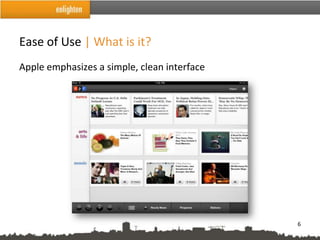
Ease of Use | What is it?
Apple emphasizes a simple, clean interface


                                             6
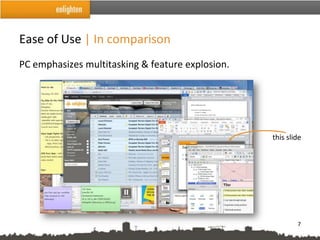
Ease of Use | In comparison
PC emphasizes multitasking & feature explosion.


                                                  this slide


                                                          7
Ease of Use | Influence

• More focused on one task at a time
• Reduce feature assault
• Reduce competition for attention on the screen


                                                   8
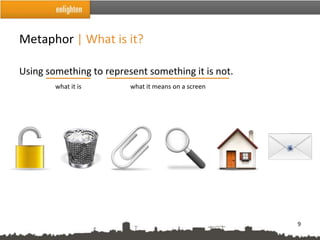
Metaphor | What is it?

Using something to represent something it is not.
        what it is       what it means on a screen


                                                     9
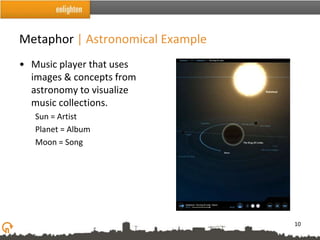
Metaphor | Astronomical Example
• Music player that uses
  images & concepts from
  astronomy to visualize
  music collections.
   Sun = Artist
   Planet = Album
   Moon = Song


                                  10
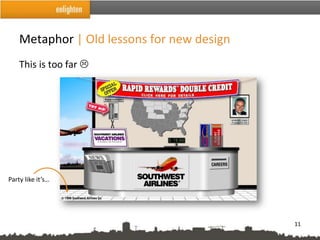
Metaphor | Old lessons for new design
    This is too far 


Party like it’s…


                                            11
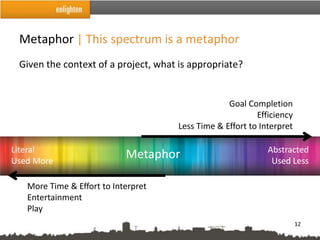
Metaphor | This spectrum is a metaphor
 Given the context of a project, what is appropriate?


                                                  Goal Completion
                                                          Efficiency
                                     Less Time & Effort to Interpret

Literal                                                      Abstracted
Used More
                            Metaphor                          Used Less

   More Time & Effort to Interpret
   Entertainment
   Play
                                                                       12
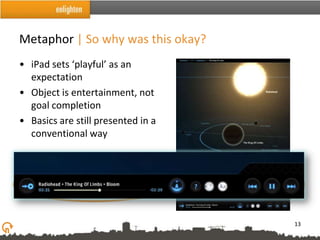
Metaphor | So why was this okay?
• iPad sets ‘playful’ as an
  expectation
• Object is entertainment, not
  goal completion
• Basics are still presented in a
  conventional way


                                    13
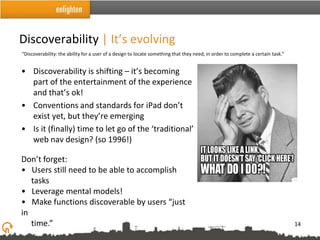
Discoverability | It’s evolving
“Discoverability: the ability for a user of a design to locate something that they need, in order to complete a certain task.”


• Discoverability is shifting – it’s becoming
  part of the entertainment of the experience
  and that’s ok!
• Conventions and standards for iPad don’t
  exist yet, but they’re emerging
• Is it (finally) time to let go of the ‘traditional’
  web nav design? (so 1996!)

Don’t forget:
• Users still need to be able to accomplish
   tasks
• Leverage mental models!
• Make functions discoverable by users “just
in
   time.”                                                                                                                        14
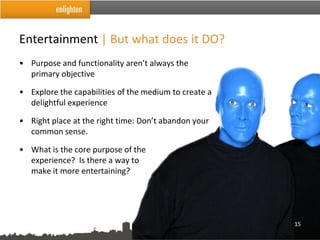
Entertainment | But what does it DO?
• Purpose and functionality aren’t always the
  primary objective

• Explore the capabilities of the medium to create a
  delightful experience

• Right place at the right time: Don’t abandon your
  common sense.

• What is the core purpose of the
  experience? Is there a way to
  make it more entertaining?


                                                       15
Touchscreen | Tips
• Be ready for multiple orientations
• Be ready to start…and to stop
• Keep the focus on the primary task
• Use simplified hierarchies
• Think gestures, not clicks
• Make targets at least 44x44 points
• Move beyond the linear
• Create opportunities to collaborate
                                        16
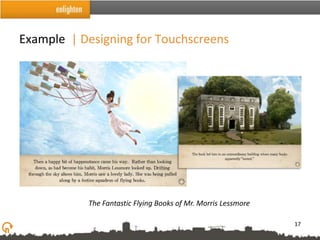
Example | Designing for Touchscreens


           The Fantastic Flying Books of Mr. Morris Lessmore

                                                               17
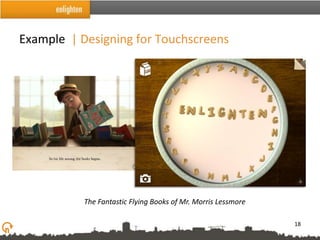
Example | Designing for Touchscreens


           The Fantastic Flying Books of Mr. Morris Lessmore

                                                               18
Pure Digital Since 1983


The Mobile vs. Desktop War is Over
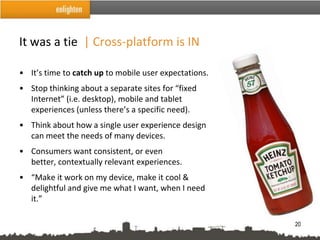
It was a tie | Cross-platform is IN

• It’s time to catch up to mobile user expectations.
• Stop thinking about a separate sites for “fixed
  Internet” (i.e. desktop), mobile and tablet
  experiences (unless there’s a specific need).
• Think about how a single user experience design
  can meet the needs of many devices.
• Consumers want consistent, or even
  better, contextually relevant experiences.
• “Make it work on my device, make it cool &
  delightful and give me what I want, when I need
  it.”

                                                       20
Responsive Design | What is it?

• One way to keep up with all of the devices/resolutions on the market

• Applies an architectural philosophy to digital design, that structures
  should respond to the environment and people in them

• Designs should respond to a user’s behavior and environment based on
  screen size (resolution), platform and orientation

• Fluid grids, flexible images and media queries

• Eliminates the need for a different design and development phase for
  each new gadget on the market


                                                                           21
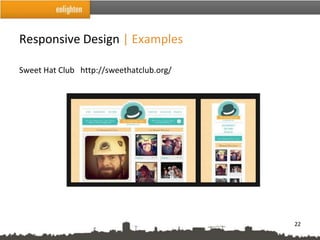
Responsive Design | Examples

Sweet Hat Club http://sweethatclub.org/


                                          22
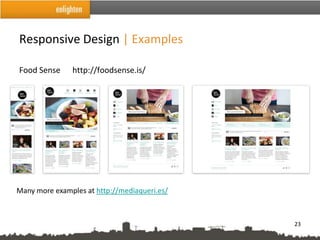
Responsive Design | Examples

Food Sense     http://foodsense.is/


Many more examples at http://mediaqueri.es/


                                              23
Pure Digital Since 1983


           Omniscient Innovation
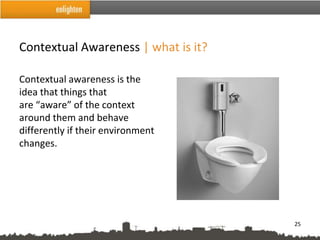
Contextual Awareness | what is it?

Contextual awareness is the
idea that things that
are “aware” of the context
around them and behave
differently if their environment
changes.


                                     25
Contextual Awareness | Using these…

•   GPS                 • Twitter, et al
•   Accelerometer       • Facebook, Google+ et al
•   Camera              • Foursquare, et al
•   Bluetooth
•   RFID
•   Infrared

• API’s
• Google maps
• Google Street view


                                                    26
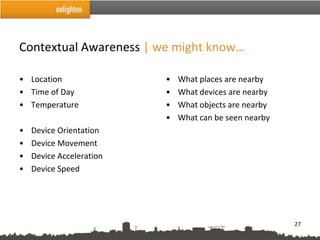
Contextual Awareness | we might know…

• Location                •   What places are nearby
• Time of Day             •   What devices are nearby
• Temperature             •   What objects are nearby
                          •   What can be seen nearby
•   Device Orientation
•   Device Movement
•   Device Acceleration
•   Device Speed


                                                        27
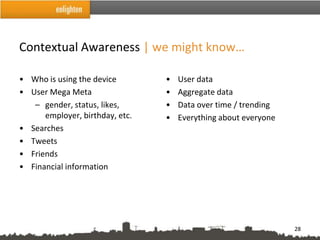
Contextual Awareness | we might know…

• Who is using the device        •   User data
• User Mega Meta                 •   Aggregate data
   – gender, status, likes,      •   Data over time / trending
      employer, birthday, etc.   •   Everything about everyone
• Searches
• Tweets
• Friends
• Financial information


                                                                 28
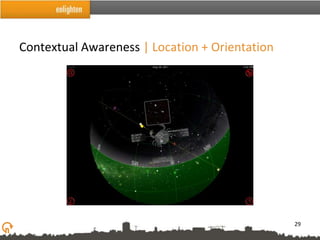
Contextual Awareness | Location + Orientation


                                                29
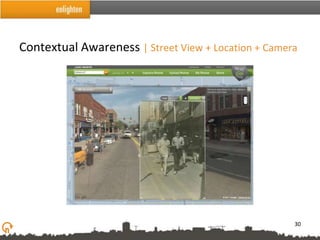
Contextual Awareness | Street View + Location + Camera


                                                     30
Contextual Awareness | why this matters

• New opportunities to leverage creatively
• Bring mobile-magic ideas to your clients
• Consider influence of mobile-mania on the immobile web
  experience and expectations


                                                           31
Pure Digital Since 1983


It Shouldn’t Feel Like Homework
Gamification | What is it?

You can apply the basic elements that make games fun and
engaging to things that typically aren't considered a game.
                                                 -Gamification.org


                                                                33
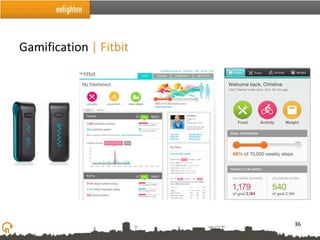
Gamification | Game Mechanics

• The processes by which games work
• Gamification applies game mechanics to situations other than
  games
• Game mechanics used well can help encourage engagement,
  active learning, and loyalty
• Gamification and mobile work well together


                                                             34
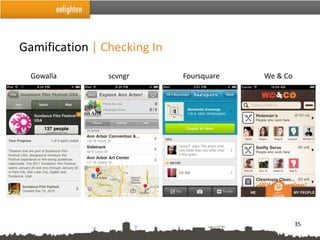
Gamification | Checking In

  Gowalla       scvngr       Foursquare   We & Co


                                                    35
Gamification | Fitbit


                        36
Gamification | Bartle’s Personality Types

Richard Bartle’s gamer personality types are a way of thinking about how
different people approach games. They can be helpful to think about when
developing other user experiences as well.
         Achievers – collect markers of accomplishment, such as points

        Explorers – enjoy the world of the game more than game objectives

        Socializers – prefer to play with others—games are about the social
        experience

        Killers – focus on competition


                                                                           37
Gamification | Applying to UX

How do gamification and gaming personality types influence the UX process?

• Consider how gamification might apply to your context
   – Can you make your application more game-like?
   – Consider how to make tasks appeal to the various gaming
      personalities
• Incorporate personality types into personas


                                                                         38
Pure Digital Since 1983


          What Does It All Mean?
Considerations | For your mind to munch on

• Moderation in all things

    – Find the right balance given the context
      [ play / metaphor / discovery / gamification / simplicity / efficiency /
      familiarity / ease of use ]

• Conventions don’t really exist yet for mobile/touch

• This stuff SCREAMS interdisciplinary


                                                                                 40
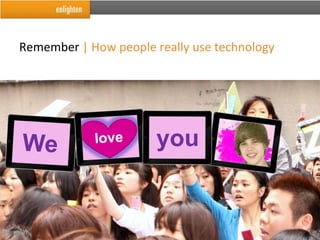
Remember | How people really use technology


                                              41
DISCUSS

Krysta Stone           Marti Gukeisen            Enlighten.com/blog
@krystastone           @Uxmarti                  @EnlightenAgency
kstone@enlighten.com   mgukeisen@enlighten.com   info@enlighten.com


                                                                  42

UX for a Mobile Age Audience

  • 1.
    Pure Digital Since1983 UX for a Mobile-Age Audience Krysta Stone @krystastone Marti Gukeisen @UXmarti
  • 2.
    Intro | WeHave Entered the “Mobile Age” • Over 95% of the US population owns a mobile phone • Nearly 25% of the US population currently owns a smartphone. – It’s projected that by 2014, over 40% of all mobile phones will be smartphones • Nearly 10% of the US population currently owns a tablet – The number of tablet users is projected to more than double in 2011, and then double again in 2012 2
  • 3.
    Outline • Intro • Influenceof iPad in UX • The Mobile vs. Desktop War is Over • Omniscient Innovation • It Shouldn’t Feel Like Homework • What Does it All Mean? 3
  • 4.
    Pure Digital Since1983 Influence of iPad in UX
  • 5.
    Influence of iPadin UX | What are they? • Ease of Use • Metaphor • Discoverability • Entertainment • Touch Screen 5
  • 6.
    Ease of Use| What is it? Apple emphasizes a simple, clean interface 6
  • 7.
    Ease of Use| In comparison PC emphasizes multitasking & feature explosion. this slide 7
  • 8.
    Ease of Use| Influence • More focused on one task at a time • Reduce feature assault • Reduce competition for attention on the screen 8
  • 9.
    Metaphor | Whatis it? Using something to represent something it is not. what it is what it means on a screen 9
  • 10.
    Metaphor | AstronomicalExample • Music player that uses images & concepts from astronomy to visualize music collections. Sun = Artist Planet = Album Moon = Song 10
  • 11.
    Metaphor | Oldlessons for new design This is too far  Party like it’s… 11
  • 12.
    Metaphor | Thisspectrum is a metaphor Given the context of a project, what is appropriate? Goal Completion Efficiency Less Time & Effort to Interpret Literal Abstracted Used More Metaphor Used Less More Time & Effort to Interpret Entertainment Play 12
  • 13.
    Metaphor | Sowhy was this okay? • iPad sets ‘playful’ as an expectation • Object is entertainment, not goal completion • Basics are still presented in a conventional way 13
  • 14.
    Discoverability | It’sevolving “Discoverability: the ability for a user of a design to locate something that they need, in order to complete a certain task.” • Discoverability is shifting – it’s becoming part of the entertainment of the experience and that’s ok! • Conventions and standards for iPad don’t exist yet, but they’re emerging • Is it (finally) time to let go of the ‘traditional’ web nav design? (so 1996!) Don’t forget: • Users still need to be able to accomplish tasks • Leverage mental models! • Make functions discoverable by users “just in time.” 14
  • 15.
    Entertainment | Butwhat does it DO? • Purpose and functionality aren’t always the primary objective • Explore the capabilities of the medium to create a delightful experience • Right place at the right time: Don’t abandon your common sense. • What is the core purpose of the experience? Is there a way to make it more entertaining? 15
  • 16.
    Touchscreen | Tips •Be ready for multiple orientations • Be ready to start…and to stop • Keep the focus on the primary task • Use simplified hierarchies • Think gestures, not clicks • Make targets at least 44x44 points • Move beyond the linear • Create opportunities to collaborate 16
  • 17.
    Example | Designingfor Touchscreens The Fantastic Flying Books of Mr. Morris Lessmore 17
  • 18.
    Example | Designingfor Touchscreens The Fantastic Flying Books of Mr. Morris Lessmore 18
  • 19.
    Pure Digital Since1983 The Mobile vs. Desktop War is Over
  • 20.
    It was atie | Cross-platform is IN • It’s time to catch up to mobile user expectations. • Stop thinking about a separate sites for “fixed Internet” (i.e. desktop), mobile and tablet experiences (unless there’s a specific need). • Think about how a single user experience design can meet the needs of many devices. • Consumers want consistent, or even better, contextually relevant experiences. • “Make it work on my device, make it cool & delightful and give me what I want, when I need it.” 20
  • 21.
    Responsive Design |What is it? • One way to keep up with all of the devices/resolutions on the market • Applies an architectural philosophy to digital design, that structures should respond to the environment and people in them • Designs should respond to a user’s behavior and environment based on screen size (resolution), platform and orientation • Fluid grids, flexible images and media queries • Eliminates the need for a different design and development phase for each new gadget on the market 21
  • 22.
    Responsive Design |Examples Sweet Hat Club http://sweethatclub.org/ 22
  • 23.
    Responsive Design |Examples Food Sense http://foodsense.is/ Many more examples at http://mediaqueri.es/ 23
  • 24.
    Pure Digital Since1983 Omniscient Innovation
  • 25.
    Contextual Awareness |what is it? Contextual awareness is the idea that things that are “aware” of the context around them and behave differently if their environment changes. 25
  • 26.
    Contextual Awareness |Using these… • GPS • Twitter, et al • Accelerometer • Facebook, Google+ et al • Camera • Foursquare, et al • Bluetooth • RFID • Infrared • API’s • Google maps • Google Street view 26
  • 27.
    Contextual Awareness |we might know… • Location • What places are nearby • Time of Day • What devices are nearby • Temperature • What objects are nearby • What can be seen nearby • Device Orientation • Device Movement • Device Acceleration • Device Speed 27
  • 28.
    Contextual Awareness |we might know… • Who is using the device • User data • User Mega Meta • Aggregate data – gender, status, likes, • Data over time / trending employer, birthday, etc. • Everything about everyone • Searches • Tweets • Friends • Financial information 28
  • 29.
    Contextual Awareness |Location + Orientation 29
  • 30.
    Contextual Awareness |Street View + Location + Camera 30
  • 31.
    Contextual Awareness |why this matters • New opportunities to leverage creatively • Bring mobile-magic ideas to your clients • Consider influence of mobile-mania on the immobile web experience and expectations 31
  • 32.
    Pure Digital Since1983 It Shouldn’t Feel Like Homework
  • 33.
    Gamification | Whatis it? You can apply the basic elements that make games fun and engaging to things that typically aren't considered a game. -Gamification.org 33
  • 34.
    Gamification | GameMechanics • The processes by which games work • Gamification applies game mechanics to situations other than games • Game mechanics used well can help encourage engagement, active learning, and loyalty • Gamification and mobile work well together 34
  • 35.
    Gamification | CheckingIn Gowalla scvngr Foursquare We & Co 35
  • 36.
  • 37.
    Gamification | Bartle’sPersonality Types Richard Bartle’s gamer personality types are a way of thinking about how different people approach games. They can be helpful to think about when developing other user experiences as well. Achievers – collect markers of accomplishment, such as points Explorers – enjoy the world of the game more than game objectives Socializers – prefer to play with others—games are about the social experience Killers – focus on competition 37
  • 38.
    Gamification | Applyingto UX How do gamification and gaming personality types influence the UX process? • Consider how gamification might apply to your context – Can you make your application more game-like? – Consider how to make tasks appeal to the various gaming personalities • Incorporate personality types into personas 38
  • 39.
    Pure Digital Since1983 What Does It All Mean?
  • 40.
    Considerations | Foryour mind to munch on • Moderation in all things – Find the right balance given the context [ play / metaphor / discovery / gamification / simplicity / efficiency / familiarity / ease of use ] • Conventions don’t really exist yet for mobile/touch • This stuff SCREAMS interdisciplinary 40
  • 41.
    Remember | Howpeople really use technology 41
  • 42.
    DISCUSS Krysta Stone Marti Gukeisen Enlighten.com/blog @krystastone @Uxmarti @EnlightenAgency kstone@enlighten.com mgukeisen@enlighten.com info@enlighten.com 42

Editor's Notes