Make you users feel nice


Introduction to
User Experience Designing –
Some Thoughts

                         Amrit Sanjeev
                  Bangalore Android User Group
About me

• Co-organizer of the Bangalore Android
  User Group.

• Research Engineer - Mobility Group at
  Philips R&D

• Architect – Android platform development

• Android hacker
How can we describe user experience ?


     “User Experience is the qualitative
      emotional description of multiple
   interaction with an object, in this case
        the user interface of a mobile
                application.”
How would you want to read news on your mobile ???
Do not confuse it with Interaction design

• Interaction design is how the user would
  interact with the application .
• Interface design is merely a method
• User Experience is the relationship
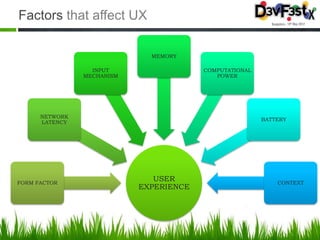
Factors that affect UX

                              MEMORY

                  INPUT                  COMPUTATIONAL
                MECHANISM                   POWER


      NETWORK
                                                         BATTERY
      LATENCY


FORM FACTOR
                               USER                          CONTEXT
                            EXPERIENCE
Why is UX so important?

• The application environment is like a space
  shuttle
  – Single early failure = non returning user
• The first 30 -60 seconds usage is very
  important
• The environment differs based on where
  you are
Layers of Mobile Experience


      PORTING           Adapt for other devices that fit our strategy
   OPTIMIZATION       Reduce all assets to its lowest possible size, memory footprint
    TESTING          Test, test and test some more
   DEVELOPMENT        Put all the pieces together
   PROTOTYPE         Test the experience within the context

     DESIGN           Create a user experience based on needs

     DEVICE PLAN        Choose devices that best serve your audience

        STATEGY           How can we add value to the business

      CONTEXT           The circumstances where information adds value

     NEEDS & GOALS        Identify the basic needs of our users

        IDEA            We need an idea that inspires us
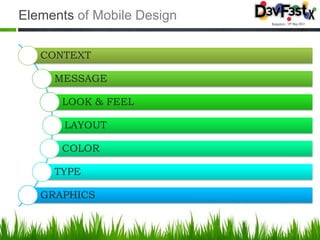
Elements of Mobile Design

   CONTEXT

     MESSAGE

      LOOK & FEEL

       LAYOUT

      COLOR

     TYPE

   GRAPHICS
Mobile context


 “Context is about the understanding human
   relationships to the people , places and
              things in the world”
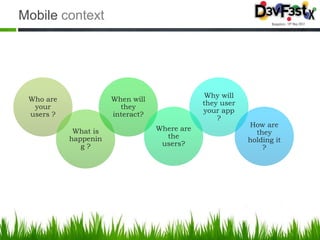
Mobile context


                                               Why will
 Who are              When will
                                              they user
  your                  they
                                              your app
 users ?              interact?
                                                  ?
                                                          How are
            What is               Where are
                                                            they
           happenin                 the
                                                          holding it
              g?                   users?
                                                              ?
Message – what you are trying to say


 “Overall mental impression you create
   explicitly through visual design.”

• How will someone react to your design?

• What are your impressions of your design
  ?
Look & Feel


• What you use to describe the appearance

• Eg) clean look and feel or usable look and
  feel

• “What does it mean?”
Layout


• How the user will visually process the
  page ?

• The structural and visual components of
  layout often get merged together, creating
  confusion and making your design more
  difficult to create.
Color


• Create and maintain brand identity

• Common problem : When complex
  designs are displayed on different mobile
  devices, the limited color depth on one
  device can cause banding, or unwanted
  posterization in the image.
Typography

• Try out custom typography styles . It will
  make a huge difference

• subpixel-based screens –
  – division of each pixel into a red, green, and blue
    (or RGB) unit at a micro- scopic level, enabling
    for a greater level of antialiasing for each font
    character or glyph


• How type is rendered on mobile screens:
  – pixel density or greater pixels per inch (PPI)
Graphics


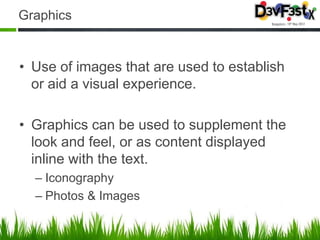
• Use of images that are used to establish
  or aid a visual experience.

• Graphics can be used to supplement the
  look and feel, or as content displayed
  inline with the text.
  – Iconography
  – Photos & Images
Behaviors and Usage
Mobile Environment

• Single early failure = non returning user

• First 30 ~ 60 seconds usage is critical

• Environment changes depending on where
  you are

• Data Snacking ( small snippets, simple but
  repetitive and regular )

• Reuse learnt behavior
Mobile Environment

• Mobile is NOT about making things
  smaller
       Miniaturisation vs Mobilisation

• Fewer options = simple and more effective
  interface

• Decide the default states in UI to maximize
  impact
Mobile Environment

• Faking it
  – Increasing responsiveness
  – Immediate visual changes while processing is
    happening in backgroud


• Keep it simple ( the real hard part )
  – Increases user comfort
  – Sense of exploration increases
Conclusion

     What comprises of a great mobile
             experience?

        Experiences are uniquely mobile

              Is sympathetic to context

             Exploit the power of mobility
Q&A
Mobile UX

Mobile UX

  • 1.
    Make you usersfeel nice Introduction to User Experience Designing – Some Thoughts Amrit Sanjeev Bangalore Android User Group
  • 2.
    About me • Co-organizerof the Bangalore Android User Group. • Research Engineer - Mobility Group at Philips R&D • Architect – Android platform development • Android hacker
  • 3.
    How can wedescribe user experience ? “User Experience is the qualitative emotional description of multiple interaction with an object, in this case the user interface of a mobile application.”
  • 4.
    How would youwant to read news on your mobile ???
  • 5.
    Do not confuseit with Interaction design • Interaction design is how the user would interact with the application . • Interface design is merely a method • User Experience is the relationship
  • 6.
    Factors that affectUX MEMORY INPUT COMPUTATIONAL MECHANISM POWER NETWORK BATTERY LATENCY FORM FACTOR USER CONTEXT EXPERIENCE
  • 7.
    Why is UXso important? • The application environment is like a space shuttle – Single early failure = non returning user • The first 30 -60 seconds usage is very important • The environment differs based on where you are
  • 8.
    Layers of MobileExperience PORTING Adapt for other devices that fit our strategy OPTIMIZATION Reduce all assets to its lowest possible size, memory footprint TESTING Test, test and test some more DEVELOPMENT Put all the pieces together PROTOTYPE Test the experience within the context DESIGN Create a user experience based on needs DEVICE PLAN Choose devices that best serve your audience STATEGY How can we add value to the business CONTEXT The circumstances where information adds value NEEDS & GOALS Identify the basic needs of our users IDEA We need an idea that inspires us
  • 9.
    Elements of MobileDesign CONTEXT MESSAGE LOOK & FEEL LAYOUT COLOR TYPE GRAPHICS
  • 10.
    Mobile context “Contextis about the understanding human relationships to the people , places and things in the world”
  • 11.
    Mobile context Why will Who are When will they user your they your app users ? interact? ? How are What is Where are they happenin the holding it g? users? ?
  • 12.
    Message – whatyou are trying to say “Overall mental impression you create explicitly through visual design.” • How will someone react to your design? • What are your impressions of your design ?
  • 13.
    Look & Feel •What you use to describe the appearance • Eg) clean look and feel or usable look and feel • “What does it mean?”
  • 14.
    Layout • How theuser will visually process the page ? • The structural and visual components of layout often get merged together, creating confusion and making your design more difficult to create.
  • 15.
    Color • Create andmaintain brand identity • Common problem : When complex designs are displayed on different mobile devices, the limited color depth on one device can cause banding, or unwanted posterization in the image.
  • 16.
    Typography • Try outcustom typography styles . It will make a huge difference • subpixel-based screens – – division of each pixel into a red, green, and blue (or RGB) unit at a micro- scopic level, enabling for a greater level of antialiasing for each font character or glyph • How type is rendered on mobile screens: – pixel density or greater pixels per inch (PPI)
  • 17.
    Graphics • Use ofimages that are used to establish or aid a visual experience. • Graphics can be used to supplement the look and feel, or as content displayed inline with the text. – Iconography – Photos & Images
  • 18.
  • 19.
    Mobile Environment • Singleearly failure = non returning user • First 30 ~ 60 seconds usage is critical • Environment changes depending on where you are • Data Snacking ( small snippets, simple but repetitive and regular ) • Reuse learnt behavior
  • 20.
    Mobile Environment • Mobileis NOT about making things smaller Miniaturisation vs Mobilisation • Fewer options = simple and more effective interface • Decide the default states in UI to maximize impact
  • 21.
    Mobile Environment • Fakingit – Increasing responsiveness – Immediate visual changes while processing is happening in backgroud • Keep it simple ( the real hard part ) – Increases user comfort – Sense of exploration increases
  • 22.
    Conclusion What comprises of a great mobile experience? Experiences are uniquely mobile Is sympathetic to context Exploit the power of mobility
  • 23.

Editor's Notes

  • #2 This presentation demonstrates the new capabilities of PowerPoint and it is best viewed in Slide Show. These slides are designed to give you great ideas for the presentations you’ll create in PowerPoint 2011!For more sample templates, click the File menu, and then click New From Template. Under Templates, click Presentations.