Graphic Design


1
Index
1.  Benefits of good Graphic Design
2.  About Graphic Design
3.  Universal design rules apply!
4.  Layout
5.  Colors
6.  Color wheel
7.  Does typography matter?
8.  Icon Design
9.  Elements of Graphic Design
10. Checklist
11. Exercise: Draft Icon set
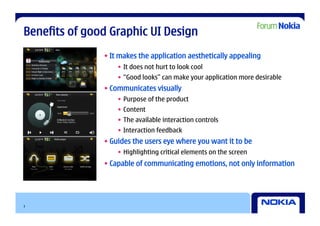
Benefits of good Graphic UI Design
               • It makes the application aesthetically appealing
                   •  It does not hurt to look cool
                   •  “Good looks” can make your application more desirable
               • Communicates visually
                   •  Purpose of the product
                   •  Content
                   •  The available interaction controls
                   •  Interaction feedback
               • Guides the users eye where you want it to be
                   •  Highlighting critical elements on the screen
               • Capable of communicating emotions, not only information


3
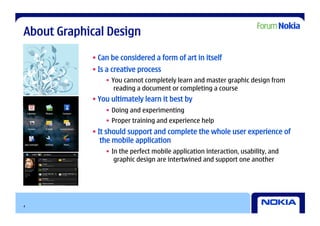
About Graphical Design

            • Can be considered a form of art in itself
            • Is a creative process
                •  You cannot completely learn and master graphic design from
                    reading a document or completing a course
            • You ultimately learn it best by
                •  Doing and experimenting
                •  Proper training and experience help
            • It should support and complete the whole user experience of
               the mobile application
                •  In the perfect mobile application interaction, usability, and
                    graphic design are intertwined and support one another


4
Universal design rules apply!

    • Graphical design has a long history
    • The universal graphical design rules apply also for mobile device UIs
        •  There are no revolutions to be expected
    • Consider carefully what metaphors or other design details can and should be
       adopted from the desktop designs
        •  Limited display space requires tough prioritization on what to present, and how
    • Don’t overdo ”wow”
    • Have respect for guidelines – they exist for a reason
        •  Following guidelines helps to retain a consistent user experience
        •  The most important official Maemo 5 UI documentation is available publicly in
            Forum Nokia


5
Layout
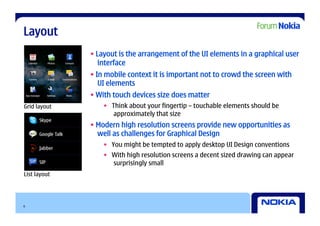
              • Layout is the arrangement of the UI elements in a graphical user
                 interface
              • In mobile context it is important not to crowd the screen with
                 UI elements
              • With touch devices size does matter
Grid layout       •  Think about your fingertip – touchable elements should be
                      approximately that size
              • Modern high resolution screens provide new opportunities as
                well as challenges for Graphical Design
                  •  You might be tempted to apply desktop UI Design conventions
                  •  With high resolution screens a decent sized drawing can appear
                     surprisingly small
List layout


6
Colors

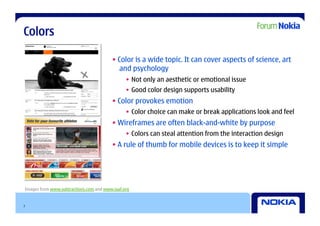
                                         • Color is a wide topic. It can cover aspects of science, art
                                            and psychology
                                               •  Not only an aesthetic or emotional issue
                                               •  Good color design supports usability
                                         • Color provokes emotion
                                               •  Color choice can make or break applications look and feel
                                         • Wireframes are often black-and-white by purpose
                                               •  Colors can steal attention from the interaction design
                                         • A rule of thumb for mobile devices is to keep it simple


Images from www.subtractions.com and www.iaaf.org


7
Color wheel


8
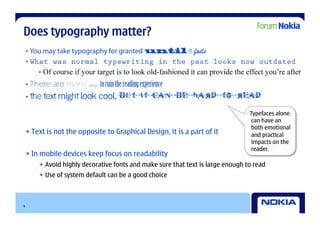
Does typography matter?


                                                                                  Typefaces alone
                                                                                   can have an
                                                                                   both emotional
    • Text is not the opposite to Graphical Design, it is a part of it             and practical
                                                                                   impacts on the
                                                                                   reader.
    • In mobile devices keep focus on readability
        •  Avoid highly decorative fonts and make sure that text is large enough to read
        •  Use of system default can be a good choice


9
Icon Design
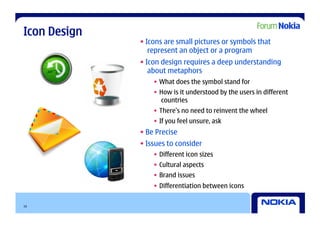
              • Icons are small pictures or symbols that
                 represent an object or a program
              • Icon design requires a deep understanding
                 about metaphors
                  •  What does the symbol stand for
                  •  How is it understood by the users in different
                     countries
                  •  There’s no need to reinvent the wheel
                  •  If you feel unsure, ask
              • Be Precise
              • Issues to consider
                  •  Different icon sizes
                  •  Cultural aspects
                  •  Brand issues
                  •  Differentiation between icons

10
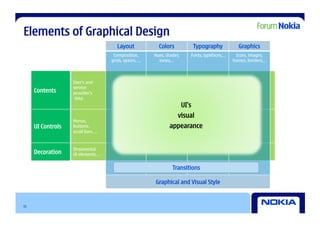
Elements of Graphical Design
                                       Layout            Colors               Typography          Graphics
                                     Composition,      Hues, shades,      Fonts, typefaces,…     Icons, images,
                                    grids, spaces, …     tones,…                               frames, borders,…


                   User‘s and
                   service
     Contents      provider’s
                    data
                                                                       UI’s
                                                                   visual
                   Menus,
     UI Controls   buttons,                                   appearance
                   scroll bars, …


                   Ornamental
     Decoration    UI elements…


                                                                Transitions

                                                       Graphical and Visual Style


11
Checklist

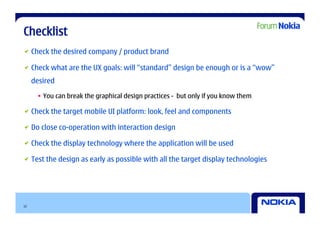
   Check the desired company / product brand


   Check what are the UX goals: will “standard” design be enough or is a “wow”
     desired

      •  You can break the graphical design practices - but only if you know them


   Check the target mobile UI platform: look, feel and components


   Do close co-operation with interaction design


   Check the display technology where the application will be used


   Test the design as early as possible with all the target display technologies


12
Creative Commons - disclaimer


            UX Driven Development For Mobile SW Developers
                            by Forum Nokia
                           is licensed under a
       Creative Commons Attribution-Noncommercial-Share Alike 3.0
                          United States License


13
forum.nokia.com/ux


14

Ux Meets Code Graphics

  • 1.
  • 2.
    Index 1.  Benefits ofgood Graphic Design 2.  About Graphic Design 3.  Universal design rules apply! 4.  Layout 5.  Colors 6.  Color wheel 7.  Does typography matter? 8.  Icon Design 9.  Elements of Graphic Design 10. Checklist 11. Exercise: Draft Icon set
  • 3.
    Benefits of goodGraphic UI Design • It makes the application aesthetically appealing •  It does not hurt to look cool •  “Good looks” can make your application more desirable • Communicates visually •  Purpose of the product •  Content •  The available interaction controls •  Interaction feedback • Guides the users eye where you want it to be •  Highlighting critical elements on the screen • Capable of communicating emotions, not only information 3
  • 4.
    About Graphical Design • Can be considered a form of art in itself • Is a creative process •  You cannot completely learn and master graphic design from reading a document or completing a course • You ultimately learn it best by •  Doing and experimenting •  Proper training and experience help • It should support and complete the whole user experience of the mobile application •  In the perfect mobile application interaction, usability, and graphic design are intertwined and support one another 4
  • 5.
    Universal design rulesapply! • Graphical design has a long history • The universal graphical design rules apply also for mobile device UIs •  There are no revolutions to be expected • Consider carefully what metaphors or other design details can and should be adopted from the desktop designs •  Limited display space requires tough prioritization on what to present, and how • Don’t overdo ”wow” • Have respect for guidelines – they exist for a reason •  Following guidelines helps to retain a consistent user experience •  The most important official Maemo 5 UI documentation is available publicly in Forum Nokia 5
  • 6.
    Layout • Layout is the arrangement of the UI elements in a graphical user interface • In mobile context it is important not to crowd the screen with UI elements • With touch devices size does matter Grid layout •  Think about your fingertip – touchable elements should be approximately that size • Modern high resolution screens provide new opportunities as well as challenges for Graphical Design •  You might be tempted to apply desktop UI Design conventions •  With high resolution screens a decent sized drawing can appear surprisingly small List layout 6
  • 7.
    Colors • Color is a wide topic. It can cover aspects of science, art and psychology •  Not only an aesthetic or emotional issue •  Good color design supports usability • Color provokes emotion •  Color choice can make or break applications look and feel • Wireframes are often black-and-white by purpose •  Colors can steal attention from the interaction design • A rule of thumb for mobile devices is to keep it simple Images from www.subtractions.com and www.iaaf.org 7
  • 8.
  • 9.
    Does typography matter? Typefaces alone can have an both emotional • Text is not the opposite to Graphical Design, it is a part of it and practical impacts on the reader. • In mobile devices keep focus on readability •  Avoid highly decorative fonts and make sure that text is large enough to read •  Use of system default can be a good choice 9
  • 10.
    Icon Design • Icons are small pictures or symbols that represent an object or a program • Icon design requires a deep understanding about metaphors •  What does the symbol stand for •  How is it understood by the users in different countries •  There’s no need to reinvent the wheel •  If you feel unsure, ask • Be Precise • Issues to consider •  Different icon sizes •  Cultural aspects •  Brand issues •  Differentiation between icons 10
  • 11.
    Elements of GraphicalDesign Layout Colors Typography Graphics Composition, Hues, shades, Fonts, typefaces,… Icons, images, grids, spaces, … tones,… frames, borders,… User‘s and service Contents provider’s data UI’s visual Menus, UI Controls buttons, appearance scroll bars, … Ornamental Decoration UI elements… Transitions Graphical and Visual Style 11
  • 12.
    Checklist   Checkthe desired company / product brand   Check what are the UX goals: will “standard” design be enough or is a “wow” desired •  You can break the graphical design practices - but only if you know them   Check the target mobile UI platform: look, feel and components   Do close co-operation with interaction design   Check the display technology where the application will be used   Test the design as early as possible with all the target display technologies 12
  • 13.
    Creative Commons -disclaimer UX Driven Development For Mobile SW Developers by Forum Nokia is licensed under a Creative Commons Attribution-Noncommercial-Share Alike 3.0 United States License 13
  • 14.