Click on the arrows  at the bottom of the  screen to move through the presentation
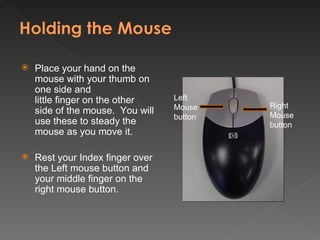
Place your hand on the mouse with your thumb on one side and  little finger on the other side of the mouse.  You will use these to steady the mouse as you move it.  Rest your Index finger over the Left mouse button and your middle finger on the right mouse button.   Left Mouse button Right Mouse button
Practising your mouse skills
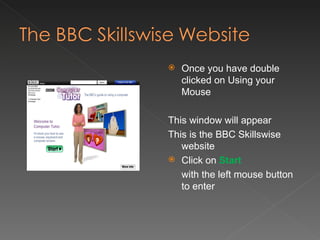
Once you have double clicked on Using your Mouse This window will appear This is the BBC Skillswise website Click on  Start with the left mouse button to enter
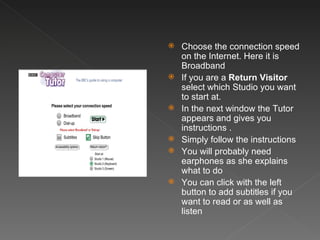
Choose the connection speed on the Internet. Here it is Broadband If you are a  Return Visitor  select which Studio you want to start at. In the next window the Tutor appears and gives you  instructions . Simply follow the instructions You will probably need earphones as she explains what to do You can click with the left button to add subtitles if you want to read or as well as listen
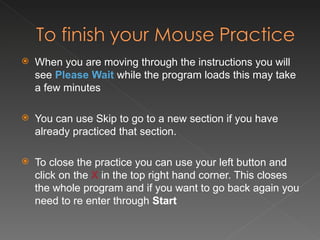
When you are moving through the instructions you will see  Please Wait  while the program loads this may take a few minutes You can use Skip to go to a new section if you have already practiced that section. To close the practice you can use your left button and click on the  X  in the top right hand corner. This closes the whole program and if you want to go back again you need to re enter through  Start
There is another shortcut to a website this has some games that can help you with using the mouse. More Mouse practice Double click on the link to open up the website. Choose which game you want to do and follow the instructions.

Using Your Mouse

  • 1.
    Click on thearrows at the bottom of the screen to move through the presentation
  • 2.
    Place your handon the mouse with your thumb on one side and little finger on the other side of the mouse. You will use these to steady the mouse as you move it. Rest your Index finger over the Left mouse button and your middle finger on the right mouse button.   Left Mouse button Right Mouse button
  • 3.
  • 4.
    Once you havedouble clicked on Using your Mouse This window will appear This is the BBC Skillswise website Click on Start with the left mouse button to enter
  • 5.
    Choose the connectionspeed on the Internet. Here it is Broadband If you are a Return Visitor select which Studio you want to start at. In the next window the Tutor appears and gives you instructions . Simply follow the instructions You will probably need earphones as she explains what to do You can click with the left button to add subtitles if you want to read or as well as listen
  • 6.
    When you aremoving through the instructions you will see Please Wait while the program loads this may take a few minutes You can use Skip to go to a new section if you have already practiced that section. To close the practice you can use your left button and click on the X in the top right hand corner. This closes the whole program and if you want to go back again you need to re enter through Start
  • 7.
    There is anothershortcut to a website this has some games that can help you with using the mouse. More Mouse practice Double click on the link to open up the website. Choose which game you want to do and follow the instructions.