User-ID
User Expert Forum, 23 October 2013

Alberto Rivai, CCIE #20068, CISSP
Systems Engineer

© 2013 Palo Alto Networks. Proprietary and Confidential
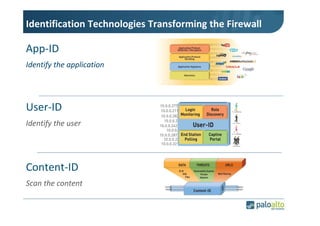
Identification Technologies Transforming the Firewall

App-ID
Identify the application

User-ID
Identify the user

Content-ID
Scan the content
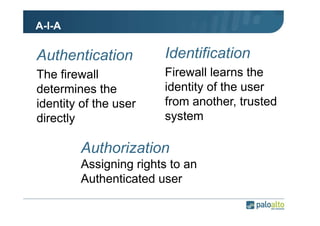
A-I-A

Authentication

Identification

The firewall
determines the
identity of the user
directly

Firewall learns the
identity of the user
from another, trusted
system

Authorization
Assigning rights to an
Authenticated user
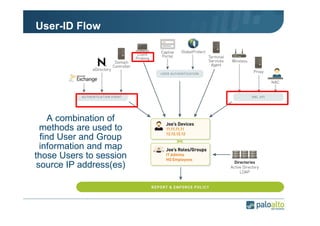
User-ID Flow

A combination of
methods are used to
find User and Group
information and map
those Users to session
source IP address(es)
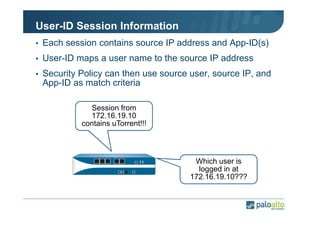
User-ID Session Information
• Each session contains source IP address and App-ID(s)
• User-ID maps a user name to the source IP address
• Security Policy can then use source user, source IP, and

App-ID as match criteria
Session from
172.16.19.10
contains uTorrent!!!

Which user is
logged in at
172.16.19.10???
User-ID Process
• Enumerating Users and Groups
• Mapping Users to IP addresses
Enumerating Users
and Groups

© 2013 Palo Alto Networks. Proprietary and Confidential
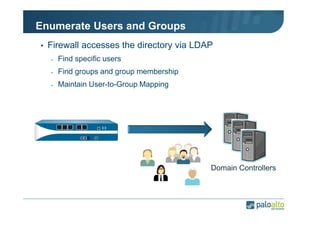
Enumerate Users and Groups
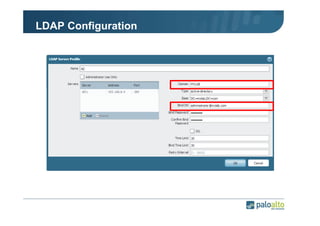
• Firewall accesses the directory via LDAP
-

Find specific users

-

Find groups and group membership

-

Maintain User-to-Group Mapping

Domain Controllers
LDAP Configuration
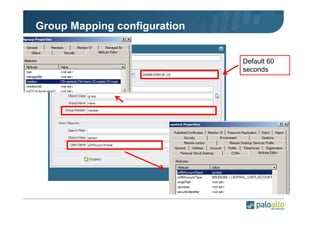
Group Mapping configuration

Default 60
seconds
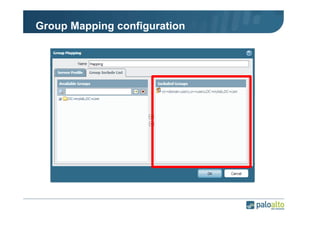
Group Mapping configuration
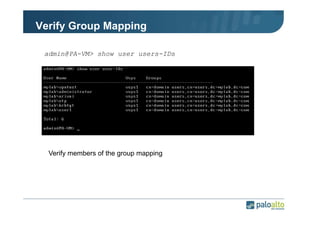
Verify Group Mapping
admin@PA-VM> show user users-IDs

Verify members of the group mapping
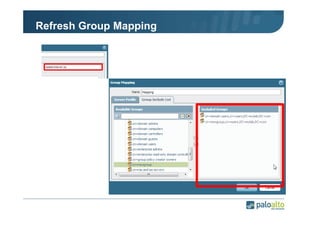
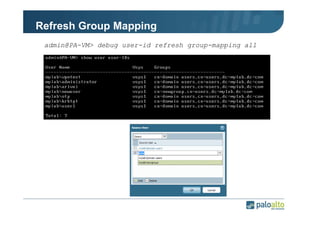
Refresh Group Mapping
admin@PA-VM> debug user-id refresh group-mapping all
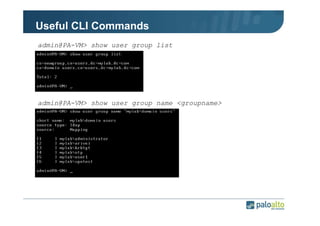
Useful CLI Commands
admin@PA-VM> show user group list

admin@PA-VM> show user group name <groupname>
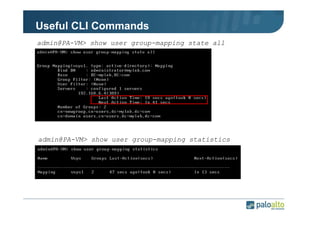
Useful CLI Commands
admin@PA-VM> show user group-mapping state all

admin@PA-VM> show user group-mapping statistics
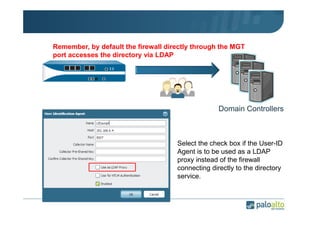
Remember, by default the firewall directly through the MGT
port accesses the directory via LDAP

Domain Controllers

Select the check box if the User-ID
Agent is to be used as a LDAP
proxy instead of the firewall
connecting directly to the directory
service.
Mapping Users to IP
addresses

© 2013 Palo Alto Networks. Proprietary and Confidential
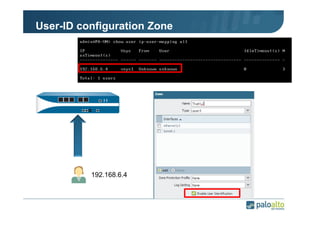
User-ID configuration Zone

192.168.6.4
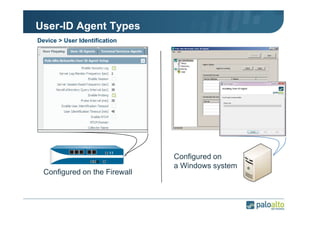
User-ID Agent Types
Device > User Identification

Configured on the Firewall

Configured on
a Windows system
Mapping Users to IP
Addresses with Windows
Agent

© 2013 Palo Alto Networks. Proprietary and Confidential
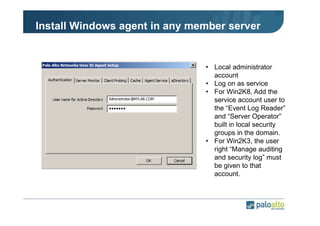
Install Windows agent in any member server

• Local administrator
account
• Log on as service
• For Win2K8, Add the
service account user to
the “Event Log Reader”
and “Server Operator”
built in local security
groups in the domain.
• For Win2K3, the user
right “Manage auditing
and security log” must
be given to that
account.
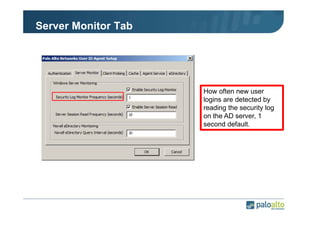
Server Monitor Tab

How often new user
logins are detected by
reading the security log
on the AD server, 1
second default.
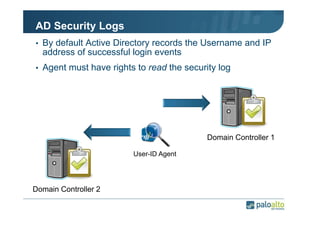
AD Security Logs
• By default Active Directory records the Username and IP

address of successful login events
• Agent must have rights to read the security log

Domain Controller 1
User-ID Agent

Domain Controller 2
AD Security Logs
• On Windows 2003 DCs:
-

672(Authentication Ticket Granted, which occurs on the logon
moment),

-

673(Service Ticket Granted)

-

674(Ticket Granted Renewed which may happen several times
during the logon session)

• On Windows 2008 DCs:
-

4768(Authentication Ticket Granted)

-

4769(Service Ticket Granted)

-

4770(Ticket Granted Renewed)
AD Security Logs
• The mappings will be maintained for a configurable time

out, which is recommended to be set to half the DHCP
lease time used in the environment.
• Client systems in an AD domain using the default

configuration will attempt to renew their tickets every 10
hours.
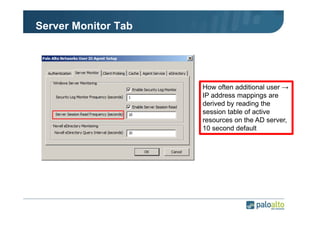
Server Monitor Tab

How often additional user →
IP address mappings are
derived by reading the
session table of active
resources on the AD server,
10 second default
Shared Server sessions
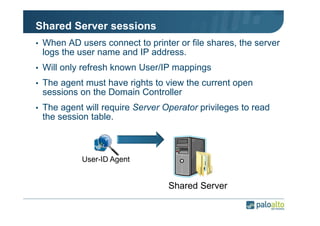
• When AD users connect to printer or file shares, the server

logs the user name and IP address.
• Will only refresh known User/IP mappings
• The agent must have rights to view the current open

sessions on the Domain Controller
• The agent will require Server Operator privileges to read

the session table.

User-ID Agent

Shared Server
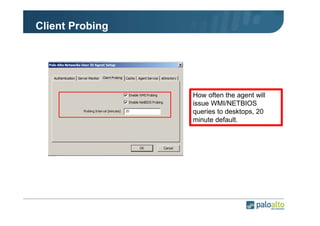
Client Probing

How often the agent will
issue WMI/NETBIOS
queries to desktops, 20
minute default.
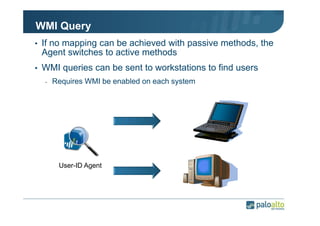
WMI Query
• If no mapping can be achieved with passive methods, the

Agent switches to active methods
• WMI queries can be sent to workstations to find users
-

Requires WMI be enabled on each system

User-ID Agent
WMI Query
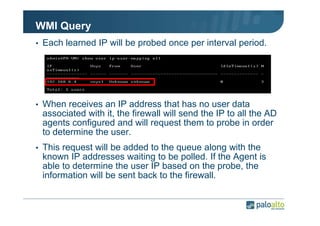
• Each learned IP will be probed once per interval period.

• When receives an IP address that has no user data

associated with it, the firewall will send the IP to all the AD
agents configured and will request them to probe in order
to determine the user.
• This request will be added to the queue along with the

known IP addresses waiting to be polled. If the Agent is
able to determine the user IP based on the probe, the
information will be sent back to the firewall.
WMI Query
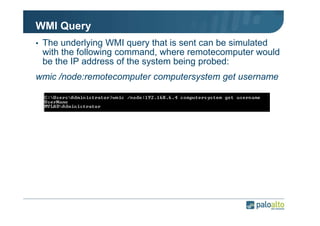
• The underlying WMI query that is sent can be simulated

with the following command, where remotecomputer would
be the IP address of the system being probed:
wmic /node:remotecomputer computersystem get username
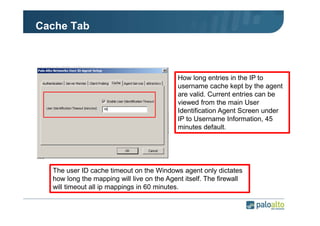
Cache Tab

How long entries in the IP to
username cache kept by the agent
are valid. Current entries can be
viewed from the main User
Identification Agent Screen under
IP to Username Information, 45
minutes default.

The user ID cache timeout on the Windows agent only dictates
how long the mapping will live on the Agent itself. The firewall
will timeout all ip mappings in 60 minutes.
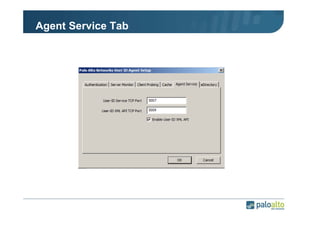
Agent Service Tab
Mapping Users to IP
Addresses with Firewall
Agent

© 2013 Palo Alto Networks. Proprietary and Confidential
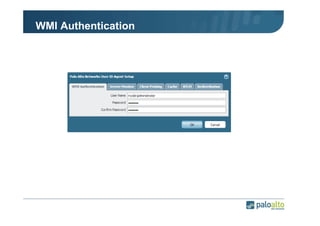
WMI Authentication
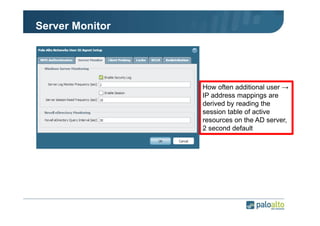
Server Monitor

How often additional user →
IP address mappings are
derived by reading the
session table of active
resources on the AD server,
2 second default
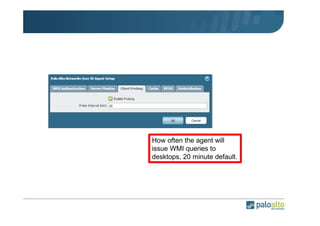
How often the agent will
issue WMI queries to
desktops, 20 minute default.
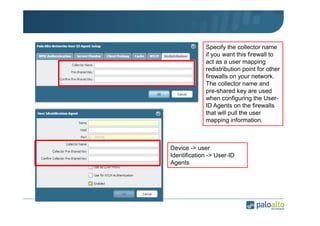
Specify the collector name
if you want this firewall to
act as a user mapping
redistribution point for other
firewalls on your network.
The collector name and
pre-shared key are used
when configuring the UserID Agents on the firewalls
that will pull the user
mapping information.

Device -> user
Identification -> User-ID
Agents
Best practices

© 2013 Palo Alto Networks. Proprietary and Confidential
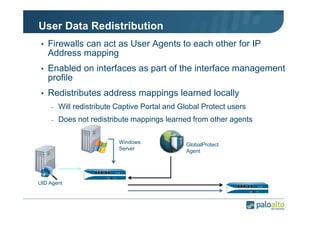
User Data Redistribution
• Firewalls can act as User Agents to each other for IP

Address mapping
• Enabled on interfaces as part of the interface management

profile
• Redistributes address mappings learned locally
-

Will redistribute Captive Portal and Global Protect users

-

Does not redistribute mappings learned from other agents
Windows
Server

UID Agent

GlobalProtect
Agent
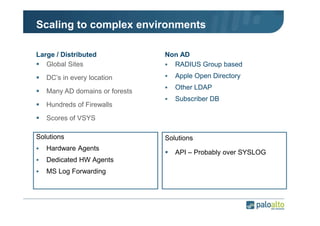
Scaling to complex environments
Large / Distributed
Global Sites
DC’s in every location
Many AD domains or forests
Hundreds of Firewalls

Non AD
RADIUS Group based
Apple Open Directory
Other LDAP
Subscriber DB

Scores of VSYS
Solutions
Hardware Agents
Dedicated HW Agents
MS Log Forwarding

Solutions
API – Probably over SYSLOG
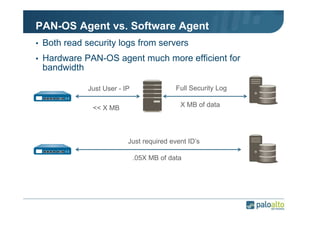
PAN-OS Agent vs. Software Agent
• Both read security logs from servers
• Hardware PAN-OS agent much more efficient for

bandwidth
Just User - IP
<< X MB

Full Security Log
X MB of data

Just required event ID’s
.05X MB of data
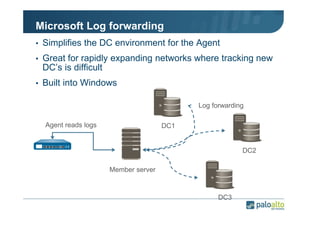
Microsoft Log forwarding
• Simplifies the DC environment for the Agent
• Great for rapidly expanding networks where tracking new

DC’s is difficult
• Built into Windows
Log forwarding
Agent reads logs

DC1

DC2
Member server

DC3
User-ID API

© 2013 Palo Alto Networks. Proprietary and Confidential
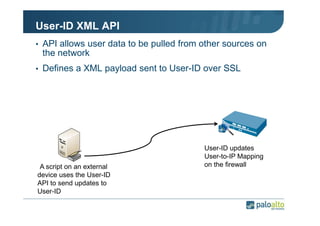
User-ID XML API
• API allows user data to be pulled from other sources on

the network
• Defines a XML payload sent to User-ID over SSL

•A script on an external
device uses the User-ID
API to send updates to
User-ID

User-ID updates
User-to-IP Mapping
on the firewall
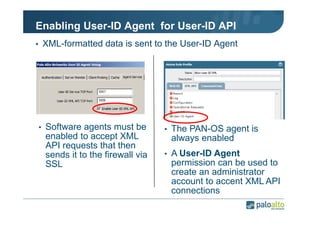
Enabling User-ID Agent for User-ID API
• XML-formatted data is sent to the User-ID Agent

• Software agents must be

enabled to accept XML
API requests that then
sends it to the firewall via
SSL

• The PAN-OS agent is

always enabled
• A User-ID Agent

permission can be used to
create an administrator
account to accent XML API
connections
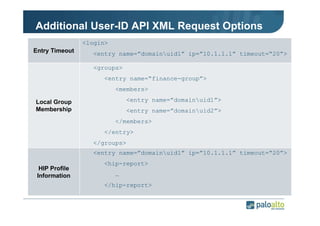
Additional User-ID API XML Request Options
<login>
Entry Timeout

<entry name=”domainuid1” ip=”10.1.1.1” timeout=“20”>
<groups>
<entry name=“finance-group”>
<members>
<entry name=”domainuid1”>

Local Group
Membership

<entry name=”domainuid2”>
</members>
</entry>
</groups>
<entry name=”domainuid1” ip=”10.1.1.1” timeout=“20”>

HIP Profile
Information

<hip-report>
…
</hip-report>
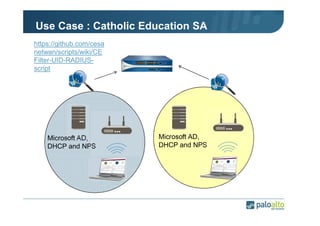
Use Case : Catholic Education SA
https://github.com/cesa
netwan/scripts/wiki/CE
Filter-UID-RADIUSscript

Microsoft AD,
DHCP and NPS

Microsoft AD,
DHCP and NPS
Resources
• https://live.paloaltonetworks.com
• https://live.paloaltonetworks.com/community/devcenter
• https://github.com/cesanetwan/scripts/wiki/CEFilter-UID-

RADIUS-script
User expert forum   user-id

User expert forum user-id

  • 1.
    User-ID User Expert Forum,23 October 2013 Alberto Rivai, CCIE #20068, CISSP Systems Engineer © 2013 Palo Alto Networks. Proprietary and Confidential
  • 2.
    Identification Technologies Transformingthe Firewall App-ID Identify the application User-ID Identify the user Content-ID Scan the content
  • 3.
    A-I-A Authentication Identification The firewall determines the identityof the user directly Firewall learns the identity of the user from another, trusted system Authorization Assigning rights to an Authenticated user
  • 4.
    User-ID Flow A combinationof methods are used to find User and Group information and map those Users to session source IP address(es)
  • 5.
    User-ID Session Information •Each session contains source IP address and App-ID(s) • User-ID maps a user name to the source IP address • Security Policy can then use source user, source IP, and App-ID as match criteria Session from 172.16.19.10 contains uTorrent!!! Which user is logged in at 172.16.19.10???
  • 6.
    User-ID Process • EnumeratingUsers and Groups • Mapping Users to IP addresses
  • 7.
    Enumerating Users and Groups ©2013 Palo Alto Networks. Proprietary and Confidential
  • 8.
    Enumerate Users andGroups • Firewall accesses the directory via LDAP - Find specific users - Find groups and group membership - Maintain User-to-Group Mapping Domain Controllers
  • 9.
  • 10.
  • 11.
  • 12.
    Verify Group Mapping admin@PA-VM>show user users-IDs Verify members of the group mapping
  • 13.
  • 14.
    Refresh Group Mapping admin@PA-VM>debug user-id refresh group-mapping all
  • 15.
    Useful CLI Commands admin@PA-VM>show user group list admin@PA-VM> show user group name <groupname>
  • 16.
    Useful CLI Commands admin@PA-VM>show user group-mapping state all admin@PA-VM> show user group-mapping statistics
  • 17.
    Remember, by defaultthe firewall directly through the MGT port accesses the directory via LDAP Domain Controllers Select the check box if the User-ID Agent is to be used as a LDAP proxy instead of the firewall connecting directly to the directory service.
  • 18.
    Mapping Users toIP addresses © 2013 Palo Alto Networks. Proprietary and Confidential
  • 19.
  • 20.
    User-ID Agent Types Device> User Identification Configured on the Firewall Configured on a Windows system
  • 21.
    Mapping Users toIP Addresses with Windows Agent © 2013 Palo Alto Networks. Proprietary and Confidential
  • 22.
    Install Windows agentin any member server • Local administrator account • Log on as service • For Win2K8, Add the service account user to the “Event Log Reader” and “Server Operator” built in local security groups in the domain. • For Win2K3, the user right “Manage auditing and security log” must be given to that account.
  • 23.
    Server Monitor Tab Howoften new user logins are detected by reading the security log on the AD server, 1 second default.
  • 24.
    AD Security Logs •By default Active Directory records the Username and IP address of successful login events • Agent must have rights to read the security log Domain Controller 1 User-ID Agent Domain Controller 2
  • 25.
    AD Security Logs •On Windows 2003 DCs: - 672(Authentication Ticket Granted, which occurs on the logon moment), - 673(Service Ticket Granted) - 674(Ticket Granted Renewed which may happen several times during the logon session) • On Windows 2008 DCs: - 4768(Authentication Ticket Granted) - 4769(Service Ticket Granted) - 4770(Ticket Granted Renewed)
  • 26.
    AD Security Logs •The mappings will be maintained for a configurable time out, which is recommended to be set to half the DHCP lease time used in the environment. • Client systems in an AD domain using the default configuration will attempt to renew their tickets every 10 hours.
  • 27.
    Server Monitor Tab Howoften additional user → IP address mappings are derived by reading the session table of active resources on the AD server, 10 second default
  • 28.
    Shared Server sessions •When AD users connect to printer or file shares, the server logs the user name and IP address. • Will only refresh known User/IP mappings • The agent must have rights to view the current open sessions on the Domain Controller • The agent will require Server Operator privileges to read the session table. User-ID Agent Shared Server
  • 29.
    Client Probing How oftenthe agent will issue WMI/NETBIOS queries to desktops, 20 minute default.
  • 30.
    WMI Query • Ifno mapping can be achieved with passive methods, the Agent switches to active methods • WMI queries can be sent to workstations to find users - Requires WMI be enabled on each system User-ID Agent
  • 31.
    WMI Query • Eachlearned IP will be probed once per interval period. • When receives an IP address that has no user data associated with it, the firewall will send the IP to all the AD agents configured and will request them to probe in order to determine the user. • This request will be added to the queue along with the known IP addresses waiting to be polled. If the Agent is able to determine the user IP based on the probe, the information will be sent back to the firewall.
  • 32.
    WMI Query • Theunderlying WMI query that is sent can be simulated with the following command, where remotecomputer would be the IP address of the system being probed: wmic /node:remotecomputer computersystem get username
  • 33.
    Cache Tab How longentries in the IP to username cache kept by the agent are valid. Current entries can be viewed from the main User Identification Agent Screen under IP to Username Information, 45 minutes default. The user ID cache timeout on the Windows agent only dictates how long the mapping will live on the Agent itself. The firewall will timeout all ip mappings in 60 minutes.
  • 34.
  • 35.
    Mapping Users toIP Addresses with Firewall Agent © 2013 Palo Alto Networks. Proprietary and Confidential
  • 36.
  • 37.
    Server Monitor How oftenadditional user → IP address mappings are derived by reading the session table of active resources on the AD server, 2 second default
  • 38.
    How often theagent will issue WMI queries to desktops, 20 minute default.
  • 39.
    Specify the collectorname if you want this firewall to act as a user mapping redistribution point for other firewalls on your network. The collector name and pre-shared key are used when configuring the UserID Agents on the firewalls that will pull the user mapping information. Device -> user Identification -> User-ID Agents
  • 40.
    Best practices © 2013Palo Alto Networks. Proprietary and Confidential
  • 41.
    User Data Redistribution •Firewalls can act as User Agents to each other for IP Address mapping • Enabled on interfaces as part of the interface management profile • Redistributes address mappings learned locally - Will redistribute Captive Portal and Global Protect users - Does not redistribute mappings learned from other agents Windows Server UID Agent GlobalProtect Agent
  • 42.
    Scaling to complexenvironments Large / Distributed Global Sites DC’s in every location Many AD domains or forests Hundreds of Firewalls Non AD RADIUS Group based Apple Open Directory Other LDAP Subscriber DB Scores of VSYS Solutions Hardware Agents Dedicated HW Agents MS Log Forwarding Solutions API – Probably over SYSLOG
  • 43.
    PAN-OS Agent vs.Software Agent • Both read security logs from servers • Hardware PAN-OS agent much more efficient for bandwidth Just User - IP << X MB Full Security Log X MB of data Just required event ID’s .05X MB of data
  • 44.
    Microsoft Log forwarding •Simplifies the DC environment for the Agent • Great for rapidly expanding networks where tracking new DC’s is difficult • Built into Windows Log forwarding Agent reads logs DC1 DC2 Member server DC3
  • 45.
    User-ID API © 2013Palo Alto Networks. Proprietary and Confidential
  • 46.
    User-ID XML API •API allows user data to be pulled from other sources on the network • Defines a XML payload sent to User-ID over SSL •A script on an external device uses the User-ID API to send updates to User-ID User-ID updates User-to-IP Mapping on the firewall
  • 47.
    Enabling User-ID Agentfor User-ID API • XML-formatted data is sent to the User-ID Agent • Software agents must be enabled to accept XML API requests that then sends it to the firewall via SSL • The PAN-OS agent is always enabled • A User-ID Agent permission can be used to create an administrator account to accent XML API connections
  • 48.
    Additional User-ID APIXML Request Options <login> Entry Timeout <entry name=”domainuid1” ip=”10.1.1.1” timeout=“20”> <groups> <entry name=“finance-group”> <members> <entry name=”domainuid1”> Local Group Membership <entry name=”domainuid2”> </members> </entry> </groups> <entry name=”domainuid1” ip=”10.1.1.1” timeout=“20”> HIP Profile Information <hip-report> … </hip-report>
  • 49.
    Use Case :Catholic Education SA https://github.com/cesa netwan/scripts/wiki/CE Filter-UID-RADIUSscript Microsoft AD, DHCP and NPS Microsoft AD, DHCP and NPS
  • 50.