Welcome!
User Experience Services Showcase
5 December 2018
Grab a cuppa and find a seat
Agenda
• Lightning talks (40ish minutes):
• UX Service update
• MyEd: Enhancing digital services for current students
• Learn Foundations: Informing the future of the VLE Service
• Document Management: Understanding current practices to inform the future
• BI/MI Tools: What does trust & quality mean to data specialists & managers?
• Online Masters: Delivering new websites collaboratively
• Web strategy & governance update
• Explore the topics further: Speakers and displays around the room
• Stay as long as you like
• We’re here until 5
UX Service update
Neil Allison
One piece in the jigsaw…
What the
user needs
What constrains
us (technology,
legislation etc)
What the
business
aspires to
achieve
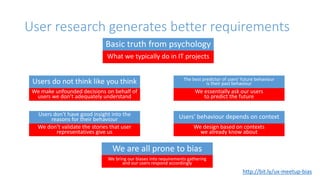
User research generates better requirements
Basic truth from psychology
What we typically do in IT projects
Users do not think like you think
We make unfounded decisions on behalf of
users we don’t adequately understand
Users don't have good insight into the
reasons for their behaviour
We don’t validate the stories that user
representatives give us
The best predictor of users' future behaviour
is their past behaviour
We essentially ask our users
to predict the future
Users' behaviour depends on context
We design based on contexts
we already know about
We are all prone to bias
We bring our biases into requirements gathering
and our users respond accordingly
http://bit.ly/ux-meetup-bias
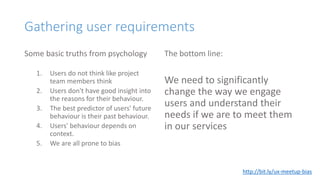
Gathering user requirements
Some basic truths from psychology
1. Users do not think like project
team members think
2. Users don't have good insight into
the reasons for their behaviour.
3. The best predictor of users' future
behaviour is their past behaviour.
4. Users' behaviour depends on
context.
5. We are all prone to bias
The bottom line:
We need to significantly
change the way we engage
users and understand their
needs if we are to meet them
in our services
http://bit.ly/ux-meetup-bias
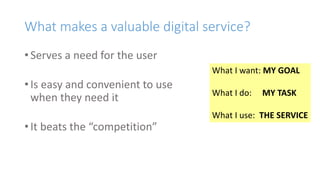
What makes a valuable digital service?
• Serves a need for the user
• Is easy and convenient to use
when they need it
• It beats the “competition”
What I want: MY GOAL
What I do: MY TASK
What I use: THE SERVICE
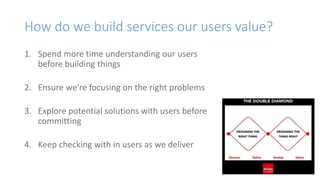
How do we build services our users value?
1. Spend more time understanding our users
before building things
2. Ensure we’re focusing on the right problems
3. Explore potential solutions with users before
committing
4. Keep checking with in users as we deliver
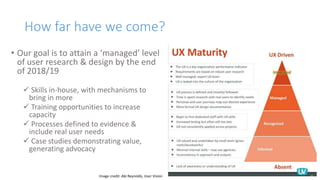
How far have we come?
• Our goal is to attain a ‘managed’ level
of user research & design by the end
of 2018/19
 Skills in-house, with mechanisms to
bring in more
 Training opportunities to increase
capacity
 Processes defined to evidence &
include real user needs
 Case studies demonstrating value,
generating advocacy
Image credit: Abi Reynolds, User Vision
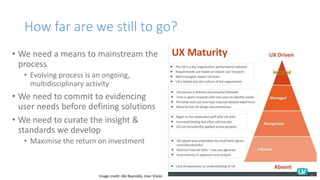
How far are we still to go?
• We need a means to mainstream the
process
• Evolving process is an ongoing,
multidisciplinary activity
• We need to commit to evidencing
user needs before defining solutions
• We need to curate the insight &
standards we develop
• Maximise the return on investment
Image credit: Abi Reynolds, User Vision
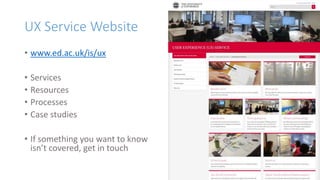
UX Service Website
• www.ed.ac.uk/is/ux
• Services
• Resources
• Processes
• Case studies
• If something you want to know
isn’t covered, get in touch
Join the community
• Regular lunchtime meetups (1.5 hours)
• Learn about a UX-related topic with a guest speaker or webinar
• Group-agreed discussion agenda follows
• Bring your lunch, we’ll supply nibbles
• Details: http://bit.ly/UX-meetup-blogs
• UX mailing list
• Find out about events first
• Ask questions, get community help
• Share ideas and resources
• Join: http://bit.ly/uoe-ux-mail
MyEd
Nicola Dobiecka
Background
• MyEd’s underlying system is upgrading in early 2019
• The Service Team wanted to use this project as an opportunity
to enhancement the current student experience
• Since June, the UX Service has operated as a team member
• Leading the prioritisation & execution of research with students
• Participating in an agile development project
Phase 1: Setting priorities
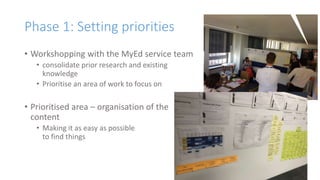
• Workshopping with the MyEd service team
• consolidate prior research and existing
knowledge
• Prioritise an area of work to focus on
• Prioritised area – organisation of the
content
• Making it as easy as possible
to find things
Phase 2: Prototype information architecture
• Top task survey identified 4 tasks significantly more important to students
than everything else:
• Access Learn
• Find Library resources
• Check email
• Check diary
• Rapid, iterative in-person card sorts with 6 students gave us an initial shape
for a new information architecture
• We could then sketch early interface ideas and
conduct guerrilla usability testing with students
Phase 3: Card sorting at scale
• Online card sorts (using Optimal Sort)
• Provide data that is easier to analyse
• Make large scale user engagement cost-effective
• The result
• 1041 respondents
• 536 completed sorts
• Over 14,000 data points to analyse
Phase 4: Agile design & testing
• Working as part of an agile development team
• Setting and executing research & design priorities to tie in
with the needs of the project
• Focusing more on interface design and IA challenges
• Ensuring regular student engagement to ensure ongoing evolution
Strong consensus on how to group
information
• Split in the demographic
• International v domestic
• 1 year v over 1 year
• PGT v PGR v UG
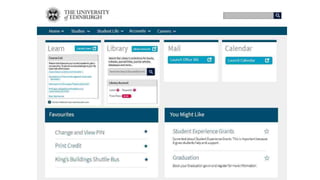
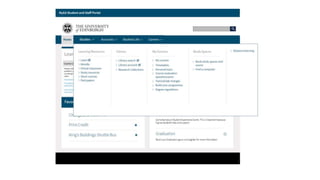
• Good consensus all round – led to new top level categories and new a
hierarchical menu
• Which we tested in October
• And a new menu presentation
• Which we tested yesterday…
Learn Foundations
Duncan Stephen
Learn Foundations
User research
Duncan Stephen
User Experience Service
user-experience@ed.ac.uk
Learn Foundations project
Provide students with courses on Learn that meet their
needs and provide the staff who design courses with the
relevant skills, knowledge and guidance to do so.
Vision: “Courses in Learn are accessible, and relevant
information is easy to find by students. Staff find Learn
easy to use, and are well supported to make and deliver
rich courses online.”
What we’ve done so far
Spoken to 18 students in total.
Representing courses from 15 Schools.
First year to postgraduate.
Students with experience at other institutions.
Open interviews with students
To understand more about students’ experiences, behaviours
and attitudes around Learn.
Understand what key tasks students are trying to achieve
through Learn.
Build a picture of how Learn fits into students’ academic year.
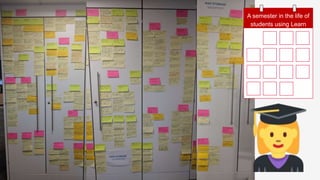
students using Learn
A semester in the life of
Cycle of usability testing
We are collaborating with Schools to help identify
usability issues in their Learn environments.
Bring the Learn user community
together around the
student experience.
Demonstrate how you can
conduct your own
usability testing.
See examples of other schools’
Learn environments.
We about to conduct open research
with staff using Learn,
to understand their experience
Help the project team shape support and guidance
around staff needs
A programme of user research to steer
prototypes of a new information architecture
and navigation model for Learn
course environments
• Top task survey
• Online card sorting
• Tree testing
Thank you
Duncan Stephen
User Experience Service
user-experience@ed.ac.uk
Document Management
Nicola Dobiecka
Overview and summary
• The UX service partnered with the SharePoint Service to gather user
requirements for document management
• Knowledge and skill sharing meant project team conducted research
and analysis too – we covered more ground together
• Rich picture uncovered on how documents are managed (or not)
What we did
• Workshops with service team and wider stakeholder group
• to analyse internal knowledge and prioritise research focus
• “Collaborative working” chosen as focus because:
• It’s common
• Teams working this way span the institution
• Collaborative working can include anyone, including people external
• Face to face interviews, visiting people in their work locations
• Interview technique training
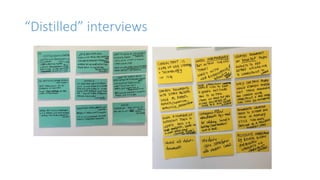
• Interview analysis and ‘distillation’ – identify themes and common
behaviours
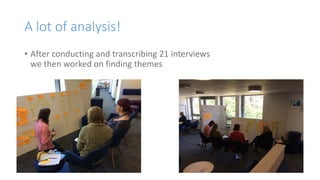
A lot of analysis!
• After conducting and transcribing 21 interviews
we then worked on finding themes
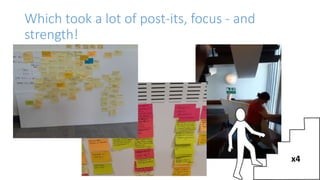
Which took a lot of post-its, focus - and
strength!
x4
“Distilled” interviews
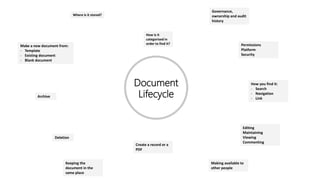
Insights framed around
document lifecycle
Document
Lifecycle
Make a new document from:
- Template
- Existing document
- Blank document
Where is it stored?
Governance,
ownership and audit
history
Permissions
Platform
Security
How you find it:
- Search
- Navigation
- Link
Editing
Maintaining
Viewing
Commenting
Making available to
other people
Create a record or a
PDF
Keeping the
document in the
same place
Deletion
Archive
How is it
categorised in
order to find it?
The Most Striking Observation
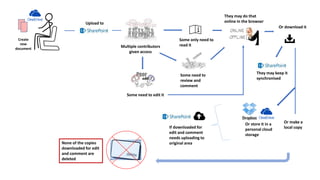
Documents are NEVER deleted
All the people we spoke to were asked about their practice around
deletion – it simply did not happen.
This has potential for a significant impact because even in the most
efficient scenario – many copies of a document can exist
Multiple contributors
given access
Create
new
document
Upload to
Some only need to
read it
They may do that
online in the browser
Or download it
Some need to
review and
comment
Some need to edit it
They may keep it
synchronised
Or make a
local copy
Or store it in a
personal cloud
storage
If downloaded for
edit and comment
needs uploading to
original areaNone of the copies
downloaded for edit
and comment are
deleted
Benefits of working this way
• The outcome of this research informed template solutions which
would meet user needs
• Reduced risk of developing solutions which might not have been useful to
people
• Greater confidence in ability to mitigate identified risks
• Skills learned on uncovering needs without bias can be used in the
rest of the project and on other projects
• The team found this way of working more insightful than that used in
the business requirements gathering
Business & Management
Information Tools
Nicola Dobiecka
Summary of UX Service involvement
• The UX Service helped the BI/MI Service to investigate:
• what appeared to be a lack of trust in the quality of datasets and
reports that BI Tools users utilize to produce or get their own reports.
• possible problems with finding reports
• Understanding what quality and reliability meant to the service users
helped identify the real, hidden, problem:
• What appeared to be an issue with trust of the reports and/or data was
actually a lack of understanding of their context
• People need to know how a report was created, who and what for in order to tell if it will
also meet their needs
Highlights of what we did
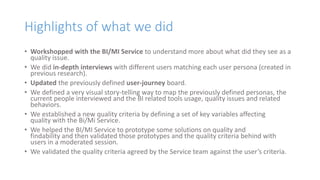
• Workshopped with the BI/MI Service to understand more about what did they see as a
quality issue.
• We did in-depth interviews with different users matching each user persona (created in
previous research).
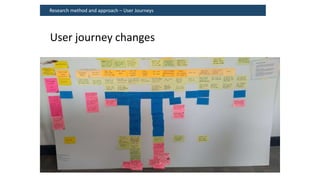
• Updated the previously defined user-journey board.
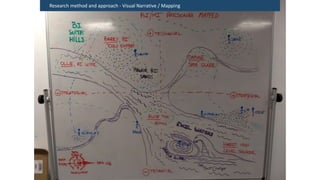
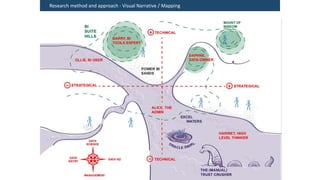
• We defined a very visual story-telling way to map the previously defined personas, the
current people interviewed and the BI related tools usage, quality issues and related
behaviors.
• We established a new quality criteria by defining a set of key variables affecting
quality with the Bi/Mi Service.
• We helped the BI/MI Service to prototype some solutions on quality and
findability and then validated those prototypes and the quality criteria behind with
users in a moderated session.
• We validated the quality criteria agreed by the Service team against the user’s criteria.
Research method and approach - In-depth Interviews
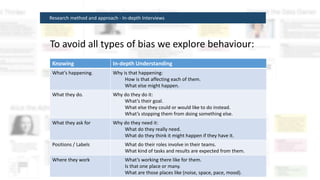
To avoid all types of bias we explore behaviour:
Knowing In-depth Understanding
What’s happening. Why is that happening:
How is that affecting each of them.
What else might happen.
What they do. Why do they do it:
What’s their goal.
What else they could or would like to do instead.
What’s stopping them from doing something else.
What they ask for Why do they need it:
What do they really need.
What do they think it might happen if they have it.
Positions / Labels What do their roles involve in their teams.
What kind of tasks and results are expected from them.
Where they work What’s working there like for them.
Is that one place or many.
What are those places like (noise, space, pace, mood).
Research method and approach – User Journeys
User journey changes
Research method and approach - Visual Narrative / Mapping
Outcomes and benefits – in general
• Identified service ideas that were unlikely to be successful through engagement with users.
• Without this insight, the BI/MI Service Management team could have progressed concepts that
would not be well received by their users and as a consequence impeded the engagement and
culture change the programme and service is seeking to achieve.
• Easily replicable techniques that sense check their ideas with users at an early stage before
significant cost and commitment.
• Increased the BI Tools Programme’s opportunities for implementation of successful services and
tools
• Provided new models around which the BI/MI Service Management team can collaborate and
communicate when working towards delivering more useful and usable tools and services to
the University.
"The UX Service provided us with a solid, structured
way of moving forward and identifying blind-spots on
what we knew about our user-base.
This process brought unexpected insights and new,
deeper understanding of our users."
(…which will help provide a better service for them)
Online Masters website
Lauren Tormey
Online learning
experience & web
enhancements
LaurenTormey
Website & Communications
Online learning
■ Online learning is a key focus for the University
■ Worked on a pilot project to improve the web provision for
prospective online learners, from investigation to offer
Two strands
■ Central website content
– Work to improve the existing central website for online learning
■ Online MSc in History
– Work with colleagues in the School of History, Classics and
Archaeology to support them in enhancing the content on their
masters programme website
Piloting new ways of working
■ Collaborative six-week sprint
■ Cross-functional team included staff from:
– Learning,Teaching andWeb
– Communications and Marketing
– Service Excellence Programme
– School of History, Classics and Archaeology
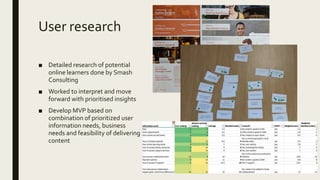
User research
■ Detailed research of potential
online learners done by Smash
Consulting
■ Worked to interpret and move
forward with prioritised insights
■ Develop MVP based on
combination of prioritized user
information needs, business
needs and feasibility of delivering
content
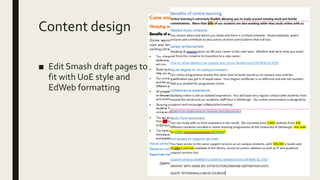
Content design
■ Edit Smash draft pages to
fit with UoE style and
EdWeb formatting
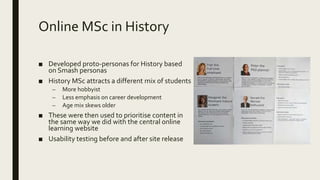
Online MSc in History
■ Developed proto-personas for History based
on Smash personas
■ History MSc attracts a different mix of students
– More hobbyist
– Less emphasis on career development
– Age mix skews older
■ These were then used to prioritise content in
the same way we did with the central online
learning website
■ Usability testing before and after site release
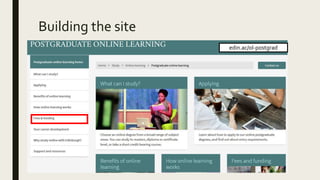
Building the site
edin.ac/ol-postgrad
Thank you.
Any questions?
Talk to me!
Website strategy & governance
Colan Mehaffey
Questions? Comments?
Colan.Mehaffey@ed.ac.uk
Thank you! Please stay a while…
• Network & refreshments
• Presenters & our project partners are here
to tell you more about their projects
• Take a moment to tell us what you thought
• Please contribute a quick video vox pop
• Vote on the board
www.ed.ac.uk/is/ux

User Experience Service showcase lightning talks - December 2018

  • 1.
    Welcome! User Experience ServicesShowcase 5 December 2018 Grab a cuppa and find a seat
  • 2.
    Agenda • Lightning talks(40ish minutes): • UX Service update • MyEd: Enhancing digital services for current students • Learn Foundations: Informing the future of the VLE Service • Document Management: Understanding current practices to inform the future • BI/MI Tools: What does trust & quality mean to data specialists & managers? • Online Masters: Delivering new websites collaboratively • Web strategy & governance update • Explore the topics further: Speakers and displays around the room • Stay as long as you like • We’re here until 5
  • 3.
  • 4.
    One piece inthe jigsaw… What the user needs What constrains us (technology, legislation etc) What the business aspires to achieve
  • 5.
    User research generatesbetter requirements Basic truth from psychology What we typically do in IT projects Users do not think like you think We make unfounded decisions on behalf of users we don’t adequately understand Users don't have good insight into the reasons for their behaviour We don’t validate the stories that user representatives give us The best predictor of users' future behaviour is their past behaviour We essentially ask our users to predict the future Users' behaviour depends on context We design based on contexts we already know about We are all prone to bias We bring our biases into requirements gathering and our users respond accordingly http://bit.ly/ux-meetup-bias
  • 6.
    Gathering user requirements Somebasic truths from psychology 1. Users do not think like project team members think 2. Users don't have good insight into the reasons for their behaviour. 3. The best predictor of users' future behaviour is their past behaviour. 4. Users' behaviour depends on context. 5. We are all prone to bias The bottom line: We need to significantly change the way we engage users and understand their needs if we are to meet them in our services http://bit.ly/ux-meetup-bias
  • 7.
    What makes avaluable digital service? • Serves a need for the user • Is easy and convenient to use when they need it • It beats the “competition” What I want: MY GOAL What I do: MY TASK What I use: THE SERVICE
  • 8.
    How do webuild services our users value? 1. Spend more time understanding our users before building things 2. Ensure we’re focusing on the right problems 3. Explore potential solutions with users before committing 4. Keep checking with in users as we deliver
  • 9.
    How far havewe come? • Our goal is to attain a ‘managed’ level of user research & design by the end of 2018/19  Skills in-house, with mechanisms to bring in more  Training opportunities to increase capacity  Processes defined to evidence & include real user needs  Case studies demonstrating value, generating advocacy Image credit: Abi Reynolds, User Vision
  • 10.
    How far arewe still to go? • We need a means to mainstream the process • Evolving process is an ongoing, multidisciplinary activity • We need to commit to evidencing user needs before defining solutions • We need to curate the insight & standards we develop • Maximise the return on investment Image credit: Abi Reynolds, User Vision
  • 11.
    UX Service Website •www.ed.ac.uk/is/ux • Services • Resources • Processes • Case studies • If something you want to know isn’t covered, get in touch
  • 12.
    Join the community •Regular lunchtime meetups (1.5 hours) • Learn about a UX-related topic with a guest speaker or webinar • Group-agreed discussion agenda follows • Bring your lunch, we’ll supply nibbles • Details: http://bit.ly/UX-meetup-blogs • UX mailing list • Find out about events first • Ask questions, get community help • Share ideas and resources • Join: http://bit.ly/uoe-ux-mail
  • 13.
  • 14.
    Background • MyEd’s underlyingsystem is upgrading in early 2019 • The Service Team wanted to use this project as an opportunity to enhancement the current student experience • Since June, the UX Service has operated as a team member • Leading the prioritisation & execution of research with students • Participating in an agile development project
  • 15.
    Phase 1: Settingpriorities • Workshopping with the MyEd service team • consolidate prior research and existing knowledge • Prioritise an area of work to focus on • Prioritised area – organisation of the content • Making it as easy as possible to find things
  • 16.
    Phase 2: Prototypeinformation architecture • Top task survey identified 4 tasks significantly more important to students than everything else: • Access Learn • Find Library resources • Check email • Check diary • Rapid, iterative in-person card sorts with 6 students gave us an initial shape for a new information architecture • We could then sketch early interface ideas and conduct guerrilla usability testing with students
  • 17.
    Phase 3: Cardsorting at scale • Online card sorts (using Optimal Sort) • Provide data that is easier to analyse • Make large scale user engagement cost-effective • The result • 1041 respondents • 536 completed sorts • Over 14,000 data points to analyse
  • 18.
    Phase 4: Agiledesign & testing • Working as part of an agile development team • Setting and executing research & design priorities to tie in with the needs of the project • Focusing more on interface design and IA challenges • Ensuring regular student engagement to ensure ongoing evolution
  • 19.
    Strong consensus onhow to group information • Split in the demographic • International v domestic • 1 year v over 1 year • PGT v PGR v UG • Good consensus all round – led to new top level categories and new a hierarchical menu • Which we tested in October • And a new menu presentation • Which we tested yesterday…
  • 22.
  • 23.
    Learn Foundations User research DuncanStephen User Experience Service user-experience@ed.ac.uk
  • 24.
    Learn Foundations project Providestudents with courses on Learn that meet their needs and provide the staff who design courses with the relevant skills, knowledge and guidance to do so. Vision: “Courses in Learn are accessible, and relevant information is easy to find by students. Staff find Learn easy to use, and are well supported to make and deliver rich courses online.”
  • 25.
    What we’ve doneso far Spoken to 18 students in total. Representing courses from 15 Schools. First year to postgraduate. Students with experience at other institutions.
  • 26.
    Open interviews withstudents To understand more about students’ experiences, behaviours and attitudes around Learn. Understand what key tasks students are trying to achieve through Learn. Build a picture of how Learn fits into students’ academic year.
  • 27.
    students using Learn Asemester in the life of
  • 28.
    Cycle of usabilitytesting We are collaborating with Schools to help identify usability issues in their Learn environments. Bring the Learn user community together around the student experience. Demonstrate how you can conduct your own usability testing. See examples of other schools’ Learn environments.
  • 29.
    We about toconduct open research with staff using Learn, to understand their experience Help the project team shape support and guidance around staff needs
  • 30.
    A programme ofuser research to steer prototypes of a new information architecture and navigation model for Learn course environments • Top task survey • Online card sorting • Tree testing
  • 31.
    Thank you Duncan Stephen UserExperience Service user-experience@ed.ac.uk
  • 32.
  • 33.
    Overview and summary •The UX service partnered with the SharePoint Service to gather user requirements for document management • Knowledge and skill sharing meant project team conducted research and analysis too – we covered more ground together • Rich picture uncovered on how documents are managed (or not)
  • 34.
    What we did •Workshops with service team and wider stakeholder group • to analyse internal knowledge and prioritise research focus • “Collaborative working” chosen as focus because: • It’s common • Teams working this way span the institution • Collaborative working can include anyone, including people external • Face to face interviews, visiting people in their work locations • Interview technique training • Interview analysis and ‘distillation’ – identify themes and common behaviours
  • 35.
    A lot ofanalysis! • After conducting and transcribing 21 interviews we then worked on finding themes
  • 36.
    Which took alot of post-its, focus - and strength! x4
  • 37.
  • 38.
  • 39.
    Document Lifecycle Make a newdocument from: - Template - Existing document - Blank document Where is it stored? Governance, ownership and audit history Permissions Platform Security How you find it: - Search - Navigation - Link Editing Maintaining Viewing Commenting Making available to other people Create a record or a PDF Keeping the document in the same place Deletion Archive How is it categorised in order to find it?
  • 40.
    The Most StrikingObservation Documents are NEVER deleted All the people we spoke to were asked about their practice around deletion – it simply did not happen. This has potential for a significant impact because even in the most efficient scenario – many copies of a document can exist
  • 41.
    Multiple contributors given access Create new document Uploadto Some only need to read it They may do that online in the browser Or download it Some need to review and comment Some need to edit it They may keep it synchronised Or make a local copy Or store it in a personal cloud storage If downloaded for edit and comment needs uploading to original areaNone of the copies downloaded for edit and comment are deleted
  • 42.
    Benefits of workingthis way • The outcome of this research informed template solutions which would meet user needs • Reduced risk of developing solutions which might not have been useful to people • Greater confidence in ability to mitigate identified risks • Skills learned on uncovering needs without bias can be used in the rest of the project and on other projects • The team found this way of working more insightful than that used in the business requirements gathering
  • 43.
    Business & Management InformationTools Nicola Dobiecka
  • 44.
    Summary of UXService involvement • The UX Service helped the BI/MI Service to investigate: • what appeared to be a lack of trust in the quality of datasets and reports that BI Tools users utilize to produce or get their own reports. • possible problems with finding reports • Understanding what quality and reliability meant to the service users helped identify the real, hidden, problem: • What appeared to be an issue with trust of the reports and/or data was actually a lack of understanding of their context • People need to know how a report was created, who and what for in order to tell if it will also meet their needs
  • 45.
    Highlights of whatwe did • Workshopped with the BI/MI Service to understand more about what did they see as a quality issue. • We did in-depth interviews with different users matching each user persona (created in previous research). • Updated the previously defined user-journey board. • We defined a very visual story-telling way to map the previously defined personas, the current people interviewed and the BI related tools usage, quality issues and related behaviors. • We established a new quality criteria by defining a set of key variables affecting quality with the Bi/Mi Service. • We helped the BI/MI Service to prototype some solutions on quality and findability and then validated those prototypes and the quality criteria behind with users in a moderated session. • We validated the quality criteria agreed by the Service team against the user’s criteria.
  • 46.
    Research method andapproach - In-depth Interviews To avoid all types of bias we explore behaviour: Knowing In-depth Understanding What’s happening. Why is that happening: How is that affecting each of them. What else might happen. What they do. Why do they do it: What’s their goal. What else they could or would like to do instead. What’s stopping them from doing something else. What they ask for Why do they need it: What do they really need. What do they think it might happen if they have it. Positions / Labels What do their roles involve in their teams. What kind of tasks and results are expected from them. Where they work What’s working there like for them. Is that one place or many. What are those places like (noise, space, pace, mood).
  • 47.
    Research method andapproach – User Journeys User journey changes
  • 48.
    Research method andapproach - Visual Narrative / Mapping
  • 49.
    Research method andapproach - Visual Narrative / Mapping
  • 50.
    Outcomes and benefits– in general • Identified service ideas that were unlikely to be successful through engagement with users. • Without this insight, the BI/MI Service Management team could have progressed concepts that would not be well received by their users and as a consequence impeded the engagement and culture change the programme and service is seeking to achieve. • Easily replicable techniques that sense check their ideas with users at an early stage before significant cost and commitment. • Increased the BI Tools Programme’s opportunities for implementation of successful services and tools • Provided new models around which the BI/MI Service Management team can collaborate and communicate when working towards delivering more useful and usable tools and services to the University.
  • 51.
    "The UX Serviceprovided us with a solid, structured way of moving forward and identifying blind-spots on what we knew about our user-base. This process brought unexpected insights and new, deeper understanding of our users." (…which will help provide a better service for them)
  • 52.
  • 53.
    Online learning experience &web enhancements LaurenTormey Website & Communications
  • 54.
    Online learning ■ Onlinelearning is a key focus for the University ■ Worked on a pilot project to improve the web provision for prospective online learners, from investigation to offer
  • 55.
    Two strands ■ Centralwebsite content – Work to improve the existing central website for online learning ■ Online MSc in History – Work with colleagues in the School of History, Classics and Archaeology to support them in enhancing the content on their masters programme website
  • 56.
    Piloting new waysof working ■ Collaborative six-week sprint ■ Cross-functional team included staff from: – Learning,Teaching andWeb – Communications and Marketing – Service Excellence Programme – School of History, Classics and Archaeology
  • 57.
    User research ■ Detailedresearch of potential online learners done by Smash Consulting ■ Worked to interpret and move forward with prioritised insights ■ Develop MVP based on combination of prioritized user information needs, business needs and feasibility of delivering content
  • 58.
    Content design ■ EditSmash draft pages to fit with UoE style and EdWeb formatting
  • 59.
    Online MSc inHistory ■ Developed proto-personas for History based on Smash personas ■ History MSc attracts a different mix of students – More hobbyist – Less emphasis on career development – Age mix skews older ■ These were then used to prioritise content in the same way we did with the central online learning website ■ Usability testing before and after site release
  • 60.
  • 61.
  • 62.
    Website strategy &governance Colan Mehaffey
  • 69.
  • 70.
    Thank you! Pleasestay a while… • Network & refreshments • Presenters & our project partners are here to tell you more about their projects • Take a moment to tell us what you thought • Please contribute a quick video vox pop • Vote on the board www.ed.ac.uk/is/ux

Editor's Notes

  • #45 The BI/MI approached to the UX Service in order to have a better understanding about –what originally was reflected as– a trust issue regarding the quality of the data and reports their users were having and at the same time –what was assumed as– a findability issue, given the great amount of reports and duplicates generated (some areas have a great amount of duplicates given that generating ad-hoc reports is easier than knowing which one could be useful from the existing ones). The BI/MI Service expressed:  They needed to find out what their users wanted when looking for data or reports.  They needed to validate what could give them confidence at the moment of pulling datasets or reports.  They wanted to include the users in the design and development process, but they weren’t sure on how to do that in an effective way.  That, due to scalability issues, they would have to offer self-service based solutions.  That they had in mind implementing a quality seal as a solution, similar to the UK’s Kitemark. 
  • #52 "The UX Service provided us with a solid, structured way of moving forward and identifying blind-spots on what we knew about our user-base. This process brought unexpected insights and new, deeper understanding of our users."
  • #61 -Take out fees & funding from Apply b/c important area to users- needed to be at top level -Everything else stay as planned from original IA document and MVP