1 
USER EXPERIENCE DESIGN 
Mark Fassbender, Global Head of Web Optimisation
2 
“People are on the web not to enjoy your 
web design, but to get something done.” 
Design Exploratory 
lexisnexis.com 
TO: S T E V E M A N N BY: D X T E A M 11 20 1 3 
Jakob Nielsen
3 
“A site that really works fulfills your 
strategic objectives while meeting the 
needs of your users. Even the best content 
and the most sophisticated technology 
won't help Design you balance Exploratory 
those goals without 
a cohesive, lexisnexis.consistent com 
user experience to 
TO: S T E V E M A N N BY: D X T E A M 11 20 1 3 
support it.” 
Jesse James Garrett
4 
What is user experience design 
“User experience (UX) is the way a person feels about 
using a product, system, or service.” 
from wikipedia 
User experience design puts the user at the heart of the development process. It is 
based on gaining a deep understanding of user motivation, goals, abilities. 
That understanding is then combined with and understanding of business goals and 
objectives to create a plan that will guide the entire development process to ensure that 
user needs are met in such a way that it is advantageous to the business. 
There’s a reason that people are coming to your website, if you understand the reason 
and rationale for a visit and put the right content in front of the right user at the right 
time, it becomes much easier to convert a visitor into a customer.
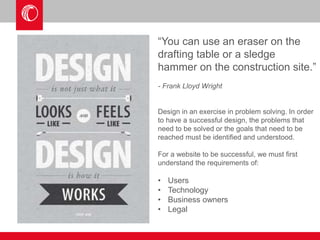
“You can use an eraser on the 
drafting table or a sledge 
hammer on the construction site.” 
- Frank Lloyd Wright 
Design in an exercise in problem solving. In order 
to have a successful design, the problems that 
need to be solved or the goals that need to be 
reached must be identified and understood. 
For a website to be successful, we must first 
understand the requirements of: 
• Users 
• Technology 
• Business owners 
• Legal
Information 
architecture 
Content 
strategy 
Campaigns 
SEO 
Technical 
functionality 
Visual 
design 
Business 
objectives 
Navigation 
Customer 
service 
Post sales 
support 
User needs 
& motivation 
Business 
objectives 
Maximum 
Success 
Potential 
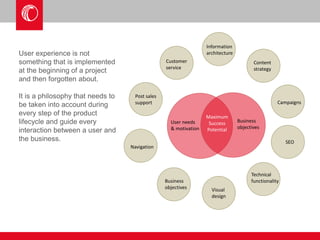
User experience is not 
something that is implemented 
at the beginning of a project 
and then forgotten about. 
It is a philosophy that needs to 
be taken into account during 
every step of the product 
lifecycle and guide every 
interaction between a user and 
the business.
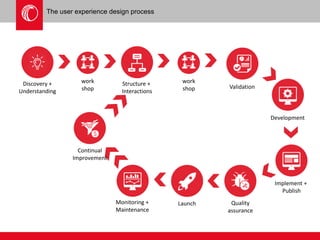
The user experience design process 
Implement + 
Publish 
Discovery + 
Understanding 
Structure + Validation 
Interactions 
Development 
Monitoring + 
Maintenance 
Quality 
assurance 
Launch 
work 
shop 
work 
shop 
Continual 
Improvement
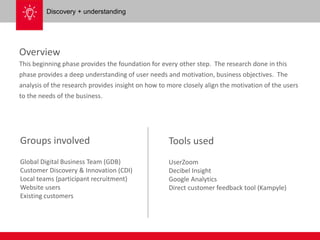
Overview 
This beginning phase provides the foundation for every other step. The research done in this 
phase provides a deep understanding of user needs and motivation, business objectives. The 
analysis of the research provides insight on how to more closely align the motivation of the users 
to the needs of the business. 
Groups involved 
Global Digital Business Team (GDB) 
Customer Discovery & Innovation (CDI) 
Local teams (participant recruitment) 
Website users 
Existing customers 
Tools used 
UserZoom 
Decibel Insight 
Google Analytics 
Direct customer feedback tool (Kampyle) 
Discovery + understanding
9 
Discovery + understanding 
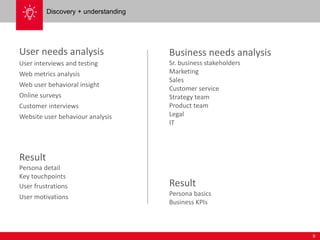
User needs analysis 
User interviews and testing 
Web metrics analysis 
Web user behavioral insight 
Online surveys 
Customer interviews 
Website user behaviour analysis 
Result 
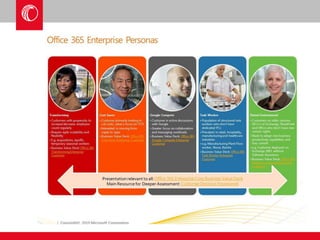
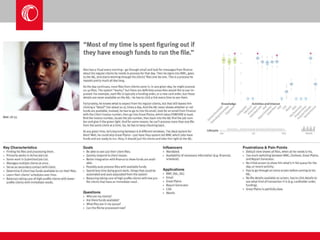
Persona detail 
Key touchpoints 
User frustrations 
User motivations 
Business needs analysis 
Sr. business stakeholders 
Marketing 
Sales 
Customer service 
Strategy team 
Product team 
Legal 
IT 
Result 
Persona basics 
Business KPIs
12 
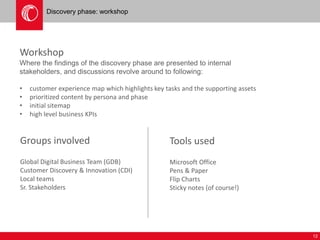
Discovery phase: workshop 
Workshop 
Where the findings of the discovery phase are presented to internal 
stakeholders, and discussions revolve around to following: 
• customer experience map which highlights key tasks and the supporting assets 
• prioritized content by persona and phase 
• initial sitemap 
• high level business KPIs 
Groups involved 
Global Digital Business Team (GDB) 
Customer Discovery & Innovation (CDI) 
Local teams 
Sr. Stakeholders 
Tools used 
Microsoft Office 
Pens & Paper 
Flip Charts 
Sticky notes (of course!)
13 
Discovery phase: workshop 
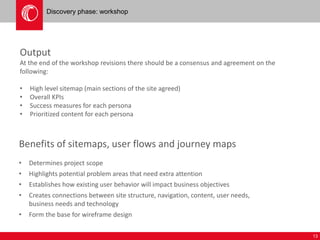
Output 
At the end of the workshop revisions there should be a consensus and agreement on the 
following: 
• High level sitemap (main sections of the site agreed) 
• Overall KPIs 
• Success measures for each persona 
• Prioritized content for each persona 
Benefits of sitemaps, user flows and journey maps 
• Determines project scope 
• Highlights potential problem areas that need extra attention 
• Establishes how existing user behavior will impact business objectives 
• Creates connections between site structure, navigation, content, user needs, 
business needs and technology 
• Form the base for wireframe design
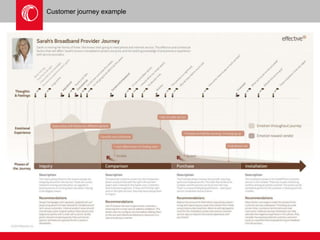
Customer journey example
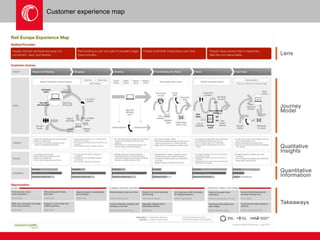
Customer experience map
16 
Structure and interactions 
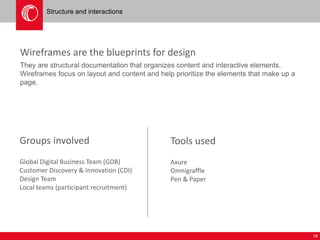
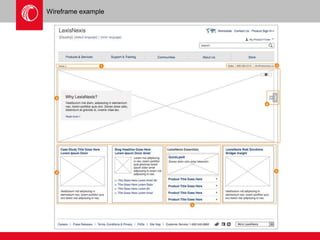
Wireframes are the blueprints for design 
They are structural documentation that organizes content and interactive elements. 
Wireframes focus on layout and content and help prioritize the elements that make up a 
page. 
Groups involved 
Global Digital Business Team (GDB) 
Customer Discovery & Innovation (CDI) 
Design Team 
Local teams (participant recruitment) 
Tools used 
Axure 
Omnigraffle 
Pen & Paper
17 
Visual design 
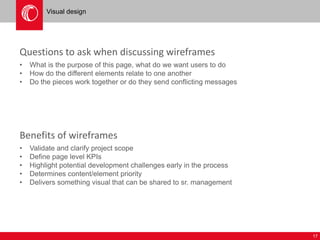
Questions to ask when discussing wireframes 
• What is the purpose of this page, what do we want users to do 
• How do the different elements relate to one another 
• Do the pieces work together or do they send conflicting messages 
Benefits of wireframes 
• Validate and clarify project scope 
• Define page level KPIs 
• Highlight potential development challenges early in the process 
• Determines content/element priority 
• Delivers something visual that can be shared to sr. management
Wireframe example
19 
Visual development 
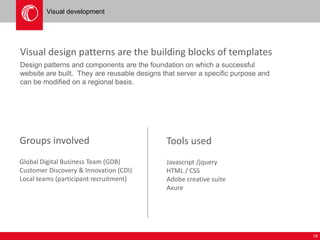
Visual design patterns are the building blocks of templates 
Design patterns and components are the foundation on which a successful 
website are built. They are reusable designs that server a specific purpose and 
can be modified on a regional basis. 
Groups involved 
Global Digital Business Team (GDB) 
Customer Discovery & Innovation (CDI) 
Local teams (participant recruitment) 
Tools used 
Javascript /jquery 
HTML / CSS 
Adobe creative suite 
Axure
20 
Visual development 
Questions to ask when discussing design components 
• Is it technically possible to build it 
• Is it ‘on brand’ 
• Does it solve a user or business need 
• Is this suitable for all sites or is this a local solution 
Benefits of pattern design 
• Build once, reuse as often as necessary 
• Can be customized for multi-region use 
• The more components exist in the library, the faster future site can be built 
• Ensure compliance to global standards – local editors are not responsible for 
technical implementation
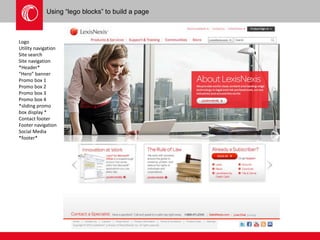
Using “lego blocks” to build a page 
Logo 
Utility navigation 
Site search 
Site navigation 
*Header* 
“Hero” banner 
Promo box 1 
Promo box 2 
Promo box 3 
Promo box 4 
*sliding promo 
box display * 
Contact footer 
Footer navigation 
Social Media 
*footer*
22 
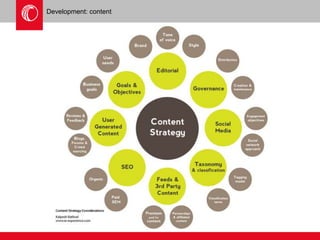
Development: content 
Content strategy & development 
A process to determine which content should appear on which pages of the 
website in order to meet user expectations and needs. 
Final page content is to be approved by business owners and subject matter experts 
Groups involved 
Local marketing teams 
Local content teams (product team) 
Global Digital Business team (strategy) 
Tools used 
Microsoft office
23 
Development: content 
SEO background research 
• Existing site research 
• Competitor research 
• Keyword identification 
• Inbound link audit 
Content strategy 
• Content audit to identify key assets 
• Page titles 
• Keywords per page 
Page content (requires wireframes to be approved) 
• Page copy and content (images, video, links, downloads, forms, etc.) 
• Individual page KPIs
Development: content
25 
Development: technical 
Pagetype and template creation 
Master pagetypes defined and created by the development team. 
Pagetypes are a ‘shell’ which will hold editable, reusable content blocks. 
These content blocks are assembled in a pagetype to create a template. 
Groups involved 
Development team 
Tools used 
Squiz 
Javascript / Jquery 
HTML / CSS 
PHP
26 
Implementation and publishing 
Content population 
Once a template has passed UAT, it will be available for web editors to 
populate with approved content. 
Content population can take place on a section by section or template by template 
basis, it is not necessary for all templates to be be created before population 
begins. 
Groups involved 
Local web teams 
Global Digital Business team (support) 
Tools used 
Microsoft office 
Squiz
27 
Implementation and publishing 
Technical implementation and configuration 
Once the content has been populated, all tracking, monitoring and third 
party code is added and configured. Other tasks include: 
• Install Google Analytics and configure goals and funnels 
• Setup redirects to minimize any traffic loss due to the redesign 
• Create XML sitemap and submit to search engines 
• Configure and monitor webmaster tools to identify critical errors 
Groups involved 
Global Digital Business team 
Local marketing team 
Tools used 
Squiz 
CRM system 
Any 3rd party application/functions 
Being used on the site
28 
Quality assurance 
Pre-flight review checks 
• All content is reviewed for accuracy and appropriateness 
• Technical functionality 
• Tracking systems (google analytics, insight tools) 
• CRM form handoff validated 
• Third party functions validated (click to chat, customer feedback) 
Groups involved 
Global Digital Business Team (GDB) 
Customer Discovery & Innovation (CDI) 
Local teams (participant recruitment) 
Tools used 
All relevant third party tools 
Customer feedback tool (Kampyle) 
Littleforest Index 
Webmaster tools 
Google Analytics 
CRM systems
Launch 
Launch 
• DNS changes 
• Send notice to search engines 
• Marketing teams begin new site campaigns
30 
Continual improvement 
Post launch support 
The performance (based on the KPIs established earlier in the process) will be 
monitored and shared with stakeholders. As opportunities for improvement 
become known, appropriate steps will be taken to maximize performance. 
• Reporting 
• Governance 
• Training 
• Consultancy 
• Actionable insight 
Groups involved 
Global Digital Business Team (GDB) 
Customer Discovery & Innovation (CDI) 
Local teams (participant recruitment) 
Tools used 
UserZoom 
Decibel Insight 
Google Analytics 
Direct customer feedback tool (Kampyle) 
Littleforest Index 
HP Autonomy Optimost 
5second test
Tools overview 
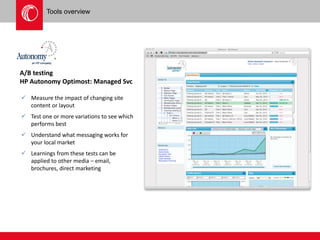
A/B testing 
HP Autonomy Optimost: Managed Svc 
 Measure the impact of changing site 
content or layout 
 Test one or more variations to see which 
performs best 
 Understand what messaging works for 
your local market 
 Learnings from these tests can be 
applied to other media – email, 
brochures, direct marketing
Tools overview 
A/B testing 
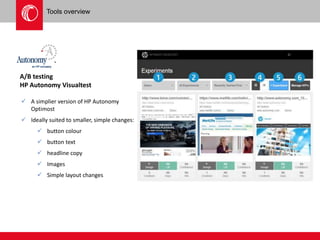
HP Autonomy Visualtest 
 A simplier version of HP Autonomy 
Optimost 
 Ideally suited to smaller, simple changes: 
 button colour 
 button text 
 headline copy 
 Images 
 Simple layout changes
Tools overview 
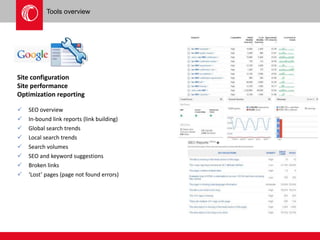
Site configuration 
Site performance 
Optimization reporting 
 SEO overview 
 In-bound link reports (link building) 
 Global search trends 
 Local search trends 
 Search volumes 
 SEO and keyword suggestions 
 Broken links 
 ‘Lost’ pages (page not found errors)
Tools overview 
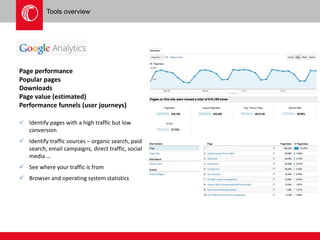
Page performance 
Popular pages 
Downloads 
Page value (estimated) 
Performance funnels (user journeys) 
 Identify pages with a high traffic but low 
conversion 
 Identify traffic sources – organic search, paid 
search, email campaigns, direct traffic, social 
media … 
 See where your traffic is from 
 Browser and operating system statistics
Tools overview 
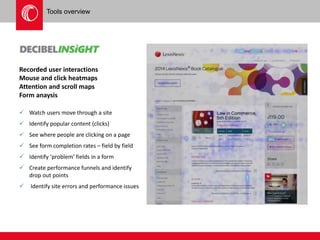
Recorded user interactions 
Mouse and click heatmaps 
Attention and scroll maps 
Form anaysis 
 Watch users move through a site 
 Identify popular content (clicks) 
 See where people are clicking on a page 
 See form completion rates – field by field 
 Identify ‘problem’ fields in a form 
 Create performance funnels and identify 
drop out points 
 Identify site errors and performance issues
Tools overview 
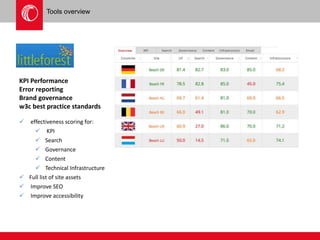
KPI Performance 
Error reporting 
Brand governance 
w3c best practice standards 
 effectiveness scoring for: 
 KPI 
 Search 
 Governance 
 Content 
 Technical Infrastructure 
 Full list of site assets 
 Improve SEO 
 Improve accessibility
Tools overview 
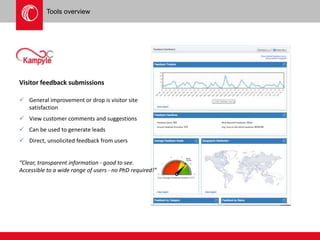
Visitor feedback submissions 
 General improvement or drop is visitor site 
satisfaction 
 View customer comments and suggestions 
 Can be used to generate leads 
 Direct, unsolicited feedback from users 
“Clear, transparent information - good to see. 
Accessible to a wide range of users - no PhD required!”
Tools overview 
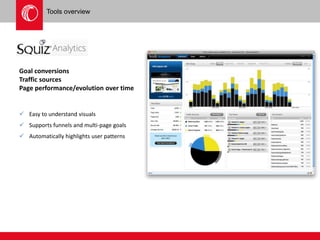
Goal conversions 
Traffic sources 
Page performance/evolution over time 
 Easy to understand visuals 
 Supports funnels and multi-page goals 
 Automatically highlights user patterns
Tools overview 
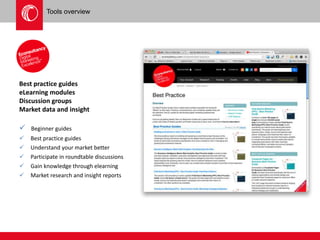
Best practice guides 
eLearning modules 
Discussion groups 
Market data and insight 
 Beginner guides 
 Best practice guides 
 Understand your market better 
 Participate in roundtable discussions 
 Gain knowledge through elearning 
 Market research and insight reports
Images and example acknowledgement 
Steve job’s design quote image 
http://designwebkit.com/inspiration/steve-jobs-quotes-visualized/ 
Process icons 
http://graphicdesignjunction.com/2013/07/seo-icons/ 
Simple persona example 
Microsoft via 
http://www.forbes.com/sites/louiscolumbus/2013/03/29/personas-are-the-future-of-enterprise-apps-lessons-learned-from-scribe- 
software/ 
Advanced persona example 
Todd Warfell via 
http://www.werner-puchert.com/2008/07/07/exploring-personas/ 
Rail Europe JourneyMap 
Adaptive Path 
http://www.adaptivepath.com/ideas/the-anatomy-of-an-experience-map/ 
Sarah’s Broadband Journey map 
Effective UI 
http://www.effectiveui.com/ 
via: 
http://www.ux-lady.com/experience-maps-user-journey-and-more-exp-map-layout/ 
http://www.uxmatters.com 
Content Strategy Considerations 
Kalpesh Rathod
Stay in touch 
Mark.fassbender@lexisnexis.co.uk 
Twitter: 
https://twitter.com/flashbender 
LinkedIn 
http://uk.linkedin.com/in/flashbender

User centered design process - Measurefest Presentation

  • 1.
    1 USER EXPERIENCEDESIGN Mark Fassbender, Global Head of Web Optimisation
  • 2.
    2 “People areon the web not to enjoy your web design, but to get something done.” Design Exploratory lexisnexis.com TO: S T E V E M A N N BY: D X T E A M 11 20 1 3 Jakob Nielsen
  • 3.
    3 “A sitethat really works fulfills your strategic objectives while meeting the needs of your users. Even the best content and the most sophisticated technology won't help Design you balance Exploratory those goals without a cohesive, lexisnexis.consistent com user experience to TO: S T E V E M A N N BY: D X T E A M 11 20 1 3 support it.” Jesse James Garrett
  • 4.
    4 What isuser experience design “User experience (UX) is the way a person feels about using a product, system, or service.” from wikipedia User experience design puts the user at the heart of the development process. It is based on gaining a deep understanding of user motivation, goals, abilities. That understanding is then combined with and understanding of business goals and objectives to create a plan that will guide the entire development process to ensure that user needs are met in such a way that it is advantageous to the business. There’s a reason that people are coming to your website, if you understand the reason and rationale for a visit and put the right content in front of the right user at the right time, it becomes much easier to convert a visitor into a customer.
  • 5.
    “You can usean eraser on the drafting table or a sledge hammer on the construction site.” - Frank Lloyd Wright Design in an exercise in problem solving. In order to have a successful design, the problems that need to be solved or the goals that need to be reached must be identified and understood. For a website to be successful, we must first understand the requirements of: • Users • Technology • Business owners • Legal
  • 6.
    Information architecture Content strategy Campaigns SEO Technical functionality Visual design Business objectives Navigation Customer service Post sales support User needs & motivation Business objectives Maximum Success Potential User experience is not something that is implemented at the beginning of a project and then forgotten about. It is a philosophy that needs to be taken into account during every step of the product lifecycle and guide every interaction between a user and the business.
  • 7.
    The user experiencedesign process Implement + Publish Discovery + Understanding Structure + Validation Interactions Development Monitoring + Maintenance Quality assurance Launch work shop work shop Continual Improvement
  • 8.
    Overview This beginningphase provides the foundation for every other step. The research done in this phase provides a deep understanding of user needs and motivation, business objectives. The analysis of the research provides insight on how to more closely align the motivation of the users to the needs of the business. Groups involved Global Digital Business Team (GDB) Customer Discovery & Innovation (CDI) Local teams (participant recruitment) Website users Existing customers Tools used UserZoom Decibel Insight Google Analytics Direct customer feedback tool (Kampyle) Discovery + understanding
  • 9.
    9 Discovery +understanding User needs analysis User interviews and testing Web metrics analysis Web user behavioral insight Online surveys Customer interviews Website user behaviour analysis Result Persona detail Key touchpoints User frustrations User motivations Business needs analysis Sr. business stakeholders Marketing Sales Customer service Strategy team Product team Legal IT Result Persona basics Business KPIs
  • 12.
    12 Discovery phase:workshop Workshop Where the findings of the discovery phase are presented to internal stakeholders, and discussions revolve around to following: • customer experience map which highlights key tasks and the supporting assets • prioritized content by persona and phase • initial sitemap • high level business KPIs Groups involved Global Digital Business Team (GDB) Customer Discovery & Innovation (CDI) Local teams Sr. Stakeholders Tools used Microsoft Office Pens & Paper Flip Charts Sticky notes (of course!)
  • 13.
    13 Discovery phase:workshop Output At the end of the workshop revisions there should be a consensus and agreement on the following: • High level sitemap (main sections of the site agreed) • Overall KPIs • Success measures for each persona • Prioritized content for each persona Benefits of sitemaps, user flows and journey maps • Determines project scope • Highlights potential problem areas that need extra attention • Establishes how existing user behavior will impact business objectives • Creates connections between site structure, navigation, content, user needs, business needs and technology • Form the base for wireframe design
  • 14.
  • 15.
  • 16.
    16 Structure andinteractions Wireframes are the blueprints for design They are structural documentation that organizes content and interactive elements. Wireframes focus on layout and content and help prioritize the elements that make up a page. Groups involved Global Digital Business Team (GDB) Customer Discovery & Innovation (CDI) Design Team Local teams (participant recruitment) Tools used Axure Omnigraffle Pen & Paper
  • 17.
    17 Visual design Questions to ask when discussing wireframes • What is the purpose of this page, what do we want users to do • How do the different elements relate to one another • Do the pieces work together or do they send conflicting messages Benefits of wireframes • Validate and clarify project scope • Define page level KPIs • Highlight potential development challenges early in the process • Determines content/element priority • Delivers something visual that can be shared to sr. management
  • 18.
  • 19.
    19 Visual development Visual design patterns are the building blocks of templates Design patterns and components are the foundation on which a successful website are built. They are reusable designs that server a specific purpose and can be modified on a regional basis. Groups involved Global Digital Business Team (GDB) Customer Discovery & Innovation (CDI) Local teams (participant recruitment) Tools used Javascript /jquery HTML / CSS Adobe creative suite Axure
  • 20.
    20 Visual development Questions to ask when discussing design components • Is it technically possible to build it • Is it ‘on brand’ • Does it solve a user or business need • Is this suitable for all sites or is this a local solution Benefits of pattern design • Build once, reuse as often as necessary • Can be customized for multi-region use • The more components exist in the library, the faster future site can be built • Ensure compliance to global standards – local editors are not responsible for technical implementation
  • 21.
    Using “lego blocks”to build a page Logo Utility navigation Site search Site navigation *Header* “Hero” banner Promo box 1 Promo box 2 Promo box 3 Promo box 4 *sliding promo box display * Contact footer Footer navigation Social Media *footer*
  • 22.
    22 Development: content Content strategy & development A process to determine which content should appear on which pages of the website in order to meet user expectations and needs. Final page content is to be approved by business owners and subject matter experts Groups involved Local marketing teams Local content teams (product team) Global Digital Business team (strategy) Tools used Microsoft office
  • 23.
    23 Development: content SEO background research • Existing site research • Competitor research • Keyword identification • Inbound link audit Content strategy • Content audit to identify key assets • Page titles • Keywords per page Page content (requires wireframes to be approved) • Page copy and content (images, video, links, downloads, forms, etc.) • Individual page KPIs
  • 24.
  • 25.
    25 Development: technical Pagetype and template creation Master pagetypes defined and created by the development team. Pagetypes are a ‘shell’ which will hold editable, reusable content blocks. These content blocks are assembled in a pagetype to create a template. Groups involved Development team Tools used Squiz Javascript / Jquery HTML / CSS PHP
  • 26.
    26 Implementation andpublishing Content population Once a template has passed UAT, it will be available for web editors to populate with approved content. Content population can take place on a section by section or template by template basis, it is not necessary for all templates to be be created before population begins. Groups involved Local web teams Global Digital Business team (support) Tools used Microsoft office Squiz
  • 27.
    27 Implementation andpublishing Technical implementation and configuration Once the content has been populated, all tracking, monitoring and third party code is added and configured. Other tasks include: • Install Google Analytics and configure goals and funnels • Setup redirects to minimize any traffic loss due to the redesign • Create XML sitemap and submit to search engines • Configure and monitor webmaster tools to identify critical errors Groups involved Global Digital Business team Local marketing team Tools used Squiz CRM system Any 3rd party application/functions Being used on the site
  • 28.
    28 Quality assurance Pre-flight review checks • All content is reviewed for accuracy and appropriateness • Technical functionality • Tracking systems (google analytics, insight tools) • CRM form handoff validated • Third party functions validated (click to chat, customer feedback) Groups involved Global Digital Business Team (GDB) Customer Discovery & Innovation (CDI) Local teams (participant recruitment) Tools used All relevant third party tools Customer feedback tool (Kampyle) Littleforest Index Webmaster tools Google Analytics CRM systems
  • 29.
    Launch Launch •DNS changes • Send notice to search engines • Marketing teams begin new site campaigns
  • 30.
    30 Continual improvement Post launch support The performance (based on the KPIs established earlier in the process) will be monitored and shared with stakeholders. As opportunities for improvement become known, appropriate steps will be taken to maximize performance. • Reporting • Governance • Training • Consultancy • Actionable insight Groups involved Global Digital Business Team (GDB) Customer Discovery & Innovation (CDI) Local teams (participant recruitment) Tools used UserZoom Decibel Insight Google Analytics Direct customer feedback tool (Kampyle) Littleforest Index HP Autonomy Optimost 5second test
  • 31.
    Tools overview A/Btesting HP Autonomy Optimost: Managed Svc  Measure the impact of changing site content or layout  Test one or more variations to see which performs best  Understand what messaging works for your local market  Learnings from these tests can be applied to other media – email, brochures, direct marketing
  • 32.
    Tools overview A/Btesting HP Autonomy Visualtest  A simplier version of HP Autonomy Optimost  Ideally suited to smaller, simple changes:  button colour  button text  headline copy  Images  Simple layout changes
  • 33.
    Tools overview Siteconfiguration Site performance Optimization reporting  SEO overview  In-bound link reports (link building)  Global search trends  Local search trends  Search volumes  SEO and keyword suggestions  Broken links  ‘Lost’ pages (page not found errors)
  • 34.
    Tools overview Pageperformance Popular pages Downloads Page value (estimated) Performance funnels (user journeys)  Identify pages with a high traffic but low conversion  Identify traffic sources – organic search, paid search, email campaigns, direct traffic, social media …  See where your traffic is from  Browser and operating system statistics
  • 35.
    Tools overview Recordeduser interactions Mouse and click heatmaps Attention and scroll maps Form anaysis  Watch users move through a site  Identify popular content (clicks)  See where people are clicking on a page  See form completion rates – field by field  Identify ‘problem’ fields in a form  Create performance funnels and identify drop out points  Identify site errors and performance issues
  • 36.
    Tools overview KPIPerformance Error reporting Brand governance w3c best practice standards  effectiveness scoring for:  KPI  Search  Governance  Content  Technical Infrastructure  Full list of site assets  Improve SEO  Improve accessibility
  • 37.
    Tools overview Visitorfeedback submissions  General improvement or drop is visitor site satisfaction  View customer comments and suggestions  Can be used to generate leads  Direct, unsolicited feedback from users “Clear, transparent information - good to see. Accessible to a wide range of users - no PhD required!”
  • 38.
    Tools overview Goalconversions Traffic sources Page performance/evolution over time  Easy to understand visuals  Supports funnels and multi-page goals  Automatically highlights user patterns
  • 39.
    Tools overview Bestpractice guides eLearning modules Discussion groups Market data and insight  Beginner guides  Best practice guides  Understand your market better  Participate in roundtable discussions  Gain knowledge through elearning  Market research and insight reports
  • 40.
    Images and exampleacknowledgement Steve job’s design quote image http://designwebkit.com/inspiration/steve-jobs-quotes-visualized/ Process icons http://graphicdesignjunction.com/2013/07/seo-icons/ Simple persona example Microsoft via http://www.forbes.com/sites/louiscolumbus/2013/03/29/personas-are-the-future-of-enterprise-apps-lessons-learned-from-scribe- software/ Advanced persona example Todd Warfell via http://www.werner-puchert.com/2008/07/07/exploring-personas/ Rail Europe JourneyMap Adaptive Path http://www.adaptivepath.com/ideas/the-anatomy-of-an-experience-map/ Sarah’s Broadband Journey map Effective UI http://www.effectiveui.com/ via: http://www.ux-lady.com/experience-maps-user-journey-and-more-exp-map-layout/ http://www.uxmatters.com Content Strategy Considerations Kalpesh Rathod
  • 41.
    Stay in touch Mark.fassbender@lexisnexis.co.uk Twitter: https://twitter.com/flashbender LinkedIn http://uk.linkedin.com/in/flashbender