Apache HTTP mod_ftp William A. Rowe, Jr. ASF Member, httpd and APR projects Sr. Software Engineer, Covalent Technologies
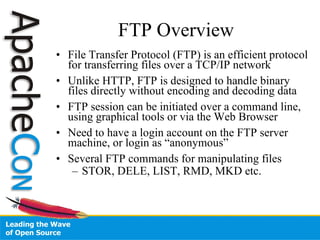
FTP Overview File Transfer Protocol (FTP) is an efficient protocol for transferring files over a TCP/IP network Unlike HTTP, FTP is designed to handle binary files directly without encoding and decoding data FTP session can be initiated over a command line, using graphical tools or via the Web Browser Need to have a login account on the FTP server machine, or login as “anonymous” Several FTP commands for manipulating files STOR, DELE, LIST, RMD, MKD etc.
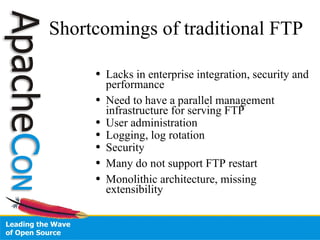
Shortcomings of traditional FTP Lacks in enterprise integration, security and performance Need to have a parallel management infrastructure for serving FTP User administration Logging, log rotation Security Many do not support FTP restart Monolithic architecture, missing extensibility
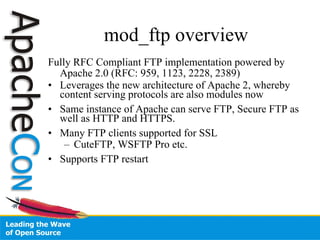
mod_ftp overview Fully RFC Compliant FTP implementation powered by Apache 2.0 (RFC: 959, 1123, 2228, 2389)‏ Leverages the new architecture of Apache 2, whereby content serving protocols are also modules now Same instance of Apache can serve FTP, Secure FTP as well as HTTP and HTTPS. Many FTP clients supported for SSL CuteFTP, WSFTP Pro etc. Supports FTP restart
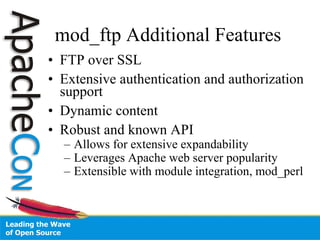
mod_ftp Additional Features FTP over SSL Extensive authentication and authorization support Dynamic content Robust and known API Allows for extensive expandability Leverages Apache web server popularity Extensible with module integration, mod_perl
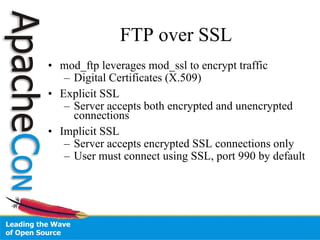
FTP over SSL mod_ftp leverages mod_ssl to encrypt traffic Digital Certificates (X.509)‏ Explicit SSL Server accepts both encrypted and unencrypted connections Implicit SSL Server accepts encrypted SSL connections only User must connect using SSL, port 990 by default
ServerName ftphost.mydomain:21  ServerRoot / path / to /server/ $(ServerName)  ServerAdmin webmaster@ ftphost.mydomain DocumentRoot &quot;/ path / to /server/ $(ServerName) /ftpdocs&quot; <Directory /> Options FollowSymLinks AllowOverride None  </Directory> <Directory &quot;/ path / to /server/ $(ServerName) /ftpdocs&quot;>  <Limit MKD RMD STOR DELE RNFR> Order deny,allow Deny from all </Limit> </Directory> LoadModule ftp_module / path /modules/mod_ftp.so  LogFormat &quot;%u [%a] %r&quot; cmd_log LogFormat &quot;%{%b %e %H:%M:%S %Y}t %T %a %B %U %M %F %d %W %u %S %Z %Y&quot; trans_log  Config Example
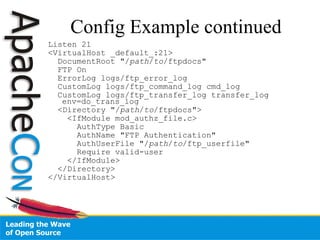
Config Example continued Listen 21 <VirtualHost _default_:21> DocumentRoot &quot;/ path / to /ftpdocs&quot;  FTP On ErrorLog logs/ftp_error_log CustomLog logs/ftp_command_log cmd_log CustomLog logs/ftp_transfer_log transfer_log env=do_trans_log  <Directory &quot;/ path / to /ftpdocs&quot;>  <IfModule mod_authz_file.c> AuthType Basic AuthName &quot;FTP Authentication&quot; AuthUserFile &quot;/ path / to /ftp_userfile&quot;  Require valid-user </IfModule> </Directory> </VirtualHost>
Good References http://httpd.apache.org/dev/dist/ http://httpd.apache.org/modules/ http://wiki.apache.org/httpd/ http://en.wikipedia.org/wiki/Ftp_client
Contact and Followup http://people.apache.org/~wrowe/ [email_address] IRC help at irc.freenode.net #apache Peer help at users@httpd.apache.org

US07FFT-mod_ftp.ppt

  • 1.
    Apache HTTP mod_ftpWilliam A. Rowe, Jr. ASF Member, httpd and APR projects Sr. Software Engineer, Covalent Technologies
  • 2.
    FTP Overview FileTransfer Protocol (FTP) is an efficient protocol for transferring files over a TCP/IP network Unlike HTTP, FTP is designed to handle binary files directly without encoding and decoding data FTP session can be initiated over a command line, using graphical tools or via the Web Browser Need to have a login account on the FTP server machine, or login as “anonymous” Several FTP commands for manipulating files STOR, DELE, LIST, RMD, MKD etc.
  • 3.
    Shortcomings of traditionalFTP Lacks in enterprise integration, security and performance Need to have a parallel management infrastructure for serving FTP User administration Logging, log rotation Security Many do not support FTP restart Monolithic architecture, missing extensibility
  • 4.
    mod_ftp overview FullyRFC Compliant FTP implementation powered by Apache 2.0 (RFC: 959, 1123, 2228, 2389)‏ Leverages the new architecture of Apache 2, whereby content serving protocols are also modules now Same instance of Apache can serve FTP, Secure FTP as well as HTTP and HTTPS. Many FTP clients supported for SSL CuteFTP, WSFTP Pro etc. Supports FTP restart
  • 5.
    mod_ftp Additional FeaturesFTP over SSL Extensive authentication and authorization support Dynamic content Robust and known API Allows for extensive expandability Leverages Apache web server popularity Extensible with module integration, mod_perl
  • 6.
    FTP over SSLmod_ftp leverages mod_ssl to encrypt traffic Digital Certificates (X.509)‏ Explicit SSL Server accepts both encrypted and unencrypted connections Implicit SSL Server accepts encrypted SSL connections only User must connect using SSL, port 990 by default
  • 7.
    ServerName ftphost.mydomain:21 ServerRoot / path / to /server/ $(ServerName) ServerAdmin webmaster@ ftphost.mydomain DocumentRoot &quot;/ path / to /server/ $(ServerName) /ftpdocs&quot; <Directory /> Options FollowSymLinks AllowOverride None </Directory> <Directory &quot;/ path / to /server/ $(ServerName) /ftpdocs&quot;> <Limit MKD RMD STOR DELE RNFR> Order deny,allow Deny from all </Limit> </Directory> LoadModule ftp_module / path /modules/mod_ftp.so LogFormat &quot;%u [%a] %r&quot; cmd_log LogFormat &quot;%{%b %e %H:%M:%S %Y}t %T %a %B %U %M %F %d %W %u %S %Z %Y&quot; trans_log Config Example
  • 8.
    Config Example continuedListen 21 <VirtualHost _default_:21> DocumentRoot &quot;/ path / to /ftpdocs&quot; FTP On ErrorLog logs/ftp_error_log CustomLog logs/ftp_command_log cmd_log CustomLog logs/ftp_transfer_log transfer_log env=do_trans_log <Directory &quot;/ path / to /ftpdocs&quot;> <IfModule mod_authz_file.c> AuthType Basic AuthName &quot;FTP Authentication&quot; AuthUserFile &quot;/ path / to /ftp_userfile&quot; Require valid-user </IfModule> </Directory> </VirtualHost>
  • 9.
    Good References http://httpd.apache.org/dev/dist/http://httpd.apache.org/modules/ http://wiki.apache.org/httpd/ http://en.wikipedia.org/wiki/Ftp_client
  • 10.
    Contact and Followuphttp://people.apache.org/~wrowe/ [email_address] IRC help at irc.freenode.net #apache Peer help at users@httpd.apache.org