Why Programming language?
Introduction to C programming.
C programming for microcontrollers ( Micro C ).
 Flasher program
Why Programming language?
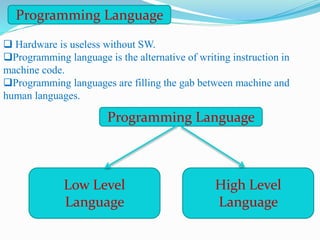
Programming Language
 Hardware is useless without SW.
Programming language is the alternative of writing instruction in
machine code.
Programming languages are filling the gab between machine and
human languages.
Programming Language
Low Level
Language
High Level
Language
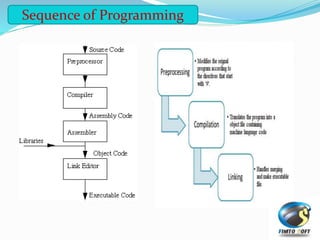
Sequence of Programming
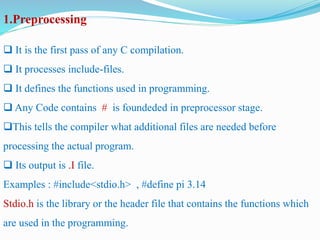
1.Preprocessing
 It is the first pass of any C compilation.
 It processes include-files.
 It defines the functions used in programming.
 Any Code contains # is foundeded in preprocessor stage.
This tells the compiler what additional files are needed before
processing the actual program.
 Its output is .I file.
Examples : #include<stdio.h> , #define pi 3.14
Stdio.h is the library or the header file that contains the functions which
are used in the programming.
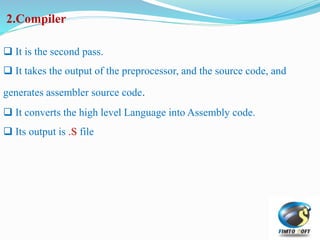
2.Compiler
 It is the second pass.
 It takes the output of the preprocessor, and the source code, and
generates assembler source code.
 It converts the high level Language into Assembly code.
 Its output is .S file
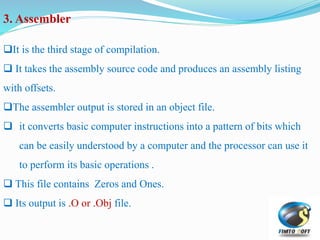
3. Assembler
It is the third stage of compilation.
 It takes the assembly source code and produces an assembly listing
with offsets.
The assembler output is stored in an object file.
 it converts basic computer instructions into a pattern of bits which
can be easily understood by a computer and the processor can use it
to perform its basic operations .
 This file contains Zeros and Ones.
 Its output is .O or .Obj file.
4. Linker
 It is the final stage of compilation.
 It takes one or more object files or libraries as input and combines
them to produce a single (usually executable) file.
 It links the Object files with the libraries.
 Its Output is .EXE file.
Introduction to C programming.
 It is a part of every C program.
 The parenthesis after main indicate that main is program building
block called a function.
 C programs contain one or more functions, one of which must be
main.
 Every program in C begins executing at the function main.
main()
This is used to display argument list on the monitor.
This an output function.
Examples:
printf (“argument”);
printf (“Hello World !!”);
Note:
n is an escape sequence for NEW LINE.
t is an escape sequence for TAB.
Printf()
 This is used to input a single character or sequence of characters from
the keyboard.
 It needs the control string codes to be recognized.
Examples:
scanf (“format control string”, &input list);
scanf(“%d,&x);
Scanf()
 Starts with /* and ends with */
 It can be simple //
 Programmers insert comments to document programs and improve
program readability.
 Can be placed anywhere in the program.
 Comments are ignored by the C compiler.
 Every line must has a comment
Comments
 There are 4 basic data types in C language:
a) Character (char) : used to hold whole number values and ASCII
characters. (8 bit)
b) Integer (int) : used to hold whole number values. (16 bit)
c) Floating Point (float) : used to hold real numbers. (32 bit)
d) Double Point (double) : used to hold real numbers. (64 bit)
Data Types
 Signed
By default all data types are declared as signed. Signed means that the
data type is capable of storing negative values.
 Unsigned
To modify a data type’s behavior so that it can only store positive
values.
Long
This doubles the storage capacity of the data type being used.
E.g. long int x will make the storage capacity of variable x to 4 bytes.
Short
If long data type modifier doubles the size, short on the other hand
reduces the size of the data type to half.
Data Modifiers
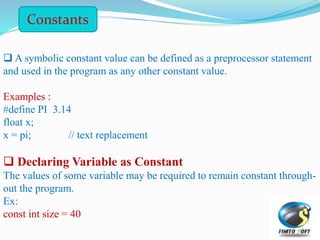
Constants
 A symbolic constant value can be defined as a preprocessor statement
and used in the program as any other constant value.
Examples :
#define PI 3.14
float x;
x = pi; // text replacement
 Declaring Variable as Constant
The values of some variable may be required to remain constant through-
out the program.
Ex:
const int size = 40
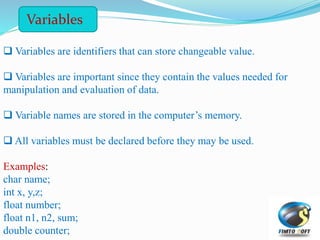
 Variables are identifiers that can store changeable value.
 Variables are important since they contain the values needed for
manipulation and evaluation of data.
 Variable names are stored in the computer’s memory.
 All variables must be declared before they may be used.
Examples:
char name;
int x, y,z;
float number;
float n1, n2, sum;
double counter;
Variables
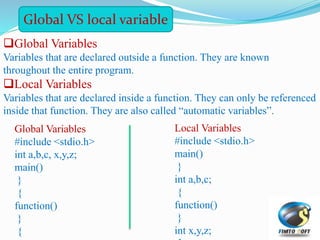
Global Variables
Variables that are declared outside a function. They are known
throughout the entire program.
Local Variables
Variables that are declared inside a function. They can only be referenced
inside that function. They are also called “automatic variables”.
Global VS local variable
Global Variables
#include <stdio.h>
int a,b,c, x,y,z;
main()
{
}
function()
{
}
Local Variables
#include <stdio.h>
main()
{
int a,b,c;
}
function()
{
int x,y,z;
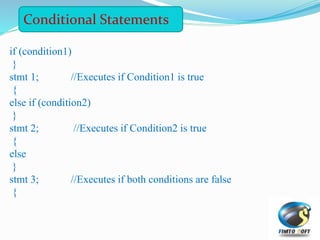
if (condition1)
{
stmt 1; //Executes if Condition1 is true
}
else if (condition2)
{
stmt 2; //Executes if Condition2 is true
}
else
{
stmt 3; //Executes if both conditions are false
}
Conditional Statements
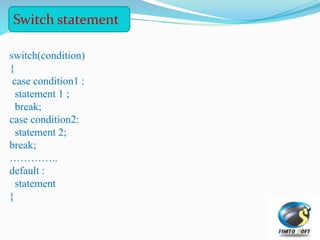
switch(condition)
{
case condition1 :
statement 1 ;
break;
case condition2:
statement 2;
break;
…………..
default :
statement
}
Switch statement
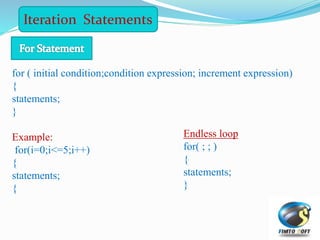
Iteration Statements
for ( initial condition;condition expression; increment expression)
{
statements;
}
Example:
for(i=0;i<=5;i++)
{
statements;
{
Endless loop
for( ; ; )
{
statements;
}
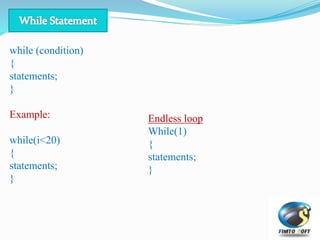
while (condition)
{
statements;
}
Example:
while(i<20)
{
statements;
}
Endless loop
While(1)
{
statements;
}
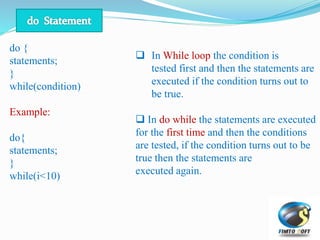
do {
statements;
}
while(condition)
Example:
do{
statements;
}
while(i<10)
 In While loop the condition is
tested first and then the statements are
executed if the condition turns out to
be true.
 In do while the statements are executed
for the first time and then the conditions
are tested, if the condition turns out to be
true then the statements are
executed again.
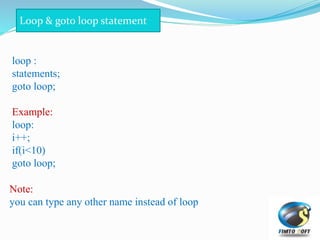
loop :
statements;
goto loop;
Example:
loop:
i++;
if(i<10)
goto loop;
Loop & goto loop statement
Note:
you can type any other name instead of loop
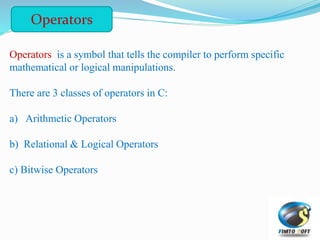
Operators is a symbol that tells the compiler to perform specific
mathematical or logical manipulations.
There are 3 classes of operators in C:
a) Arithmetic Operators
b) Relational & Logical Operators
c) Bitwise Operators
Operators
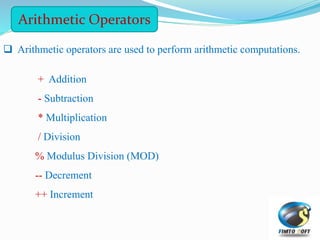
 Arithmetic operators are used to perform arithmetic computations.
+ Addition
- Subtraction
* Multiplication
/ Division
% Modulus Division (MOD)
-- Decrement
++ Increment
Arithmetic Operators
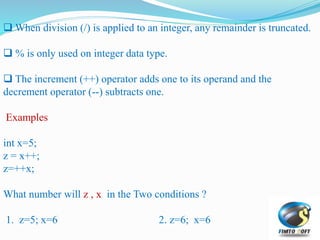
 When division (/) is applied to an integer, any remainder is truncated.
 % is only used on integer data type.
 The increment (++) operator adds one to its operand and the
decrement operator (--) subtracts one.
Examples
int x=5;
z = x++;
z=++x;
What number will z , x in the Two conditions ?
1. z=5; x=6 2. z=6; x=6
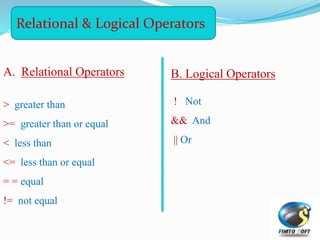
Relational & Logical Operators
A. Relational Operators
> greater than
>= greater than or equal
< less than
<= less than or equal
= = equal
!= not equal
B. Logical Operators
! Not
&& And
|| Or
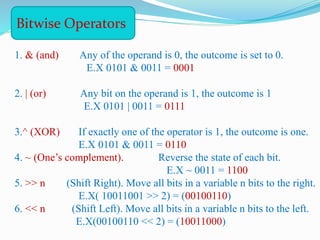
1. & (and) Any of the operand is 0, the outcome is set to 0.
E.X 0101 & 0011 = 0001
2. | (or) Any bit on the operand is 1, the outcome is 1
E.X 0101 | 0011 = 0111
3.^ (XOR) If exactly one of the operator is 1, the outcome is one.
E.X 0101 & 0011 = 0110
4. ~ (One’s complement). Reverse the state of each bit.
E.X ~ 0011 = 1100
5. >> n (Shift Right). Move all bits in a variable n bits to the right.
E.X( 10011001 >> 2) = (00100110)
6. << n (Shift Left). Move all bits in a variable n bits to the left.
E.X(00100110 << 2) = (10011000)
Bitwise Operators
Micro C Programming
Micro C programming
 Determination of data direction in micro c :-
 TRISX=Value;
X :- is the port name we want to control it’s pins [A , B , C , D , E]
VALUE :- it has one of two values [0 , 1 ]
zero for make the pin output
one for making the pin input .
 The value may binary or hexadecimal or decimal.
TRISX=0b10110101; //Binary
TRISX.fN = 0 or 1;
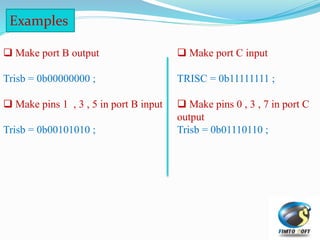
 Make port B output
Trisb = 0b00000000 ;
 Make pins 1 , 3 , 5 in port B input
Trisb = 0b00101010 ;
Examples
 Make port C input
TRISC = 0b11111111 ;
 Make pins 0 , 3 , 7 in port C
output
Trisb = 0b01110110 ;
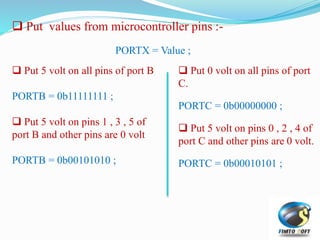
 Put values from microcontroller pins :-
PORTX = Value ;
 Put 5 volt on all pins of port B
PORTB = 0b11111111 ;
 Put 5 volt on pins 1 , 3 , 5 of
port B and other pins are 0 volt
PORTB = 0b00101010 ;
 Put 0 volt on all pins of port
C.
PORTC = 0b00000000 ;
 Put 5 volt on pins 0 , 2 , 4 of
port C and other pins are 0 volt.
PORTC = 0b00010101 ;
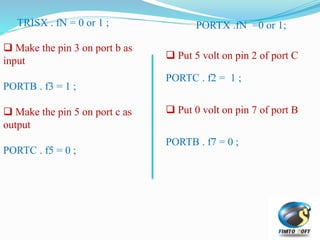
TRISX . fN = 0 or 1 ;
 Make the pin 3 on port b as
input
PORTB . f3 = 1 ;
 Make the pin 5 on port c as
output
PORTC . f5 = 0 ;
PORTX .fN =0 or 1;
 Put 5 volt on pin 2 of port C
PORTC . f2 = 1 ;
 Put 0 volt on pin 7 of port B
PORTB . f7 = 0 ;
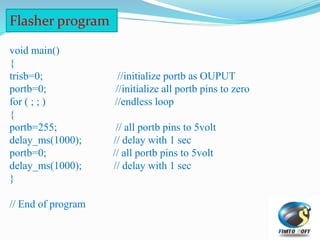
Flasher program
void main()
{
trisb=0; //initialize portb as OUPUT
portb=0; //initialize all portb pins to zero
for ( ; ; ) //endless loop
{
portb=255; // all portb pins to 5volt
delay_ms(1000); // delay with 1 sec
portb=0; // all portb pins to 5volt
delay_ms(1000); // delay with 1 sec
}
// End of program

Microcontroller lec 3

  • 2.
    Why Programming language? Introductionto C programming. C programming for microcontrollers ( Micro C ).  Flasher program
  • 3.
  • 4.
    Programming Language  Hardwareis useless without SW. Programming language is the alternative of writing instruction in machine code. Programming languages are filling the gab between machine and human languages. Programming Language Low Level Language High Level Language
  • 5.
  • 6.
    1.Preprocessing  It isthe first pass of any C compilation.  It processes include-files.  It defines the functions used in programming.  Any Code contains # is foundeded in preprocessor stage. This tells the compiler what additional files are needed before processing the actual program.  Its output is .I file. Examples : #include<stdio.h> , #define pi 3.14 Stdio.h is the library or the header file that contains the functions which are used in the programming.
  • 7.
    2.Compiler  It isthe second pass.  It takes the output of the preprocessor, and the source code, and generates assembler source code.  It converts the high level Language into Assembly code.  Its output is .S file
  • 8.
    3. Assembler It isthe third stage of compilation.  It takes the assembly source code and produces an assembly listing with offsets. The assembler output is stored in an object file.  it converts basic computer instructions into a pattern of bits which can be easily understood by a computer and the processor can use it to perform its basic operations .  This file contains Zeros and Ones.  Its output is .O or .Obj file.
  • 9.
    4. Linker  Itis the final stage of compilation.  It takes one or more object files or libraries as input and combines them to produce a single (usually executable) file.  It links the Object files with the libraries.  Its Output is .EXE file.
  • 10.
    Introduction to Cprogramming.
  • 11.
     It isa part of every C program.  The parenthesis after main indicate that main is program building block called a function.  C programs contain one or more functions, one of which must be main.  Every program in C begins executing at the function main. main()
  • 12.
    This is usedto display argument list on the monitor. This an output function. Examples: printf (“argument”); printf (“Hello World !!”); Note: n is an escape sequence for NEW LINE. t is an escape sequence for TAB. Printf()
  • 13.
     This isused to input a single character or sequence of characters from the keyboard.  It needs the control string codes to be recognized. Examples: scanf (“format control string”, &input list); scanf(“%d,&x); Scanf()
  • 14.
     Starts with/* and ends with */  It can be simple //  Programmers insert comments to document programs and improve program readability.  Can be placed anywhere in the program.  Comments are ignored by the C compiler.  Every line must has a comment Comments
  • 15.
     There are4 basic data types in C language: a) Character (char) : used to hold whole number values and ASCII characters. (8 bit) b) Integer (int) : used to hold whole number values. (16 bit) c) Floating Point (float) : used to hold real numbers. (32 bit) d) Double Point (double) : used to hold real numbers. (64 bit) Data Types
  • 16.
     Signed By defaultall data types are declared as signed. Signed means that the data type is capable of storing negative values.  Unsigned To modify a data type’s behavior so that it can only store positive values. Long This doubles the storage capacity of the data type being used. E.g. long int x will make the storage capacity of variable x to 4 bytes. Short If long data type modifier doubles the size, short on the other hand reduces the size of the data type to half. Data Modifiers
  • 17.
    Constants  A symbolicconstant value can be defined as a preprocessor statement and used in the program as any other constant value. Examples : #define PI 3.14 float x; x = pi; // text replacement  Declaring Variable as Constant The values of some variable may be required to remain constant through- out the program. Ex: const int size = 40
  • 18.
     Variables areidentifiers that can store changeable value.  Variables are important since they contain the values needed for manipulation and evaluation of data.  Variable names are stored in the computer’s memory.  All variables must be declared before they may be used. Examples: char name; int x, y,z; float number; float n1, n2, sum; double counter; Variables
  • 19.
    Global Variables Variables thatare declared outside a function. They are known throughout the entire program. Local Variables Variables that are declared inside a function. They can only be referenced inside that function. They are also called “automatic variables”. Global VS local variable Global Variables #include <stdio.h> int a,b,c, x,y,z; main() { } function() { } Local Variables #include <stdio.h> main() { int a,b,c; } function() { int x,y,z;
  • 20.
    if (condition1) { stmt 1;//Executes if Condition1 is true } else if (condition2) { stmt 2; //Executes if Condition2 is true } else { stmt 3; //Executes if both conditions are false } Conditional Statements
  • 21.
    switch(condition) { case condition1 : statement1 ; break; case condition2: statement 2; break; ………….. default : statement } Switch statement
  • 22.
    Iteration Statements for (initial condition;condition expression; increment expression) { statements; } Example: for(i=0;i<=5;i++) { statements; { Endless loop for( ; ; ) { statements; }
  • 23.
  • 24.
    do { statements; } while(condition) Example: do{ statements; } while(i<10)  InWhile loop the condition is tested first and then the statements are executed if the condition turns out to be true.  In do while the statements are executed for the first time and then the conditions are tested, if the condition turns out to be true then the statements are executed again.
  • 25.
    loop : statements; goto loop; Example: loop: i++; if(i<10) gotoloop; Loop & goto loop statement Note: you can type any other name instead of loop
  • 26.
    Operators is asymbol that tells the compiler to perform specific mathematical or logical manipulations. There are 3 classes of operators in C: a) Arithmetic Operators b) Relational & Logical Operators c) Bitwise Operators Operators
  • 27.
     Arithmetic operatorsare used to perform arithmetic computations. + Addition - Subtraction * Multiplication / Division % Modulus Division (MOD) -- Decrement ++ Increment Arithmetic Operators
  • 28.
     When division(/) is applied to an integer, any remainder is truncated.  % is only used on integer data type.  The increment (++) operator adds one to its operand and the decrement operator (--) subtracts one. Examples int x=5; z = x++; z=++x; What number will z , x in the Two conditions ? 1. z=5; x=6 2. z=6; x=6
  • 29.
    Relational & LogicalOperators A. Relational Operators > greater than >= greater than or equal < less than <= less than or equal = = equal != not equal B. Logical Operators ! Not && And || Or
  • 30.
    1. & (and)Any of the operand is 0, the outcome is set to 0. E.X 0101 & 0011 = 0001 2. | (or) Any bit on the operand is 1, the outcome is 1 E.X 0101 | 0011 = 0111 3.^ (XOR) If exactly one of the operator is 1, the outcome is one. E.X 0101 & 0011 = 0110 4. ~ (One’s complement). Reverse the state of each bit. E.X ~ 0011 = 1100 5. >> n (Shift Right). Move all bits in a variable n bits to the right. E.X( 10011001 >> 2) = (00100110) 6. << n (Shift Left). Move all bits in a variable n bits to the left. E.X(00100110 << 2) = (10011000) Bitwise Operators
  • 31.
  • 32.
    Micro C programming Determination of data direction in micro c :-  TRISX=Value; X :- is the port name we want to control it’s pins [A , B , C , D , E] VALUE :- it has one of two values [0 , 1 ] zero for make the pin output one for making the pin input .  The value may binary or hexadecimal or decimal. TRISX=0b10110101; //Binary TRISX.fN = 0 or 1;
  • 33.
     Make portB output Trisb = 0b00000000 ;  Make pins 1 , 3 , 5 in port B input Trisb = 0b00101010 ; Examples  Make port C input TRISC = 0b11111111 ;  Make pins 0 , 3 , 7 in port C output Trisb = 0b01110110 ;
  • 34.
     Put valuesfrom microcontroller pins :- PORTX = Value ;  Put 5 volt on all pins of port B PORTB = 0b11111111 ;  Put 5 volt on pins 1 , 3 , 5 of port B and other pins are 0 volt PORTB = 0b00101010 ;  Put 0 volt on all pins of port C. PORTC = 0b00000000 ;  Put 5 volt on pins 0 , 2 , 4 of port C and other pins are 0 volt. PORTC = 0b00010101 ;
  • 35.
    TRISX . fN= 0 or 1 ;  Make the pin 3 on port b as input PORTB . f3 = 1 ;  Make the pin 5 on port c as output PORTC . f5 = 0 ; PORTX .fN =0 or 1;  Put 5 volt on pin 2 of port C PORTC . f2 = 1 ;  Put 0 volt on pin 7 of port B PORTB . f7 = 0 ;
  • 36.
    Flasher program void main() { trisb=0;//initialize portb as OUPUT portb=0; //initialize all portb pins to zero for ( ; ; ) //endless loop { portb=255; // all portb pins to 5volt delay_ms(1000); // delay with 1 sec portb=0; // all portb pins to 5volt delay_ms(1000); // delay with 1 sec } // End of program