Introduction to Programming
Some Terminologies
 Algorithm / Flowchart
A step-by-step procedure for solving a particular
problem
Independent of the programming language
 Program
A translation of the algorithm/flowchart into a form
that can be processed by a computer
Typically written in a high-level language like C,
C++, Java, etc.
Variables and Constants
 Most important concept for problem
solving using computers
 All temporary results are stored in terms of
variables
The value of a variable can be changed
The value of a constant do not change
 Where are they stored?
In main memory
Variables and Constants…
 How does memory look like (logically)?
As a list of storage locations, each having a
unique address
Variables and constants are stored in these
storage locations
A variable is like a bin
 The contents of the bin is the value of the variable
 The variable name is used to refer to the value of the
variable
 A variable is mapped to a location of the memory,
called its address
Memory map
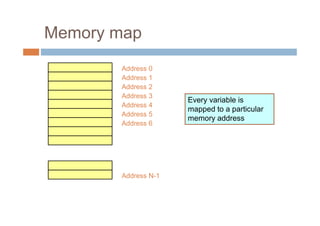
Address 0
Address 1
Address 2
Address 3
Address 4
Address 5
Address 6
Address N-1
Every variable is
mapped to a particular
memory address
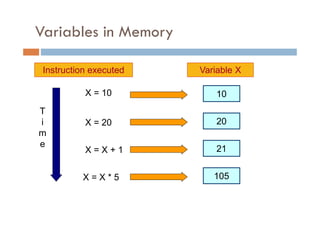
Variables in Memory
Variable X
X = 10
X = 20
X = X + 1
X = X * 5
10
Instruction executed
T
i
m
e
20
21
105
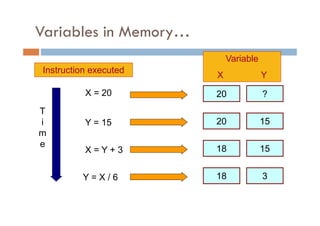
Variables in Memory…
Variable
X Y
X = 20
Y = 15
X = Y + 3
Y = X / 6
Instruction executed
20 ?
T
i
m
e
20 15
18 15
18 3
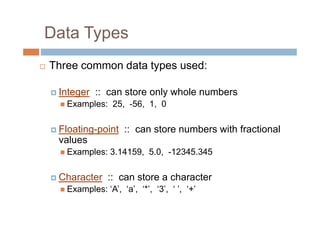
Data Types
 Three common data types used:
Integer :: can store only whole numbers
 Examples: 25, -56, 1, 0
Floating-point :: can store numbers with fractional
values
 Examples: 3.14159, 5.0, -12345.345
Character :: can store a character
 Examples: ‘A’, ‘a’, ‘*’, ‘3’, ‘ ’, ‘+’
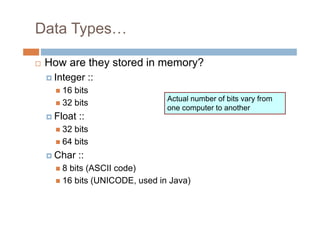
Data Types…
 How are they stored in memory?
Integer ::
 16 bits
 32 bits
Float ::
 32 bits
 64 bits
Char ::
 8 bits (ASCII code)
 16 bits (UNICODE, used in Java)
Actual number of bits vary from
one computer to another
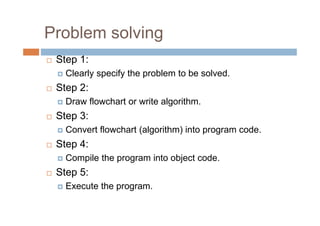
Problem solving
 Step 1:
Clearly specify the problem to be solved.
 Step 2:
Draw flowchart or write algorithm.
 Step 3:
Convert flowchart (algorithm) into program code.
 Step 4:
Compile the program into object code.
 Step 5:
Execute the program.
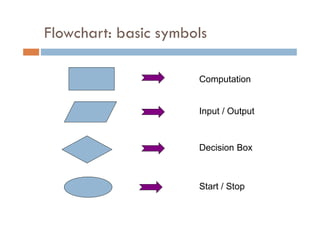
Flowchart: basic symbols
Computation
Input / Output
Decision Box
Start / Stop
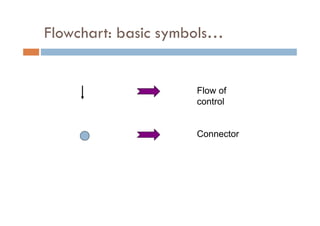
Flowchart: basic symbols…
Flow of
control
Connector
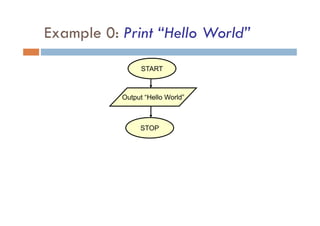
Example 0: Print “Hello World”
Output “Hello World”
STOP
START
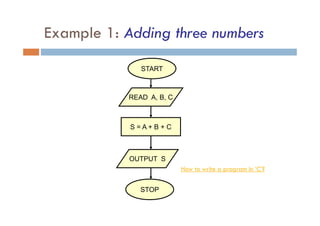
Example 1: Adding three numbers
READ A, B, C
S = A + B + C
OUTPUT S
STOP
START
How to write a program in ‘C’?
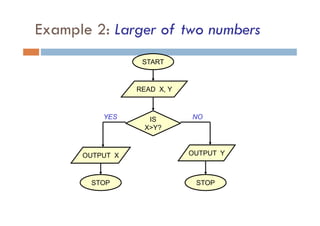
Example 2: Larger of two numbers
START
STOP
READ X, Y
OUTPUT Y
IS
X>Y?
OUTPUT X
STOP
YES NO
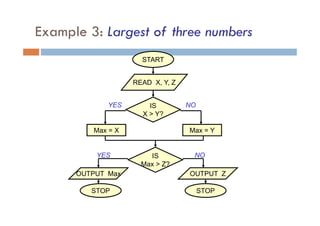
Example 3: Largest of three numbers
START
READ X, Y, Z
IS
Max > Z?
IS
X > Y?
Max = X Max = Y
OUTPUT Max OUTPUT Z
STOP STOP
YES
YES
NO
NO
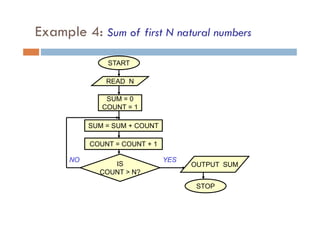
Example 4: Sum of first N natural numbers
START
READ N
SUM = 0
COUNT = 1
SUM = SUM + COUNT
COUNT = COUNT + 1
IS
COUNT > N?
OUTPUT SUM
STOP
YES
NO
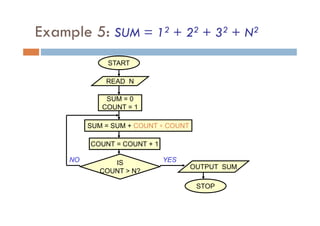
Example 5: SUM = 12 + 22 + 32 + N2
START
READ N
SUM = 0
COUNT = 1
SUM = SUM + COUNT ∗ COUNT
COUNT = COUNT + 1
IS
COUNT > N?
OUTPUT SUM
STOP
YES
NO
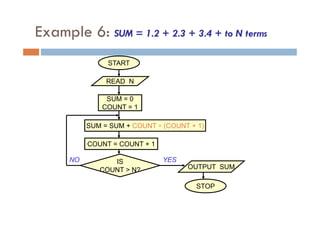
Example 6: SUM = 1.2 + 2.3 + 3.4 + to N terms
START
READ N
SUM = 0
COUNT = 1
SUM = SUM + COUNT ∗ (COUNT + 1)
COUNT = COUNT + 1
IS
COUNT > N? OUTPUT SUM
STOP
YES
NO
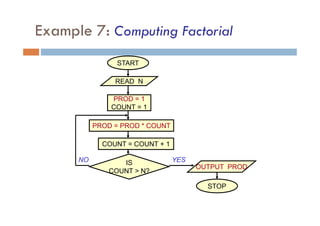
Example 7: Computing Factorial
START
READ N
PROD = 1
COUNT = 1
PROD = PROD * COUNT
COUNT = COUNT + 1
IS
COUNT > N?
OUTPUT PROD
STOP
YES
NO
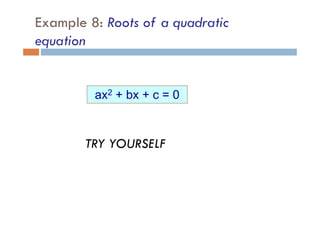
Example 8: Roots of a quadratic
equation
ax2 + bx + c = 0
TRY YOURSELF
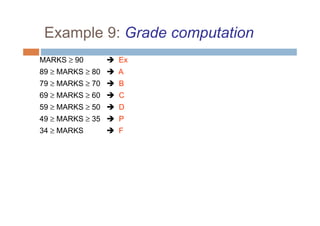
Example 9: Grade computation
MARKS ≥ 90  Ex
89 ≥ MARKS ≥ 80  A
79 ≥ MARKS ≥ 70  B
69 ≥ MARKS ≥ 60  C
59 ≥ MARKS ≥ 50  D
49 ≥ MARKS ≥ 35  P
34 ≥ MARKS  F
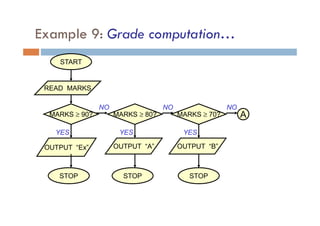
Example 9: Grade computation…
START
READ MARKS
OUTPUT “Ex”
MARKS ≥ 90? MARKS ≥ 80? MARKS ≥ 70?
OUTPUT “A” OUTPUT “B”
STOP
STOP
STOP
A
YES
YES
YES
NO
NO
NO
Programming in C: Basics
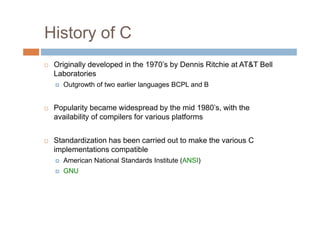
History of C
 Originally developed in the 1970’s by Dennis Ritchie at AT&T Bell
Laboratories
Outgrowth of two earlier languages BCPL and B
 Popularity became widespread by the mid 1980’s, with the
availability of compilers for various platforms
 Standardization has been carried out to make the various C
implementations compatible
American National Standards Institute (ANSI)
GNU
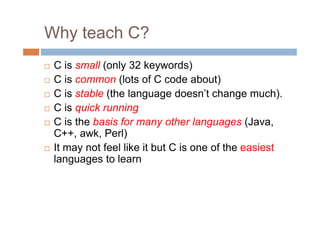
Why teach C?
 C is small (only 32 keywords)
 C is common (lots of C code about)
 C is stable (the language doesn’t change much).
 C is quick running
 C is the basis for many other languages (Java,
C++, awk, Perl)
 It may not feel like it but C is one of the easiest
languages to learn
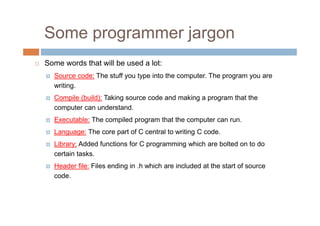
Some programmer jargon
 Some words that will be used a lot:
Source code: The stuff you type into the computer. The program you are
writing.
Compile (build): Taking source code and making a program that the
computer can understand.
Executable: The compiled program that the computer can run.
Language: The core part of C central to writing C code.
Library: Added functions for C programming which are bolted on to do
certain tasks.
Header file: Files ending in .h which are included at the start of source
code.
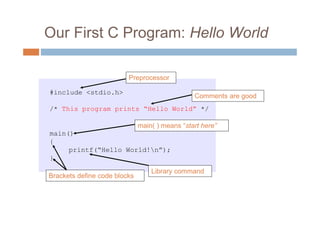
Our First C Program: Hello World
#include <stdio.h>
/* This program prints “Hello World” */
main()
{
printf(“Hello World!n”);
}
Brackets define code blocks
Library command
main( ) means “start here”
Preprocessor
Comments are good
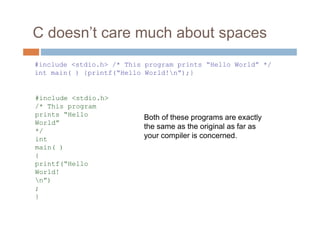
C doesn’t care much about spaces
Both of these programs are exactly
the same as the original as far as
your compiler is concerned.
#include <stdio.h> /* This program prints “Hello World” */
int main( ) {printf(“Hello World!n”);}
#include <stdio.h>
/* This program
prints “Hello
World”
*/
int
main( )
{
printf(“Hello
World!
n”)
;
}
The C Character Set
 The C language alphabet:
Uppercase letters ‘A’ to ‘Z’
Lowercase letters ‘a’ to ‘z’
Digits ‘0’ to ‘9’
Certain special characters:
! # % ^ & * ( )
- _ + = ~ [ ] 
| ; : ‘ “ { } ,
. < > / ? blank
C is CASE SENSITIVE
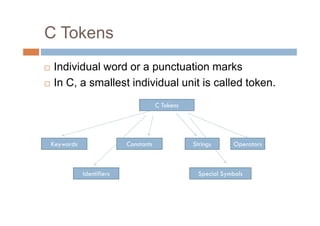
C Tokens
 Individual word or a punctuation marks
 In C, a smallest individual unit is called token.
C Tokens
Keywords
Identifiers
Constants Strings
Special Symbols
Operators
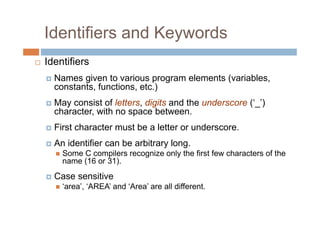
Identifiers and Keywords
 Identifiers
Names given to various program elements (variables,
constants, functions, etc.)
May consist of letters, digits and the underscore (‘_’)
character, with no space between.
First character must be a letter or underscore.
An identifier can be arbitrary long.
 Some C compilers recognize only the first few characters of the
name (16 or 31).
Case sensitive
 ‘area’, ‘AREA’ and ‘Area’ are all different.
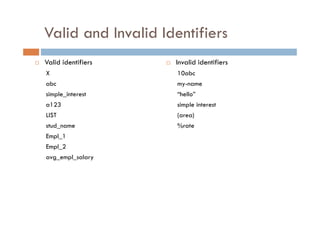
Valid and Invalid Identifiers
 Valid identifiers
X
abc
simple_interest
a123
LIST
stud_name
Empl_1
Empl_2
avg_empl_salary
 Invalid identifiers
10abc
my-name
“hello”
simple interest
(area)
%rate
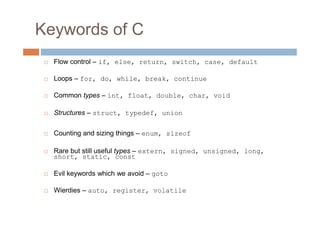
Keywords of C
 Flow control – if, else, return, switch, case, default
 Loops – for, do, while, break, continue
 Common types – int, float, double, char, void
 Structures – struct, typedef, union
 Counting and sizing things – enum, sizeof
 Rare but still useful types – extern, signed, unsigned, long,
short, static, const
 Evil keywords which we avoid – goto
 Wierdies – auto, register, volatile
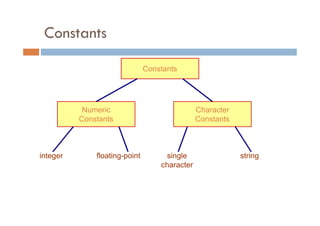
Constants
Constants
Numeric
Constants
Character
Constants
string
single
character
floating-point
integer
Integer Constants
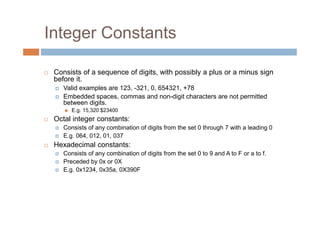
 Consists of a sequence of digits, with possibly a plus or a minus sign
before it.
Valid examples are 123, -321, 0, 654321, +78
Embedded spaces, commas and non-digit characters are not permitted
between digits.
 E.g. 15,320 $23400
 Octal integer constants:
Consists of any combination of digits from the set 0 through 7 with a leading 0
E.g. 064, 012, 01, 037
 Hexadecimal constants:
Consists of any combination of digits from the set 0 to 9 and A to F or a to f.
Preceded by 0x or 0X
E.g. 0x1234, 0x35a, 0X390F
Integer Constants…
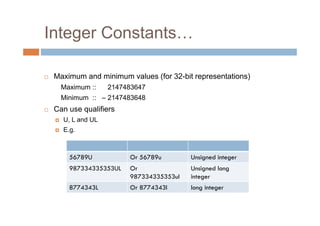
 Maximum and minimum values (for 32-bit representations)
Maximum :: 2147483647
Minimum :: – 2147483648
 Can use qualifiers
U, L and UL
E.g.
56789U Or 56789u Unsigned integer
987334335353UL Or
987334335353ul
Unsigned long
integer
8774343L Or 8774343l long integer
Integer Constants…
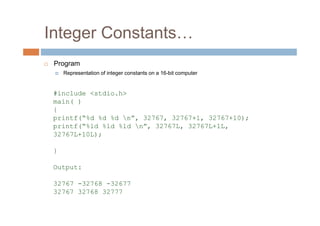
 Program
Representation of integer constants on a 16-bit computer
#include <stdio.h>
main( )
{
printf(“%d %d %d n”, 32767, 32767+1, 32767+10);
printf(“%ld %ld %ld n”, 32767L, 32767L+1L,
32767L+10L);
}
Output:
32767 -32768 -32677
32767 32768 32777
Integer Constants…
 Which are others?
Real/floating point constants
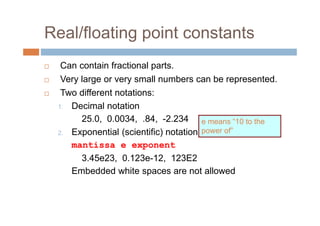
 Can contain fractional parts.
 Very large or very small numbers can be represented.
 Two different notations:
1. Decimal notation
25.0, 0.0034, .84, -2.234
2. Exponential (scientific) notation
mantissa e exponent
3.45e23, 0.123e-12, 123E2
Embedded white spaces are not allowed
e means “10 to the
power of”
Character and string constants
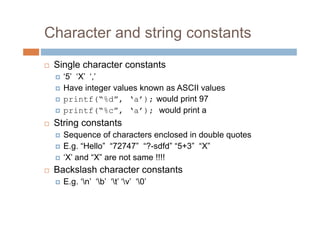
 Single character constants
‘5’ ‘X’ ‘,’
Have integer values known as ASCII values
printf(“%d”, ‘a’); would print 97
printf(“%c”, ‘a’); would print a
 String constants
Sequence of characters enclosed in double quotes
E.g. “Hello” “72747” “?-sdfd” “5+3” “X”
‘X’ and “X” are not same !!!!
 Backslash character constants
E.g. ‘n’ ‘b’ ‘t’ ‘v’ ‘0’
Data Types
 Primary (or fundamental) data types
 Derived data types
 User-defined data types
Data Types…
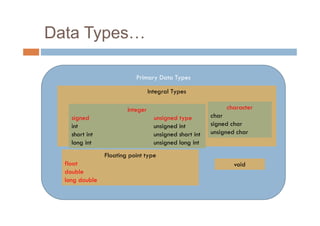
Primary Data Types
Integral Types
Floating point type
float
double
long double
character
char
signed char
unsigned char
Integer
signed unsigned type
int unsigned int
short int unsigned short int
long int unsigned long int
void
Data Types…
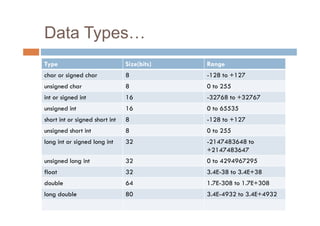
Type Size(bits) Range
char or signed char 8 -128 to +127
unsigned char 8 0 to 255
int or signed int 16 -32768 to +32767
unsigned int 16 0 to 65535
short int or signed short int 8 -128 to +127
unsigned short int 8 0 to 255
long int or signed long int 32 -2147483648 to
+2147483647
unsigned long int 32 0 to 4294967295
float 32 3.4E-38 to 3.4E+38
double 64 1.7E-308 to 1.7E+308
long double 80 3.4E-4932 to 3.4E+4932
Declaration of Variables
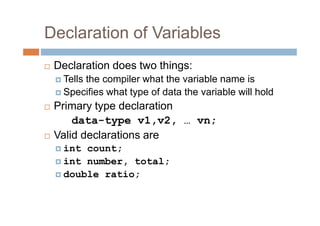
 Declaration does two things:
Tells the compiler what the variable name is
Specifies what type of data the variable will hold
 Primary type declaration
data-type v1,v2, … vn;
 Valid declarations are
int count;
int number, total;
double ratio;
Data types and their keyword
equivalents
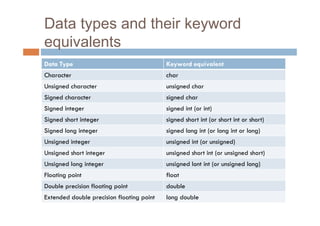
Data Type Keyword equivalent
Character char
Unsigned character unsigned char
Signed character signed char
Signed integer signed int (or int)
Signed short integer signed short int (or short int or short)
Signed long integer signed long int (or long int or long)
Unsigned integer unsigned int (or unsigned)
Unsigned short integer unsigned short int (or unsigned short)
Unsigned long integer unsigned lont int (or unsigned long)
Floating point float
Double precision floating point double
Extended double precision floating point long double
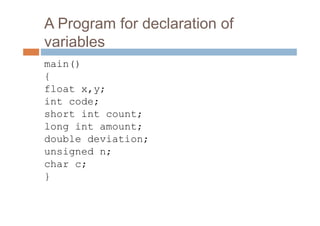
A Program for declaration of
variables
main()
{
float x,y;
int code;
short int count;
long int amount;
double deviation;
unsigned n;
char c;
}
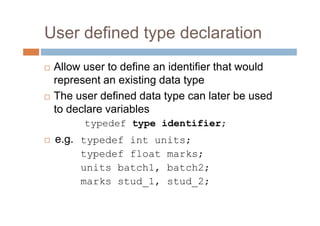
User defined type declaration
 Allow user to define an identifier that would
represent an existing data type
 The user defined data type can later be used
to declare variables
typedef type identifier;
 e.g. typedef int units;
typedef float marks;
units batch1, batch2;
marks stud_1, stud_2;
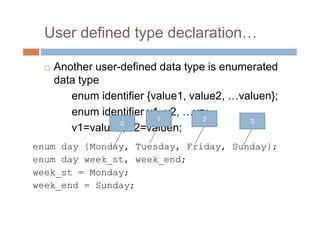
User defined type declaration…
 Another user-defined data type is enumerated
data type
enum identifier {value1, value2, …valuen};
enum identifier v1, v2, …vn;
v1=value3; v2=valuen;
enum day {Monday, Tuesday, Friday, Sunday};
enum day week_st, week_end;
week_st = Monday;
week_end = Sunday;
0
1 2 3
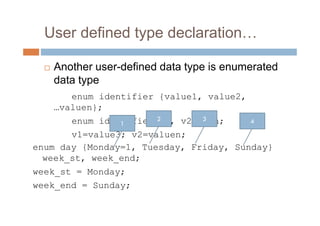
User defined type declaration…
 Another user-defined data type is enumerated
data type
enum identifier {value1, value2,
…valuen};
enum identifier v1, v2, …vn;
v1=value3; v2=valuen;
enum day {Monday=1, Tuesday, Friday, Sunday}
week_st, week_end;
week_st = Monday;
week_end = Sunday;
1
2 3 4
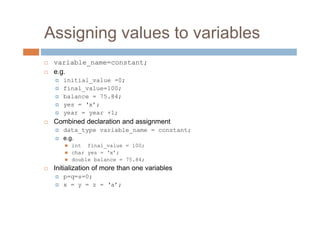
Assigning values to variables
 variable_name=constant;
 e.g.
initial_value =0;
final_value=100;
balance = 75.84;
yes = ‘x’;
year = year +1;
 Combined declaration and assignment
data_type variable_name = constant;
e.g.
 int final_value = 100;
 char yes = ‘x’;
 double balance = 75.84;
 Initialization of more than one variables
p=q=s=0;
x = y = z = ‘a’;
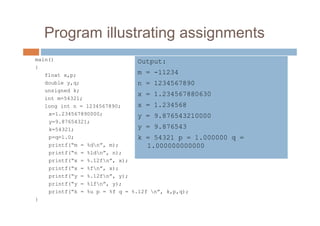
Program illustrating assignments
main()
{
float x,p;
double y,q;
unsigned k;
int m=54321;
long int n = 1234567890;
x=1.234567890000;
y=9.87654321;
k=54321;
p=q=1.0;
printf(“m = %dn”, m);
printf(“n = %ldn”, n);
printf(“x = %.12fn”, x);
printf(“x = %fn”, x);
printf(“y = %.12fn”, y);
printf(“y = %lfn”, y);
printf(“k = %u p = %f q = %.12f n”, k,p,q);
}
Output:
m = -11234
n = 1234567890
x = 1.234567880630
x = 1.234568
y = 9.876543210000
y = 9.876543
k = 54321 p = 1.000000 q =
1.000000000000
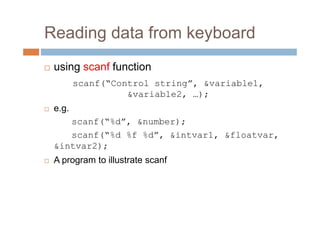
Reading data from keyboard
 using scanf function
scanf(“Control string”, &variable1,
&variable2, …);
 e.g.
scanf(“%d”, &number);
scanf(“%d %f %d”, &intvar1, &floatvar,
&intvar2);
 A program to illustrate scanf
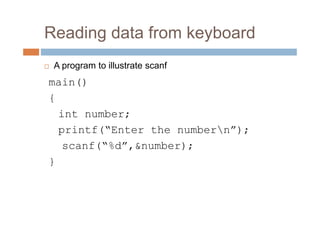
Reading data from keyboard
 A program to illustrate scanf
main()
{
int number;
printf(“Enter the numbern”);
scanf(“%d”,&number);
}
Defining symbolic constants
 Certain constants that appear repeatedly in a
number of places in the program
 e.g. 3.14 i.e. the value of pi
 We face two problems in the subsequent use
of such program
problem in modification of the program, and
problem in understanding the program
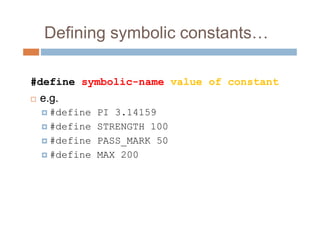
Defining symbolic constants…
#define symbolic-name value of constant
 e.g.
#define PI 3.14159
#define STRENGTH 100
#define PASS_MARK 50
#define MAX 200
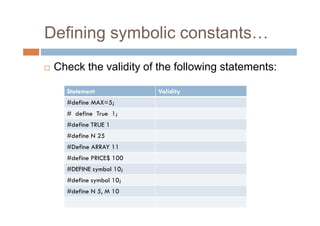
Defining symbolic constants…
 Check the validity of the following statements:
Statement Validity
#define MAX=5;
# define True 1;
#define TRUE 1
#define N 25
#Define ARRAY 11
#define PRICE$ 100
#DEFINE symbol 10;
#define symbol 10;
#define N 5, M 10
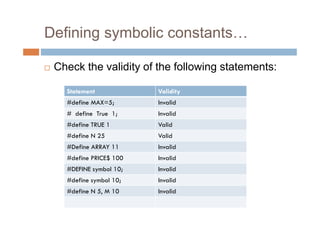
Defining symbolic constants…
 Check the validity of the following statements:
Statement Validity
#define MAX=5; Invalid
# define True 1; Invalid
#define TRUE 1 Valid
#define N 25 Valid
#Define ARRAY 11 Invalid
#define PRICE$ 100 Invalid
#DEFINE symbol 10; Invalid
#define symbol 10; Invalid
#define N 5, M 10 Invalid
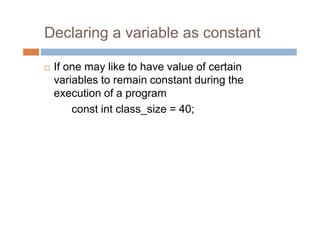
Declaring a variable as constant
 If one may like to have value of certain
variables to remain constant during the
execution of a program
const int class_size = 40;
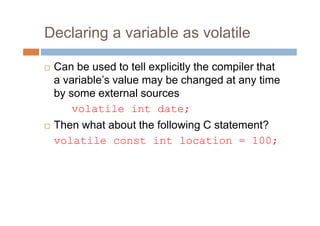
Declaring a variable as volatile
 Can be used to tell explicitly the compiler that
a variable’s value may be changed at any time
by some external sources
volatile int date;
 Then what about the following C statement?
volatile const int location = 100;
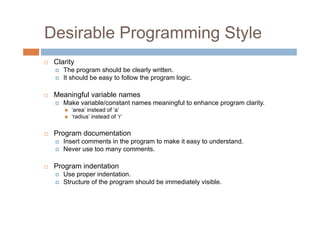
Desirable Programming Style
 Clarity
The program should be clearly written.
It should be easy to follow the program logic.
 Meaningful variable names
Make variable/constant names meaningful to enhance program clarity.
 ‘area’ instead of ‘a’
 ‘radius’ instead of ‘r’
 Program documentation
Insert comments in the program to make it easy to understand.
Never use too many comments.
 Program indentation
Use proper indentation.
Structure of the program should be immediately visible.
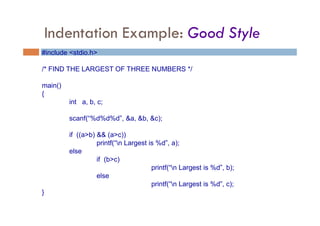
Indentation Example: Good Style
#include <stdio.h>
/* FIND THE LARGEST OF THREE NUMBERS */
main()
{
int a, b, c;
scanf(“%d%d%d”, &a, &b, &c);
if ((a>b) && (a>c))
printf(“n Largest is %d”, a);
else
if (b>c)
printf(“n Largest is %d”, b);
else
printf(“n Largest is %d”, c);
}
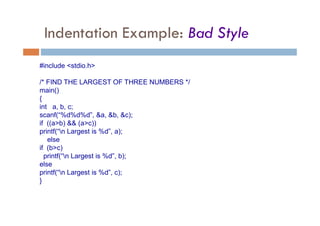
Indentation Example: Bad Style
#include <stdio.h>
/* FIND THE LARGEST OF THREE NUMBERS */
main()
{
int a, b, c;
scanf(“%d%d%d”, &a, &b, &c);
if ((a>b) && (a>c))
printf(“n Largest is %d”, a);
else
if (b>c)
printf(“n Largest is %d”, b);
else
printf(“n Largest is %d”, c);
}
Assignment-1
 At the end of each chapter, you will be given a list
(selected) of assignment questions.
 Prepare 200 pages full scape assignment book and
write down all assignments in that.
 This carries some weightage in your internal marks.
 Solve the following exercise questions from the book
by E. Balagurusamy
 2.1, 2.2, 2.15, 2.16, 2.17, 2.18, 2.19
introduction to C Programming basics.pdf

  • 1.
  • 2.
    Some Terminologies  Algorithm/ Flowchart A step-by-step procedure for solving a particular problem Independent of the programming language  Program A translation of the algorithm/flowchart into a form that can be processed by a computer Typically written in a high-level language like C, C++, Java, etc.
  • 3.
    Variables and Constants Most important concept for problem solving using computers  All temporary results are stored in terms of variables The value of a variable can be changed The value of a constant do not change  Where are they stored? In main memory
  • 4.
    Variables and Constants… How does memory look like (logically)? As a list of storage locations, each having a unique address Variables and constants are stored in these storage locations A variable is like a bin  The contents of the bin is the value of the variable  The variable name is used to refer to the value of the variable  A variable is mapped to a location of the memory, called its address
  • 5.
    Memory map Address 0 Address1 Address 2 Address 3 Address 4 Address 5 Address 6 Address N-1 Every variable is mapped to a particular memory address
  • 6.
    Variables in Memory VariableX X = 10 X = 20 X = X + 1 X = X * 5 10 Instruction executed T i m e 20 21 105
  • 7.
    Variables in Memory… Variable XY X = 20 Y = 15 X = Y + 3 Y = X / 6 Instruction executed 20 ? T i m e 20 15 18 15 18 3
  • 8.
    Data Types  Threecommon data types used: Integer :: can store only whole numbers  Examples: 25, -56, 1, 0 Floating-point :: can store numbers with fractional values  Examples: 3.14159, 5.0, -12345.345 Character :: can store a character  Examples: ‘A’, ‘a’, ‘*’, ‘3’, ‘ ’, ‘+’
  • 9.
    Data Types…  Howare they stored in memory? Integer ::  16 bits  32 bits Float ::  32 bits  64 bits Char ::  8 bits (ASCII code)  16 bits (UNICODE, used in Java) Actual number of bits vary from one computer to another
  • 10.
    Problem solving  Step1: Clearly specify the problem to be solved.  Step 2: Draw flowchart or write algorithm.  Step 3: Convert flowchart (algorithm) into program code.  Step 4: Compile the program into object code.  Step 5: Execute the program.
  • 11.
    Flowchart: basic symbols Computation Input/ Output Decision Box Start / Stop
  • 12.
  • 13.
    Example 0: Print“Hello World” Output “Hello World” STOP START
  • 14.
    Example 1: Addingthree numbers READ A, B, C S = A + B + C OUTPUT S STOP START How to write a program in ‘C’?
  • 15.
    Example 2: Largerof two numbers START STOP READ X, Y OUTPUT Y IS X>Y? OUTPUT X STOP YES NO
  • 16.
    Example 3: Largestof three numbers START READ X, Y, Z IS Max > Z? IS X > Y? Max = X Max = Y OUTPUT Max OUTPUT Z STOP STOP YES YES NO NO
  • 17.
    Example 4: Sumof first N natural numbers START READ N SUM = 0 COUNT = 1 SUM = SUM + COUNT COUNT = COUNT + 1 IS COUNT > N? OUTPUT SUM STOP YES NO
  • 18.
    Example 5: SUM= 12 + 22 + 32 + N2 START READ N SUM = 0 COUNT = 1 SUM = SUM + COUNT ∗ COUNT COUNT = COUNT + 1 IS COUNT > N? OUTPUT SUM STOP YES NO
  • 19.
    Example 6: SUM= 1.2 + 2.3 + 3.4 + to N terms START READ N SUM = 0 COUNT = 1 SUM = SUM + COUNT ∗ (COUNT + 1) COUNT = COUNT + 1 IS COUNT > N? OUTPUT SUM STOP YES NO
  • 20.
    Example 7: ComputingFactorial START READ N PROD = 1 COUNT = 1 PROD = PROD * COUNT COUNT = COUNT + 1 IS COUNT > N? OUTPUT PROD STOP YES NO
  • 21.
    Example 8: Rootsof a quadratic equation ax2 + bx + c = 0 TRY YOURSELF
  • 22.
    Example 9: Gradecomputation MARKS ≥ 90  Ex 89 ≥ MARKS ≥ 80  A 79 ≥ MARKS ≥ 70  B 69 ≥ MARKS ≥ 60  C 59 ≥ MARKS ≥ 50  D 49 ≥ MARKS ≥ 35  P 34 ≥ MARKS  F
  • 23.
    Example 9: Gradecomputation… START READ MARKS OUTPUT “Ex” MARKS ≥ 90? MARKS ≥ 80? MARKS ≥ 70? OUTPUT “A” OUTPUT “B” STOP STOP STOP A YES YES YES NO NO NO
  • 24.
  • 25.
    History of C Originally developed in the 1970’s by Dennis Ritchie at AT&T Bell Laboratories Outgrowth of two earlier languages BCPL and B  Popularity became widespread by the mid 1980’s, with the availability of compilers for various platforms  Standardization has been carried out to make the various C implementations compatible American National Standards Institute (ANSI) GNU
  • 26.
    Why teach C? C is small (only 32 keywords)  C is common (lots of C code about)  C is stable (the language doesn’t change much).  C is quick running  C is the basis for many other languages (Java, C++, awk, Perl)  It may not feel like it but C is one of the easiest languages to learn
  • 27.
    Some programmer jargon Some words that will be used a lot: Source code: The stuff you type into the computer. The program you are writing. Compile (build): Taking source code and making a program that the computer can understand. Executable: The compiled program that the computer can run. Language: The core part of C central to writing C code. Library: Added functions for C programming which are bolted on to do certain tasks. Header file: Files ending in .h which are included at the start of source code.
  • 28.
    Our First CProgram: Hello World #include <stdio.h> /* This program prints “Hello World” */ main() { printf(“Hello World!n”); } Brackets define code blocks Library command main( ) means “start here” Preprocessor Comments are good
  • 29.
    C doesn’t caremuch about spaces Both of these programs are exactly the same as the original as far as your compiler is concerned. #include <stdio.h> /* This program prints “Hello World” */ int main( ) {printf(“Hello World!n”);} #include <stdio.h> /* This program prints “Hello World” */ int main( ) { printf(“Hello World! n”) ; }
  • 30.
    The C CharacterSet  The C language alphabet: Uppercase letters ‘A’ to ‘Z’ Lowercase letters ‘a’ to ‘z’ Digits ‘0’ to ‘9’ Certain special characters: ! # % ^ & * ( ) - _ + = ~ [ ] | ; : ‘ “ { } , . < > / ? blank C is CASE SENSITIVE
  • 31.
    C Tokens  Individualword or a punctuation marks  In C, a smallest individual unit is called token. C Tokens Keywords Identifiers Constants Strings Special Symbols Operators
  • 32.
    Identifiers and Keywords Identifiers Names given to various program elements (variables, constants, functions, etc.) May consist of letters, digits and the underscore (‘_’) character, with no space between. First character must be a letter or underscore. An identifier can be arbitrary long.  Some C compilers recognize only the first few characters of the name (16 or 31). Case sensitive  ‘area’, ‘AREA’ and ‘Area’ are all different.
  • 33.
    Valid and InvalidIdentifiers  Valid identifiers X abc simple_interest a123 LIST stud_name Empl_1 Empl_2 avg_empl_salary  Invalid identifiers 10abc my-name “hello” simple interest (area) %rate
  • 34.
    Keywords of C Flow control – if, else, return, switch, case, default  Loops – for, do, while, break, continue  Common types – int, float, double, char, void  Structures – struct, typedef, union  Counting and sizing things – enum, sizeof  Rare but still useful types – extern, signed, unsigned, long, short, static, const  Evil keywords which we avoid – goto  Wierdies – auto, register, volatile
  • 35.
  • 36.
    Integer Constants  Consistsof a sequence of digits, with possibly a plus or a minus sign before it. Valid examples are 123, -321, 0, 654321, +78 Embedded spaces, commas and non-digit characters are not permitted between digits.  E.g. 15,320 $23400  Octal integer constants: Consists of any combination of digits from the set 0 through 7 with a leading 0 E.g. 064, 012, 01, 037  Hexadecimal constants: Consists of any combination of digits from the set 0 to 9 and A to F or a to f. Preceded by 0x or 0X E.g. 0x1234, 0x35a, 0X390F
  • 37.
    Integer Constants…  Maximumand minimum values (for 32-bit representations) Maximum :: 2147483647 Minimum :: – 2147483648  Can use qualifiers U, L and UL E.g. 56789U Or 56789u Unsigned integer 987334335353UL Or 987334335353ul Unsigned long integer 8774343L Or 8774343l long integer
  • 38.
    Integer Constants…  Program Representationof integer constants on a 16-bit computer #include <stdio.h> main( ) { printf(“%d %d %d n”, 32767, 32767+1, 32767+10); printf(“%ld %ld %ld n”, 32767L, 32767L+1L, 32767L+10L); } Output: 32767 -32768 -32677 32767 32768 32777
  • 39.
  • 40.
    Real/floating point constants Can contain fractional parts.  Very large or very small numbers can be represented.  Two different notations: 1. Decimal notation 25.0, 0.0034, .84, -2.234 2. Exponential (scientific) notation mantissa e exponent 3.45e23, 0.123e-12, 123E2 Embedded white spaces are not allowed e means “10 to the power of”
  • 41.
    Character and stringconstants  Single character constants ‘5’ ‘X’ ‘,’ Have integer values known as ASCII values printf(“%d”, ‘a’); would print 97 printf(“%c”, ‘a’); would print a  String constants Sequence of characters enclosed in double quotes E.g. “Hello” “72747” “?-sdfd” “5+3” “X” ‘X’ and “X” are not same !!!!  Backslash character constants E.g. ‘n’ ‘b’ ‘t’ ‘v’ ‘0’
  • 42.
    Data Types  Primary(or fundamental) data types  Derived data types  User-defined data types
  • 43.
    Data Types… Primary DataTypes Integral Types Floating point type float double long double character char signed char unsigned char Integer signed unsigned type int unsigned int short int unsigned short int long int unsigned long int void
  • 44.
    Data Types… Type Size(bits)Range char or signed char 8 -128 to +127 unsigned char 8 0 to 255 int or signed int 16 -32768 to +32767 unsigned int 16 0 to 65535 short int or signed short int 8 -128 to +127 unsigned short int 8 0 to 255 long int or signed long int 32 -2147483648 to +2147483647 unsigned long int 32 0 to 4294967295 float 32 3.4E-38 to 3.4E+38 double 64 1.7E-308 to 1.7E+308 long double 80 3.4E-4932 to 3.4E+4932
  • 45.
    Declaration of Variables Declaration does two things: Tells the compiler what the variable name is Specifies what type of data the variable will hold  Primary type declaration data-type v1,v2, … vn;  Valid declarations are int count; int number, total; double ratio;
  • 46.
    Data types andtheir keyword equivalents Data Type Keyword equivalent Character char Unsigned character unsigned char Signed character signed char Signed integer signed int (or int) Signed short integer signed short int (or short int or short) Signed long integer signed long int (or long int or long) Unsigned integer unsigned int (or unsigned) Unsigned short integer unsigned short int (or unsigned short) Unsigned long integer unsigned lont int (or unsigned long) Floating point float Double precision floating point double Extended double precision floating point long double
  • 47.
    A Program fordeclaration of variables main() { float x,y; int code; short int count; long int amount; double deviation; unsigned n; char c; }
  • 48.
    User defined typedeclaration  Allow user to define an identifier that would represent an existing data type  The user defined data type can later be used to declare variables typedef type identifier;  e.g. typedef int units; typedef float marks; units batch1, batch2; marks stud_1, stud_2;
  • 49.
    User defined typedeclaration…  Another user-defined data type is enumerated data type enum identifier {value1, value2, …valuen}; enum identifier v1, v2, …vn; v1=value3; v2=valuen; enum day {Monday, Tuesday, Friday, Sunday}; enum day week_st, week_end; week_st = Monday; week_end = Sunday; 0 1 2 3
  • 50.
    User defined typedeclaration…  Another user-defined data type is enumerated data type enum identifier {value1, value2, …valuen}; enum identifier v1, v2, …vn; v1=value3; v2=valuen; enum day {Monday=1, Tuesday, Friday, Sunday} week_st, week_end; week_st = Monday; week_end = Sunday; 1 2 3 4
  • 51.
    Assigning values tovariables  variable_name=constant;  e.g. initial_value =0; final_value=100; balance = 75.84; yes = ‘x’; year = year +1;  Combined declaration and assignment data_type variable_name = constant; e.g.  int final_value = 100;  char yes = ‘x’;  double balance = 75.84;  Initialization of more than one variables p=q=s=0; x = y = z = ‘a’;
  • 52.
    Program illustrating assignments main() { floatx,p; double y,q; unsigned k; int m=54321; long int n = 1234567890; x=1.234567890000; y=9.87654321; k=54321; p=q=1.0; printf(“m = %dn”, m); printf(“n = %ldn”, n); printf(“x = %.12fn”, x); printf(“x = %fn”, x); printf(“y = %.12fn”, y); printf(“y = %lfn”, y); printf(“k = %u p = %f q = %.12f n”, k,p,q); } Output: m = -11234 n = 1234567890 x = 1.234567880630 x = 1.234568 y = 9.876543210000 y = 9.876543 k = 54321 p = 1.000000 q = 1.000000000000
  • 53.
    Reading data fromkeyboard  using scanf function scanf(“Control string”, &variable1, &variable2, …);  e.g. scanf(“%d”, &number); scanf(“%d %f %d”, &intvar1, &floatvar, &intvar2);  A program to illustrate scanf
  • 54.
    Reading data fromkeyboard  A program to illustrate scanf main() { int number; printf(“Enter the numbern”); scanf(“%d”,&number); }
  • 55.
    Defining symbolic constants Certain constants that appear repeatedly in a number of places in the program  e.g. 3.14 i.e. the value of pi  We face two problems in the subsequent use of such program problem in modification of the program, and problem in understanding the program
  • 56.
    Defining symbolic constants… #definesymbolic-name value of constant  e.g. #define PI 3.14159 #define STRENGTH 100 #define PASS_MARK 50 #define MAX 200
  • 57.
    Defining symbolic constants… Check the validity of the following statements: Statement Validity #define MAX=5; # define True 1; #define TRUE 1 #define N 25 #Define ARRAY 11 #define PRICE$ 100 #DEFINE symbol 10; #define symbol 10; #define N 5, M 10
  • 58.
    Defining symbolic constants… Check the validity of the following statements: Statement Validity #define MAX=5; Invalid # define True 1; Invalid #define TRUE 1 Valid #define N 25 Valid #Define ARRAY 11 Invalid #define PRICE$ 100 Invalid #DEFINE symbol 10; Invalid #define symbol 10; Invalid #define N 5, M 10 Invalid
  • 59.
    Declaring a variableas constant  If one may like to have value of certain variables to remain constant during the execution of a program const int class_size = 40;
  • 60.
    Declaring a variableas volatile  Can be used to tell explicitly the compiler that a variable’s value may be changed at any time by some external sources volatile int date;  Then what about the following C statement? volatile const int location = 100;
  • 61.
    Desirable Programming Style Clarity The program should be clearly written. It should be easy to follow the program logic.  Meaningful variable names Make variable/constant names meaningful to enhance program clarity.  ‘area’ instead of ‘a’  ‘radius’ instead of ‘r’  Program documentation Insert comments in the program to make it easy to understand. Never use too many comments.  Program indentation Use proper indentation. Structure of the program should be immediately visible.
  • 62.
    Indentation Example: GoodStyle #include <stdio.h> /* FIND THE LARGEST OF THREE NUMBERS */ main() { int a, b, c; scanf(“%d%d%d”, &a, &b, &c); if ((a>b) && (a>c)) printf(“n Largest is %d”, a); else if (b>c) printf(“n Largest is %d”, b); else printf(“n Largest is %d”, c); }
  • 63.
    Indentation Example: BadStyle #include <stdio.h> /* FIND THE LARGEST OF THREE NUMBERS */ main() { int a, b, c; scanf(“%d%d%d”, &a, &b, &c); if ((a>b) && (a>c)) printf(“n Largest is %d”, a); else if (b>c) printf(“n Largest is %d”, b); else printf(“n Largest is %d”, c); }
  • 64.
    Assignment-1  At theend of each chapter, you will be given a list (selected) of assignment questions.  Prepare 200 pages full scape assignment book and write down all assignments in that.  This carries some weightage in your internal marks.  Solve the following exercise questions from the book by E. Balagurusamy  2.1, 2.2, 2.15, 2.16, 2.17, 2.18, 2.19