C Programming Course Overview What is to be taught?: How to program C stylishly and elegantly. Small and fast mathematical programs. Documenting code. Writing good algorithms. NO fancy graphics that go out of date quickly. Why teach programming?: Some maths relies on computers (4 colour theorem). Simulation lets us apply maths to the real world. It might get you a job after you finish your maths course. It can be fun to do.
Why teach C? C is  small  (only 32 keywords). C is  common  (lots of C code about). C is  stable  (the language doesn’t change much). C is  quick running . C is the  basis for many other languages  (Java, C++, awk, Perl). It may not feel like it but C is one of the easiest languages to learn. NOTE: Obviously programmers will find this course easier than everyone else.  BUT, this course is for non-programmers.  If you cannot understand what I say, please please ask me either in the lecture or afterwards.
Some programmer jargon Some words that will be used a lot: Source code: The stuff you type into the computer. The program you are writing. Compile (build): Taking source code and making a program that the computer can understand. Executable: The compiled program that the computer can run. Language: (Special sense) The core part of C central to writing C code. Library: Added functions for C programming which are bolted on to do certain tasks. Header file: Files ending in .h which are included at the start of source code.
More about Hello World Preprocessor Library command main() means “start here” Comments are good Return 0 from main means our program finished without errors Brackets define code blocks
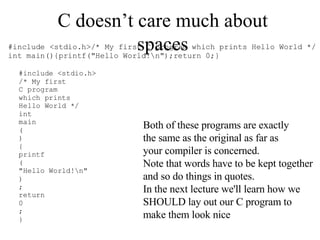
C doesn’t care much about spaces Both of these programs are exactly the same as the original as far as your compiler is concerned. Note that words have to be kept together and so do things in quotes. In the next lecture we'll learn how we SHOULD lay out our C program to make them look nice
 
Keywords of C Flow control (6) –  if, else, return, switch, case, default Loops (5) –  for, do, while, break, continue Common  types  (5) –  int, float, double, char, void structures  (3) –  struct, typedef, union Counting and sizing things (2) –  enum, sizeof   Rare but still useful  types  (7) –  extern, signed, unsigned, long, short, static, const Evil keywords which we avoid (1) –  goto Wierdies (3) –  auto, register, volatile
Types of variable We must  declare  the  type  of every variable we use in C.  Every variable has a  type  (e.g.  int ) and a  name . We already saw  int, double  and  float. This prevents some bugs caused by spelling errors (misspelling variable names). Declarations of types should always be together at the top of main or a function (see later). Other types are  char ,  signed ,  unsigned ,  long ,  short  and  const.
Naming variables Variables in C can be given any name made from numbers, letters and underlines which is not a keyword and does not begin with a number. A good name for your variables is important Ideally, a comment with each variable name helps people know what they do. In coursework I like to see well chosen variable names and comments on variables (I don’t always do this in notes because there is little space). int a,b; double d; /* This is a bit cryptic */ int start_time; int no_students; double course_mark; /* This is a bit better */
The  char  type char  stores a character variable We can print  char  with  %c A  char  has a  single quote  not a double quote. We can use it like so: int main() { char a, b; a= 'x';  /* Set a to the character x */ printf ("a is %c\n",a); b= '\n'; /* This really is one character*/ printf ("b is %c\n",b); return 0; }
More types: Signed/unsigned, long, short, const unsigned  means that an  int  or  char  value can only be positive.  signed  means that it can be positive or negative. long  means that  int ,  float  or  double  have more precision (and are larger)  short  means they have less  const  means a variable which doesn't vary – useful for physical constants or things like pi or e short int small_no;  unsigned char uchar; long double precise_number; short float not_so_precise; const short float pi= 3.14; const long double e= 2.718281828;
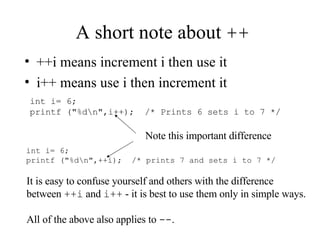
A short note about  ++ ++i means increment i then use it i++ means use i then increment it int i= 6; printf ("%d\n",i++);  /* Prints 6 sets i to 7 */ int i= 6; printf ("%d\n",++i);  /* prints 7 and sets i to 7 */ Note this important difference It is easy to confuse yourself and others with the difference  between  ++i  and  i++  - it is best to use them only in simple ways. All of the above also applies to  -- .
Some simple operations for variables In addition to  + ,  - ,  *  and  /  we can also use +=,  -= ,  *= ,  /= ,  --  and  %  (modulo) --  (subtract one) e.g.  countdown--;   +=  (add to a variable) e.g.  a+= 5;   -=  (subtract from variable) e.g.  num_living-= num_dead;   *=  (multiply a variable) e.g.  no_bunnies*=2;   /=   (divide a variable) e.g.  fraction/= divisor;   (x % y)  gives the remainder when  x  is divided by  y   remainder= x%y ; (ints only)
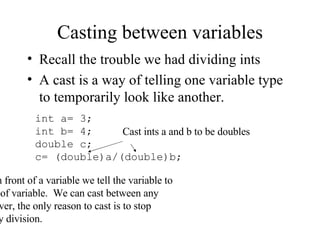
Casting between variables Recall the trouble we had dividing ints A cast is a way of telling one variable type to temporarily look like another. int a= 3; int b= 4; double c; c= (double)a/(double)b; By using  ( type )  in front of a variable we tell the variable to act like another type of variable.  We can cast between any type.  Usually, however, the only reason to cast is to stop ints being rounded by division. Cast ints a and b to be doubles
What is a function? The  function  is one of the most basic things to understand in C programming. A  function  is a sub-unit of a program which performs a specific task. We have already (without knowing it) seen one function from the C library –  printf. We need to learn to write our own functions. Functions take  arguments  (variables) and may return an  argument. Think of a function as extending the C language to a new task. Or perhaps variables are NOUNS functions are VERBS.
An example function Prototype the function Call the function The function itself function header
Functions can access other functions Once you have written a function, it can be accessed from other functions.  We can therefore build more complex functions from simpler functions
void  functions A function doesn't have to take or return arguments.  We prototype such a function using  void. Prototype (at top of file remember) void odd_or_even (int); Function takes and returns void (no arguments) Function which takes one int arguments and returns none Another prototype
Notes about functions A function can take any number of arguments mixed in any way.  A function can return at most one argument. When we return from a function, the values of the argument HAVE NOT CHANGED. We can declare variables within a function just like we can within  main()  - these variables will be deleted when we return from the function
Where do functions go in the program Generally speaking it doesn't matter too much.  main() is a function just like any other (you could even call it from other functions if you wanted. It is common to make main() the first function in your code. Functions must be entirely separate from each other. Prototypes must come before functions are used. A usual order is: Prototypes THEN main THEN other functions.
What are these prototype things? A prototype tells your C program what to expect from a function - what arguments it takes (if any) and what it returns (if any) Prototypes should go before  main() #include  finds the prototypes for library functions (e.g. printf) A function MUST return the variable type we say that it does in the prototype.
What is scope? The  scope  of a variable is where it can be used in a program Normally variables are  local  in  scope -  this means they can only be used in the function where they are declared (main is a function) We can also declare  global  variables. If we declare a variable outside a function it can be used in any function  beneath  where it is declared Global variables are A BAD THING
The print stars example This program prints five rows of five stars This prints 'n' stars and then a new line character Loop around 5 times to  print the stars ***** ***** ***** ***** ***** Variables here are LOCAL variables
Why global is bad This program only prints ONE row of five stars Variable here is global variable
Thinking like the computer for debugging  A good technique for "debugging" code is to think of yourself in place of the computer. Go through all the loops in the program and ask "what is in each variable?" Each time you go through a loop ask "is the condition met" and "should I continue" The factorial program shows how to do this.
Factorial program (and thoughts) int main() { int number= 4; int answer; int count; answer= 1; count= number; while (count >= 0) { answer= answer* count; count--; } printf ("%d! = %d\n", number,answer); return 0; } number= 4 answer= 1 count= 4 enter while loop answer= 1*4=4 count=3 enter while loop answer=4*3= 12 count=2 enter while loop answer=12*2= 24 count= 1 enter while loop answer= 24*1= 24 count= 0 enter while loop answer= 24*0= 0 AHA – I see!!!
Other techniques for debugging Check missing brackets and commas. Check that you have a semicolon at the end of every line which needs one. Put in some  printf s– if you know what your program is DOING you will know what it is DOING WRONG. Try to explain to someone else what the program is meant to do. Take a break, get a cup of coffee and come back to it fresh.  (Debugging is FRUSTRATING).

Lập trình C

  • 1.
    C Programming CourseOverview What is to be taught?: How to program C stylishly and elegantly. Small and fast mathematical programs. Documenting code. Writing good algorithms. NO fancy graphics that go out of date quickly. Why teach programming?: Some maths relies on computers (4 colour theorem). Simulation lets us apply maths to the real world. It might get you a job after you finish your maths course. It can be fun to do.
  • 2.
    Why teach C?C is small (only 32 keywords). C is common (lots of C code about). C is stable (the language doesn’t change much). C is quick running . C is the basis for many other languages (Java, C++, awk, Perl). It may not feel like it but C is one of the easiest languages to learn. NOTE: Obviously programmers will find this course easier than everyone else. BUT, this course is for non-programmers. If you cannot understand what I say, please please ask me either in the lecture or afterwards.
  • 3.
    Some programmer jargonSome words that will be used a lot: Source code: The stuff you type into the computer. The program you are writing. Compile (build): Taking source code and making a program that the computer can understand. Executable: The compiled program that the computer can run. Language: (Special sense) The core part of C central to writing C code. Library: Added functions for C programming which are bolted on to do certain tasks. Header file: Files ending in .h which are included at the start of source code.
  • 4.
    More about HelloWorld Preprocessor Library command main() means “start here” Comments are good Return 0 from main means our program finished without errors Brackets define code blocks
  • 5.
    C doesn’t caremuch about spaces Both of these programs are exactly the same as the original as far as your compiler is concerned. Note that words have to be kept together and so do things in quotes. In the next lecture we'll learn how we SHOULD lay out our C program to make them look nice
  • 6.
  • 7.
    Keywords of CFlow control (6) – if, else, return, switch, case, default Loops (5) – for, do, while, break, continue Common types (5) – int, float, double, char, void structures (3) – struct, typedef, union Counting and sizing things (2) – enum, sizeof Rare but still useful types (7) – extern, signed, unsigned, long, short, static, const Evil keywords which we avoid (1) – goto Wierdies (3) – auto, register, volatile
  • 8.
    Types of variableWe must declare the type of every variable we use in C. Every variable has a type (e.g. int ) and a name . We already saw int, double and float. This prevents some bugs caused by spelling errors (misspelling variable names). Declarations of types should always be together at the top of main or a function (see later). Other types are char , signed , unsigned , long , short and const.
  • 9.
    Naming variables Variablesin C can be given any name made from numbers, letters and underlines which is not a keyword and does not begin with a number. A good name for your variables is important Ideally, a comment with each variable name helps people know what they do. In coursework I like to see well chosen variable names and comments on variables (I don’t always do this in notes because there is little space). int a,b; double d; /* This is a bit cryptic */ int start_time; int no_students; double course_mark; /* This is a bit better */
  • 10.
    The char type char stores a character variable We can print char with %c A char has a single quote not a double quote. We can use it like so: int main() { char a, b; a= 'x'; /* Set a to the character x */ printf ("a is %c\n",a); b= '\n'; /* This really is one character*/ printf ("b is %c\n",b); return 0; }
  • 11.
    More types: Signed/unsigned,long, short, const unsigned means that an int or char value can only be positive. signed means that it can be positive or negative. long means that int , float or double have more precision (and are larger) short means they have less const means a variable which doesn't vary – useful for physical constants or things like pi or e short int small_no; unsigned char uchar; long double precise_number; short float not_so_precise; const short float pi= 3.14; const long double e= 2.718281828;
  • 12.
    A short noteabout ++ ++i means increment i then use it i++ means use i then increment it int i= 6; printf ("%d\n",i++); /* Prints 6 sets i to 7 */ int i= 6; printf ("%d\n",++i); /* prints 7 and sets i to 7 */ Note this important difference It is easy to confuse yourself and others with the difference between ++i and i++ - it is best to use them only in simple ways. All of the above also applies to -- .
  • 13.
    Some simple operationsfor variables In addition to + , - , * and / we can also use +=, -= , *= , /= , -- and % (modulo) -- (subtract one) e.g. countdown--; += (add to a variable) e.g. a+= 5; -= (subtract from variable) e.g. num_living-= num_dead; *= (multiply a variable) e.g. no_bunnies*=2; /= (divide a variable) e.g. fraction/= divisor; (x % y) gives the remainder when x is divided by y remainder= x%y ; (ints only)
  • 14.
    Casting between variablesRecall the trouble we had dividing ints A cast is a way of telling one variable type to temporarily look like another. int a= 3; int b= 4; double c; c= (double)a/(double)b; By using ( type ) in front of a variable we tell the variable to act like another type of variable. We can cast between any type. Usually, however, the only reason to cast is to stop ints being rounded by division. Cast ints a and b to be doubles
  • 15.
    What is afunction? The function is one of the most basic things to understand in C programming. A function is a sub-unit of a program which performs a specific task. We have already (without knowing it) seen one function from the C library – printf. We need to learn to write our own functions. Functions take arguments (variables) and may return an argument. Think of a function as extending the C language to a new task. Or perhaps variables are NOUNS functions are VERBS.
  • 16.
    An example functionPrototype the function Call the function The function itself function header
  • 17.
    Functions can accessother functions Once you have written a function, it can be accessed from other functions. We can therefore build more complex functions from simpler functions
  • 18.
    void functionsA function doesn't have to take or return arguments. We prototype such a function using void. Prototype (at top of file remember) void odd_or_even (int); Function takes and returns void (no arguments) Function which takes one int arguments and returns none Another prototype
  • 19.
    Notes about functionsA function can take any number of arguments mixed in any way. A function can return at most one argument. When we return from a function, the values of the argument HAVE NOT CHANGED. We can declare variables within a function just like we can within main() - these variables will be deleted when we return from the function
  • 20.
    Where do functionsgo in the program Generally speaking it doesn't matter too much. main() is a function just like any other (you could even call it from other functions if you wanted. It is common to make main() the first function in your code. Functions must be entirely separate from each other. Prototypes must come before functions are used. A usual order is: Prototypes THEN main THEN other functions.
  • 21.
    What are theseprototype things? A prototype tells your C program what to expect from a function - what arguments it takes (if any) and what it returns (if any) Prototypes should go before main() #include finds the prototypes for library functions (e.g. printf) A function MUST return the variable type we say that it does in the prototype.
  • 22.
    What is scope?The scope of a variable is where it can be used in a program Normally variables are local in scope - this means they can only be used in the function where they are declared (main is a function) We can also declare global variables. If we declare a variable outside a function it can be used in any function beneath where it is declared Global variables are A BAD THING
  • 23.
    The print starsexample This program prints five rows of five stars This prints 'n' stars and then a new line character Loop around 5 times to print the stars ***** ***** ***** ***** ***** Variables here are LOCAL variables
  • 24.
    Why global isbad This program only prints ONE row of five stars Variable here is global variable
  • 25.
    Thinking like thecomputer for debugging A good technique for "debugging" code is to think of yourself in place of the computer. Go through all the loops in the program and ask "what is in each variable?" Each time you go through a loop ask "is the condition met" and "should I continue" The factorial program shows how to do this.
  • 26.
    Factorial program (andthoughts) int main() { int number= 4; int answer; int count; answer= 1; count= number; while (count >= 0) { answer= answer* count; count--; } printf ("%d! = %d\n", number,answer); return 0; } number= 4 answer= 1 count= 4 enter while loop answer= 1*4=4 count=3 enter while loop answer=4*3= 12 count=2 enter while loop answer=12*2= 24 count= 1 enter while loop answer= 24*1= 24 count= 0 enter while loop answer= 24*0= 0 AHA – I see!!!
  • 27.
    Other techniques fordebugging Check missing brackets and commas. Check that you have a semicolon at the end of every line which needs one. Put in some printf s– if you know what your program is DOING you will know what it is DOING WRONG. Try to explain to someone else what the program is meant to do. Take a break, get a cup of coffee and come back to it fresh. (Debugging is FRUSTRATING).