Kyle Mckendrick
Page 1
Unit 4, 5 and 62 – Evaluation
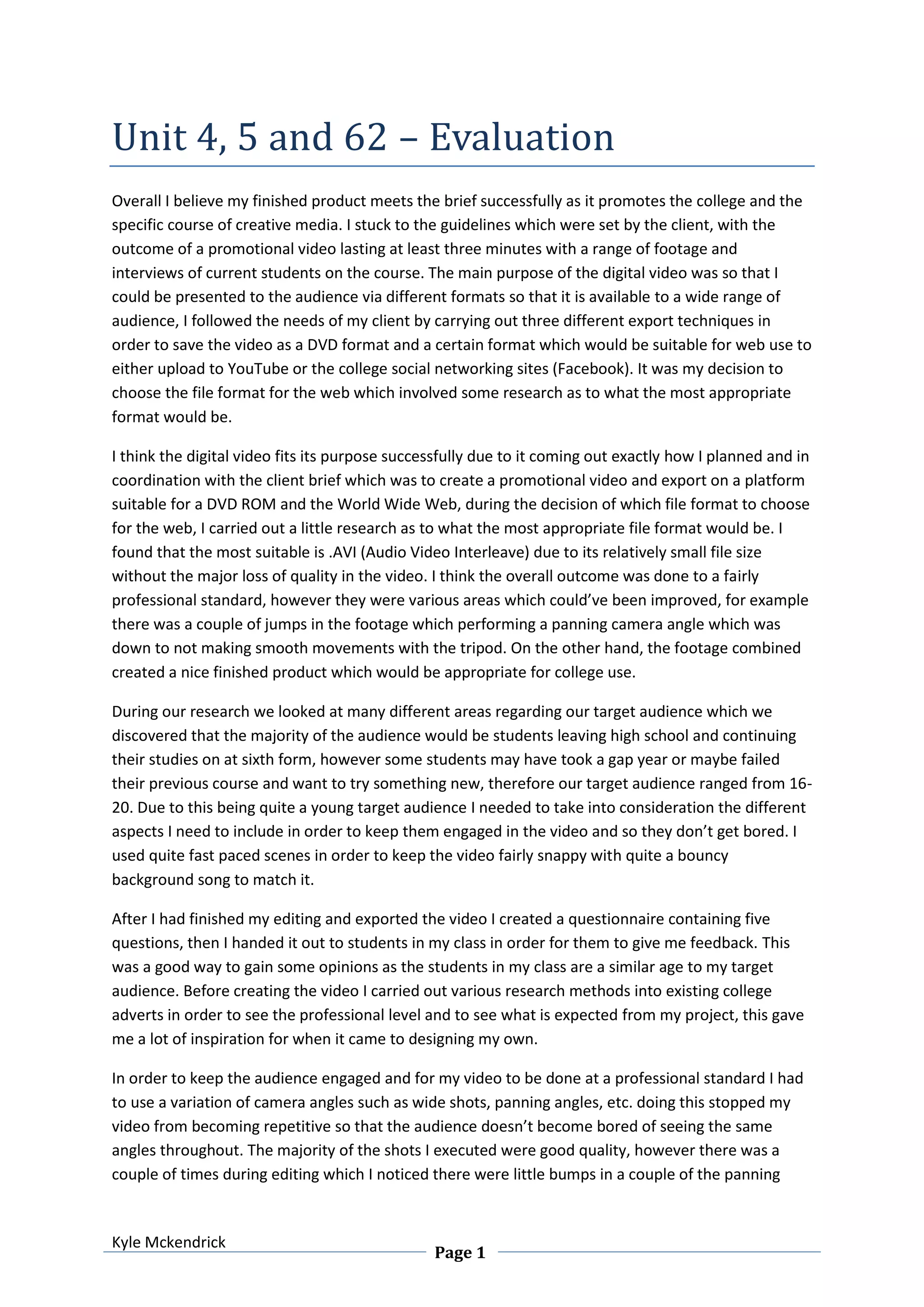
Overall I believe my finished product meets the brief successfully as it promotes the college and the
specific course of creative media. I stuck to the guidelines which were set by the client, with the
outcome of a promotional video lasting at least three minutes with a range of footage and
interviews of current students on the course. The main purpose of the digital video was so that I
could be presented to the audience via different formats so that it is available to a wide range of
audience, I followed the needs of my client by carrying out three different export techniques in
order to save the video as a DVD format and a certain format which would be suitable for web use to
either upload to YouTube or the college social networking sites (Facebook). It was my decision to
choose the file format for the web which involved some research as to what the most appropriate
format would be.
I think the digital video fits its purpose successfully due to it coming out exactly how I planned and in
coordination with the client brief which was to create a promotional video and export on a platform
suitable for a DVD ROM and the World Wide Web, during the decision of which file format to choose
for the web, I carried out a little research as to what the most appropriate file format would be. I
found that the most suitable is .AVI (Audio Video Interleave) due to its relatively small file size
without the major loss of quality in the video. I think the overall outcome was done to a fairly
professional standard, however they were various areas which could’ve been improved, for example
there was a couple of jumps in the footage which performing a panning camera angle which was
down to not making smooth movements with the tripod. On the other hand, the footage combined
created a nice finished product which would be appropriate for college use.
During our research we looked at many different areas regarding our target audience which we
discovered that the majority of the audience would be students leaving high school and continuing
their studies on at sixth form, however some students may have took a gap year or maybe failed
their previous course and want to try something new, therefore our target audience ranged from 16-
20. Due to this being quite a young target audience I needed to take into consideration the different
aspects I need to include in order to keep them engaged in the video and so they don’t get bored. I
used quite fast paced scenes in order to keep the video fairly snappy with quite a bouncy
background song to match it.
After I had finished my editing and exported the video I created a questionnaire containing five
questions, then I handed it out to students in my class in order for them to give me feedback. This
was a good way to gain some opinions as the students in my class are a similar age to my target
audience. Before creating the video I carried out various research methods into existing college
adverts in order to see the professional level and to see what is expected from my project, this gave
me a lot of inspiration for when it came to designing my own.
In order to keep the audience engaged and for my video to be done at a professional standard I had
to use a variation of camera angles such as wide shots, panning angles, etc. doing this stopped my
video from becoming repetitive so that the audience doesn’t become bored of seeing the same
angles throughout. The majority of the shots I executed were good quality, however there was a
couple of times during editing which I noticed there were little bumps in a couple of the panning
Kyle Mckendrick
Page 2
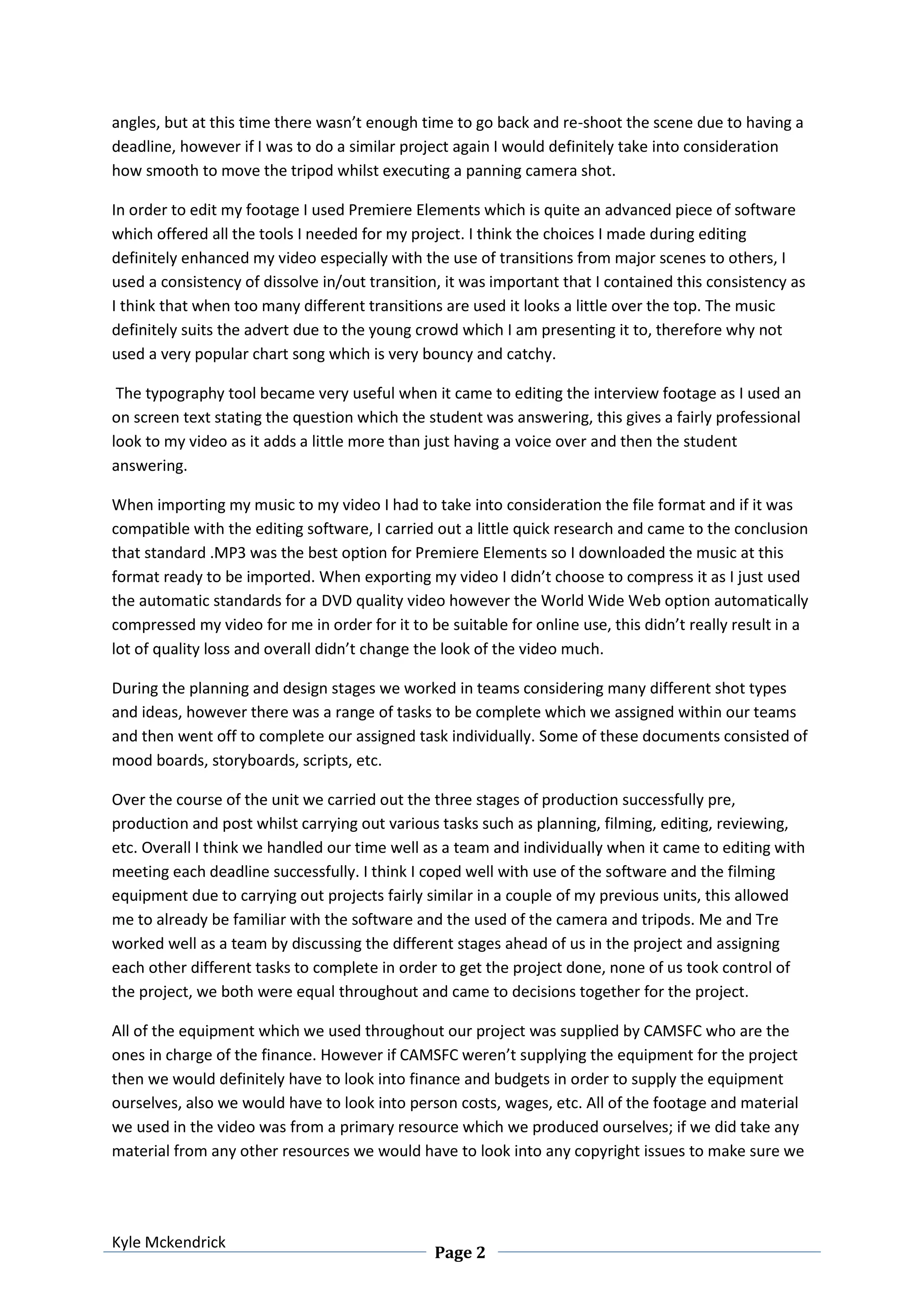
angles, but at this time there wasn’t enough time to go back and re-shoot the scene due to having a
deadline, however if I was to do a similar project again I would definitely take into consideration
how smooth to move the tripod whilst executing a panning camera shot.
In order to edit my footage I used Premiere Elements which is quite an advanced piece of software
which offered all the tools I needed for my project. I think the choices I made during editing
definitely enhanced my video especially with the use of transitions from major scenes to others, I
used a consistency of dissolve in/out transition, it was important that I contained this consistency as
I think that when too many different transitions are used it looks a little over the top. The music
definitely suits the advert due to the young crowd which I am presenting it to, therefore why not
used a very popular chart song which is very bouncy and catchy.
The typography tool became very useful when it came to editing the interview footage as I used an
on screen text stating the question which the student was answering, this gives a fairly professional
look to my video as it adds a little more than just having a voice over and then the student
answering.
When importing my music to my video I had to take into consideration the file format and if it was
compatible with the editing software, I carried out a little quick research and came to the conclusion
that standard .MP3 was the best option for Premiere Elements so I downloaded the music at this
format ready to be imported. When exporting my video I didn’t choose to compress it as I just used
the automatic standards for a DVD quality video however the World Wide Web option automatically
compressed my video for me in order for it to be suitable for online use, this didn’t really result in a
lot of quality loss and overall didn’t change the look of the video much.
During the planning and design stages we worked in teams considering many different shot types
and ideas, however there was a range of tasks to be complete which we assigned within our teams
and then went off to complete our assigned task individually. Some of these documents consisted of
mood boards, storyboards, scripts, etc.
Over the course of the unit we carried out the three stages of production successfully pre,
production and post whilst carrying out various tasks such as planning, filming, editing, reviewing,
etc. Overall I think we handled our time well as a team and individually when it came to editing with
meeting each deadline successfully. I think I coped well with use of the software and the filming
equipment due to carrying out projects fairly similar in a couple of my previous units, this allowed
me to already be familiar with the software and the used of the camera and tripods. Me and Tre
worked well as a team by discussing the different stages ahead of us in the project and assigning
each other different tasks to complete in order to get the project done, none of us took control of
the project, we both were equal throughout and came to decisions together for the project.
All of the equipment which we used throughout our project was supplied by CAMSFC who are the
ones in charge of the finance. However if CAMSFC weren’t supplying the equipment for the project
then we would definitely have to look into finance and budgets in order to supply the equipment
ourselves, also we would have to look into person costs, wages, etc. All of the footage and material
we used in the video was from a primary resource which we produced ourselves; if we did take any
material from any other resources we would have to look into any copyright issues to make sure we
Kyle Mckendrick
Page 3
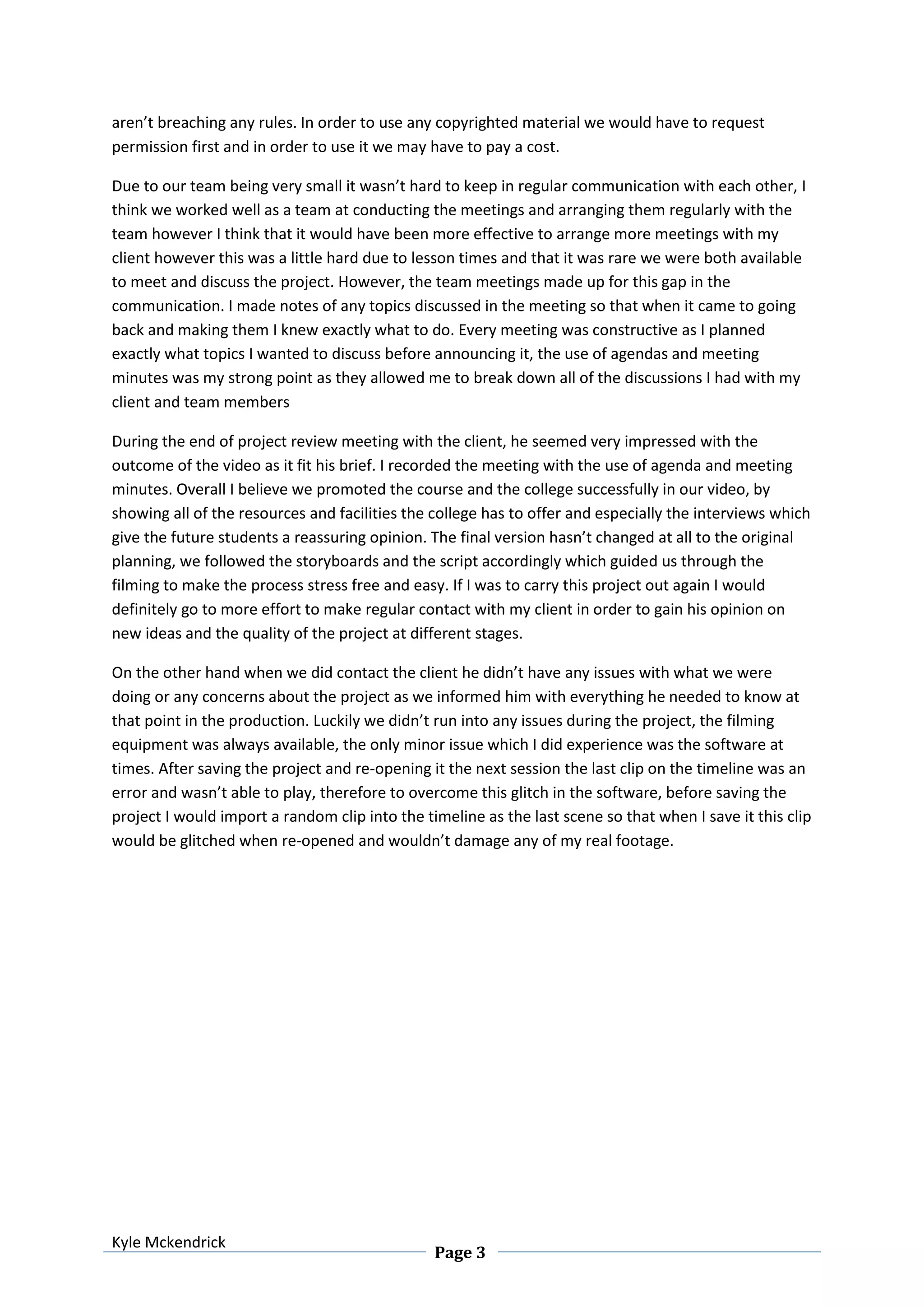
aren’t breaching any rules. In order to use any copyrighted material we would have to request
permission first and in order to use it we may have to pay a cost.
Due to our team being very small it wasn’t hard to keep in regular communication with each other, I
think we worked well as a team at conducting the meetings and arranging them regularly with the
team however I think that it would have been more effective to arrange more meetings with my
client however this was a little hard due to lesson times and that it was rare we were both available
to meet and discuss the project. However, the team meetings made up for this gap in the
communication. I made notes of any topics discussed in the meeting so that when it came to going
back and making them I knew exactly what to do. Every meeting was constructive as I planned
exactly what topics I wanted to discuss before announcing it, the use of agendas and meeting
minutes was my strong point as they allowed me to break down all of the discussions I had with my
client and team members
During the end of project review meeting with the client, he seemed very impressed with the
outcome of the video as it fit his brief. I recorded the meeting with the use of agenda and meeting
minutes. Overall I believe we promoted the course and the college successfully in our video, by
showing all of the resources and facilities the college has to offer and especially the interviews which
give the future students a reassuring opinion. The final version hasn’t changed at all to the original
planning, we followed the storyboards and the script accordingly which guided us through the
filming to make the process stress free and easy. If I was to carry this project out again I would
definitely go to more effort to make regular contact with my client in order to gain his opinion on
new ideas and the quality of the project at different stages.
On the other hand when we did contact the client he didn’t have any issues with what we were
doing or any concerns about the project as we informed him with everything he needed to know at
that point in the production. Luckily we didn’t run into any issues during the project, the filming
equipment was always available, the only minor issue which I did experience was the software at
times. After saving the project and re-opening it the next session the last clip on the timeline was an
error and wasn’t able to play, therefore to overcome this glitch in the software, before saving the
project I would import a random clip into the timeline as the last scene so that when I save it this clip
would be glitched when re-opened and wouldn’t damage any of my real footage.

Unit 4, 5 and 62 evaluation

  • 1.
    Kyle Mckendrick Page 1 Unit4, 5 and 62 – Evaluation Overall I believe my finished product meets the brief successfully as it promotes the college and the specific course of creative media. I stuck to the guidelines which were set by the client, with the outcome of a promotional video lasting at least three minutes with a range of footage and interviews of current students on the course. The main purpose of the digital video was so that I could be presented to the audience via different formats so that it is available to a wide range of audience, I followed the needs of my client by carrying out three different export techniques in order to save the video as a DVD format and a certain format which would be suitable for web use to either upload to YouTube or the college social networking sites (Facebook). It was my decision to choose the file format for the web which involved some research as to what the most appropriate format would be. I think the digital video fits its purpose successfully due to it coming out exactly how I planned and in coordination with the client brief which was to create a promotional video and export on a platform suitable for a DVD ROM and the World Wide Web, during the decision of which file format to choose for the web, I carried out a little research as to what the most appropriate file format would be. I found that the most suitable is .AVI (Audio Video Interleave) due to its relatively small file size without the major loss of quality in the video. I think the overall outcome was done to a fairly professional standard, however they were various areas which could’ve been improved, for example there was a couple of jumps in the footage which performing a panning camera angle which was down to not making smooth movements with the tripod. On the other hand, the footage combined created a nice finished product which would be appropriate for college use. During our research we looked at many different areas regarding our target audience which we discovered that the majority of the audience would be students leaving high school and continuing their studies on at sixth form, however some students may have took a gap year or maybe failed their previous course and want to try something new, therefore our target audience ranged from 16- 20. Due to this being quite a young target audience I needed to take into consideration the different aspects I need to include in order to keep them engaged in the video and so they don’t get bored. I used quite fast paced scenes in order to keep the video fairly snappy with quite a bouncy background song to match it. After I had finished my editing and exported the video I created a questionnaire containing five questions, then I handed it out to students in my class in order for them to give me feedback. This was a good way to gain some opinions as the students in my class are a similar age to my target audience. Before creating the video I carried out various research methods into existing college adverts in order to see the professional level and to see what is expected from my project, this gave me a lot of inspiration for when it came to designing my own. In order to keep the audience engaged and for my video to be done at a professional standard I had to use a variation of camera angles such as wide shots, panning angles, etc. doing this stopped my video from becoming repetitive so that the audience doesn’t become bored of seeing the same angles throughout. The majority of the shots I executed were good quality, however there was a couple of times during editing which I noticed there were little bumps in a couple of the panning
  • 2.
    Kyle Mckendrick Page 2 angles,but at this time there wasn’t enough time to go back and re-shoot the scene due to having a deadline, however if I was to do a similar project again I would definitely take into consideration how smooth to move the tripod whilst executing a panning camera shot. In order to edit my footage I used Premiere Elements which is quite an advanced piece of software which offered all the tools I needed for my project. I think the choices I made during editing definitely enhanced my video especially with the use of transitions from major scenes to others, I used a consistency of dissolve in/out transition, it was important that I contained this consistency as I think that when too many different transitions are used it looks a little over the top. The music definitely suits the advert due to the young crowd which I am presenting it to, therefore why not used a very popular chart song which is very bouncy and catchy. The typography tool became very useful when it came to editing the interview footage as I used an on screen text stating the question which the student was answering, this gives a fairly professional look to my video as it adds a little more than just having a voice over and then the student answering. When importing my music to my video I had to take into consideration the file format and if it was compatible with the editing software, I carried out a little quick research and came to the conclusion that standard .MP3 was the best option for Premiere Elements so I downloaded the music at this format ready to be imported. When exporting my video I didn’t choose to compress it as I just used the automatic standards for a DVD quality video however the World Wide Web option automatically compressed my video for me in order for it to be suitable for online use, this didn’t really result in a lot of quality loss and overall didn’t change the look of the video much. During the planning and design stages we worked in teams considering many different shot types and ideas, however there was a range of tasks to be complete which we assigned within our teams and then went off to complete our assigned task individually. Some of these documents consisted of mood boards, storyboards, scripts, etc. Over the course of the unit we carried out the three stages of production successfully pre, production and post whilst carrying out various tasks such as planning, filming, editing, reviewing, etc. Overall I think we handled our time well as a team and individually when it came to editing with meeting each deadline successfully. I think I coped well with use of the software and the filming equipment due to carrying out projects fairly similar in a couple of my previous units, this allowed me to already be familiar with the software and the used of the camera and tripods. Me and Tre worked well as a team by discussing the different stages ahead of us in the project and assigning each other different tasks to complete in order to get the project done, none of us took control of the project, we both were equal throughout and came to decisions together for the project. All of the equipment which we used throughout our project was supplied by CAMSFC who are the ones in charge of the finance. However if CAMSFC weren’t supplying the equipment for the project then we would definitely have to look into finance and budgets in order to supply the equipment ourselves, also we would have to look into person costs, wages, etc. All of the footage and material we used in the video was from a primary resource which we produced ourselves; if we did take any material from any other resources we would have to look into any copyright issues to make sure we
  • 3.
    Kyle Mckendrick Page 3 aren’tbreaching any rules. In order to use any copyrighted material we would have to request permission first and in order to use it we may have to pay a cost. Due to our team being very small it wasn’t hard to keep in regular communication with each other, I think we worked well as a team at conducting the meetings and arranging them regularly with the team however I think that it would have been more effective to arrange more meetings with my client however this was a little hard due to lesson times and that it was rare we were both available to meet and discuss the project. However, the team meetings made up for this gap in the communication. I made notes of any topics discussed in the meeting so that when it came to going back and making them I knew exactly what to do. Every meeting was constructive as I planned exactly what topics I wanted to discuss before announcing it, the use of agendas and meeting minutes was my strong point as they allowed me to break down all of the discussions I had with my client and team members During the end of project review meeting with the client, he seemed very impressed with the outcome of the video as it fit his brief. I recorded the meeting with the use of agenda and meeting minutes. Overall I believe we promoted the course and the college successfully in our video, by showing all of the resources and facilities the college has to offer and especially the interviews which give the future students a reassuring opinion. The final version hasn’t changed at all to the original planning, we followed the storyboards and the script accordingly which guided us through the filming to make the process stress free and easy. If I was to carry this project out again I would definitely go to more effort to make regular contact with my client in order to gain his opinion on new ideas and the quality of the project at different stages. On the other hand when we did contact the client he didn’t have any issues with what we were doing or any concerns about the project as we informed him with everything he needed to know at that point in the production. Luckily we didn’t run into any issues during the project, the filming equipment was always available, the only minor issue which I did experience was the software at times. After saving the project and re-opening it the next session the last clip on the timeline was an error and wasn’t able to play, therefore to overcome this glitch in the software, before saving the project I would import a random clip into the timeline as the last scene so that when I save it this clip would be glitched when re-opened and wouldn’t damage any of my real footage.