What is a computer? A device that accepts information and manipulates it for some result.
COMPUTER HARWARE FIRMWARE SOFTWARE CPU MAIN MEMORY PERIPHERAL DEVICES SYSTEM APPLICATION
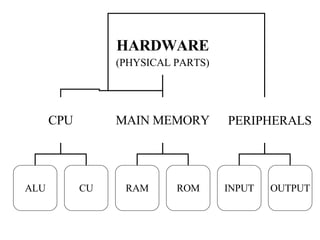
HARDWARE (PHYSICAL PARTS) CPU MAIN MEMORY PERIPHERALS ALU CU RAM ROM INPUT OUTPUT
CPU MICROPROCESSOR MOTHER BOARD CASE OTHER COMPONENTS BUSES
MONITOR The computer monitor is the physical display for your computer.  The terms  monitor  and  display  are often used interchangeably
KEYBOARD looks like a standard typewriter keyboard.   Cursor Keys; Function Keys, F1 through F12; Numerical Keypad …
MOUSE input device like the keyboard, but more dynamic. has a roller ball that is attached to several internal sensors ; 2 or 3 buttons you can click, highlight, or drag and drop the item.
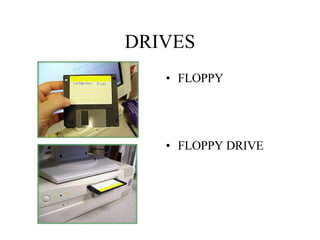
DRIVES FLOPPY FLOPPY DRIVE
CD-ROM DRIVE
PRINTER A printer transfers graphics and text from your computer to paper.  has lights and displays that tell you when it is out of paper or toner or ink, or when it has paper jammed inside it.  Printers can differ in the resolution per inch, color capability and speed
SOFTWARE PROVIDES INSTRUCTIONS AND DATA SYSTEM  SOFTWARE OPERATING SYSTEM & OTHER PROGRAMS THAT ALLOW COMPUTER TO FUNCTION APPLICATION SOFTWARE USED BY OPERATOR FOR SPECIFIC TASKS
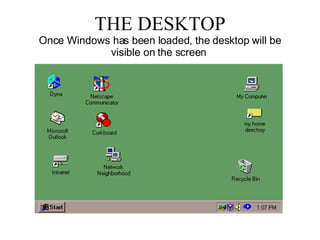
THE DESKTOP Once Windows has been loaded, the desktop will be visible on the screen
WINDOW Title Bar :  Located at the top of the window, tells you what program you are using.   Tool Bars :  Located below the title bar, are specific to each program.   Task Bar:  Located at the bottom of the window, tells you what programs are open.   Scroll Bars :  Located on the side and on the bottom, enables you to scroll up/down or right/left.

Unit 0 Introduction To Computer

  • 1.
    What is acomputer? A device that accepts information and manipulates it for some result.
  • 2.
    COMPUTER HARWARE FIRMWARESOFTWARE CPU MAIN MEMORY PERIPHERAL DEVICES SYSTEM APPLICATION
  • 3.
    HARDWARE (PHYSICAL PARTS)CPU MAIN MEMORY PERIPHERALS ALU CU RAM ROM INPUT OUTPUT
  • 4.
    CPU MICROPROCESSOR MOTHERBOARD CASE OTHER COMPONENTS BUSES
  • 5.
    MONITOR The computermonitor is the physical display for your computer. The terms monitor and display are often used interchangeably
  • 6.
    KEYBOARD looks likea standard typewriter keyboard. Cursor Keys; Function Keys, F1 through F12; Numerical Keypad …
  • 7.
    MOUSE input devicelike the keyboard, but more dynamic. has a roller ball that is attached to several internal sensors ; 2 or 3 buttons you can click, highlight, or drag and drop the item.
  • 8.
  • 9.
  • 10.
    PRINTER A printertransfers graphics and text from your computer to paper. has lights and displays that tell you when it is out of paper or toner or ink, or when it has paper jammed inside it. Printers can differ in the resolution per inch, color capability and speed
  • 11.
    SOFTWARE PROVIDES INSTRUCTIONSAND DATA SYSTEM SOFTWARE OPERATING SYSTEM & OTHER PROGRAMS THAT ALLOW COMPUTER TO FUNCTION APPLICATION SOFTWARE USED BY OPERATOR FOR SPECIFIC TASKS
  • 12.
    THE DESKTOP OnceWindows has been loaded, the desktop will be visible on the screen
  • 13.
    WINDOW Title Bar: Located at the top of the window, tells you what program you are using. Tool Bars : Located below the title bar, are specific to each program. Task Bar: Located at the bottom of the window, tells you what programs are open. Scroll Bars : Located on the side and on the bottom, enables you to scroll up/down or right/left.