COMPUTER
FUNDAMENTALS
DaVid Kawlni, Department of Computer Science
GOVT. SERCHHIP COLLEGE COACHING CENTRE
2022
INDEX
üGenerations of Computer
üComponents of Computer System
üComputer Languages
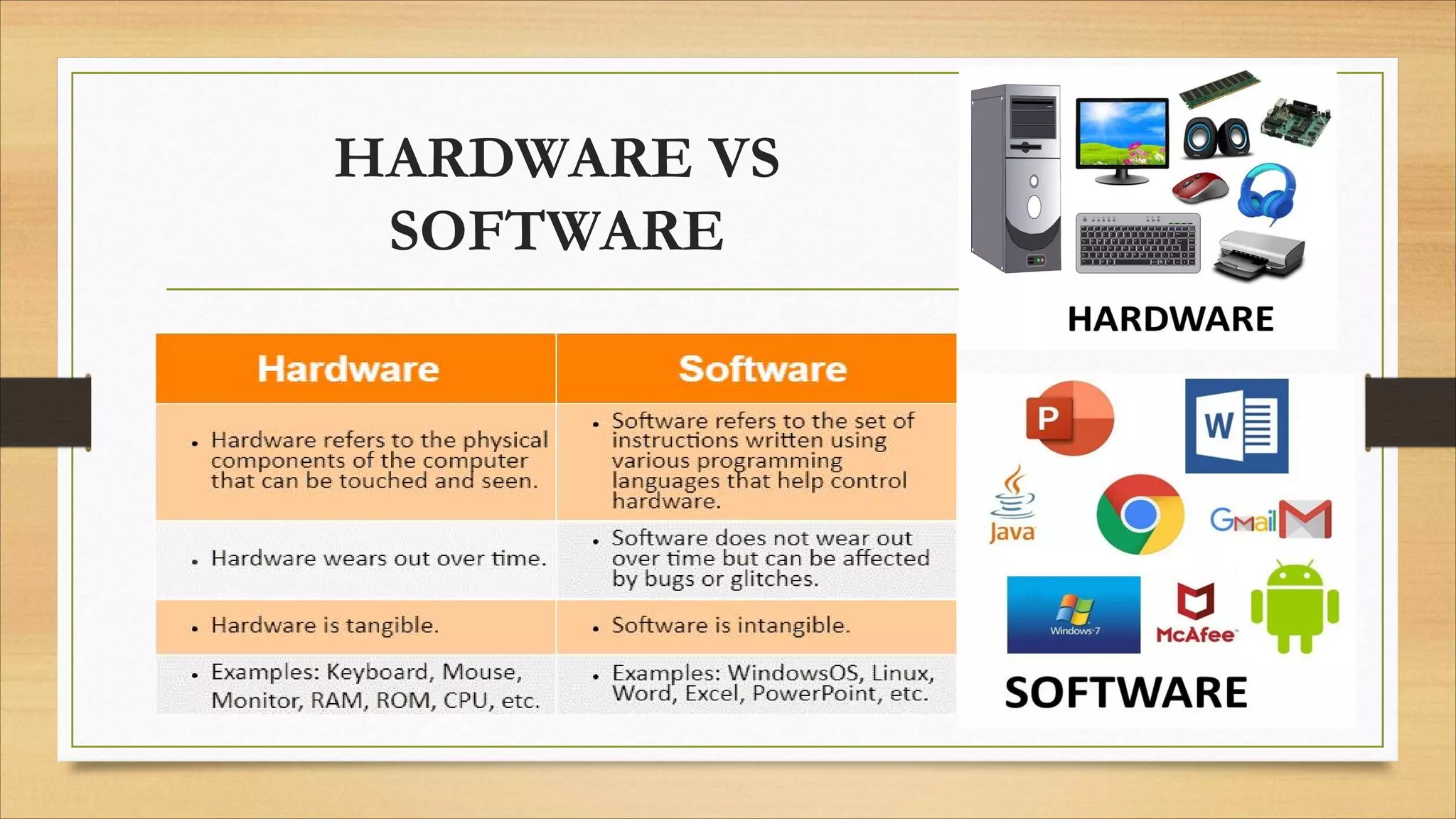
üHardware vs Software
üOperating System
üClassification of Computers
üBasic Terminologies
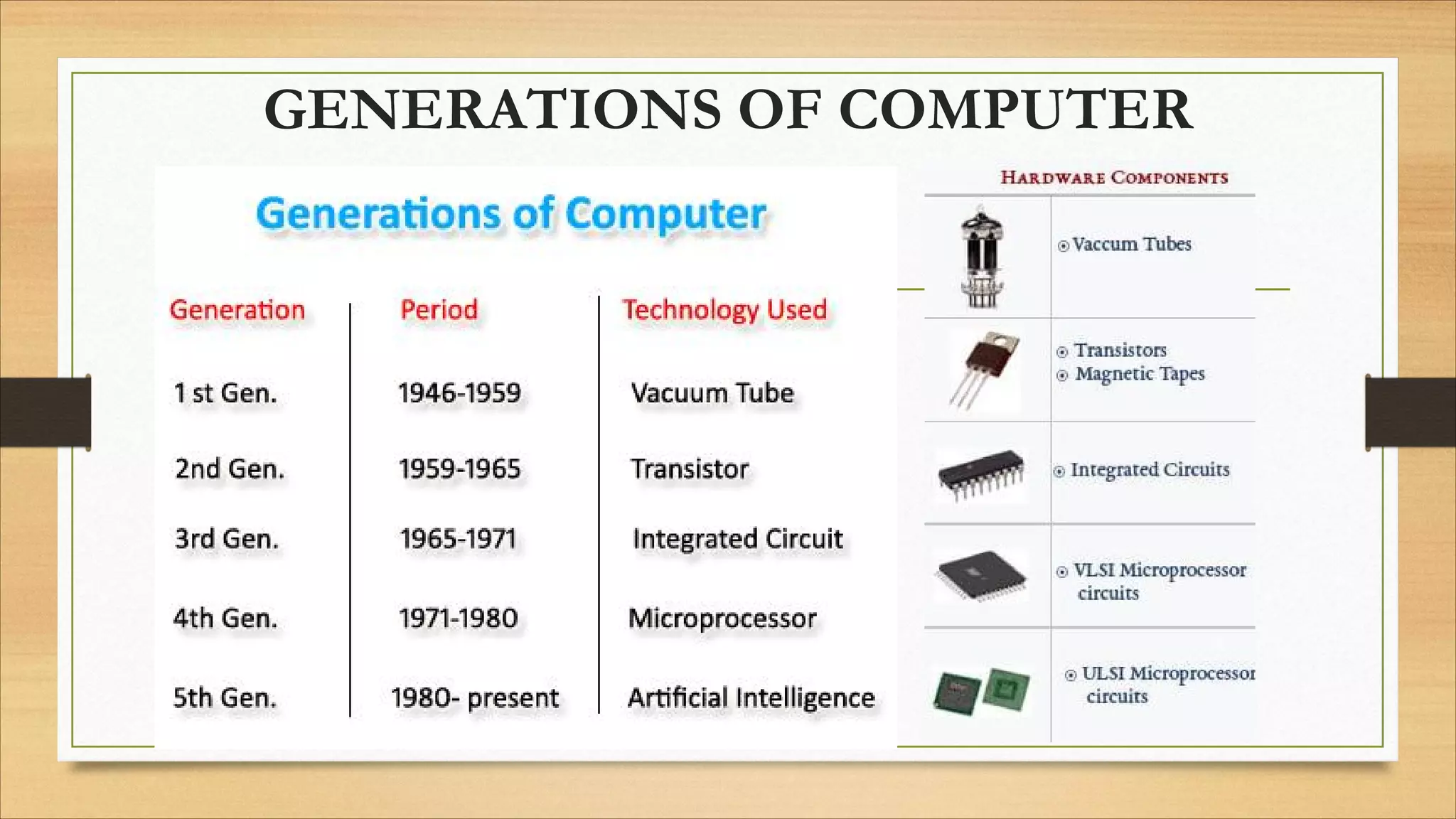
GENERATIONS OF COMPUTER
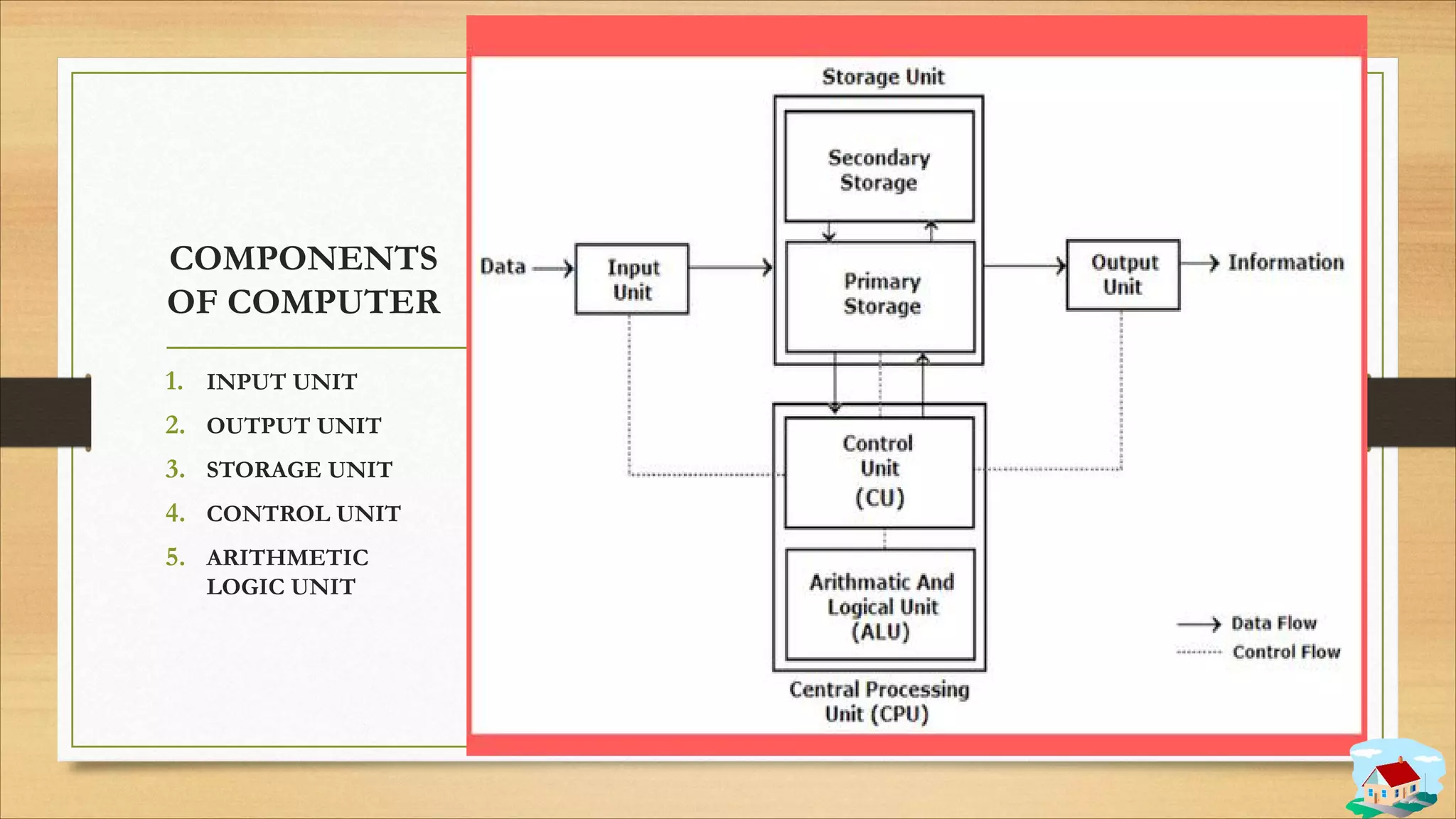
COMPONENTS
OF COMPUTER
1. INPUT UNIT
2. OUTPUT UNIT
3. STORAGE UNIT
4. CONTROL UNIT
5. ARITHMETIC
LOGIC UNIT
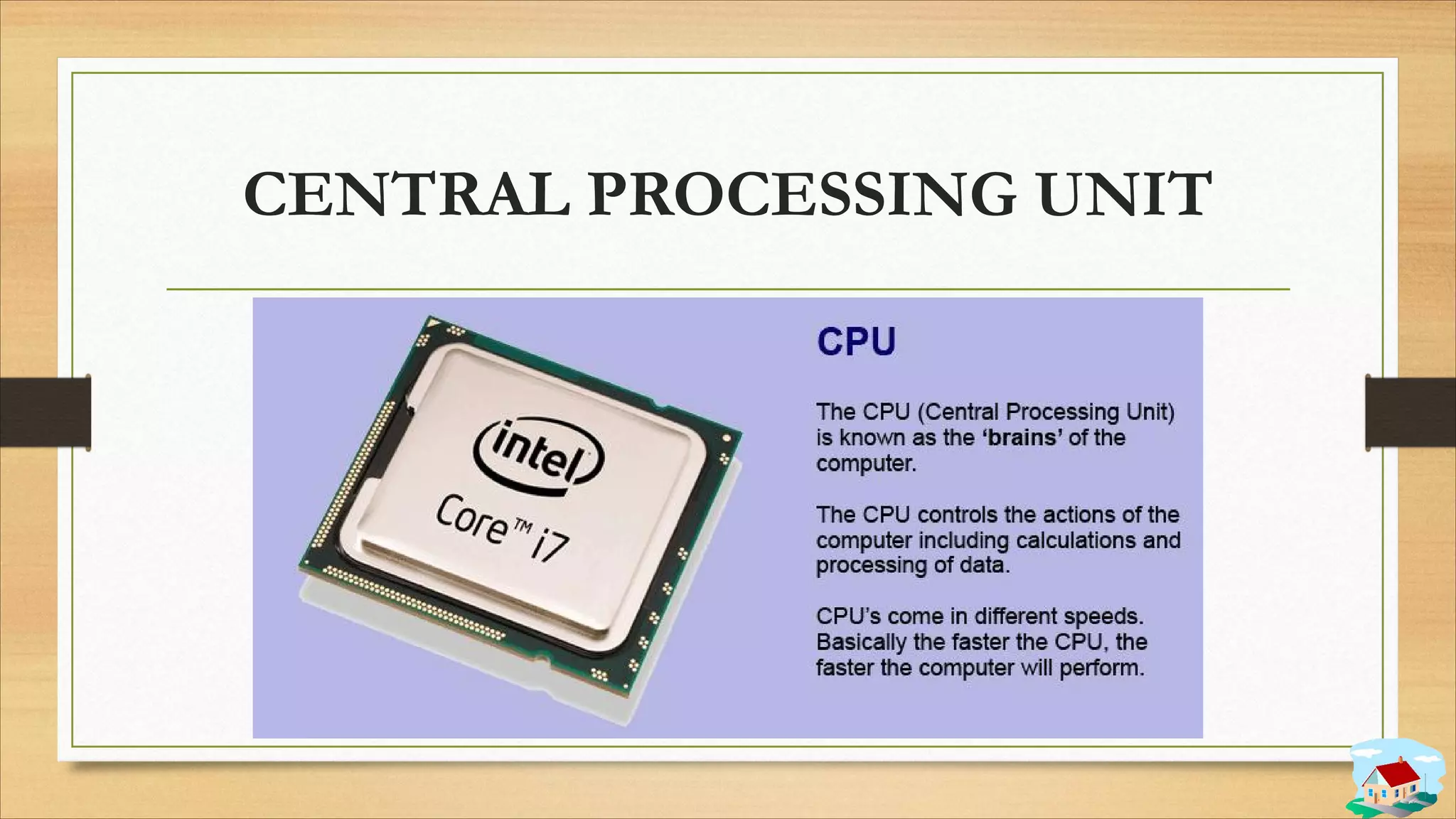
CENTRAL PROCESSING UNIT
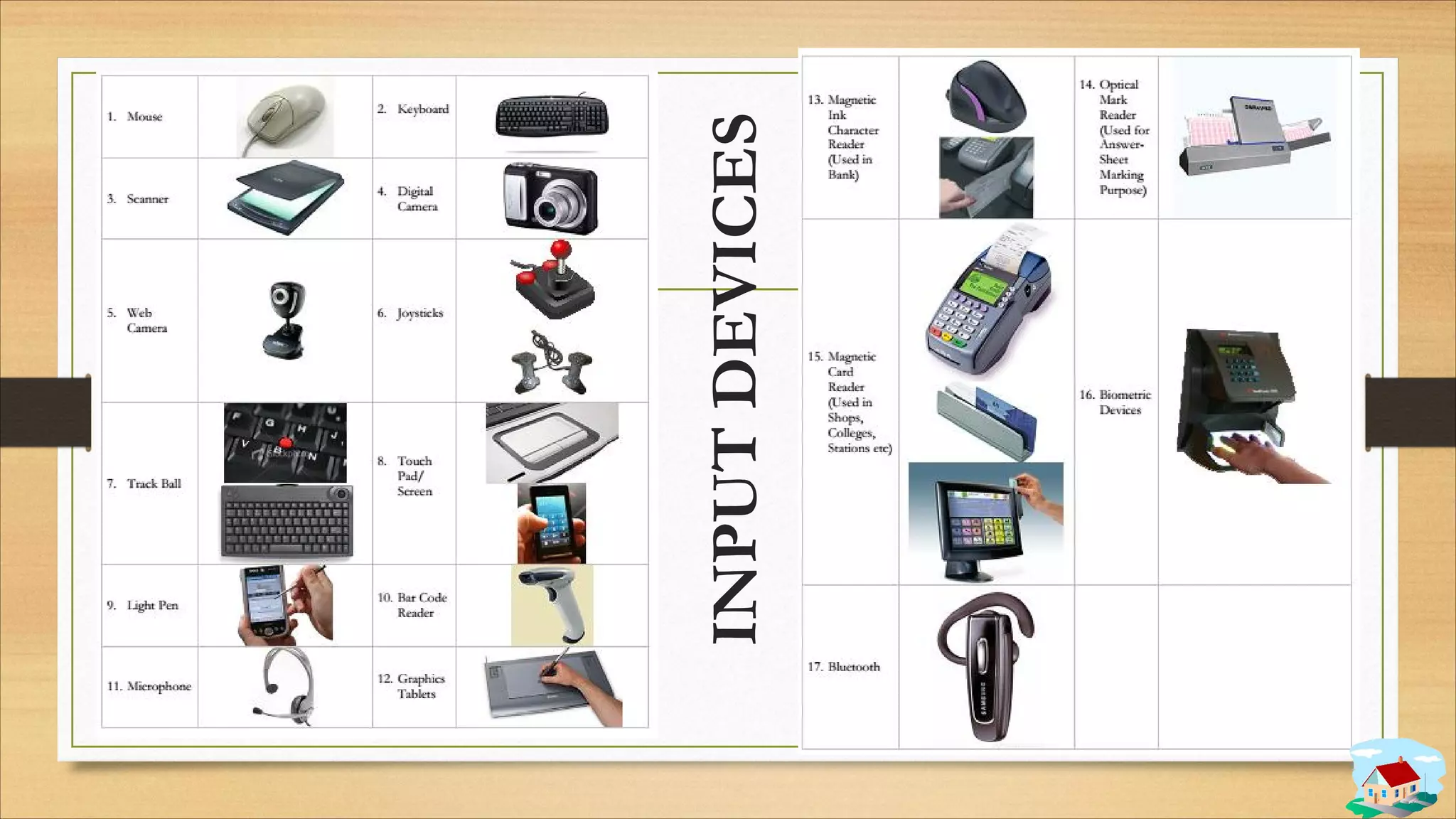
INPUT
DEVICES
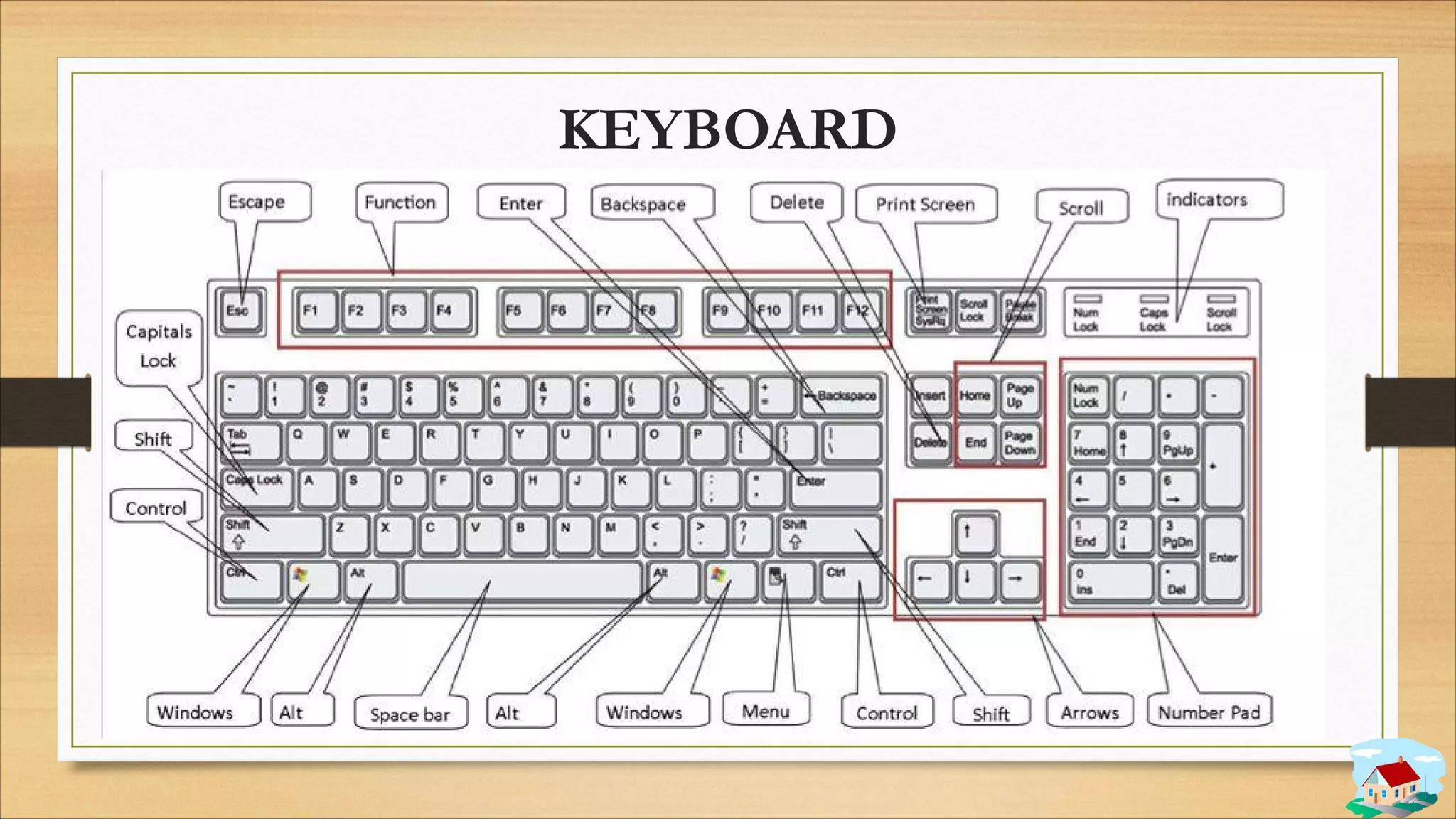
KEYBOARD
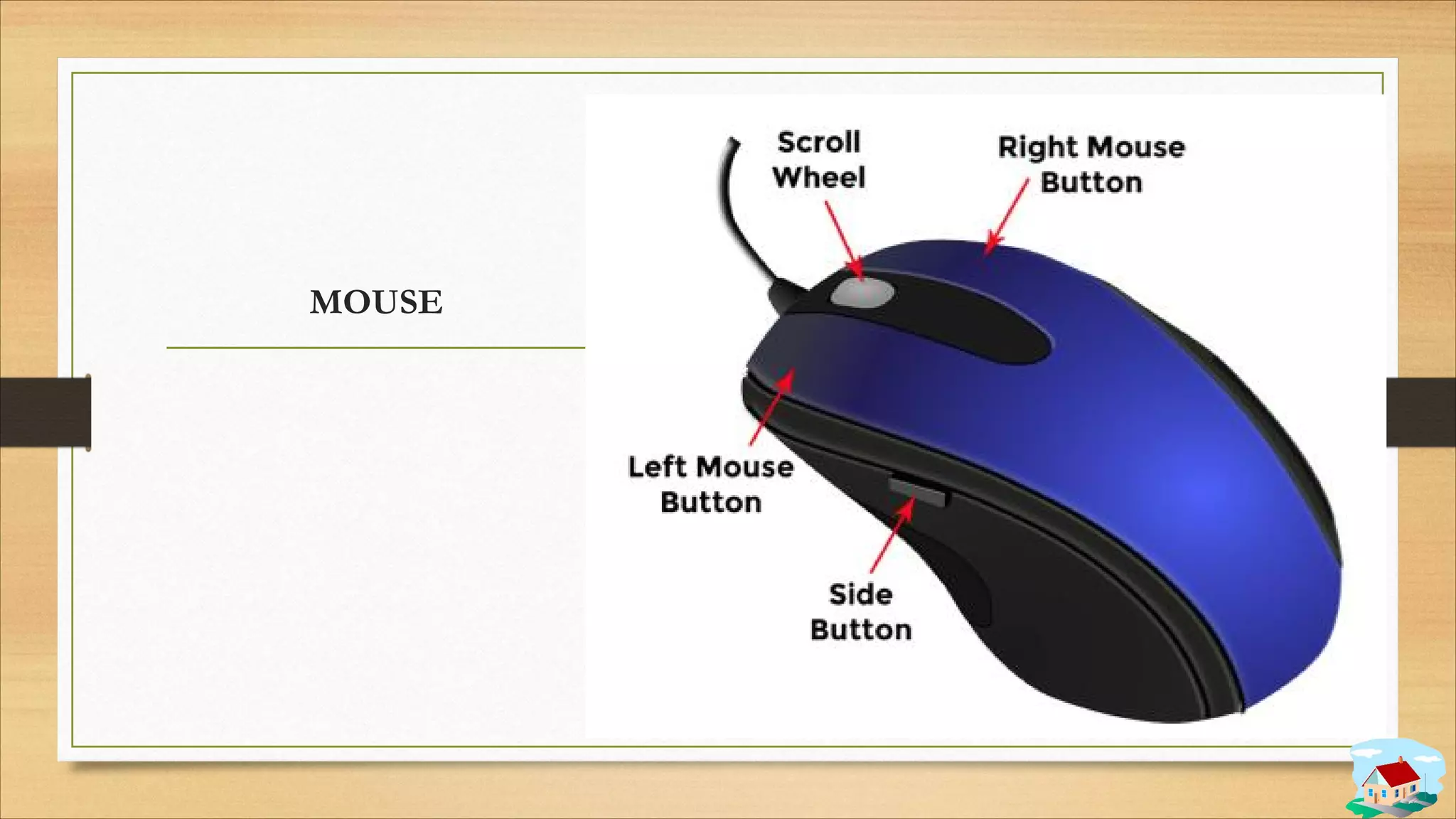
MOUSE
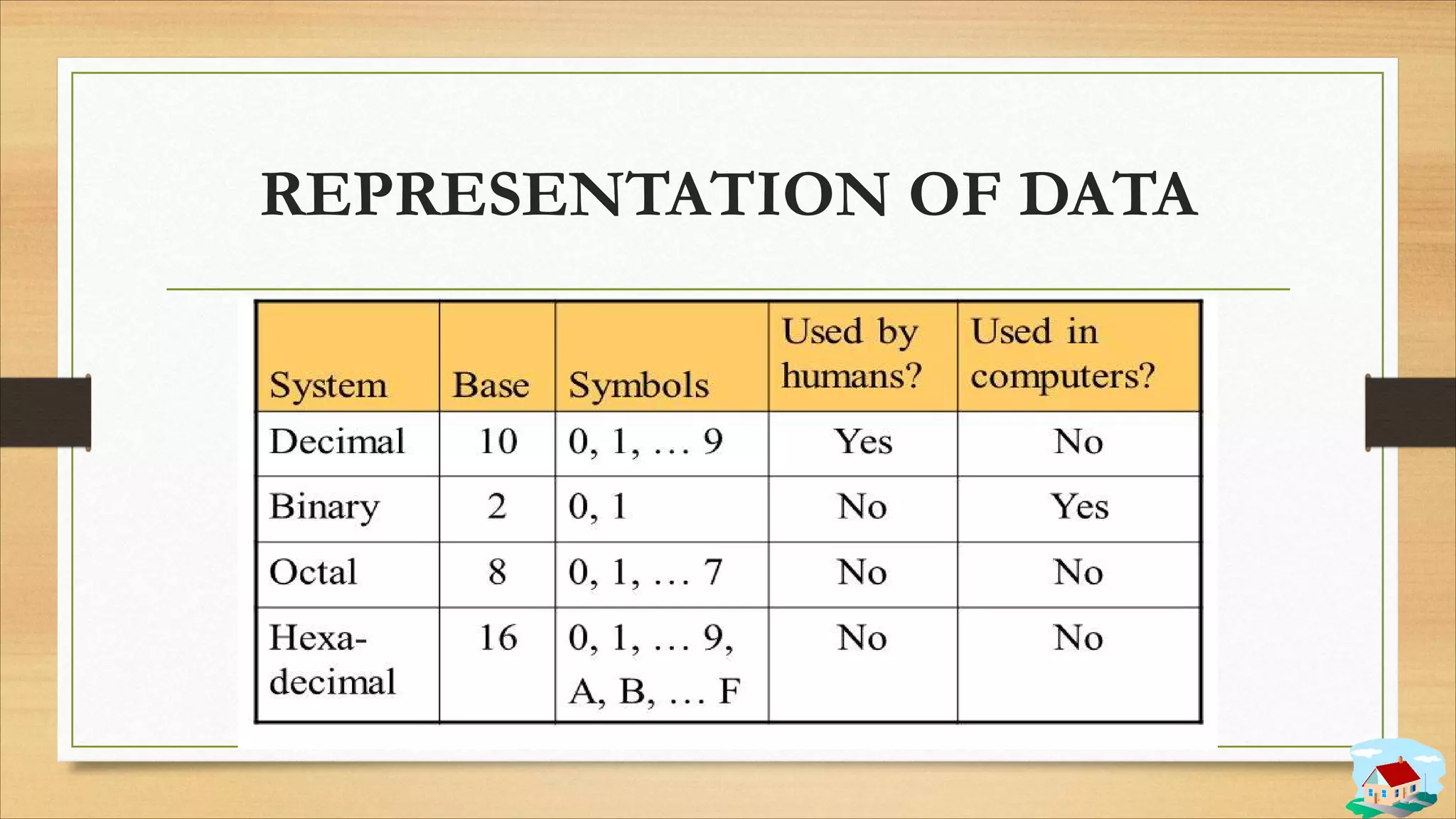
REPRESENTATION OF DATA
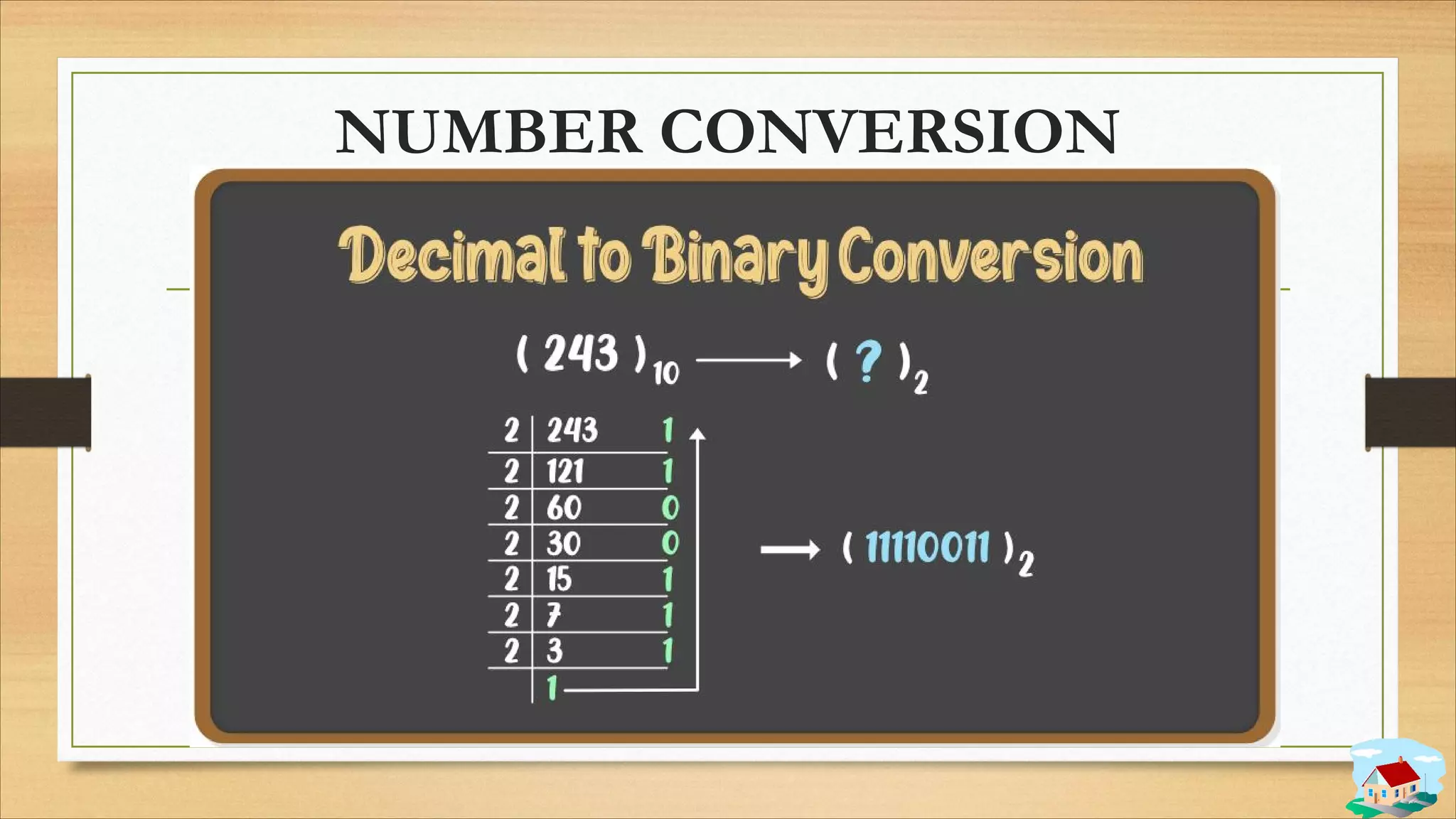
NUMBER CONVERSION
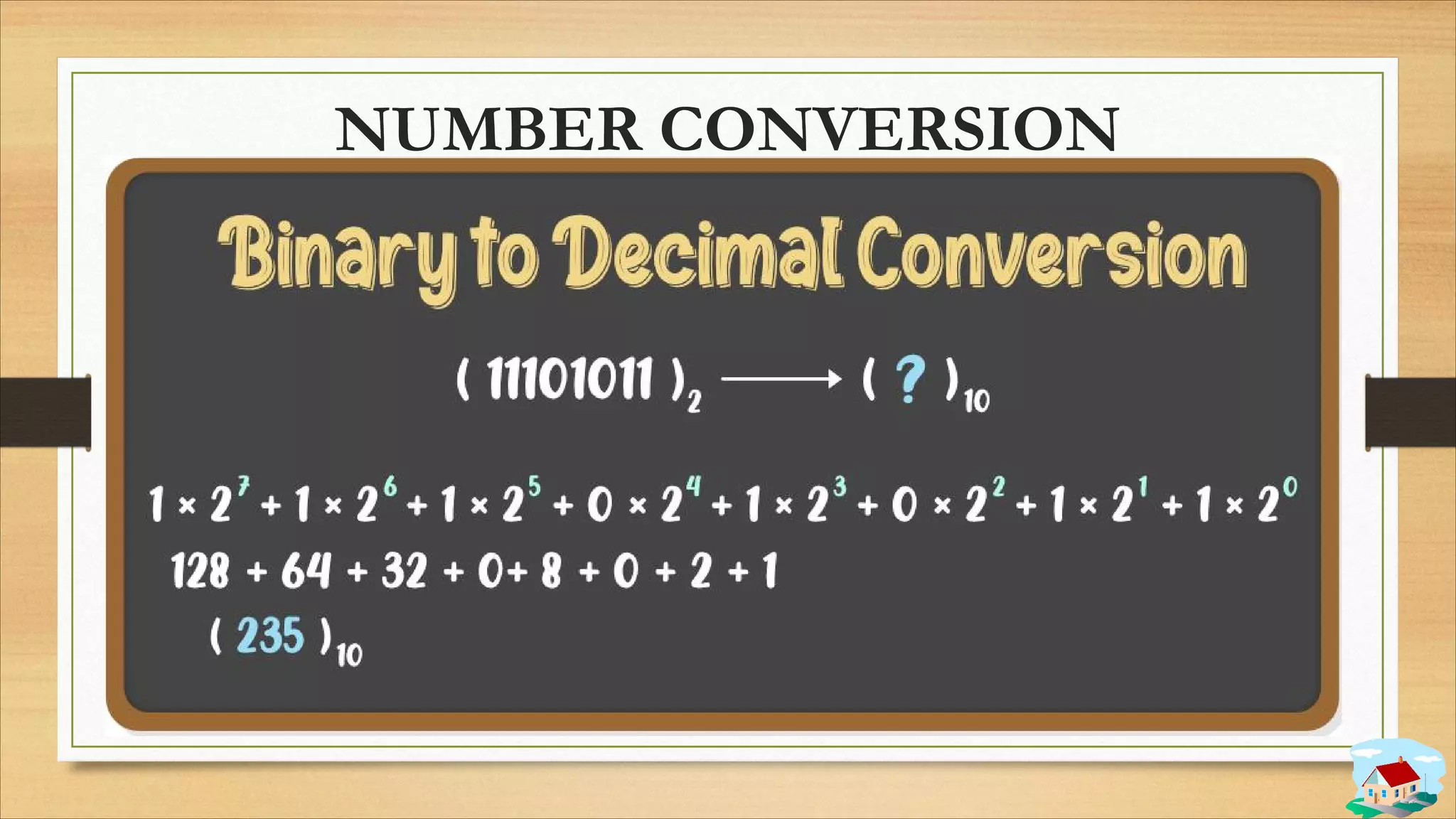
NUMBER CONVERSION
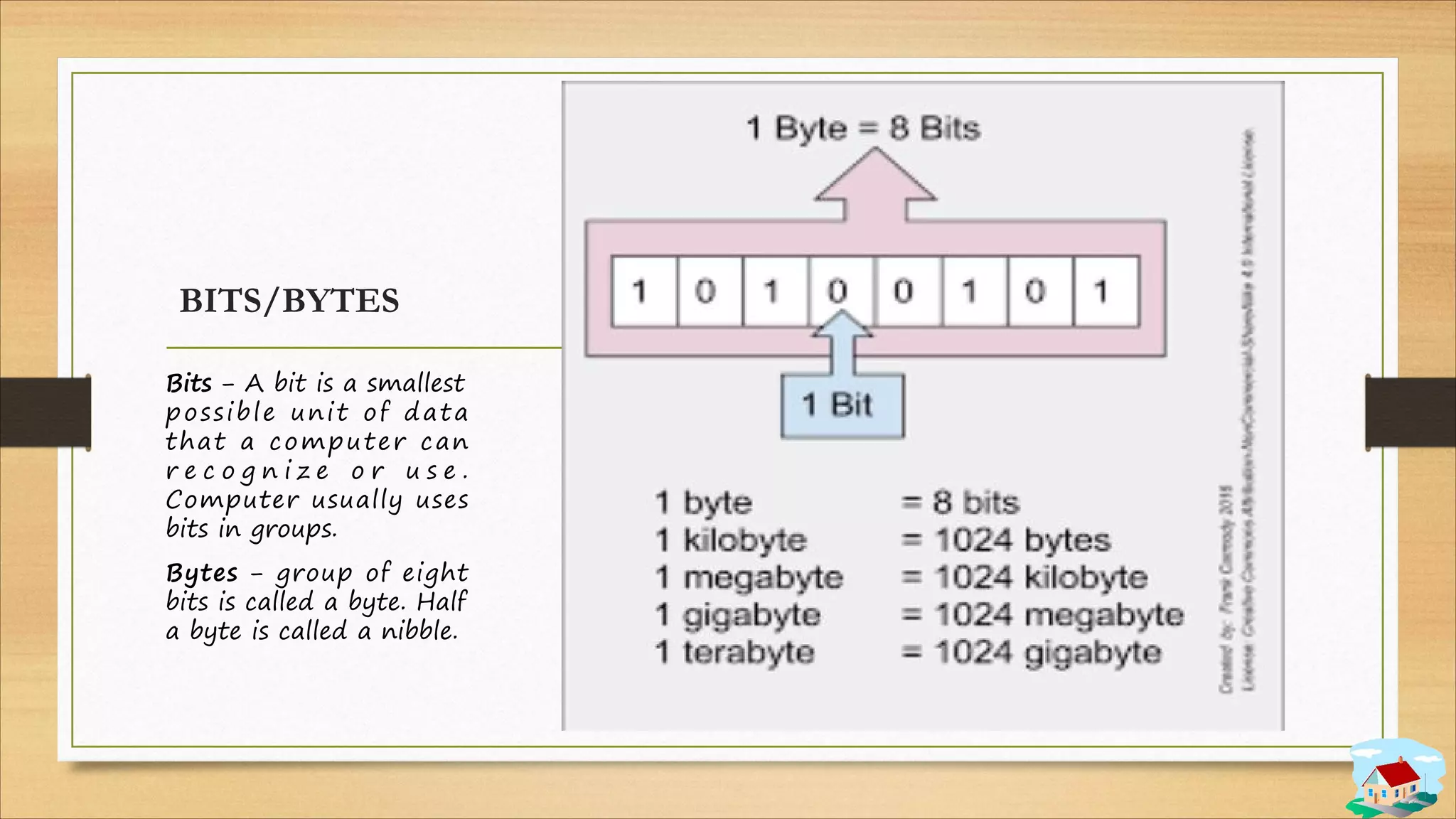
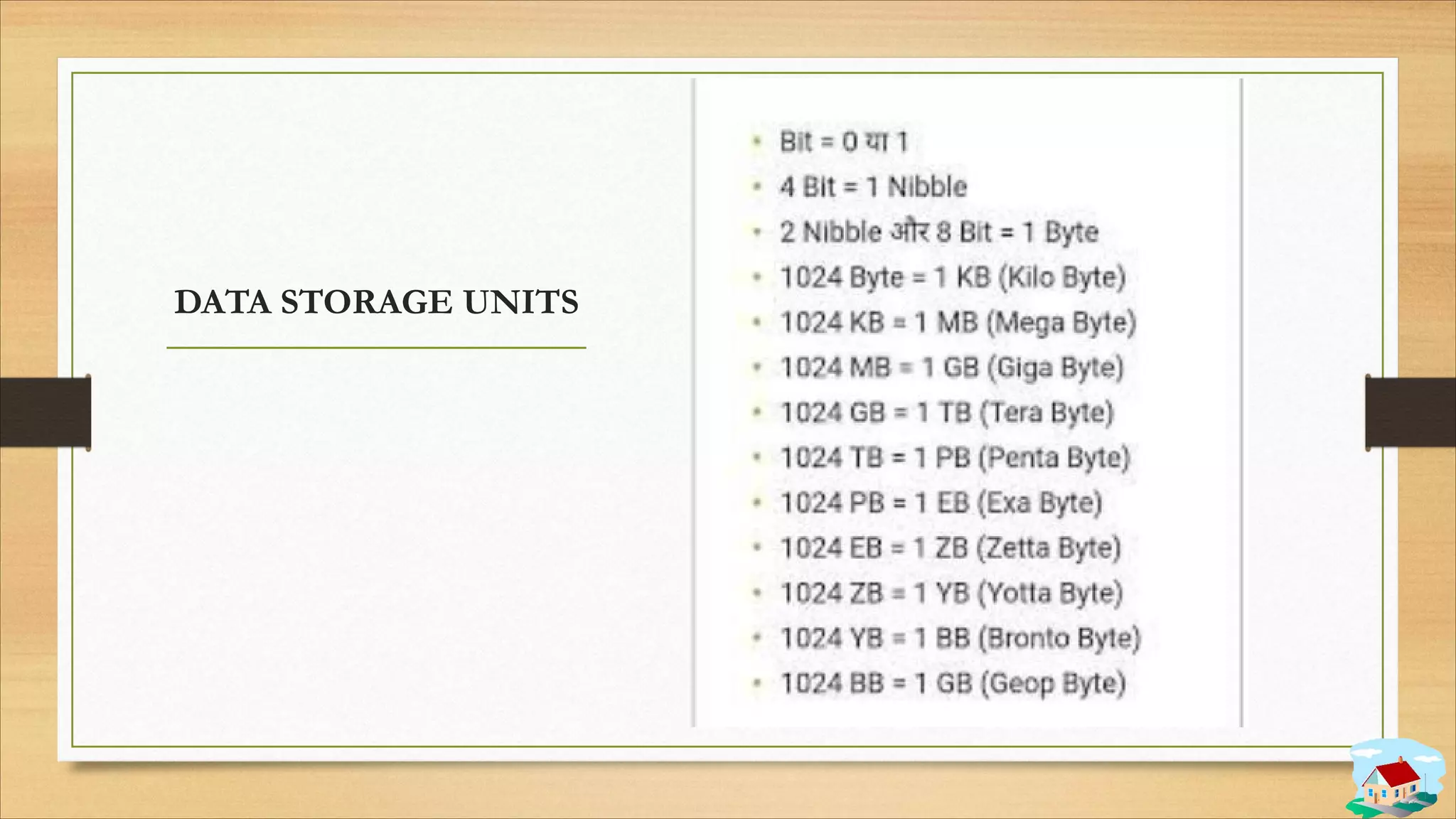
BITS/BYTES
Bits − A bit is a smallest
possible unit of data
that a computer can
r e c o g n i z e o r u s e .
Computer usually uses
bits in groups.
Bytes − group of eight
bits is called a byte. Half
a byte is called a nibble.
DATA STORAGE UNITS
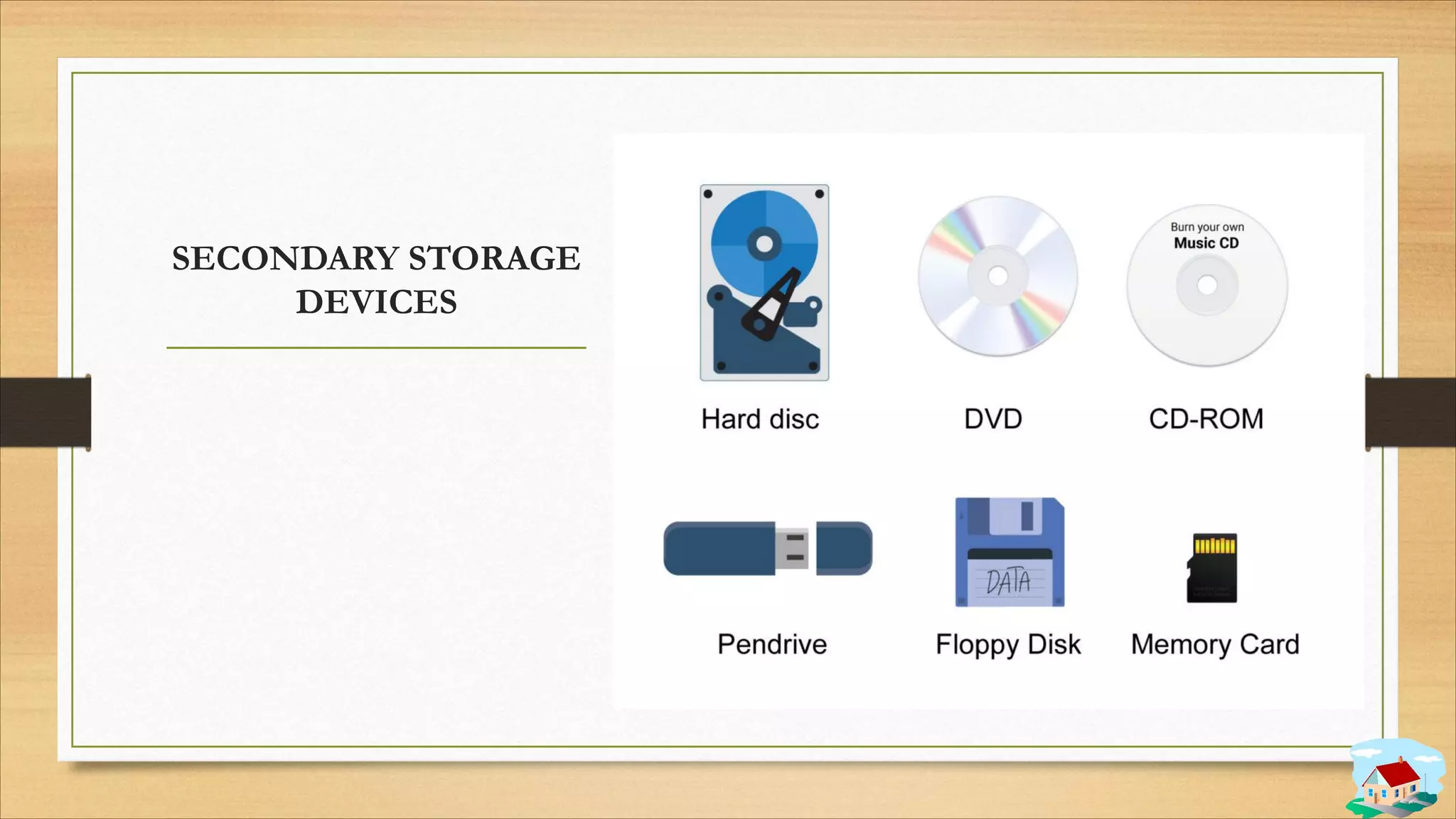
SECONDARY STORAGE
DEVICES
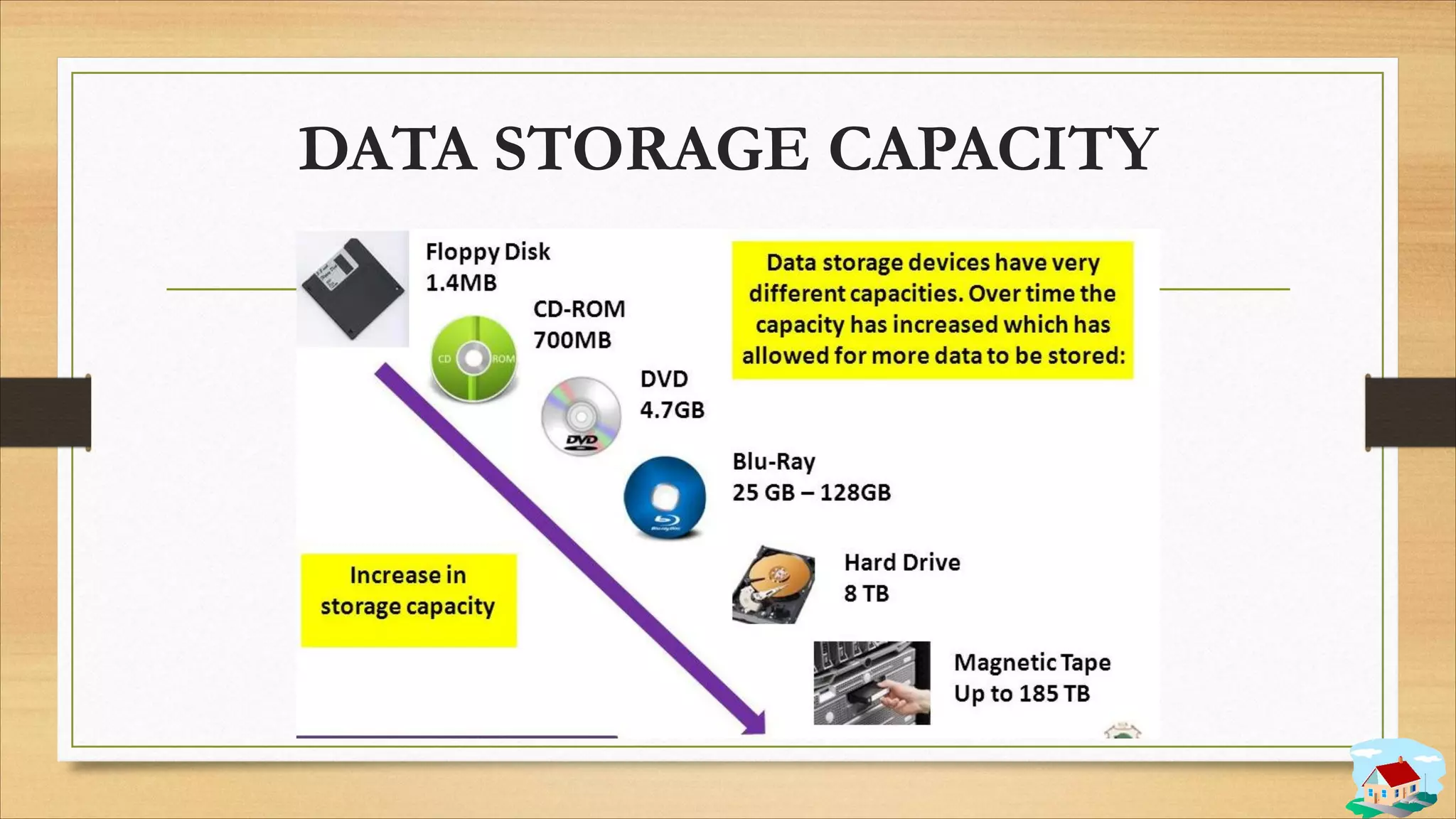
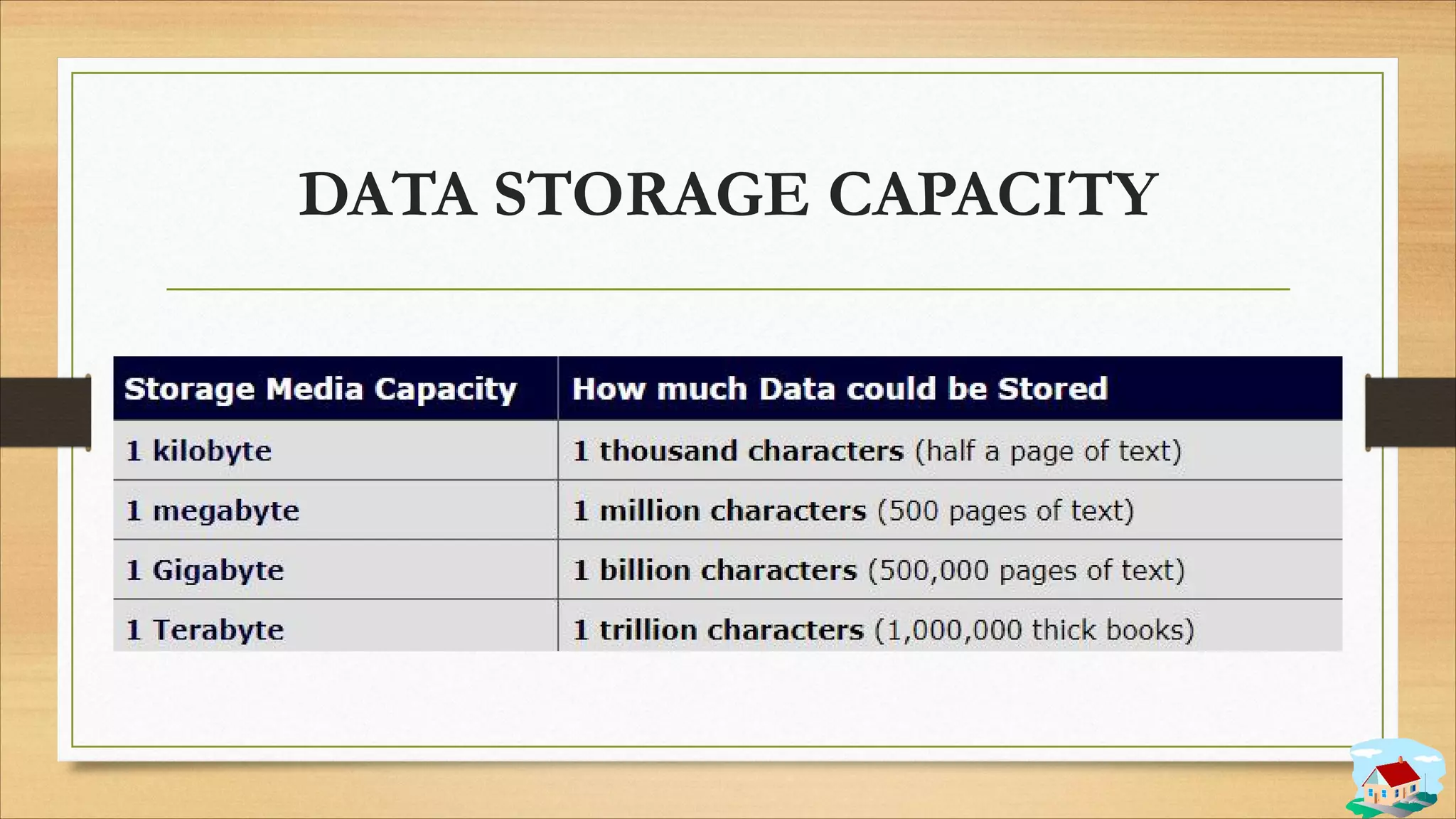
DATA STORAGE CAPACITY
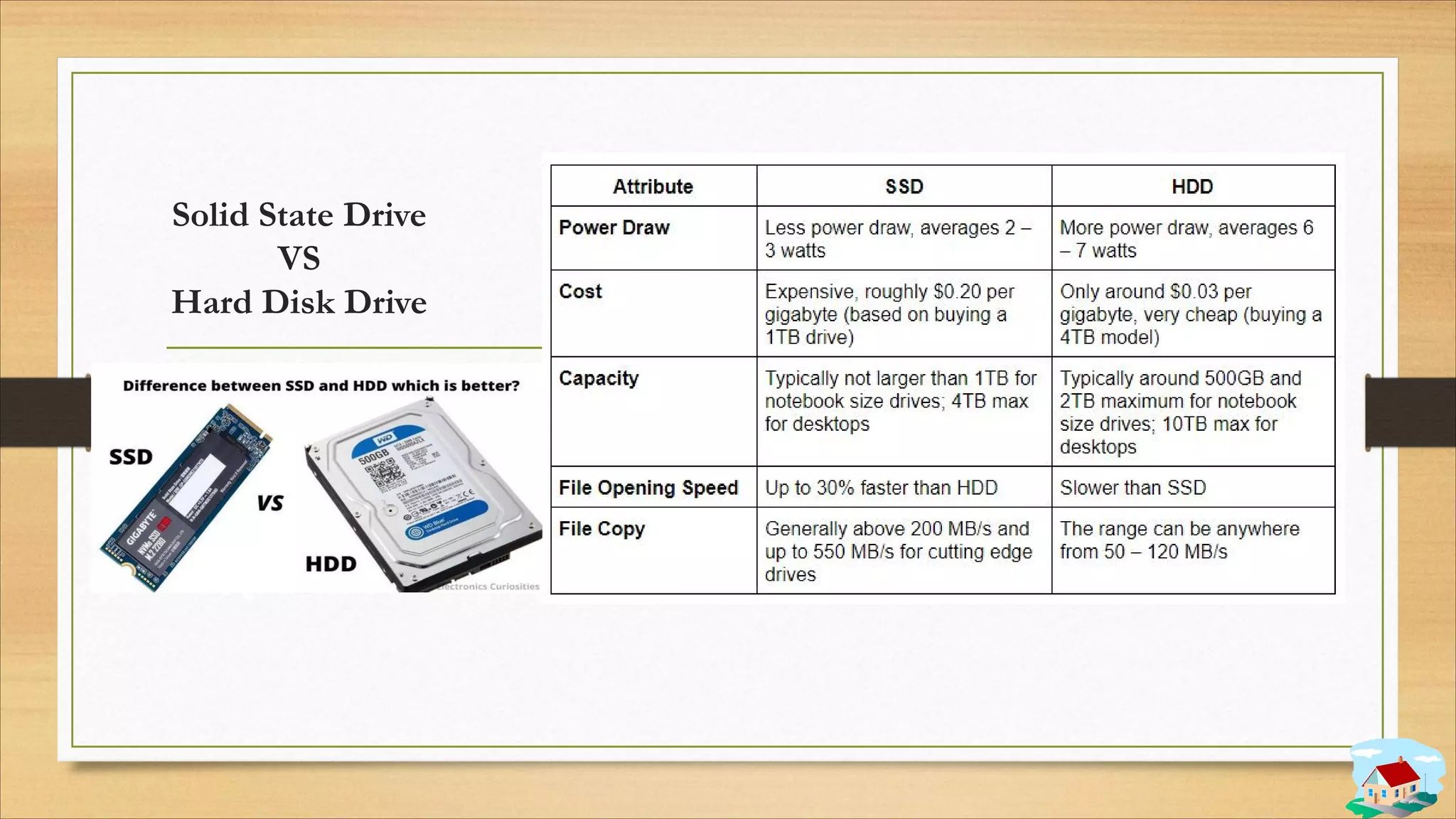
Solid State Drive
VS
Hard Disk Drive
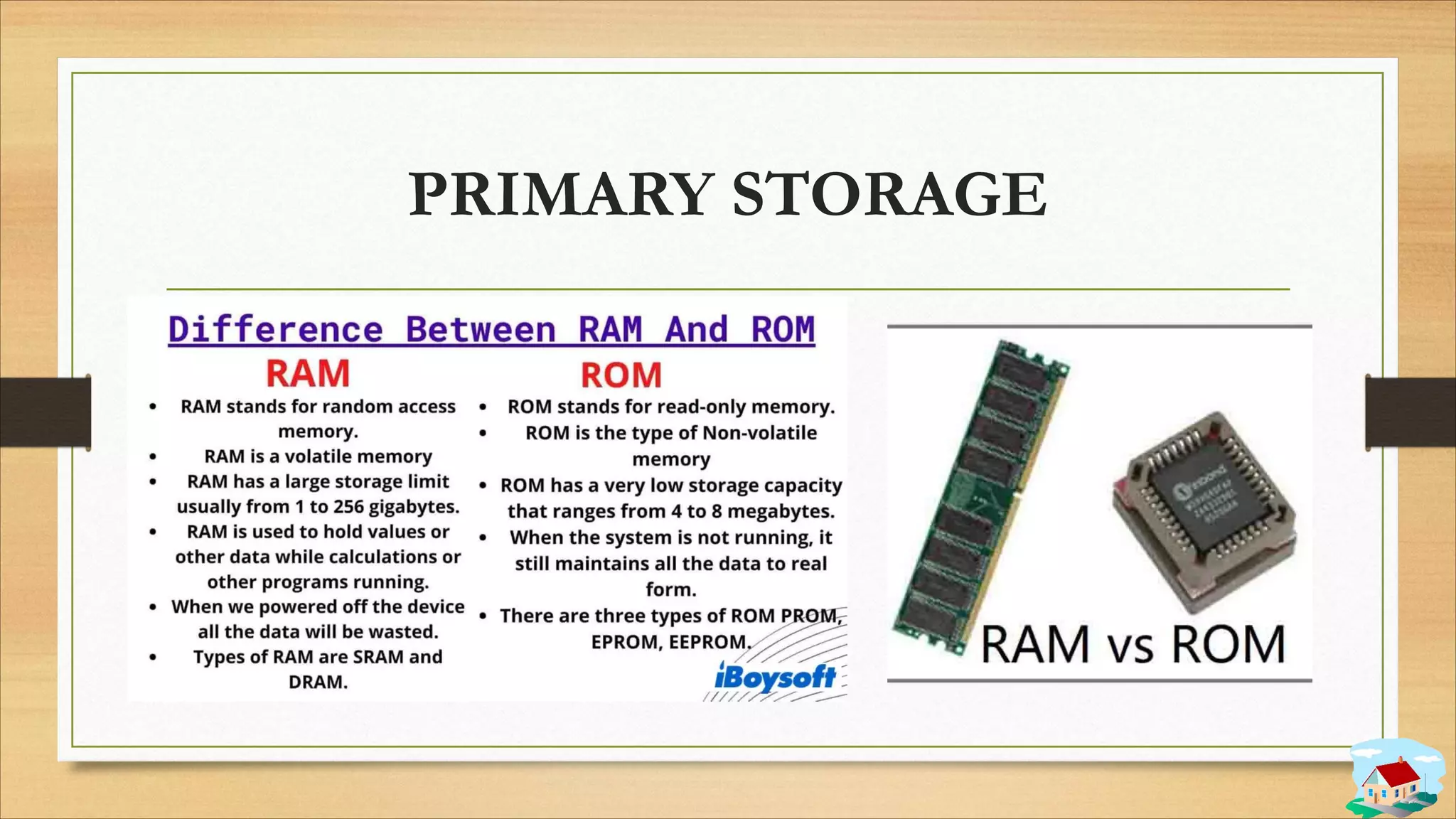
PRIMARY STORAGE
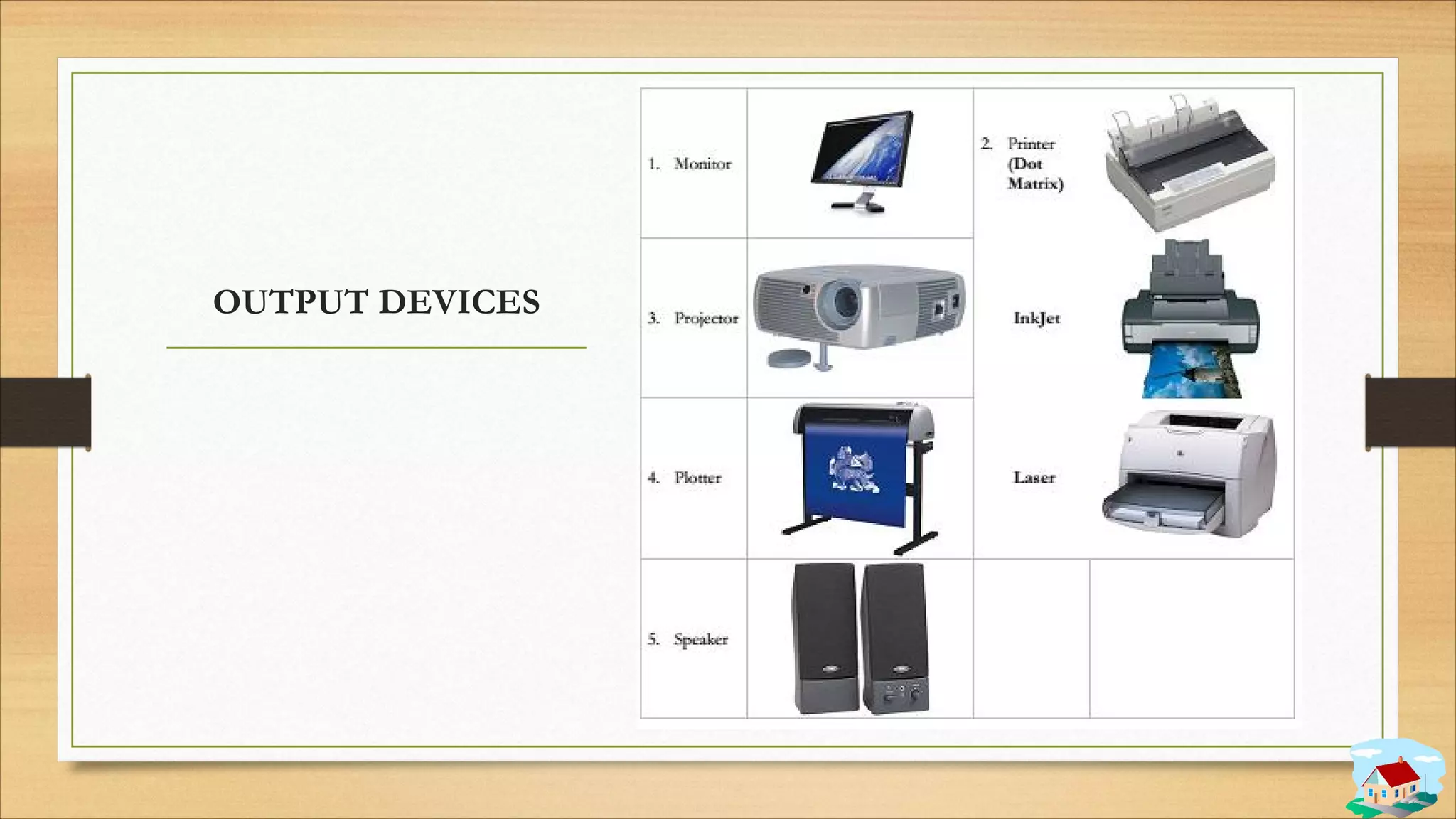
OUTPUT DEVICES
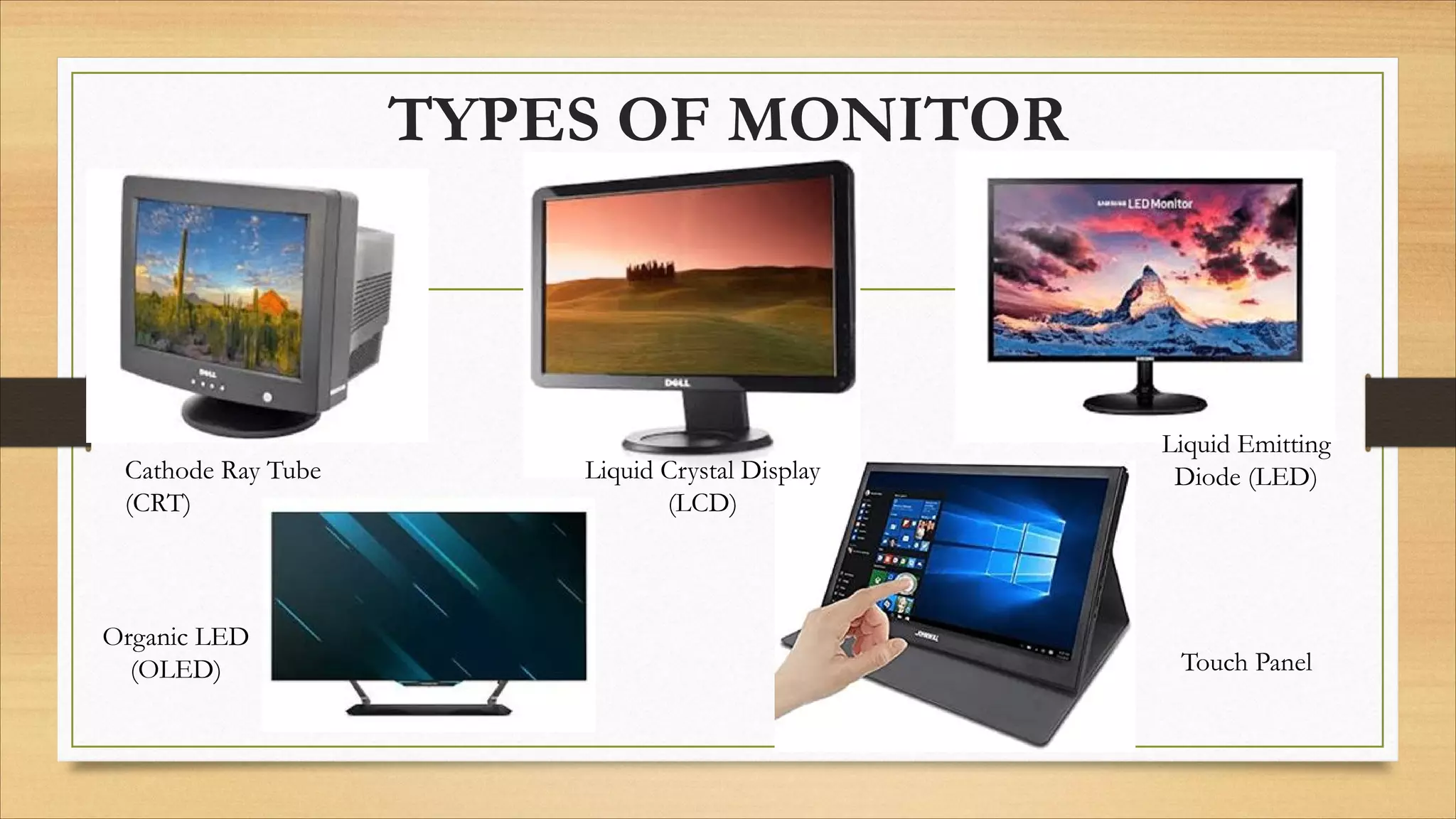
TYPES OF MONITOR
Cathode Ray Tube
(CRT)
Liquid Crystal Display
(LCD)
Liquid Emitting
Diode (LED)
Touch Panel
Organic LED
(OLED)
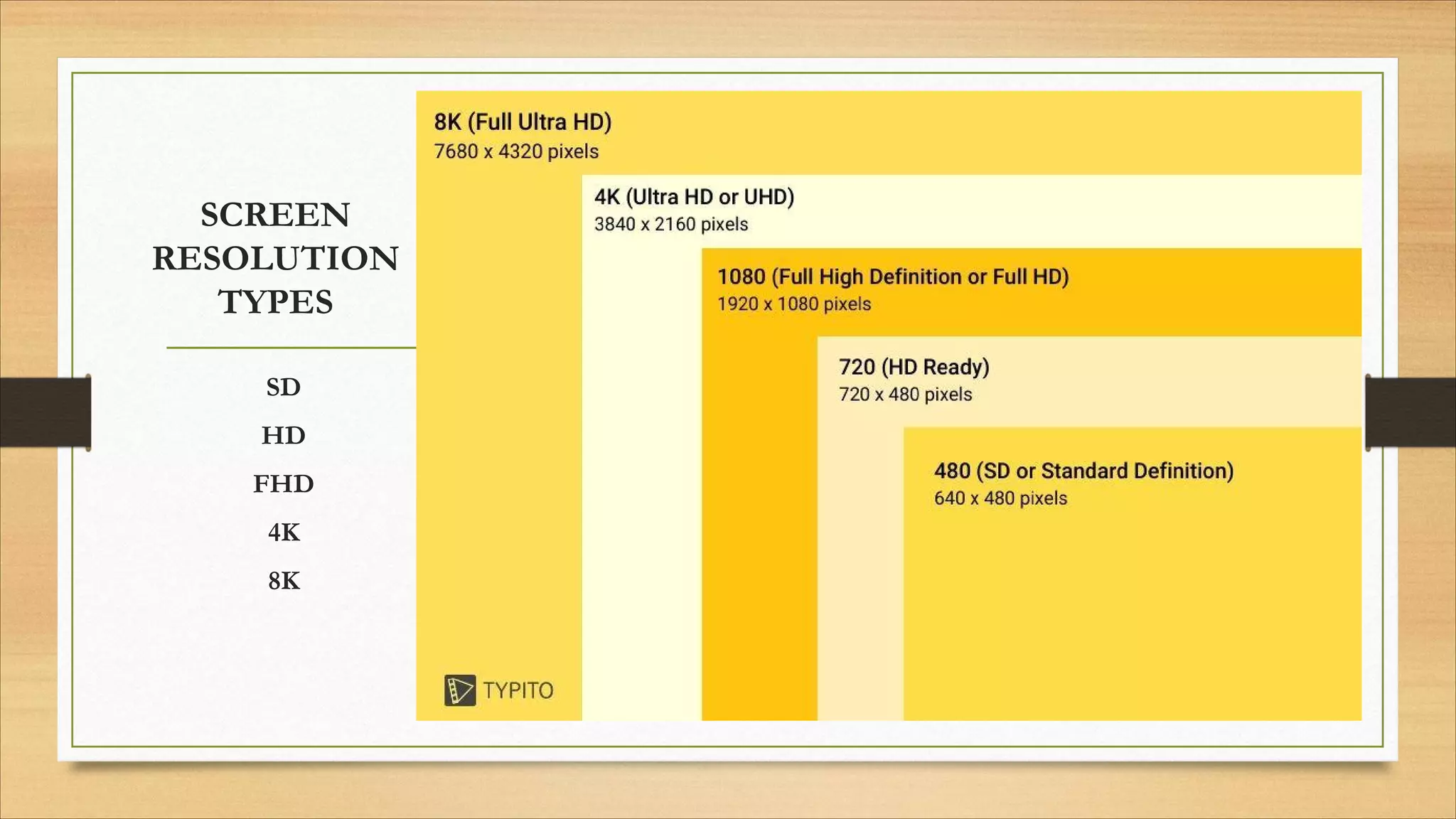
SCREEN
RESOLUTION
TYPES
SD
HD
FHD
4K
8K
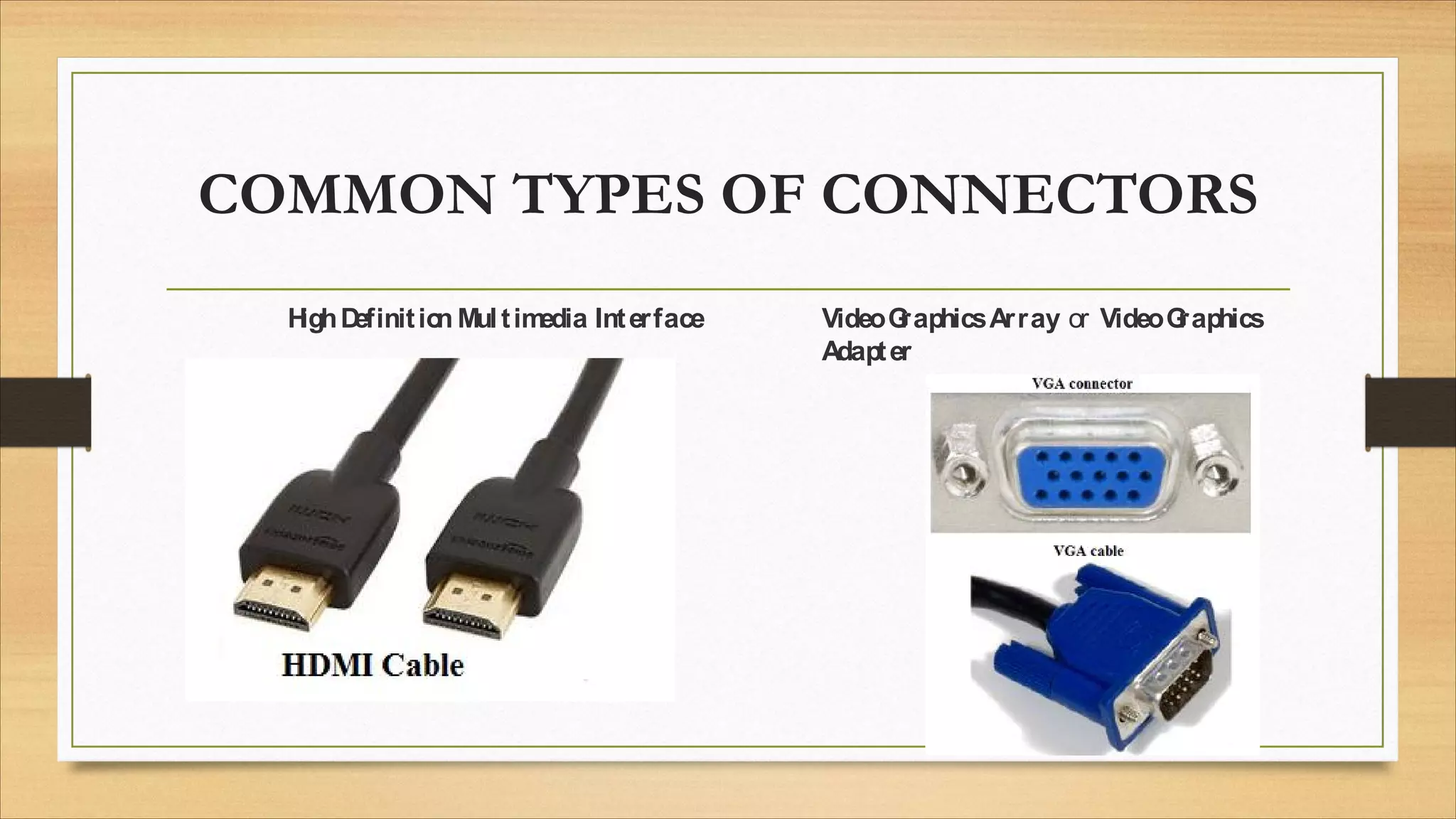
COMMON TYPES OF CONNECTORS
H
ighD
efinitio
n Multim
edia Interface VideoG
raphicsArray or VideoG
raphics
Adapter
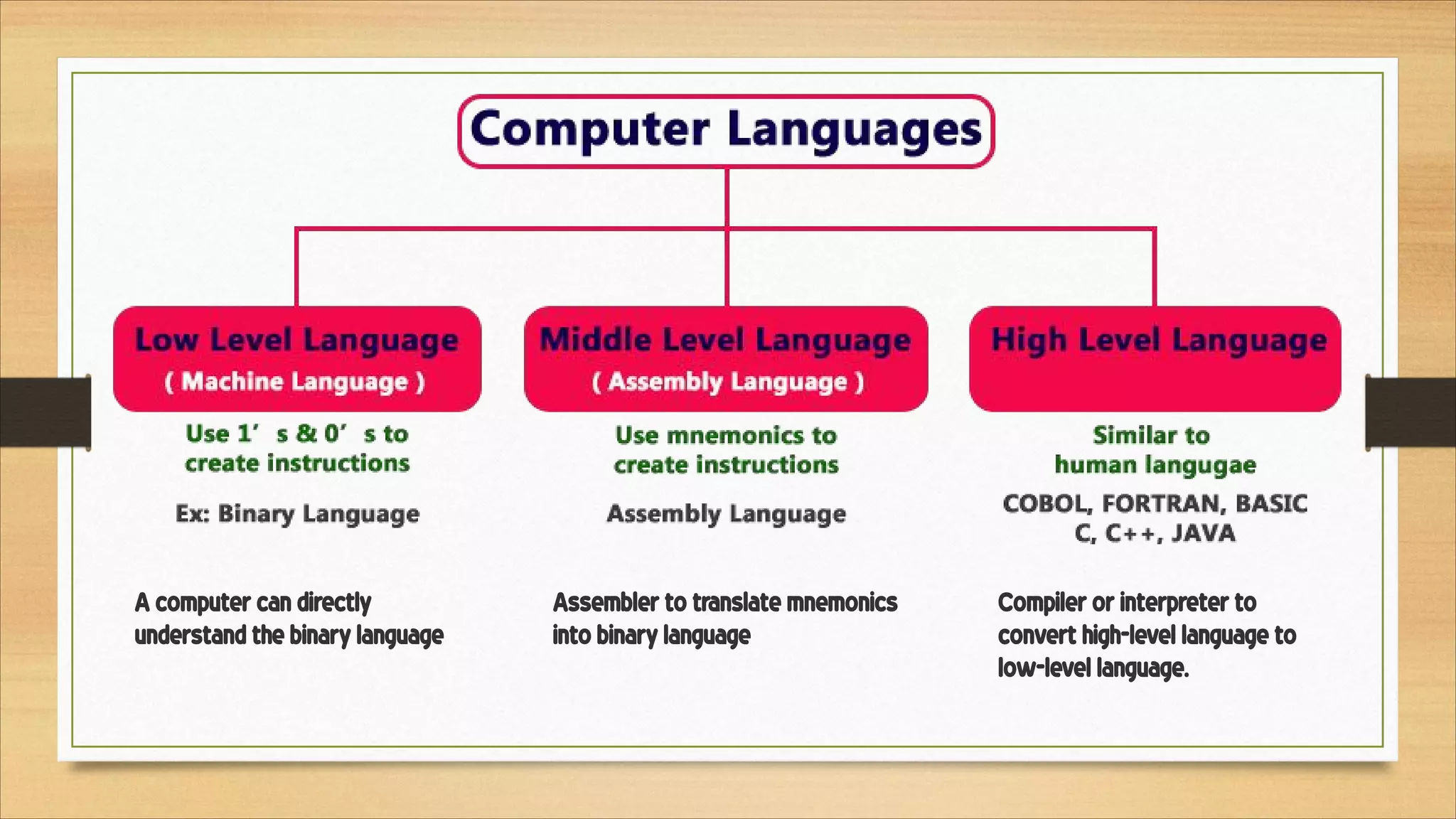
Assembler to translate mnemonics 
into binary language
Compiler or interpreter to 
convert high-level language to 
low-level language.
A computer can directly 
understand the binary language
HARDWARE VS
SOFTWARE
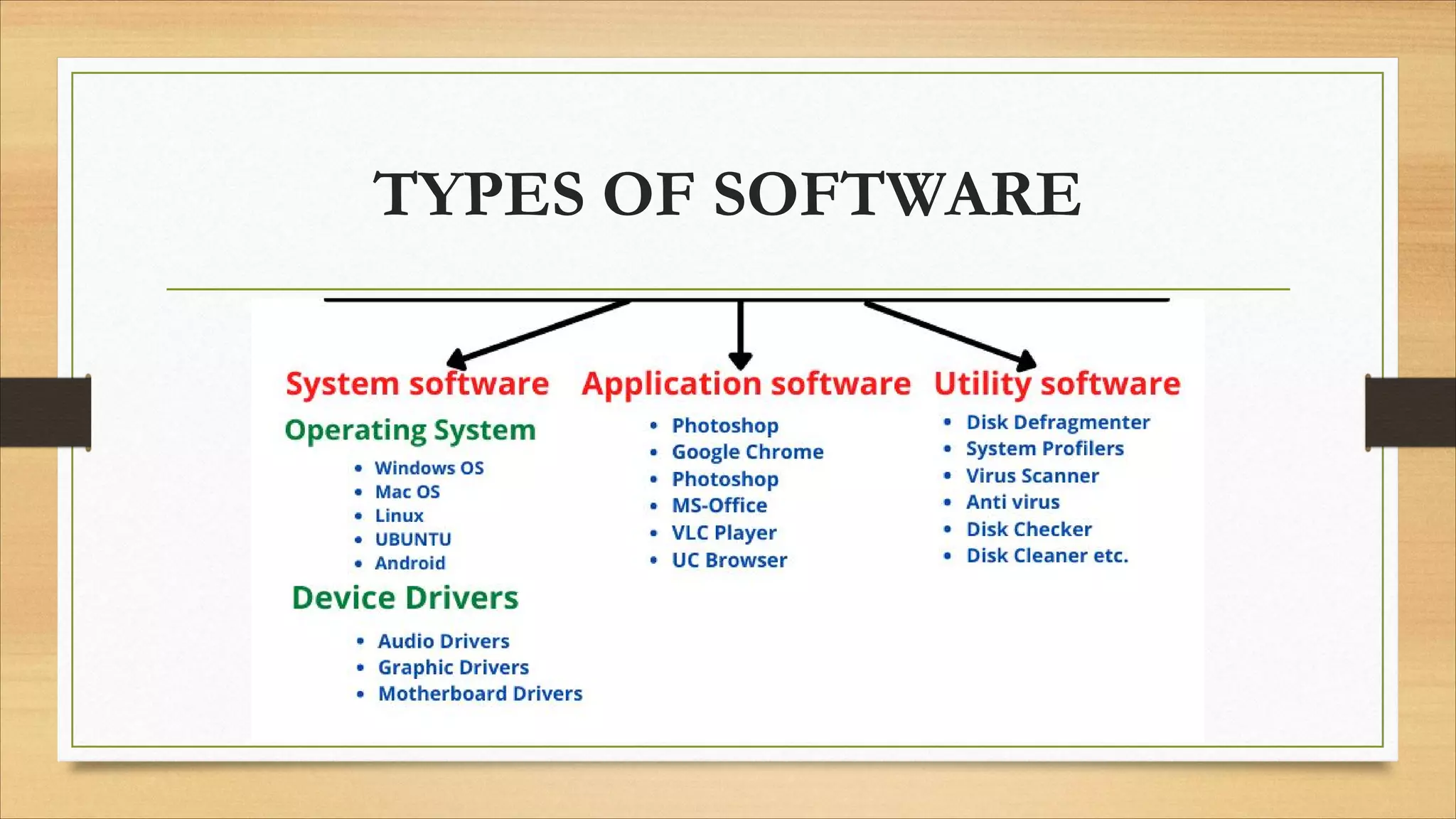
TYPES OF SOFTWARE
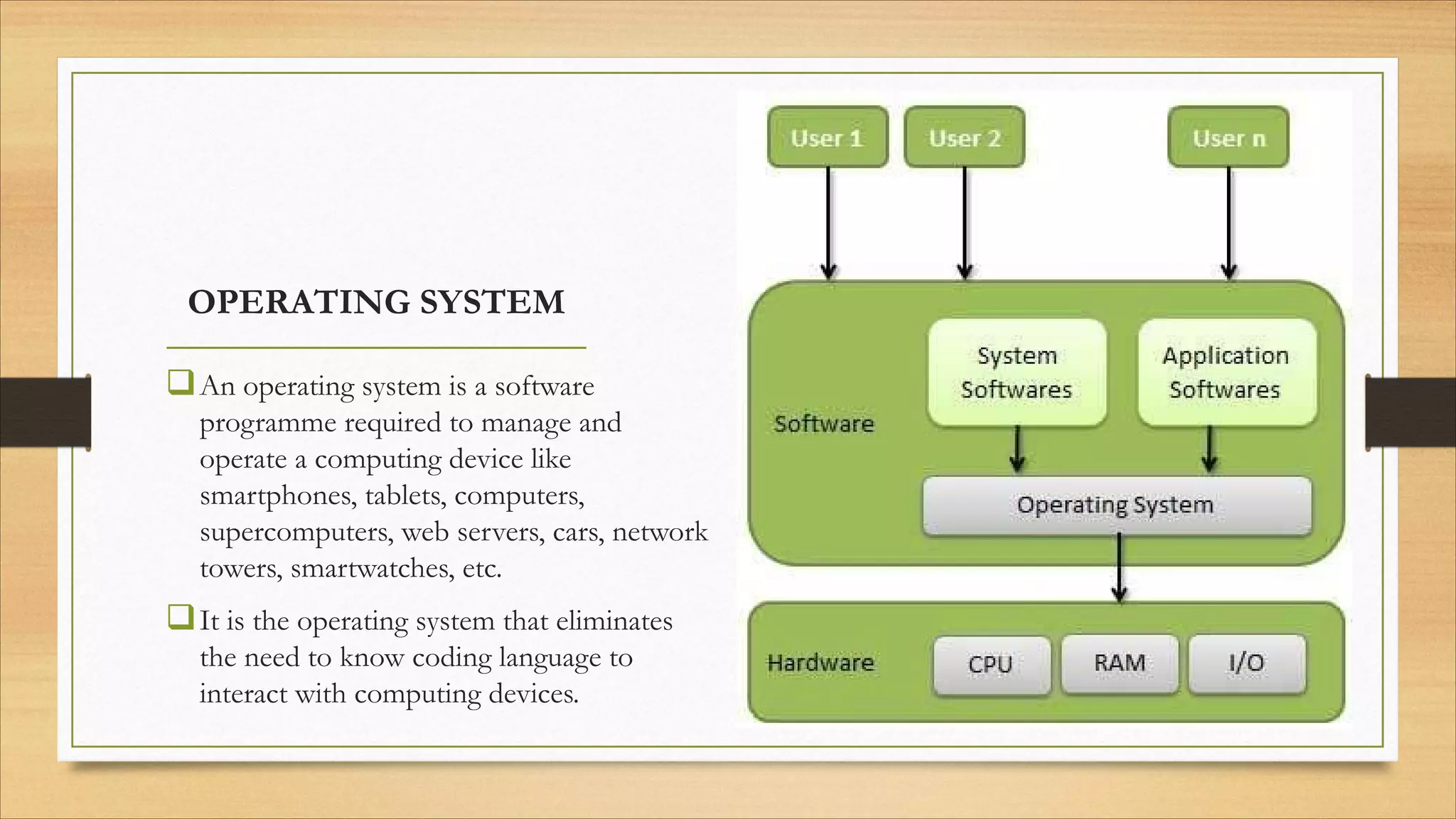
OPERATING SYSTEM
qAn operating system is a software
programme required to manage and
operate a computing device like
smartphones, tablets, computers,
supercomputers, web servers, cars, network
towers, smartwatches, etc.
qIt is the operating system that eliminates
the need to know coding language to
interact with computing devices.
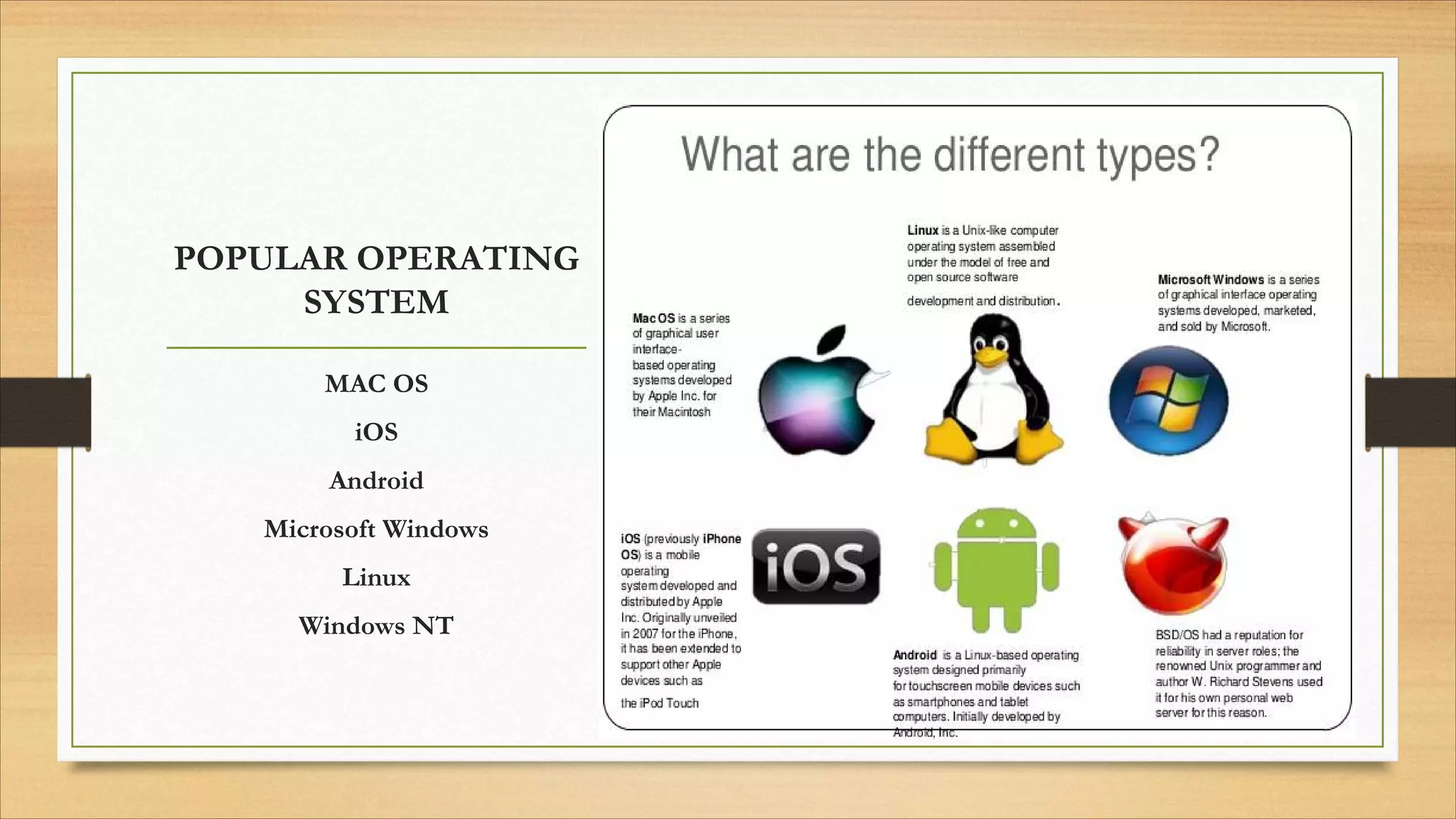
POPULAR OPERATING
SYSTEM
MAC OS
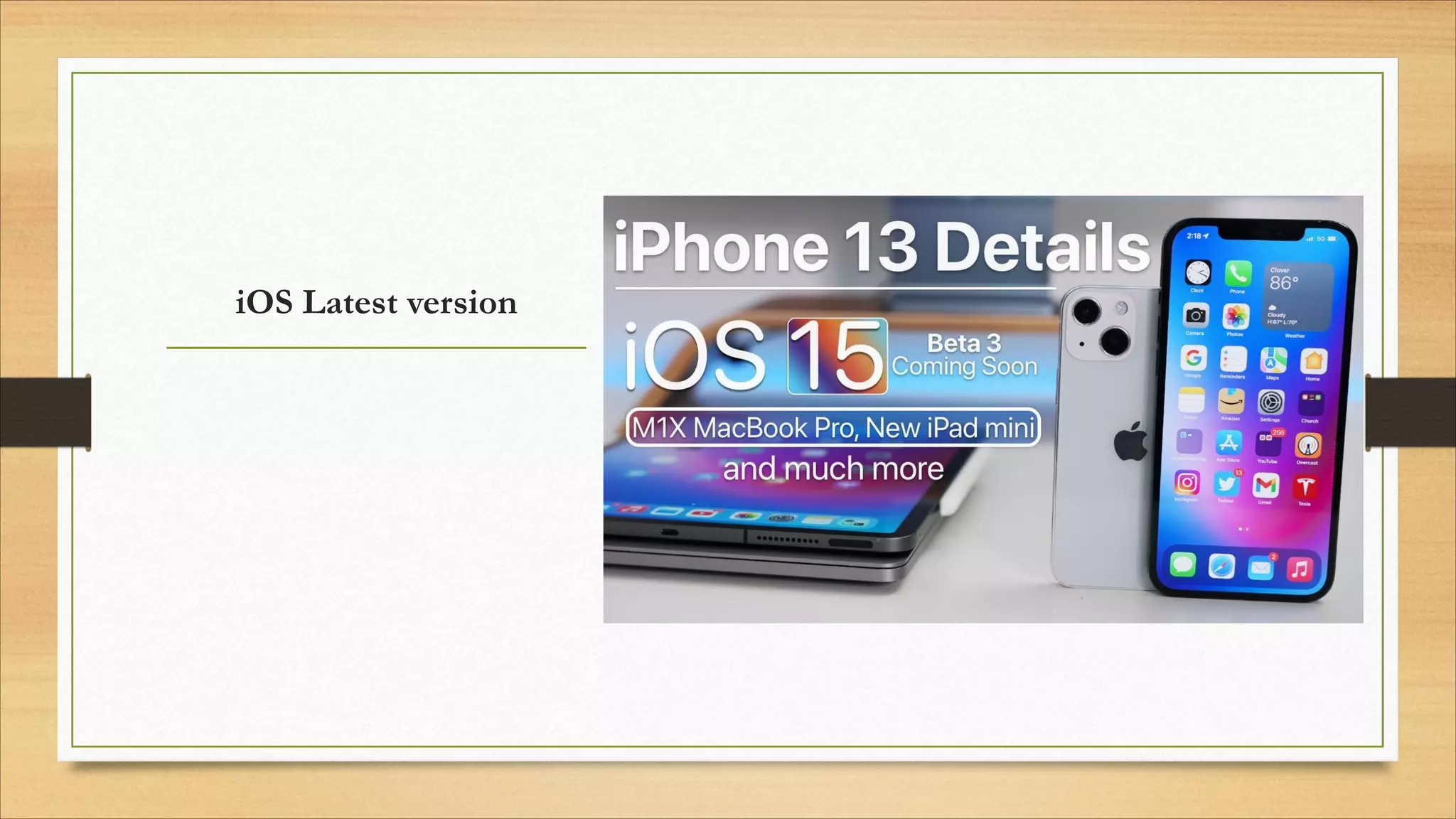
iOS
Android
Microsoft Windows
Linux
Windows NT
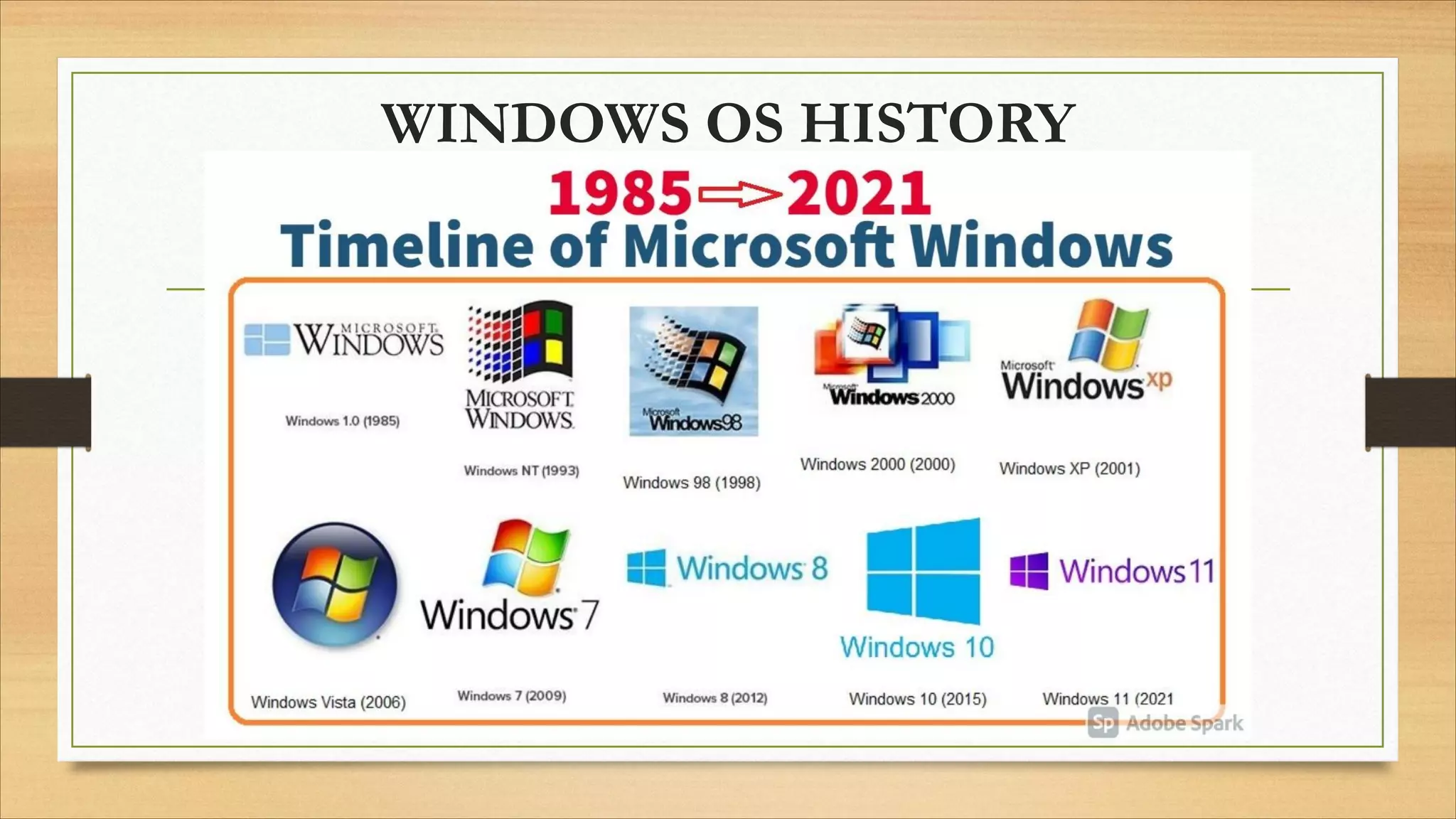
WINDOWS OS HISTORY
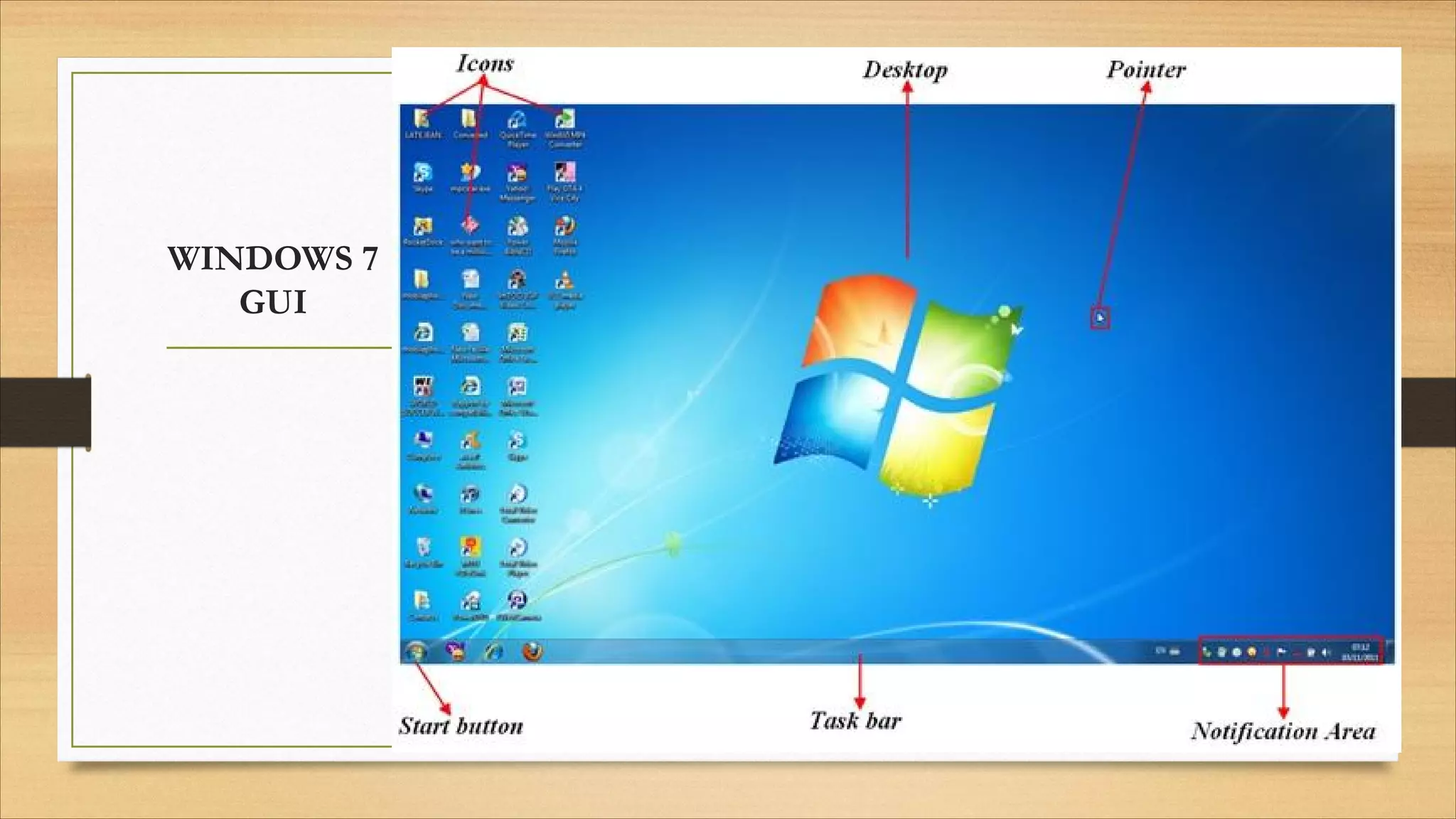
WINDOWS 7
GUI
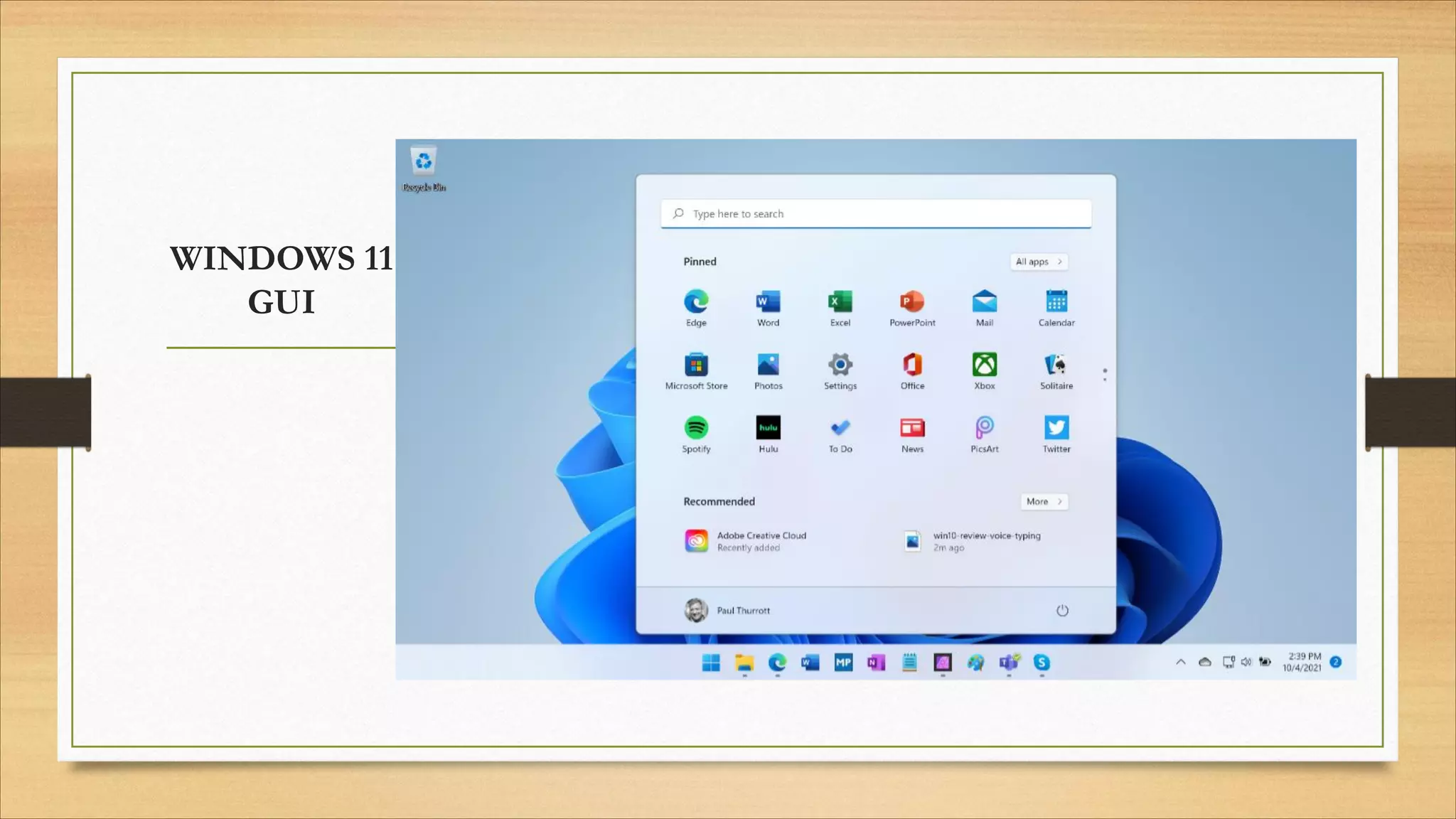
WINDOWS 11
GUI
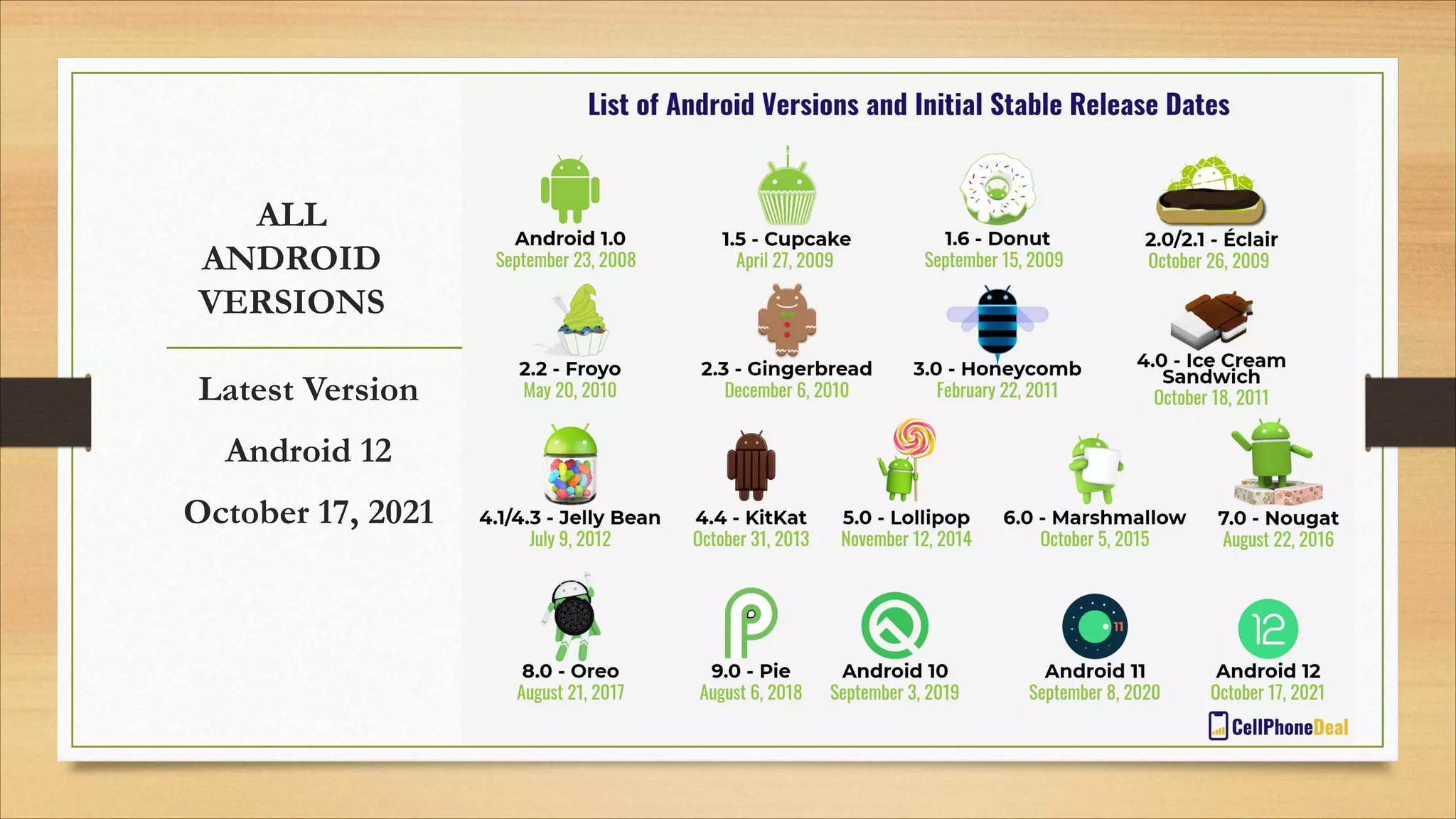
ALL
ANDROID
VERSIONS
Latest Version
Android 12
October 17, 2021
iOS Latest version
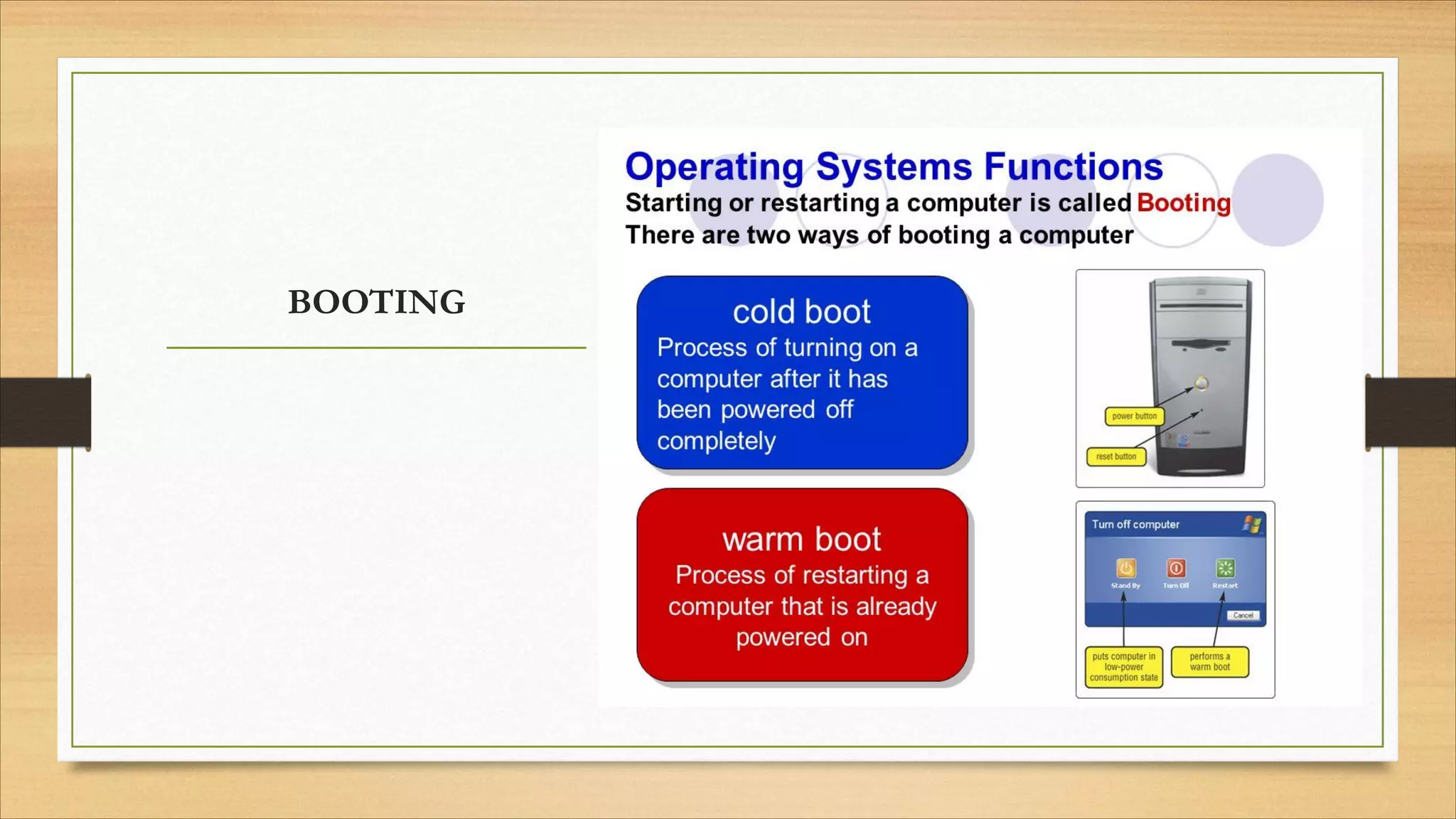
BOOTING
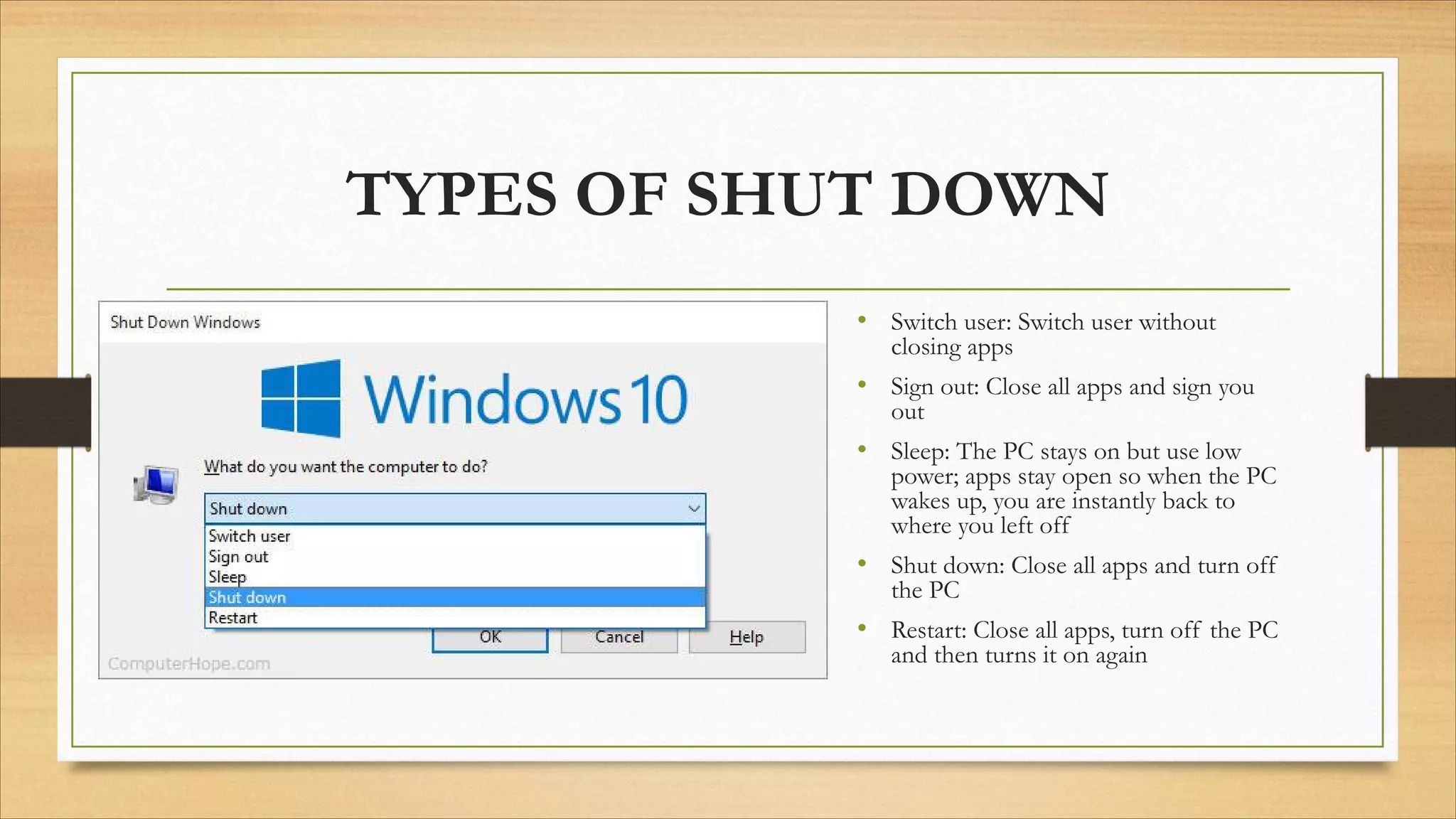
TYPES OF SHUT DOWN
• Switch user: Switch user without
closing apps
• Sign out: Close all apps and sign you
out
• Sleep: The PC stays on but use low
power; apps stay open so when the PC
wakes up, you are instantly back to
where you left off
• Shut down: Close all apps and turn off
the PC
• Restart: Close all apps, turn off the PC
and then turns it on again
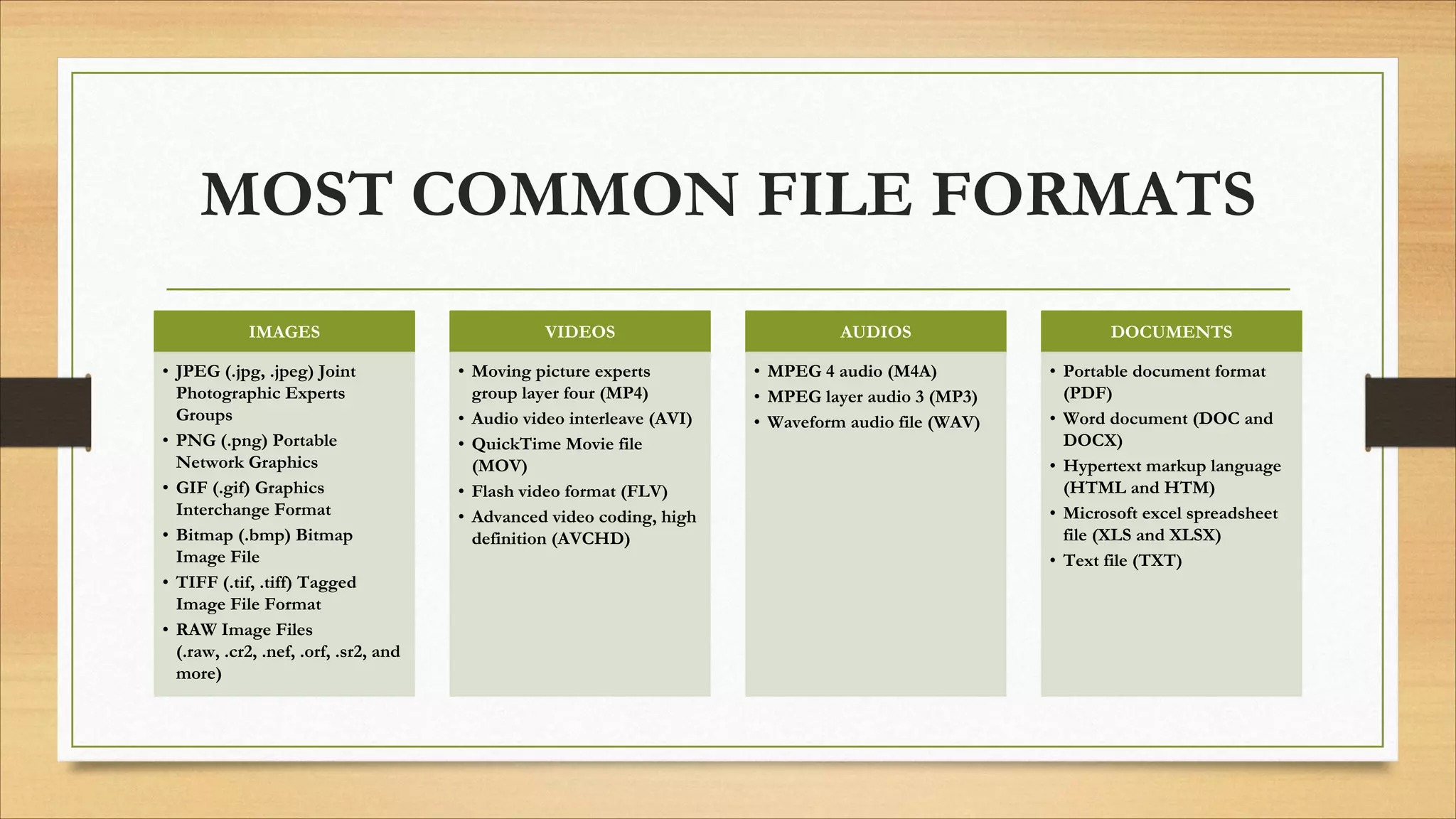
MOST COMMON FILE FORMATS
IMAGES
• JPEG (.jpg, .jpeg) Joint
Photographic Experts
Groups
• PNG (.png) Portable
Network Graphics
• GIF (.gif) Graphics
Interchange Format
• Bitmap (.bmp) Bitmap
Image File
• TIFF (.tif, .tiff) Tagged
Image File Format
• RAW Image Files
(.raw, .cr2, .nef, .orf, .sr2, and
more)
VIDEOS
• Moving picture experts
group layer four (MP4)
• Audio video interleave (AVI)
• QuickTime Movie file
(MOV)
• Flash video format (FLV)
• Advanced video coding, high
definition (AVCHD)
AUDIOS
• MPEG 4 audio (M4A)
• MPEG layer audio 3 (MP3)
• Waveform audio file (WAV)
DOCUMENTS
• Portable document format
(PDF)
• Word document (DOC and
DOCX)
• Hypertext markup language
(HTML and HTM)
• Microsoft excel spreadsheet
file (XLS and XLSX)
• Text file (TXT)
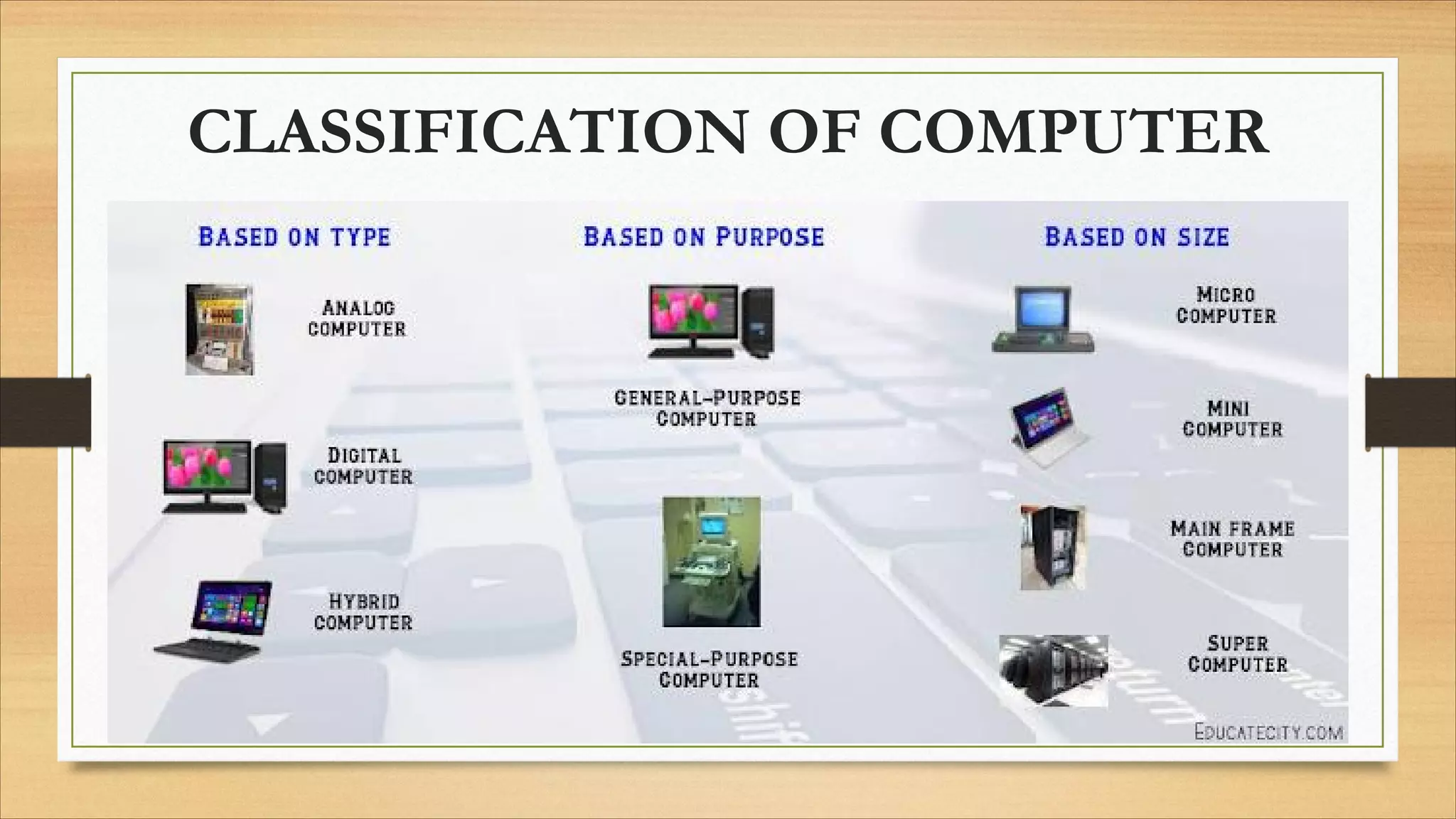
CLASSIFICATION OF COMPUTER
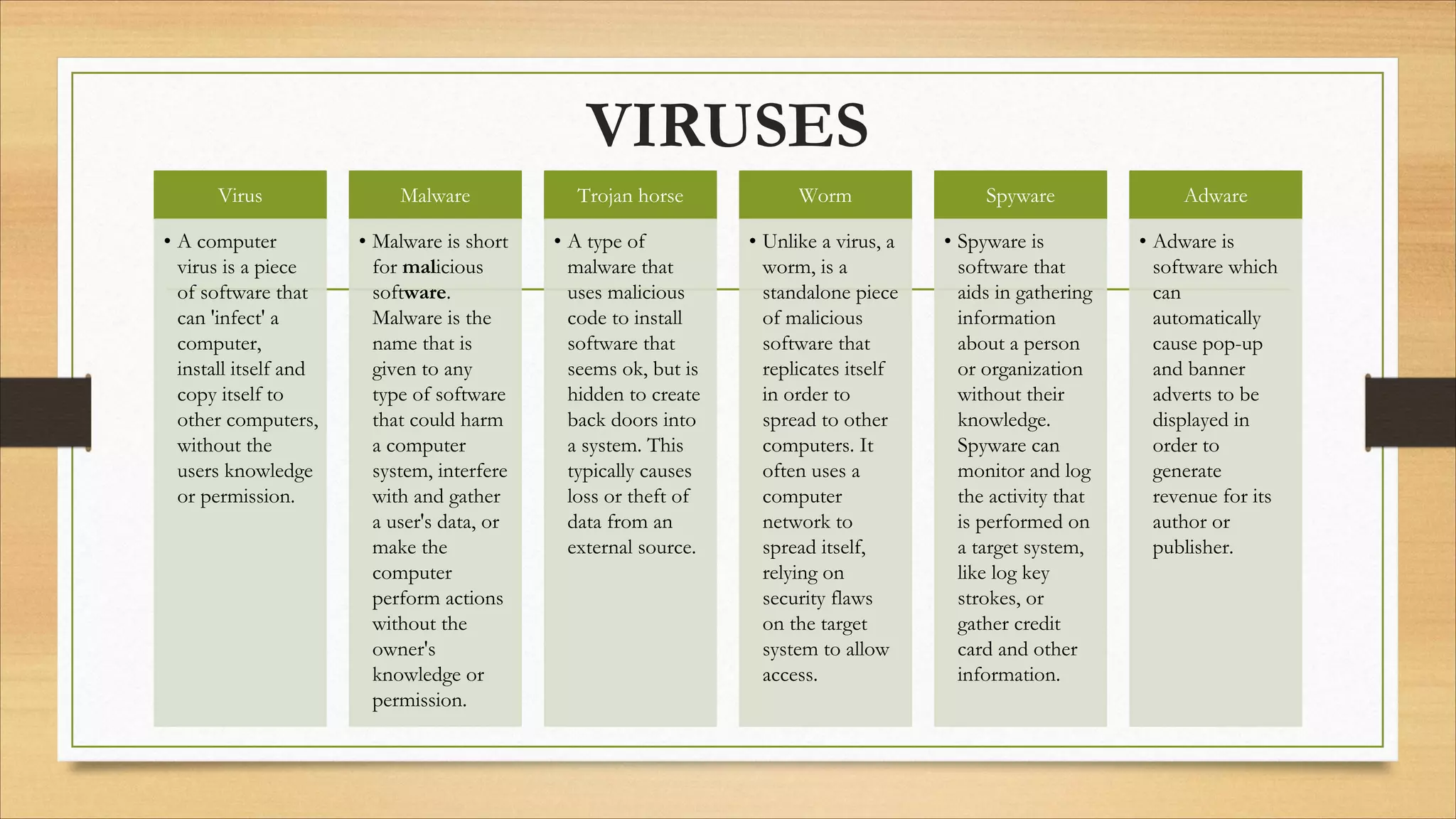
VIRUSES
Virus
• A computer
virus is a piece
of software that
can 'infect' a
computer,
install itself and
copy itself to
other computers,
without the
users knowledge
or permission.
Malware
• Malware is short
for malicious
software.
Malware is the
name that is
given to any
type of software
that could harm
a computer
system, interfere
with and gather
a user's data, or
make the
computer
perform actions
without the
owner's
knowledge or
permission.
Trojan horse
• A type of
malware that
uses malicious
code to install
software that
seems ok, but is
hidden to create
back doors into
a system. This
typically causes
loss or theft of
data from an
external source.
Worm
• Unlike a virus, a
worm, is a
standalone piece
of malicious
software that
replicates itself
in order to
spread to other
computers. It
often uses a
computer
network to
spread itself,
relying on
security flaws
on the target
system to allow
access.
Spyware
• Spyware is
software that
aids in gathering
information
about a person
or organization
without their
knowledge.
Spyware can
monitor and log
the activity that
is performed on
a target system,
like log key
strokes, or
gather credit
card and other
information.
Adware
• Adware is
software which
can
automatically
cause pop-up
and banner
adverts to be
displayed in
order to
generate
revenue for its
author or
publisher.
BASIC COMPUTER
TERMINOLOGY
• Application - A computer program that does specific tasks such as word processing or spreadsheets.
• Bit - Represents a binary digit which is the amount of information obtained by asking a ‘yes’ or ‘no’ question. This is also the smallest
unit of information stored on a computer as a 0 or 1.
• Blinking Cursor - This is a vertical blinking bar that locates the position on the screen where text can be inserted or deleted. This
appears most frequently in text or dialog boxes.
• Byte - Data is stored on a computer in Bytes. A byte is one character, which may be a number or letter. A byte is composed of 8
consecutive bits.
• Cache This is a type of memory and is similar to RAM. Cache is used by the computer to move data between the RAM and CPU. 
• CD-ROM - A removable disk that stores data. A CD-ROM can only be read. You cannot record (save) data onto one. You may
however record (save) onto a CD-Rewritable disk. This is most often called a CD. A CD looks like a music CD, but contains data
instead of music.
• Computer - A collection of electronic parts that allow software programs to run that perform certain tasks. A computer can accept
input, change data, store data and display data.
• CPU - The CPU (central processing unit), is the brain of the computer. New Windows-based programs use a Pentium processor
primarily.
• Cursor - A synonym for the pointer, which is controlled by the mouse. The cursor may take different shapes.
• DVD (Digital Versatile Disc) - Technology that store more information than a CD-ROM and can be written upon. The disk
resembles a CD-ROM but has approximately seven times the storage capacity.
• File - A collection of data with a name.
• Flash Drive - This is a small portable hard drive that plugs into a USB port and allows you to transport files between
different computers. Also called a thumb drive.
• Graphical User Interface (GUI) A program that helps you more easily work with you operating system and application
programs by providing pictures and visual clues to help you work. Windows is the GUI on PCs.
• Hand Pointer - The cursor changes into a pointing hand when it passes over a hypertext link. This allows connecting directly
to the link.
• Hard Drive - The place where programs and files are stored in a computer. Also called the Hard Disc.
• Hard Disc Space - The amount of permanent storage of data measured in bytes. This storage exists whether the computer
is on or off.
• Hardware - The physical components of the computer. They usually include the; monitor, printer, mouse, keyboard and
modem.
• Hypertext Link - These links are clicked on as text, images or files that open another web page. Text Hyperlinks are often a
different color than the words around them.
• I Beam - As the cursor moves over text, the pointer will change into an ‘I.’ This facilitates word processing and copying text.
See Blinking Cursor.
• Keyboard - Similar in part to a typewriter keyboard, this is used to key (type) in commands, text and data.
• Memory (RAM) - The amount of temporary storage that you can use at one time. Memory stores ends when the computer
is shut down. This is the reason that you save work before turning off the computer. Data is saved from RAM to the
computer or onto a storage unit, such as a CD.
• Modem - This is a way to transfer data through a telephone or cable line generally by the Internet. It may be internal or
external. Some modems are used to fax or act as answering machines.
• Monitor - Similar to a television screen, the monitor allows you to see the data on your computer.
• Motherboard - The circuit board that functioning parts of the computer connect to is the motherboard. The CPU, RAM
and cache all plug into the motherboard.
• Mouse - A hand-operated device to control the cursor on the screen. The mouse for PCs has two buttons. The button is
usually clicked once to select an item on the screen. Double-clicking the left button opens windows or programs.
• Multitasking - This describes the ability to do more than one thing at a time. For computer use this means that you may
have more than one program open at time in the memory, but only one program can actually be fully active. Inactive
programs can be processing data or doing other tasks in the background.
• Network - A group of two or more computers linked together.
• NIC (Network Interface Card) - A card is put in the computer allowing connection to a network.
• Operating System - Directs the computer how to operate. It acts as a mediator between the hardware and the application
programs that are used for work. This allows access to computer files, loads application programs into memory and closes
programs.
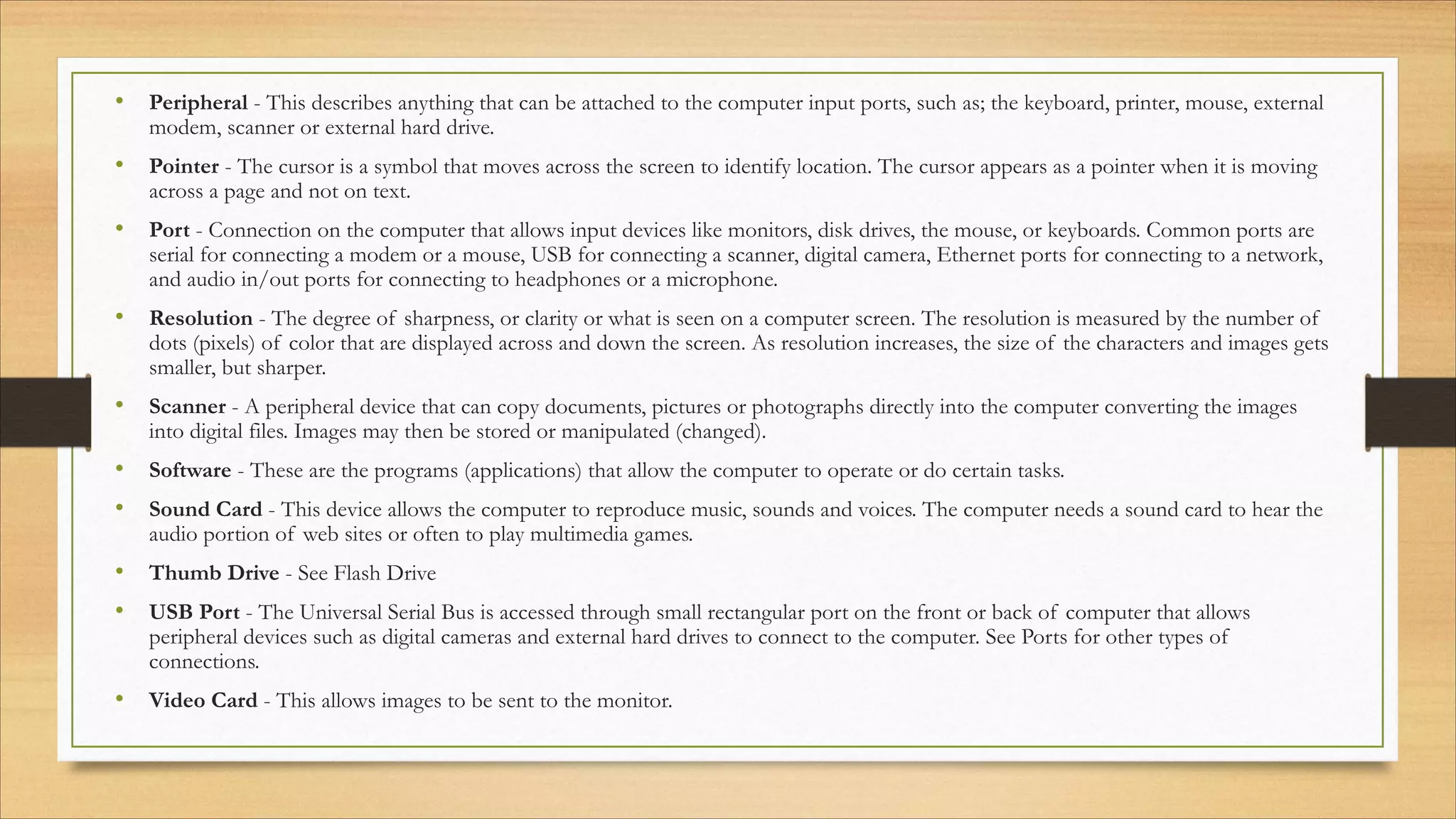
• Peripheral - This describes anything that can be attached to the computer input ports, such as; the keyboard, printer, mouse, external
modem, scanner or external hard drive.
• Pointer - The cursor is a symbol that moves across the screen to identify location. The cursor appears as a pointer when it is moving
across a page and not on text.
• Port - Connection on the computer that allows input devices like monitors, disk drives, the mouse, or keyboards. Common ports are
serial for connecting a modem or a mouse, USB for connecting a scanner, digital camera, Ethernet ports for connecting to a network,
and audio in/out ports for connecting to headphones or a microphone.
• Resolution - The degree of sharpness, or clarity or what is seen on a computer screen. The resolution is measured by the number of
dots (pixels) of color that are displayed across and down the screen. As resolution increases, the size of the characters and images gets
smaller, but sharper.
• Scanner - A peripheral device that can copy documents, pictures or photographs directly into the computer converting the images
into digital files. Images may then be stored or manipulated (changed).
• Software - These are the programs (applications) that allow the computer to operate or do certain tasks.
• Sound Card - This device allows the computer to reproduce music, sounds and voices. The computer needs a sound card to hear the
audio portion of web sites or often to play multimedia games.
• Thumb Drive - See Flash Drive
• USB Port - The Universal Serial Bus is accessed through small rectangular port on the front or back of computer that allows
peripheral devices such as digital cameras and external hard drives to connect to the computer. See Ports for other types of
connections.
• Video Card - This allows images to be sent to the monitor.

COMPUTER FUNDAMENTALS

  • 1.
    COMPUTER FUNDAMENTALS DaVid Kawlni, Departmentof Computer Science GOVT. SERCHHIP COLLEGE COACHING CENTRE 2022
  • 2.
    INDEX üGenerations of Computer üComponentsof Computer System üComputer Languages üHardware vs Software üOperating System üClassification of Computers üBasic Terminologies
  • 3.
  • 4.
    COMPONENTS OF COMPUTER 1. INPUTUNIT 2. OUTPUT UNIT 3. STORAGE UNIT 4. CONTROL UNIT 5. ARITHMETIC LOGIC UNIT
  • 5.
  • 6.
  • 7.
  • 8.
  • 9.
  • 10.
  • 11.
  • 12.
    BITS/BYTES Bits − A bitis a smallest possible unit of data that a computer can r e c o g n i z e o r u s e . Computer usually uses bits in groups. Bytes − group of eight bits is called a byte. Half a byte is called a nibble.
  • 13.
  • 14.
  • 15.
  • 16.
  • 17.
  • 18.
  • 19.
  • 20.
    TYPES OF MONITOR CathodeRay Tube (CRT) Liquid Crystal Display (LCD) Liquid Emitting Diode (LED) Touch Panel Organic LED (OLED)
  • 21.
  • 22.
    COMMON TYPES OFCONNECTORS H ighD efinitio n Multim edia Interface VideoG raphicsArray or VideoG raphics Adapter
  • 23.
  • 25.
  • 26.
  • 27.
    OPERATING SYSTEM qAn operatingsystem is a software programme required to manage and operate a computing device like smartphones, tablets, computers, supercomputers, web servers, cars, network towers, smartwatches, etc. qIt is the operating system that eliminates the need to know coding language to interact with computing devices.
  • 28.
  • 29.
  • 30.
  • 31.
  • 32.
  • 33.
  • 34.
  • 35.
    TYPES OF SHUTDOWN • Switch user: Switch user without closing apps • Sign out: Close all apps and sign you out • Sleep: The PC stays on but use low power; apps stay open so when the PC wakes up, you are instantly back to where you left off • Shut down: Close all apps and turn off the PC • Restart: Close all apps, turn off the PC and then turns it on again
  • 36.
    MOST COMMON FILEFORMATS IMAGES • JPEG (.jpg, .jpeg) Joint Photographic Experts Groups • PNG (.png) Portable Network Graphics • GIF (.gif) Graphics Interchange Format • Bitmap (.bmp) Bitmap Image File • TIFF (.tif, .tiff) Tagged Image File Format • RAW Image Files (.raw, .cr2, .nef, .orf, .sr2, and more) VIDEOS • Moving picture experts group layer four (MP4) • Audio video interleave (AVI) • QuickTime Movie file (MOV) • Flash video format (FLV) • Advanced video coding, high definition (AVCHD) AUDIOS • MPEG 4 audio (M4A) • MPEG layer audio 3 (MP3) • Waveform audio file (WAV) DOCUMENTS • Portable document format (PDF) • Word document (DOC and DOCX) • Hypertext markup language (HTML and HTM) • Microsoft excel spreadsheet file (XLS and XLSX) • Text file (TXT)
  • 37.
  • 38.
    VIRUSES Virus • A computer virusis a piece of software that can 'infect' a computer, install itself and copy itself to other computers, without the users knowledge or permission. Malware • Malware is short for malicious software. Malware is the name that is given to any type of software that could harm a computer system, interfere with and gather a user's data, or make the computer perform actions without the owner's knowledge or permission. Trojan horse • A type of malware that uses malicious code to install software that seems ok, but is hidden to create back doors into a system. This typically causes loss or theft of data from an external source. Worm • Unlike a virus, a worm, is a standalone piece of malicious software that replicates itself in order to spread to other computers. It often uses a computer network to spread itself, relying on security flaws on the target system to allow access. Spyware • Spyware is software that aids in gathering information about a person or organization without their knowledge. Spyware can monitor and log the activity that is performed on a target system, like log key strokes, or gather credit card and other information. Adware • Adware is software which can automatically cause pop-up and banner adverts to be displayed in order to generate revenue for its author or publisher.
  • 39.
  • 40.
    • Application -A computer program that does specific tasks such as word processing or spreadsheets. • Bit - Represents a binary digit which is the amount of information obtained by asking a ‘yes’ or ‘no’ question. This is also the smallest unit of information stored on a computer as a 0 or 1. • Blinking Cursor - This is a vertical blinking bar that locates the position on the screen where text can be inserted or deleted. This appears most frequently in text or dialog boxes. • Byte - Data is stored on a computer in Bytes. A byte is one character, which may be a number or letter. A byte is composed of 8 consecutive bits. • Cache This is a type of memory and is similar to RAM. Cache is used by the computer to move data between the RAM and CPU.  • CD-ROM - A removable disk that stores data. A CD-ROM can only be read. You cannot record (save) data onto one. You may however record (save) onto a CD-Rewritable disk. This is most often called a CD. A CD looks like a music CD, but contains data instead of music. • Computer - A collection of electronic parts that allow software programs to run that perform certain tasks. A computer can accept input, change data, store data and display data. • CPU - The CPU (central processing unit), is the brain of the computer. New Windows-based programs use a Pentium processor primarily. • Cursor - A synonym for the pointer, which is controlled by the mouse. The cursor may take different shapes. • DVD (Digital Versatile Disc) - Technology that store more information than a CD-ROM and can be written upon. The disk resembles a CD-ROM but has approximately seven times the storage capacity. • File - A collection of data with a name.
  • 41.
    • Flash Drive- This is a small portable hard drive that plugs into a USB port and allows you to transport files between different computers. Also called a thumb drive. • Graphical User Interface (GUI) A program that helps you more easily work with you operating system and application programs by providing pictures and visual clues to help you work. Windows is the GUI on PCs. • Hand Pointer - The cursor changes into a pointing hand when it passes over a hypertext link. This allows connecting directly to the link. • Hard Drive - The place where programs and files are stored in a computer. Also called the Hard Disc. • Hard Disc Space - The amount of permanent storage of data measured in bytes. This storage exists whether the computer is on or off. • Hardware - The physical components of the computer. They usually include the; monitor, printer, mouse, keyboard and modem. • Hypertext Link - These links are clicked on as text, images or files that open another web page. Text Hyperlinks are often a different color than the words around them. • I Beam - As the cursor moves over text, the pointer will change into an ‘I.’ This facilitates word processing and copying text. See Blinking Cursor. • Keyboard - Similar in part to a typewriter keyboard, this is used to key (type) in commands, text and data.
  • 42.
    • Memory (RAM)- The amount of temporary storage that you can use at one time. Memory stores ends when the computer is shut down. This is the reason that you save work before turning off the computer. Data is saved from RAM to the computer or onto a storage unit, such as a CD. • Modem - This is a way to transfer data through a telephone or cable line generally by the Internet. It may be internal or external. Some modems are used to fax or act as answering machines. • Monitor - Similar to a television screen, the monitor allows you to see the data on your computer. • Motherboard - The circuit board that functioning parts of the computer connect to is the motherboard. The CPU, RAM and cache all plug into the motherboard. • Mouse - A hand-operated device to control the cursor on the screen. The mouse for PCs has two buttons. The button is usually clicked once to select an item on the screen. Double-clicking the left button opens windows or programs. • Multitasking - This describes the ability to do more than one thing at a time. For computer use this means that you may have more than one program open at time in the memory, but only one program can actually be fully active. Inactive programs can be processing data or doing other tasks in the background. • Network - A group of two or more computers linked together. • NIC (Network Interface Card) - A card is put in the computer allowing connection to a network. • Operating System - Directs the computer how to operate. It acts as a mediator between the hardware and the application programs that are used for work. This allows access to computer files, loads application programs into memory and closes programs.
  • 43.
    • Peripheral -This describes anything that can be attached to the computer input ports, such as; the keyboard, printer, mouse, external modem, scanner or external hard drive. • Pointer - The cursor is a symbol that moves across the screen to identify location. The cursor appears as a pointer when it is moving across a page and not on text. • Port - Connection on the computer that allows input devices like monitors, disk drives, the mouse, or keyboards. Common ports are serial for connecting a modem or a mouse, USB for connecting a scanner, digital camera, Ethernet ports for connecting to a network, and audio in/out ports for connecting to headphones or a microphone. • Resolution - The degree of sharpness, or clarity or what is seen on a computer screen. The resolution is measured by the number of dots (pixels) of color that are displayed across and down the screen. As resolution increases, the size of the characters and images gets smaller, but sharper. • Scanner - A peripheral device that can copy documents, pictures or photographs directly into the computer converting the images into digital files. Images may then be stored or manipulated (changed). • Software - These are the programs (applications) that allow the computer to operate or do certain tasks. • Sound Card - This device allows the computer to reproduce music, sounds and voices. The computer needs a sound card to hear the audio portion of web sites or often to play multimedia games. • Thumb Drive - See Flash Drive • USB Port - The Universal Serial Bus is accessed through small rectangular port on the front or back of computer that allows peripheral devices such as digital cameras and external hard drives to connect to the computer. See Ports for other types of connections. • Video Card - This allows images to be sent to the monitor.