Understanding the PC Boot Process
  How Linux and Windows start their day


           By Dominique Gerald Cimafranca
              dominique.cimafranca@gmail.com


   This work is licensed under the Creative Commons Attribution-Share Alike 3.0 Philippines License. To view a copy of this
   license, visit http://creativecommons.org/licenses/by-sa/3.0/ph/ or send a letter to Creative Commons, 171 Second Street,
   Suite 300, San Francisco, California, 94105, USA.
The PC boot process in a nutshell
1. Executes code from well-known location.
2. Execute first-stage boot loader from MBR.
3. Execute second-stage boot loader.
4. Load the kernel.
5. Load the first user space program.
BIOS
●   BIOS – Basic Input/Output System
●   Located at memory location 0xFFFF0
●   Boot firmware designed to be run at startup
●   POST – Power-on Self-Test
    ●   Identifies, tests, and initializes system devices
●   Run-time services
    ●   Initial configuration
    ●   Selects which device to boot from
●   Alternatively, Extensible Firmware Interface (EFI)
Stage 1 Boot Loader: MBR
●   MBR – Master Boot Record
●   Located on first sector of the boot disk
●   Size: 512 bytes
●   BIOS loads MBR to RAM, relinquishes control
●   Main job: load the second-stage boot loader
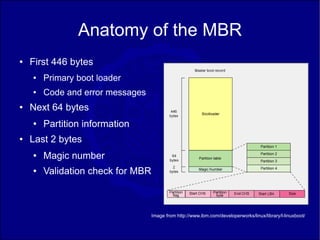
Anatomy of the MBR
●   First 446 bytes
    ●   Primary boot loader
    ●   Code and error messages
●   Next 64 bytes
    ●   Partition information
●   Last 2 bytes
    ●   Magic number
    ●   Validation check for MBR


                                   Image from http://www.ibm.com/developerworks/linux/library/l-linuxboot/
Stage 2 Boot Loader
●   Loads the kernel
●   On Linux:
    ●   GRUB – Grand Universal Bootloader
    ●   LILO – Linux Loader
    ●   Others: SysLinux, ISOLinux, PXELinux
●   From Windows NT to Windows XP:
    ●   NTLDR
●   On Windows Vista:
    ●   Windows Boot Manager
A closer look at GRUB
●   GRUB understands ext2 and ext3 file systems
    ●   LILO had to load raw sectors from the hard disk
●   GRUB displays a list of available kernels
    ●   On Ubuntu, defined in /boot/grub/menu.lst
●   More info: http://www.gnu.org/software/grub/
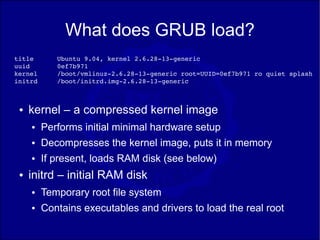
What does GRUB load?
title       Ubuntu 9.04, kernel 2.6.28­13­generic
uuid        0ef7b971
kernel      /boot/vmlinuz­2.6.28­13­generic root=UUID=0ef7b971 ro quiet splash 
initrd      /boot/initrd.img­2.6.28­13­generic


 ●   kernel – a compressed kernel image
     ●   Performs initial minimal hardware setup
     ●   Decompresses the kernel image, puts it in memory
     ●   If present, loads RAM disk (see below)
 ●   initrd – initial RAM disk
     ●   Temporary root file system
     ●   Contains executables and drivers to load the real root
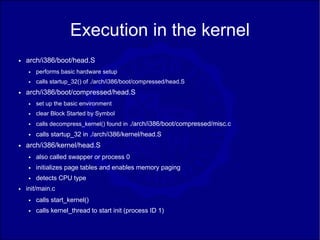
Execution in the kernel
●   arch/i386/boot/head.S
    ●   performs basic hardware setup
    ●   calls startup_32() of ./arch/i386/boot/compressed/head.S
●   arch/i386/boot/compressed/head.S
    ●   set up the basic environment
    ●   clear Block Started by Symbol
    ●   calls decompress_kernel() found in ./arch/i386/boot/compressed/misc.c
    ●   calls startup_32 in ./arch/i386/kernel/head.S
●   arch/i386/kernel/head.S
    ●   also called swapper or process 0
    ●   initializes page tables and enables memory paging
    ●   detects CPU type
●   init/main.c
    ●   calls start_kernel()
    ●   calls kernel_thread to start init (process ID 1)
initrd
●   Initial RAM disk – a small temporary file system
●   During stage 2 boot, initrd is copied into RAM
    and mounted
●   Allows the kernel to fully boot without having to
    mount any physical disks
●   Supports many hardware configurations
    through loadable modules
●   After kernel is booted, the real root file system
    is mounted
init
●   The first user space program -- /sbin/init
●   Typical for desktop Linux systems
●   For Ubuntu, init reads /etc/event.d
    ●   see https://launchpad.net/upstart/
    ●   default run level defined at /etc/event.d/rc-default
    ●   for normal start, Ubuntu is at run level 2
    ●   executes programs from /etc/rc2.d
●   For other Linux systems, init reads /etc/inittab
What about Windows XP?
●   Boot Loader Phase
●   Kernel loading phase
●   Session Manager
●   Winlogon
Windows XP and earlier
●   NTLDR – the actual boot loader
●   boot.ini – booting options
    ●   presents menu options as to what OS to load
    ●   if absent, defaults to Windows directory of first
        partition
What NTLDR does
●   Accesses the file system on boot drive
●   Looks for hiberfil.sys, the hibernation image
●   Reads boot.ini and prompts the user
●   Runs NTDETECT.COM
●   Starts NTOSKRNL.EXE
NTOSKRNL.EXE
●   Kernel image of Windows NT family
●   Contains
    ●   Cache Manager
    ●   Executive
    ●   Kernel
    ●   Security Reference Monitor
    ●   Memory Manager
    ●   Scheduler
●   Also known as:
    ●   NTOSKRNL.EXE : 1 CPU
    ●   NTKRNLMP.EXE : N CPU SMP
    ●   NTKRNLPA.EXE : 1 CPU, PAE
    ●   NTKRPAMP.EXE : N CPU SMP, PAE
Kernel Loading Phase
●   HAL.DLL -- type of hardware abstraction layer
●   KDCOM.DLL -- Kernel Debugger HW Extension
    DLL
●   BOOTVID.DLL -- for the windows logo and
    side-scrolling bar
●   configsystem registry
Session Manager
●   SMSS.EXE
●   What it does:
    ●   Creates environment variables
    ●   Starts the kernel and user modes of the Win32 subsystem
        –   win32k.sys (kernel-mode)
        –   winsrv.dll (user-mode)
        –   csrss.exe (user-mode)
●   Creates DOS device mappings listed at the
    HKLMSystemCurrentControlSetControlSession
    ManagerDOS Devices registry key.
●   Creates virtual memory paging files.
●   Starts winlogon.exe, the Windows logon manager
Windows Logon
●   Winlogon starts the Local Security Authority
    Subsystem Service (LSASS) and Service
    Control Manager (SCM)
●   Also responsible for responding to the secure
    attention sequence (SAS), loading the user
    profile on logon, and optionally locking the
    computer when a screensaver is running.
What about Windows Vista?
●   Windows Boot Manager (bootmgr)
●   Boot Configuration Data
    ●   replacing boot.ini
    ●   found in BootBcd
●   winload.exe
    ●   operating system boot loader
●   NTOSKRNL.EXE and device drivers
Sources
●   “Inside the Linux Boot Process”, M. Tim Jones, IBM Developerworks
    ●   http://www.ibm.com/developerworks/linux/library/l-linuxboot/
●   “Linux initial RAM disk overview”, M. Tim Jones, IBM Developerworks
    ●   http://www.ibm.com/developerworks/linux/library/l-initrd.html
●   Windows NT Startup Process
    ●   http://en.wikipedia.org/wiki/Windows_NT_Startup_Process
●   Windows Vista Startup Process
    ●   http://en.wikipedia.org/wiki/Windows_Vista_startup_process
    ●   http://www.microsoft.com/whdc/system/platform/firmware/bcd.mspx

Understanding The Boot Process

  • 1.
    Understanding the PCBoot Process How Linux and Windows start their day By Dominique Gerald Cimafranca dominique.cimafranca@gmail.com This work is licensed under the Creative Commons Attribution-Share Alike 3.0 Philippines License. To view a copy of this license, visit http://creativecommons.org/licenses/by-sa/3.0/ph/ or send a letter to Creative Commons, 171 Second Street, Suite 300, San Francisco, California, 94105, USA.
  • 2.
    The PC bootprocess in a nutshell 1. Executes code from well-known location. 2. Execute first-stage boot loader from MBR. 3. Execute second-stage boot loader. 4. Load the kernel. 5. Load the first user space program.
  • 3.
    BIOS ● BIOS – Basic Input/Output System ● Located at memory location 0xFFFF0 ● Boot firmware designed to be run at startup ● POST – Power-on Self-Test ● Identifies, tests, and initializes system devices ● Run-time services ● Initial configuration ● Selects which device to boot from ● Alternatively, Extensible Firmware Interface (EFI)
  • 4.
    Stage 1 BootLoader: MBR ● MBR – Master Boot Record ● Located on first sector of the boot disk ● Size: 512 bytes ● BIOS loads MBR to RAM, relinquishes control ● Main job: load the second-stage boot loader
  • 5.
    Anatomy of theMBR ● First 446 bytes ● Primary boot loader ● Code and error messages ● Next 64 bytes ● Partition information ● Last 2 bytes ● Magic number ● Validation check for MBR Image from http://www.ibm.com/developerworks/linux/library/l-linuxboot/
  • 6.
    Stage 2 BootLoader ● Loads the kernel ● On Linux: ● GRUB – Grand Universal Bootloader ● LILO – Linux Loader ● Others: SysLinux, ISOLinux, PXELinux ● From Windows NT to Windows XP: ● NTLDR ● On Windows Vista: ● Windows Boot Manager
  • 7.
    A closer lookat GRUB ● GRUB understands ext2 and ext3 file systems ● LILO had to load raw sectors from the hard disk ● GRUB displays a list of available kernels ● On Ubuntu, defined in /boot/grub/menu.lst ● More info: http://www.gnu.org/software/grub/
  • 8.
    What does GRUBload? title Ubuntu 9.04, kernel 2.6.28­13­generic uuid 0ef7b971 kernel /boot/vmlinuz­2.6.28­13­generic root=UUID=0ef7b971 ro quiet splash  initrd /boot/initrd.img­2.6.28­13­generic ● kernel – a compressed kernel image ● Performs initial minimal hardware setup ● Decompresses the kernel image, puts it in memory ● If present, loads RAM disk (see below) ● initrd – initial RAM disk ● Temporary root file system ● Contains executables and drivers to load the real root
  • 9.
    Execution in thekernel ● arch/i386/boot/head.S ● performs basic hardware setup ● calls startup_32() of ./arch/i386/boot/compressed/head.S ● arch/i386/boot/compressed/head.S ● set up the basic environment ● clear Block Started by Symbol ● calls decompress_kernel() found in ./arch/i386/boot/compressed/misc.c ● calls startup_32 in ./arch/i386/kernel/head.S ● arch/i386/kernel/head.S ● also called swapper or process 0 ● initializes page tables and enables memory paging ● detects CPU type ● init/main.c ● calls start_kernel() ● calls kernel_thread to start init (process ID 1)
  • 10.
    initrd ● Initial RAM disk – a small temporary file system ● During stage 2 boot, initrd is copied into RAM and mounted ● Allows the kernel to fully boot without having to mount any physical disks ● Supports many hardware configurations through loadable modules ● After kernel is booted, the real root file system is mounted
  • 11.
    init ● The first user space program -- /sbin/init ● Typical for desktop Linux systems ● For Ubuntu, init reads /etc/event.d ● see https://launchpad.net/upstart/ ● default run level defined at /etc/event.d/rc-default ● for normal start, Ubuntu is at run level 2 ● executes programs from /etc/rc2.d ● For other Linux systems, init reads /etc/inittab
  • 12.
    What about WindowsXP? ● Boot Loader Phase ● Kernel loading phase ● Session Manager ● Winlogon
  • 13.
    Windows XP andearlier ● NTLDR – the actual boot loader ● boot.ini – booting options ● presents menu options as to what OS to load ● if absent, defaults to Windows directory of first partition
  • 14.
    What NTLDR does ● Accesses the file system on boot drive ● Looks for hiberfil.sys, the hibernation image ● Reads boot.ini and prompts the user ● Runs NTDETECT.COM ● Starts NTOSKRNL.EXE
  • 15.
    NTOSKRNL.EXE ● Kernel image of Windows NT family ● Contains ● Cache Manager ● Executive ● Kernel ● Security Reference Monitor ● Memory Manager ● Scheduler ● Also known as: ● NTOSKRNL.EXE : 1 CPU ● NTKRNLMP.EXE : N CPU SMP ● NTKRNLPA.EXE : 1 CPU, PAE ● NTKRPAMP.EXE : N CPU SMP, PAE
  • 16.
    Kernel Loading Phase ● HAL.DLL -- type of hardware abstraction layer ● KDCOM.DLL -- Kernel Debugger HW Extension DLL ● BOOTVID.DLL -- for the windows logo and side-scrolling bar ● configsystem registry
  • 17.
    Session Manager ● SMSS.EXE ● What it does: ● Creates environment variables ● Starts the kernel and user modes of the Win32 subsystem – win32k.sys (kernel-mode) – winsrv.dll (user-mode) – csrss.exe (user-mode) ● Creates DOS device mappings listed at the HKLMSystemCurrentControlSetControlSession ManagerDOS Devices registry key. ● Creates virtual memory paging files. ● Starts winlogon.exe, the Windows logon manager
  • 18.
    Windows Logon ● Winlogon starts the Local Security Authority Subsystem Service (LSASS) and Service Control Manager (SCM) ● Also responsible for responding to the secure attention sequence (SAS), loading the user profile on logon, and optionally locking the computer when a screensaver is running.
  • 19.
    What about WindowsVista? ● Windows Boot Manager (bootmgr) ● Boot Configuration Data ● replacing boot.ini ● found in BootBcd ● winload.exe ● operating system boot loader ● NTOSKRNL.EXE and device drivers
  • 20.
    Sources ● “Inside the Linux Boot Process”, M. Tim Jones, IBM Developerworks ● http://www.ibm.com/developerworks/linux/library/l-linuxboot/ ● “Linux initial RAM disk overview”, M. Tim Jones, IBM Developerworks ● http://www.ibm.com/developerworks/linux/library/l-initrd.html ● Windows NT Startup Process ● http://en.wikipedia.org/wiki/Windows_NT_Startup_Process ● Windows Vista Startup Process ● http://en.wikipedia.org/wiki/Windows_Vista_startup_process ● http://www.microsoft.com/whdc/system/platform/firmware/bcd.mspx