Boot process
BIOS vs UEFI
Concepts about booting a computer: the test
BIOS
EFI,UEFI
MBR
GPT
SECURE BOOT
ESP
FAT32
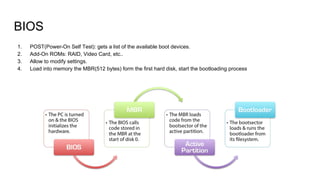
BIOS
1. POST(Power-On Self Test): gets a list of the available boot devices.
2. Add-On ROMs: RAID, Video Card, etc..
3. Allow to modify settings.
4. Load into memory the MBR(512 bytes) form the first hard disk, start the bootloading process
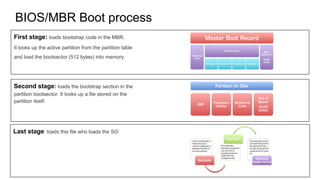
BIOS/MBR Boot process
First stage: loads bootstrap code in the MBR.
It looks up the active partition from the partition table
and load the bootsector (512 bytes) into memory.
Second stage: loads the bootstrap section in the
partition bootsector. It looks up a file stored on the
partition itself.
Last stage: loads this file who loads the SO
MBR partition table limitations
● Can manage up to 2TB disk space.
● Up to 4 primary partitions. Hack: use 1 extended partition with 4 logical
partitions inside.
● The OS communication with BIOS is thought interruptions.
GPT partition table improvements
● Can manage up to more the 9ZB: (TB->PB->EB->ZB)
● 128 primary partitions
UEFI SPECIFICATION
● Based in EFI which was developed by Intel.
● Released in 2005. Specification manage by UEFI Forum, http://uefi.org/members
● Requires the firmware to interpret GPT partition table but also MBR for BIOS
compatibility mode.
● Defines a new GPT partition type: ESP (EFI System Partition), accessible by
both the firmware and the OS
● Defines the UEFI boot manager who load UEFI drivers and UEFI bootloader
at boot time.
● Provides efibootmgr, a tool to configure the system boot behaviour from a
booted OS.
UEFI BOOT MANAGER
[root@system directory]# efibootmgr -v
BootCurrent: 0002
Timeout: 3 seconds
BootOrder: 0003,0002,0000,0004
Boot0000* CD/DVD Drive BIOS(3,0,00)
Boot0001* Hard Drive HD(2,0,00)
Boot0002* Fedora HD(1,800,61800,6d98f360-cb3e-4727-8fed-5ce0c040365d)File(EFIfedoragrubx64.efi)
Boot0003* opensuse HD(1,800,61800,6d98f360-cb3e-4727-8fed-5ce0c040365d)File(EFIopensusegrubx64.efi)
Boot0004* Hard Drive BIOS(2,0,00)P0: ST1500DM003-9YN16G
Disk boot targets can be defined but also non-disk targets as PXE server.
Disk boot targets:
● BIOS compatibility boot entries: 0000,0004. Autogenerated by the firmware.
● “Fall backpath” native UEFI entries: 0001. The firmware will look through each ESP partition in the
disk, in the order they exist, and look for EFIBOOTBOOT{machine type short-name}.EFI: BOOT64.EFI
(x86-64)BOOTIA32.EFI (x86-32)
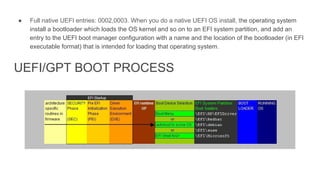
● Full native UEFI entries: 0002,0003. When you do a native UEFI OS install, the operating system
install a bootloader which loads the OS kernel and so on to an EFI system partition, and add an
entry to the UEFI boot manager configuration with a name and the location of the bootloader (in EFI
executable format) that is intended for loading that operating system.
UEFI/GPT BOOT PROCESS
SECURE BOOT
The firmware can contain a set of signatures, and refuse to run any EFI executable which is not signed
with one of those signatures.
Computers complying with the requirements must:
● Ship with Secure Boot turned on (except for servers)
● Have Microsoft’s key in the list of keys they trust
● Disable BIOS compatibility mode when Secure Boot is enabled (actually the UEFI spec requires this
too, if I read it correctly)
● Support signature blacklisting
● X86 computers must allow a physically present person who can disable Secure Boot and also can
enable Custom Mode, and modify the list of keys the firmware trusts
● ARM computers must NOT allow a physically present person who can disable Secure Boot and also
can NOT enable Custom Mode, and modify the list of keys the firmware trusts
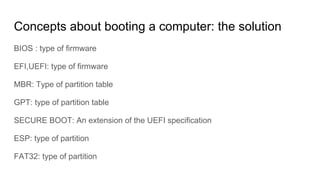
Concepts about booting a computer: the solution
BIOS : type of firmware
EFI,UEFI: type of firmware
MBR: Type of partition table
GPT: type of partition table
SECURE BOOT: An extension of the UEFI specification
ESP: type of partition
FAT32: type of partition

Boot process: BIOS vs UEFI

  • 1.
  • 2.
    Concepts about bootinga computer: the test BIOS EFI,UEFI MBR GPT SECURE BOOT ESP FAT32
  • 3.
    BIOS 1. POST(Power-On SelfTest): gets a list of the available boot devices. 2. Add-On ROMs: RAID, Video Card, etc.. 3. Allow to modify settings. 4. Load into memory the MBR(512 bytes) form the first hard disk, start the bootloading process
  • 4.
    BIOS/MBR Boot process Firststage: loads bootstrap code in the MBR. It looks up the active partition from the partition table and load the bootsector (512 bytes) into memory. Second stage: loads the bootstrap section in the partition bootsector. It looks up a file stored on the partition itself. Last stage: loads this file who loads the SO
  • 5.
    MBR partition tablelimitations ● Can manage up to 2TB disk space. ● Up to 4 primary partitions. Hack: use 1 extended partition with 4 logical partitions inside. ● The OS communication with BIOS is thought interruptions. GPT partition table improvements ● Can manage up to more the 9ZB: (TB->PB->EB->ZB) ● 128 primary partitions
  • 6.
    UEFI SPECIFICATION ● Basedin EFI which was developed by Intel. ● Released in 2005. Specification manage by UEFI Forum, http://uefi.org/members ● Requires the firmware to interpret GPT partition table but also MBR for BIOS compatibility mode. ● Defines a new GPT partition type: ESP (EFI System Partition), accessible by both the firmware and the OS ● Defines the UEFI boot manager who load UEFI drivers and UEFI bootloader at boot time. ● Provides efibootmgr, a tool to configure the system boot behaviour from a booted OS.
  • 7.
    UEFI BOOT MANAGER [root@systemdirectory]# efibootmgr -v BootCurrent: 0002 Timeout: 3 seconds BootOrder: 0003,0002,0000,0004 Boot0000* CD/DVD Drive BIOS(3,0,00) Boot0001* Hard Drive HD(2,0,00) Boot0002* Fedora HD(1,800,61800,6d98f360-cb3e-4727-8fed-5ce0c040365d)File(EFIfedoragrubx64.efi) Boot0003* opensuse HD(1,800,61800,6d98f360-cb3e-4727-8fed-5ce0c040365d)File(EFIopensusegrubx64.efi) Boot0004* Hard Drive BIOS(2,0,00)P0: ST1500DM003-9YN16G Disk boot targets can be defined but also non-disk targets as PXE server. Disk boot targets: ● BIOS compatibility boot entries: 0000,0004. Autogenerated by the firmware. ● “Fall backpath” native UEFI entries: 0001. The firmware will look through each ESP partition in the disk, in the order they exist, and look for EFIBOOTBOOT{machine type short-name}.EFI: BOOT64.EFI (x86-64)BOOTIA32.EFI (x86-32)
  • 8.
    ● Full nativeUEFI entries: 0002,0003. When you do a native UEFI OS install, the operating system install a bootloader which loads the OS kernel and so on to an EFI system partition, and add an entry to the UEFI boot manager configuration with a name and the location of the bootloader (in EFI executable format) that is intended for loading that operating system. UEFI/GPT BOOT PROCESS
  • 9.
    SECURE BOOT The firmwarecan contain a set of signatures, and refuse to run any EFI executable which is not signed with one of those signatures. Computers complying with the requirements must: ● Ship with Secure Boot turned on (except for servers) ● Have Microsoft’s key in the list of keys they trust ● Disable BIOS compatibility mode when Secure Boot is enabled (actually the UEFI spec requires this too, if I read it correctly) ● Support signature blacklisting ● X86 computers must allow a physically present person who can disable Secure Boot and also can enable Custom Mode, and modify the list of keys the firmware trusts ● ARM computers must NOT allow a physically present person who can disable Secure Boot and also can NOT enable Custom Mode, and modify the list of keys the firmware trusts
  • 10.
    Concepts about bootinga computer: the solution BIOS : type of firmware EFI,UEFI: type of firmware MBR: Type of partition table GPT: type of partition table SECURE BOOT: An extension of the UEFI specification ESP: type of partition FAT32: type of partition