
Metadata 101
   An introduction metadata and data management

                           By Dominique Gerald M. Cimafranca
                              villageidiotsavant.com


This work is licensed under the Creative Commons Attribution-Noncommercial-Share Alike 3.0 Philippines
License. To view a copy of this license, visit http://creativecommons.org/licenses/by-nc-sa/3.0/ph/ or send
a letter to Creative Commons, 171 Second Street, Suite 300, San Francisco, California, 94105, USA.
What is Metadata?

Data that provides information
about other data
     A collection of structured information
     about a document or a piece of content

     For example: Author, Title, Subject, Issue
     Date, Publisher
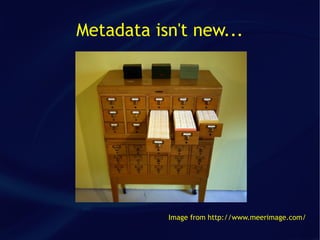
Metadata isn't new...


           Image from http://www.meerimage.com/
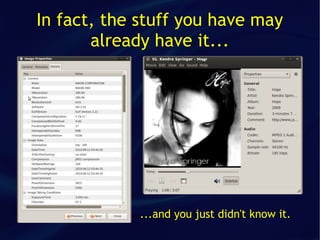
In fact, the stuff you have may
       already have it...


             ...and you just didn't know it.
Purpose of Metadata
●   To identify content
    ●   Capture fields and distinguish each document from all others
●   Manage content
    ●   Version numbers, archive date, security and access permissions
●   Retrieval of content
    ●   Taxonomy topics, subject keywords, document type
●   Connect content to other content
    ●   Behavioral metadata captured in transaction (e.g., Amazon)
●   Business processes
    ●   Authored by whom? Reviewed by whom and when? Approved by whom and
        when?
●   Support records management
    ●   Retention periods, disposition cycle
In a nutshell...


...to make information easy to
find, manage, and contextualize.
However...


Metadata is most useful in collections

Metadata is most useful when shared

Metadata is most useful in collaboration
Issues with information access today

●   Tons of content from disparate sources
●   Cumbersome navigation
●   Keyword search assumes that you know what you are
    looking for
●   Large number of search results – most of them
    irrelevant
●   Lack of context in search results
●   Search engines rely on mathematical algorithms to
    determine relevance and ranking of search results
Types of Metadata
●   Descriptive
    ●
        Describes a resource for discovery and
        identification, e.g., abstract, author, keywords
●
    Structural
    ●   Indicates how the parts of the resource are
        arranged, e.g., chapters in a book
●   Administrative
    ●
        Provides information on how to manage a resource,
        e.g., when it was created, who has access to it
Structural Metadata
●   Structural metadata defines the relationship
    between whole and parts.
●   Structural metadata can also be used for
    navigational purposes, e.g., links to related
    files.
Administrative Metadata
●   Administrative metadata provides information
    to help manage a resource, such as when and
    how it was created, file type, and other
    technical information, and who can access it.
●
    Most common subsets
    ●
        Rights management metadata
    ●   Preservation metadata
Why Metadata?
●   Resource discovery
●   Organizing electronic resources
●   Interoperability
●
    Digital identification
●
    Archiving and presentation
Metadata alone isn't enough...


...even Metadata has to be properly
thought out and properly used.
Planning Metadata
●   Whose requirements are you trying to meet?
    ●
        Who are your users and what are their
        requirements?
●
    What is your business case?
    ●   Why should you undertake this project?
●   What is your business model?
    ●
        How will this project be worthwhile?
Metadata Structure
●   Recognized standards
●   Local specifications
●   Social tagging systems
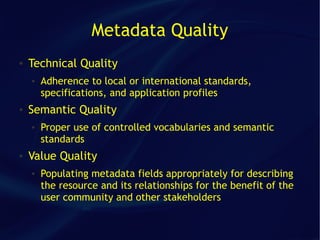
Metadata Quality
●   Technical Quality
    ●   Adherence to local or international standards,
        specifications, and application profiles
●   Semantic Quality
    ●   Proper use of controlled vocabularies and semantic
        standards
●   Value Quality
    ●   Populating metadata fields appropriately for describing
        the resource and its relationships for the benefit of the
        user community and other stakeholders
“Accurate, consistent, sufficient, and
thus reliable.”
                   --Greenberg & Robertson, 2002
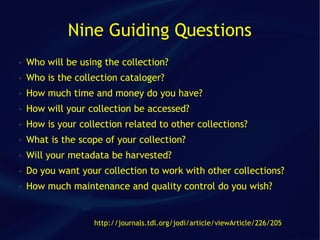
Nine Guiding Questions
●   Who will be using the collection?
●   Who is the collection cataloger?
●   How much time and money do you have?
●   How will your collection be accessed?
●   How is your collection related to other collections?
●   What is the scope of your collection?
●   Will your metadata be harvested?
●   Do you want your collection to work with other collections?
●   How much maintenance and quality control do you wish?


                   http://journals.tdl.org/jodi/article/viewArticle/226/205
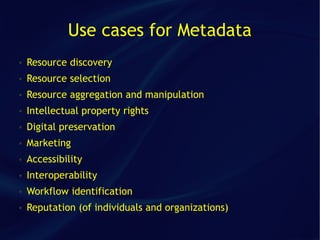
Use cases for Metadata
●   Resource discovery
●   Resource selection
●   Resource aggregation and manipulation
●   Intellectual property rights
●   Digital preservation
●   Marketing
●   Accessibility
●   Interoperability
●   Workflow identification
●   Reputation (of individuals and organizations)
How is Metadata created? By humans...
●   Created by resource authors
●   Added by resource depositors
●   Created, checked, augmented by professionals
    ●   Catalogers
    ●   Subject Experts
    ●   Designated IPR keepers
●   Enriched by resource users
    ●   Additional description, comments, annotations, descriptions of usage
    ●   Corrections
    ●   Enrichment (additional subject description)
    ●   Social tagging
    ●   Ratings and recommendations
...or by machines

●   Extraction from resource files
●   Inferred from resource relationships
●   Creation according to system settings
●
    Generation of default values
●
    Extraction via text mining
The need for Metadata standards
●   Different information providers using different
    metadata schemas
●   Even metadata schemas of groups within
    organizations are different or out of sync
●
    Result
    ●
        Inconsistent search results
    ●   Lack of interoperability
    ●   Information silos
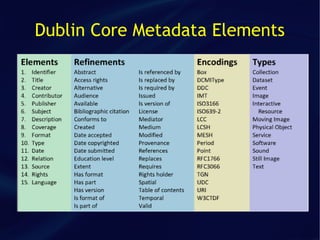
Dublin Core
●   General purpose metadata standard for use across domains
●   15 core elements
●   Element qualifiers to narrow the meaning of elements
    ●   E.g., Date Created vs Date Modified
●   Encoding schemes: controlled vocabularies or parsing rules
    to refine the interpretation of an element
●   Can be represented in HTML and XML (RDF)
●   See http://dublincore.org
Dublin Core Metadata Elements
Taxonomy
●   A classification scheme
    ●
        Designed to group related things together
●
    Semantic
    ●
        Fixed vocabulary that is meaningful to its users
●   A knowledge map
    ●
        Should give the user a grasp of the structure of the
        knowledge domain
    ●   Establishes relationships between objects
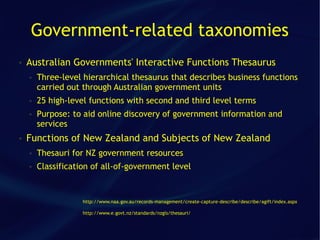
Government-related taxonomies
●   Australian Governments' Interactive Functions Thesaurus
    ●   Three-level hierarchical thesaurus that describes business functions
        carried out through Australian government units
    ●   25 high-level functions with second and third level terms
    ●   Purpose: to aid online discovery of government information and
        services
●   Functions of New Zealand and Subjects of New Zealand
    ●   Thesauri for NZ government resources
    ●   Classification of all-of-government level


                    http://www.naa.gov.au/records-management/create-capture-describe/describe/agift/index.aspx

                    http://www.e.govt.nz/standards/nzgls/thesauri/
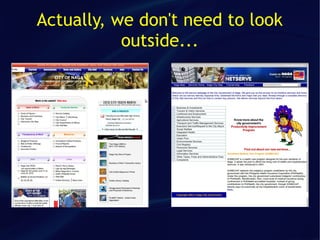
Actually, we don't need to look
           outside...
Remember!


Metadata is most useful in collections

Metadata is most useful when shared

Metadata is most useful in collaboration
Sources
●
    Metadata Primer (http://www.slideshare.net/selvats/metadata-primer)
●
    AGIFT (http://www.naa.gov.au/records-management/create-capture-describe/describe/classification/agift/index.htm)
●
    Taxonomy and Metadata (http://www.slideshare.net/dchampeau/taxonomy-and-metadata)
●
    Understanding Metadata (www.niso.org/standards/resources/UnderstandingMetadata.pdf)
●
    An Introduction to Metadata (http://www.library.uq.edu.au/iad/ctmeta4.html)
●
    NZGLS thesauri (http://www.e.govt.nz/standards/nzgls/thesauri/downloads.html)
●
    If you tag it, will they come? (Sarah Currier)
●
    Nine questions to guide you in choosing a metadata schema
    (http://journals.tdl.org/jodi/article/viewArticle/226/205)

Metadata 101

  • 1.
    Metadata 101 An introduction metadata and data management By Dominique Gerald M. Cimafranca villageidiotsavant.com This work is licensed under the Creative Commons Attribution-Noncommercial-Share Alike 3.0 Philippines License. To view a copy of this license, visit http://creativecommons.org/licenses/by-nc-sa/3.0/ph/ or send a letter to Creative Commons, 171 Second Street, Suite 300, San Francisco, California, 94105, USA.
  • 2.
    What is Metadata? Datathat provides information about other data A collection of structured information about a document or a piece of content For example: Author, Title, Subject, Issue Date, Publisher
  • 3.
    Metadata isn't new... Image from http://www.meerimage.com/
  • 4.
    In fact, thestuff you have may already have it... ...and you just didn't know it.
  • 5.
    Purpose of Metadata ● To identify content ● Capture fields and distinguish each document from all others ● Manage content ● Version numbers, archive date, security and access permissions ● Retrieval of content ● Taxonomy topics, subject keywords, document type ● Connect content to other content ● Behavioral metadata captured in transaction (e.g., Amazon) ● Business processes ● Authored by whom? Reviewed by whom and when? Approved by whom and when? ● Support records management ● Retention periods, disposition cycle
  • 6.
    In a nutshell... ...tomake information easy to find, manage, and contextualize.
  • 7.
    However... Metadata is mostuseful in collections Metadata is most useful when shared Metadata is most useful in collaboration
  • 8.
    Issues with informationaccess today ● Tons of content from disparate sources ● Cumbersome navigation ● Keyword search assumes that you know what you are looking for ● Large number of search results – most of them irrelevant ● Lack of context in search results ● Search engines rely on mathematical algorithms to determine relevance and ranking of search results
  • 9.
    Types of Metadata ● Descriptive ● Describes a resource for discovery and identification, e.g., abstract, author, keywords ● Structural ● Indicates how the parts of the resource are arranged, e.g., chapters in a book ● Administrative ● Provides information on how to manage a resource, e.g., when it was created, who has access to it
  • 10.
    Structural Metadata ● Structural metadata defines the relationship between whole and parts. ● Structural metadata can also be used for navigational purposes, e.g., links to related files.
  • 11.
    Administrative Metadata ● Administrative metadata provides information to help manage a resource, such as when and how it was created, file type, and other technical information, and who can access it. ● Most common subsets ● Rights management metadata ● Preservation metadata
  • 12.
    Why Metadata? ● Resource discovery ● Organizing electronic resources ● Interoperability ● Digital identification ● Archiving and presentation
  • 13.
    Metadata alone isn'tenough... ...even Metadata has to be properly thought out and properly used.
  • 14.
    Planning Metadata ● Whose requirements are you trying to meet? ● Who are your users and what are their requirements? ● What is your business case? ● Why should you undertake this project? ● What is your business model? ● How will this project be worthwhile?
  • 15.
    Metadata Structure ● Recognized standards ● Local specifications ● Social tagging systems
  • 16.
    Metadata Quality ● Technical Quality ● Adherence to local or international standards, specifications, and application profiles ● Semantic Quality ● Proper use of controlled vocabularies and semantic standards ● Value Quality ● Populating metadata fields appropriately for describing the resource and its relationships for the benefit of the user community and other stakeholders
  • 17.
    “Accurate, consistent, sufficient,and thus reliable.” --Greenberg & Robertson, 2002
  • 18.
    Nine Guiding Questions ● Who will be using the collection? ● Who is the collection cataloger? ● How much time and money do you have? ● How will your collection be accessed? ● How is your collection related to other collections? ● What is the scope of your collection? ● Will your metadata be harvested? ● Do you want your collection to work with other collections? ● How much maintenance and quality control do you wish? http://journals.tdl.org/jodi/article/viewArticle/226/205
  • 19.
    Use cases forMetadata ● Resource discovery ● Resource selection ● Resource aggregation and manipulation ● Intellectual property rights ● Digital preservation ● Marketing ● Accessibility ● Interoperability ● Workflow identification ● Reputation (of individuals and organizations)
  • 20.
    How is Metadatacreated? By humans... ● Created by resource authors ● Added by resource depositors ● Created, checked, augmented by professionals ● Catalogers ● Subject Experts ● Designated IPR keepers ● Enriched by resource users ● Additional description, comments, annotations, descriptions of usage ● Corrections ● Enrichment (additional subject description) ● Social tagging ● Ratings and recommendations
  • 21.
    ...or by machines ● Extraction from resource files ● Inferred from resource relationships ● Creation according to system settings ● Generation of default values ● Extraction via text mining
  • 22.
    The need forMetadata standards ● Different information providers using different metadata schemas ● Even metadata schemas of groups within organizations are different or out of sync ● Result ● Inconsistent search results ● Lack of interoperability ● Information silos
  • 23.
    Dublin Core ● General purpose metadata standard for use across domains ● 15 core elements ● Element qualifiers to narrow the meaning of elements ● E.g., Date Created vs Date Modified ● Encoding schemes: controlled vocabularies or parsing rules to refine the interpretation of an element ● Can be represented in HTML and XML (RDF) ● See http://dublincore.org
  • 24.
  • 25.
    Taxonomy ● A classification scheme ● Designed to group related things together ● Semantic ● Fixed vocabulary that is meaningful to its users ● A knowledge map ● Should give the user a grasp of the structure of the knowledge domain ● Establishes relationships between objects
  • 26.
    Government-related taxonomies ● Australian Governments' Interactive Functions Thesaurus ● Three-level hierarchical thesaurus that describes business functions carried out through Australian government units ● 25 high-level functions with second and third level terms ● Purpose: to aid online discovery of government information and services ● Functions of New Zealand and Subjects of New Zealand ● Thesauri for NZ government resources ● Classification of all-of-government level http://www.naa.gov.au/records-management/create-capture-describe/describe/agift/index.aspx http://www.e.govt.nz/standards/nzgls/thesauri/
  • 27.
    Actually, we don'tneed to look outside...
  • 28.
    Remember! Metadata is mostuseful in collections Metadata is most useful when shared Metadata is most useful in collaboration
  • 30.
    Sources ● Metadata Primer (http://www.slideshare.net/selvats/metadata-primer) ● AGIFT (http://www.naa.gov.au/records-management/create-capture-describe/describe/classification/agift/index.htm) ● Taxonomy and Metadata (http://www.slideshare.net/dchampeau/taxonomy-and-metadata) ● Understanding Metadata (www.niso.org/standards/resources/UnderstandingMetadata.pdf) ● An Introduction to Metadata (http://www.library.uq.edu.au/iad/ctmeta4.html) ● NZGLS thesauri (http://www.e.govt.nz/standards/nzgls/thesauri/downloads.html) ● If you tag it, will they come? (Sarah Currier) ● Nine questions to guide you in choosing a metadata schema (http://journals.tdl.org/jodi/article/viewArticle/226/205)