Understanding Memory
Management
L J Gokul Vasan
Contents
• Basics
– Swapping
– Paging
– Virtual Memory
• Hardware in memory management
– TLB
– Translation of address
• Theory on memory management
– Locality of reference
– Thrashing Problem
– Working set
• Software in Memory management
– Replacement policy
– Placement policy
– Scan rate policy
– Fetch Policy
Understanding Memory Management 2
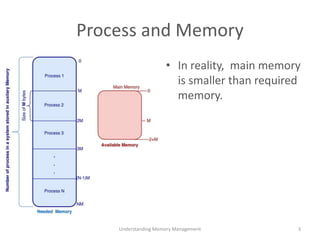
Process and Memory
• In reality, main memory
is smaller than required
memory.
3Understanding Memory Management
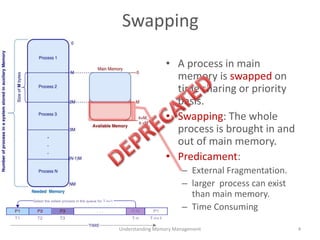
Swapping
• A process in main
memory is swapped on
time sharing or priority
basis.
• Swapping: The whole
process is brought in and
out of main memory.
• Predicament:
– External Fragmentation.
– larger process can exist
than main memory.
– Time Consuming
4Understanding Memory Management
Paging
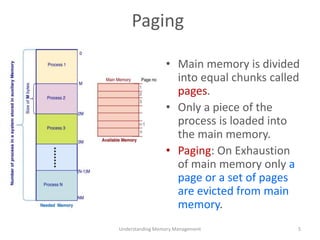
• Main memory is divided
into equal chunks called
pages.
• Only a piece of the
process is loaded into
the main memory.
• Paging: On Exhaustion
of main memory only a
page or a set of pages
are evicted from main
memory.
Understanding Memory Management 5
Paging
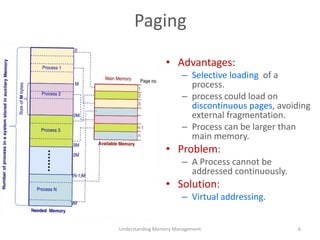
• Advantages:
– Selective loading of a
process.
– process could load on
discontinuous pages, avoiding
external fragmentation.
– Process can be larger than
main memory.
• Problem:
– A Process cannot be
addressed continuously.
• Solution:
– Virtual addressing.
Understanding Memory Management 6
Virtual Addressing
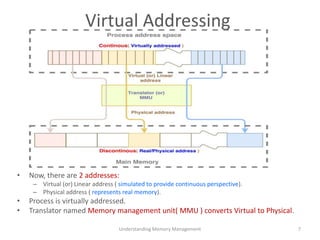
• Now, there are 2 addresses:
– Virtual (or) Linear address ( simulated to provide continuous perspective).
– Physical address ( represents real memory).
• Process is virtually addressed.
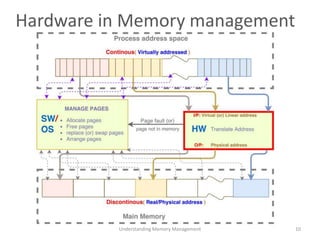
• Translator named Memory management unit( MMU ) converts Virtual to Physical.
Understanding Memory Management 7
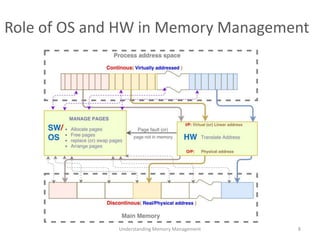
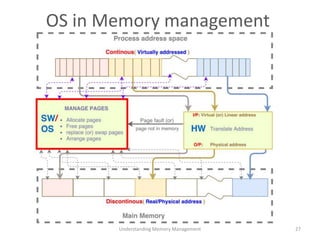
Role of OS and HW in Memory Management
Understanding Memory Management 8
Hardware in Memory management
Address Translation
Virtual -> Physical
Understanding Memory Management 9
Hardware in Memory management
Understanding Memory Management 10
MMU position in HW
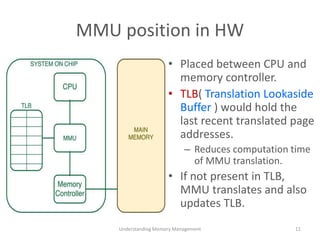
• Placed between CPU and
memory controller.
• TLB( Translation Lookaside
Buffer ) would hold the
last recent translated page
addresses.
– Reduces computation time
of MMU translation.
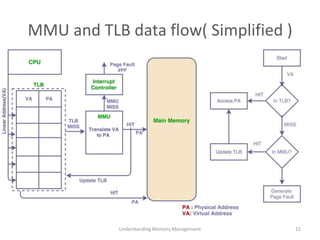
• If not present in TLB,
MMU translates and also
updates TLB.
Understanding Memory Management 11
MMU and TLB data flow( Simplified )
Understanding Memory Management 12
Virtual Address
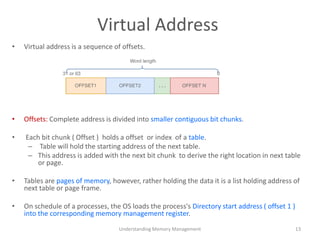
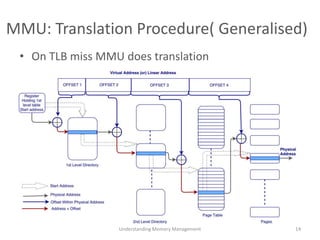
• Virtual address is a sequence of offsets.
• Offsets: Complete address is divided into smaller contiguous bit chunks.
• Each bit chunk ( Offset ) holds a offset or index of a table.
– Table will hold the starting address of the next table.
– This address is added with the next bit chunk to derive the right location in next table
or page.
• Tables are pages of memory, however, rather holding the data it is a list holding address of
next table or page frame.
• On schedule of a processes, the OS loads the process's Directory start address ( offset 1 )
into the corresponding memory management register.
Understanding Memory Management 13
MMU: Translation Procedure( Generalised)
• On TLB miss MMU does translation
Understanding Memory Management 14
Why the concept of paging, TLB and
caches work?
Locality of reference
Understanding Memory Management 15
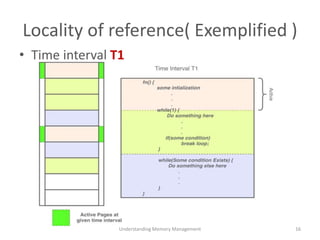
Locality of reference( Exemplified )
• Time interval T1
Understanding Memory Management 16
Locality of reference( Exemplified )
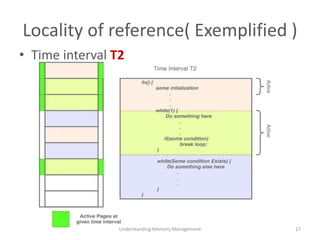
• Time interval T2
Understanding Memory Management 17
Locality of reference( Exemplified )
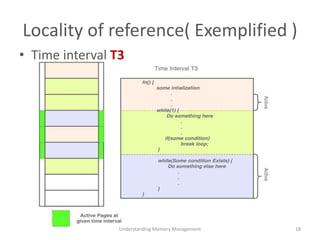
• Time interval T3
Understanding Memory Management 18
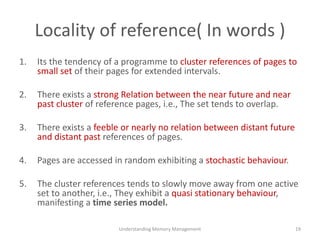
Locality of reference( In words )
1. Its the tendency of a programme to cluster references of pages to
small set of their pages for extended intervals.
2. There exists a strong Relation between the near future and near
past cluster of reference pages, i.e., The set tends to overlap.
3. There exists a feeble or nearly no relation between distant future
and distant past references of pages.
4. Pages are accessed in random exhibiting a stochastic behaviour.
5. The cluster references tends to slowly move away from one active
set to another, i.e., They exhibit a quasi stationary behaviour,
manifesting a time series model.
Understanding Memory Management 19
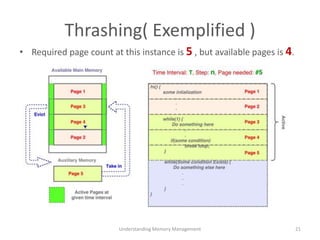
Thrashing problem
• A process spends significant computation on
paging rather than on its real computation.
Thrashing( Exemplified )
• Required page count at this instance is 5 , but available pages is 4.
Understanding Memory Management 21
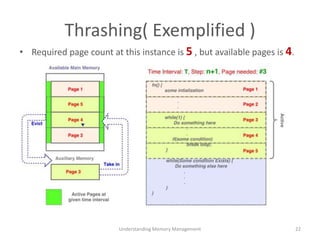
Thrashing( Exemplified )
Understanding Memory Management 22
• Required page count at this instance is 5 , but available pages is 4.
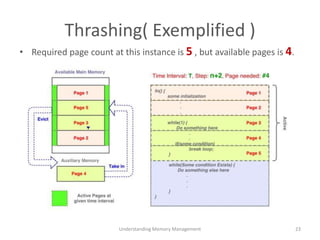
Thrashing( Exemplified )
Understanding Memory Management 23
• Required page count at this instance is 5 , but available pages is 4.
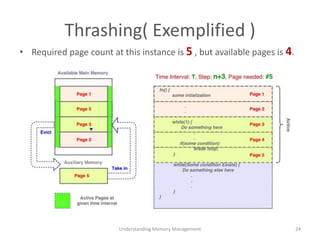
Thrashing( Exemplified )
Understanding Memory Management 24
• Required page count at this instance is 5 , but available pages is 4.
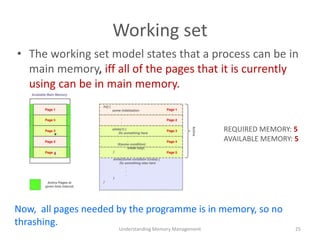
Working set
• The working set model states that a process can be in
main memory, iff all of the pages that it is currently
using can be in main memory.
Understanding Memory Management 25
Now, all pages needed by the programme is in memory, so no
thrashing.
REQUIRED MEMORY: 5
AVAILABLE MEMORY: 5
OS in Memory management
Policies (or) Rules
OS in Memory management
Understanding Memory Management 27
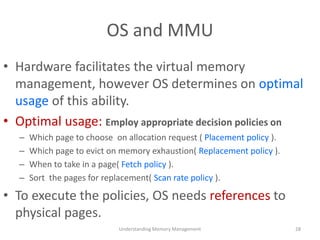
OS and MMU
• Hardware facilitates the virtual memory
management, however OS determines on optimal
usage of this ability.
• Optimal usage: Employ appropriate decision policies on
– Which page to choose on allocation request ( Placement policy ).
– Which page to evict on memory exhaustion( Replacement policy ).
– When to take in a page( Fetch policy ).
– Sort the pages for replacement( Scan rate policy ).
• To execute the policies, OS needs references to
physical pages.
Understanding Memory Management 28
Pages and Page Frame
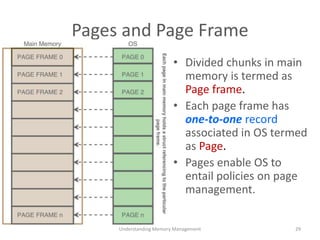
• Divided chunks in main
memory is termed as
Page frame.
• Each page frame has
one-to-one record
associated in OS termed
as Page.
• Pages enable OS to
entail policies on page
management.
Understanding Memory Management 29
Pages, Page frame and Zones
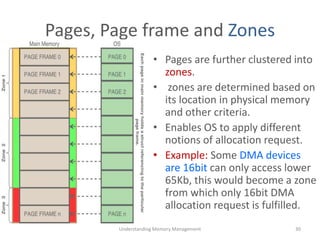
• Pages are further clustered into
zones.
• zones are determined based on
its location in physical memory
and other criteria.
• Enables OS to apply different
notions of allocation request.
• Example: Some DMA devices
are 16bit can only access lower
65Kb, this would become a zone
from which only 16bit DMA
allocation request is fulfilled.
Understanding Memory Management 30
Pages and Active list: Ideal scenario
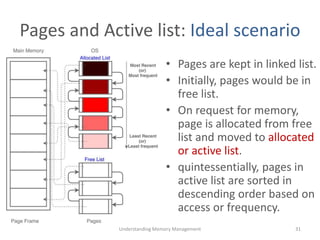
• Pages are kept in linked list.
• Initially, pages would be in
free list.
• On request for memory,
page is allocated from free
list and moved to allocated
or active list.
• quintessentially, pages in
active list are sorted in
descending order based on
access or frequency.
Understanding Memory Management 31
Pages and Active list: Exhausted scenario
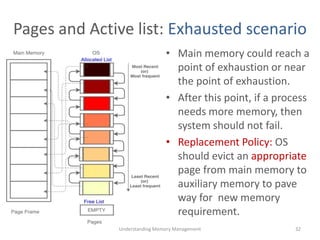
• Main memory could reach a
point of exhaustion or near
the point of exhaustion.
• After this point, if a process
needs more memory, then
system should not fail.
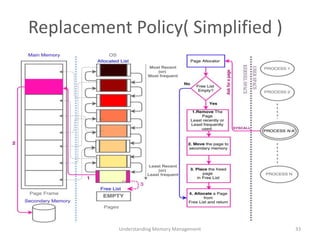
• Replacement Policy: OS
should evict an appropriate
page from main memory to
auxiliary memory to pave
way for new memory
requirement.
Understanding Memory Management 32
Replacement Policy( Simplified )
Understanding Memory Management 33
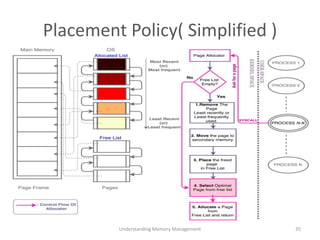
Placement Policy
• Tries to address following questions during allocation.
– Are some physical pages preferable to others within a
process?
– Does allocating such a preferable page increases
performance of the process?
• Addresses these query by selecting optimal page
from the free list.
Understanding Memory Management 34
Placement Policy( Simplified )
Understanding Memory Management 35
Placement Policy: Optimal Page
• Pick a right page from free list such that:
– It reduces cache conflict or thrashing. (or/and)
– It is near to the process’s processor ( NUMA ). (or/and)
– It saves energy. (or/and)
– Increases parallelization.
Understanding Memory Management 36
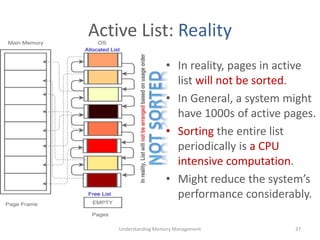
Active List: Reality
• In reality, pages in active
list will not be sorted.
• In General, a system might
have 1000s of active pages.
• Sorting the entire list
periodically is a CPU
intensive computation.
• Might reduce the system’s
performance considerably.
Understanding Memory Management 37
Scan rate Policy
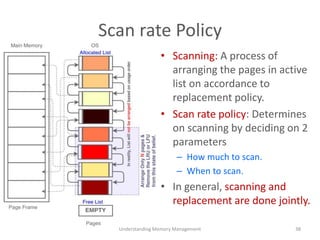
• Scanning: A process of
arranging the pages in active
list on accordance to
replacement policy.
• Scan rate policy: Determines
on scanning by deciding on 2
parameters
– How much to scan.
– When to scan.
• In general, scanning and
replacement are done jointly.
Understanding Memory Management 38
Scan rate Policy: When to Scan
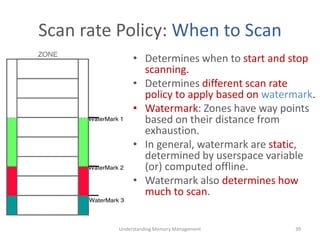
• Determines when to start and stop
scanning.
• Determines different scan rate
policy to apply based on watermark.
• Watermark: Zones have way points
based on their distance from
exhaustion.
• In general, watermark are static,
determined by userspace variable
(or) computed offline.
• Watermark also determines how
much to scan.
Understanding Memory Management 39
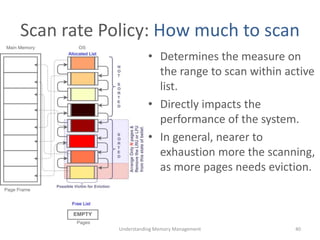
Scan rate Policy: How much to scan
• Determines the measure on
the range to scan within active
list.
• Directly impacts the
performance of the system.
• In general, nearer to
exhaustion more the scanning,
as more pages needs eviction.
Understanding Memory Management 40
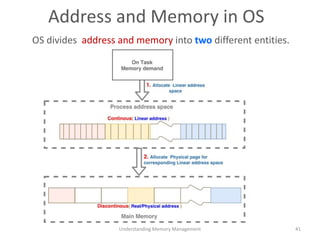
Address and Memory in OS
Understanding Memory Management 41
OS divides address and memory into two different entities.
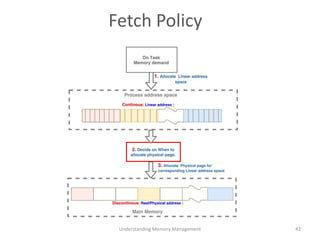
Fetch Policy
Understanding Memory Management 42
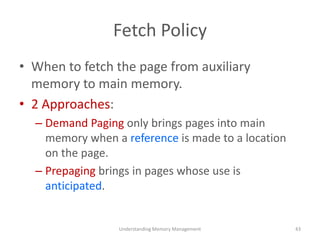
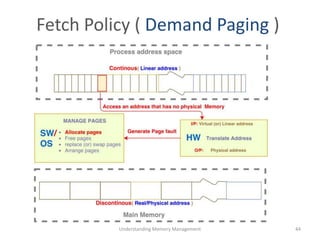
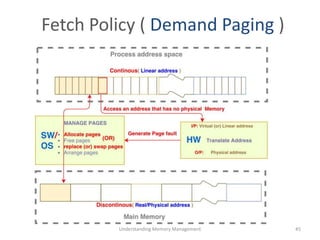
Fetch Policy
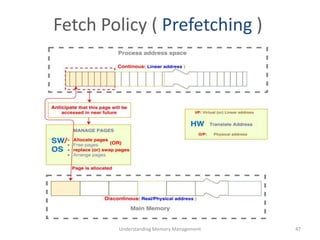
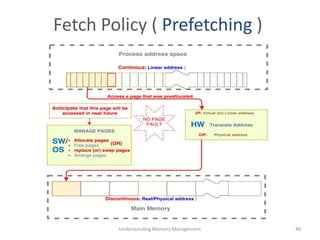
• When to fetch the page from auxiliary
memory to main memory.
• 2 Approaches:
– Demand Paging only brings pages into main
memory when a reference is made to a location
on the page.
– Prepaging brings in pages whose use is
anticipated.
Understanding Memory Management 43
Fetch Policy ( Demand Paging )
Understanding Memory Management 44
Fetch Policy ( Demand Paging )
Understanding Memory Management 45
Fetch Policy ( Prefetching )
Understanding Memory Management 46
Fetch Policy ( Prefetching )
Understanding Memory Management 47
Fetch Policy ( Prefetching )
Understanding Memory Management 48
Thank You
Understanding Memory Management 49

Understanding memory management

  • 1.
  • 2.
    Contents • Basics – Swapping –Paging – Virtual Memory • Hardware in memory management – TLB – Translation of address • Theory on memory management – Locality of reference – Thrashing Problem – Working set • Software in Memory management – Replacement policy – Placement policy – Scan rate policy – Fetch Policy Understanding Memory Management 2
  • 3.
    Process and Memory •In reality, main memory is smaller than required memory. 3Understanding Memory Management
  • 4.
    Swapping • A processin main memory is swapped on time sharing or priority basis. • Swapping: The whole process is brought in and out of main memory. • Predicament: – External Fragmentation. – larger process can exist than main memory. – Time Consuming 4Understanding Memory Management
  • 5.
    Paging • Main memoryis divided into equal chunks called pages. • Only a piece of the process is loaded into the main memory. • Paging: On Exhaustion of main memory only a page or a set of pages are evicted from main memory. Understanding Memory Management 5
  • 6.
    Paging • Advantages: – Selectiveloading of a process. – process could load on discontinuous pages, avoiding external fragmentation. – Process can be larger than main memory. • Problem: – A Process cannot be addressed continuously. • Solution: – Virtual addressing. Understanding Memory Management 6
  • 7.
    Virtual Addressing • Now,there are 2 addresses: – Virtual (or) Linear address ( simulated to provide continuous perspective). – Physical address ( represents real memory). • Process is virtually addressed. • Translator named Memory management unit( MMU ) converts Virtual to Physical. Understanding Memory Management 7
  • 8.
    Role of OSand HW in Memory Management Understanding Memory Management 8
  • 9.
    Hardware in Memorymanagement Address Translation Virtual -> Physical Understanding Memory Management 9
  • 10.
    Hardware in Memorymanagement Understanding Memory Management 10
  • 11.
    MMU position inHW • Placed between CPU and memory controller. • TLB( Translation Lookaside Buffer ) would hold the last recent translated page addresses. – Reduces computation time of MMU translation. • If not present in TLB, MMU translates and also updates TLB. Understanding Memory Management 11
  • 12.
    MMU and TLBdata flow( Simplified ) Understanding Memory Management 12
  • 13.
    Virtual Address • Virtualaddress is a sequence of offsets. • Offsets: Complete address is divided into smaller contiguous bit chunks. • Each bit chunk ( Offset ) holds a offset or index of a table. – Table will hold the starting address of the next table. – This address is added with the next bit chunk to derive the right location in next table or page. • Tables are pages of memory, however, rather holding the data it is a list holding address of next table or page frame. • On schedule of a processes, the OS loads the process's Directory start address ( offset 1 ) into the corresponding memory management register. Understanding Memory Management 13
  • 14.
    MMU: Translation Procedure(Generalised) • On TLB miss MMU does translation Understanding Memory Management 14
  • 15.
    Why the conceptof paging, TLB and caches work? Locality of reference Understanding Memory Management 15
  • 16.
    Locality of reference(Exemplified ) • Time interval T1 Understanding Memory Management 16
  • 17.
    Locality of reference(Exemplified ) • Time interval T2 Understanding Memory Management 17
  • 18.
    Locality of reference(Exemplified ) • Time interval T3 Understanding Memory Management 18
  • 19.
    Locality of reference(In words ) 1. Its the tendency of a programme to cluster references of pages to small set of their pages for extended intervals. 2. There exists a strong Relation between the near future and near past cluster of reference pages, i.e., The set tends to overlap. 3. There exists a feeble or nearly no relation between distant future and distant past references of pages. 4. Pages are accessed in random exhibiting a stochastic behaviour. 5. The cluster references tends to slowly move away from one active set to another, i.e., They exhibit a quasi stationary behaviour, manifesting a time series model. Understanding Memory Management 19
  • 20.
    Thrashing problem • Aprocess spends significant computation on paging rather than on its real computation.
  • 21.
    Thrashing( Exemplified ) •Required page count at this instance is 5 , but available pages is 4. Understanding Memory Management 21
  • 22.
    Thrashing( Exemplified ) UnderstandingMemory Management 22 • Required page count at this instance is 5 , but available pages is 4.
  • 23.
    Thrashing( Exemplified ) UnderstandingMemory Management 23 • Required page count at this instance is 5 , but available pages is 4.
  • 24.
    Thrashing( Exemplified ) UnderstandingMemory Management 24 • Required page count at this instance is 5 , but available pages is 4.
  • 25.
    Working set • Theworking set model states that a process can be in main memory, iff all of the pages that it is currently using can be in main memory. Understanding Memory Management 25 Now, all pages needed by the programme is in memory, so no thrashing. REQUIRED MEMORY: 5 AVAILABLE MEMORY: 5
  • 26.
    OS in Memorymanagement Policies (or) Rules
  • 27.
    OS in Memorymanagement Understanding Memory Management 27
  • 28.
    OS and MMU •Hardware facilitates the virtual memory management, however OS determines on optimal usage of this ability. • Optimal usage: Employ appropriate decision policies on – Which page to choose on allocation request ( Placement policy ). – Which page to evict on memory exhaustion( Replacement policy ). – When to take in a page( Fetch policy ). – Sort the pages for replacement( Scan rate policy ). • To execute the policies, OS needs references to physical pages. Understanding Memory Management 28
  • 29.
    Pages and PageFrame • Divided chunks in main memory is termed as Page frame. • Each page frame has one-to-one record associated in OS termed as Page. • Pages enable OS to entail policies on page management. Understanding Memory Management 29
  • 30.
    Pages, Page frameand Zones • Pages are further clustered into zones. • zones are determined based on its location in physical memory and other criteria. • Enables OS to apply different notions of allocation request. • Example: Some DMA devices are 16bit can only access lower 65Kb, this would become a zone from which only 16bit DMA allocation request is fulfilled. Understanding Memory Management 30
  • 31.
    Pages and Activelist: Ideal scenario • Pages are kept in linked list. • Initially, pages would be in free list. • On request for memory, page is allocated from free list and moved to allocated or active list. • quintessentially, pages in active list are sorted in descending order based on access or frequency. Understanding Memory Management 31
  • 32.
    Pages and Activelist: Exhausted scenario • Main memory could reach a point of exhaustion or near the point of exhaustion. • After this point, if a process needs more memory, then system should not fail. • Replacement Policy: OS should evict an appropriate page from main memory to auxiliary memory to pave way for new memory requirement. Understanding Memory Management 32
  • 33.
    Replacement Policy( Simplified) Understanding Memory Management 33
  • 34.
    Placement Policy • Triesto address following questions during allocation. – Are some physical pages preferable to others within a process? – Does allocating such a preferable page increases performance of the process? • Addresses these query by selecting optimal page from the free list. Understanding Memory Management 34
  • 35.
    Placement Policy( Simplified) Understanding Memory Management 35
  • 36.
    Placement Policy: OptimalPage • Pick a right page from free list such that: – It reduces cache conflict or thrashing. (or/and) – It is near to the process’s processor ( NUMA ). (or/and) – It saves energy. (or/and) – Increases parallelization. Understanding Memory Management 36
  • 37.
    Active List: Reality •In reality, pages in active list will not be sorted. • In General, a system might have 1000s of active pages. • Sorting the entire list periodically is a CPU intensive computation. • Might reduce the system’s performance considerably. Understanding Memory Management 37
  • 38.
    Scan rate Policy •Scanning: A process of arranging the pages in active list on accordance to replacement policy. • Scan rate policy: Determines on scanning by deciding on 2 parameters – How much to scan. – When to scan. • In general, scanning and replacement are done jointly. Understanding Memory Management 38
  • 39.
    Scan rate Policy:When to Scan • Determines when to start and stop scanning. • Determines different scan rate policy to apply based on watermark. • Watermark: Zones have way points based on their distance from exhaustion. • In general, watermark are static, determined by userspace variable (or) computed offline. • Watermark also determines how much to scan. Understanding Memory Management 39
  • 40.
    Scan rate Policy:How much to scan • Determines the measure on the range to scan within active list. • Directly impacts the performance of the system. • In general, nearer to exhaustion more the scanning, as more pages needs eviction. Understanding Memory Management 40
  • 41.
    Address and Memoryin OS Understanding Memory Management 41 OS divides address and memory into two different entities.
  • 42.
  • 43.
    Fetch Policy • Whento fetch the page from auxiliary memory to main memory. • 2 Approaches: – Demand Paging only brings pages into main memory when a reference is made to a location on the page. – Prepaging brings in pages whose use is anticipated. Understanding Memory Management 43
  • 44.
    Fetch Policy (Demand Paging ) Understanding Memory Management 44
  • 45.
    Fetch Policy (Demand Paging ) Understanding Memory Management 45
  • 46.
    Fetch Policy (Prefetching ) Understanding Memory Management 46
  • 47.
    Fetch Policy (Prefetching ) Understanding Memory Management 47
  • 48.
    Fetch Policy (Prefetching ) Understanding Memory Management 48
  • 49.