Unit 1
Introduction to computer network
T1 - Overview of computer network
IT45103
NETWORKING
Definition of Computer
Network
• A computer network is an interconnection of
computers and computing equipment using either
wires or radio waves and can share data and
computing resources.
• Computer networks that use radio waves are termed
wireless and can involve broadcast radio, microwaves
or satellite transmissions.
Networking
2
Networking
3
Types of computer
networks
• Networks spanning an area of several meters around
an individual are called personal area networks
(PANs). Most common is Bluetooth for headphones etc
• Networks a little larger in geographic size such as
spanning a room, a floor within a building, a building
or a campus are called Local Area Networks (LANs).
Networking
4
Types of computer
networks (cont..)
• Networks that serve an area up to roughly 50
kilometers approximately the area of a typical city are
called metropolitan area networks (MANs).
• high-speed networks that interconnect businesses with
other businesses and the Internet.
• Usually is a business service offered by telcos/ISPs
• Large networks encompassing parts of states, multiple
states, countries and the world are wide area
networks (WANs). e.g. Internet
Networking
5
Networking
6
Advantages of
computer network
• Sharing of peripheral devices: Laser printer, disk
drives and scanner are examples of peripheral devices
– that is, hardware that is connected to a computer.
• Sharing of program and data: In most organizations,
people use the same software and need access to the
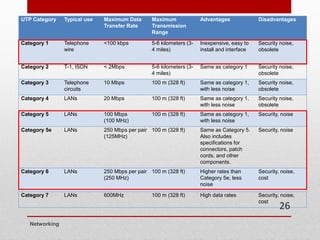
same information.
• Better communications: One of the greatest features of
networks is electronic mail. Also instant messaging
and calling apps such as WhatsApp are becoming
critical.
Networking
7
Advantages of
computer network
(cont..)
• Security of information: data would be backed up or
duplicated on a networked storage device secured by
password.
• Access to databases: enable users to tap into
numerous databases, whether the private databases of
a company or the public databases of online services.
Networking
8
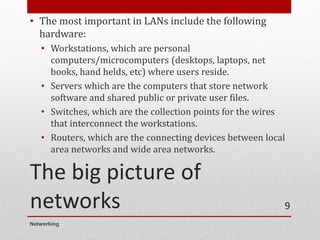
The big picture of
networks
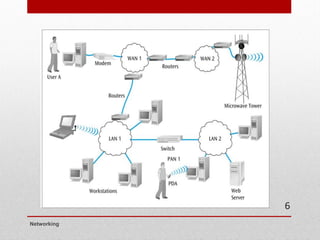
• The most important in LANs include the following
hardware:
• Workstations, which are personal
computers/microcomputers (desktops, laptops, net
books, hand helds, etc) where users reside.
• Servers which are the computers that store network
software and shared public or private user files.
• Switches, which are the collection points for the wires
that interconnect the workstations.
• Routers, which are the connecting devices between local
area networks and wide area networks.
Networking
9
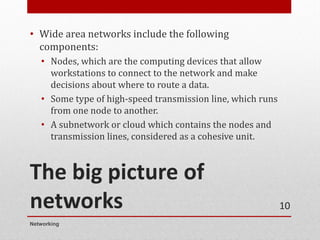
The big picture of
networks
• Wide area networks include the following
components:
• Nodes, which are the computing devices that allow
workstations to connect to the network and make
decisions about where to route a data.
• Some type of high-speed transmission line, which runs
from one node to another.
• A subnetwork or cloud which contains the nodes and
transmission lines, considered as a cohesive unit.
Networking
10
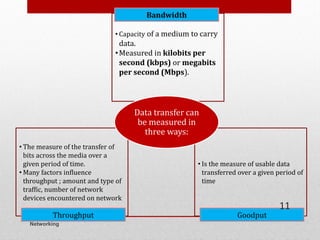
• Capacity of a medium to carry
data.
•Measured in kilobits per
second (kbps) or megabits
per second (Mbps).
Bandwidth
• The measure of the transfer of
bits across the media over a
given period of time.
• Many factors influence
throughput ; amount and type of
traffic, number of network
devices encountered on network
Throughput
• Is the measure of usable data
transferred over a given period of
time
Goodput
Data transfer can
be measured in
three ways:
Networking
11
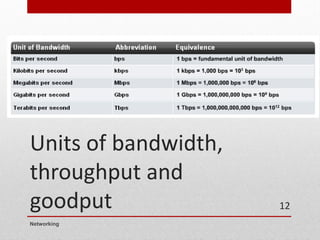
Units of bandwidth,
throughput and
goodput
Networking
12
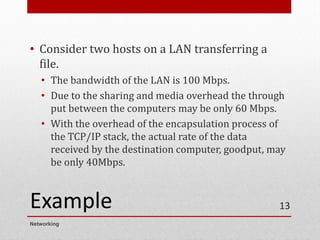
Example
• Consider two hosts on a LAN transferring a
file.
• The bandwidth of the LAN is 100 Mbps.
• Due to the sharing and media overhead the through
put between the computers may be only 60 Mbps.
• With the overhead of the encapsulation process of
the TCP/IP stack, the actual rate of the data
received by the destination computer, goodput, may
be only 40Mbps.
Networking
13
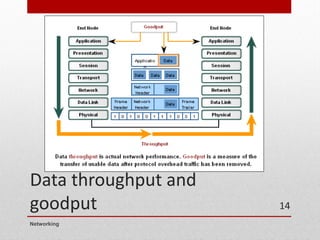
Data throughput and
goodput
Networking
14
Unit 1
Introduction to computer network
T2 - Network Models
IT45103
NETWORKING
Networking
Network Models
• A network model defines how and where resources
are shared and how access to these resources is
regulated
• Fall into two major types
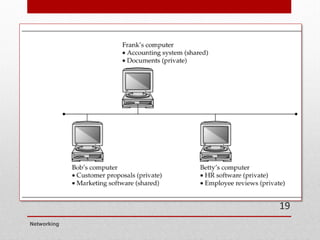
• Peer-to-peer network: Most computers function
as clients or servers (no centralized control over
who has access to network resources)
• Server-based network: Certain computers take on
specialized roles and function mainly as servers,
and ordinary users’ machines tend to function
mainly as clients
16
Networking
Peer-to-Peer/Workgroup
Model
• Computers on a peer-to-peer network can take both a
client and a server role
• Any user can share resources on his/her computer
with any other user’s computer
• Every user must act as the administrator of his/her
computer
• Can give everyone else unlimited access to their
resources or grant restricted access to other users
• Usernames and passwords (credentials) are used to
control that access
17
Networking
Peer-to-Peer/Workgroup
Model
• Problems with Peer-to-peer networks:
• Must remember multiple sets of identifications to access
resources spread out over several computers
• Desktop PCs and the OSs installed on them aren’t made to
provide network services as efficiently as dedicated
network servers
• Data organization: If every machine can be a server, how
can users keep track of what information is stored on which
machine?
• Peer-to-peer networks are best suited for small organizations
that have small networks and small operating budgets
18
Networking
19
Server/Domain-Based
Model
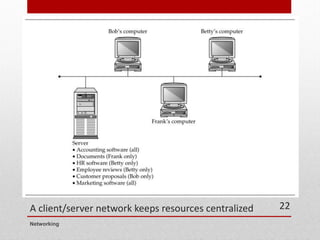
• Server-based networks provide centralized
control over network resources
• Users log on to the network with a single set
of identifications maintained by one or more
servers running a server OS
• In most cases, servers are dedicated to
running network services and should not be
used to run user applications
Networking
20
Server/Domain-Based
Model
• A domain is a collection of users and computers whose
accounts are managed by Windows servers called
domain controllers
• Users and computers in a domain are subject to network
access and security policies defined by a network
administrator
• The software that manages this security is referred to as a
directory service
• On Windows servers, the directory service software is
Active Directory
Networking
21
A client/server network keeps resources centralized
Networking
22
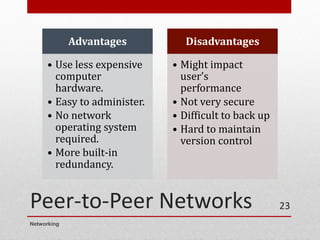
Peer-to-Peer Networks
Networking
23
Advantages
• Use less expensive
computer
hardware.
• Easy to administer.
• No network
operating system
required.
• More built-in
redundancy.
Disadvantages
• Might impact
user’s
performance
• Not very secure
• Difficult to back up
• Hard to maintain
version control
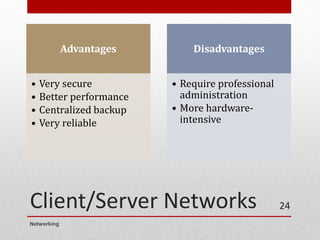
Client/Server Networks
Advantages
• Very secure
• Better performance
• Centralized backup
• Very reliable
Disadvantages
• Require professional
administration
• More hardware-
intensive
Networking
24
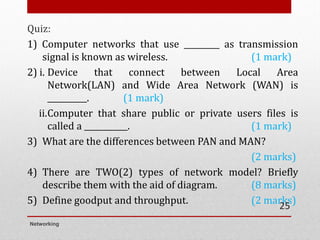
Quiz:
1) Computer networks that use _________ as transmission
signal is known as wireless. (1 mark)
2) i. Device that connect between Local Area
Network(LAN) and Wide Area Network (WAN) is
__________. (1 mark)
ii.Computer that share public or private users files is
called a ___________. (1 mark)
3) What are the differences between PAN and MAN?
(2 marks)
4) There are TWO(2) types of network model? Briefly
describe them with the aid of diagram. (8 marks)
5) Define goodput and throughput. (2 marks)
Networking
25
Unit 1
Introduction to computer network
T3 - Network Topologies
IT45103
NETWORKING
• Topology basically means shape.
• Network topology refers how a network is physically
laid out and how signals travel from one device to
another.
• Broken down into TWO topologies.
• The arrangement of cabling and how cables connect one
device to another in a network is considered the
network’s physical topology.
• The path data travel between computers on a network is
considered the network’s logical topology.
Networking
2
Bus Topology
• The first topology used in local area networking was
the bus topology
• A bus topology, more completely called a common bus
multipoint topology, is a network where, basically, a
single network cable is used from one end of the
network to the other, with different network devices
(called nodes) connected to the cable at different
locations.
• This topology is seldom used in modern networks
Networking
3
Bus Topology
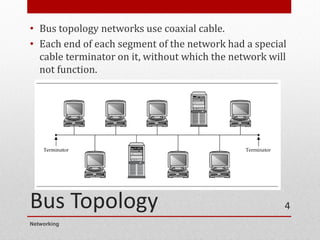
• Bus topology networks use coaxial cable.
• Each end of each segment of the network had a special
cable terminator on it, without which the network will
not function.
Networking
4
Bus Topology
• From a device's viewpoint, all other systems
communicate through the same, shared path.
• Because it is a shared media technology, mechanisms
must be put into place to determine network traffic
over the cable.
• Typically, collision detection (CD) or collision
avoidance (CA) algorithms are used in bus topologies
to determine network access along with concepts such
as "broadcasts" to reach every device on the cable.
• The biggest issue was that any cable break or issue
put the whole network offline
Networking
5
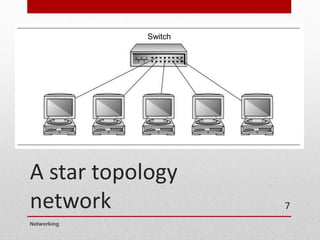
Star Topology
• Every node on the LAN has a dedicated cable that is
pulled back to a centralized point, typically a wiring
closet.
• All cables are terminated in a network component
such as a switch or hub.
• The network switch (or hub) is a single point of failure
• Each device has a dedicated wire to the switch to
implement the star.
• This is the topology used in all current LANs
Networking
6
A star topology
network
Networking
7
Switch
Star Topology
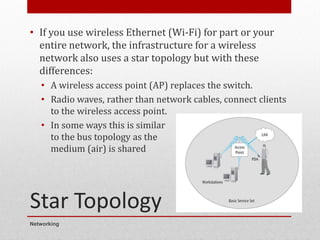
• If you use wireless Ethernet (Wi-Fi) for part or your
entire network, the infrastructure for a wireless
network also uses a star topology but with these
differences:
• A wireless access point (AP) replaces the switch.
• Radio waves, rather than network cables, connect clients
to the wireless access point.
• In some ways this is similar
to the bus topology as the
medium (air) is shared
Networking
8
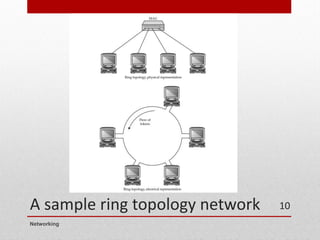
Ring Topology
• A ring topology may actually be a physical
arrangement of a network cable
• The network behaves like a ring, where the
network signals travel around the ring to each
node in turn.
• Ring topology LANs are based on Token Ring
• Like bus topology, ring topology is seldom
used in modern networks
Networking
9
A sample ring topology network
Networking
10
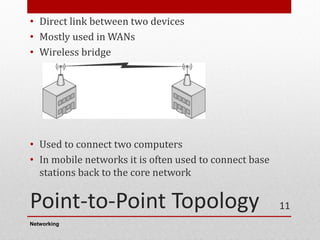
Point-to-Point Topology
• Direct link between two devices
• Mostly used in WANs
• Wireless bridge
• Used to connect two computers
• In mobile networks it is often used to connect base
stations back to the core network
Networking
11
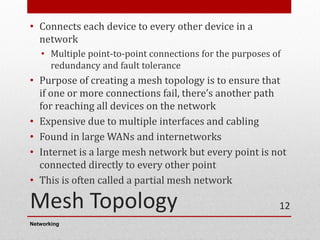
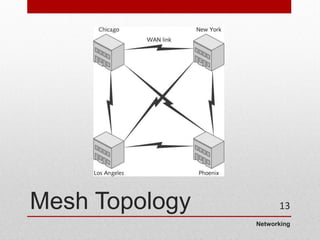
Mesh Topology
• Connects each device to every other device in a
network
• Multiple point-to-point connections for the purposes of
redundancy and fault tolerance
• Purpose of creating a mesh topology is to ensure that
if one or more connections fail, there’s another path
for reaching all devices on the network
• Expensive due to multiple interfaces and cabling
• Found in large WANs and internetworks
• Internet is a large mesh network but every point is not
connected directly to every other point
• This is often called a partial mesh network
Networking
12
Networking
Mesh Topology 13
Unit 1
Introduction to computer network
T4 - Network Media
IT45103
NETWORKING
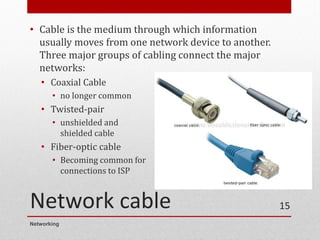
Network cable
• Cable is the medium through which information
usually moves from one network device to another.
Three major groups of cabling connect the major
networks:
• Coaxial Cable
• no longer common
• Twisted-pair
• unshielded and
shielded cable
• Fiber-optic cable
• Becoming common for
connections to ISP
Networking
15
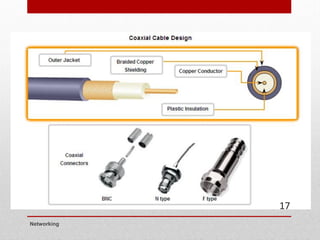
Coaxial Cable
• Is a single wire wrapped in foam insulation, surrounded by a braided
metal shield, and then covered in a plastic jacket.
• The braided metal shield is very good at blocking electromagnetic
signals from entering the cable and producing noise.
• Coaxial cable is good at carrying analog signals with a wide range of
frequencies.
• For example, it can transmit large numbers of video channels, such as
those found on the cable television services that are delivered into
homes and businesses.
• Now used mostly for satellite services like Astro and for connections to
antennas
Networking
16
Networking
17
Coaxial Cable (cont..)
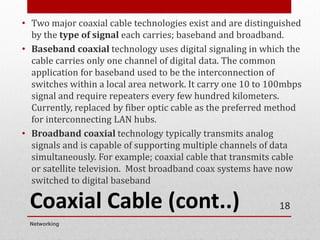
• Two major coaxial cable technologies exist and are distinguished
by the type of signal each carries; baseband and broadband.
• Baseband coaxial technology uses digital signaling in which the
cable carries only one channel of digital data. The common
application for baseband used to be the interconnection of
switches within a local area network. It carry one 10 to 100mbps
signal and require repeaters every few hundred kilometers.
Currently, replaced by fiber optic cable as the preferred method
for interconnecting LAN hubs.
• Broadband coaxial technology typically transmits analog
signals and is capable of supporting multiple channels of data
simultaneously. For example; coaxial cable that transmits cable
or satellite television. Most broadband coax systems have now
switched to digital baseband
Networking
18
Coaxial Cable (cont..)
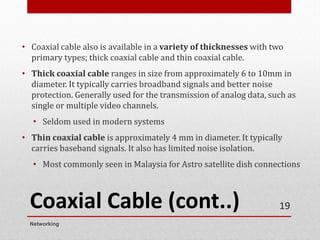
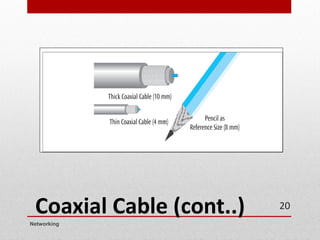
• Coaxial cable also is available in a variety of thicknesses with two
primary types; thick coaxial cable and thin coaxial cable.
• Thick coaxial cable ranges in size from approximately 6 to 10mm in
diameter. It typically carries broadband signals and better noise
protection. Generally used for the transmission of analog data, such as
single or multiple video channels.
• Seldom used in modern systems
• Thin coaxial cable is approximately 4 mm in diameter. It typically
carries baseband signals. It also has limited noise isolation.
• Most commonly seen in Malaysia for Astro satellite dish connections
Networking
19
Coaxial Cable (cont..)
Networking
20
Twisted-pair (unshielded
and shielded) cable
• Currently the most commonly used data
transmission medium.
• Used for most LANs and telephone
connections
• Consists of pairs of copper wires twisted
together to create magnetic field and thus
reduce interference.
• Two types of twisted pair are Shielded Twisted
Pair (STP) and Unshielded Twisted Pair (UTP).
Networking
21
Shielded Twisted-Pair (STP)
Cable
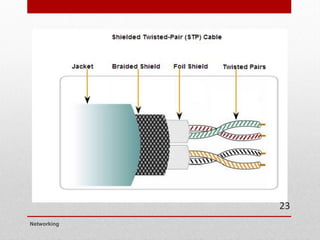
• Consists of twisted wire pairs that are individually insulated and
surrounded by shielding made of metallic substance.
• Provides better noise protection than UTP cabling, however at a
significantly higher price.
• More expensive, heavier, and difficult to bend when installing
(compared to UTP).
• For many years, STP was the cabling structure specified for use
in Token Ring network installations.
• Seldom used in modern networks
Networking
22
Networking
23
Unshielded Twisted Pair (UTP)
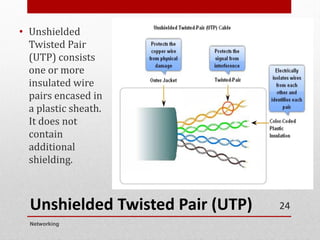
• Unshielded
Twisted Pair
(UTP) consists
one or more
insulated wire
pairs encased in
a plastic sheath.
It does not
contain
additional
shielding.
Networking
24
Unshielded Twisted Pair (UTP)
• The UTP cable used in LANs consists of four
pairs of insulated wires, other UTP types
contain fewer pairs.
• Also used for telphone wire, with only 2 pairs,
because voice applications are much less
demanding than networking in bandwidth and
signal quality.
• There are many different categories of UTP as
shown in the next slide
Networking
25
UTP Category Typical use Maximum Data
Transfer Rate
Maximum
Transmission
Range
Advantages Disadvantages
Category 1 Telephone
wire
<100 kbps 5-6 kilometers (3-
4 miles)
Inexpensive, easy to
install and interface
Security noise,
obsolete
Category 2 T-1, ISDN < 2Mbps 5-6 kilometers (3-
4 miles)
Same as category 1 Security noise,
obsolete
Category 3 Telephone
circuits
10 Mbps 100 m (328 ft) Same as category 1,
with less noise
Security noise,
obsolete
Category 4 LANs 20 Mbps 100 m (328 ft) Same as category 1,
with less noise
Security noise,
obsolete
Category 5 LANs 100 Mbps
(100 MHz)
100 m (328 ft) Same as category 1,
with less noise
Security, noise
Category 5e LANs 250 Mbps per pair
(125MHz)
100 m (328 ft) Same as Category 5.
Also includes
specifications for
connectors, patch
cords, and other
components.
Security, noise
Category 6 LANs 250 Mbps per pair
(250 MHz)
100 m (328 ft) Higher rates than
Category 5e, less
noise
Security, noise,
cost
Category 7 LANs 600MHz 100 m (328 ft) High data rates Security, noise,
cost
Networking
26
UTP connectors
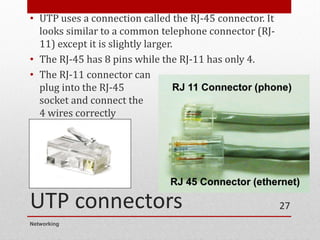
• UTP uses a connection called the RJ-45 connector. It
looks similar to a common telephone connector (RJ-
11) except it is slightly larger.
• The RJ-45 has 8 pins while the RJ-11 has only 4.
• The RJ-11 connector can
plug into the RJ-45
socket and connect the
4 wires correctly
Networking
27
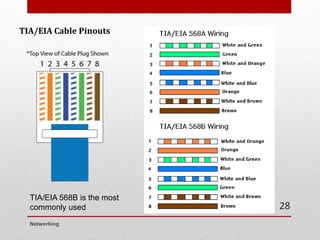
TIA/EIA Cable Pinouts
Networking
28
TIA/EIA 568B is the most
commonly used
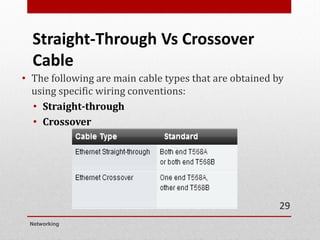
Straight-Through Vs Crossover
Cable
• The following are main cable types that are obtained by
using specific wiring conventions:
• Straight-through
• Crossover
Networking
29
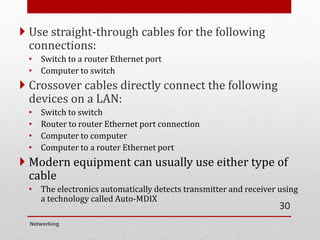
 Use straight-through cables for the following
connections:
• Switch to a router Ethernet port
• Computer to switch
 Crossover cables directly connect the following
devices on a LAN:
• Switch to switch
• Router to router Ethernet port connection
• Computer to computer
• Computer to a router Ethernet port
 Modern equipment can usually use either type of
cable
• The electronics automatically detects transmitter and receiver using
a technology called Auto-MDIX
Networking
30
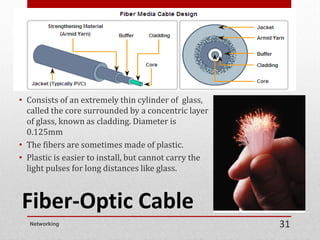
Fiber-Optic Cable
• Consists of an extremely thin cylinder of glass,
called the core surrounded by a concentric layer
of glass, known as cladding. Diameter is
0.125mm
• The fibers are sometimes made of plastic.
• Plastic is easier to install, but cannot carry the
light pulses for long distances like glass.
Networking 31
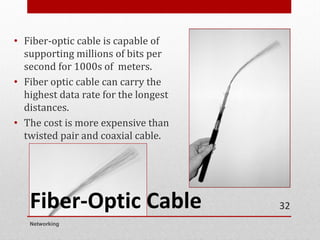
Fiber-Optic Cable
• Fiber-optic cable is capable of
supporting millions of bits per
second for 1000s of meters.
• Fiber optic cable can carry the
highest data rate for the longest
distances.
• The cost is more expensive than
twisted pair and coaxial cable.
Networking
32
33
Networking
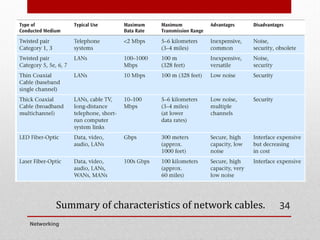
Summary of characteristics of network cables.
Networking
34
Quiz:
1) Compare Shielded Twisted-Pair (STP) and Unshielded Twisted-Pair
(UTP) cable. (6 marks)
2) List the color of cable pinouts for T568A and T568B. (8 marks)
3) Define cladding for Fiber-Optic cable. (1 mark)
Networking
35
Unit 1
Introduction to computer network
T5 - Wireless Media
IT45103
NETWORKING
Wireless Media
• Radio, satellite transmissions, and infrared light are all
different forms of electromagnetic waves that are used to
transmit data
• In wireless transmissions, space is the medium
• Note in the following figure how each source occupies a
different set of frequencies
Networking
2
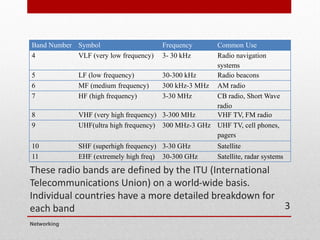
These radio bands are defined by the ITU (International
Telecommunications Union) on a world-wide basis.
Individual countries have a more detailed breakdown for
each band
Band Number Symbol Frequency Common Use
4 VLF (very low frequency) 3- 30 kHz Radio navigation
systems
5 LF (low frequency) 30-300 kHz Radio beacons
6 MF (medium frequency) 300 kHz-3 MHz AM radio
7 HF (high frequency) 3-30 MHz CB radio, Short Wave
radio
8 VHF (very high frequency) 3-300 MHz VHF TV, FM radio
9 UHF(ultra high frequency) 300 MHz-3 GHz UHF TV, cell phones,
pagers
10 SHF (superhigh frequency) 3-30 GHz Satellite
11 EHF (extremely high freq) 30-300 GHz Satellite, radar systems
Networking
3
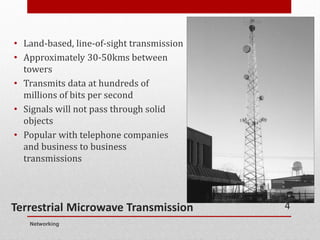
Terrestrial Microwave Transmission
• Land-based, line-of-sight transmission
• Approximately 30-50kms between
towers
• Transmits data at hundreds of
millions of bits per second
• Signals will not pass through solid
objects
• Popular with telephone companies
and business to business
transmissions
Networking
4
Satellite Microwave Transmission
• Similar to terrestrial microwave except the signal
travels from a ground station on earth to a satellite
and back to another ground station
• Can also transmit signals from one satellite to another
• Satellites can be classified by how far out into orbit
each one is (LEO, MEO, GEO, and HEO)
• Adds some delay due to length of transmission path
Networking
5
6
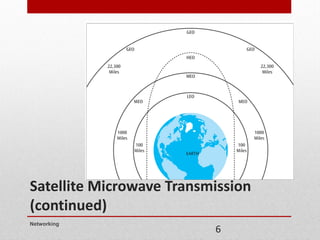
Satellite Microwave Transmission
(continued)
Networking
Satellite Microwave Transmission (continued)
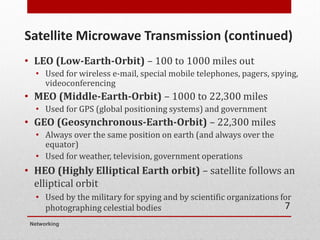
• LEO (Low-Earth-Orbit) – 100 to 1000 miles out
• Used for wireless e-mail, special mobile telephones, pagers, spying,
videoconferencing
• MEO (Middle-Earth-Orbit) – 1000 to 22,300 miles
• Used for GPS (global positioning systems) and government
• GEO (Geosynchronous-Earth-Orbit) – 22,300 miles
• Always over the same position on earth (and always over the
equator)
• Used for weather, television, government operations
• HEO (Highly Elliptical Earth orbit) – satellite follows an
elliptical orbit
• Used by the military for spying and by scientific organizations for
photographing celestial bodies
Networking
7
Cellular Telephones
• Wireless telephone service, also called mobile telephone,
cell phone, and Personal Communications Services (PCS)
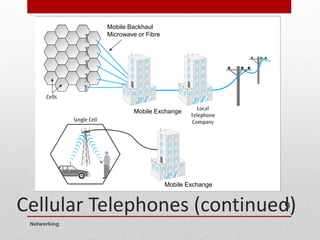
• To support multiple users in a metropolitan area is broken
into cells (honeycomb-like pattern)
• Each cell has its own transmission tower and set of
assignable channels
Networking
8
Cellular Telephones (continued)
Mobile Exchange
Mobile Exchange
Mobile Backhaul
Microwave or Fibre
Mobile Exchange
Mobile Exchange
Networking
9
Cellular Telephones (cont..)
• Four basic generations of cellular telephone systems
currently exist:
• first generation (analog cellular telephone),
• second generation – 2G (GSM, Digital personal
communications services (PCS),
• third generation – 3G (Convergence of data signals with
voice signals)
• fourth generation – 4G (LTE technology).
• fifth generation – 5G (Coming to Malaysia soon)
Networking
10
Infrared Transmissions
• Transmissions that use a focused ray of light in the infrared
frequency range
• Very common with remote control devices, but was also
used for device-to-device transfers, such as mobile phone to
computer
Networking
11
WiMax - Broadband Wireless
Systems
• Mostly now replaced by 4G technology
• Delivered Internet services into homes, businesses and
mobile devices
• Designed to bypass the local loop telephone line
• Transmits voice, data, and video over high frequency radio
signals
• Maximum range of 20-30 miles and transmission speeds in
Mbps
• IEEE 802.16 set of standards
Networking
12
Bluetooth
• Bluetooth is a specification for short-range, point-to-point
or point-to-multipoint voice and data transfer
• Bluetooth can transmit through solid, non-metal objects
• Its typical link range is from 10 cm to 10 m, but can be
extended to 100 m by increasing the power
• Bluetooth enables users to connect to a wide range of
computing and telecommunication devices without the
need of connecting cables
• Typical uses include phones, headsets, notebooks and some
desktop computers
Networking
13
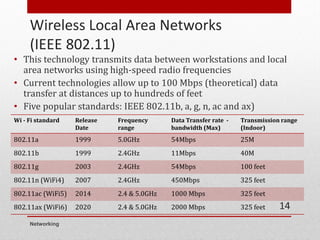
Wireless Local Area Networks
(IEEE 802.11)
• This technology transmits data between workstations and local
area networks using high-speed radio frequencies
• Current technologies allow up to 100 Mbps (theoretical) data
transfer at distances up to hundreds of feet
• Five popular standards: IEEE 802.11b, a, g, n, ac and ax)
Wi - Fi standard Release
Date
Frequency
range
Data Transfer rate -
bandwidth (Max)
Transmission range
(Indoor)
802.11a 1999 5.0GHz 54Mbps 25M
802.11b 1999 2.4GHz 11Mbps 40M
802.11g 2003 2.4GHz 54Mbps 100 feet
802.11n (WiFi4) 2007 2.4GHz 450Mbps 325 feet
802.11ac (WiFi5) 2014 2.4 & 5.0GHz 1000 Mbps 325 feet
802.11ax (WiFi6) 2020 2.4 & 5.0GHz 2000 Mbps 325 feet
Networking
14
Unit 1
Introduction to computer network
T6 - Network Devices
IT45103
NETWORKING
An Overview
• Network devices are responsible for moving data from
one network cable to another.
• A good network design uses the correct device for
each of the various jobs the network must fulfill.
Networking
16
Network Interface Card
• Network interface cards (also called NICs, network
adapters or network cards)
• Connectivity devices that enable a workstation, server,
printer or other node to receive and transmit data
over the network media.
• All NICs contain a data transceiver, the device that
transmits and receives data signals.
Networking
17
NICs
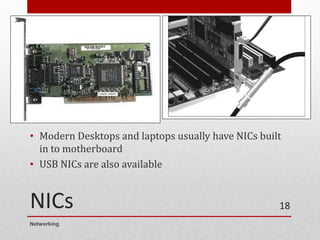
• Modern Desktops and laptops usually have NICs built
in to motherboard
• USB NICs are also available
Networking
18
Repeater
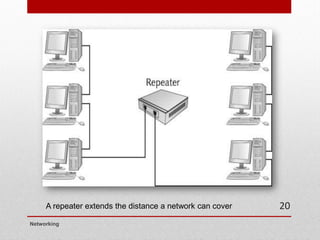
• Device that extends the distance of a particular
network run.
• It takes a weak network signal in on one side, boosts
the signal, and then sends it out its other side.
• A good example of the use of repeaters would be in a
local area network using a star topology with
unshielded twisted-pair cabling.
• Not commonly used in modern network practice
Networking
19
A repeater extends the distance a network can cover
Networking
20
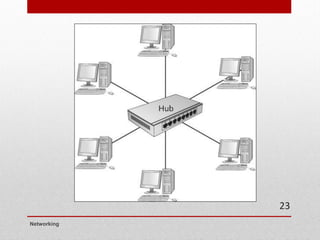
Hub
• Non-intelligent device that simply and immediately
retransmits the data it receives from any workstation
out to all other workstations.
• Could be considered as a multi-port repeater.
• It does not filter out any data frames, and it does not
perform any routing.
• Each hub is a separate collision domain
• All packets are transmitted immediately when received
and so there can be collisions
Networking
21
Hub (cont..)
• Total network bandwidth is limited to the speed of the
hub.
• A 10Base-T hub provides 10Mb bandwidth maximum,
no matter how many ports it has.
• Supports half duplex only
• The devices can both transmit and receive on the media
but cannot do so simultaneously.
• Seldom used in modern networks
Networking
22
Networking
23
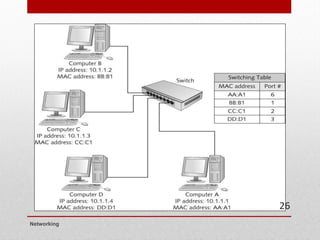
Switches
• Switches, can be considered as intelligent hubs.
• Can be used to interconnect multiple workstations on
a single LAN or to interconnect multiple LANs.
• The primary function to direct the data frame to only
the addressed receiver.
• Thus, the switch needs to know where all the devices
are so that it can send the data out on the appropriate
link.
• It learns this by watching incoming traffic
Networking
24
Switches (cont..)
• Acts as a filter.
• Reduces traffic and collisions over the network.
• Total network bandwidth is determined by the
number of ports on the switch.
• For example, an 8 port 100Mb switch can support up to
800 Mbps bandwidth.
• Supports full duplex communications. This allows
devices to both transmit and receive data at the same
time.
• Can buffer frames if output port is busy.
• Switch have, in practice, replaced hubs.
Networking
25
Networking
26
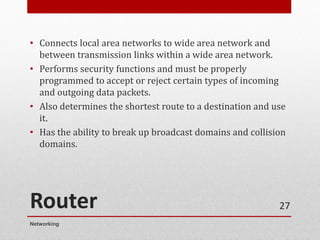
Router
• Connects local area networks to wide area network and
between transmission links within a wide area network.
• Performs security functions and must be properly
programmed to accept or reject certain types of incoming
and outgoing data packets.
• Also determines the shortest route to a destination and use
it.
• Has the ability to break up broadcast domains and collision
domains.
Networking
27
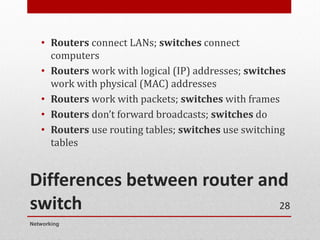
Differences between router and
switch
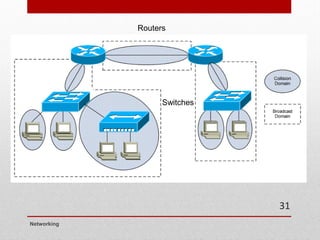
• Routers connect LANs; switches connect
computers
• Routers work with logical (IP) addresses; switches
work with physical (MAC) addresses
• Routers work with packets; switches with frames
• Routers don’t forward broadcasts; switches do
• Routers use routing tables; switches use switching
tables
Networking
28
• https://community.fs.com/blog/do-you-know-the-
differences-between-hubs-switches-and-routers.html
Networking
29
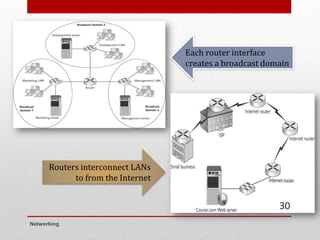
Routers interconnect LANs
to from the Internet
Each router interface
creates a broadcast domain
Networking
30
Routers
Switches
Networking
31
Unit 1
Introduction to Computer Network
T7 - TCP/IP Model
IT45103
NETWORKING
TCP/IP model
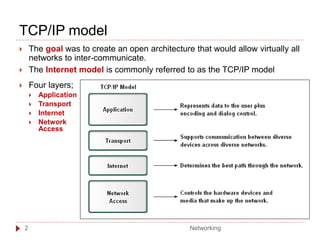
 The goal was to create an open architecture that would allow virtually all
networks to inter-communicate.
 The Internet model is commonly referred to as the TCP/IP model
 Four layers;
 Application
 Transport
 Internet
 Network
Access
Networking
2
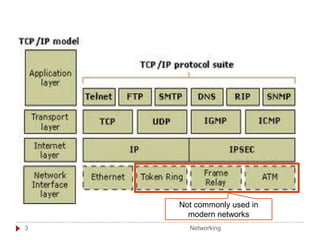
Not commonly used in
modern networks
Networking
3
Application Layer
 Supports the network applications.
 Common network applications include web browsing, e-
mail, file transfers, remote logins and network
management.
 Protocols involved;
 Hypertext Transfer Protocol (HTTP) to allow Web browsers and
servers to send and receive World Wide Web pages.
 Simple Mail Transfer Protocol (SMTP) to allow users to send
and receive electronic mail.
 File Transfer Protocol (FTP) to transfer files from one computer
system to another.
 Telnet to allow a remote user to log in to another computer system
 Simple Network Management Protocol (SNMP) to allow the numerous
elements within a computer network to be managed from a single point.
Networking
4
 Commonly uses the Transmission Control
Protocol (TCP) to maintain an error-free end-to-end
connection.
 TCP implements
 packet sequencing control so that the packets stay in the proper
order
 error control in case one packet from a sequence of packets does
not arrive at the final destination or is received damaged
 User Datagram Protocol (UDP) is an alternative
used for voice and other real time applications
 It forwards packets quickly without sequence or error management.
 The application layer protocol will implement any control necessary
Transport Layer
Networking
5
 Protocol used at this layer is the Internet Protocol (IP).
 Internet Protocol is the software that prepares a packet
of data so that it can move from one network to another
on the Internet or within a set of corporate networks.
 Most important is the addition of source and destination
information
Internet Layer
Network Access Layer
 Prepares a data packet (called a frame at this layer) for
transmission from the user workstation to a router
connecting the local area network to the Internet or
another LAN
Networking
6
The complete communication process includes these
steps:
 Creation of data at the application layer of the originating source
end device.
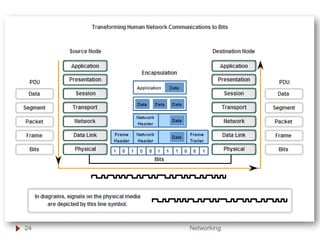
 Segmentation and encapsulation of data as it passes down the
protocol stack in the source end device.
 Generation of the data onto the media at the network access layer
of the stack
 Transportation of the data through the internetwork, which
consists of media and any intermediary devices
 Reception of the data at the network access layer of the destination
end device
 Decapsulation and reassembly of the data as it passes up the
stack in the destination device.
 Passing this data to the destination application at the Application
layer of the destination end device
Networking
7
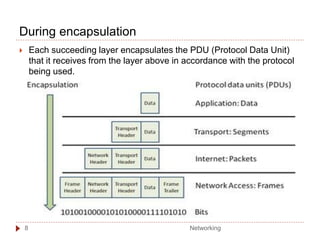
During encapsulation
 Each succeeding layer encapsulates the PDU (Protocol Data Unit)
that it receives from the layer above in accordance with the protocol
being used.
Networking
8
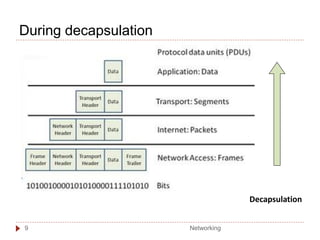
During decapsulation
Decapsulation
Networking
9
Unit 1
Introduction to Computer Network
T8 - OSI Model
IT45103
NETWORKING
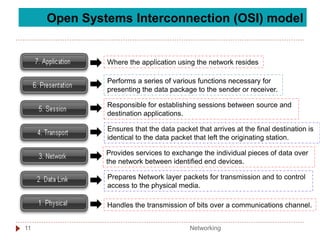
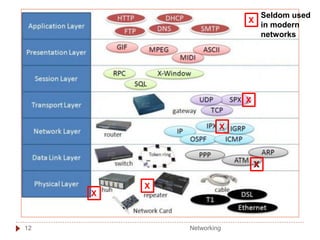
Open Systems Interconnection (OSI) model
Where the application using the network resides
Performs a series of various functions necessary for
presenting the data package to the sender or receiver.
Responsible for establishing sessions between source and
destination applications.
Ensures that the data packet that arrives at the final destination is
identical to the data packet that left the originating station.
Provides services to exchange the individual pieces of data over
the network between identified end devices.
Prepares Network layer packets for transmission and to control
access to the physical media.
Handles the transmission of bits over a communications channel.
Networking
11
X
X
X
Seldom used
in modern
networks
X
X
X
Networking
12
Layer 7 : Application Layer
 Provides the interface between the applications.
 Exchanges data between programs running on the
source and destination hosts.
 Covers applications such as electronic mail, file
transfer systems, remote login systems and Web
browsing.
Networking
13
 The Presentation layer has three primary functions:
 Coding and conversion of Application layer data to ensure
that data from the source device can be interpreted by the
appropriate application on the destination device.
 Compression of the data in a manner that can be
decompressed by the destination device.
 Encryption of the data for transmission and the decryption of
data upon receipt by the destination.
 The standards for video, audio and graphics are examples.
 Video – Motion Picture Experts Group (MP4).
 Audio – MP3, AC3 etc
 Graphic image -Graphics Interchange Format (GIF), Joint
Photographic Experts Group (JPEG).
Layer 6 : Presentation Layer
Networking
14
 Session layer handles the exchange of information
to initiate dialogs, keep them active, and to restart
sessions that are disrupted.
 For example, while transmitting a large document
such as an electronic book, the session layer may
insert a synchronization point at the end of each
chapter. If any error occurs during transmission, both
sender and receiver can back up to the last
synchronization point and start retransmission from
there.
Layer 5 : Session Layer
Networking
15
 To ensure no transmission errors, the data arrives in
the same order as it was transmitted, and there is no
duplication of data.
 Includes these functions:
 Enables multiple applications to communicate over the
network at the same time on a single device
 Ensures that, if required, all the data is received reliably
and in order by the correct application
 Employs error handling mechanisms
Layer 4 : Transport Layer
Networking
16
 To accomplish this end-to-end transport, Layer 3
uses four basic processes:
 Addressing
 Identifies source and destination addresses
 Encapsulation
 Splits data into packets as necessary
 Routing
 Finds a route from source to destination
 Decapsulation
 Re-assembles data as necessary
Layer 3 : Network Layer
Networking
17
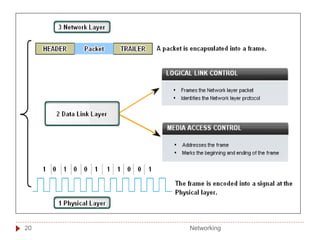
 The Data Link layer performs two basic services:
 Allows the upper layers to access the media using
techniques such as framing.
 Controls how data is placed onto the media and is
received from the media using techniques such as media
access control and error detection.
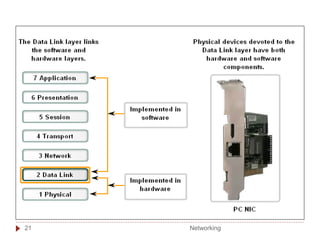
 Usually implemented in a physical device, such as a
NIC with associated driver software.
 This performs the functions of preparing data for
transmission and encoding the data as signals to be
sent on the associated media.
Layer 2 : Data Link Layer
Networking
18
 Data Link layer is often divided into two sublayers:
 Logical Link Control (LLC) places information in the
frame that identifies which Network layer protocol is
being used for the frame.
 Media Access Control (MAC) provides Data Link layer
addressing and delimiting of data according to the
physical signaling requirements of the medium and the
type of Data Link layer protocol in use.
Layer 2 : Data Link Layer
Networking
19
Networking
20
Networking
21
 To perform this transmission of bits, the physical
layer handles voltage levels, plug and connector
dimensions, pin configurations and other electrical
and mechanical issues.
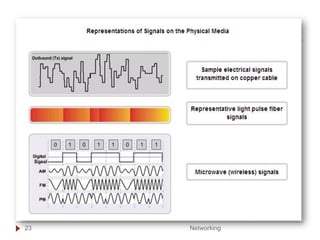
 There are currently three basic forms of network
media on which data is represented: Copper cable,
Fiber, Wireless.
 These all, of course, use very different forms of
electromagnetic signals, voltage levels, plugs etc.
Layer 1 : Physical Layer
Networking
22
Networking
23
Networking
24
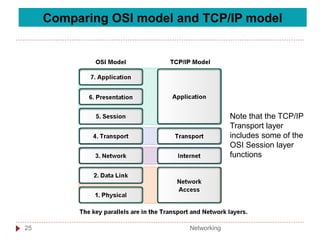
Comparing OSI model and TCP/IP model
Note that the TCP/IP
Transport layer
includes some of the
OSI Session layer
functions
Networking
25
Unit 1
Introduction to computer network
T9 - IP Addresses
IT45103
NETWORKING
Networking
1
Introduction
 Each device on a network must be uniquely defined.
 At the Network layer, the packets of the communication
need to be identified with the source and destination
addresses of the two end systems.
 These addresses are used in the data network as binary
patterns.
 For us humans, a string of 32 bits is difficult to interpret
and even more difficult to remember.
01011010110011000110100110100101
 Therefore, IPv4 addresses are written using dotted
decimal format.
202.23.12.42
Networking
2
Dotted decimal
3
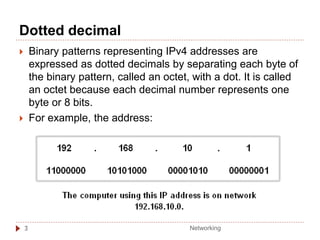
 Binary patterns representing IPv4 addresses are
expressed as dotted decimals by separating each byte of
the binary pattern, called an octet, with a dot. It is called
an octet because each decimal number represents one
byte or 8 bits.
 For example, the address:
Networking
Dotted decimal
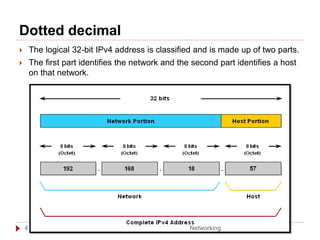
 The logical 32-bit IPv4 address is classified and is made up of two parts.
 The first part identifies the network and the second part identifies a host
on that network.
Networking
4
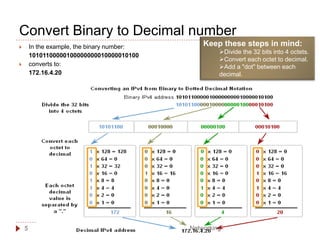
Keep these steps in mind:
➢Divide the 32 bits into 4 octets.
➢Convert each octet to decimal.
➢Add a "dot" between each
decimal.
Convert Binary to Decimal number
5
 In the example, the binary number:
10101100000100000000010000010100
 converts to:
172.16.4.20
Networking
Convert Decimal to Binary
Networking
6
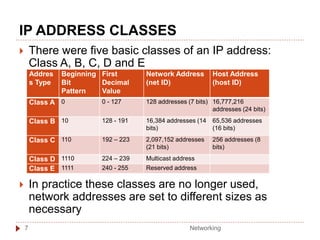
IP ADDRESS CLASSES
 There were five basic classes of an IP address:
Class A, B, C, D and E
 In practice these classes are no longer used,
network addresses are set to different sizes as
necessary
Addres
s Type
Beginning
Bit
Pattern
First
Decimal
Value
Network Address
(net ID)
Host Address
(host ID)
Class A 0 0 - 127 128 addresses (7 bits) 16,777,216
addresses (24 bits)
Class B 10 128 - 191 16,384 addresses (14
bits)
65,536 addresses
(16 bits)
Class C 110 192 – 223 2,097,152 addresses
(21 bits)
256 addresses (8
bits)
Class D 1110 224 – 239 Multicast address
Class E 1111 240 - 255 Reserved address
Networking
7
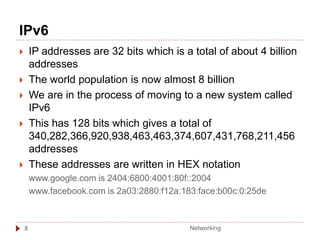
IPv6
8
 IP addresses are 32 bits which is a total of about 4 billion
addresses
 The world population is now almost 8 billion
 We are in the process of moving to a new system called
IPv6
 This has 128 bits which gives a total of
340,282,366,920,938,463,463,374,607,431,768,211,456
addresses
 These addresses are written in HEX notation
www.google.com is 2404:6800:4001:80f::2004
www.facebook.com is 2a03:2880:f12a:183:face:b00c:0:25de
Networking
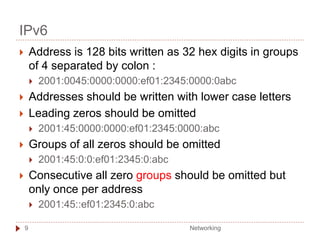
IPv6
 Address is 128 bits written as 32 hex digits in groups
of 4 separated by colon :
 2001:0045:0000:0000:ef01:2345:0000:0abc
 Addresses should be written with lower case letters
 Leading zeros should be omitted
 2001:45:0000:0000:ef01:2345:0000:abc
 Groups of all zeros should be omitted
 2001:45:0:0:ef01:2345:0:abc
 Consecutive all zero groups should be omitted but
only once per address
 2001:45::ef01:2345:0:abc
Networking
9
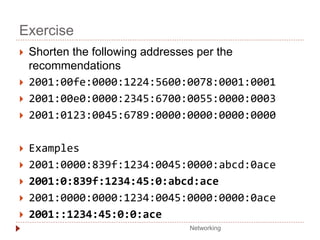
Exercise
 Shorten the following addresses per the
recommendations
 2001:00fe:0000:1224:5600:0078:0001:0001
 2001:00e0:0000:2345:6700:0055:0000:0003
 2001:0123:0045:6789:0000:0000:0000:0000
 Examples
 2001:0000:839f:1234:0045:0000:abcd:0ace
 2001:0:839f:1234:45:0:abcd:ace
 2001:0000:0000:1234:0045:0000:0000:0ace
 2001::1234:45:0:0:ace
Networking

Unit 1 Introduction To Computer Networks.pdf

  • 1.
    Unit 1 Introduction tocomputer network T1 - Overview of computer network IT45103 NETWORKING
  • 2.
    Definition of Computer Network •A computer network is an interconnection of computers and computing equipment using either wires or radio waves and can share data and computing resources. • Computer networks that use radio waves are termed wireless and can involve broadcast radio, microwaves or satellite transmissions. Networking 2
  • 3.
  • 4.
    Types of computer networks •Networks spanning an area of several meters around an individual are called personal area networks (PANs). Most common is Bluetooth for headphones etc • Networks a little larger in geographic size such as spanning a room, a floor within a building, a building or a campus are called Local Area Networks (LANs). Networking 4
  • 5.
    Types of computer networks(cont..) • Networks that serve an area up to roughly 50 kilometers approximately the area of a typical city are called metropolitan area networks (MANs). • high-speed networks that interconnect businesses with other businesses and the Internet. • Usually is a business service offered by telcos/ISPs • Large networks encompassing parts of states, multiple states, countries and the world are wide area networks (WANs). e.g. Internet Networking 5
  • 6.
  • 7.
    Advantages of computer network •Sharing of peripheral devices: Laser printer, disk drives and scanner are examples of peripheral devices – that is, hardware that is connected to a computer. • Sharing of program and data: In most organizations, people use the same software and need access to the same information. • Better communications: One of the greatest features of networks is electronic mail. Also instant messaging and calling apps such as WhatsApp are becoming critical. Networking 7
  • 8.
    Advantages of computer network (cont..) •Security of information: data would be backed up or duplicated on a networked storage device secured by password. • Access to databases: enable users to tap into numerous databases, whether the private databases of a company or the public databases of online services. Networking 8
  • 9.
    The big pictureof networks • The most important in LANs include the following hardware: • Workstations, which are personal computers/microcomputers (desktops, laptops, net books, hand helds, etc) where users reside. • Servers which are the computers that store network software and shared public or private user files. • Switches, which are the collection points for the wires that interconnect the workstations. • Routers, which are the connecting devices between local area networks and wide area networks. Networking 9
  • 10.
    The big pictureof networks • Wide area networks include the following components: • Nodes, which are the computing devices that allow workstations to connect to the network and make decisions about where to route a data. • Some type of high-speed transmission line, which runs from one node to another. • A subnetwork or cloud which contains the nodes and transmission lines, considered as a cohesive unit. Networking 10
  • 11.
    • Capacity ofa medium to carry data. •Measured in kilobits per second (kbps) or megabits per second (Mbps). Bandwidth • The measure of the transfer of bits across the media over a given period of time. • Many factors influence throughput ; amount and type of traffic, number of network devices encountered on network Throughput • Is the measure of usable data transferred over a given period of time Goodput Data transfer can be measured in three ways: Networking 11
  • 12.
    Units of bandwidth, throughputand goodput Networking 12
  • 13.
    Example • Consider twohosts on a LAN transferring a file. • The bandwidth of the LAN is 100 Mbps. • Due to the sharing and media overhead the through put between the computers may be only 60 Mbps. • With the overhead of the encapsulation process of the TCP/IP stack, the actual rate of the data received by the destination computer, goodput, may be only 40Mbps. Networking 13
  • 14.
  • 15.
    Unit 1 Introduction tocomputer network T2 - Network Models IT45103 NETWORKING
  • 16.
    Networking Network Models • Anetwork model defines how and where resources are shared and how access to these resources is regulated • Fall into two major types • Peer-to-peer network: Most computers function as clients or servers (no centralized control over who has access to network resources) • Server-based network: Certain computers take on specialized roles and function mainly as servers, and ordinary users’ machines tend to function mainly as clients 16
  • 17.
    Networking Peer-to-Peer/Workgroup Model • Computers ona peer-to-peer network can take both a client and a server role • Any user can share resources on his/her computer with any other user’s computer • Every user must act as the administrator of his/her computer • Can give everyone else unlimited access to their resources or grant restricted access to other users • Usernames and passwords (credentials) are used to control that access 17
  • 18.
    Networking Peer-to-Peer/Workgroup Model • Problems withPeer-to-peer networks: • Must remember multiple sets of identifications to access resources spread out over several computers • Desktop PCs and the OSs installed on them aren’t made to provide network services as efficiently as dedicated network servers • Data organization: If every machine can be a server, how can users keep track of what information is stored on which machine? • Peer-to-peer networks are best suited for small organizations that have small networks and small operating budgets 18
  • 19.
  • 20.
    Server/Domain-Based Model • Server-based networksprovide centralized control over network resources • Users log on to the network with a single set of identifications maintained by one or more servers running a server OS • In most cases, servers are dedicated to running network services and should not be used to run user applications Networking 20
  • 21.
    Server/Domain-Based Model • A domainis a collection of users and computers whose accounts are managed by Windows servers called domain controllers • Users and computers in a domain are subject to network access and security policies defined by a network administrator • The software that manages this security is referred to as a directory service • On Windows servers, the directory service software is Active Directory Networking 21
  • 22.
    A client/server networkkeeps resources centralized Networking 22
  • 23.
    Peer-to-Peer Networks Networking 23 Advantages • Useless expensive computer hardware. • Easy to administer. • No network operating system required. • More built-in redundancy. Disadvantages • Might impact user’s performance • Not very secure • Difficult to back up • Hard to maintain version control
  • 24.
    Client/Server Networks Advantages • Verysecure • Better performance • Centralized backup • Very reliable Disadvantages • Require professional administration • More hardware- intensive Networking 24
  • 25.
    Quiz: 1) Computer networksthat use _________ as transmission signal is known as wireless. (1 mark) 2) i. Device that connect between Local Area Network(LAN) and Wide Area Network (WAN) is __________. (1 mark) ii.Computer that share public or private users files is called a ___________. (1 mark) 3) What are the differences between PAN and MAN? (2 marks) 4) There are TWO(2) types of network model? Briefly describe them with the aid of diagram. (8 marks) 5) Define goodput and throughput. (2 marks) Networking 25
  • 26.
    Unit 1 Introduction tocomputer network T3 - Network Topologies IT45103 NETWORKING
  • 27.
    • Topology basicallymeans shape. • Network topology refers how a network is physically laid out and how signals travel from one device to another. • Broken down into TWO topologies. • The arrangement of cabling and how cables connect one device to another in a network is considered the network’s physical topology. • The path data travel between computers on a network is considered the network’s logical topology. Networking 2
  • 28.
    Bus Topology • Thefirst topology used in local area networking was the bus topology • A bus topology, more completely called a common bus multipoint topology, is a network where, basically, a single network cable is used from one end of the network to the other, with different network devices (called nodes) connected to the cable at different locations. • This topology is seldom used in modern networks Networking 3
  • 29.
    Bus Topology • Bustopology networks use coaxial cable. • Each end of each segment of the network had a special cable terminator on it, without which the network will not function. Networking 4
  • 30.
    Bus Topology • Froma device's viewpoint, all other systems communicate through the same, shared path. • Because it is a shared media technology, mechanisms must be put into place to determine network traffic over the cable. • Typically, collision detection (CD) or collision avoidance (CA) algorithms are used in bus topologies to determine network access along with concepts such as "broadcasts" to reach every device on the cable. • The biggest issue was that any cable break or issue put the whole network offline Networking 5
  • 31.
    Star Topology • Everynode on the LAN has a dedicated cable that is pulled back to a centralized point, typically a wiring closet. • All cables are terminated in a network component such as a switch or hub. • The network switch (or hub) is a single point of failure • Each device has a dedicated wire to the switch to implement the star. • This is the topology used in all current LANs Networking 6
  • 32.
  • 33.
    Star Topology • Ifyou use wireless Ethernet (Wi-Fi) for part or your entire network, the infrastructure for a wireless network also uses a star topology but with these differences: • A wireless access point (AP) replaces the switch. • Radio waves, rather than network cables, connect clients to the wireless access point. • In some ways this is similar to the bus topology as the medium (air) is shared Networking 8
  • 34.
    Ring Topology • Aring topology may actually be a physical arrangement of a network cable • The network behaves like a ring, where the network signals travel around the ring to each node in turn. • Ring topology LANs are based on Token Ring • Like bus topology, ring topology is seldom used in modern networks Networking 9
  • 35.
    A sample ringtopology network Networking 10
  • 36.
    Point-to-Point Topology • Directlink between two devices • Mostly used in WANs • Wireless bridge • Used to connect two computers • In mobile networks it is often used to connect base stations back to the core network Networking 11
  • 37.
    Mesh Topology • Connectseach device to every other device in a network • Multiple point-to-point connections for the purposes of redundancy and fault tolerance • Purpose of creating a mesh topology is to ensure that if one or more connections fail, there’s another path for reaching all devices on the network • Expensive due to multiple interfaces and cabling • Found in large WANs and internetworks • Internet is a large mesh network but every point is not connected directly to every other point • This is often called a partial mesh network Networking 12
  • 38.
  • 39.
    Unit 1 Introduction tocomputer network T4 - Network Media IT45103 NETWORKING
  • 40.
    Network cable • Cableis the medium through which information usually moves from one network device to another. Three major groups of cabling connect the major networks: • Coaxial Cable • no longer common • Twisted-pair • unshielded and shielded cable • Fiber-optic cable • Becoming common for connections to ISP Networking 15
  • 41.
    Coaxial Cable • Isa single wire wrapped in foam insulation, surrounded by a braided metal shield, and then covered in a plastic jacket. • The braided metal shield is very good at blocking electromagnetic signals from entering the cable and producing noise. • Coaxial cable is good at carrying analog signals with a wide range of frequencies. • For example, it can transmit large numbers of video channels, such as those found on the cable television services that are delivered into homes and businesses. • Now used mostly for satellite services like Astro and for connections to antennas Networking 16
  • 42.
  • 43.
    Coaxial Cable (cont..) •Two major coaxial cable technologies exist and are distinguished by the type of signal each carries; baseband and broadband. • Baseband coaxial technology uses digital signaling in which the cable carries only one channel of digital data. The common application for baseband used to be the interconnection of switches within a local area network. It carry one 10 to 100mbps signal and require repeaters every few hundred kilometers. Currently, replaced by fiber optic cable as the preferred method for interconnecting LAN hubs. • Broadband coaxial technology typically transmits analog signals and is capable of supporting multiple channels of data simultaneously. For example; coaxial cable that transmits cable or satellite television. Most broadband coax systems have now switched to digital baseband Networking 18
  • 44.
    Coaxial Cable (cont..) •Coaxial cable also is available in a variety of thicknesses with two primary types; thick coaxial cable and thin coaxial cable. • Thick coaxial cable ranges in size from approximately 6 to 10mm in diameter. It typically carries broadband signals and better noise protection. Generally used for the transmission of analog data, such as single or multiple video channels. • Seldom used in modern systems • Thin coaxial cable is approximately 4 mm in diameter. It typically carries baseband signals. It also has limited noise isolation. • Most commonly seen in Malaysia for Astro satellite dish connections Networking 19
  • 45.
  • 46.
    Twisted-pair (unshielded and shielded)cable • Currently the most commonly used data transmission medium. • Used for most LANs and telephone connections • Consists of pairs of copper wires twisted together to create magnetic field and thus reduce interference. • Two types of twisted pair are Shielded Twisted Pair (STP) and Unshielded Twisted Pair (UTP). Networking 21
  • 47.
    Shielded Twisted-Pair (STP) Cable •Consists of twisted wire pairs that are individually insulated and surrounded by shielding made of metallic substance. • Provides better noise protection than UTP cabling, however at a significantly higher price. • More expensive, heavier, and difficult to bend when installing (compared to UTP). • For many years, STP was the cabling structure specified for use in Token Ring network installations. • Seldom used in modern networks Networking 22
  • 48.
  • 49.
    Unshielded Twisted Pair(UTP) • Unshielded Twisted Pair (UTP) consists one or more insulated wire pairs encased in a plastic sheath. It does not contain additional shielding. Networking 24
  • 50.
    Unshielded Twisted Pair(UTP) • The UTP cable used in LANs consists of four pairs of insulated wires, other UTP types contain fewer pairs. • Also used for telphone wire, with only 2 pairs, because voice applications are much less demanding than networking in bandwidth and signal quality. • There are many different categories of UTP as shown in the next slide Networking 25
  • 51.
    UTP Category Typicaluse Maximum Data Transfer Rate Maximum Transmission Range Advantages Disadvantages Category 1 Telephone wire <100 kbps 5-6 kilometers (3- 4 miles) Inexpensive, easy to install and interface Security noise, obsolete Category 2 T-1, ISDN < 2Mbps 5-6 kilometers (3- 4 miles) Same as category 1 Security noise, obsolete Category 3 Telephone circuits 10 Mbps 100 m (328 ft) Same as category 1, with less noise Security noise, obsolete Category 4 LANs 20 Mbps 100 m (328 ft) Same as category 1, with less noise Security noise, obsolete Category 5 LANs 100 Mbps (100 MHz) 100 m (328 ft) Same as category 1, with less noise Security, noise Category 5e LANs 250 Mbps per pair (125MHz) 100 m (328 ft) Same as Category 5. Also includes specifications for connectors, patch cords, and other components. Security, noise Category 6 LANs 250 Mbps per pair (250 MHz) 100 m (328 ft) Higher rates than Category 5e, less noise Security, noise, cost Category 7 LANs 600MHz 100 m (328 ft) High data rates Security, noise, cost Networking 26
  • 52.
    UTP connectors • UTPuses a connection called the RJ-45 connector. It looks similar to a common telephone connector (RJ- 11) except it is slightly larger. • The RJ-45 has 8 pins while the RJ-11 has only 4. • The RJ-11 connector can plug into the RJ-45 socket and connect the 4 wires correctly Networking 27
  • 53.
    TIA/EIA Cable Pinouts Networking 28 TIA/EIA568B is the most commonly used
  • 54.
    Straight-Through Vs Crossover Cable •The following are main cable types that are obtained by using specific wiring conventions: • Straight-through • Crossover Networking 29
  • 55.
     Use straight-throughcables for the following connections: • Switch to a router Ethernet port • Computer to switch  Crossover cables directly connect the following devices on a LAN: • Switch to switch • Router to router Ethernet port connection • Computer to computer • Computer to a router Ethernet port  Modern equipment can usually use either type of cable • The electronics automatically detects transmitter and receiver using a technology called Auto-MDIX Networking 30
  • 56.
    Fiber-Optic Cable • Consistsof an extremely thin cylinder of glass, called the core surrounded by a concentric layer of glass, known as cladding. Diameter is 0.125mm • The fibers are sometimes made of plastic. • Plastic is easier to install, but cannot carry the light pulses for long distances like glass. Networking 31
  • 57.
    Fiber-Optic Cable • Fiber-opticcable is capable of supporting millions of bits per second for 1000s of meters. • Fiber optic cable can carry the highest data rate for the longest distances. • The cost is more expensive than twisted pair and coaxial cable. Networking 32
  • 58.
  • 59.
    Summary of characteristicsof network cables. Networking 34
  • 60.
    Quiz: 1) Compare ShieldedTwisted-Pair (STP) and Unshielded Twisted-Pair (UTP) cable. (6 marks) 2) List the color of cable pinouts for T568A and T568B. (8 marks) 3) Define cladding for Fiber-Optic cable. (1 mark) Networking 35
  • 61.
    Unit 1 Introduction tocomputer network T5 - Wireless Media IT45103 NETWORKING
  • 62.
    Wireless Media • Radio,satellite transmissions, and infrared light are all different forms of electromagnetic waves that are used to transmit data • In wireless transmissions, space is the medium • Note in the following figure how each source occupies a different set of frequencies Networking 2
  • 63.
    These radio bandsare defined by the ITU (International Telecommunications Union) on a world-wide basis. Individual countries have a more detailed breakdown for each band Band Number Symbol Frequency Common Use 4 VLF (very low frequency) 3- 30 kHz Radio navigation systems 5 LF (low frequency) 30-300 kHz Radio beacons 6 MF (medium frequency) 300 kHz-3 MHz AM radio 7 HF (high frequency) 3-30 MHz CB radio, Short Wave radio 8 VHF (very high frequency) 3-300 MHz VHF TV, FM radio 9 UHF(ultra high frequency) 300 MHz-3 GHz UHF TV, cell phones, pagers 10 SHF (superhigh frequency) 3-30 GHz Satellite 11 EHF (extremely high freq) 30-300 GHz Satellite, radar systems Networking 3
  • 64.
    Terrestrial Microwave Transmission •Land-based, line-of-sight transmission • Approximately 30-50kms between towers • Transmits data at hundreds of millions of bits per second • Signals will not pass through solid objects • Popular with telephone companies and business to business transmissions Networking 4
  • 65.
    Satellite Microwave Transmission •Similar to terrestrial microwave except the signal travels from a ground station on earth to a satellite and back to another ground station • Can also transmit signals from one satellite to another • Satellites can be classified by how far out into orbit each one is (LEO, MEO, GEO, and HEO) • Adds some delay due to length of transmission path Networking 5
  • 66.
  • 67.
    Satellite Microwave Transmission(continued) • LEO (Low-Earth-Orbit) – 100 to 1000 miles out • Used for wireless e-mail, special mobile telephones, pagers, spying, videoconferencing • MEO (Middle-Earth-Orbit) – 1000 to 22,300 miles • Used for GPS (global positioning systems) and government • GEO (Geosynchronous-Earth-Orbit) – 22,300 miles • Always over the same position on earth (and always over the equator) • Used for weather, television, government operations • HEO (Highly Elliptical Earth orbit) – satellite follows an elliptical orbit • Used by the military for spying and by scientific organizations for photographing celestial bodies Networking 7
  • 68.
    Cellular Telephones • Wirelesstelephone service, also called mobile telephone, cell phone, and Personal Communications Services (PCS) • To support multiple users in a metropolitan area is broken into cells (honeycomb-like pattern) • Each cell has its own transmission tower and set of assignable channels Networking 8
  • 69.
    Cellular Telephones (continued) MobileExchange Mobile Exchange Mobile Backhaul Microwave or Fibre Mobile Exchange Mobile Exchange Networking 9
  • 70.
    Cellular Telephones (cont..) •Four basic generations of cellular telephone systems currently exist: • first generation (analog cellular telephone), • second generation – 2G (GSM, Digital personal communications services (PCS), • third generation – 3G (Convergence of data signals with voice signals) • fourth generation – 4G (LTE technology). • fifth generation – 5G (Coming to Malaysia soon) Networking 10
  • 71.
    Infrared Transmissions • Transmissionsthat use a focused ray of light in the infrared frequency range • Very common with remote control devices, but was also used for device-to-device transfers, such as mobile phone to computer Networking 11
  • 72.
    WiMax - BroadbandWireless Systems • Mostly now replaced by 4G technology • Delivered Internet services into homes, businesses and mobile devices • Designed to bypass the local loop telephone line • Transmits voice, data, and video over high frequency radio signals • Maximum range of 20-30 miles and transmission speeds in Mbps • IEEE 802.16 set of standards Networking 12
  • 73.
    Bluetooth • Bluetooth isa specification for short-range, point-to-point or point-to-multipoint voice and data transfer • Bluetooth can transmit through solid, non-metal objects • Its typical link range is from 10 cm to 10 m, but can be extended to 100 m by increasing the power • Bluetooth enables users to connect to a wide range of computing and telecommunication devices without the need of connecting cables • Typical uses include phones, headsets, notebooks and some desktop computers Networking 13
  • 74.
    Wireless Local AreaNetworks (IEEE 802.11) • This technology transmits data between workstations and local area networks using high-speed radio frequencies • Current technologies allow up to 100 Mbps (theoretical) data transfer at distances up to hundreds of feet • Five popular standards: IEEE 802.11b, a, g, n, ac and ax) Wi - Fi standard Release Date Frequency range Data Transfer rate - bandwidth (Max) Transmission range (Indoor) 802.11a 1999 5.0GHz 54Mbps 25M 802.11b 1999 2.4GHz 11Mbps 40M 802.11g 2003 2.4GHz 54Mbps 100 feet 802.11n (WiFi4) 2007 2.4GHz 450Mbps 325 feet 802.11ac (WiFi5) 2014 2.4 & 5.0GHz 1000 Mbps 325 feet 802.11ax (WiFi6) 2020 2.4 & 5.0GHz 2000 Mbps 325 feet Networking 14
  • 75.
    Unit 1 Introduction tocomputer network T6 - Network Devices IT45103 NETWORKING
  • 76.
    An Overview • Networkdevices are responsible for moving data from one network cable to another. • A good network design uses the correct device for each of the various jobs the network must fulfill. Networking 16
  • 77.
    Network Interface Card •Network interface cards (also called NICs, network adapters or network cards) • Connectivity devices that enable a workstation, server, printer or other node to receive and transmit data over the network media. • All NICs contain a data transceiver, the device that transmits and receives data signals. Networking 17
  • 78.
    NICs • Modern Desktopsand laptops usually have NICs built in to motherboard • USB NICs are also available Networking 18
  • 79.
    Repeater • Device thatextends the distance of a particular network run. • It takes a weak network signal in on one side, boosts the signal, and then sends it out its other side. • A good example of the use of repeaters would be in a local area network using a star topology with unshielded twisted-pair cabling. • Not commonly used in modern network practice Networking 19
  • 80.
    A repeater extendsthe distance a network can cover Networking 20
  • 81.
    Hub • Non-intelligent devicethat simply and immediately retransmits the data it receives from any workstation out to all other workstations. • Could be considered as a multi-port repeater. • It does not filter out any data frames, and it does not perform any routing. • Each hub is a separate collision domain • All packets are transmitted immediately when received and so there can be collisions Networking 21
  • 82.
    Hub (cont..) • Totalnetwork bandwidth is limited to the speed of the hub. • A 10Base-T hub provides 10Mb bandwidth maximum, no matter how many ports it has. • Supports half duplex only • The devices can both transmit and receive on the media but cannot do so simultaneously. • Seldom used in modern networks Networking 22
  • 83.
  • 84.
    Switches • Switches, canbe considered as intelligent hubs. • Can be used to interconnect multiple workstations on a single LAN or to interconnect multiple LANs. • The primary function to direct the data frame to only the addressed receiver. • Thus, the switch needs to know where all the devices are so that it can send the data out on the appropriate link. • It learns this by watching incoming traffic Networking 24
  • 85.
    Switches (cont..) • Actsas a filter. • Reduces traffic and collisions over the network. • Total network bandwidth is determined by the number of ports on the switch. • For example, an 8 port 100Mb switch can support up to 800 Mbps bandwidth. • Supports full duplex communications. This allows devices to both transmit and receive data at the same time. • Can buffer frames if output port is busy. • Switch have, in practice, replaced hubs. Networking 25
  • 86.
  • 87.
    Router • Connects localarea networks to wide area network and between transmission links within a wide area network. • Performs security functions and must be properly programmed to accept or reject certain types of incoming and outgoing data packets. • Also determines the shortest route to a destination and use it. • Has the ability to break up broadcast domains and collision domains. Networking 27
  • 88.
    Differences between routerand switch • Routers connect LANs; switches connect computers • Routers work with logical (IP) addresses; switches work with physical (MAC) addresses • Routers work with packets; switches with frames • Routers don’t forward broadcasts; switches do • Routers use routing tables; switches use switching tables Networking 28
  • 89.
  • 90.
    Routers interconnect LANs tofrom the Internet Each router interface creates a broadcast domain Networking 30
  • 91.
  • 92.
    Unit 1 Introduction toComputer Network T7 - TCP/IP Model IT45103 NETWORKING
  • 93.
    TCP/IP model  Thegoal was to create an open architecture that would allow virtually all networks to inter-communicate.  The Internet model is commonly referred to as the TCP/IP model  Four layers;  Application  Transport  Internet  Network Access Networking 2
  • 94.
    Not commonly usedin modern networks Networking 3
  • 95.
    Application Layer  Supportsthe network applications.  Common network applications include web browsing, e- mail, file transfers, remote logins and network management.  Protocols involved;  Hypertext Transfer Protocol (HTTP) to allow Web browsers and servers to send and receive World Wide Web pages.  Simple Mail Transfer Protocol (SMTP) to allow users to send and receive electronic mail.  File Transfer Protocol (FTP) to transfer files from one computer system to another.  Telnet to allow a remote user to log in to another computer system  Simple Network Management Protocol (SNMP) to allow the numerous elements within a computer network to be managed from a single point. Networking 4
  • 96.
     Commonly usesthe Transmission Control Protocol (TCP) to maintain an error-free end-to-end connection.  TCP implements  packet sequencing control so that the packets stay in the proper order  error control in case one packet from a sequence of packets does not arrive at the final destination or is received damaged  User Datagram Protocol (UDP) is an alternative used for voice and other real time applications  It forwards packets quickly without sequence or error management.  The application layer protocol will implement any control necessary Transport Layer Networking 5
  • 97.
     Protocol usedat this layer is the Internet Protocol (IP).  Internet Protocol is the software that prepares a packet of data so that it can move from one network to another on the Internet or within a set of corporate networks.  Most important is the addition of source and destination information Internet Layer Network Access Layer  Prepares a data packet (called a frame at this layer) for transmission from the user workstation to a router connecting the local area network to the Internet or another LAN Networking 6
  • 98.
    The complete communicationprocess includes these steps:  Creation of data at the application layer of the originating source end device.  Segmentation and encapsulation of data as it passes down the protocol stack in the source end device.  Generation of the data onto the media at the network access layer of the stack  Transportation of the data through the internetwork, which consists of media and any intermediary devices  Reception of the data at the network access layer of the destination end device  Decapsulation and reassembly of the data as it passes up the stack in the destination device.  Passing this data to the destination application at the Application layer of the destination end device Networking 7
  • 99.
    During encapsulation  Eachsucceeding layer encapsulates the PDU (Protocol Data Unit) that it receives from the layer above in accordance with the protocol being used. Networking 8
  • 100.
  • 101.
    Unit 1 Introduction toComputer Network T8 - OSI Model IT45103 NETWORKING
  • 102.
    Open Systems Interconnection(OSI) model Where the application using the network resides Performs a series of various functions necessary for presenting the data package to the sender or receiver. Responsible for establishing sessions between source and destination applications. Ensures that the data packet that arrives at the final destination is identical to the data packet that left the originating station. Provides services to exchange the individual pieces of data over the network between identified end devices. Prepares Network layer packets for transmission and to control access to the physical media. Handles the transmission of bits over a communications channel. Networking 11
  • 103.
  • 104.
    Layer 7 :Application Layer  Provides the interface between the applications.  Exchanges data between programs running on the source and destination hosts.  Covers applications such as electronic mail, file transfer systems, remote login systems and Web browsing. Networking 13
  • 105.
     The Presentationlayer has three primary functions:  Coding and conversion of Application layer data to ensure that data from the source device can be interpreted by the appropriate application on the destination device.  Compression of the data in a manner that can be decompressed by the destination device.  Encryption of the data for transmission and the decryption of data upon receipt by the destination.  The standards for video, audio and graphics are examples.  Video – Motion Picture Experts Group (MP4).  Audio – MP3, AC3 etc  Graphic image -Graphics Interchange Format (GIF), Joint Photographic Experts Group (JPEG). Layer 6 : Presentation Layer Networking 14
  • 106.
     Session layerhandles the exchange of information to initiate dialogs, keep them active, and to restart sessions that are disrupted.  For example, while transmitting a large document such as an electronic book, the session layer may insert a synchronization point at the end of each chapter. If any error occurs during transmission, both sender and receiver can back up to the last synchronization point and start retransmission from there. Layer 5 : Session Layer Networking 15
  • 107.
     To ensureno transmission errors, the data arrives in the same order as it was transmitted, and there is no duplication of data.  Includes these functions:  Enables multiple applications to communicate over the network at the same time on a single device  Ensures that, if required, all the data is received reliably and in order by the correct application  Employs error handling mechanisms Layer 4 : Transport Layer Networking 16
  • 108.
     To accomplishthis end-to-end transport, Layer 3 uses four basic processes:  Addressing  Identifies source and destination addresses  Encapsulation  Splits data into packets as necessary  Routing  Finds a route from source to destination  Decapsulation  Re-assembles data as necessary Layer 3 : Network Layer Networking 17
  • 109.
     The DataLink layer performs two basic services:  Allows the upper layers to access the media using techniques such as framing.  Controls how data is placed onto the media and is received from the media using techniques such as media access control and error detection.  Usually implemented in a physical device, such as a NIC with associated driver software.  This performs the functions of preparing data for transmission and encoding the data as signals to be sent on the associated media. Layer 2 : Data Link Layer Networking 18
  • 110.
     Data Linklayer is often divided into two sublayers:  Logical Link Control (LLC) places information in the frame that identifies which Network layer protocol is being used for the frame.  Media Access Control (MAC) provides Data Link layer addressing and delimiting of data according to the physical signaling requirements of the medium and the type of Data Link layer protocol in use. Layer 2 : Data Link Layer Networking 19
  • 111.
  • 112.
  • 113.
     To performthis transmission of bits, the physical layer handles voltage levels, plug and connector dimensions, pin configurations and other electrical and mechanical issues.  There are currently three basic forms of network media on which data is represented: Copper cable, Fiber, Wireless.  These all, of course, use very different forms of electromagnetic signals, voltage levels, plugs etc. Layer 1 : Physical Layer Networking 22
  • 114.
  • 115.
  • 116.
    Comparing OSI modeland TCP/IP model Note that the TCP/IP Transport layer includes some of the OSI Session layer functions Networking 25
  • 117.
    Unit 1 Introduction tocomputer network T9 - IP Addresses IT45103 NETWORKING Networking 1
  • 118.
    Introduction  Each deviceon a network must be uniquely defined.  At the Network layer, the packets of the communication need to be identified with the source and destination addresses of the two end systems.  These addresses are used in the data network as binary patterns.  For us humans, a string of 32 bits is difficult to interpret and even more difficult to remember. 01011010110011000110100110100101  Therefore, IPv4 addresses are written using dotted decimal format. 202.23.12.42 Networking 2
  • 119.
    Dotted decimal 3  Binarypatterns representing IPv4 addresses are expressed as dotted decimals by separating each byte of the binary pattern, called an octet, with a dot. It is called an octet because each decimal number represents one byte or 8 bits.  For example, the address: Networking
  • 120.
    Dotted decimal  Thelogical 32-bit IPv4 address is classified and is made up of two parts.  The first part identifies the network and the second part identifies a host on that network. Networking 4
  • 121.
    Keep these stepsin mind: ➢Divide the 32 bits into 4 octets. ➢Convert each octet to decimal. ➢Add a "dot" between each decimal. Convert Binary to Decimal number 5  In the example, the binary number: 10101100000100000000010000010100  converts to: 172.16.4.20 Networking
  • 122.
    Convert Decimal toBinary Networking 6
  • 123.
    IP ADDRESS CLASSES There were five basic classes of an IP address: Class A, B, C, D and E  In practice these classes are no longer used, network addresses are set to different sizes as necessary Addres s Type Beginning Bit Pattern First Decimal Value Network Address (net ID) Host Address (host ID) Class A 0 0 - 127 128 addresses (7 bits) 16,777,216 addresses (24 bits) Class B 10 128 - 191 16,384 addresses (14 bits) 65,536 addresses (16 bits) Class C 110 192 – 223 2,097,152 addresses (21 bits) 256 addresses (8 bits) Class D 1110 224 – 239 Multicast address Class E 1111 240 - 255 Reserved address Networking 7
  • 124.
    IPv6 8  IP addressesare 32 bits which is a total of about 4 billion addresses  The world population is now almost 8 billion  We are in the process of moving to a new system called IPv6  This has 128 bits which gives a total of 340,282,366,920,938,463,463,374,607,431,768,211,456 addresses  These addresses are written in HEX notation www.google.com is 2404:6800:4001:80f::2004 www.facebook.com is 2a03:2880:f12a:183:face:b00c:0:25de Networking
  • 125.
    IPv6  Address is128 bits written as 32 hex digits in groups of 4 separated by colon :  2001:0045:0000:0000:ef01:2345:0000:0abc  Addresses should be written with lower case letters  Leading zeros should be omitted  2001:45:0000:0000:ef01:2345:0000:abc  Groups of all zeros should be omitted  2001:45:0:0:ef01:2345:0:abc  Consecutive all zero groups should be omitted but only once per address  2001:45::ef01:2345:0:abc Networking 9
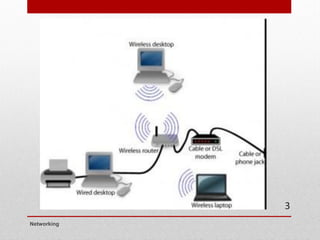
  • 126.
    Exercise  Shorten thefollowing addresses per the recommendations  2001:00fe:0000:1224:5600:0078:0001:0001  2001:00e0:0000:2345:6700:0055:0000:0003  2001:0123:0045:6789:0000:0000:0000:0000  Examples  2001:0000:839f:1234:0045:0000:abcd:0ace  2001:0:839f:1234:45:0:abcd:ace  2001:0000:0000:1234:0045:0000:0000:0ace  2001::1234:45:0:0:ace Networking