Understanding Computers: Today and Tomorrow, 13th Edition
Chapter 15:
Computer Security and
Privacy
Understanding Computers: Today and Tomorrow, 13th Edition
2
Overview
• This chapter covers:
– Hardware loss, hardware damage, and system
failure, and the safeguards that can help reduce the
risk of a problem occurring due to these concerns
– Software piracy and digital counterfeiting and steps
that are being taken to prevent these computer
crimes
– Possible risks for personal privacy violations due to
databases, marketing activities, electronic
surveillance, and monitoring, and precautions that can
be taken to safeguard one’s privacy
Understanding Computers: Today and Tomorrow, 13th Edition
3
Why Be Concerned About Computer Security?
• There are a number of security concerns related to
computers that users should be aware of, including:
– Having a computer or other device stolen
– Losing important data
– Losing contact lists
– Buying pirated or counterfeited products
Understanding Computers: Today and Tomorrow, 13th Edition
4
Hardware Loss, Damage, and System Failure
• Hardware loss: Can occur when a personal computer,
USB flash drive, mobile device, or other piece of
hardware is stolen, lost, or damaged
– Hardware theft: When hardware is stolen from an
individual or an organization
• Often stolen from homes, businesses, cars,
airports, hotels, etc.
• Often occurs for the value of the hardware, but
increasingly for the information that might be
contained on the hardware
Understanding Computers: Today and Tomorrow, 13th Edition
5
Hardware Loss, Damage, and System Failure
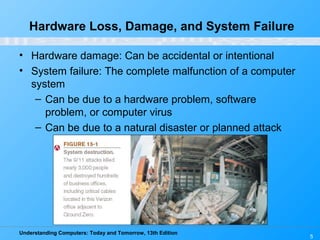
• Hardware damage: Can be accidental or intentional
• System failure: The complete malfunction of a computer
system
– Can be due to a hardware problem, software
problem, or computer virus
– Can be due to a natural disaster or planned attack
Understanding Computers: Today and Tomorrow, 13th Edition
6
Protecting Against Hardware Loss, Hardware
Damage, and System Failure
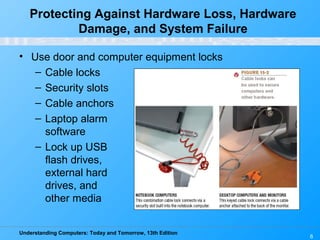
• Use door and computer equipment locks
– Cable locks
– Security slots
– Cable anchors
– Laptop alarm
software
– Lock up USB
flash drives,
external hard
drives, and
other media
Understanding Computers: Today and Tomorrow, 13th Edition
7
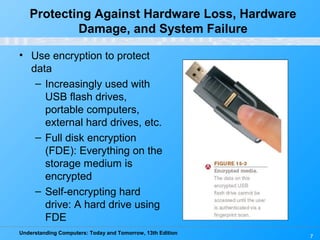
• Use encryption to protect
data
– Increasingly used with
USB flash drives,
portable computers,
external hard drives, etc.
– Full disk encryption
(FDE): Everything on the
storage medium is
encrypted
– Self-encrypting hard
drive: A hard drive using
FDE
Protecting Against Hardware Loss, Hardware
Damage, and System Failure
Understanding Computers: Today and Tomorrow, 13th Edition
8
• Computer tracking software: Used to find a computer or
other device after it is lost or stolen
– Sends out identifying data via the Internet
– Law enforcement can use this data to recover the
device
– Stealth tracking software: The sending of data is
transparent to the user
– Kill switch: Technology that causes the device to self-
destruct
• Other precautions:
– Asset tags, tamper evident labels, etc.
Protecting Against Hardware Loss, Hardware
Damage, and System Failure
Understanding Computers: Today and Tomorrow, 13th Edition
9
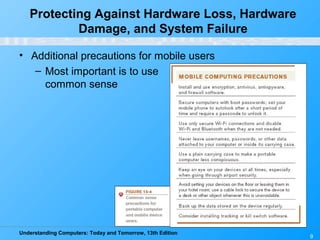
• Additional precautions for mobile users
– Most important is to use
common sense
Protecting Against Hardware Loss, Hardware
Damage, and System Failure
Understanding Computers: Today and Tomorrow, 13th Edition
10
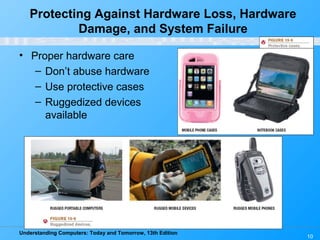
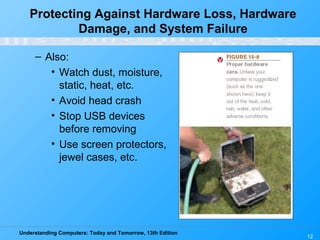
• Proper hardware care
– Don’t abuse hardware
– Use protective cases
– Ruggedized devices
available
Protecting Against Hardware Loss, Hardware
Damage, and System Failure
Understanding Computers: Today and Tomorrow, 13th Edition
11
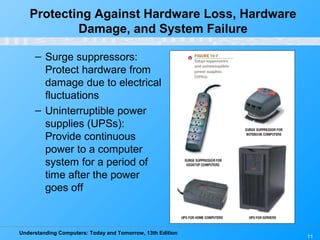
– Surge suppressors:
Protect hardware from
damage due to electrical
fluctuations
– Uninterruptible power
supplies (UPSs):
Provide continuous
power to a computer
system for a period of
time after the power
goes off
Protecting Against Hardware Loss, Hardware
Damage, and System Failure
Understanding Computers: Today and Tomorrow, 13th Edition
12
– Also:
• Watch dust, moisture,
static, heat, etc.
• Avoid head crash
• Stop USB devices
before removing
• Use screen protectors,
jewel cases, etc.
Protecting Against Hardware Loss, Hardware
Damage, and System Failure
Understanding Computers: Today and Tomorrow, 13th Edition
13
• Backup and disaster recovery plans:
– Both businesses and individuals should use
appropriate backup procedures
– Backup media needs to be secured
• Data storage companies store backup media at
secure remote locations
• Online backup is another possibility
– Continuous data protection (CDP): Enables data
backups to be made on a continual basis
– Disaster-recovery plan: Describes the steps a
company will take following the occurrence of a
disaster
Protecting Against Hardware Loss, Hardware
Damage, and System Failure
Understanding Computers: Today and Tomorrow, 13th Edition
14
Quick Quiz
1. Which of the following would not likely be a reason for
stealing a notebook computer?
a. For the data contained on the computer
b. To use in a denial of service (DoS) attack
c. For the value of the hardware
2. True or False: It is only important to use a surge
suppressor during bad weather, when a lightning strike
may occur.
3. A copy of a file that is created in case the original is
damaged is called a(n) _____________.
Answers:
1) b; 2) False; 3) backup
Understanding Computers: Today and Tomorrow, 13th Edition
15
Software Piracy and Digital Counterfeiting
• Software piracy: Unauthorized copying of a computer
program
– Occurs when:
• Individuals make illegal copies of software to give
to friends
• Businesses or individuals install software on more
than the number of computers allowed according
to the end-user license agreement (EULA)
• Sellers install unlicensed copies on computers sold
to consumers
• Large-scale operations in which programs and
packaging are illegally duplicated and sold as
supposedly legitimate products
Understanding Computers: Today and Tomorrow, 13th Edition
16
Software Piracy and Digital Counterfeiting
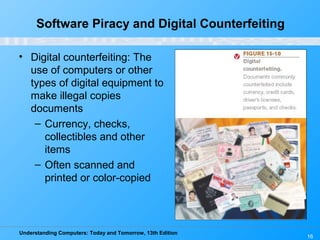
• Digital counterfeiting: The
use of computers or other
types of digital equipment to
make illegal copies
documents
– Currency, checks,
collectibles and other
items
– Often scanned and
printed or color-copied
Understanding Computers: Today and Tomorrow, 13th Edition
17
Protection Against Software Piracy and
Digital Counterfeiting
• Software antipiracy tools
– Educating businesses and consumers
– Registration code or product key
– Checking validity of a software installation before
upgrades or other resources related to the program
can be used
– Watching online auction sites/lawsuits
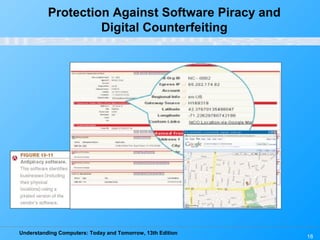
– Incorporating code into applications to inform the
vendor when pirated copies are being used, or is in
violation of the license
Understanding Computers: Today and Tomorrow, 13th Edition
Protection Against Software Piracy and
Digital Counterfeiting
18
Understanding Computers: Today and Tomorrow, 13th Edition
19
Protection Against Software Piracy and
Digital Counterfeiting
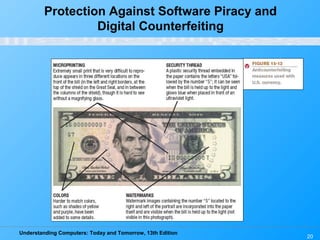
• Digital counterfeiting prevention
– New currency designs
• Microprinting, watermarks, security thread, etc.
• Special paper is used with U.S. currency
– Identifying technology included in digital imaging
hardware
– Digital watermarks: Subtle alteration to a digital item
that is not noticeable but that can be retrieved to
identify the owner of the item
– Also can use:
• RFID tags and other hard-to-reproduce content
Understanding Computers: Today and Tomorrow, 13th Edition
20
Protection Against Software Piracy and
Digital Counterfeiting
Understanding Computers: Today and Tomorrow, 13th Edition
21
Quick Quiz
1. Using a computer to make illegal copies of currency to
circulate as real currency is a form of _____________.
a. software piracy
b. computer sabotage
c. digital counterfeiting
2. True or False: Software piracy is rarely performed today.
3. Printed text or an image on a CD case or box that
changes its appearance when viewed from different
angles to prove the item is authentic is called a(n)
_____________.
Answers:
1) c; 2) False; 3) hologram
Understanding Computers: Today and Tomorrow, 13th Edition
22
Why Be Concerned About
Information Privacy?
• Privacy: State of being concealed or free from
unauthorized intrusion
• Information privacy: Rights of individuals and companies
to control how information about them is collected and
used
• Computers add additional privacy challenges
– Many data breaches recently due to lost or stolen
hardware, carelessness with documents containing
sensitive data, etc.
• Businesses need to be concerned with the
expense, damage to reputation, and possible
lawsuits
Understanding Computers: Today and Tomorrow, 13th Edition
23
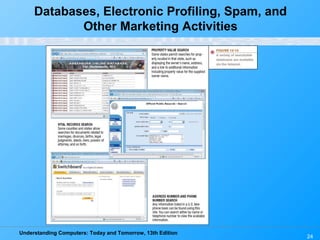
Databases, Electronic Profiling, Spam, and
Other Marketing Activities
• Marketing database: Collection of data about people,
used for marketing purposes
– Data obtained through online and offline purchases,
public information, etc.
– Used in conjunction with Web activities
• Social activity and searches performed
• Government database: Collection of data about people,
collected and maintained by the government
– Tax information, Social Security earnings, personal
health records, marriage and divorce information
– Some information is confidential, other is public
Understanding Computers: Today and Tomorrow, 13th Edition
24
Databases, Electronic Profiling, Spam, and
Other Marketing Activities
Understanding Computers: Today and Tomorrow, 13th Edition
25
Databases, Electronic Profiling, Spam, and
Other Marketing Activities
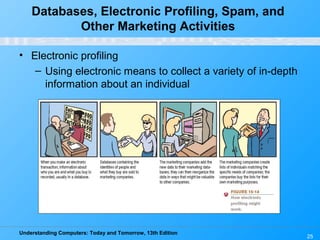
• Electronic profiling
– Using electronic means to collect a variety of in-depth
information about an individual
Understanding Computers: Today and Tomorrow, 13th Edition
26
Databases, Electronic Profiling, Spam, and
Other Marketing Activities
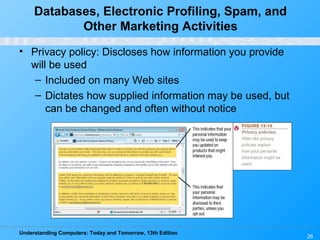
• Privacy policy: Discloses how information you provide
will be used
– Included on many Web sites
– Dictates how supplied information may be used, but
can be changed and often without notice
Understanding Computers: Today and Tomorrow, 13th Edition
27
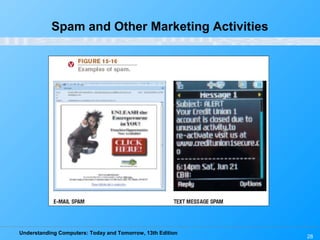
Spam and Other Marketing Activities
• Spam: Unsolicited, bulk e-mail sent over the Internet
– Often involves health-related products, counterfeit
products, fraudulent business opportunities,
pornography, etc.
– Marketing e-mails from companies a person has
done business with
– Appearing via instant messaging (spim)
– Also delivered via mobile phones, social networking
sites
Understanding Computers: Today and Tomorrow, 13th Edition
Spam and Other Marketing Activities
28
Understanding Computers: Today and Tomorrow, 13th Edition
29
Protecting the Privacy of
Personal Information
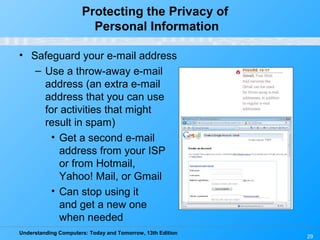
• Safeguard your e-mail address
– Use a throw-away e-mail
address (an extra e-mail
address that you can use
for activities that might
result in spam)
• Get a second e-mail
address from your ISP
or from Hotmail,
Yahoo! Mail, or Gmail
• Can stop using it
and get a new one
when needed
Understanding Computers: Today and Tomorrow, 13th Edition
30
Protecting the Privacy of
Personal Information
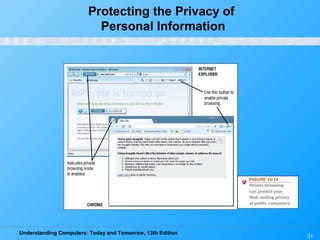
• Be cautious of revealing personal information
– Read a Web site’s privacy policy
– Avoid putting too many personal details on your Web
site
– Be wary of sites offering prizes in exchange for
personal information
– Consider using privacy software, such as anonymous
surfing
– Supply only the required information in registration
forms
– Delete your browsing history and e-mail settings
when using a public computer
Understanding Computers: Today and Tomorrow, 13th Edition
Protecting the Privacy of
Personal Information
31
Understanding Computers: Today and Tomorrow, 13th Edition
32
Protecting the Privacy of
Personal Information
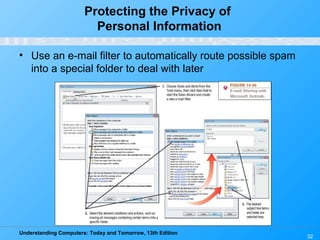
• Use an e-mail filter to automatically route possible spam
into a special folder to deal with later
Understanding Computers: Today and Tomorrow, 13th Edition
33
Protecting the Privacy of
Personal Information
• Can opt out from marketing activities
– Some privacy groups want individuals to have to opt
in to activities instead
• Web servers holding sensitive data should be secured
– Only enter personal information on Web sites using
secure servers
– Automatic encryption systems for e-mail can help
sensitive data from accidentally being revealed
Understanding Computers: Today and Tomorrow, 13th Edition
34
Protecting the Privacy of
Personal Information
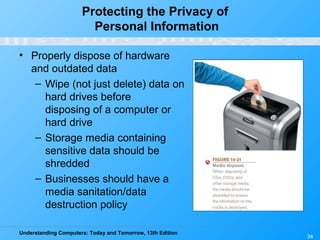
• Properly dispose of hardware
and outdated data
– Wipe (not just delete) data on
hard drives before
disposing of a computer or
hard drive
– Storage media containing
sensitive data should be
shredded
– Businesses should have a
media sanitation/data
destruction policy
Understanding Computers: Today and Tomorrow, 13th Edition
35
Online Video
“Google Search Privacy: Personalized Search”
(click below to start video)
Reminder: The complete set of online videos and video podcasts are available at:
www.cengage.com/computerconcepts/np/uc13
Courtesy of Google Inc.
Understanding Computers: Today and Tomorrow, 13th Edition
36
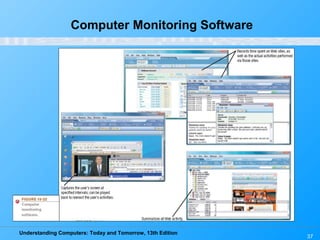
Electronic Surveillance and Monitoring
• Computer monitoring software: Records an individual’s
computer usage either by capturing images of the
screen, recording the actual keystrokes used, or creating
a summary of Web sites visited
– Can be used in homes by adults to monitor computer
usage of children or spouse
– Can be used in businesses to monitor employee
computer usage
– Keystroke-logging programs: Used to capture
keystrokes
• Can be used by hacker to capture usernames,
passwords, and other sensitive information entered
into a computer via the keyboard
Understanding Computers: Today and Tomorrow, 13th Edition
37
Computer Monitoring Software
Understanding Computers: Today and Tomorrow, 13th Edition
38
Electronic Surveillance and Monitoring
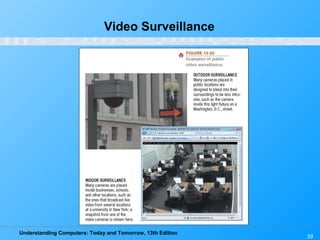
• Video surveillance: The use of video cameras to monitor
activities of individuals
– Used to monitor employees
– Used in public locations for crime-prevention
purposes
• Stores and other businesses, Public streets
• Subways, airports, etc.
– Can be used with face recognition software
• Identify terrorists and other known criminals
– Privacy issues also involved with the use of camera
phones
Understanding Computers: Today and Tomorrow, 13th Edition
39
Video Surveillance
Understanding Computers: Today and Tomorrow, 13th Edition
40
Electronic Surveillance and Monitoring
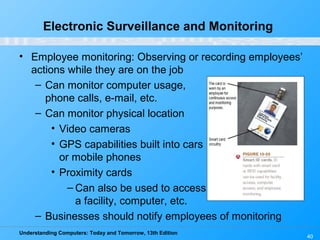
• Employee monitoring: Observing or recording employees’
actions while they are on the job
– Can monitor computer usage,
phone calls, e-mail, etc.
– Can monitor physical location
• Video cameras
• GPS capabilities built into cars
or mobile phones
• Proximity cards
– Can also be used to access
a facility, computer, etc.
– Businesses should notify employees of monitoring
Understanding Computers: Today and Tomorrow, 13th Edition
41
Electronic Surveillance and Monitoring
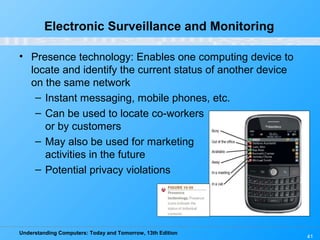
• Presence technology: Enables one computing device to
locate and identify the current status of another device
on the same network
– Instant messaging, mobile phones, etc.
– Can be used to locate co-workers
or by customers
– May also be used for marketing
activities in the future
– Potential privacy violations
Understanding Computers: Today and Tomorrow, 13th Edition
42
Protecting Personal and
Workspace Privacy
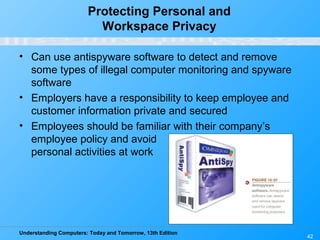
• Can use antispyware software to detect and remove
some types of illegal computer monitoring and spyware
software
• Employers have a responsibility to keep employee and
customer information private and secured
• Employees should be familiar with their company’s
employee policy and avoid
personal activities at work
Understanding Computers: Today and Tomorrow, 13th Edition
43
Quick Quiz
1. A document that discloses how your personal information
will be used is called a(n) _____________.
a. privacy policy
b. opt out
c. throw-away e-mail address
2. True or False: The problem of protecting personal privacy
and keeping personal information private did not exist
before computers and the Internet.
3. The ability of one computing device on a network to
identity the status of another device on that network is
known as _____________.
Answers:
1) a; 2) False; 3) presence technology
Understanding Computers: Today and Tomorrow, 13th Edition
44
Summary
• Why Be Concerned About Computer Security
• Hardware Loss, Hardware Damage, and System Failure
• Software Piracy and Digital Counterfeiting
• Why Be Concerned About Information Privacy
• Databases, Electronic Profiling, Spam, and Other
Marketing Activities
• Electronic Surveillance and Monitoring
• Computer Security and Privacy Legislation

Understanding Computers: Today and Tomorrow, 13th Edition Chapter 15 - Computer Security and Privacy

  • 1.
    Understanding Computers: Todayand Tomorrow, 13th Edition Chapter 15: Computer Security and Privacy
  • 2.
    Understanding Computers: Todayand Tomorrow, 13th Edition 2 Overview • This chapter covers: – Hardware loss, hardware damage, and system failure, and the safeguards that can help reduce the risk of a problem occurring due to these concerns – Software piracy and digital counterfeiting and steps that are being taken to prevent these computer crimes – Possible risks for personal privacy violations due to databases, marketing activities, electronic surveillance, and monitoring, and precautions that can be taken to safeguard one’s privacy
  • 3.
    Understanding Computers: Todayand Tomorrow, 13th Edition 3 Why Be Concerned About Computer Security? • There are a number of security concerns related to computers that users should be aware of, including: – Having a computer or other device stolen – Losing important data – Losing contact lists – Buying pirated or counterfeited products
  • 4.
    Understanding Computers: Todayand Tomorrow, 13th Edition 4 Hardware Loss, Damage, and System Failure • Hardware loss: Can occur when a personal computer, USB flash drive, mobile device, or other piece of hardware is stolen, lost, or damaged – Hardware theft: When hardware is stolen from an individual or an organization • Often stolen from homes, businesses, cars, airports, hotels, etc. • Often occurs for the value of the hardware, but increasingly for the information that might be contained on the hardware
  • 5.
    Understanding Computers: Todayand Tomorrow, 13th Edition 5 Hardware Loss, Damage, and System Failure • Hardware damage: Can be accidental or intentional • System failure: The complete malfunction of a computer system – Can be due to a hardware problem, software problem, or computer virus – Can be due to a natural disaster or planned attack
  • 6.
    Understanding Computers: Todayand Tomorrow, 13th Edition 6 Protecting Against Hardware Loss, Hardware Damage, and System Failure • Use door and computer equipment locks – Cable locks – Security slots – Cable anchors – Laptop alarm software – Lock up USB flash drives, external hard drives, and other media
  • 7.
    Understanding Computers: Todayand Tomorrow, 13th Edition 7 • Use encryption to protect data – Increasingly used with USB flash drives, portable computers, external hard drives, etc. – Full disk encryption (FDE): Everything on the storage medium is encrypted – Self-encrypting hard drive: A hard drive using FDE Protecting Against Hardware Loss, Hardware Damage, and System Failure
  • 8.
    Understanding Computers: Todayand Tomorrow, 13th Edition 8 • Computer tracking software: Used to find a computer or other device after it is lost or stolen – Sends out identifying data via the Internet – Law enforcement can use this data to recover the device – Stealth tracking software: The sending of data is transparent to the user – Kill switch: Technology that causes the device to self- destruct • Other precautions: – Asset tags, tamper evident labels, etc. Protecting Against Hardware Loss, Hardware Damage, and System Failure
  • 9.
    Understanding Computers: Todayand Tomorrow, 13th Edition 9 • Additional precautions for mobile users – Most important is to use common sense Protecting Against Hardware Loss, Hardware Damage, and System Failure
  • 10.
    Understanding Computers: Todayand Tomorrow, 13th Edition 10 • Proper hardware care – Don’t abuse hardware – Use protective cases – Ruggedized devices available Protecting Against Hardware Loss, Hardware Damage, and System Failure
  • 11.
    Understanding Computers: Todayand Tomorrow, 13th Edition 11 – Surge suppressors: Protect hardware from damage due to electrical fluctuations – Uninterruptible power supplies (UPSs): Provide continuous power to a computer system for a period of time after the power goes off Protecting Against Hardware Loss, Hardware Damage, and System Failure
  • 12.
    Understanding Computers: Todayand Tomorrow, 13th Edition 12 – Also: • Watch dust, moisture, static, heat, etc. • Avoid head crash • Stop USB devices before removing • Use screen protectors, jewel cases, etc. Protecting Against Hardware Loss, Hardware Damage, and System Failure
  • 13.
    Understanding Computers: Todayand Tomorrow, 13th Edition 13 • Backup and disaster recovery plans: – Both businesses and individuals should use appropriate backup procedures – Backup media needs to be secured • Data storage companies store backup media at secure remote locations • Online backup is another possibility – Continuous data protection (CDP): Enables data backups to be made on a continual basis – Disaster-recovery plan: Describes the steps a company will take following the occurrence of a disaster Protecting Against Hardware Loss, Hardware Damage, and System Failure
  • 14.
    Understanding Computers: Todayand Tomorrow, 13th Edition 14 Quick Quiz 1. Which of the following would not likely be a reason for stealing a notebook computer? a. For the data contained on the computer b. To use in a denial of service (DoS) attack c. For the value of the hardware 2. True or False: It is only important to use a surge suppressor during bad weather, when a lightning strike may occur. 3. A copy of a file that is created in case the original is damaged is called a(n) _____________. Answers: 1) b; 2) False; 3) backup
  • 15.
    Understanding Computers: Todayand Tomorrow, 13th Edition 15 Software Piracy and Digital Counterfeiting • Software piracy: Unauthorized copying of a computer program – Occurs when: • Individuals make illegal copies of software to give to friends • Businesses or individuals install software on more than the number of computers allowed according to the end-user license agreement (EULA) • Sellers install unlicensed copies on computers sold to consumers • Large-scale operations in which programs and packaging are illegally duplicated and sold as supposedly legitimate products
  • 16.
    Understanding Computers: Todayand Tomorrow, 13th Edition 16 Software Piracy and Digital Counterfeiting • Digital counterfeiting: The use of computers or other types of digital equipment to make illegal copies documents – Currency, checks, collectibles and other items – Often scanned and printed or color-copied
  • 17.
    Understanding Computers: Todayand Tomorrow, 13th Edition 17 Protection Against Software Piracy and Digital Counterfeiting • Software antipiracy tools – Educating businesses and consumers – Registration code or product key – Checking validity of a software installation before upgrades or other resources related to the program can be used – Watching online auction sites/lawsuits – Incorporating code into applications to inform the vendor when pirated copies are being used, or is in violation of the license
  • 18.
    Understanding Computers: Todayand Tomorrow, 13th Edition Protection Against Software Piracy and Digital Counterfeiting 18
  • 19.
    Understanding Computers: Todayand Tomorrow, 13th Edition 19 Protection Against Software Piracy and Digital Counterfeiting • Digital counterfeiting prevention – New currency designs • Microprinting, watermarks, security thread, etc. • Special paper is used with U.S. currency – Identifying technology included in digital imaging hardware – Digital watermarks: Subtle alteration to a digital item that is not noticeable but that can be retrieved to identify the owner of the item – Also can use: • RFID tags and other hard-to-reproduce content
  • 20.
    Understanding Computers: Todayand Tomorrow, 13th Edition 20 Protection Against Software Piracy and Digital Counterfeiting
  • 21.
    Understanding Computers: Todayand Tomorrow, 13th Edition 21 Quick Quiz 1. Using a computer to make illegal copies of currency to circulate as real currency is a form of _____________. a. software piracy b. computer sabotage c. digital counterfeiting 2. True or False: Software piracy is rarely performed today. 3. Printed text or an image on a CD case or box that changes its appearance when viewed from different angles to prove the item is authentic is called a(n) _____________. Answers: 1) c; 2) False; 3) hologram
  • 22.
    Understanding Computers: Todayand Tomorrow, 13th Edition 22 Why Be Concerned About Information Privacy? • Privacy: State of being concealed or free from unauthorized intrusion • Information privacy: Rights of individuals and companies to control how information about them is collected and used • Computers add additional privacy challenges – Many data breaches recently due to lost or stolen hardware, carelessness with documents containing sensitive data, etc. • Businesses need to be concerned with the expense, damage to reputation, and possible lawsuits
  • 23.
    Understanding Computers: Todayand Tomorrow, 13th Edition 23 Databases, Electronic Profiling, Spam, and Other Marketing Activities • Marketing database: Collection of data about people, used for marketing purposes – Data obtained through online and offline purchases, public information, etc. – Used in conjunction with Web activities • Social activity and searches performed • Government database: Collection of data about people, collected and maintained by the government – Tax information, Social Security earnings, personal health records, marriage and divorce information – Some information is confidential, other is public
  • 24.
    Understanding Computers: Todayand Tomorrow, 13th Edition 24 Databases, Electronic Profiling, Spam, and Other Marketing Activities
  • 25.
    Understanding Computers: Todayand Tomorrow, 13th Edition 25 Databases, Electronic Profiling, Spam, and Other Marketing Activities • Electronic profiling – Using electronic means to collect a variety of in-depth information about an individual
  • 26.
    Understanding Computers: Todayand Tomorrow, 13th Edition 26 Databases, Electronic Profiling, Spam, and Other Marketing Activities • Privacy policy: Discloses how information you provide will be used – Included on many Web sites – Dictates how supplied information may be used, but can be changed and often without notice
  • 27.
    Understanding Computers: Todayand Tomorrow, 13th Edition 27 Spam and Other Marketing Activities • Spam: Unsolicited, bulk e-mail sent over the Internet – Often involves health-related products, counterfeit products, fraudulent business opportunities, pornography, etc. – Marketing e-mails from companies a person has done business with – Appearing via instant messaging (spim) – Also delivered via mobile phones, social networking sites
  • 28.
    Understanding Computers: Todayand Tomorrow, 13th Edition Spam and Other Marketing Activities 28
  • 29.
    Understanding Computers: Todayand Tomorrow, 13th Edition 29 Protecting the Privacy of Personal Information • Safeguard your e-mail address – Use a throw-away e-mail address (an extra e-mail address that you can use for activities that might result in spam) • Get a second e-mail address from your ISP or from Hotmail, Yahoo! Mail, or Gmail • Can stop using it and get a new one when needed
  • 30.
    Understanding Computers: Todayand Tomorrow, 13th Edition 30 Protecting the Privacy of Personal Information • Be cautious of revealing personal information – Read a Web site’s privacy policy – Avoid putting too many personal details on your Web site – Be wary of sites offering prizes in exchange for personal information – Consider using privacy software, such as anonymous surfing – Supply only the required information in registration forms – Delete your browsing history and e-mail settings when using a public computer
  • 31.
    Understanding Computers: Todayand Tomorrow, 13th Edition Protecting the Privacy of Personal Information 31
  • 32.
    Understanding Computers: Todayand Tomorrow, 13th Edition 32 Protecting the Privacy of Personal Information • Use an e-mail filter to automatically route possible spam into a special folder to deal with later
  • 33.
    Understanding Computers: Todayand Tomorrow, 13th Edition 33 Protecting the Privacy of Personal Information • Can opt out from marketing activities – Some privacy groups want individuals to have to opt in to activities instead • Web servers holding sensitive data should be secured – Only enter personal information on Web sites using secure servers – Automatic encryption systems for e-mail can help sensitive data from accidentally being revealed
  • 34.
    Understanding Computers: Todayand Tomorrow, 13th Edition 34 Protecting the Privacy of Personal Information • Properly dispose of hardware and outdated data – Wipe (not just delete) data on hard drives before disposing of a computer or hard drive – Storage media containing sensitive data should be shredded – Businesses should have a media sanitation/data destruction policy
  • 35.
    Understanding Computers: Todayand Tomorrow, 13th Edition 35 Online Video “Google Search Privacy: Personalized Search” (click below to start video) Reminder: The complete set of online videos and video podcasts are available at: www.cengage.com/computerconcepts/np/uc13 Courtesy of Google Inc.
  • 36.
    Understanding Computers: Todayand Tomorrow, 13th Edition 36 Electronic Surveillance and Monitoring • Computer monitoring software: Records an individual’s computer usage either by capturing images of the screen, recording the actual keystrokes used, or creating a summary of Web sites visited – Can be used in homes by adults to monitor computer usage of children or spouse – Can be used in businesses to monitor employee computer usage – Keystroke-logging programs: Used to capture keystrokes • Can be used by hacker to capture usernames, passwords, and other sensitive information entered into a computer via the keyboard
  • 37.
    Understanding Computers: Todayand Tomorrow, 13th Edition 37 Computer Monitoring Software
  • 38.
    Understanding Computers: Todayand Tomorrow, 13th Edition 38 Electronic Surveillance and Monitoring • Video surveillance: The use of video cameras to monitor activities of individuals – Used to monitor employees – Used in public locations for crime-prevention purposes • Stores and other businesses, Public streets • Subways, airports, etc. – Can be used with face recognition software • Identify terrorists and other known criminals – Privacy issues also involved with the use of camera phones
  • 39.
    Understanding Computers: Todayand Tomorrow, 13th Edition 39 Video Surveillance
  • 40.
    Understanding Computers: Todayand Tomorrow, 13th Edition 40 Electronic Surveillance and Monitoring • Employee monitoring: Observing or recording employees’ actions while they are on the job – Can monitor computer usage, phone calls, e-mail, etc. – Can monitor physical location • Video cameras • GPS capabilities built into cars or mobile phones • Proximity cards – Can also be used to access a facility, computer, etc. – Businesses should notify employees of monitoring
  • 41.
    Understanding Computers: Todayand Tomorrow, 13th Edition 41 Electronic Surveillance and Monitoring • Presence technology: Enables one computing device to locate and identify the current status of another device on the same network – Instant messaging, mobile phones, etc. – Can be used to locate co-workers or by customers – May also be used for marketing activities in the future – Potential privacy violations
  • 42.
    Understanding Computers: Todayand Tomorrow, 13th Edition 42 Protecting Personal and Workspace Privacy • Can use antispyware software to detect and remove some types of illegal computer monitoring and spyware software • Employers have a responsibility to keep employee and customer information private and secured • Employees should be familiar with their company’s employee policy and avoid personal activities at work
  • 43.
    Understanding Computers: Todayand Tomorrow, 13th Edition 43 Quick Quiz 1. A document that discloses how your personal information will be used is called a(n) _____________. a. privacy policy b. opt out c. throw-away e-mail address 2. True or False: The problem of protecting personal privacy and keeping personal information private did not exist before computers and the Internet. 3. The ability of one computing device on a network to identity the status of another device on that network is known as _____________. Answers: 1) a; 2) False; 3) presence technology
  • 44.
    Understanding Computers: Todayand Tomorrow, 13th Edition 44 Summary • Why Be Concerned About Computer Security • Hardware Loss, Hardware Damage, and System Failure • Software Piracy and Digital Counterfeiting • Why Be Concerned About Information Privacy • Databases, Electronic Profiling, Spam, and Other Marketing Activities • Electronic Surveillance and Monitoring • Computer Security and Privacy Legislation