Understanding Computers: Today and Tomorrow, 13th Edition
Chapter 16:
Intellectual Property Rights,
Ethics, Health, Access, and
the Environment
Understanding Computers: Today and Tomorrow, 13th Edition
2
Learning Objectives
1. Understand the different types of intellectual property
rights and how they relate to computer use.
2. Explain what is meant by ethics and provide several
examples of unethical behavior in computer-related
matters.
3. Describe some possible physical and emotional health
risks associated with the use of computers.
Understanding Computers: Today and Tomorrow, 13th Edition
3
Learning Objectives
4. Discuss the impact factors, such as nationality, income,
race, education, and physical disabilities, may have on
computer access and use.
5. Suggest some ways computer users can practice
“green computing” and properly dispose of obsolete
computer equipment.
6. Discuss the current status of legislation related to
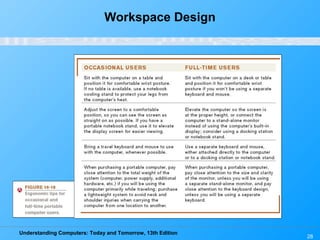
intellectual property rights, ethics, access, and the
environment in relation to computers.
Understanding Computers: Today and Tomorrow, 13th Edition
4
Overview
• This chapter covers:
– Various types of intellectual property rights
– A discussion of ethics, including ethical use of
copyrighted material, resources and information,
unethical use of digital manipulation, and ethical
business practices
– The impact of computers on our physical and
emotional health
– Issues related to the access of technology
– The impact of computers on our environment
– A look at legislation related to these issues
Understanding Computers: Today and Tomorrow, 13th Edition
5
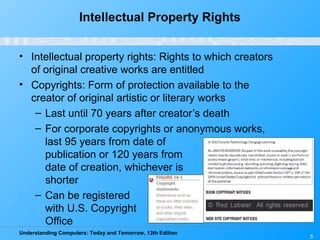
Intellectual Property Rights
• Intellectual property rights: Rights to which creators
of original creative works are entitled
• Copyrights: Form of protection available to the
creator of original artistic or literary works
– Last until 70 years after creator’s death
– For corporate copyrights or anonymous works,
last 95 years from date of
publication or 120 years from
date of creation, whichever is
shorter
– Can be registered
with U.S. Copyright
Office
Understanding Computers: Today and Tomorrow, 13th Edition
6
Intellectual Property Rights
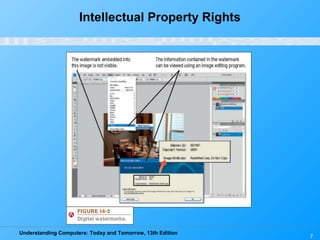
– To protect rights, can use:
• Digital watermarks: Subtle alteration of digital
content that is not noticeable but that can identify
the copyright holder
• Digital rights management (DRM) software:
Controls use of the copyrighted work
–Can limit who can view, print or copy a document
–Can control use of downloaded content (number of
devices a file can be copied to, expiration of VOD
movie, etc.)
Understanding Computers: Today and Tomorrow, 13th Edition
Intellectual Property Rights
7
Understanding Computers: Today and Tomorrow, 13th Edition
8
Intellectual Property Rights
• Trademark: A word, phrase, symbol, or design that
identifies goods or services
– Includes protection for
domain names
(cybersquatting and
typosquatting)
– Domain name disputes
can be brought to the World
Intellectual Property
Organization (WIPO)
Understanding Computers: Today and Tomorrow, 13th Edition
9
Intellectual Property Rights
• Patents : Protect inventions
– Lasts for 20 years
– Can also protect a business
practice or procedure
• PriceLine.com’s name-your-
own-price
• Amazon.com’s one-click
purchase
– Expensive to get but can be
very lucrative
Understanding Computers: Today and Tomorrow, 13th Edition
10
Quick Quiz
1. Copyrights are valid for _____________.
a. 70 years after the creation of the work
b. 70 years after the publication of the work
c. 70 years after the death of the creator
2. True or False: Logos cannot be trademarked, just the
names of companies or products.
3. ______________________ are used to protect
inventions.
Answers:
1) c; 2) False; 3) Patents
Understanding Computers: Today and Tomorrow, 13th Edition
11
Ethics
• Ethics: Overall standards of moral conduct
– Can vary with individual and religious beliefs, country,
race, or culture
– Personal ethics: Guide an individual’s personal
behavior
– Business ethics: Guide a business’s policies,
decisions, and actions
– Computer ethics: Concern moral conduct related to
computer use
– Individuals and businesses need to make ethical
decisions every day
Understanding Computers: Today and Tomorrow, 13th Edition
12
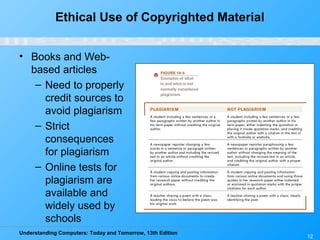
Ethical Use of Copyrighted Material
• Books and Web-
based articles
– Need to properly
credit sources to
avoid plagiarism
– Strict
consequences
for plagiarism
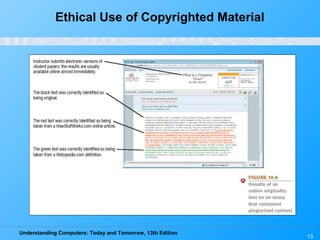
– Online tests for
plagiarism are
available and
widely used by
schools
Understanding Computers: Today and Tomorrow, 13th Edition
13
Ethical Use of Copyrighted Material
Understanding Computers: Today and Tomorrow, 13th Edition
14
Ethical Use of Copyrighted Material
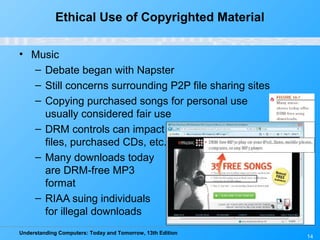
• Music
– Debate began with Napster
– Still concerns surrounding P2P file sharing sites
– Copying purchased songs for personal use
usually considered fair use
– DRM controls can impact downloaded
files, purchased CDs, etc.
– Many downloads today
are DRM-free MP3
format
– RIAA suing individuals
for illegal downloads
Understanding Computers: Today and Tomorrow, 13th Edition
15
Ethical Use of Copyrighted Material
• Movies
– Movie piracy is high (illegal copies, recording pre-
release movies to create DVDs, etc.)
– Distributing bootleg copies of movies is illegal and
unethical
• Often happens via the Internet
– DRM controls on downloaded movies can slow piracy
– Legal prosecution for copyright violations for both
music and movies is increasing
• Typically aimed at bootleggers and cammers
Understanding Computers: Today and Tomorrow, 13th Edition
16
Ethical Use of Resources
and Information
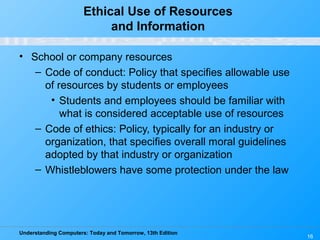
• School or company resources
– Code of conduct: Policy that specifies allowable use
of resources by students or employees
• Students and employees should be familiar with
what is considered acceptable use of resources
– Code of ethics: Policy, typically for an industry or
organization, that specifies overall moral guidelines
adopted by that industry or organization
– Whistleblowers have some protection under the law
Understanding Computers: Today and Tomorrow, 13th Edition
17
Ethical Use of Resources
and Information
• Employee and customer information
– Businesses need to decide what is ethical use of
employee and customer information
– Business schools are increasing
business ethics
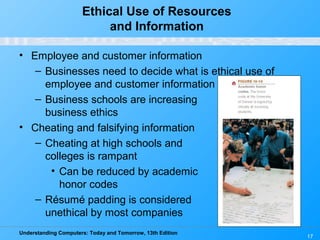
• Cheating and falsifying information
– Cheating at high schools and
colleges is rampant
• Can be reduced by academic
honor codes
– Résumé padding is considered
unethical by most companies
Understanding Computers: Today and Tomorrow, 13th Edition
18
Computer Hoaxes and
Digital Manipulation
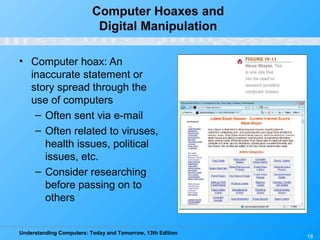
• Computer hoax: An
inaccurate statement or
story spread through the
use of computers
– Often sent via e-mail
– Often related to viruses,
health issues, political
issues, etc.
– Consider researching
before passing on to
others
Understanding Computers: Today and Tomorrow, 13th Edition
19
Computer Hoaxes and
Digital Manipulation
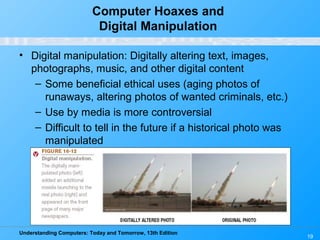
• Digital manipulation: Digitally altering text, images,
photographs, music, and other digital content
– Some beneficial ethical uses (aging photos of
runaways, altering photos of wanted criminals, etc.)
– Use by media is more controversial
– Difficult to tell in the future if a historical photo was
manipulated
Understanding Computers: Today and Tomorrow, 13th Edition
20
Ethical Business Practices and Decision
Making
• Businesses need to make ethical decisions regarding:
– Fraudulent reporting and other scandalous activities
• Sarbanes-Oxley Act of 2002: Includes provisions to
improve the quality of financial reporting
– Ethically questionable products or services
• Decisions regarding products or services some
individuals find objectionable
• Proof of age requirements for selling liquor,
tobacco, and other adult products via Internet
– Online age verification is an emerging option
Understanding Computers: Today and Tomorrow, 13th Edition
21
Ethical Business Practices and Decision
Making
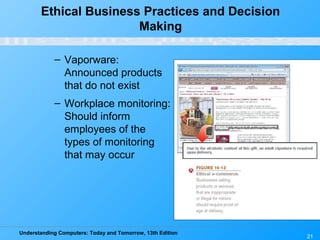
– Vaporware:
Announced products
that do not exist
– Workplace monitoring:
Should inform
employees of the
types of monitoring
that may occur
Understanding Computers: Today and Tomorrow, 13th Edition
22
Ethical Business Practices and Decision
Making
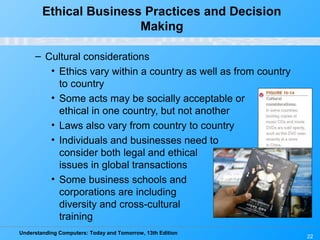
– Cultural considerations
• Ethics vary within a country as well as from country
to country
• Some acts may be socially acceptable or
ethical in one country, but not another
• Laws also vary from country to country
• Individuals and businesses need to
consider both legal and ethical
issues in global transactions
• Some business schools and
corporations are including
diversity and cross-cultural
training
Understanding Computers: Today and Tomorrow, 13th Edition
23
Quick Quiz
1. An inaccurate statement or story spread though the use of
computers is referred to as _____________.
a. digital manipulation
b. code of ethics
c. computer hoax
2. True or False: Most legal experts agree that it’s okay for
someone who has legally obtained an audio CD to
transfer those songs to a CD-R disc for personal use.
3. Software and hardware products that have been
announced and advertised, but which are not yet
available are considered ______________________.
Answers:
1) c; 2) True; 3) vaporware
Understanding Computers: Today and Tomorrow, 13th Edition
24
Computers and Health
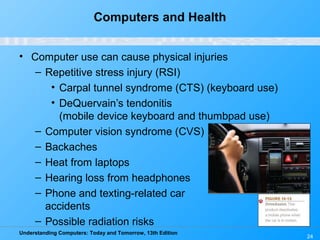
• Computer use can cause physical injuries
– Repetitive stress injury (RSI)
• Carpal tunnel syndrome (CTS) (keyboard use)
• DeQuervain’s tendonitis
(mobile device keyboard and thumbpad use)
– Computer vision syndrome (CVS)
– Backaches
– Heat from laptops
– Hearing loss from headphones
– Phone and texting-related car
accidents
– Possible radiation risks
Understanding Computers: Today and Tomorrow, 13th Edition
25
Computers and Health
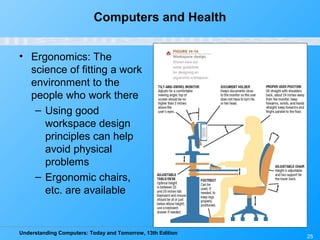
• Ergonomics: The
science of fitting a work
environment to the
people who work there
– Using good
workspace design
principles can help
avoid physical
problems
– Ergonomic chairs,
etc. are available
Understanding Computers: Today and Tomorrow, 13th Edition
26
Computers and Health
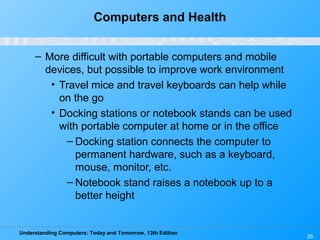
– More difficult with portable computers and mobile
devices, but possible to improve work environment
• Travel mice and travel keyboards can help while
on the go
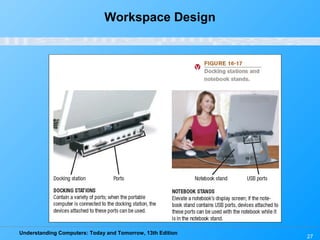
• Docking stations or notebook stands can be used
with portable computer at home or in the office
– Docking station connects the computer to
permanent hardware, such as a keyboard,
mouse, monitor, etc.
– Notebook stand raises a notebook up to a
better height
Understanding Computers: Today and Tomorrow, 13th Edition
27
Workspace Design
Understanding Computers: Today and Tomorrow, 13th Edition
28
Workspace Design
Understanding Computers: Today and Tomorrow, 13th Edition
29
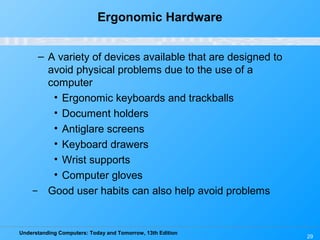
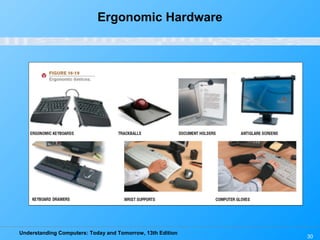
Ergonomic Hardware
– A variety of devices available that are designed to
avoid physical problems due to the use of a
computer
• Ergonomic keyboards and trackballs
• Document holders
• Antiglare screens
• Keyboard drawers
• Wrist supports
• Computer gloves
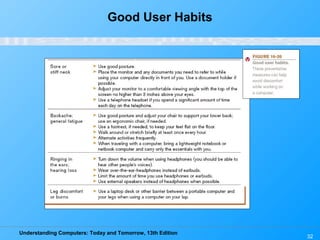
̶ Good user habits can also help avoid problems
Understanding Computers: Today and Tomorrow, 13th Edition
30
Ergonomic Hardware
Understanding Computers: Today and Tomorrow, 13th Edition
31
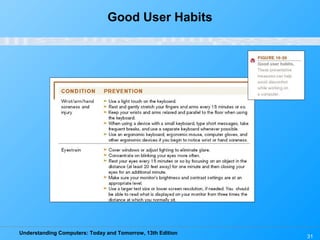
Good User Habits
Understanding Computers: Today and Tomorrow, 13th Edition
32
Good User Habits
Understanding Computers: Today and Tomorrow, 13th Edition
33
Computers and Health
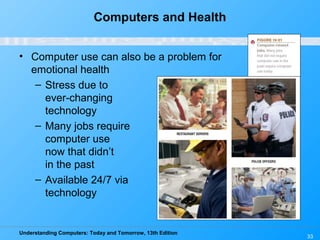
• Computer use can also be a problem for
emotional health
– Stress due to
ever-changing
technology
– Many jobs require
computer use
now that didn’t
in the past
– Available 24/7 via
technology
Understanding Computers: Today and Tomorrow, 13th Edition
34
Computers and Health
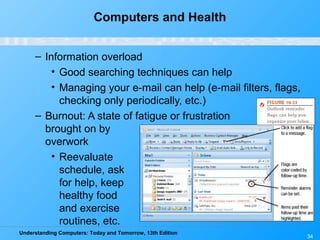
– Information overload
• Good searching techniques can help
• Managing your e-mail can help (e-mail filters, flags,
checking only periodically, etc.)
– Burnout: A state of fatigue or frustration
brought on by
overwork
• Reevaluate
schedule, ask
for help, keep
healthy food
and exercise
routines, etc.
Understanding Computers: Today and Tomorrow, 13th Edition
35
Computers and Health
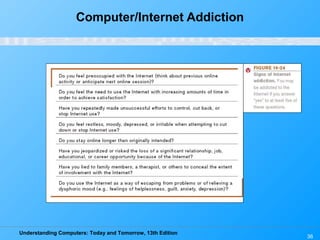
– Internet addiction: The problem of overusing, or being
unable to stop using, a computer or the Internet
• Growing problem in many countries
• Often related to e-mail, IM, shopping, gaming,
social networking, and pornography
• Can be addicted to other types of technology
(video games, etc.)
• Can result in loss of relationships, job loss,
academic failure, health problems, financial
consequences, child custody, suicide, and more
• Can be treated similar to other addictions
Understanding Computers: Today and Tomorrow, 13th Edition
36
Computer/Internet Addiction
Understanding Computers: Today and Tomorrow, 13th Edition
37
Access to Technology
• Digital divide: The gap between those who have access
to technology and those who don’t
• Can have digital divide within a country, as well as
between countries
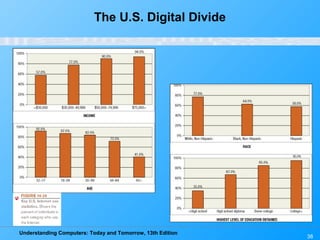
• U.S. digital divide: Differences in technology use by
income, race, geographical area, education, broadband
Internet use, etc.
– Reducing the U.S. digital divide is important to ensure
all citizens have an equal chance of being successful
– Some people choose not to use technology
Understanding Computers: Today and Tomorrow, 13th Edition
38
The U.S. Digital Divide
Understanding Computers: Today and Tomorrow, 13th Edition
39
Access to Technology
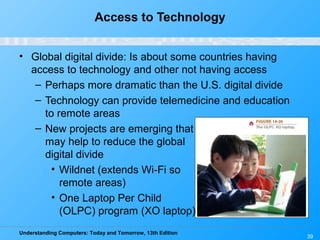
• Global digital divide: Is about some countries having
access to technology and other not having access
– Perhaps more dramatic than the U.S. digital divide
– Technology can provide telemedicine and education
to remote areas
– New projects are emerging that
may help to reduce the global
digital divide
• Wildnet (extends Wi-Fi so
remote areas)
• One Laptop Per Child
(OLPC) program (XO laptop)
Understanding Computers: Today and Tomorrow, 13th Edition
40
Online Video
“Intel World Ahead Program”
(click below to start video)
Reminder: The complete set of online videos and video podcasts are available at:
www.cengage.com/computerconcepts/np/uc13
Reproduced with
permission from Intel
Corporation
Understanding Computers: Today and Tomorrow, 13th Edition
41
Access to Technology
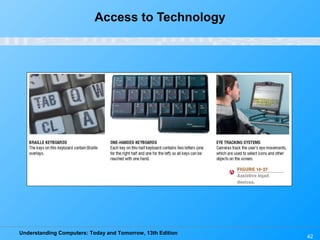
• Assistive technology: Hardware and software designed
for use by individuals with physical disabilities
– Assistive input devices include:
• Braille keyboards, keyguards, one-handed
keyboards
• Voice input systems
• Assistive pointing systems (switches, feet mice,
head pointing systems, eye pointing systems, etc.)
• Can also be used by general population as desired
Understanding Computers: Today and Tomorrow, 13th Edition
42
Access to Technology
Understanding Computers: Today and Tomorrow, 13th Edition
43
Access to Technology
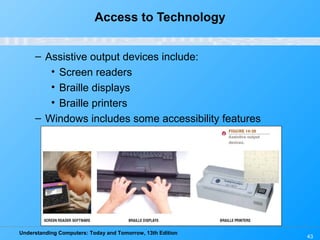
– Assistive output devices include:
• Screen readers
• Braille displays
• Braille printers
– Windows includes some accessibility features
Understanding Computers: Today and Tomorrow, 13th Edition
44
Environmental Concerns
• Green computing: The use of computers in an
environmentally friendly manner
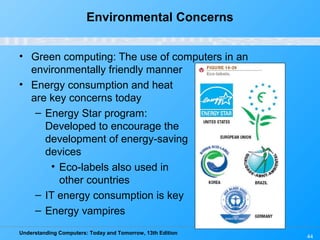
• Energy consumption and heat
are key concerns today
– Energy Star program:
Developed to encourage the
development of energy-saving
devices
• Eco-labels also used in
other countries
– IT energy consumption is key
– Energy vampires
Understanding Computers: Today and Tomorrow, 13th Edition
45
Environmental Concerns
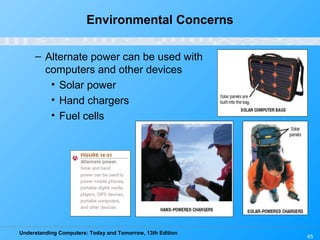
– Alternate power can be used with
computers and other devices
• Solar power
• Hand chargers
• Fuel cells
Understanding Computers: Today and Tomorrow, 13th Edition
46
Environmental Concerns
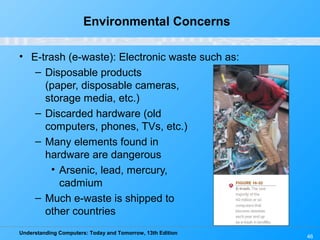
• E-trash (e-waste): Electronic waste such as:
– Disposable products
(paper, disposable cameras,
storage media, etc.)
– Discarded hardware (old
computers, phones, TVs, etc.)
– Many elements found in
hardware are dangerous
• Arsenic, lead, mercury,
cadmium
– Much e-waste is shipped to
other countries
Understanding Computers: Today and Tomorrow, 13th Edition
47
Environmental Concerns
• Green computing methods
– Recycling
• Many devices, media, etc. can be recycled
• Some states are implementing disposal fees for
new hardware to ensure they are disposed of
properly
– Donate obsolete equipment to schools and other
organizations
• Data needs to be completely removed for security
and privacy reasons
– Reuse (recharged toner cartridges, new purpose for
computers, etc.)
Understanding Computers: Today and Tomorrow, 13th Edition
48
Related Legislation
• There is legislation to protect intellectual property rights,
such as:
– Family Entertainment and Copyright Act of 2005
(FECA)
– U.S. Anticybersquatting Consumer Protection Act
– Digital Millennium Copyright Act (DMCA)
• Ethical legislation is more difficult to pass
• The amendment to the Rehabilitation Act in 1998
requires federal agency information be accessible
• Currently, no federal computer recycling laws are in
effect in the U.S.
• Sarbanes-Oxley and HIPAA established privacy and data
protection standards
Understanding Computers: Today and Tomorrow, 13th Edition
49
Quick Quiz
1. Which of the following is NOT an assistive input device?
a. Braille display
b. Head-pointing system
c. One-handed keyboard
2. True or False: E-trash is no longer a concern today since
modern computers contain very few toxic materials.
3. A device designed to connect a portable computer to
conventional hardware such as a keyboard, mouse, and
printer is called a(n) ______________________.
Answers:
1) a; 2) False; 3) docking station
Understanding Computers: Today and Tomorrow, 13th Edition
50
Summary
• Intellectual Property Rights
• Ethics
• Computers and Health
• Access to Technology
• Environmental Concerns
• Related Legislation

Uc13.chapter.16

  • 1.
    Understanding Computers: Todayand Tomorrow, 13th Edition Chapter 16: Intellectual Property Rights, Ethics, Health, Access, and the Environment
  • 2.
    Understanding Computers: Todayand Tomorrow, 13th Edition 2 Learning Objectives 1. Understand the different types of intellectual property rights and how they relate to computer use. 2. Explain what is meant by ethics and provide several examples of unethical behavior in computer-related matters. 3. Describe some possible physical and emotional health risks associated with the use of computers.
  • 3.
    Understanding Computers: Todayand Tomorrow, 13th Edition 3 Learning Objectives 4. Discuss the impact factors, such as nationality, income, race, education, and physical disabilities, may have on computer access and use. 5. Suggest some ways computer users can practice “green computing” and properly dispose of obsolete computer equipment. 6. Discuss the current status of legislation related to intellectual property rights, ethics, access, and the environment in relation to computers.
  • 4.
    Understanding Computers: Todayand Tomorrow, 13th Edition 4 Overview • This chapter covers: – Various types of intellectual property rights – A discussion of ethics, including ethical use of copyrighted material, resources and information, unethical use of digital manipulation, and ethical business practices – The impact of computers on our physical and emotional health – Issues related to the access of technology – The impact of computers on our environment – A look at legislation related to these issues
  • 5.
    Understanding Computers: Todayand Tomorrow, 13th Edition 5 Intellectual Property Rights • Intellectual property rights: Rights to which creators of original creative works are entitled • Copyrights: Form of protection available to the creator of original artistic or literary works – Last until 70 years after creator’s death – For corporate copyrights or anonymous works, last 95 years from date of publication or 120 years from date of creation, whichever is shorter – Can be registered with U.S. Copyright Office
  • 6.
    Understanding Computers: Todayand Tomorrow, 13th Edition 6 Intellectual Property Rights – To protect rights, can use: • Digital watermarks: Subtle alteration of digital content that is not noticeable but that can identify the copyright holder • Digital rights management (DRM) software: Controls use of the copyrighted work –Can limit who can view, print or copy a document –Can control use of downloaded content (number of devices a file can be copied to, expiration of VOD movie, etc.)
  • 7.
    Understanding Computers: Todayand Tomorrow, 13th Edition Intellectual Property Rights 7
  • 8.
    Understanding Computers: Todayand Tomorrow, 13th Edition 8 Intellectual Property Rights • Trademark: A word, phrase, symbol, or design that identifies goods or services – Includes protection for domain names (cybersquatting and typosquatting) – Domain name disputes can be brought to the World Intellectual Property Organization (WIPO)
  • 9.
    Understanding Computers: Todayand Tomorrow, 13th Edition 9 Intellectual Property Rights • Patents : Protect inventions – Lasts for 20 years – Can also protect a business practice or procedure • PriceLine.com’s name-your- own-price • Amazon.com’s one-click purchase – Expensive to get but can be very lucrative
  • 10.
    Understanding Computers: Todayand Tomorrow, 13th Edition 10 Quick Quiz 1. Copyrights are valid for _____________. a. 70 years after the creation of the work b. 70 years after the publication of the work c. 70 years after the death of the creator 2. True or False: Logos cannot be trademarked, just the names of companies or products. 3. ______________________ are used to protect inventions. Answers: 1) c; 2) False; 3) Patents
  • 11.
    Understanding Computers: Todayand Tomorrow, 13th Edition 11 Ethics • Ethics: Overall standards of moral conduct – Can vary with individual and religious beliefs, country, race, or culture – Personal ethics: Guide an individual’s personal behavior – Business ethics: Guide a business’s policies, decisions, and actions – Computer ethics: Concern moral conduct related to computer use – Individuals and businesses need to make ethical decisions every day
  • 12.
    Understanding Computers: Todayand Tomorrow, 13th Edition 12 Ethical Use of Copyrighted Material • Books and Web- based articles – Need to properly credit sources to avoid plagiarism – Strict consequences for plagiarism – Online tests for plagiarism are available and widely used by schools
  • 13.
    Understanding Computers: Todayand Tomorrow, 13th Edition 13 Ethical Use of Copyrighted Material
  • 14.
    Understanding Computers: Todayand Tomorrow, 13th Edition 14 Ethical Use of Copyrighted Material • Music – Debate began with Napster – Still concerns surrounding P2P file sharing sites – Copying purchased songs for personal use usually considered fair use – DRM controls can impact downloaded files, purchased CDs, etc. – Many downloads today are DRM-free MP3 format – RIAA suing individuals for illegal downloads
  • 15.
    Understanding Computers: Todayand Tomorrow, 13th Edition 15 Ethical Use of Copyrighted Material • Movies – Movie piracy is high (illegal copies, recording pre- release movies to create DVDs, etc.) – Distributing bootleg copies of movies is illegal and unethical • Often happens via the Internet – DRM controls on downloaded movies can slow piracy – Legal prosecution for copyright violations for both music and movies is increasing • Typically aimed at bootleggers and cammers
  • 16.
    Understanding Computers: Todayand Tomorrow, 13th Edition 16 Ethical Use of Resources and Information • School or company resources – Code of conduct: Policy that specifies allowable use of resources by students or employees • Students and employees should be familiar with what is considered acceptable use of resources – Code of ethics: Policy, typically for an industry or organization, that specifies overall moral guidelines adopted by that industry or organization – Whistleblowers have some protection under the law
  • 17.
    Understanding Computers: Todayand Tomorrow, 13th Edition 17 Ethical Use of Resources and Information • Employee and customer information – Businesses need to decide what is ethical use of employee and customer information – Business schools are increasing business ethics • Cheating and falsifying information – Cheating at high schools and colleges is rampant • Can be reduced by academic honor codes – Résumé padding is considered unethical by most companies
  • 18.
    Understanding Computers: Todayand Tomorrow, 13th Edition 18 Computer Hoaxes and Digital Manipulation • Computer hoax: An inaccurate statement or story spread through the use of computers – Often sent via e-mail – Often related to viruses, health issues, political issues, etc. – Consider researching before passing on to others
  • 19.
    Understanding Computers: Todayand Tomorrow, 13th Edition 19 Computer Hoaxes and Digital Manipulation • Digital manipulation: Digitally altering text, images, photographs, music, and other digital content – Some beneficial ethical uses (aging photos of runaways, altering photos of wanted criminals, etc.) – Use by media is more controversial – Difficult to tell in the future if a historical photo was manipulated
  • 20.
    Understanding Computers: Todayand Tomorrow, 13th Edition 20 Ethical Business Practices and Decision Making • Businesses need to make ethical decisions regarding: – Fraudulent reporting and other scandalous activities • Sarbanes-Oxley Act of 2002: Includes provisions to improve the quality of financial reporting – Ethically questionable products or services • Decisions regarding products or services some individuals find objectionable • Proof of age requirements for selling liquor, tobacco, and other adult products via Internet – Online age verification is an emerging option
  • 21.
    Understanding Computers: Todayand Tomorrow, 13th Edition 21 Ethical Business Practices and Decision Making – Vaporware: Announced products that do not exist – Workplace monitoring: Should inform employees of the types of monitoring that may occur
  • 22.
    Understanding Computers: Todayand Tomorrow, 13th Edition 22 Ethical Business Practices and Decision Making – Cultural considerations • Ethics vary within a country as well as from country to country • Some acts may be socially acceptable or ethical in one country, but not another • Laws also vary from country to country • Individuals and businesses need to consider both legal and ethical issues in global transactions • Some business schools and corporations are including diversity and cross-cultural training
  • 23.
    Understanding Computers: Todayand Tomorrow, 13th Edition 23 Quick Quiz 1. An inaccurate statement or story spread though the use of computers is referred to as _____________. a. digital manipulation b. code of ethics c. computer hoax 2. True or False: Most legal experts agree that it’s okay for someone who has legally obtained an audio CD to transfer those songs to a CD-R disc for personal use. 3. Software and hardware products that have been announced and advertised, but which are not yet available are considered ______________________. Answers: 1) c; 2) True; 3) vaporware
  • 24.
    Understanding Computers: Todayand Tomorrow, 13th Edition 24 Computers and Health • Computer use can cause physical injuries – Repetitive stress injury (RSI) • Carpal tunnel syndrome (CTS) (keyboard use) • DeQuervain’s tendonitis (mobile device keyboard and thumbpad use) – Computer vision syndrome (CVS) – Backaches – Heat from laptops – Hearing loss from headphones – Phone and texting-related car accidents – Possible radiation risks
  • 25.
    Understanding Computers: Todayand Tomorrow, 13th Edition 25 Computers and Health • Ergonomics: The science of fitting a work environment to the people who work there – Using good workspace design principles can help avoid physical problems – Ergonomic chairs, etc. are available
  • 26.
    Understanding Computers: Todayand Tomorrow, 13th Edition 26 Computers and Health – More difficult with portable computers and mobile devices, but possible to improve work environment • Travel mice and travel keyboards can help while on the go • Docking stations or notebook stands can be used with portable computer at home or in the office – Docking station connects the computer to permanent hardware, such as a keyboard, mouse, monitor, etc. – Notebook stand raises a notebook up to a better height
  • 27.
    Understanding Computers: Todayand Tomorrow, 13th Edition 27 Workspace Design
  • 28.
    Understanding Computers: Todayand Tomorrow, 13th Edition 28 Workspace Design
  • 29.
    Understanding Computers: Todayand Tomorrow, 13th Edition 29 Ergonomic Hardware – A variety of devices available that are designed to avoid physical problems due to the use of a computer • Ergonomic keyboards and trackballs • Document holders • Antiglare screens • Keyboard drawers • Wrist supports • Computer gloves ̶ Good user habits can also help avoid problems
  • 30.
    Understanding Computers: Todayand Tomorrow, 13th Edition 30 Ergonomic Hardware
  • 31.
    Understanding Computers: Todayand Tomorrow, 13th Edition 31 Good User Habits
  • 32.
    Understanding Computers: Todayand Tomorrow, 13th Edition 32 Good User Habits
  • 33.
    Understanding Computers: Todayand Tomorrow, 13th Edition 33 Computers and Health • Computer use can also be a problem for emotional health – Stress due to ever-changing technology – Many jobs require computer use now that didn’t in the past – Available 24/7 via technology
  • 34.
    Understanding Computers: Todayand Tomorrow, 13th Edition 34 Computers and Health – Information overload • Good searching techniques can help • Managing your e-mail can help (e-mail filters, flags, checking only periodically, etc.) – Burnout: A state of fatigue or frustration brought on by overwork • Reevaluate schedule, ask for help, keep healthy food and exercise routines, etc.
  • 35.
    Understanding Computers: Todayand Tomorrow, 13th Edition 35 Computers and Health – Internet addiction: The problem of overusing, or being unable to stop using, a computer or the Internet • Growing problem in many countries • Often related to e-mail, IM, shopping, gaming, social networking, and pornography • Can be addicted to other types of technology (video games, etc.) • Can result in loss of relationships, job loss, academic failure, health problems, financial consequences, child custody, suicide, and more • Can be treated similar to other addictions
  • 36.
    Understanding Computers: Todayand Tomorrow, 13th Edition 36 Computer/Internet Addiction
  • 37.
    Understanding Computers: Todayand Tomorrow, 13th Edition 37 Access to Technology • Digital divide: The gap between those who have access to technology and those who don’t • Can have digital divide within a country, as well as between countries • U.S. digital divide: Differences in technology use by income, race, geographical area, education, broadband Internet use, etc. – Reducing the U.S. digital divide is important to ensure all citizens have an equal chance of being successful – Some people choose not to use technology
  • 38.
    Understanding Computers: Todayand Tomorrow, 13th Edition 38 The U.S. Digital Divide
  • 39.
    Understanding Computers: Todayand Tomorrow, 13th Edition 39 Access to Technology • Global digital divide: Is about some countries having access to technology and other not having access – Perhaps more dramatic than the U.S. digital divide – Technology can provide telemedicine and education to remote areas – New projects are emerging that may help to reduce the global digital divide • Wildnet (extends Wi-Fi so remote areas) • One Laptop Per Child (OLPC) program (XO laptop)
  • 40.
    Understanding Computers: Todayand Tomorrow, 13th Edition 40 Online Video “Intel World Ahead Program” (click below to start video) Reminder: The complete set of online videos and video podcasts are available at: www.cengage.com/computerconcepts/np/uc13 Reproduced with permission from Intel Corporation
  • 41.
    Understanding Computers: Todayand Tomorrow, 13th Edition 41 Access to Technology • Assistive technology: Hardware and software designed for use by individuals with physical disabilities – Assistive input devices include: • Braille keyboards, keyguards, one-handed keyboards • Voice input systems • Assistive pointing systems (switches, feet mice, head pointing systems, eye pointing systems, etc.) • Can also be used by general population as desired
  • 42.
    Understanding Computers: Todayand Tomorrow, 13th Edition 42 Access to Technology
  • 43.
    Understanding Computers: Todayand Tomorrow, 13th Edition 43 Access to Technology – Assistive output devices include: • Screen readers • Braille displays • Braille printers – Windows includes some accessibility features
  • 44.
    Understanding Computers: Todayand Tomorrow, 13th Edition 44 Environmental Concerns • Green computing: The use of computers in an environmentally friendly manner • Energy consumption and heat are key concerns today – Energy Star program: Developed to encourage the development of energy-saving devices • Eco-labels also used in other countries – IT energy consumption is key – Energy vampires
  • 45.
    Understanding Computers: Todayand Tomorrow, 13th Edition 45 Environmental Concerns – Alternate power can be used with computers and other devices • Solar power • Hand chargers • Fuel cells
  • 46.
    Understanding Computers: Todayand Tomorrow, 13th Edition 46 Environmental Concerns • E-trash (e-waste): Electronic waste such as: – Disposable products (paper, disposable cameras, storage media, etc.) – Discarded hardware (old computers, phones, TVs, etc.) – Many elements found in hardware are dangerous • Arsenic, lead, mercury, cadmium – Much e-waste is shipped to other countries
  • 47.
    Understanding Computers: Todayand Tomorrow, 13th Edition 47 Environmental Concerns • Green computing methods – Recycling • Many devices, media, etc. can be recycled • Some states are implementing disposal fees for new hardware to ensure they are disposed of properly – Donate obsolete equipment to schools and other organizations • Data needs to be completely removed for security and privacy reasons – Reuse (recharged toner cartridges, new purpose for computers, etc.)
  • 48.
    Understanding Computers: Todayand Tomorrow, 13th Edition 48 Related Legislation • There is legislation to protect intellectual property rights, such as: – Family Entertainment and Copyright Act of 2005 (FECA) – U.S. Anticybersquatting Consumer Protection Act – Digital Millennium Copyright Act (DMCA) • Ethical legislation is more difficult to pass • The amendment to the Rehabilitation Act in 1998 requires federal agency information be accessible • Currently, no federal computer recycling laws are in effect in the U.S. • Sarbanes-Oxley and HIPAA established privacy and data protection standards
  • 49.
    Understanding Computers: Todayand Tomorrow, 13th Edition 49 Quick Quiz 1. Which of the following is NOT an assistive input device? a. Braille display b. Head-pointing system c. One-handed keyboard 2. True or False: E-trash is no longer a concern today since modern computers contain very few toxic materials. 3. A device designed to connect a portable computer to conventional hardware such as a keyboard, mouse, and printer is called a(n) ______________________. Answers: 1) a; 2) False; 3) docking station
  • 50.
    Understanding Computers: Todayand Tomorrow, 13th Edition 50 Summary • Intellectual Property Rights • Ethics • Computers and Health • Access to Technology • Environmental Concerns • Related Legislation