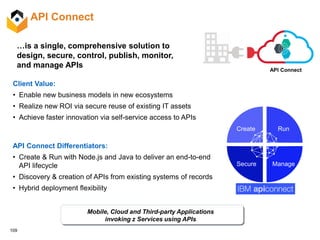
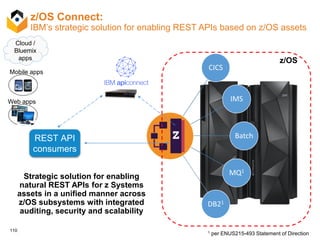
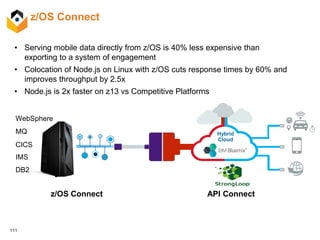
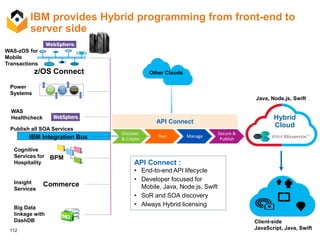
© 2016 IBM Corporation
Cloud Stack no servidor IBM LinuxONE
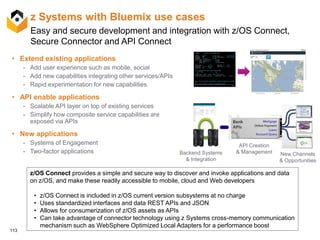
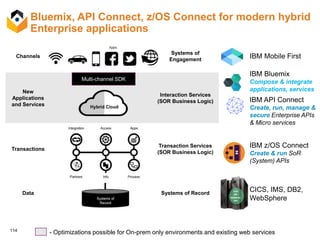
(a.k.a. servidor Mainframe)
© 2016 IBM Corporation
IBM z Systems
2
Referências Bibliográficas
Apresentação originalmente publicada no link do
DeveloperWorks:
• Cloud Stack for z Systems – July 2016 – Long Deck –
FinalPublished.pdf
https://www.ibm.com/developerworks/community/groups/servi
ce/html/communityview?communityUuid=9a17556c-6094-
4201-acd0-
d8125a3fa0db#fullpageWidgetId=Wce09c89acad9_4e56_b
4ec_e072b104159c&file=23a2d50f-5aa8-4230-ae4e-
49b93ea46edc
1
Cloud Stack Architecture for LoZ & LinuxONE
Kershaw Mehta – Chief Architect, Open Stack Solutions & PaaS (kershaw@us.ibm.com)
Mohammad Abdirashid – Program Manager & System Architect, Innovation Lab (abdir@us.ibm.com)
Utz Bacher – Lead Architect Linux and Docker on z (utz.bacher@de.ibm.com)
Elton DeSouza– Wizard & Technical Lead Innovation Lab (elton.desouza@ca.ibm.com)
July 10, 2016
2
• Cloud Stack Overview
• Hypervisor
• Infrastructure as a Service via OpenStack
• Container Management
• Microservices Architecture
• Deployment Management
• Platform as a Service
• Hybrid Cloud & the API Economy
Agenda
3
Cloud Management for Linux on z Systems
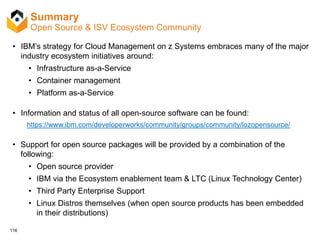
IBM’s strategy for Cloud Management for Linux on z Systems and LinuxONE is an
open and standards-based approach.
We support and embrace many of the major industry ecosystem initiatives
around:
• Infrastructure as-a-Service
• Container management
• Platform as-a-Service.
Note: This presentation applies to both Linux for z Systems and LinuxONE
environment, even though we may only refer to one of these.
4
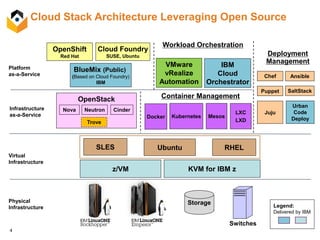
Cloud Stack Architecture Leveraging Open Source
Physical
Infrastructure
Storage
Switches
Virtual
Infrastructure
Infrastructure
as-a-Service
Platform
as-a-Service
z/VM KVM for IBM z
SLES
OpenStack
Nova Neutron Cinder
Docker
Container Management
Kubernetes Mesos
Cloud Foundry
SUSE, Ubuntu
OpenShift
Red Hat
BlueMix (Public)
(Based on Cloud Foundry)
IBM
LXC
LXD
Deployment
Management
Chef
Puppet
Ansible
SaltStack
Juju
Ubuntu RHEL
IBM
Cloud
Orchestrator
Workload Orchestration
VMware
vRealize
Automation
Legend:
Delivered by IBM
Urban
Code
Deploy
Trove
5
Partnership with Open Source Community
…including Linux Distros
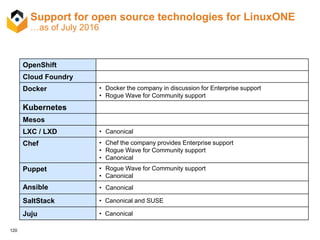
• Many of the open source technologies described earlier already run on and are proven
to work on Linux for z Systems - very little code needed to be changed.
• In many cases, IBM is working with the individual open source providers, in order to
officially support z Systems.
• Docker
• Chef
• Puppet
• etc…
• We have also been working with the Linux distributors to have them provide support for
the open source packages in their Enterprise Linux distributions.
• In addition we are working with the Linux distributors who provide add-on products
based on open source technology to also include support for z Systems. For example:
• SUSE OpenStack Cloud
• Ubuntu OpenStack
6
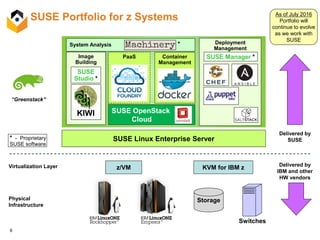
SUSE Portfolio for z Systems
Physical
Infrastructure
Virtualization Layer
Storage
Switches
z/VM KVM for IBM z
SUSE Linux Enterprise Server
Delivered by
IBM and other
HW vendors
Delivered by
SUSE
“Greenstack”
Deployment
Management
Image
Building
SUSE OpenStack
Cloud
Container
Management
PaaS SUSE Manager *
* - Proprietary
SUSE software
SUSE
Studio *
KIWI
System Analysis *
As of July 2016
Portfolio will
continue to evolve
as we work with
SUSE
7
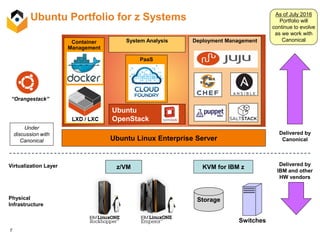
Ubuntu Portfolio for z Systems
Physical
Infrastructure
Virtualization Layer
Storage
Switches
z/VM KVM for IBM z
Ubuntu Linux Enterprise Server
Delivered by
IBM and other
HW vendors
Delivered by
Canonical
“Orangestack”
Deployment ManagementSystem Analysis
Ubuntu
OpenStack
Container
Management
PaaS
Under
discussion with
Canonical
As of July 2016
Portfolio will
continue to evolve
as we work with
Canonical
8
Hypervisors
9
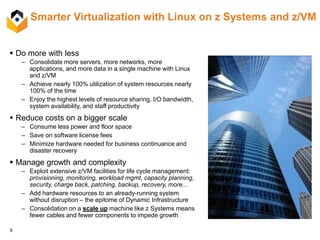
Smarter Virtualization with Linux on z Systems and z/VM
 Do more with less
– Consolidate more servers, more networks, more
applications, and more data in a single machine with Linux
and z/VM
– Achieve nearly 100% utilization of system resources nearly
100% of the time
– Enjoy the highest levels of resource sharing, I/O bandwidth,
system availability, and staff productivity
 Reduce costs on a bigger scale
– Consume less power and floor space
– Save on software license fees
– Minimize hardware needed for business continuance and
disaster recovery
 Manage growth and complexity
– Exploit extensive z/VM facilities for life cycle management:
provisioning, monitoring, workload mgmt, capacity planning,
security, charge back, patching, backup, recovery, more...
– Add hardware resources to an already-running system
without disruption – the epitome of Dynamic Infrastructure
– Consolidation on a scale up machine like z Systems means
fewer cables and fewer components to impede growth
10
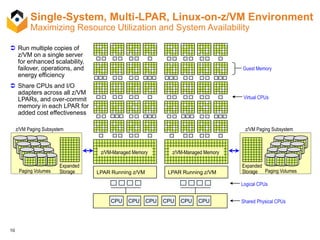
 Run multiple copies of
z/VM on a single server
for enhanced scalability,
failover, operations, and
energy efficiency
 Share CPUs and I/O
adapters across all z/VM
LPARs, and over-commit
memory in each LPAR for
added cost effectiveness
CPU CPU CPU Shared Physical CPUsCPU CPUCPU
z/VM Paging Subsystem
Expanded
Storage Paging Volumes
Virtual CPUs
z/VM Paging Subsystem
Expanded
Storage
Guest Memory
LPAR Running z/VM LPAR Running z/VM
Logical CPUs
z/VM-Managed Memory z/VM-Managed Memory
Paging Volumes
Single-System, Multi-LPAR, Linux-on-z/VM Environment
Maximizing Resource Utilization and System Availability
11
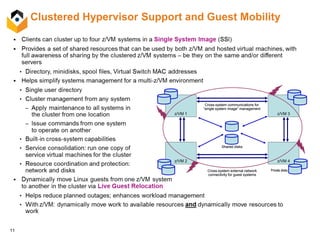
Clustered Hypervisor Support and Guest Mobility
z/VM 2
z/VM 1
z/VM 4
z/VM 3
Shared disks
Private disks
Cross-system communications for
“single system image” management
Cross-system external network
connectivity for guest systems
z/VM 2
z/VM 1
z/VM 4
z/VM 3
Shared disks
Private disks
Cross-system communications for
“single system image” management
Cross-system external network
connectivity for guest systems
12
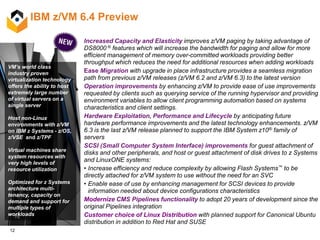
IBM z/VM 6.4 Preview
VM’s world class
industry proven
virtualization technology
offers the ability to host
extremely large number
of virtual servers on a
single server
Host non-Linux
environments with z/VM
on IBM z Systems - z/OS,
z/VSE and z/TPF
Virtual machines share
system resources with
very high levels of
resource utilization.
Optimized for z Systems
architecture multi-
tenancy, capacity on
demand and support for
multiple types of
workloads
Increased Capacity and Elasticity improves z/VM paging by taking advantage of
DS8000 ® features which will increase the bandwidth for paging and allow for more
efficient management of memory over-committed workloads providing better
throughput which reduces the need for additional resources when adding workloads
Ease Migration with upgrade in place infrastructure provides a seamless migration
path from previous z/VM releases (z/VM 6.2 and z/VM 6.3) to the latest version
Operation improvements by enhancing z/VM to provide ease of use improvements
requested by clients such as querying service of the running hypervisor and providing
environment variables to allow client programming automation based on systems
characteristics and client settings.
Hardware Exploitation, Performance and Lifecycle by anticipating future
hardware performance improvements and the latest technology enhancements. z/VM
6.3 is the last z/VM release planned to support the IBM System z10® family of
servers
SCSI (Small Computer System Interface) improvements for guest attachment of
disks and other peripherals, and host or guest attachment of disk drives to z Systems
and LinuxONE systems:
• Increase efficiency and reduce complexity by allowing Flash Systems™ to be
directly attached for z/VM system to use without the need for an SVC
• Enable ease of use by enhancing management for SCSI devices to provide
information needed about device configurations characteristics
Modernize CMS Pipelines functionality to adopt 20 years of development since the
original Pipelines integration
Customer choice of Linux Distribution with planned support for Canonical Ubuntu
distribution in addition to Red Hat and SUSE
13
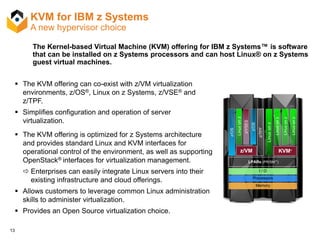
KVM for IBM z Systems
A new hypervisor choice
The Kernel-based Virtual Machine (KVM) offering for IBM z Systems™ is software
that can be installed on z Systems processors and can host Linux® on z Systems
guest virtual machines.
 The KVM offering can co-exist with z/VM virtualization
environments, z/OS®, Linux on z Systems, z/VSE® and
z/TPF.
 Simplifies configuration and operation of server
virtualization.
 The KVM offering is optimized for z Systems architecture
and provides standard Linux and KVM interfaces for
operational control of the environment, as well as supporting
OpenStack® interfaces for virtualization management.
 Enterprises can easily integrate Linux servers into their
existing infrastructure and cloud offerings.
 Allows customers to leverage common Linux administration
skills to administer virtualization.
 Provides an Open Source virtualization choice.
LPARs (PR/SM™)
z/TPF
z/OS
KVM*z/VM
z/OS
Linuxonz
Linuxonz
Linuxonz
Linuxonz
Linuxonz
Memory
Processors
I / O
z/VSES
14
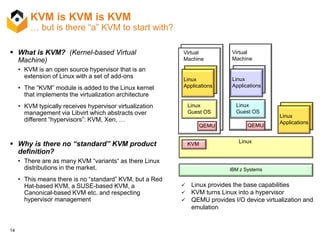
KVM is KVM is KVM
… but is there “a” KVM to start with?
 What is KVM? (Kernel-based Virtual
Machine)
• KVM is an open source hypervisor that is an
extension of Linux with a set of add-ons
• The “KVM” module is added to the Linux kernel
that implements the virtualization architecture
• KVM typically receives hypervisor virtualization
management via Libvirt which abstracts over
different “hypervisors”: KVM, Xen, …
 Why is there no “standard” KVM product
definition?
• There are as many KVM “variants“ as there Linux
distributions in the market.
• This means there is no “standard” KVM, but a Red
Hat-based KVM, a SUSE-based KVM, a
Canonical-based KVM etc. and respecting
hypervisor management
IBM z Systems
LinuxKVM
Virtual
Machine
QEMU
Linux
Guest OS
Linux
Applications
Virtual
Machine
QEMU
Linux
Guest OS
Linux
Applications
Linux
Applications
 Linux provides the base capabilities
 KVM turns Linux into a hypervisor
 QEMU provides I/O device virtualization and
emulation
15
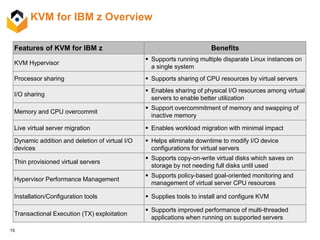
KVM for IBM z Overview
Features of KVM for IBM z Benefits
KVM Hypervisor
 Supports running multiple disparate Linux instances on
a single system
Processor sharing  Supports sharing of CPU resources by virtual servers
I/O sharing
 Enables sharing of physical I/O resources among virtual
servers to enable better utilization
Memory and CPU overcommit
 Support overcommitment of memory and swapping of
inactive memory
Live virtual server migration  Enables workload migration with minimal impact
Dynamic addition and deletion of virtual I/O
devices
 Helps eliminate downtime to modify I/O device
configurations for virtual servers
Thin provisioned virtual servers
 Supports copy-on-write virtual disks which saves on
storage by not needing full disks until used
Hypervisor Performance Management
 Supports policy-based goal-oriented monitoring and
management of virtual server CPU resources
Installation/Configuration tools  Supplies tools to install and configure KVM
Transactional Execution (TX) exploitation
 Supports improved performance of multi-threaded
applications when running on supported servers
16
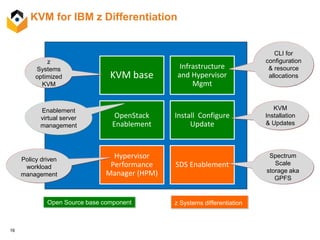
KVM for IBM z Differentiation
KVM base
Infrastructure
and Hypervisor
Mgmt
Install Configure
Update
Hypervisor
Performance
Manager (HPM)
SDS Enablement
CLI for
configuration
& resource
allocations
Spectrum
Scale
storage aka
GPFS
z
Systems
optimized
KVM
Policy driven
workload
management
KVM
Installation
& Updates
z Systems differentiationOpen Source base component
OpenStack
Enablement
Enablement
virtual server
management
17
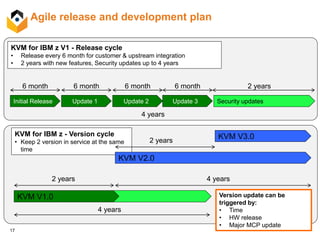
Agile release and development plan
Initial Release
4 years
KVM for IBM z V1 - Release cycle
• Release every 6 month for customer & upstream integration
• 2 years with new features, Security updates up to 4 years
6 month
Update 1
6 month
Update 2
6 month
Update 3
6 month
Security updates
2 years
KVM 1.0
KVM V3.0
4 years
2 years 4 years
2 years
KVM for IBM z - Version cycle
• Keep 2 version in service at the same
time
Version update can be
triggered by:
• Time
• HW release
• Major MCP update
KVM V1.0
KVM V2.0
18
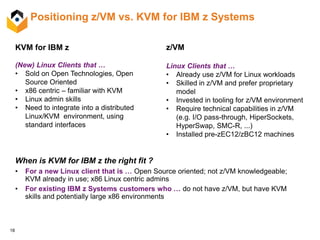
Positioning z/VM vs. KVM for IBM z Systems
When is KVM for IBM z the right fit ?
• For a new Linux client that is … Open Source oriented; not z/VM knowledgeable;
KVM already in use; x86 Linux centric admins
• For existing IBM z Systems customers who … do not have z/VM, but have KVM
skills and potentially large x86 environments
KVM for IBM z
(New) Linux Clients that …
• Sold on Open Technologies, Open
Source Oriented
• x86 centric – familiar with KVM
• Linux admin skills
• Need to integrate into a distributed
Linux/KVM environment, using
standard interfaces
z/VM
Linux Clients that …
• Already use z/VM for Linux workloads
• Skilled in z/VM and prefer proprietary
model
• Invested in tooling for z/VM environment
• Require technical capabilities in z/VM
(e.g. I/O pass-through, HiperSockets,
HyperSwap, SMC-R, ...)
• Installed pre-zEC12/zBC12 machines
19
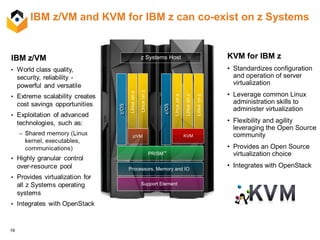
IBM z/VM and KVM for IBM z can co-exist on z Systems
KVM for IBM z
• Standardizes configuration
and operation of server
virtualization
• Leverage common Linux
administration skills to
administer virtualization
• Flexibility and agility
leveraging the Open Source
community
• Provides an Open Source
virtualization choice
• Integrates with OpenStackProcessors, Memory and IO
Support Element
z Systems Host
PR/SM™
Linuxonz
z/OS
Linuxonz
Linuxonz
Linuxonz
z/OS
KVMz/VM
Linuxonz
20
Infrastructure as a Service
via OpenStack
21
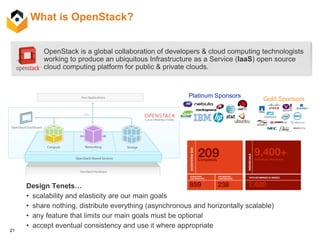
What is OpenStack?
OpenStack is a global collaboration of developers & cloud computing technologists
working to produce an ubiquitous Infrastructure as a Service (IaaS) open source
cloud computing platform for public & private clouds.
Platinum Sponsors
Gold Sponsors
Design Tenets…
• scalability and elasticity are our main goals
• share nothing, distribute everything (asynchronous and horizontally scalable)
• any feature that limits our main goals must be optional
• accept eventual consistency and use it where appropriate
22
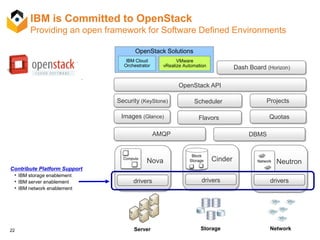
IBM is Committed to OpenStack
Providing an open framework for Software Defined Environments
Neutron
drivers
Contribute Platform Support
• IBM storage enablement
• IBM server enablement
• IBM network enablement
OpenStack API
Security (KeyStone) Scheduler Projects
Images (Glance) Quotas
OpenStack Solutions
Nova
drivers
Server
Cinder
drivers
Storage Network
AMQP DBMS
Flavors
IBM Cloud
Orchestrator Dash Board (Horizon)
VMware
vRealize Automation
23
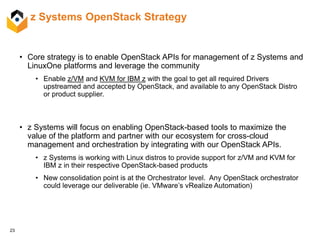
z Systems OpenStack Strategy
• Core strategy is to enable OpenStack APIs for management of z Systems and
LinuxOne platforms and leverage the community
• Enable z/VM and KVM for IBM z with the goal to get all required Drivers
upstreamed and accepted by OpenStack, and available to any OpenStack Distro
or product supplier.
• z Systems will focus on enabling OpenStack-based tools to maximize the
value of the platform and partner with our ecosystem for cross-cloud
management and orchestration by integrating with our OpenStack APIs.
• z Systems is working with Linux distros to provide support for z/VM and KVM for
IBM z in their respective OpenStack-based products
• New consolidation point is at the Orchestrator level. Any OpenStack orchestrator
could leverage our deliverable (ie. VMware’s vRealize Automation)
24
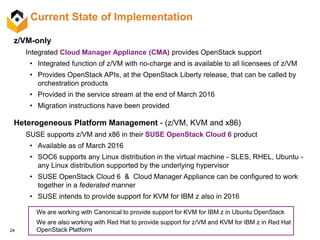
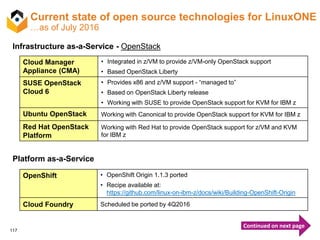
Current State of Implementation
z/VM-only
Integrated Cloud Manager Appliance (CMA) provides OpenStack support
• Integrated function of z/VM with no-charge and is available to all licensees of z/VM
• Provides OpenStack APIs, at the OpenStack Liberty release, that can be called by
orchestration products
• Provided in the service stream at the end of March 2016
• Migration instructions have been provided
Heterogeneous Platform Management - (z/VM, KVM and x86)
SUSE supports z/VM and x86 in their SUSE OpenStack Cloud 6 product
• Available as of March 2016
• SOC6 supports any Linux distribution in the virtual machine - SLES, RHEL, Ubuntu -
any Linux distribution supported by the underlying hypervisor
• SUSE OpenStack Cloud 6 & Cloud Manager Appliance can be configured to work
together in a federated manner
• SUSE intends to provide support for KVM for IBM z also in 2016
We are working with Canonical to provide support for KVM for IBM z in Ubuntu OpenStack
We are also working with Red Hat to provide support for z/VM and KVM for IBM z in Red Hat
OpenStack Platform
25
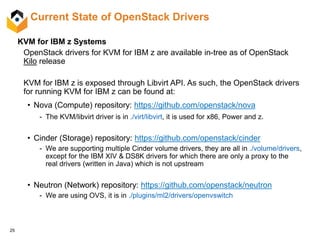
Current State of OpenStack Drivers
KVM for IBM z Systems
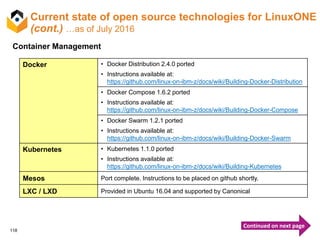
OpenStack drivers for KVM for IBM z are available in-tree as of OpenStack
Kilo release
KVM for IBM z is exposed through Libvirt API. As such, the OpenStack drivers
for running KVM for IBM z can be found at:
• Nova (Compute) repository: https://github.com/openstack/nova
- The KVM/libvirt driver is in ./virt/libvirt, it is used for x86, Power and z.
• Cinder (Storage) repository: https://github.com/openstack/cinder
- We are supporting multiple Cinder volume drivers, they are all in ./volume/drivers,
except for the IBM XIV & DS8K drivers for which there are only a proxy to the
real drivers (written in Java) which is not upstream
• Neutron (Network) repository: https://github.com/openstack/neutron
- We are using OVS, it is in ./plugins/ml2/drivers/openvswitch
26
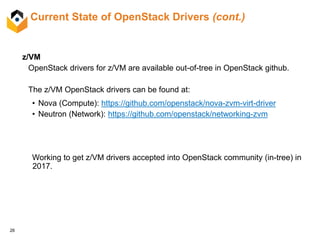
Current State of OpenStack Drivers (cont.)
z/VM
OpenStack drivers for z/VM are available out-of-tree in OpenStack github.
The z/VM OpenStack drivers can be found at:
• Nova (Compute): https://github.com/openstack/nova-zvm-virt-driver
• Neutron (Network): https://github.com/openstack/networking-zvm
Working to get z/VM drivers accepted into OpenStack community (in-tree) in
2017.
27
z Systems OpenStack Strategy - Key Takeaways
• z Systems is partnering with our Linux Distros to have them deliver
OpenStack support for our platform in their respective products.
• z Systems will continue to work with the OpenStack open source community
to influence and accept our technology.
• z Systems is working closely with our ecosystem partners to define a Cloud
Stack that sits on top of Infrastructure as-a-Service to enable a consistent
management paradigm and deliver higher value.
28
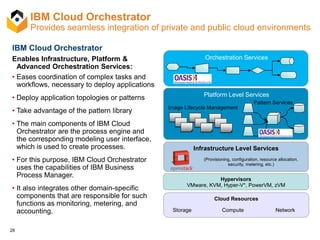
IBM Cloud Orchestrator
Enables Infrastructure, Platform &
Advanced Orchestration Services:
• Eases coordination of complex tasks and
workflows, necessary to deploy applications
• Deploy application topologies or patterns
• Take advantage of the pattern library
• The main components of IBM Cloud
Orchestrator are the process engine and
the corresponding modeling user interface,
which is used to create processes.
• For this purpose, IBM Cloud Orchestrator
uses the capabilities of IBM Business
Process Manager.
• It also integrates other domain-specific
components that are responsible for such
functions as monitoring, metering, and
accounting.
Orchestration Services
Platform Level Services
Infrastructure Level Services
Image Lifecycle Management
Pattern Services
Cloud Resources
Storage Compute Network
(Provisioning, configuration, resource allocation,
security, metering, etc.)
Hypervisors
VMware, KVM, Hyper-V*, PowerVM, zVM
IBM Cloud Orchestrator
Provides seamless integration of private and public cloud environments
29
IBM and VMware announced a cooperative effort to give our mutual clients the
ability to provision and manage virtual machines and applications running on
IBM Power Systems and IBM z Systems with VMware's vRealize™
Automation™ 6.2 (vRA) solution through OpenStack enabled APIs.
VMware vRA (vRealize Automation) support
30
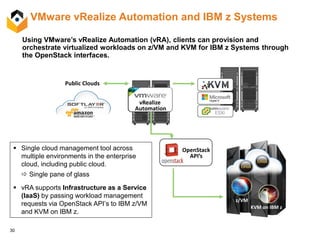
VMware vRealize Automation and IBM z Systems
Using VMware’s vRealize Automation (vRA), clients can provision and
orchestrate virtualized workloads on z/VM and KVM for IBM z Systems through
the OpenStack interfaces.
 Single cloud management tool across
multiple environments in the enterprise
cloud, including public cloud.
 Single pane of glass
 vRA supports Infrastructure as a Service
(IaaS) by passing workload management
requests via OpenStack API’s to IBM z/VM
and KVM on IBM z.
Public Clouds
z/VM
KVM on IBM z
vRealize
Automation
OpenStack
API’s
31
Container Management
32
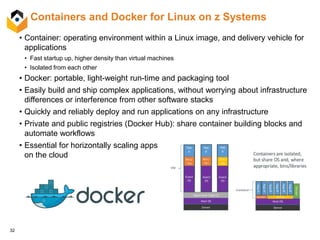
• Container: operating environment within a Linux image, and delivery vehicle for
applications
• Fast startup up, higher density than virtual machines
• Isolated from each other
• Docker: portable, light-weight run-time and packaging tool
• Easily build and ship complex applications, without worrying about infrastructure
differences or interference from other software stacks
• Quickly and reliably deploy and run applications on any infrastructure
• Private and public registries (Docker Hub): share container building blocks and
automate workflows
• Essential for horizontally scaling apps
on the cloud
Containers and Docker for Linux on z Systems
33
Use cases
• Facilitates portability and cross platform deployment through generic build description
• Develop applications on x86 and build for both x86 and z platforms, seamlessly deploy to x86
and z Systems
• Package applications without worrying about dependencies on other libraries and
software
• If container app requires dependencies, creator of the container adds them to the container
image
• Entirely independent of host software level
• Simple re-use of components
• One container image used to deploy same application many times by different people
• Supports micro-service architecture by simple deployment and management of
components
• Large application consisting of several SW components can be broken down into multiple
containers to allow for reuse of parts
• Large density through lightweight container isolation mechanism in Linux kernel
• Hundreds to thousands of virtual containers to run in one system
• Docker ties Dev and Ops together
• Consistent environment from Dev to Ops facilitates staging and avoids environmental errors
34
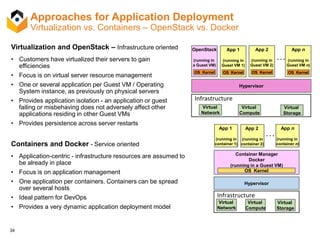
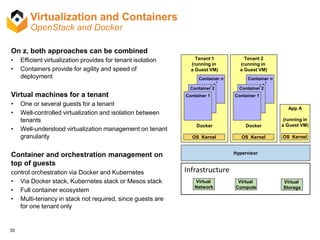
Approaches for Application Deployment
Virtualization vs. Containers – OpenStack vs. Docker
Virtualization and OpenStack – Infrastructure oriented
• Customers have virtualized their servers to gain
efficiencies
• Focus is on virtual server resource management
• One or several application per Guest VM / Operating
System instance, as previously on physical servers
• Provides application isolation - an application or guest
failing or misbehaving does not adversely affect other
applications residing in other Guest VMs
• Provides persistence across server restarts
Containers and Docker - Service oriented
• Application-centric - infrastructure resources are assumed to
be already in place
• Focus is on application management
• One application per containers. Containers can be spread
over several hosts
• Ideal pattern for DevOps
• Provides a very dynamic application deployment model
Hypervisor
OpenStack
(running in
a Guest VM)
App n
(running in
Guest VM n)
App 1
(running in
Guest VM 1)
App 2
(running in
Guest VM 2)
OS Kernel OS KernelOS KernelOS Kernel
. . .
Virtual
Compute
Virtual
Storage
Infrastructure
Virtual
Network
Hypervisor
Container Manager
Docker
(running in a Guest VM)
App 1
(running in
container 1)
App 2
(running in
container 2)
App n
(running in
container n)
. . .
OS Kernel
Virtual
Compute
Virtual
Storage
Infrastructure
Virtual
Network
35
Virtualization and Containers
OpenStack and Docker
On z, both approaches can be combined
• Efficient virtualization provides for tenant isolation
• Containers provide for agility and speed of
deployment
Virtual machines for a tenant
• One or several guests for a tenant
• Well-controlled virtualization and isolation between
tenants
• Well-understood virtualization management on tenant
granularity
Container and orchestration management on
top of guests
control orchestration via Docker and Kubernetes
• Via Docker stack, Kubernetes stack or Mesos stack
• Full container ecosystem
• Multi-tenancy in stack not required, since guests are
for one tenant only
Tenant 1
(running in
a Guest VM)
Docker
Hypervisor
Virtual
Compute
Virtual
Storage
Infrastructure
Virtual
Network
Tenant 2
(running in
a Guest VM)
Docker
OS Kernel
Container n
Container 2
Container 1
Container n
Container 2
Container 1
...
...
App A
(running in
a Guest VM)
OS KernelOS Kernel
36
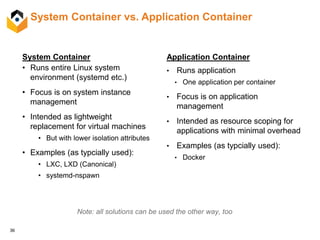
System Container vs. Application Container
System Container
• Runs entire Linux system
environment (systemd etc.)
• Focus is on system instance
management
• Intended as lightweight
replacement for virtual machines
• But with lower isolation attributes
• Examples (as typcially used):
• LXC, LXD (Canonical)
• systemd-nspawn
Application Container
• Runs application
• One application per container
• Focus is on application
management
• Intended as resource scoping for
applications with minimal overhead
• Examples (as typcially used):
• Docker
Note: all solutions can be used the other way, too
37
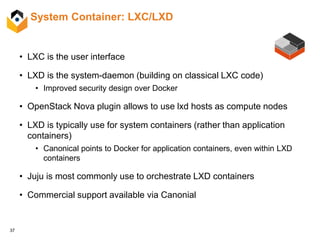
System Container: LXC/LXD
• LXC is the user interface
• LXD is the system-daemon (building on classical LXC code)
• Improved security design over Docker
• OpenStack Nova plugin allows to use lxd hosts as compute nodes
• LXD is typically use for system containers (rather than application
containers)
• Canonical points to Docker for application containers, even within LXD
containers
• Juju is most commonly use to orchestrate LXD containers
• Commercial support available via Canonial
38
Mgmt Infrastructure
Cluster OrchestrationRegistry
Docker Engine
PaaS (or SaaS)
Overlay networks
Storage volumes
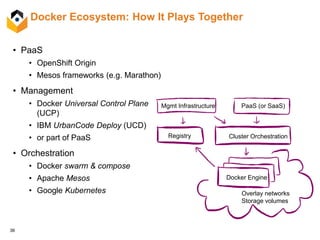
Docker Ecosystem: How It Plays Together
• PaaS
• OpenShift Origin
• Mesos frameworks (e.g. Marathon)
• Management
• Docker Universal Control Plane
(UCP)
• IBM UrbanCode Deploy (UCD)
• or part of PaaS
• Orchestration
• Docker swarm & compose
• Apache Mesos
• Google Kubernetes
39
Docker Ecosystem: Registry
• Docker Hub: Public Registry with User and Organization Management
• Private areas available
• Contains ~100 official images of companies (Ubuntu, MongoDB, …)
• Automated builds possible
• On-premise Private Registry (“distribution”): Open Source
• Simple user management (No web UI)
• Docker Trusted Registry (DTR): Commercial Docker Offering
• User and organization management
• AD/LDAP authentication
• Note: runs on x86 only at this time
 SUSE Portus: Open Source Authorization Service and Frontend for Private
Registry
• Users and organization management
• LDAP authentication
40
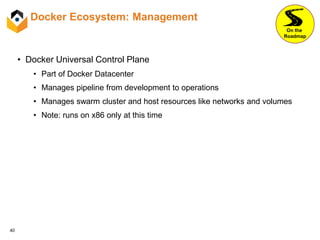
Docker Ecosystem: Management
• Docker Universal Control Plane
• Part of Docker Datacenter
• Manages pipeline from development to operations
• Manages swarm cluster and host resources like networks and volumes
• Note: runs on x86 only at this time
On the
Roadmap
41
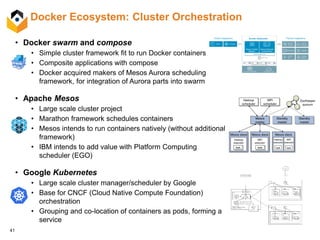
Docker Ecosystem: Cluster Orchestration
• Docker swarm and compose
• Simple cluster framework fit to run Docker containers
• Composite applications with compose
• Docker acquired makers of Mesos Aurora scheduling
framework, for integration of Aurora parts into swarm
• Apache Mesos
• Large scale cluster project
• Marathon framework schedules containers
• Mesos intends to run containers natively (without additional
framework)
• IBM intends to add value with Platform Computing
scheduler (EGO)
• Google Kubernetes
• Large scale cluster manager/scheduler by Google
• Base for CNCF (Cloud Native Compute Foundation)
orchestration
• Grouping and co-location of containers as pods, forming a
service
42
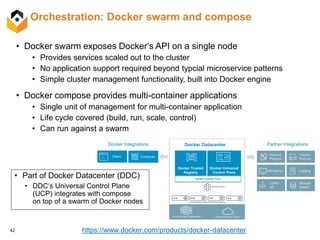
Orchestration: Docker swarm and compose
• Docker swarm exposes Docker‘s API on a single node
• Provides services scaled out to the cluster
• No application support required beyond typcial microservice patterns
• Simple cluster management functionality, built into Docker engine
• Docker compose provides multi-container applications
• Single unit of management for multi-container application
• Life cycle covered (build, run, scale, control)
• Can run against a swarm
• Part of Docker Datacenter (DDC)
• DDC‘s Universal Control Plane
(UCP) integrates with compose
on top of a swarm of Docker nodes
https://www.docker.com/products/docker-datacenter
43
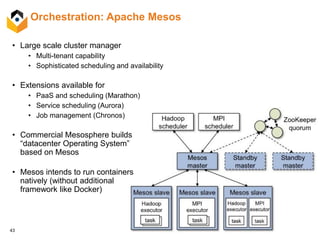
Orchestration: Apache Mesos
• Large scale cluster manager
• Multi-tenant capability
• Sophisticated scheduling and availability
• Extensions available for
• PaaS and scheduling (Marathon)
• Service scheduling (Aurora)
• Job management (Chronos)
• Commercial Mesosphere builds
“datacenter Operating System”
based on Mesos
• Mesos intends to run containers
natively (without additional
framework like Docker)
44
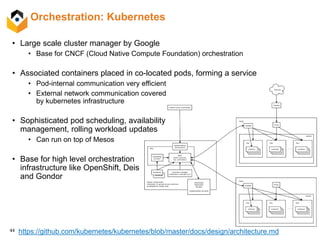
Orchestration: Kubernetes
• Large scale cluster manager by Google
• Base for CNCF (Cloud Native Compute Foundation) orchestration
• Associated containers placed in co-located pods, forming a service
• Pod-internal communication very efficient
• External network communication covered
by kubernetes infrastructure
• Sophisticated pod scheduling, availability
management, rolling workload updates
• Can run on top of Mesos
• Base for high level orchestration
infrastructure like OpenShift, Deis
and Gondor
https://github.com/kubernetes/kubernetes/blob/master/docs/design/architecture.md
45
Docker Ecosystem: Logging and Monitoring
Log Management: feed application logs
via Docker logging infrastructure into
(non-Docker specific) tools
• Large Open Source ecosystem, usually
combinations:
1.Logging via Logstash, Fluentd
2.Storage typically via Elasticsearch
3.Analysis via Kibana
• QRadar by IBM Security: Security
Information and Event Management
• Integration with many components
of enterprise IT infrastructure
• Splunk: Universal log management and
analysis framework
• Many players in Cloud-based services
(logentries, splunk, loggly, ...)
Monitoring: most projects existing and
extended towards Docker support
 Open Source:
– cAdvisor by Google: simple web UI
with API support for Docker
– Prometheus: sophisticated framework
46
Open Container Initiative (OCI)
• IBM is a founding member & active participant of the OCI
• Docker is de-facto container format standard
• CoreOS launched competitive and open approach (rocket container runtime,
appc container format)
• Open Container Initiative to define industry standard container format and runtime
• Housed under the Linux Foundation, sponsored by many IT companies
• Including CoreOS, Docker, Google, IBM, the Linux Foundation, Mesosphere,
Microsoft, Red Hat, SUSE, VMWare, ...
• Docker donated their container format and runtime (“runc”)
• OCI principles for container specification:
• Not bound to specific higher level stack (e.g. orchestration)
• Not bound to particular client, vendor, or project
• Portable across OS, hardware, CPU architectures, public clouds
47
Microservices Architecture
48
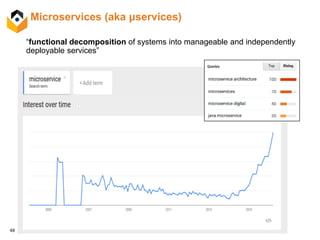
Microservices (aka μservices)
“functional decomposition of systems into manageable and independently
deployable services”
49
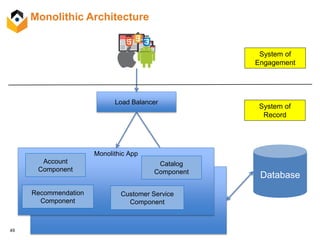
Monolithic Architecture
Load Balancer
Monolithic App
Account
Component
Catalog
Component
Recommendation
Component
Customer Service
Component
Database
System of
Engagement
System of
Record
50
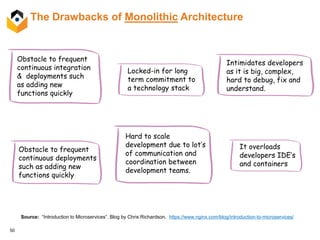
The Drawbacks of Monolithic Architecture
Obstacle to frequent
continuous integration
& deployments such
as adding new
functions quickly
Locked-in for long
term commitment to
a technology stack
It overloads
developers IDE’s
and containers
Obstacle to frequent
continuous deployments
such as adding new
functions quickly
Intimidates developers
as it is big, complex,
hard to debug, fix and
understand.
Hard to scale
development due to lot’s
of communication and
coordination between
development teams.
Source: “Introduction to Microservices”. Blog by Chris Richardson. https://www.nginx.com/blog/introduction-to-microservices/
51
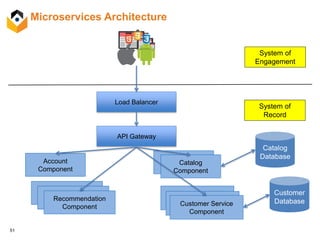
Microservices Architecture
Load Balancer
Account
Component
Catalog
Component
Recommendation
Component Customer Service
Component
Catalog
Database
Catalog
Component
Customer Service
Component
Customer Service
Component
Recommendation
ComponentRecommendation
Component
API Gateway
Customer
Database
System of
Engagement
System of
Record
52
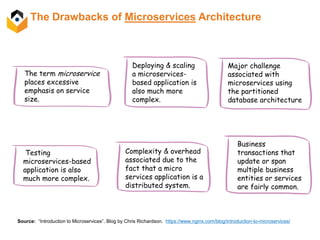
The Drawbacks of Microservices Architecture
The term microservice
places excessive
emphasis on service
size.
Deploying & scaling
a microservices-
based application is
also much more
complex.
Testing
microservices-based
application is also
much more complex.
Major challenge
associated with
microservices using
the partitioned
database architecture
Business
transactions that
update or span
multiple business
entities or services
are fairly common.
Complexity & overhead
associated due to the
fact that a micro
services application is a
distributed system.
Source: “Introduction to Microservices”. Blog by Chris Richardson. https://www.nginx.com/blog/introduction-to-microservices/
53
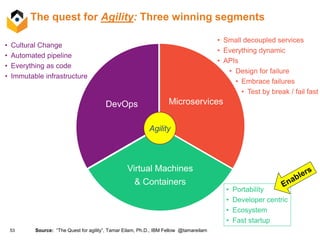
The quest for Agility: Three winning segments
• Cultural Change
• Automated pipeline
• Everything as code
• Immutable infrastructure
Source: “The Quest for agility”, Tamar Eilam, Ph.D., IBM Fellow @tamareilam
Microservices
Virtual Machines
& Containers
DevOps
• Small decoupled services
• Everything dynamic
• APIs
• Design for failure
• Embrace failures
• Test by break / fail fast
Agility
• Portability
• Developer centric
• Ecosystem
• Fast startup
54
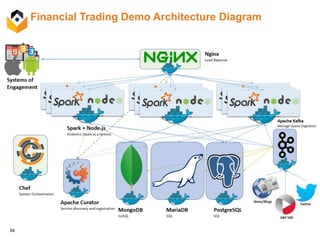
Financial Trading Demo Architecture Diagram
55
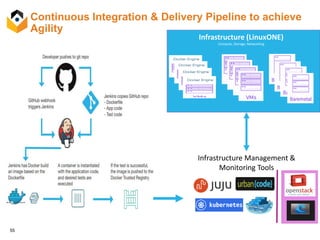
Continuous Integration & Delivery Pipeline to achieve
Agility
Clustering & Scheduling
(Orchestration)
Infrastructure (LinuxONE)
Compute, Storage, Networking
Infrastructure Management &
Monitoring Tools
56
The Art of Scalability
by Martin L. Abbot and Michael T. Fisher
Source: http://theartofscalability.com
57
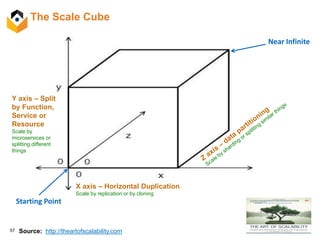
The Scale Cube
Source: http://theartofscalability.com
Y axis – Split
by Function,
Service or
Resource
Scale by
microservices or
splitting different
things
X axis – Horizontal Duplication
Scale by replication or by cloning
Near Infinite
Starting Point
58
The Scale Cube
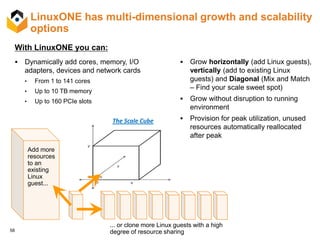
LinuxONE has multi-dimensional growth and scalability
options
Add more
resources
to an
existing
Linux
guest...
 Grow horizontally (add Linux guests),
vertically (add to existing Linux
guests) and Diagonal (Mix and Match
– Find your scale sweet spot)
 Grow without disruption to running
environment
 Provision for peak utilization, unused
resources automatically reallocated
after peak
... or clone more Linux guests with a high
degree of resource sharing
With LinuxONE you can:
 Dynamically add cores, memory, I/O
adapters, devices and network cards
• From 1 to 141 cores
• Up to 10 TB memory
• Up to 160 PCIe slots
59
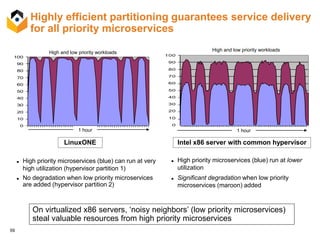
Highly efficient partitioning guarantees service delivery
for all priority microservices
 High priority microservices (blue) can run at very
high utilization (hypervisor partition 1)
 No degradation when low priority microservices
are added (hypervisor partition 2)
 High priority microservices (blue) run at lower
utilization
 Significant degradation when low priority
microservices (maroon) added
High priority workloads
zVM 10VM 32 Core % CPU Usage
0
10
20
30
40
50
60
70
80
90
100
1 5 9 13 17 21 25 29 33 37 41 45 49 53 57
Time (mins)
%CPUUsage
Usage - FB Standalone
z/VM 10VM 32 Core CPU Usage With Physical
0.00
10.00
20.00
30.00
40.00
50.00
60.00
70.00
80.00
90.00
100.00
1 5 9 13 17 21 25 29 33 37 41 45 49 53 57
Time (mins)
%CPUUsage
Donor Workload
Priority Workload
High and low priority workloads
Intel x86 server with common hypervisorLinuxONE
ESX % CPU Usage FB
0
10
20
30
40
50
60
70
80
90
100
0
6
12
17
23
29
34
40
46
51
Time (mins)
%CPUUsage
ESX CPU Usage Shared
0.00
10.00
20.00
30.00
40.00
50.00
60.00
70.00
80.00
90.00
100.00
0
5
10
15
20
25
30
35
40
45
50
55
Time (mins)
%CPUUsage
High and low priority workloads
On virtualized x86 servers, ‘noisy neighbors’ (low priority microservices)
steal valuable resources from high priority microservices
1 hour 1 hour
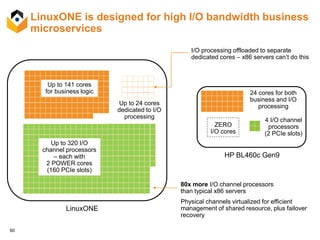
60
LinuxONE is designed for high I/O bandwidth business
microservices
Up to 141 cores
for business logic
Up to 320 I/O
channel processors
– each with
2 POWER cores
(160 PCIe slots)
Up to 24 cores
dedicated to I/O
processing
LinuxONE
HP BL460c Gen9
24 cores for both
business and I/O
processing
ZERO
I/O cores
4 I/O channel
processors
(2 PCIe slots)
I/O processing offloaded to separate
dedicated cores – x86 servers can’t do this
80x more I/O channel processors
than typical x86 servers
Physical channels virtualized for efficient
management of shared resource, plus failover
recovery
61
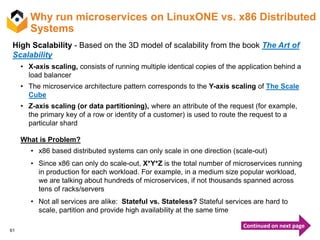
Why run microservices on LinuxONE vs. x86 Distributed
Systems
High Scalability - Based on the 3D model of scalability from the book The Art of
Scalability
• X-axis scaling, consists of running multiple identical copies of the application behind a
load balancer
• The microservice architecture pattern corresponds to the Y-axis scaling of The Scale
Cube
• Z-axis scaling (or data partitioning), where an attribute of the request (for example,
the primary key of a row or identity of a customer) is used to route the request to a
particular shard
What is Problem?
• x86 based distributed systems can only scale in one direction (scale-out)
• Since x86 can only do scale-out, X*Y*Z is the total number of microservices running
in production for each workload. For example, in a medium size popular workload,
we are talking about hundreds of microservices, if not thousands spanned across
tens of racks/servers
• Not all services are alike: Stateful vs. Stateless? Stateful services are hard to
scale, partition and provide high availability at the same time
Continued on next page
62
Why run microservices on LinuxONE vs. x86 Distributed
Systems (cont.)
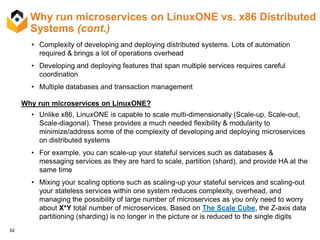
• Complexity of developing and deploying distributed systems. Lots of automation
required & brings a lot of operations overhead
• Developing and deploying features that span multiple services requires careful
coordination
• Multiple databases and transaction management
Why run microservices on LinuxONE?
• Unlike x86, LinuxONE is capable to scale multi-dimensionally (Scale-up, Scale-out,
Scale-diagonal). These provides a much needed flexibility & modularity to
minimize/address some of the complexity of developing and deploying microservices
on distributed systems
• For example, you can scale-up your stateful services such as databases &
messaging services as they are hard to scale, partition (shard), and provide HA at the
same time
• Mixing your scaling options such as scaling-up your stateful services and scaling-out
your stateless services within one system reduces complexity, overhead, and
managing the possibility of large number of microservices as you only need to worry
about X*Y total number of microservices. Based on The Scale Cube, the Z-axis data
partitioning (sharding) is no longer in the picture or is reduced to the single digits
63
Why run microservices on LinuxONE vs. x86 Distributed
Systems (cont.)
Latency
What is the Problem?
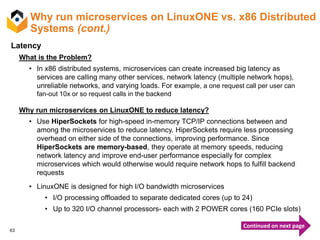
• In x86 distributed systems, microservices can create increased big latency as
services are calling many other services, network latency (multiple network hops),
unreliable networks, and varying loads. For example, a one request call per user can
fan-out 10x or so request calls in the backend
Why run microservices on LinuxONE to reduce latency?
• Use HiperSockets for high-speed in-memory TCP/IP connections between and
among the microservices to reduce latency. HiperSockets require less processing
overhead on either side of the connections, improving performance. Since
HiperSockets are memory-based, they operate at memory speeds, reducing
network latency and improve end-user performance especially for complex
microservices which would otherwise would require network hops to fulfill backend
requests
• LinuxONE is designed for high I/O bandwidth microservices
• I/O processing offloaded to separate dedicated cores (up to 24)
• Up to 320 I/O channel processors- each with 2 POWER cores (160 PCIe slots)
Continued on next page
64
Why run microservices on LinuxONE vs. x86 Distributed
Systems (cont.)
• In LinuxONE, you can co-locate all your microservices in one single box. For
example, co-locate:
• Systems of Record + Systems of Insight + Systems of Engagement
in-a-Box on LinuxONE
• Co-locate SOR, SOI, and SOE for right-time insights and richer engagement
• For example:
• Co-locating Node.js microservices w/ SOR on LinuxONE vs. x86 results in
60% Faster Response Time 2.5x better Throughput
• Apache Spark co-located on LinuxONE drove up to 3x faster than Spark
running off- platform on x86 for aggregation analytical query
65
Deployment Management
66
Pain points associated without Configuration and
Deployment Management Tools
• Without configuration & deployment management tools, there is no way to
obtain information about the assets that support IT services or the
relationships between them.
• Lack of configuration management and accurate deployment data can cause
an organization a significant harm to it’s IT operations. Whether this is related
to incidents, problems, change, service level or service costing.
• Hard to debug and resolve incidents on time and identify what is actually
broken. This could have a significance effect on existing SLA’s.
• IT service architecture for even small organizations can be complex and
extensive. Without proper configuration and deployment tools, the
organization is opening itself to a great deal of uncertainty and risk.
• Without the configuration and deployment management data, this makes it
difficult for IT departments to successfully execute more client-facing service
management activities, particularly incident and change management.
67
Benefits of Using Deployment Management
• Save time and reduce errors in your infrastructure by automating
(Infrastructure as a Code) provisioning and configuration at scale
• Reduce risk by automating complex processes
• Drive down cost by improving efficiency and reducing outages
• Improve application quality and stability through frequent releases
• Speed time to market by accelerating the pace of deployment through
automation
• Drive environment consistency from testing to production even when you
are using multiple clouds and On-premise.
• Manage changes to infrastructure, apps and compliance in multiple
environments
68
Deployment Management Tools
Available & supported for z Systems & LinuxONE
Enterprise Version
ISV Support
Community Version
Third Party Support
69
Juju & Charms
 Open source service orchestration management technology
developed by Canonical Ltd., the company behind Ubuntu.
 Software that allows fast product deployment, integration and scale on a wide
choice of cloud services and servers.
 Methods that significantly reduce the workload for deploying and configuring a
product’s services.
 Assistance for IT to deploy, configure, manage, maintain, and scale cloud services
quickly and efficiently on public clouds, as well as on physical servers,
OpenStack, and containers.
 Canonical is the distributor of the Ubuntu OS and Juju is their service
orchestration management tool
70
What is Juju all about?
 Juju is open source service orchestration
 Works on the service level not the image level
 Provisioning
 Pluggable provisioning backends
 Local machine development and large scale deployments
 Event-Based
 Reacts to changes in the environment
 Context free self-configuring services
 Scalable
 Services scale easily by adding / subtracting units
 Works with your existing configuration management tools
 Puppet, Chef, Salt, Ansible, Docker - all work inside charms
 Charms can be written in any language
 GUI and command line tool - allows you to experiment and visualize
 Service portability on bare metal, private / public cloud
 Offers a quick and easy environment to test services on a local machine
 Quickly deploys services - reduces days to minutes
71
Charms Defined
 Contain the distilled best practices to deploy, integrate, scale and expose
a service
 Incorporate experience from distro management and personal package
archives (PPAs)
 Official charms undergo testing and review - are available at a “preferred”
namespace
 Automated Charm testing via Jenkins across providers
 Open source and proprietary models charm distribution models available
 Bundles of charms can be created to represent group of services and
relationships
 Bundles can preserve best practices
 Charm version
 Service configuration and relations
 Resource utilization and constraints
 Bundles can be shared as yaml files to simplify architect collaboration
• Charms are wrapped software packages that are enabled to
work within JuJu
72
Why Charm?
• IBM Value:
• Another channel for software sales
• Provides visibility to IBM products to the JuJu user community
• Presents a commitment to the Ubuntu ecosystem to our customers
• Client Value:
• Reduce the time taken for deploying and configuring IBM product on Cloud
• By enabling charms, IBM products can be deployed on Canonical supported
clouds like Amazon Web Service, Azure, OpenStack, etc.
73
What is a Chef and how it helps?
• Chef is built around simple concepts: achieving desired state, centralized modeling of IT
infrastructure, and resource primitives that serve as building blocks. These concepts
enable you to quickly manage any infrastructure with Chef. These very same concepts
allow Chef to handle the most difficult infrastructure challenges on the planet. Anything
that can run the chef-client can be managed by Chef.
• Chef is Infrastructure as a Code:
• Programmatically provision and configure
• Treat like any other code base
• Reconstruct business from code repository, data backup, and bare metal resources
• Chef Programs:
• Generate configurations directly on nodes from their run list
• Reduce management complexity through abstraction
• Store configuration of your programs in version control
• Chef is a powerful automation platform that transforms complex infrastructure
into code, bringing your servers and services to life. Whether you’re operating in
the cloud, on-premises, or a hybrid, Chef automates how applications are
configured, deployed, and managed across your network, no matter its size.
74
Chef Architecture
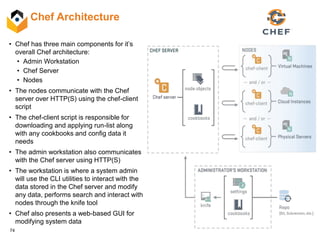
• Chef has three main components for it’s
overall Chef architecture:
• Admin Workstation
• Chef Server
• Nodes
• The nodes communicate with the Chef
server over HTTP(S) using the chef-client
script
• The chef-client script is responsible for
downloading and applying run-list along
with any cookbooks and config data it
needs
• The admin workstation also communicates
with the Chef server using HTTP(S)
• The workstation is where a system admin
will use the CLI utilities to interact with the
data stored in the Chef server and modify
any data, performs search and interact with
nodes through the knife tool
• Chef also presents a web-based GUI for
modifying system data
75
Cooking with Chef on Linux on z Systems
• Increasing interest from z Systems customers to support native OpenStack
and related interfaces (e.g. Chef) from which they can build their own clouds
• Chef: one of the most popular configuration management systems
• Infrastructure as code: speed, flexibility, scalability
• Integration with cloud computing platforms
• IBM made customizations to build Open Source Chef on Linux on z Systems
• Chef client builds cleanly out of the box
• Chef server requires replacing language dependencies (e.g. Java, Node.js); minor
changes to Ohai for system information collection
• Instructions for building your own Chef for Linux on z Systems:
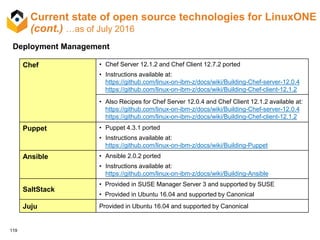
• https://github.com/linux-on-ibm-z/docs/wiki/Building-Chef-client-12.1.2
• https://github.com/linux-on-ibm-z/docs/wiki/Building-Chef-server-12.0.4
76
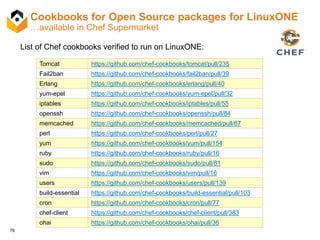
Cookbooks for Open Source packages for LinuxONE
…available in Chef Supermarket
Tomcat https://github.com/chef-cookbooks/tomcat/pull/235
Fail2ban https://github.com/chef-cookbooks/fail2ban/pull/39
Erlang https://github.com/chef-cookbooks/erlang/pull/40
yum-epel https://github.com/chef-cookbooks/yum-epel/pull/32
iptables https://github.com/chef-cookbooks/iptables/pull/55
openssh https://github.com/chef-cookbooks/openssh/pull/84
memcached https://github.com/chef-cookbooks/memcached/pull/67
perl https://github.com/chef-cookbooks/perl/pull/27
yum https://github.com/chef-cookbooks/yum/pull/154
ruby https://github.com/chef-cookbooks/ruby/pull/16
sudo https://github.com/chef-cookbooks/sudo/pull/81
vim https://github.com/chef-cookbooks/vim/pull/16
users https://github.com/chef-cookbooks/users/pull/139
build-essential https://github.com/chef-cookbooks/build-essential/pull/103
cron https://github.com/chef-cookbooks/cron/pull/77
chef-client https://github.com/chef-cookbooks/chef-client/pull/383
ohai https://github.com/chef-cookbooks/ohai/pull/36
List of Chef cookbooks verified to run on LinuxONE:
77
What is Puppet and How it Helps?
• Puppet Enterprise is IT automation software that gives system administrators the
power to easily automate repetitive tasks, quickly deploy critical applications, and
proactively manage infrastructure, on-premises or in the cloud.
• Puppet Enterprise automates tasks at any stage of the IT infrastructure lifecycle,
including: discovery, provisioning, OS & app configuration management,
orchestration, and reporting. Specifically, PE offers:
• Configuration management tools that let you define a desired state for your
infrastructure and then automatically enforce that state.
• A web-based console UI and APIs for analyzing events, managing your nodes and
users, and editing resources on the fly.
• Powerful orchestration capabilities.
• An advanced provisioning application called Razor that can deploy bare metal
systems.
• With Puppet, you can:
• Free up time to work on projects that deliver more business value
• Ensure consistency, reliability and stability
• Facilitate closer collaboration between sysadmins and developers
78
Puppet Architecture
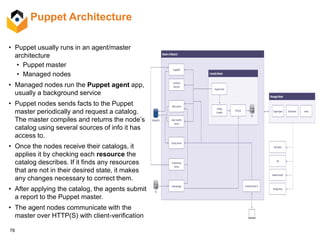
• Puppet usually runs in an agent/master
architecture
• Puppet master
• Managed nodes
• Managed nodes run the Puppet agent app,
usually a background service
• Puppet nodes sends facts to the Puppet
master periodically and request a catalog.
The master compiles and returns the node’s
catalog using several sources of info it has
access to.
• Once the nodes receive their catalogs, it
applies it by checking each resource the
catalog describes. If it finds any resources
that are not in their desired state, it makes
any changes necessary to correct them.
• After applying the catalog, the agents submit
a report to the Puppet master.
• The agent nodes communicate with the
master over HTTP(S) with client-verification
79
What is Ansible and how it helps?
• Ansible is a radically simple IT automation engine that automates cloud
provisioning, configuration management, application deployment, intra-service
orchestration, and may other IT needs.
• Being designed for multi-tier deployments since day one, Ansible models your
IT infrastructure by describing how all of your systems inter-relate, rather than
just managing one system at a time.
• It uses no agents and no additional custom security infrastructure, so it's easy
to deploy - and most importantly, it uses a very simple language (YAML, in the
form of Ansible Playbooks) that allow you to describe your automation jobs in
a way that approaches plain English.
80
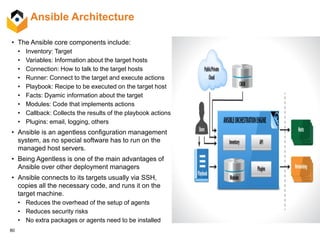
Ansible Architecture
• The Ansible core components include:
• Inventory: Target
• Variables: Information about the target hosts
• Connection: How to talk to the target hosts
• Runner: Connect to the target and execute actions
• Playbook: Recipe to be executed on the target host
• Facts: Dyamic information about the target
• Modules: Code that implements actions
• Callback: Collects the results of the playbook actions
• Plugins: email, logging, others
• Ansible is an agentless configuration management
system, as no special software has to run on the
managed host servers.
• Being Agentless is one of the main advantages of
Ansible over other deployment managers
• Ansible connects to its targets usually via SSH,
copies all the necessary code, and runs it on the
target machine.
• Reduces the overhead of the setup of agents
• Reduces security risks
• No extra packages or agents need to be installed
81
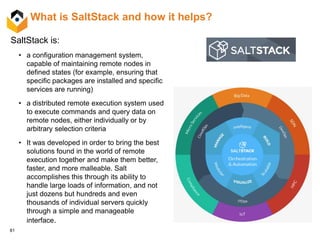
What is SaltStack and how it helps?
SaltStack is:
• a configuration management system,
capable of maintaining remote nodes in
defined states (for example, ensuring that
specific packages are installed and specific
services are running)
• a distributed remote execution system used
to execute commands and query data on
remote nodes, either individually or by
arbitrary selection criteria
• It was developed in order to bring the best
solutions found in the world of remote
execution together and make them better,
faster, and more malleable. Salt
accomplishes this through its ability to
handle large loads of information, and not
just dozens but hundreds and even
thousands of individual servers quickly
through a simple and manageable
interface.
82
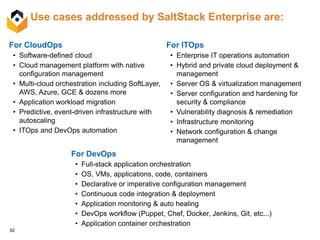
Use cases addressed by SaltStack Enterprise are:
For CloudOps
• Software-defined cloud
• Cloud management platform with native
configuration management
• Multi-cloud orchestration including SoftLayer,
AWS, Azure, GCE & dozens more
• Application workload migration
• Predictive, event-driven infrastructure with
autoscaling
• ITOps and DevOps automation
For ITOps
• Enterprise IT operations automation
• Hybrid and private cloud deployment &
management
• Server OS & virtualization management
• Server configuration and hardening for
security & compliance
• Vulnerability diagnosis & remediation
• Infrastructure monitoring
• Network configuration & change
management
For DevOps
• Full-stack application orchestration
• OS, VMs, applications, code, containers
• Declarative or imperative configuration management
• Continuous code integration & deployment
• Application monitoring & auto healing
• DevOps workflow (Puppet, Chef, Docker, Jenkins, Git, etc...)
• Application container orchestration
83
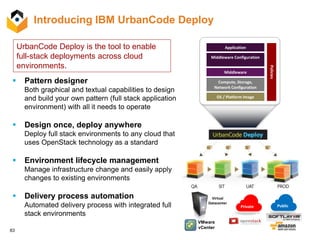
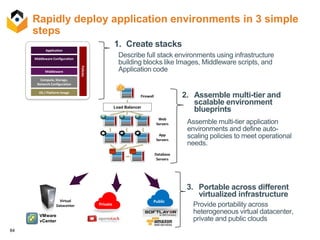
Introducing IBM UrbanCode Deploy
 Pattern designer
Both graphical and textual capabilities to design
and build your own pattern (full stack application
environment) with all it needs to operate
 Design once, deploy anywhere
Deploy full stack environments to any cloud that
uses OpenStack technology as a standard
 Environment lifecycle management
Manage infrastructure change and easily apply
changes to existing environments
 Delivery process automation
Automated delivery process with integrated full
stack environments
Application
Compute, Storage,
Network Configuration
OS / Platform Image
Middleware Configuration
Middleware
Policies
VMware
vCenter
Private Public
Virtual
Datacenter
UrbanCode Deploy is the tool to enable
full-stack deployments across cloud
environments.
84
Rapidly deploy application environments in 3 simple
steps
Provide portability across
heterogeneous virtual datacenter,
private and public clouds
3. Portable across different
virtualized infrastructure
Assemble multi-tier application
environments and define auto-
scaling policies to meet operational
needs.
2. Assemble multi-tier and
scalable environment
blueprints
1. Create stacks
Load Balancer
Web
Servers
App
Servers
Database
Servers
Firewall
Application
Compute, Storage,
Network Configuration
OS / Platform Image
Middleware Configuration
Middleware
Policies
Describe full stack environments using infrastructure
building blocks like Images, Middleware scripts, and
Application code
VMware
vCenter
Private
PublicVirtual
Datacenter
85
Platform as a Service
(PaaS)
86
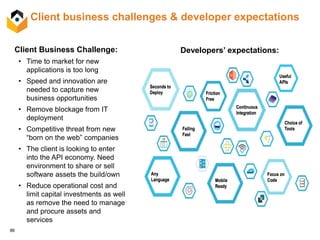
Client business challenges & developer expectations
Client Business Challenge:
• Time to market for new
applications is too long
• Speed and innovation are
needed to capture new
business opportunities
• Remove blockage from IT
deployment
• Competitive threat from new
“born on the web” companies
• The client is looking to enter
into the API economy. Need
environment to share or sell
software assets the build/own
• Reduce operational cost and
limit capital investments as well
as remove the need to manage
and procure assets and
services
Developers’ expectations:
87
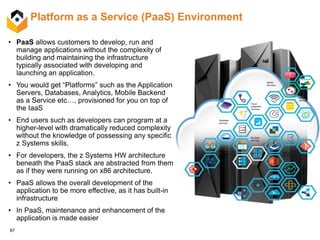
Platform as a Service (PaaS) Environment
• PaaS allows customers to develop, run and
manage applications without the complexity of
building and maintaining the infrastructure
typically associated with developing and
launching an application.
• You would get “Platforms” such as the Application
Servers, Databases, Analytics, Mobile Backend
as a Service etc…, provisioned for you on top of
the IaaS
• End users such as developers can program at a
higher-level with dramatically reduced complexity
without the knowledge of possessing any specific
z Systems skills.
• For developers, the z Systems HW architecture
beneath the PaaS stack are abstracted from them
as if they were running on x86 architecture.
• PaaS allows the overall development of the
application to be more effective, as it has built-in
infrastructure
• In PaaS, maintenance and enhancement of the
application is made easier
Security
Services
Web and
application
services
Cloud
Integration
Services
Mobile
Services
Database
services
Big Data
services
Watson
Services
88
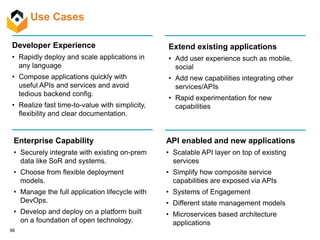
Developer Experience
• Rapidly deploy and scale applications in
any language
• Compose applications quickly with
useful APIs and services and avoid
tedious backend config.
• Realize fast time-to-value with simplicity,
flexibility and clear documentation.
Extend existing applications
• Add user experience such as mobile,
social
• Add new capabilities integrating other
services/APIs
• Rapid experimentation for new
capabilities
API enabled and new applications
• Scalable API layer on top of existing
services
• Simplify how composite service
capabilities are exposed via APIs
• Systems of Engagement
• Different state management models
• Microservices based architecture
applications
Enterprise Capability
• Securely integrate with existing on-prem
data like SoR and systems.
• Choose from flexible deployment
models.
• Manage the full application lifecycle with
DevOps.
• Develop and deploy on a platform built
on a foundation of open technology.
Use Cases
89
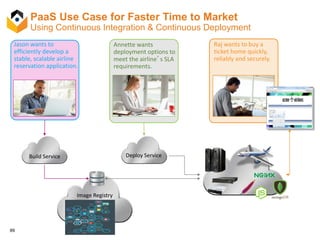
PaaS Use Case for Faster Time to Market
Using Continuous Integration & Continuous Deployment
Build Service Deploy Service
Image Registry
Jason wants to
efficiently develop a
stable, scalable airline
reservation application.
Annette wants
deployment options to
meet the airline’s SLA
requirements.
Raj wants to buy a
ticket home quickly,
reliably and securely.
90
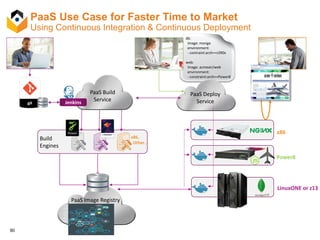
PaaS Use Case for Faster Time to Market
Using Continuous Integration & Continuous Deployment
db:
image: mongo
environment:
- contraint:arch==s390x
web:
image: acmeair/web
environment:
- constraint:arch==Power8
Build
Engines
x86,
Other…
PaaS Build
ServiceJenkins
PaaS Image Registry
PaaS Deploy
Service
x86
Power8
LinuxONE or z13
91
Different PaaS Options
92
What is OpenShift and Why Use It?
Accelerate Application Delivery and DevOps
OpenShift helps organizations accelerate
development & deployment of critical apps and
services.
Customer Momentum
Every day more and more customers are
looking into OpenShift. With customers
spanning across 14 different industries, it’s no
surprise OpenShift is gaining traction.
Enterprise Ready
OpenShift provides a complete, enterprise-
ready solution. From the operating system, to
middleware, to a truly open hybrid cloud.
Open Source Innovation Leaders
Red Hat is driving innovation in OpenShift and
upstream communities like Docker, Kubernetes,
Project Atomic & more.
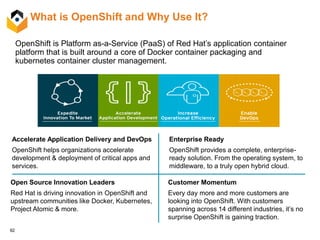
OpenShift is Platform as-a-Service (PaaS) of Red Hat’s application container
platform that is built around a core of Docker container packaging and
kubernetes container cluster management.
93
OpenShift Application Services - (OpenShift Origin)
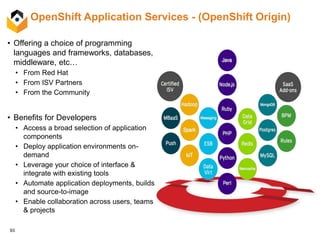
• Offering a choice of programming
languages and frameworks, databases,
middleware, etc…
• From Red Hat
• From ISV Partners
• From the Community
• Benefits for Developers
• Access a broad selection of application
components
• Deploy application environments on-
demand
• Leverage your choice of interface &
integrate with existing tools
• Automate application deployments, builds
and source-to-image
• Enable collaboration across users, teams
& projects
94
OpenShift Architecture - (OpenShift Origin)
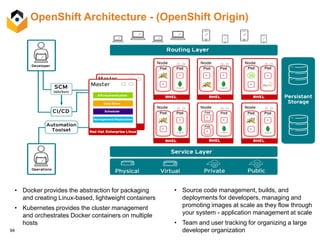
• Docker provides the abstraction for packaging
and creating Linux-based, lightweight containers
• Kubernetes provides the cluster management
and orchestrates Docker containers on multiple
hosts
• Source code management, builds, and
deployments for developers, managing and
promoting images at scale as they flow through
your system - application management at scale
• Team and user tracking for organizing a large
developer organization
95
OpenShift – what is available today vs. future?
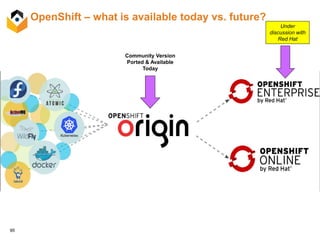
Community Version
Ported & Available
Today
Under
discussion with
Red Hat
96
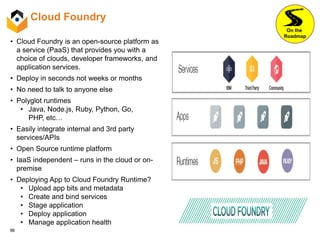
Cloud Foundry
• Cloud Foundry is an open-source platform as
a service (PaaS) that provides you with a
choice of clouds, developer frameworks, and
application services.
• Deploy in seconds not weeks or months
• No need to talk to anyone else
• Polyglot runtimes
• Java, Node.js, Ruby, Python, Go,
PHP, etc…
• Easily integrate internal and 3rd party
services/APIs
• Open Source runtime platform
• IaaS independent – runs in the cloud or on-
premise
• Deploying App to Cloud Foundry Runtime?
• Upload app bits and metadata
• Create and bind services
• Stage application
• Deploy application
• Manage application health
On the
Roadmap
97
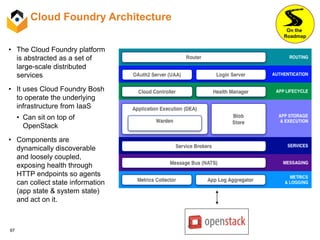
Cloud Foundry Architecture
• The Cloud Foundry platform
is abstracted as a set of
large-scale distributed
services
• It uses Cloud Foundry Bosh
to operate the underlying
infrastructure from IaaS
• Can sit on top of
OpenStack
• Components are
dynamically discoverable
and loosely coupled,
exposing health through
HTTP endpoints so agents
can collect state information
(app state & system state)
and act on it.
On the
Roadmap
98
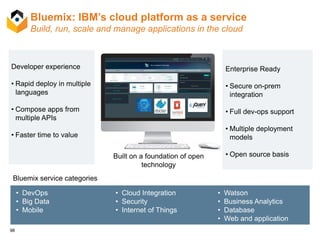
Bluemix: IBM’s cloud platform as a service
Build, run, scale and manage applications in the cloud
• DevOps
• Big Data
• Mobile
Bluemix service categories
• Cloud Integration
• Security
• Internet of Things
• Watson
• Business Analytics
• Database
• Web and application
Developer experience
• Rapid deploy in multiple
languages
• Compose apps from
multiple APIs
• Faster time to value
Built on a foundation of open
technology
Enterprise Ready
• Secure on-prem
integration
• Full dev-ops support
• Multiple deployment
models
• Open source basis
99
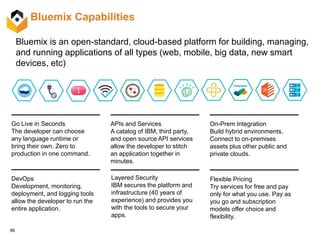
Bluemix is an open-standard, cloud-based platform for building, managing,
and running applications of all types (web, mobile, big data, new smart
devices, etc)
Go Live in Seconds
The developer can choose
any language runtime or
bring their own. Zero to
production in one command.
DevOps
Development, monitoring,
deployment, and logging tools
allow the developer to run the
entire application.
APIs and Services
A catalog of IBM, third party,
and open source API services
allow the developer to stitch
an application together in
minutes.
On-Prem Integration
Build hybrid environments.
Connect to on-premises
assets plus other public and
private clouds.
Flexible Pricing
Try services for free and pay
only for what you use. Pay as
you go and subscription
models offer choice and
flexibility.
Layered Security
IBM secures the platform and
infrastructure (40 years of
experience) and provides you
with the tools to secure your
apps.
Bluemix Capabilities
100
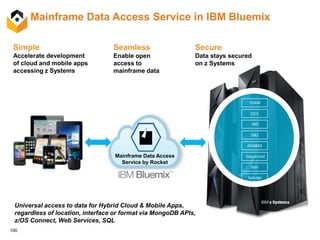
Simple
Accelerate development
of cloud and mobile apps
accessing z Systems
Mainframe Data Access
Service by Rocket
Universal access to data for Hybrid Cloud & Mobile Apps,
regardless of location, interface or format via MongoDB APIs,
z/OS Connect, Web Services, SQL
VSAM
CICS
IMS
DB2
Sequential
ADABAS
SMF
SysLogs
Mainframe Data Access Service in IBM Bluemix
Seamless
Enable open
access to
mainframe data
Secure
Data stays secured
on z Systems
101
Hybrid Cloud & the API Economy
102
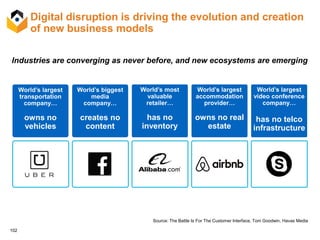
Digital disruption is driving the evolution and creation
of new business models
Source: The Battle Is For The Customer Interface, Tom Goodwin, Havas Media
World’s largest
transportation
company…
owns no
vehicles
World’s biggest
media
company…
creates no
content
World’s most
valuable
retailer…
has no
inventory
World’s largest
accommodation
provider…
owns no real
estate
World’s largest
video conference
company…
has no telco
infrastructure
Industries are converging as never before, and new ecosystems are emerging
103
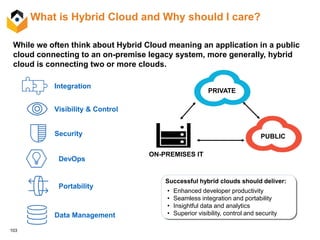
What is Hybrid Cloud and Why should I care?
Successful hybrid clouds should deliver:
• Enhanced developer productivity
• Seamless integration and portability
• Insightful data and analytics
• Superior visibility, control and security
PRIVATE
PUBLIC
ON-PREMISES IT
While we often think about Hybrid Cloud meaning an application in a public
cloud connecting to an on-premise legacy system, more generally, hybrid
cloud is connecting two or more clouds.
Integration
Visibility & Control
Security
DevOps
Portability
Data Management
104
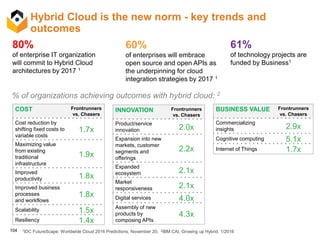
Hybrid Cloud is the new norm - key trends and
outcomes
80%
of enterprise IT organization
will commit to Hybrid Cloud
architectures by 2017 1
60%
of enterprises will embrace
open source and open APIs as
the underpinning for cloud
integration strategies by 2017 1
61%
of technology projects are
funded by Business1
COST Frontrunners
vs. Chasers
Cost reduction by
shifting fixed costs to
variable costs
1.7x
Maximizing value
from existing
traditional
infrastructure
1.9x
Improved
productivity 1.8x
Improved business
processes
and workflows
1.8x
Scalability 1.5x
Resiliency 1.4x
INNOVATION Frontrunners
vs. Chasers
Product/service
innovation 2.0x
Expansion into new
markets, customer
segments and
offerings
2.2x
Expanded
ecosystem 2.1x
Market
responsiveness 2.1x
Digital services 4.0x
Assembly of new
products by
composing APIs
4.3x
BUSINESS VALUE Frontrunners
vs. Chasers
Commercializing
insights 2.9x
Cognitive computing 5.1x
Internet of Things 1.7x
1IDC FutureScape: Worldwide Cloud 2016 Predictions, November 20; 2IBM CAI, Growing up Hybrid, 1/2016
% of organizations achieving outcomes with hybrid cloud: 2
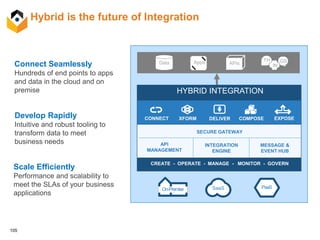
105
Hybrid is the future of Integration
HYBRID INTEGRATION
SaaS PaaSOn-Premise
CONNECT XFORM DELIVER COMPOSE EXPOSE
API
MANAGEMENT
SECURE GATEWAY
INTEGRATION
ENGINE
CREATE - OPERATE - MANAGE - MONITOR - GOVERN
Data APIsApps TH GS
IN
MESSAGE &
EVENT HUB
Connect Seamlessly
Hundreds of end points to apps
and data in the cloud and on
premise
Develop Rapidly
Intuitive and robust tooling to
transform data to meet
business needs
Scale Efficiently
Performance and scalability to
meet the SLAs of your business
applications
106
Leverage the API Economy
APIs are the Language of Cloud:
connection and consumption of IT,
applications and data
REST APIs connect IT, Apps and
Data
IBM Middleware Cloud Integration
Portfolio enables the API Economy
• Data Power, Cast Iron, z/OS
Connect, API Connect
• Cloud Integration Services for
Bluemix.
• Hybrid Cloud Messaging Portfolio
(IIB, MQ etc)
Connections are Encrypted, Auditable, Access
Monitored
107
By 2014, 75% of the
Fortune 1000 will offer
public Web APIs.
By 2016, 50% of B2B
collaboration will take place
through Web APIs.
Sources: Gartner, Predicts 2012: Application Development, 4Q, 2011; Gartner, Govern Your Services and Manage Your
APIs with Application Services Governance, 4Q 2012; Gartner, Open for Business: Learn to Profit by Open Data, 1Q 2012
APIs represent a new, fast-
growing channel opportunity
Business models
are evolving
Branch Toll-free Website Web APIs
APIs are a path to new business opportunities
and growth is accelerating dramatically
108
API Connect: Simplified & Comprehensive API foundation to
jumpstart your entry into the API Economy
Create Run Manage Secure
• API Discovery
• API Policy Management
• Publish to Developer
Portal
• Self-service Developer
Portal
• Subscription Management
• Social Collaboration
• Community Management
• API Monitoring & Analytics
• Lifecycle Mgmt &
Governance
• API Policy
Enforcement
• Security & Control
• Connectivity & Scale
• Traffic control &
mediation
• Workload
optimization
• Monitoring/Analytics
Collection
• Connect API to
data sources
• Develop &
Compose API
• Generate API
consumer SDK
• Build, debug,
deploy, Node.js
microservice apps
• Build, debug,
deploy Java
microservice apps
• Node.js & Java
common
management &
scaling
• Stage to cloud or
on-prem catalog
Unified experience across API Lifecycle; not a collection of piece parts.
109
Client Value:
• Enable new business models in new ecosystems
• Realize new ROI via secure reuse of existing IT assets
• Achieve faster innovation via self-service access to APIs
API Connect Differentiators:
• Create & Run with Node.js and Java to deliver an end-to-end
API lifecycle
• Discovery & creation of APIs from existing systems of records
• Hybrid deployment flexibility
Create Run
ManageSecure
API Connect
API Connect
…is a single, comprehensive solution to
design, secure, control, publish, monitor,
and manage APIs
Mobile, Cloud and Third-party Applications
invoking z Services using APIs
110
z/OS Connect:
IBM’s strategic solution for enabling REST APIs based on z/OS assets
CICS
IMS
Batch
MQ1
DB21
REST API
consumers
z/OS
Strategic solution for enabling
natural REST APIs for z Systems
assets in a unified manner across
z/OS subsystems with integrated
auditing, security and scalability
Mobile apps
Web apps
Cloud /
Bluemix
apps
1 per ENUS215-493 Statement of Direction
111
z/OS Connect
Hybrid
Cloud n
API Connect
CICS
IMS
WebSphere
DB2
MQ
• Serving mobile data directly from z/OS is 40% less expensive than
exporting to a system of engagement
• Colocation of Node.js on Linux with z/OS cuts response times by 60% and
improves throughput by 2.5x
• Node.js is 2x faster on z13 vs Competitive Platforms
z/OS Connect
112
API Connect
z/OS Connect
Hybrid
Cloud
BPM
IBM Integration Bus
WAS-zOS for
Mobile
Transactions
WAS
Healthcheck
Cognitive
Services for
Hospitality
Commerce
Discover
& Create
Run Manage
Secure &
Publish
Publish all SOA Services
Insight
Services
Big Data
linkage with
DashDB
API Connect :
• End-to-end API lifecycle
• Developer focused for
Mobile, Java, Node.js, Swift
• SoR and SOA discovery
• Always Hybrid licensing
Other Clouds
Java, Node.js, Swift
Client-side
JavaScript, Java, Swift
Power
Systems
IBM provides Hybrid programming from front-end to
server side
113
z Systems with Bluemix use cases
• Extend existing applications
- Add user experience such as mobile, social
- Add new capabilities integrating other services/APIs
- Rapid experimentation for new capabilities
• API enable applications
- Scalable API layer on top of existing services
- Simplify how composite service capabilities are
exposed via APIs
• New applications
- Systems of Engagement
- Two-factor applications Backend Systems
& Integration
API Creation
& Management New Channels
& Opportunities
z/OS Connect provides a simple and secure way to discover and invoke applications and data
on z/OS, and make these readily accessible to mobile, cloud and Web developers
• z/OS Connect is included in z/OS current version subsystems at no charge
• Uses standardized interfaces and data REST APIs and JSON
• Allows for consumerization of z/OS assets as APIs
• Can take advantage of connector technology using z Systems cross-memory communication
mechanism such as WebSphere Optimized Local Adapters for a performance boost
Easy and secure development and integration with z/OS Connect,
Secure Connector and API Connect
114
Bluemix, API Connect, z/OS Connect for modern hybrid
Enterprise applications
CICS
IMS
WebSphere
DB2
CICS, IMS, DB2,
WebSphere
IBM z/OS Connect
Create & run SoR
(System) APIs
IBM API Connect
Create, run, manage &
secure Enterprise APIs
& Micro services
IBM Bluemix
Compose & integrate
applications, services
- Optimizations possible for On-prem only environments and existing web services
IBM Mobile FirstChannels
Systems of
Engagement
New
Applications
and Services
Interaction Services
(SOR Business Logic)
Transactions
Transaction Services
(SOR Business Logic)
Data Systems of Record
Multi-channel SDK
115
Summary
116
Summary
Open Source & ISV Ecosystem Community
• IBM’s strategy for Cloud Management on z Systems embraces many of the major
industry ecosystem initiatives around:
• Infrastructure as-a-Service
• Container management
• Platform as-a-Service
• Information and status of all open-source software can be found:
https://www.ibm.com/developerworks/community/groups/community/lozopensource/
• Support for open source packages will be provided by a combination of the
following:
• Open source provider
• IBM via the Ecosystem enablement team & LTC (Linux Technology Center)
• Third Party Enterprise Support
• Linux Distros themselves (when open source products has been embedded
in their distributions)
117
Current state of open source technologies for LinuxONE
…as of July 2016
Infrastructure as-a-Service - OpenStack
Cloud Manager
Appliance (CMA)
• Integrated in z/VM to provide z/VM-only OpenStack support
• Based OpenStack Liberty
SUSE OpenStack
Cloud 6
• Provides x86 and z/VM support - “managed to”
• Based on OpenStack Liberty release
• Working with SUSE to provide OpenStack support for KVM for IBM z
Ubuntu OpenStack Working with Canonical to provide OpenStack support for KVM for IBM z
Red Hat OpenStack
Platform
Working with Red Hat to provide OpenStack support for z/VM and KVM
for IBM z
Continued on next page
Platform as-a-Service
OpenShift • OpenShift Origin 1.1.3 ported
• Recipe available at:
https://github.com/linux-on-ibm-z/docs/wiki/Building-OpenShift-Origin
Cloud Foundry Scheduled be ported by 4Q2016
118
Current state of open source technologies for LinuxONE
(cont.) …as of July 2016
Container Management
Docker • Docker Distribution 2.4.0 ported
• Instructions available at:
https://github.com/linux-on-ibm-z/docs/wiki/Building-Docker-Distribution
• Docker Compose 1.6.2 ported
• Instructions available at:
https://github.com/linux-on-ibm-z/docs/wiki/Building-Docker-Compose
• Docker Swarm 1.2.1 ported
• Instructions available at:
https://github.com/linux-on-ibm-z/docs/wiki/Building-Docker-Swarm
Kubernetes • Kubernetes 1.1.0 ported
• Instructions available at:
https://github.com/linux-on-ibm-z/docs/wiki/Building-Kubernetes
Mesos Port complete. Instructions to be placed on github shortly.
LXC / LXD Provided in Ubuntu 16.04 and supported by Canonical
Continued on next page
119
Current state of open source technologies for LinuxONE
(cont.) …as of July 2016
Deployment Management
Chef • Chef Server 12.1.2 and Chef Client 12.7.2 ported
• Instructions available at:
https://github.com/linux-on-ibm-z/docs/wiki/Building-Chef-server-12.0.4
https://github.com/linux-on-ibm-z/docs/wiki/Building-Chef-client-12.1.2
• Also Recipes for Chef Server 12.0.4 and Chef Client 12.1.2 available at:
https://github.com/linux-on-ibm-z/docs/wiki/Building-Chef-server-12.0.4
https://github.com/linux-on-ibm-z/docs/wiki/Building-Chef-client-12.1.2
Puppet • Puppet 4.3.1 ported
• Instructions available at:
https://github.com/linux-on-ibm-z/docs/wiki/Building-Puppet
Ansible • Ansible 2.0.2 ported
• Instructions available at:
https://github.com/linux-on-ibm-z/docs/wiki/Building-Ansible
SaltStack
• Provided in SUSE Manager Server 3 and supported by SUSE
• Provided in Ubuntu 16.04 and supported by Canonical
Juju Provided in Ubuntu 16.04 and supported by Canonical
120
Support for open source technologies for LinuxONE
…as of July 2016
OpenShift
Cloud Foundry
Docker • Docker the company in discussion for Enterprise support
• Rogue Wave for Community support
Kubernetes
Mesos
LXC / LXD • Canonical
Chef • Chef the company provides Enterprise support
• Rogue Wave for Community support
• Canonical
Puppet • Rogue Wave for Community support
• Canonical
Ansible • Canonical
SaltStack • Canonical and SUSE
Juju • Canonical
121
Questions? Thank you!

Cloud stack for z Systems - July 2016

  • 1.
    © 2016 IBMCorporation Cloud Stack no servidor IBM LinuxONE (a.k.a. servidor Mainframe)
  • 2.
    © 2016 IBMCorporation IBM z Systems 2 Referências Bibliográficas Apresentação originalmente publicada no link do DeveloperWorks: • Cloud Stack for z Systems – July 2016 – Long Deck – FinalPublished.pdf https://www.ibm.com/developerworks/community/groups/servi ce/html/communityview?communityUuid=9a17556c-6094- 4201-acd0- d8125a3fa0db#fullpageWidgetId=Wce09c89acad9_4e56_b 4ec_e072b104159c&file=23a2d50f-5aa8-4230-ae4e- 49b93ea46edc
  • 3.
    1 Cloud Stack Architecturefor LoZ & LinuxONE Kershaw Mehta – Chief Architect, Open Stack Solutions & PaaS (kershaw@us.ibm.com) Mohammad Abdirashid – Program Manager & System Architect, Innovation Lab (abdir@us.ibm.com) Utz Bacher – Lead Architect Linux and Docker on z (utz.bacher@de.ibm.com) Elton DeSouza– Wizard & Technical Lead Innovation Lab (elton.desouza@ca.ibm.com) July 10, 2016
  • 4.
    2 • Cloud StackOverview • Hypervisor • Infrastructure as a Service via OpenStack • Container Management • Microservices Architecture • Deployment Management • Platform as a Service • Hybrid Cloud & the API Economy Agenda
  • 5.
    3 Cloud Management forLinux on z Systems IBM’s strategy for Cloud Management for Linux on z Systems and LinuxONE is an open and standards-based approach. We support and embrace many of the major industry ecosystem initiatives around: • Infrastructure as-a-Service • Container management • Platform as-a-Service. Note: This presentation applies to both Linux for z Systems and LinuxONE environment, even though we may only refer to one of these.
  • 6.
    4 Cloud Stack ArchitectureLeveraging Open Source Physical Infrastructure Storage Switches Virtual Infrastructure Infrastructure as-a-Service Platform as-a-Service z/VM KVM for IBM z SLES OpenStack Nova Neutron Cinder Docker Container Management Kubernetes Mesos Cloud Foundry SUSE, Ubuntu OpenShift Red Hat BlueMix (Public) (Based on Cloud Foundry) IBM LXC LXD Deployment Management Chef Puppet Ansible SaltStack Juju Ubuntu RHEL IBM Cloud Orchestrator Workload Orchestration VMware vRealize Automation Legend: Delivered by IBM Urban Code Deploy Trove
  • 7.
    5 Partnership with OpenSource Community …including Linux Distros • Many of the open source technologies described earlier already run on and are proven to work on Linux for z Systems - very little code needed to be changed. • In many cases, IBM is working with the individual open source providers, in order to officially support z Systems. • Docker • Chef • Puppet • etc… • We have also been working with the Linux distributors to have them provide support for the open source packages in their Enterprise Linux distributions. • In addition we are working with the Linux distributors who provide add-on products based on open source technology to also include support for z Systems. For example: • SUSE OpenStack Cloud • Ubuntu OpenStack
  • 8.
    6 SUSE Portfolio forz Systems Physical Infrastructure Virtualization Layer Storage Switches z/VM KVM for IBM z SUSE Linux Enterprise Server Delivered by IBM and other HW vendors Delivered by SUSE “Greenstack” Deployment Management Image Building SUSE OpenStack Cloud Container Management PaaS SUSE Manager * * - Proprietary SUSE software SUSE Studio * KIWI System Analysis * As of July 2016 Portfolio will continue to evolve as we work with SUSE
  • 9.
    7 Ubuntu Portfolio forz Systems Physical Infrastructure Virtualization Layer Storage Switches z/VM KVM for IBM z Ubuntu Linux Enterprise Server Delivered by IBM and other HW vendors Delivered by Canonical “Orangestack” Deployment ManagementSystem Analysis Ubuntu OpenStack Container Management PaaS Under discussion with Canonical As of July 2016 Portfolio will continue to evolve as we work with Canonical
  • 10.
  • 11.
    9 Smarter Virtualization withLinux on z Systems and z/VM  Do more with less – Consolidate more servers, more networks, more applications, and more data in a single machine with Linux and z/VM – Achieve nearly 100% utilization of system resources nearly 100% of the time – Enjoy the highest levels of resource sharing, I/O bandwidth, system availability, and staff productivity  Reduce costs on a bigger scale – Consume less power and floor space – Save on software license fees – Minimize hardware needed for business continuance and disaster recovery  Manage growth and complexity – Exploit extensive z/VM facilities for life cycle management: provisioning, monitoring, workload mgmt, capacity planning, security, charge back, patching, backup, recovery, more... – Add hardware resources to an already-running system without disruption – the epitome of Dynamic Infrastructure – Consolidation on a scale up machine like z Systems means fewer cables and fewer components to impede growth
  • 12.
    10  Run multiplecopies of z/VM on a single server for enhanced scalability, failover, operations, and energy efficiency  Share CPUs and I/O adapters across all z/VM LPARs, and over-commit memory in each LPAR for added cost effectiveness CPU CPU CPU Shared Physical CPUsCPU CPUCPU z/VM Paging Subsystem Expanded Storage Paging Volumes Virtual CPUs z/VM Paging Subsystem Expanded Storage Guest Memory LPAR Running z/VM LPAR Running z/VM Logical CPUs z/VM-Managed Memory z/VM-Managed Memory Paging Volumes Single-System, Multi-LPAR, Linux-on-z/VM Environment Maximizing Resource Utilization and System Availability
  • 13.
    11 Clustered Hypervisor Supportand Guest Mobility z/VM 2 z/VM 1 z/VM 4 z/VM 3 Shared disks Private disks Cross-system communications for “single system image” management Cross-system external network connectivity for guest systems z/VM 2 z/VM 1 z/VM 4 z/VM 3 Shared disks Private disks Cross-system communications for “single system image” management Cross-system external network connectivity for guest systems
  • 14.
    12 IBM z/VM 6.4Preview VM’s world class industry proven virtualization technology offers the ability to host extremely large number of virtual servers on a single server Host non-Linux environments with z/VM on IBM z Systems - z/OS, z/VSE and z/TPF Virtual machines share system resources with very high levels of resource utilization. Optimized for z Systems architecture multi- tenancy, capacity on demand and support for multiple types of workloads Increased Capacity and Elasticity improves z/VM paging by taking advantage of DS8000 ® features which will increase the bandwidth for paging and allow for more efficient management of memory over-committed workloads providing better throughput which reduces the need for additional resources when adding workloads Ease Migration with upgrade in place infrastructure provides a seamless migration path from previous z/VM releases (z/VM 6.2 and z/VM 6.3) to the latest version Operation improvements by enhancing z/VM to provide ease of use improvements requested by clients such as querying service of the running hypervisor and providing environment variables to allow client programming automation based on systems characteristics and client settings. Hardware Exploitation, Performance and Lifecycle by anticipating future hardware performance improvements and the latest technology enhancements. z/VM 6.3 is the last z/VM release planned to support the IBM System z10® family of servers SCSI (Small Computer System Interface) improvements for guest attachment of disks and other peripherals, and host or guest attachment of disk drives to z Systems and LinuxONE systems: • Increase efficiency and reduce complexity by allowing Flash Systems™ to be directly attached for z/VM system to use without the need for an SVC • Enable ease of use by enhancing management for SCSI devices to provide information needed about device configurations characteristics Modernize CMS Pipelines functionality to adopt 20 years of development since the original Pipelines integration Customer choice of Linux Distribution with planned support for Canonical Ubuntu distribution in addition to Red Hat and SUSE
  • 15.
    13 KVM for IBMz Systems A new hypervisor choice The Kernel-based Virtual Machine (KVM) offering for IBM z Systems™ is software that can be installed on z Systems processors and can host Linux® on z Systems guest virtual machines.  The KVM offering can co-exist with z/VM virtualization environments, z/OS®, Linux on z Systems, z/VSE® and z/TPF.  Simplifies configuration and operation of server virtualization.  The KVM offering is optimized for z Systems architecture and provides standard Linux and KVM interfaces for operational control of the environment, as well as supporting OpenStack® interfaces for virtualization management.  Enterprises can easily integrate Linux servers into their existing infrastructure and cloud offerings.  Allows customers to leverage common Linux administration skills to administer virtualization.  Provides an Open Source virtualization choice. LPARs (PR/SM™) z/TPF z/OS KVM*z/VM z/OS Linuxonz Linuxonz Linuxonz Linuxonz Linuxonz Memory Processors I / O z/VSES
  • 16.
    14 KVM is KVMis KVM … but is there “a” KVM to start with?  What is KVM? (Kernel-based Virtual Machine) • KVM is an open source hypervisor that is an extension of Linux with a set of add-ons • The “KVM” module is added to the Linux kernel that implements the virtualization architecture • KVM typically receives hypervisor virtualization management via Libvirt which abstracts over different “hypervisors”: KVM, Xen, …  Why is there no “standard” KVM product definition? • There are as many KVM “variants“ as there Linux distributions in the market. • This means there is no “standard” KVM, but a Red Hat-based KVM, a SUSE-based KVM, a Canonical-based KVM etc. and respecting hypervisor management IBM z Systems LinuxKVM Virtual Machine QEMU Linux Guest OS Linux Applications Virtual Machine QEMU Linux Guest OS Linux Applications Linux Applications  Linux provides the base capabilities  KVM turns Linux into a hypervisor  QEMU provides I/O device virtualization and emulation
  • 17.
    15 KVM for IBMz Overview Features of KVM for IBM z Benefits KVM Hypervisor  Supports running multiple disparate Linux instances on a single system Processor sharing  Supports sharing of CPU resources by virtual servers I/O sharing  Enables sharing of physical I/O resources among virtual servers to enable better utilization Memory and CPU overcommit  Support overcommitment of memory and swapping of inactive memory Live virtual server migration  Enables workload migration with minimal impact Dynamic addition and deletion of virtual I/O devices  Helps eliminate downtime to modify I/O device configurations for virtual servers Thin provisioned virtual servers  Supports copy-on-write virtual disks which saves on storage by not needing full disks until used Hypervisor Performance Management  Supports policy-based goal-oriented monitoring and management of virtual server CPU resources Installation/Configuration tools  Supplies tools to install and configure KVM Transactional Execution (TX) exploitation  Supports improved performance of multi-threaded applications when running on supported servers
  • 18.
    16 KVM for IBMz Differentiation KVM base Infrastructure and Hypervisor Mgmt Install Configure Update Hypervisor Performance Manager (HPM) SDS Enablement CLI for configuration & resource allocations Spectrum Scale storage aka GPFS z Systems optimized KVM Policy driven workload management KVM Installation & Updates z Systems differentiationOpen Source base component OpenStack Enablement Enablement virtual server management
  • 19.
    17 Agile release anddevelopment plan Initial Release 4 years KVM for IBM z V1 - Release cycle • Release every 6 month for customer & upstream integration • 2 years with new features, Security updates up to 4 years 6 month Update 1 6 month Update 2 6 month Update 3 6 month Security updates 2 years KVM 1.0 KVM V3.0 4 years 2 years 4 years 2 years KVM for IBM z - Version cycle • Keep 2 version in service at the same time Version update can be triggered by: • Time • HW release • Major MCP update KVM V1.0 KVM V2.0
  • 20.
    18 Positioning z/VM vs.KVM for IBM z Systems When is KVM for IBM z the right fit ? • For a new Linux client that is … Open Source oriented; not z/VM knowledgeable; KVM already in use; x86 Linux centric admins • For existing IBM z Systems customers who … do not have z/VM, but have KVM skills and potentially large x86 environments KVM for IBM z (New) Linux Clients that … • Sold on Open Technologies, Open Source Oriented • x86 centric – familiar with KVM • Linux admin skills • Need to integrate into a distributed Linux/KVM environment, using standard interfaces z/VM Linux Clients that … • Already use z/VM for Linux workloads • Skilled in z/VM and prefer proprietary model • Invested in tooling for z/VM environment • Require technical capabilities in z/VM (e.g. I/O pass-through, HiperSockets, HyperSwap, SMC-R, ...) • Installed pre-zEC12/zBC12 machines
  • 21.
    19 IBM z/VM andKVM for IBM z can co-exist on z Systems KVM for IBM z • Standardizes configuration and operation of server virtualization • Leverage common Linux administration skills to administer virtualization • Flexibility and agility leveraging the Open Source community • Provides an Open Source virtualization choice • Integrates with OpenStackProcessors, Memory and IO Support Element z Systems Host PR/SM™ Linuxonz z/OS Linuxonz Linuxonz Linuxonz z/OS KVMz/VM Linuxonz
  • 22.
    20 Infrastructure as aService via OpenStack
  • 23.
    21 What is OpenStack? OpenStackis a global collaboration of developers & cloud computing technologists working to produce an ubiquitous Infrastructure as a Service (IaaS) open source cloud computing platform for public & private clouds. Platinum Sponsors Gold Sponsors Design Tenets… • scalability and elasticity are our main goals • share nothing, distribute everything (asynchronous and horizontally scalable) • any feature that limits our main goals must be optional • accept eventual consistency and use it where appropriate
  • 24.
    22 IBM is Committedto OpenStack Providing an open framework for Software Defined Environments Neutron drivers Contribute Platform Support • IBM storage enablement • IBM server enablement • IBM network enablement OpenStack API Security (KeyStone) Scheduler Projects Images (Glance) Quotas OpenStack Solutions Nova drivers Server Cinder drivers Storage Network AMQP DBMS Flavors IBM Cloud Orchestrator Dash Board (Horizon) VMware vRealize Automation
  • 25.
    23 z Systems OpenStackStrategy • Core strategy is to enable OpenStack APIs for management of z Systems and LinuxOne platforms and leverage the community • Enable z/VM and KVM for IBM z with the goal to get all required Drivers upstreamed and accepted by OpenStack, and available to any OpenStack Distro or product supplier. • z Systems will focus on enabling OpenStack-based tools to maximize the value of the platform and partner with our ecosystem for cross-cloud management and orchestration by integrating with our OpenStack APIs. • z Systems is working with Linux distros to provide support for z/VM and KVM for IBM z in their respective OpenStack-based products • New consolidation point is at the Orchestrator level. Any OpenStack orchestrator could leverage our deliverable (ie. VMware’s vRealize Automation)
  • 26.
    24 Current State ofImplementation z/VM-only Integrated Cloud Manager Appliance (CMA) provides OpenStack support • Integrated function of z/VM with no-charge and is available to all licensees of z/VM • Provides OpenStack APIs, at the OpenStack Liberty release, that can be called by orchestration products • Provided in the service stream at the end of March 2016 • Migration instructions have been provided Heterogeneous Platform Management - (z/VM, KVM and x86) SUSE supports z/VM and x86 in their SUSE OpenStack Cloud 6 product • Available as of March 2016 • SOC6 supports any Linux distribution in the virtual machine - SLES, RHEL, Ubuntu - any Linux distribution supported by the underlying hypervisor • SUSE OpenStack Cloud 6 & Cloud Manager Appliance can be configured to work together in a federated manner • SUSE intends to provide support for KVM for IBM z also in 2016 We are working with Canonical to provide support for KVM for IBM z in Ubuntu OpenStack We are also working with Red Hat to provide support for z/VM and KVM for IBM z in Red Hat OpenStack Platform
  • 27.
    25 Current State ofOpenStack Drivers KVM for IBM z Systems OpenStack drivers for KVM for IBM z are available in-tree as of OpenStack Kilo release KVM for IBM z is exposed through Libvirt API. As such, the OpenStack drivers for running KVM for IBM z can be found at: • Nova (Compute) repository: https://github.com/openstack/nova - The KVM/libvirt driver is in ./virt/libvirt, it is used for x86, Power and z. • Cinder (Storage) repository: https://github.com/openstack/cinder - We are supporting multiple Cinder volume drivers, they are all in ./volume/drivers, except for the IBM XIV & DS8K drivers for which there are only a proxy to the real drivers (written in Java) which is not upstream • Neutron (Network) repository: https://github.com/openstack/neutron - We are using OVS, it is in ./plugins/ml2/drivers/openvswitch
  • 28.
    26 Current State ofOpenStack Drivers (cont.) z/VM OpenStack drivers for z/VM are available out-of-tree in OpenStack github. The z/VM OpenStack drivers can be found at: • Nova (Compute): https://github.com/openstack/nova-zvm-virt-driver • Neutron (Network): https://github.com/openstack/networking-zvm Working to get z/VM drivers accepted into OpenStack community (in-tree) in 2017.
  • 29.
    27 z Systems OpenStackStrategy - Key Takeaways • z Systems is partnering with our Linux Distros to have them deliver OpenStack support for our platform in their respective products. • z Systems will continue to work with the OpenStack open source community to influence and accept our technology. • z Systems is working closely with our ecosystem partners to define a Cloud Stack that sits on top of Infrastructure as-a-Service to enable a consistent management paradigm and deliver higher value.
  • 30.
    28 IBM Cloud Orchestrator EnablesInfrastructure, Platform & Advanced Orchestration Services: • Eases coordination of complex tasks and workflows, necessary to deploy applications • Deploy application topologies or patterns • Take advantage of the pattern library • The main components of IBM Cloud Orchestrator are the process engine and the corresponding modeling user interface, which is used to create processes. • For this purpose, IBM Cloud Orchestrator uses the capabilities of IBM Business Process Manager. • It also integrates other domain-specific components that are responsible for such functions as monitoring, metering, and accounting. Orchestration Services Platform Level Services Infrastructure Level Services Image Lifecycle Management Pattern Services Cloud Resources Storage Compute Network (Provisioning, configuration, resource allocation, security, metering, etc.) Hypervisors VMware, KVM, Hyper-V*, PowerVM, zVM IBM Cloud Orchestrator Provides seamless integration of private and public cloud environments
  • 31.
    29 IBM and VMwareannounced a cooperative effort to give our mutual clients the ability to provision and manage virtual machines and applications running on IBM Power Systems and IBM z Systems with VMware's vRealize™ Automation™ 6.2 (vRA) solution through OpenStack enabled APIs. VMware vRA (vRealize Automation) support
  • 32.
    30 VMware vRealize Automationand IBM z Systems Using VMware’s vRealize Automation (vRA), clients can provision and orchestrate virtualized workloads on z/VM and KVM for IBM z Systems through the OpenStack interfaces.  Single cloud management tool across multiple environments in the enterprise cloud, including public cloud.  Single pane of glass  vRA supports Infrastructure as a Service (IaaS) by passing workload management requests via OpenStack API’s to IBM z/VM and KVM on IBM z. Public Clouds z/VM KVM on IBM z vRealize Automation OpenStack API’s
  • 33.
  • 34.
    32 • Container: operatingenvironment within a Linux image, and delivery vehicle for applications • Fast startup up, higher density than virtual machines • Isolated from each other • Docker: portable, light-weight run-time and packaging tool • Easily build and ship complex applications, without worrying about infrastructure differences or interference from other software stacks • Quickly and reliably deploy and run applications on any infrastructure • Private and public registries (Docker Hub): share container building blocks and automate workflows • Essential for horizontally scaling apps on the cloud Containers and Docker for Linux on z Systems
  • 35.
    33 Use cases • Facilitatesportability and cross platform deployment through generic build description • Develop applications on x86 and build for both x86 and z platforms, seamlessly deploy to x86 and z Systems • Package applications without worrying about dependencies on other libraries and software • If container app requires dependencies, creator of the container adds them to the container image • Entirely independent of host software level • Simple re-use of components • One container image used to deploy same application many times by different people • Supports micro-service architecture by simple deployment and management of components • Large application consisting of several SW components can be broken down into multiple containers to allow for reuse of parts • Large density through lightweight container isolation mechanism in Linux kernel • Hundreds to thousands of virtual containers to run in one system • Docker ties Dev and Ops together • Consistent environment from Dev to Ops facilitates staging and avoids environmental errors
  • 36.
    34 Approaches for ApplicationDeployment Virtualization vs. Containers – OpenStack vs. Docker Virtualization and OpenStack – Infrastructure oriented • Customers have virtualized their servers to gain efficiencies • Focus is on virtual server resource management • One or several application per Guest VM / Operating System instance, as previously on physical servers • Provides application isolation - an application or guest failing or misbehaving does not adversely affect other applications residing in other Guest VMs • Provides persistence across server restarts Containers and Docker - Service oriented • Application-centric - infrastructure resources are assumed to be already in place • Focus is on application management • One application per containers. Containers can be spread over several hosts • Ideal pattern for DevOps • Provides a very dynamic application deployment model Hypervisor OpenStack (running in a Guest VM) App n (running in Guest VM n) App 1 (running in Guest VM 1) App 2 (running in Guest VM 2) OS Kernel OS KernelOS KernelOS Kernel . . . Virtual Compute Virtual Storage Infrastructure Virtual Network Hypervisor Container Manager Docker (running in a Guest VM) App 1 (running in container 1) App 2 (running in container 2) App n (running in container n) . . . OS Kernel Virtual Compute Virtual Storage Infrastructure Virtual Network
  • 37.
    35 Virtualization and Containers OpenStackand Docker On z, both approaches can be combined • Efficient virtualization provides for tenant isolation • Containers provide for agility and speed of deployment Virtual machines for a tenant • One or several guests for a tenant • Well-controlled virtualization and isolation between tenants • Well-understood virtualization management on tenant granularity Container and orchestration management on top of guests control orchestration via Docker and Kubernetes • Via Docker stack, Kubernetes stack or Mesos stack • Full container ecosystem • Multi-tenancy in stack not required, since guests are for one tenant only Tenant 1 (running in a Guest VM) Docker Hypervisor Virtual Compute Virtual Storage Infrastructure Virtual Network Tenant 2 (running in a Guest VM) Docker OS Kernel Container n Container 2 Container 1 Container n Container 2 Container 1 ... ... App A (running in a Guest VM) OS KernelOS Kernel
  • 38.
    36 System Container vs.Application Container System Container • Runs entire Linux system environment (systemd etc.) • Focus is on system instance management • Intended as lightweight replacement for virtual machines • But with lower isolation attributes • Examples (as typcially used): • LXC, LXD (Canonical) • systemd-nspawn Application Container • Runs application • One application per container • Focus is on application management • Intended as resource scoping for applications with minimal overhead • Examples (as typcially used): • Docker Note: all solutions can be used the other way, too
  • 39.
    37 System Container: LXC/LXD •LXC is the user interface • LXD is the system-daemon (building on classical LXC code) • Improved security design over Docker • OpenStack Nova plugin allows to use lxd hosts as compute nodes • LXD is typically use for system containers (rather than application containers) • Canonical points to Docker for application containers, even within LXD containers • Juju is most commonly use to orchestrate LXD containers • Commercial support available via Canonial
  • 40.
    38 Mgmt Infrastructure Cluster OrchestrationRegistry DockerEngine PaaS (or SaaS) Overlay networks Storage volumes Docker Ecosystem: How It Plays Together • PaaS • OpenShift Origin • Mesos frameworks (e.g. Marathon) • Management • Docker Universal Control Plane (UCP) • IBM UrbanCode Deploy (UCD) • or part of PaaS • Orchestration • Docker swarm & compose • Apache Mesos • Google Kubernetes
  • 41.
    39 Docker Ecosystem: Registry •Docker Hub: Public Registry with User and Organization Management • Private areas available • Contains ~100 official images of companies (Ubuntu, MongoDB, …) • Automated builds possible • On-premise Private Registry (“distribution”): Open Source • Simple user management (No web UI) • Docker Trusted Registry (DTR): Commercial Docker Offering • User and organization management • AD/LDAP authentication • Note: runs on x86 only at this time  SUSE Portus: Open Source Authorization Service and Frontend for Private Registry • Users and organization management • LDAP authentication
  • 42.
    40 Docker Ecosystem: Management •Docker Universal Control Plane • Part of Docker Datacenter • Manages pipeline from development to operations • Manages swarm cluster and host resources like networks and volumes • Note: runs on x86 only at this time On the Roadmap
  • 43.
    41 Docker Ecosystem: ClusterOrchestration • Docker swarm and compose • Simple cluster framework fit to run Docker containers • Composite applications with compose • Docker acquired makers of Mesos Aurora scheduling framework, for integration of Aurora parts into swarm • Apache Mesos • Large scale cluster project • Marathon framework schedules containers • Mesos intends to run containers natively (without additional framework) • IBM intends to add value with Platform Computing scheduler (EGO) • Google Kubernetes • Large scale cluster manager/scheduler by Google • Base for CNCF (Cloud Native Compute Foundation) orchestration • Grouping and co-location of containers as pods, forming a service
  • 44.
    42 Orchestration: Docker swarmand compose • Docker swarm exposes Docker‘s API on a single node • Provides services scaled out to the cluster • No application support required beyond typcial microservice patterns • Simple cluster management functionality, built into Docker engine • Docker compose provides multi-container applications • Single unit of management for multi-container application • Life cycle covered (build, run, scale, control) • Can run against a swarm • Part of Docker Datacenter (DDC) • DDC‘s Universal Control Plane (UCP) integrates with compose on top of a swarm of Docker nodes https://www.docker.com/products/docker-datacenter
  • 45.
    43 Orchestration: Apache Mesos •Large scale cluster manager • Multi-tenant capability • Sophisticated scheduling and availability • Extensions available for • PaaS and scheduling (Marathon) • Service scheduling (Aurora) • Job management (Chronos) • Commercial Mesosphere builds “datacenter Operating System” based on Mesos • Mesos intends to run containers natively (without additional framework like Docker)
  • 46.
    44 Orchestration: Kubernetes • Largescale cluster manager by Google • Base for CNCF (Cloud Native Compute Foundation) orchestration • Associated containers placed in co-located pods, forming a service • Pod-internal communication very efficient • External network communication covered by kubernetes infrastructure • Sophisticated pod scheduling, availability management, rolling workload updates • Can run on top of Mesos • Base for high level orchestration infrastructure like OpenShift, Deis and Gondor https://github.com/kubernetes/kubernetes/blob/master/docs/design/architecture.md
  • 47.
    45 Docker Ecosystem: Loggingand Monitoring Log Management: feed application logs via Docker logging infrastructure into (non-Docker specific) tools • Large Open Source ecosystem, usually combinations: 1.Logging via Logstash, Fluentd 2.Storage typically via Elasticsearch 3.Analysis via Kibana • QRadar by IBM Security: Security Information and Event Management • Integration with many components of enterprise IT infrastructure • Splunk: Universal log management and analysis framework • Many players in Cloud-based services (logentries, splunk, loggly, ...) Monitoring: most projects existing and extended towards Docker support  Open Source: – cAdvisor by Google: simple web UI with API support for Docker – Prometheus: sophisticated framework
  • 48.
    46 Open Container Initiative(OCI) • IBM is a founding member & active participant of the OCI • Docker is de-facto container format standard • CoreOS launched competitive and open approach (rocket container runtime, appc container format) • Open Container Initiative to define industry standard container format and runtime • Housed under the Linux Foundation, sponsored by many IT companies • Including CoreOS, Docker, Google, IBM, the Linux Foundation, Mesosphere, Microsoft, Red Hat, SUSE, VMWare, ... • Docker donated their container format and runtime (“runc”) • OCI principles for container specification: • Not bound to specific higher level stack (e.g. orchestration) • Not bound to particular client, vendor, or project • Portable across OS, hardware, CPU architectures, public clouds
  • 49.
  • 50.
    48 Microservices (aka μservices) “functionaldecomposition of systems into manageable and independently deployable services”
  • 51.
    49 Monolithic Architecture Load Balancer MonolithicApp Account Component Catalog Component Recommendation Component Customer Service Component Database System of Engagement System of Record
  • 52.
    50 The Drawbacks ofMonolithic Architecture Obstacle to frequent continuous integration & deployments such as adding new functions quickly Locked-in for long term commitment to a technology stack It overloads developers IDE’s and containers Obstacle to frequent continuous deployments such as adding new functions quickly Intimidates developers as it is big, complex, hard to debug, fix and understand. Hard to scale development due to lot’s of communication and coordination between development teams. Source: “Introduction to Microservices”. Blog by Chris Richardson. https://www.nginx.com/blog/introduction-to-microservices/
  • 53.
    51 Microservices Architecture Load Balancer Account Component Catalog Component Recommendation ComponentCustomer Service Component Catalog Database Catalog Component Customer Service Component Customer Service Component Recommendation ComponentRecommendation Component API Gateway Customer Database System of Engagement System of Record
  • 54.
    52 The Drawbacks ofMicroservices Architecture The term microservice places excessive emphasis on service size. Deploying & scaling a microservices- based application is also much more complex. Testing microservices-based application is also much more complex. Major challenge associated with microservices using the partitioned database architecture Business transactions that update or span multiple business entities or services are fairly common. Complexity & overhead associated due to the fact that a micro services application is a distributed system. Source: “Introduction to Microservices”. Blog by Chris Richardson. https://www.nginx.com/blog/introduction-to-microservices/
  • 55.
    53 The quest forAgility: Three winning segments • Cultural Change • Automated pipeline • Everything as code • Immutable infrastructure Source: “The Quest for agility”, Tamar Eilam, Ph.D., IBM Fellow @tamareilam Microservices Virtual Machines & Containers DevOps • Small decoupled services • Everything dynamic • APIs • Design for failure • Embrace failures • Test by break / fail fast Agility • Portability • Developer centric • Ecosystem • Fast startup
  • 56.
    54 Financial Trading DemoArchitecture Diagram
  • 57.
    55 Continuous Integration &Delivery Pipeline to achieve Agility Clustering & Scheduling (Orchestration) Infrastructure (LinuxONE) Compute, Storage, Networking Infrastructure Management & Monitoring Tools
  • 58.
    56 The Art ofScalability by Martin L. Abbot and Michael T. Fisher Source: http://theartofscalability.com
  • 59.
    57 The Scale Cube Source:http://theartofscalability.com Y axis – Split by Function, Service or Resource Scale by microservices or splitting different things X axis – Horizontal Duplication Scale by replication or by cloning Near Infinite Starting Point
  • 60.
    58 The Scale Cube LinuxONEhas multi-dimensional growth and scalability options Add more resources to an existing Linux guest...  Grow horizontally (add Linux guests), vertically (add to existing Linux guests) and Diagonal (Mix and Match – Find your scale sweet spot)  Grow without disruption to running environment  Provision for peak utilization, unused resources automatically reallocated after peak ... or clone more Linux guests with a high degree of resource sharing With LinuxONE you can:  Dynamically add cores, memory, I/O adapters, devices and network cards • From 1 to 141 cores • Up to 10 TB memory • Up to 160 PCIe slots
  • 61.
    59 Highly efficient partitioningguarantees service delivery for all priority microservices  High priority microservices (blue) can run at very high utilization (hypervisor partition 1)  No degradation when low priority microservices are added (hypervisor partition 2)  High priority microservices (blue) run at lower utilization  Significant degradation when low priority microservices (maroon) added High priority workloads zVM 10VM 32 Core % CPU Usage 0 10 20 30 40 50 60 70 80 90 100 1 5 9 13 17 21 25 29 33 37 41 45 49 53 57 Time (mins) %CPUUsage Usage - FB Standalone z/VM 10VM 32 Core CPU Usage With Physical 0.00 10.00 20.00 30.00 40.00 50.00 60.00 70.00 80.00 90.00 100.00 1 5 9 13 17 21 25 29 33 37 41 45 49 53 57 Time (mins) %CPUUsage Donor Workload Priority Workload High and low priority workloads Intel x86 server with common hypervisorLinuxONE ESX % CPU Usage FB 0 10 20 30 40 50 60 70 80 90 100 0 6 12 17 23 29 34 40 46 51 Time (mins) %CPUUsage ESX CPU Usage Shared 0.00 10.00 20.00 30.00 40.00 50.00 60.00 70.00 80.00 90.00 100.00 0 5 10 15 20 25 30 35 40 45 50 55 Time (mins) %CPUUsage High and low priority workloads On virtualized x86 servers, ‘noisy neighbors’ (low priority microservices) steal valuable resources from high priority microservices 1 hour 1 hour
  • 62.
    60 LinuxONE is designedfor high I/O bandwidth business microservices Up to 141 cores for business logic Up to 320 I/O channel processors – each with 2 POWER cores (160 PCIe slots) Up to 24 cores dedicated to I/O processing LinuxONE HP BL460c Gen9 24 cores for both business and I/O processing ZERO I/O cores 4 I/O channel processors (2 PCIe slots) I/O processing offloaded to separate dedicated cores – x86 servers can’t do this 80x more I/O channel processors than typical x86 servers Physical channels virtualized for efficient management of shared resource, plus failover recovery
  • 63.
    61 Why run microserviceson LinuxONE vs. x86 Distributed Systems High Scalability - Based on the 3D model of scalability from the book The Art of Scalability • X-axis scaling, consists of running multiple identical copies of the application behind a load balancer • The microservice architecture pattern corresponds to the Y-axis scaling of The Scale Cube • Z-axis scaling (or data partitioning), where an attribute of the request (for example, the primary key of a row or identity of a customer) is used to route the request to a particular shard What is Problem? • x86 based distributed systems can only scale in one direction (scale-out) • Since x86 can only do scale-out, X*Y*Z is the total number of microservices running in production for each workload. For example, in a medium size popular workload, we are talking about hundreds of microservices, if not thousands spanned across tens of racks/servers • Not all services are alike: Stateful vs. Stateless? Stateful services are hard to scale, partition and provide high availability at the same time Continued on next page
  • 64.
    62 Why run microserviceson LinuxONE vs. x86 Distributed Systems (cont.) • Complexity of developing and deploying distributed systems. Lots of automation required & brings a lot of operations overhead • Developing and deploying features that span multiple services requires careful coordination • Multiple databases and transaction management Why run microservices on LinuxONE? • Unlike x86, LinuxONE is capable to scale multi-dimensionally (Scale-up, Scale-out, Scale-diagonal). These provides a much needed flexibility & modularity to minimize/address some of the complexity of developing and deploying microservices on distributed systems • For example, you can scale-up your stateful services such as databases & messaging services as they are hard to scale, partition (shard), and provide HA at the same time • Mixing your scaling options such as scaling-up your stateful services and scaling-out your stateless services within one system reduces complexity, overhead, and managing the possibility of large number of microservices as you only need to worry about X*Y total number of microservices. Based on The Scale Cube, the Z-axis data partitioning (sharding) is no longer in the picture or is reduced to the single digits
  • 65.
    63 Why run microserviceson LinuxONE vs. x86 Distributed Systems (cont.) Latency What is the Problem? • In x86 distributed systems, microservices can create increased big latency as services are calling many other services, network latency (multiple network hops), unreliable networks, and varying loads. For example, a one request call per user can fan-out 10x or so request calls in the backend Why run microservices on LinuxONE to reduce latency? • Use HiperSockets for high-speed in-memory TCP/IP connections between and among the microservices to reduce latency. HiperSockets require less processing overhead on either side of the connections, improving performance. Since HiperSockets are memory-based, they operate at memory speeds, reducing network latency and improve end-user performance especially for complex microservices which would otherwise would require network hops to fulfill backend requests • LinuxONE is designed for high I/O bandwidth microservices • I/O processing offloaded to separate dedicated cores (up to 24) • Up to 320 I/O channel processors- each with 2 POWER cores (160 PCIe slots) Continued on next page
  • 66.
    64 Why run microserviceson LinuxONE vs. x86 Distributed Systems (cont.) • In LinuxONE, you can co-locate all your microservices in one single box. For example, co-locate: • Systems of Record + Systems of Insight + Systems of Engagement in-a-Box on LinuxONE • Co-locate SOR, SOI, and SOE for right-time insights and richer engagement • For example: • Co-locating Node.js microservices w/ SOR on LinuxONE vs. x86 results in 60% Faster Response Time 2.5x better Throughput • Apache Spark co-located on LinuxONE drove up to 3x faster than Spark running off- platform on x86 for aggregation analytical query
  • 67.
  • 68.
    66 Pain points associatedwithout Configuration and Deployment Management Tools • Without configuration & deployment management tools, there is no way to obtain information about the assets that support IT services or the relationships between them. • Lack of configuration management and accurate deployment data can cause an organization a significant harm to it’s IT operations. Whether this is related to incidents, problems, change, service level or service costing. • Hard to debug and resolve incidents on time and identify what is actually broken. This could have a significance effect on existing SLA’s. • IT service architecture for even small organizations can be complex and extensive. Without proper configuration and deployment tools, the organization is opening itself to a great deal of uncertainty and risk. • Without the configuration and deployment management data, this makes it difficult for IT departments to successfully execute more client-facing service management activities, particularly incident and change management.
  • 69.
    67 Benefits of UsingDeployment Management • Save time and reduce errors in your infrastructure by automating (Infrastructure as a Code) provisioning and configuration at scale • Reduce risk by automating complex processes • Drive down cost by improving efficiency and reducing outages • Improve application quality and stability through frequent releases • Speed time to market by accelerating the pace of deployment through automation • Drive environment consistency from testing to production even when you are using multiple clouds and On-premise. • Manage changes to infrastructure, apps and compliance in multiple environments
  • 70.
    68 Deployment Management Tools Available& supported for z Systems & LinuxONE Enterprise Version ISV Support Community Version Third Party Support
  • 71.
    69 Juju & Charms Open source service orchestration management technology developed by Canonical Ltd., the company behind Ubuntu.  Software that allows fast product deployment, integration and scale on a wide choice of cloud services and servers.  Methods that significantly reduce the workload for deploying and configuring a product’s services.  Assistance for IT to deploy, configure, manage, maintain, and scale cloud services quickly and efficiently on public clouds, as well as on physical servers, OpenStack, and containers.  Canonical is the distributor of the Ubuntu OS and Juju is their service orchestration management tool
  • 72.
    70 What is Jujuall about?  Juju is open source service orchestration  Works on the service level not the image level  Provisioning  Pluggable provisioning backends  Local machine development and large scale deployments  Event-Based  Reacts to changes in the environment  Context free self-configuring services  Scalable  Services scale easily by adding / subtracting units  Works with your existing configuration management tools  Puppet, Chef, Salt, Ansible, Docker - all work inside charms  Charms can be written in any language  GUI and command line tool - allows you to experiment and visualize  Service portability on bare metal, private / public cloud  Offers a quick and easy environment to test services on a local machine  Quickly deploys services - reduces days to minutes
  • 73.
    71 Charms Defined  Containthe distilled best practices to deploy, integrate, scale and expose a service  Incorporate experience from distro management and personal package archives (PPAs)  Official charms undergo testing and review - are available at a “preferred” namespace  Automated Charm testing via Jenkins across providers  Open source and proprietary models charm distribution models available  Bundles of charms can be created to represent group of services and relationships  Bundles can preserve best practices  Charm version  Service configuration and relations  Resource utilization and constraints  Bundles can be shared as yaml files to simplify architect collaboration • Charms are wrapped software packages that are enabled to work within JuJu
  • 74.
    72 Why Charm? • IBMValue: • Another channel for software sales • Provides visibility to IBM products to the JuJu user community • Presents a commitment to the Ubuntu ecosystem to our customers • Client Value: • Reduce the time taken for deploying and configuring IBM product on Cloud • By enabling charms, IBM products can be deployed on Canonical supported clouds like Amazon Web Service, Azure, OpenStack, etc.
  • 75.
    73 What is aChef and how it helps? • Chef is built around simple concepts: achieving desired state, centralized modeling of IT infrastructure, and resource primitives that serve as building blocks. These concepts enable you to quickly manage any infrastructure with Chef. These very same concepts allow Chef to handle the most difficult infrastructure challenges on the planet. Anything that can run the chef-client can be managed by Chef. • Chef is Infrastructure as a Code: • Programmatically provision and configure • Treat like any other code base • Reconstruct business from code repository, data backup, and bare metal resources • Chef Programs: • Generate configurations directly on nodes from their run list • Reduce management complexity through abstraction • Store configuration of your programs in version control • Chef is a powerful automation platform that transforms complex infrastructure into code, bringing your servers and services to life. Whether you’re operating in the cloud, on-premises, or a hybrid, Chef automates how applications are configured, deployed, and managed across your network, no matter its size.
  • 76.
    74 Chef Architecture • Chefhas three main components for it’s overall Chef architecture: • Admin Workstation • Chef Server • Nodes • The nodes communicate with the Chef server over HTTP(S) using the chef-client script • The chef-client script is responsible for downloading and applying run-list along with any cookbooks and config data it needs • The admin workstation also communicates with the Chef server using HTTP(S) • The workstation is where a system admin will use the CLI utilities to interact with the data stored in the Chef server and modify any data, performs search and interact with nodes through the knife tool • Chef also presents a web-based GUI for modifying system data
  • 77.
    75 Cooking with Chefon Linux on z Systems • Increasing interest from z Systems customers to support native OpenStack and related interfaces (e.g. Chef) from which they can build their own clouds • Chef: one of the most popular configuration management systems • Infrastructure as code: speed, flexibility, scalability • Integration with cloud computing platforms • IBM made customizations to build Open Source Chef on Linux on z Systems • Chef client builds cleanly out of the box • Chef server requires replacing language dependencies (e.g. Java, Node.js); minor changes to Ohai for system information collection • Instructions for building your own Chef for Linux on z Systems: • https://github.com/linux-on-ibm-z/docs/wiki/Building-Chef-client-12.1.2 • https://github.com/linux-on-ibm-z/docs/wiki/Building-Chef-server-12.0.4
  • 78.
    76 Cookbooks for OpenSource packages for LinuxONE …available in Chef Supermarket Tomcat https://github.com/chef-cookbooks/tomcat/pull/235 Fail2ban https://github.com/chef-cookbooks/fail2ban/pull/39 Erlang https://github.com/chef-cookbooks/erlang/pull/40 yum-epel https://github.com/chef-cookbooks/yum-epel/pull/32 iptables https://github.com/chef-cookbooks/iptables/pull/55 openssh https://github.com/chef-cookbooks/openssh/pull/84 memcached https://github.com/chef-cookbooks/memcached/pull/67 perl https://github.com/chef-cookbooks/perl/pull/27 yum https://github.com/chef-cookbooks/yum/pull/154 ruby https://github.com/chef-cookbooks/ruby/pull/16 sudo https://github.com/chef-cookbooks/sudo/pull/81 vim https://github.com/chef-cookbooks/vim/pull/16 users https://github.com/chef-cookbooks/users/pull/139 build-essential https://github.com/chef-cookbooks/build-essential/pull/103 cron https://github.com/chef-cookbooks/cron/pull/77 chef-client https://github.com/chef-cookbooks/chef-client/pull/383 ohai https://github.com/chef-cookbooks/ohai/pull/36 List of Chef cookbooks verified to run on LinuxONE:
  • 79.
    77 What is Puppetand How it Helps? • Puppet Enterprise is IT automation software that gives system administrators the power to easily automate repetitive tasks, quickly deploy critical applications, and proactively manage infrastructure, on-premises or in the cloud. • Puppet Enterprise automates tasks at any stage of the IT infrastructure lifecycle, including: discovery, provisioning, OS & app configuration management, orchestration, and reporting. Specifically, PE offers: • Configuration management tools that let you define a desired state for your infrastructure and then automatically enforce that state. • A web-based console UI and APIs for analyzing events, managing your nodes and users, and editing resources on the fly. • Powerful orchestration capabilities. • An advanced provisioning application called Razor that can deploy bare metal systems. • With Puppet, you can: • Free up time to work on projects that deliver more business value • Ensure consistency, reliability and stability • Facilitate closer collaboration between sysadmins and developers
  • 80.
    78 Puppet Architecture • Puppetusually runs in an agent/master architecture • Puppet master • Managed nodes • Managed nodes run the Puppet agent app, usually a background service • Puppet nodes sends facts to the Puppet master periodically and request a catalog. The master compiles and returns the node’s catalog using several sources of info it has access to. • Once the nodes receive their catalogs, it applies it by checking each resource the catalog describes. If it finds any resources that are not in their desired state, it makes any changes necessary to correct them. • After applying the catalog, the agents submit a report to the Puppet master. • The agent nodes communicate with the master over HTTP(S) with client-verification
  • 81.
    79 What is Ansibleand how it helps? • Ansible is a radically simple IT automation engine that automates cloud provisioning, configuration management, application deployment, intra-service orchestration, and may other IT needs. • Being designed for multi-tier deployments since day one, Ansible models your IT infrastructure by describing how all of your systems inter-relate, rather than just managing one system at a time. • It uses no agents and no additional custom security infrastructure, so it's easy to deploy - and most importantly, it uses a very simple language (YAML, in the form of Ansible Playbooks) that allow you to describe your automation jobs in a way that approaches plain English.
  • 82.
    80 Ansible Architecture • TheAnsible core components include: • Inventory: Target • Variables: Information about the target hosts • Connection: How to talk to the target hosts • Runner: Connect to the target and execute actions • Playbook: Recipe to be executed on the target host • Facts: Dyamic information about the target • Modules: Code that implements actions • Callback: Collects the results of the playbook actions • Plugins: email, logging, others • Ansible is an agentless configuration management system, as no special software has to run on the managed host servers. • Being Agentless is one of the main advantages of Ansible over other deployment managers • Ansible connects to its targets usually via SSH, copies all the necessary code, and runs it on the target machine. • Reduces the overhead of the setup of agents • Reduces security risks • No extra packages or agents need to be installed
  • 83.
    81 What is SaltStackand how it helps? SaltStack is: • a configuration management system, capable of maintaining remote nodes in defined states (for example, ensuring that specific packages are installed and specific services are running) • a distributed remote execution system used to execute commands and query data on remote nodes, either individually or by arbitrary selection criteria • It was developed in order to bring the best solutions found in the world of remote execution together and make them better, faster, and more malleable. Salt accomplishes this through its ability to handle large loads of information, and not just dozens but hundreds and even thousands of individual servers quickly through a simple and manageable interface.
  • 84.
    82 Use cases addressedby SaltStack Enterprise are: For CloudOps • Software-defined cloud • Cloud management platform with native configuration management • Multi-cloud orchestration including SoftLayer, AWS, Azure, GCE & dozens more • Application workload migration • Predictive, event-driven infrastructure with autoscaling • ITOps and DevOps automation For ITOps • Enterprise IT operations automation • Hybrid and private cloud deployment & management • Server OS & virtualization management • Server configuration and hardening for security & compliance • Vulnerability diagnosis & remediation • Infrastructure monitoring • Network configuration & change management For DevOps • Full-stack application orchestration • OS, VMs, applications, code, containers • Declarative or imperative configuration management • Continuous code integration & deployment • Application monitoring & auto healing • DevOps workflow (Puppet, Chef, Docker, Jenkins, Git, etc...) • Application container orchestration
  • 85.
    83 Introducing IBM UrbanCodeDeploy  Pattern designer Both graphical and textual capabilities to design and build your own pattern (full stack application environment) with all it needs to operate  Design once, deploy anywhere Deploy full stack environments to any cloud that uses OpenStack technology as a standard  Environment lifecycle management Manage infrastructure change and easily apply changes to existing environments  Delivery process automation Automated delivery process with integrated full stack environments Application Compute, Storage, Network Configuration OS / Platform Image Middleware Configuration Middleware Policies VMware vCenter Private Public Virtual Datacenter UrbanCode Deploy is the tool to enable full-stack deployments across cloud environments.
  • 86.
    84 Rapidly deploy applicationenvironments in 3 simple steps Provide portability across heterogeneous virtual datacenter, private and public clouds 3. Portable across different virtualized infrastructure Assemble multi-tier application environments and define auto- scaling policies to meet operational needs. 2. Assemble multi-tier and scalable environment blueprints 1. Create stacks Load Balancer Web Servers App Servers Database Servers Firewall Application Compute, Storage, Network Configuration OS / Platform Image Middleware Configuration Middleware Policies Describe full stack environments using infrastructure building blocks like Images, Middleware scripts, and Application code VMware vCenter Private PublicVirtual Datacenter
  • 87.
    85 Platform as aService (PaaS)
  • 88.
    86 Client business challenges& developer expectations Client Business Challenge: • Time to market for new applications is too long • Speed and innovation are needed to capture new business opportunities • Remove blockage from IT deployment • Competitive threat from new “born on the web” companies • The client is looking to enter into the API economy. Need environment to share or sell software assets the build/own • Reduce operational cost and limit capital investments as well as remove the need to manage and procure assets and services Developers’ expectations:
  • 89.
    87 Platform as aService (PaaS) Environment • PaaS allows customers to develop, run and manage applications without the complexity of building and maintaining the infrastructure typically associated with developing and launching an application. • You would get “Platforms” such as the Application Servers, Databases, Analytics, Mobile Backend as a Service etc…, provisioned for you on top of the IaaS • End users such as developers can program at a higher-level with dramatically reduced complexity without the knowledge of possessing any specific z Systems skills. • For developers, the z Systems HW architecture beneath the PaaS stack are abstracted from them as if they were running on x86 architecture. • PaaS allows the overall development of the application to be more effective, as it has built-in infrastructure • In PaaS, maintenance and enhancement of the application is made easier Security Services Web and application services Cloud Integration Services Mobile Services Database services Big Data services Watson Services
  • 90.
    88 Developer Experience • Rapidlydeploy and scale applications in any language • Compose applications quickly with useful APIs and services and avoid tedious backend config. • Realize fast time-to-value with simplicity, flexibility and clear documentation. Extend existing applications • Add user experience such as mobile, social • Add new capabilities integrating other services/APIs • Rapid experimentation for new capabilities API enabled and new applications • Scalable API layer on top of existing services • Simplify how composite service capabilities are exposed via APIs • Systems of Engagement • Different state management models • Microservices based architecture applications Enterprise Capability • Securely integrate with existing on-prem data like SoR and systems. • Choose from flexible deployment models. • Manage the full application lifecycle with DevOps. • Develop and deploy on a platform built on a foundation of open technology. Use Cases
  • 91.
    89 PaaS Use Casefor Faster Time to Market Using Continuous Integration & Continuous Deployment Build Service Deploy Service Image Registry Jason wants to efficiently develop a stable, scalable airline reservation application. Annette wants deployment options to meet the airline’s SLA requirements. Raj wants to buy a ticket home quickly, reliably and securely.
  • 92.
    90 PaaS Use Casefor Faster Time to Market Using Continuous Integration & Continuous Deployment db: image: mongo environment: - contraint:arch==s390x web: image: acmeair/web environment: - constraint:arch==Power8 Build Engines x86, Other… PaaS Build ServiceJenkins PaaS Image Registry PaaS Deploy Service x86 Power8 LinuxONE or z13
  • 93.
  • 94.
    92 What is OpenShiftand Why Use It? Accelerate Application Delivery and DevOps OpenShift helps organizations accelerate development & deployment of critical apps and services. Customer Momentum Every day more and more customers are looking into OpenShift. With customers spanning across 14 different industries, it’s no surprise OpenShift is gaining traction. Enterprise Ready OpenShift provides a complete, enterprise- ready solution. From the operating system, to middleware, to a truly open hybrid cloud. Open Source Innovation Leaders Red Hat is driving innovation in OpenShift and upstream communities like Docker, Kubernetes, Project Atomic & more. OpenShift is Platform as-a-Service (PaaS) of Red Hat’s application container platform that is built around a core of Docker container packaging and kubernetes container cluster management.
  • 95.
    93 OpenShift Application Services- (OpenShift Origin) • Offering a choice of programming languages and frameworks, databases, middleware, etc… • From Red Hat • From ISV Partners • From the Community • Benefits for Developers • Access a broad selection of application components • Deploy application environments on- demand • Leverage your choice of interface & integrate with existing tools • Automate application deployments, builds and source-to-image • Enable collaboration across users, teams & projects
  • 96.
    94 OpenShift Architecture -(OpenShift Origin) • Docker provides the abstraction for packaging and creating Linux-based, lightweight containers • Kubernetes provides the cluster management and orchestrates Docker containers on multiple hosts • Source code management, builds, and deployments for developers, managing and promoting images at scale as they flow through your system - application management at scale • Team and user tracking for organizing a large developer organization
  • 97.
    95 OpenShift – whatis available today vs. future? Community Version Ported & Available Today Under discussion with Red Hat
  • 98.
    96 Cloud Foundry • CloudFoundry is an open-source platform as a service (PaaS) that provides you with a choice of clouds, developer frameworks, and application services. • Deploy in seconds not weeks or months • No need to talk to anyone else • Polyglot runtimes • Java, Node.js, Ruby, Python, Go, PHP, etc… • Easily integrate internal and 3rd party services/APIs • Open Source runtime platform • IaaS independent – runs in the cloud or on- premise • Deploying App to Cloud Foundry Runtime? • Upload app bits and metadata • Create and bind services • Stage application • Deploy application • Manage application health On the Roadmap
  • 99.
    97 Cloud Foundry Architecture •The Cloud Foundry platform is abstracted as a set of large-scale distributed services • It uses Cloud Foundry Bosh to operate the underlying infrastructure from IaaS • Can sit on top of OpenStack • Components are dynamically discoverable and loosely coupled, exposing health through HTTP endpoints so agents can collect state information (app state & system state) and act on it. On the Roadmap
  • 100.
    98 Bluemix: IBM’s cloudplatform as a service Build, run, scale and manage applications in the cloud • DevOps • Big Data • Mobile Bluemix service categories • Cloud Integration • Security • Internet of Things • Watson • Business Analytics • Database • Web and application Developer experience • Rapid deploy in multiple languages • Compose apps from multiple APIs • Faster time to value Built on a foundation of open technology Enterprise Ready • Secure on-prem integration • Full dev-ops support • Multiple deployment models • Open source basis
  • 101.
    99 Bluemix is anopen-standard, cloud-based platform for building, managing, and running applications of all types (web, mobile, big data, new smart devices, etc) Go Live in Seconds The developer can choose any language runtime or bring their own. Zero to production in one command. DevOps Development, monitoring, deployment, and logging tools allow the developer to run the entire application. APIs and Services A catalog of IBM, third party, and open source API services allow the developer to stitch an application together in minutes. On-Prem Integration Build hybrid environments. Connect to on-premises assets plus other public and private clouds. Flexible Pricing Try services for free and pay only for what you use. Pay as you go and subscription models offer choice and flexibility. Layered Security IBM secures the platform and infrastructure (40 years of experience) and provides you with the tools to secure your apps. Bluemix Capabilities
  • 102.
    100 Simple Accelerate development of cloudand mobile apps accessing z Systems Mainframe Data Access Service by Rocket Universal access to data for Hybrid Cloud & Mobile Apps, regardless of location, interface or format via MongoDB APIs, z/OS Connect, Web Services, SQL VSAM CICS IMS DB2 Sequential ADABAS SMF SysLogs Mainframe Data Access Service in IBM Bluemix Seamless Enable open access to mainframe data Secure Data stays secured on z Systems
  • 103.
    101 Hybrid Cloud &the API Economy
  • 104.
    102 Digital disruption isdriving the evolution and creation of new business models Source: The Battle Is For The Customer Interface, Tom Goodwin, Havas Media World’s largest transportation company… owns no vehicles World’s biggest media company… creates no content World’s most valuable retailer… has no inventory World’s largest accommodation provider… owns no real estate World’s largest video conference company… has no telco infrastructure Industries are converging as never before, and new ecosystems are emerging
  • 105.
    103 What is HybridCloud and Why should I care? Successful hybrid clouds should deliver: • Enhanced developer productivity • Seamless integration and portability • Insightful data and analytics • Superior visibility, control and security PRIVATE PUBLIC ON-PREMISES IT While we often think about Hybrid Cloud meaning an application in a public cloud connecting to an on-premise legacy system, more generally, hybrid cloud is connecting two or more clouds. Integration Visibility & Control Security DevOps Portability Data Management
  • 106.
    104 Hybrid Cloud isthe new norm - key trends and outcomes 80% of enterprise IT organization will commit to Hybrid Cloud architectures by 2017 1 60% of enterprises will embrace open source and open APIs as the underpinning for cloud integration strategies by 2017 1 61% of technology projects are funded by Business1 COST Frontrunners vs. Chasers Cost reduction by shifting fixed costs to variable costs 1.7x Maximizing value from existing traditional infrastructure 1.9x Improved productivity 1.8x Improved business processes and workflows 1.8x Scalability 1.5x Resiliency 1.4x INNOVATION Frontrunners vs. Chasers Product/service innovation 2.0x Expansion into new markets, customer segments and offerings 2.2x Expanded ecosystem 2.1x Market responsiveness 2.1x Digital services 4.0x Assembly of new products by composing APIs 4.3x BUSINESS VALUE Frontrunners vs. Chasers Commercializing insights 2.9x Cognitive computing 5.1x Internet of Things 1.7x 1IDC FutureScape: Worldwide Cloud 2016 Predictions, November 20; 2IBM CAI, Growing up Hybrid, 1/2016 % of organizations achieving outcomes with hybrid cloud: 2
  • 107.
    105 Hybrid is thefuture of Integration HYBRID INTEGRATION SaaS PaaSOn-Premise CONNECT XFORM DELIVER COMPOSE EXPOSE API MANAGEMENT SECURE GATEWAY INTEGRATION ENGINE CREATE - OPERATE - MANAGE - MONITOR - GOVERN Data APIsApps TH GS IN MESSAGE & EVENT HUB Connect Seamlessly Hundreds of end points to apps and data in the cloud and on premise Develop Rapidly Intuitive and robust tooling to transform data to meet business needs Scale Efficiently Performance and scalability to meet the SLAs of your business applications
  • 108.
    106 Leverage the APIEconomy APIs are the Language of Cloud: connection and consumption of IT, applications and data REST APIs connect IT, Apps and Data IBM Middleware Cloud Integration Portfolio enables the API Economy • Data Power, Cast Iron, z/OS Connect, API Connect • Cloud Integration Services for Bluemix. • Hybrid Cloud Messaging Portfolio (IIB, MQ etc) Connections are Encrypted, Auditable, Access Monitored
  • 109.
    107 By 2014, 75%of the Fortune 1000 will offer public Web APIs. By 2016, 50% of B2B collaboration will take place through Web APIs. Sources: Gartner, Predicts 2012: Application Development, 4Q, 2011; Gartner, Govern Your Services and Manage Your APIs with Application Services Governance, 4Q 2012; Gartner, Open for Business: Learn to Profit by Open Data, 1Q 2012 APIs represent a new, fast- growing channel opportunity Business models are evolving Branch Toll-free Website Web APIs APIs are a path to new business opportunities and growth is accelerating dramatically
  • 110.
    108 API Connect: Simplified& Comprehensive API foundation to jumpstart your entry into the API Economy Create Run Manage Secure • API Discovery • API Policy Management • Publish to Developer Portal • Self-service Developer Portal • Subscription Management • Social Collaboration • Community Management • API Monitoring & Analytics • Lifecycle Mgmt & Governance • API Policy Enforcement • Security & Control • Connectivity & Scale • Traffic control & mediation • Workload optimization • Monitoring/Analytics Collection • Connect API to data sources • Develop & Compose API • Generate API consumer SDK • Build, debug, deploy, Node.js microservice apps • Build, debug, deploy Java microservice apps • Node.js & Java common management & scaling • Stage to cloud or on-prem catalog Unified experience across API Lifecycle; not a collection of piece parts.
  • 111.
    109 Client Value: • Enablenew business models in new ecosystems • Realize new ROI via secure reuse of existing IT assets • Achieve faster innovation via self-service access to APIs API Connect Differentiators: • Create & Run with Node.js and Java to deliver an end-to-end API lifecycle • Discovery & creation of APIs from existing systems of records • Hybrid deployment flexibility Create Run ManageSecure API Connect API Connect …is a single, comprehensive solution to design, secure, control, publish, monitor, and manage APIs Mobile, Cloud and Third-party Applications invoking z Services using APIs
  • 112.
    110 z/OS Connect: IBM’s strategicsolution for enabling REST APIs based on z/OS assets CICS IMS Batch MQ1 DB21 REST API consumers z/OS Strategic solution for enabling natural REST APIs for z Systems assets in a unified manner across z/OS subsystems with integrated auditing, security and scalability Mobile apps Web apps Cloud / Bluemix apps 1 per ENUS215-493 Statement of Direction
  • 113.
    111 z/OS Connect Hybrid Cloud n APIConnect CICS IMS WebSphere DB2 MQ • Serving mobile data directly from z/OS is 40% less expensive than exporting to a system of engagement • Colocation of Node.js on Linux with z/OS cuts response times by 60% and improves throughput by 2.5x • Node.js is 2x faster on z13 vs Competitive Platforms z/OS Connect
  • 114.
    112 API Connect z/OS Connect Hybrid Cloud BPM IBMIntegration Bus WAS-zOS for Mobile Transactions WAS Healthcheck Cognitive Services for Hospitality Commerce Discover & Create Run Manage Secure & Publish Publish all SOA Services Insight Services Big Data linkage with DashDB API Connect : • End-to-end API lifecycle • Developer focused for Mobile, Java, Node.js, Swift • SoR and SOA discovery • Always Hybrid licensing Other Clouds Java, Node.js, Swift Client-side JavaScript, Java, Swift Power Systems IBM provides Hybrid programming from front-end to server side
  • 115.
    113 z Systems withBluemix use cases • Extend existing applications - Add user experience such as mobile, social - Add new capabilities integrating other services/APIs - Rapid experimentation for new capabilities • API enable applications - Scalable API layer on top of existing services - Simplify how composite service capabilities are exposed via APIs • New applications - Systems of Engagement - Two-factor applications Backend Systems & Integration API Creation & Management New Channels & Opportunities z/OS Connect provides a simple and secure way to discover and invoke applications and data on z/OS, and make these readily accessible to mobile, cloud and Web developers • z/OS Connect is included in z/OS current version subsystems at no charge • Uses standardized interfaces and data REST APIs and JSON • Allows for consumerization of z/OS assets as APIs • Can take advantage of connector technology using z Systems cross-memory communication mechanism such as WebSphere Optimized Local Adapters for a performance boost Easy and secure development and integration with z/OS Connect, Secure Connector and API Connect
  • 116.
    114 Bluemix, API Connect,z/OS Connect for modern hybrid Enterprise applications CICS IMS WebSphere DB2 CICS, IMS, DB2, WebSphere IBM z/OS Connect Create & run SoR (System) APIs IBM API Connect Create, run, manage & secure Enterprise APIs & Micro services IBM Bluemix Compose & integrate applications, services - Optimizations possible for On-prem only environments and existing web services IBM Mobile FirstChannels Systems of Engagement New Applications and Services Interaction Services (SOR Business Logic) Transactions Transaction Services (SOR Business Logic) Data Systems of Record Multi-channel SDK
  • 117.
  • 118.
    116 Summary Open Source &ISV Ecosystem Community • IBM’s strategy for Cloud Management on z Systems embraces many of the major industry ecosystem initiatives around: • Infrastructure as-a-Service • Container management • Platform as-a-Service • Information and status of all open-source software can be found: https://www.ibm.com/developerworks/community/groups/community/lozopensource/ • Support for open source packages will be provided by a combination of the following: • Open source provider • IBM via the Ecosystem enablement team & LTC (Linux Technology Center) • Third Party Enterprise Support • Linux Distros themselves (when open source products has been embedded in their distributions)
  • 119.
    117 Current state ofopen source technologies for LinuxONE …as of July 2016 Infrastructure as-a-Service - OpenStack Cloud Manager Appliance (CMA) • Integrated in z/VM to provide z/VM-only OpenStack support • Based OpenStack Liberty SUSE OpenStack Cloud 6 • Provides x86 and z/VM support - “managed to” • Based on OpenStack Liberty release • Working with SUSE to provide OpenStack support for KVM for IBM z Ubuntu OpenStack Working with Canonical to provide OpenStack support for KVM for IBM z Red Hat OpenStack Platform Working with Red Hat to provide OpenStack support for z/VM and KVM for IBM z Continued on next page Platform as-a-Service OpenShift • OpenShift Origin 1.1.3 ported • Recipe available at: https://github.com/linux-on-ibm-z/docs/wiki/Building-OpenShift-Origin Cloud Foundry Scheduled be ported by 4Q2016
  • 120.
    118 Current state ofopen source technologies for LinuxONE (cont.) …as of July 2016 Container Management Docker • Docker Distribution 2.4.0 ported • Instructions available at: https://github.com/linux-on-ibm-z/docs/wiki/Building-Docker-Distribution • Docker Compose 1.6.2 ported • Instructions available at: https://github.com/linux-on-ibm-z/docs/wiki/Building-Docker-Compose • Docker Swarm 1.2.1 ported • Instructions available at: https://github.com/linux-on-ibm-z/docs/wiki/Building-Docker-Swarm Kubernetes • Kubernetes 1.1.0 ported • Instructions available at: https://github.com/linux-on-ibm-z/docs/wiki/Building-Kubernetes Mesos Port complete. Instructions to be placed on github shortly. LXC / LXD Provided in Ubuntu 16.04 and supported by Canonical Continued on next page
  • 121.
    119 Current state ofopen source technologies for LinuxONE (cont.) …as of July 2016 Deployment Management Chef • Chef Server 12.1.2 and Chef Client 12.7.2 ported • Instructions available at: https://github.com/linux-on-ibm-z/docs/wiki/Building-Chef-server-12.0.4 https://github.com/linux-on-ibm-z/docs/wiki/Building-Chef-client-12.1.2 • Also Recipes for Chef Server 12.0.4 and Chef Client 12.1.2 available at: https://github.com/linux-on-ibm-z/docs/wiki/Building-Chef-server-12.0.4 https://github.com/linux-on-ibm-z/docs/wiki/Building-Chef-client-12.1.2 Puppet • Puppet 4.3.1 ported • Instructions available at: https://github.com/linux-on-ibm-z/docs/wiki/Building-Puppet Ansible • Ansible 2.0.2 ported • Instructions available at: https://github.com/linux-on-ibm-z/docs/wiki/Building-Ansible SaltStack • Provided in SUSE Manager Server 3 and supported by SUSE • Provided in Ubuntu 16.04 and supported by Canonical Juju Provided in Ubuntu 16.04 and supported by Canonical
  • 122.
    120 Support for opensource technologies for LinuxONE …as of July 2016 OpenShift Cloud Foundry Docker • Docker the company in discussion for Enterprise support • Rogue Wave for Community support Kubernetes Mesos LXC / LXD • Canonical Chef • Chef the company provides Enterprise support • Rogue Wave for Community support • Canonical Puppet • Rogue Wave for Community support • Canonical Ansible • Canonical SaltStack • Canonical and SUSE Juju • Canonical
  • 123.