Uji Multikolinearitas
Ikuti langkah berikut ini
With Pdt Christofel Hukubun
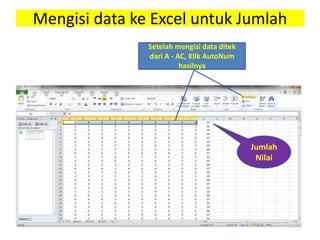
Mengisi data ke Excel untuk Jumlah
Setelah mengisi data ditek
dari A - AC, Klik AutoNum
hasilnya
Jumlah
Nilai
with Pdt Chris Hukubun Descriptives 3
Kliik Varibel
View
Ketik Variabel
Y, X1, X2, X3
Decimal (0)
Masukan data jumlah Variabel Y,
X1, X2, X3 ke SPSS 20
with Pdt Chris Hukubun Descriptives 4
Klik Data View
Klik : Analyze > Regretion > Linier
Akan muncul tabel Linier Regretion
Klik Statistic
Ctrl + A Pindahkan Y ke
Dependen, X1, X2, X3
ke Independen
Akan muncul
(centang Estimates, Covariance matrix, Mode Fit,
Collonearooty diagnostics)
Klik Continiue
Muncul
Klik Ok
Hasil
ANOVAa
Model Sum of
Squares
df Mean
Square
F Sig.
1
Regression 17200.761 3 5733.587 155.230 .000b
Residual 6316.073 171 36.936
Total 23516.834 174
a. Dependent Variable: Y
b. Predictors: (Constant), X3, X2, X1
Hasil
Coefficientsa
Model Unstandardized
Coefficients
Standardi
zed
Coefficien
ts
t Sig. Collinearity
Statistics
B Std. Error Beta Toleran
ce
VIF
1
(Constan
t) 35.464 3.636 9.752 .000
X1 2.614 4.553 1.088 .574 .567 .000 2285.3
31
X2 .990 1.226 .410 .808 .420 .006 164.02
7
X3 -1.548 4.372 -.642 -.354 .724 .000 2094.2
45
a. Dependent Variable: Y
Hasil
Coefficientsa
Model Unstandardized
Coefficients
Standardized
Coefficients
t Sig. Collinearity Statistics
B Std. Error Beta Tolerance VIF
1
(Constant) 35.464 3.636 9.752 .000
X1 2.614 4.553 1.088 .574 .567 .000 2285.331
X2 .990 1.226 .410 .808 .420 .006 164.027
X3 -1.548 4.372 -.642 -.354 .724 .000 2094.245
a. Dependent Variable: Y

Uji multikolinearitas