The  Microsoft vision  for Unified communications Anthony Howlett Senior Account Manager http://www.eneskay.com
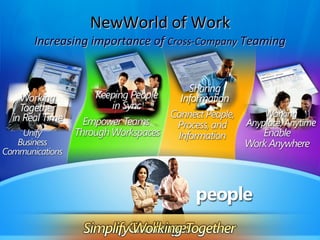
NewWorld of Work Increasing importance of  Cross-Company  Teaming
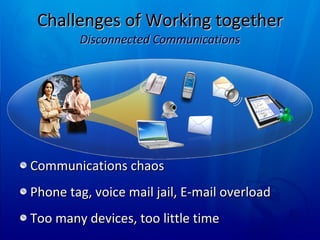
Challenges of Working together Disconnected Communications Communications chaos Phone tag, voice mail jail, E-mail overload Too many devices, too little time
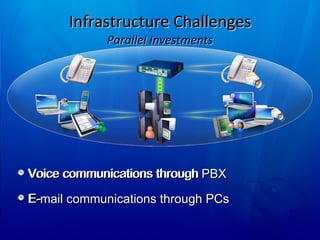
Infrastructure Challenges Parallel Investments Voice communications through PBX E-mail communications through PCs Voice communications through  E-
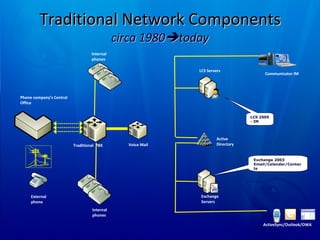
Traditional Network Components circa 1980  today External phone Phone company’s Central Office Traditional  PBX Internal phones Voice Mail Exchange Servers Active Directory Internal phones LCS 2005 - IM Exchange 2003 Email/Calendar/Contacts LCS Servers Communicator IM ActiveSync/Outlook/OWA
Unified  Messaging Communications are either  synchronous Voice conversations, Video Conferencing, IM Or  Asynchronous Faxes, e-mail, voice mail  UM – about bring all the synch to one place. Major investment in Exchange 2007 Voice mail and fax into [Outlook] inbox Listen to e-mail when you call in for messages
Unified Communications We communicate with  people,  not addresses We have a huge choice of media The best medium varies:  Would you phone someone you knew to be out ? Would a chat save a long e-mail exchange Ever ask “is this a good time for a call” Choice of medium driven by presence
How would you connect if The person you wanted was... On Holiday for the next week In a meeting for the next 30 mins Around, but not at their PC At their PC but with a “do not disturb” sign Available  ... Wouldn’t it be good to know ?
The first goal of UC. Wherever I see a name, I see also see  presence.
Demo Presence in Microsoft apps.
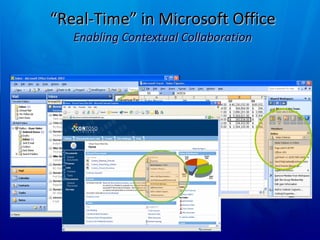
“ Real-Time” in Microsoft Office Enabling Contextual Collaboration
When you have presence ... If you can see presence you can choose your mode of communication.  1:1 or multi-party Voice, Video, data-conference, IM, Mail .... Let the computer place the call To speak to one of my contacts , why must I key in their address on the voice Network ?
If the computer controls the call... Click to call ... Every phone number can (should) be a tel: URI Richer call management What is today’s protocol for call transfer Can you set up a conference call easily ? Information about inbound call  Caller ID on “Toast”  Why shouldn’t voice calls have a subject
Demo  Voice integration
Voice calls is one of many “modalities”  Easy to move between them  IM ... “ Are you free for a call ” [Click] Voice ... “ Hey James .... If you could see ”. [Click] Data conference... “ We need Dave... ” [Click] Develop new conferencing experiences ...
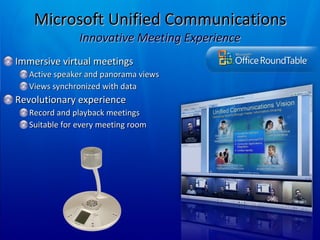
Microsoft Unified Communications Innovative Meeting Experience Immersive virtual meetings Active speaker and panorama views Views synchronized with data Revolutionary experience Record and playback meetings Suitable for every meeting room
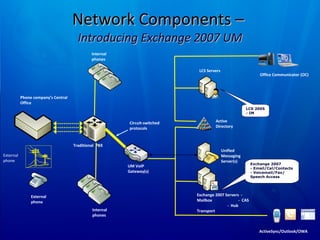
Network Components –  Introducing Exchange 2007 UM External phone External phone Phone company’s Central Office Traditional  PBX Internal phones Exchange 2007 Servers  -  Mailbox  -  CAS  -  Hub Transport Active Directory Internal phones LCS 2005 - IM LCS Servers Office Communicator (OC) UM VoIP Gateway(s) Circuit-switched protocols Unified Messaging Server(s) Exchange 2007 - Email/Cal/Contacts - Voicemail/Fax/ Speech Access ActiveSync/Outlook/OWA
The second rule of UC Remember  Where I see a name I see presence  I want to communicate with people so... Where I see presence, I should be able to start a conversation (in the right medium)
Developer action Make any phone number you display a tel: uri Presence  enable applications Web applications have easy code sample code SDK for forms applications Think about demand for customer contact in more media than phone / e-mail
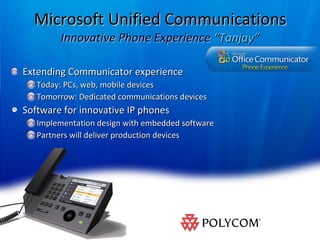
Microsoft Unified Communications Innovative Phone Experience  “Tanjay” Extending Communicator experience Today: PCs, web, mobile devices Tomorrow: Dedicated communications devices Software for innovative IP phones Implementation design with embedded software Partners will deliver production devices
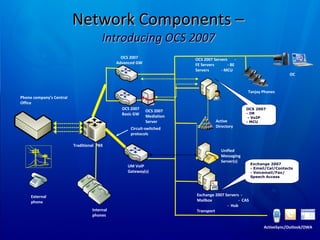
Network Components –  Introducing OCS 2007  External phone Phone company’s Central Office Traditional  PBX Internal phones Exchange 2007 Servers  -  Mailbox  -  CAS  -  Hub Transport Active Directory OCS 2007 - IM  - VoIP  - MCU OCS 2007 Servers  - FE Servers  - BE Servers  - MCU OC UM VoIP Gateway(s) Circuit-switched protocols Unified Messaging Server(s) Exchange 2007 - Email/Cal/Contacts - Voicemail/Fax/ Speech Access OCS 2007 Basic GW OCS 2007 Advanced GW OCS 2007  Mediation Server Tanjay Phones ActiveSync/Outlook/OWA
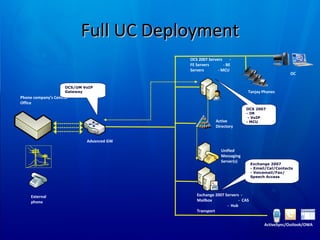
Full UC Deployment External phone Phone company’s Central Office Exchange 2007 Servers  -  Mailbox  -  CAS  -  Hub Transport Active Directory OCS 2007 - IM  - VoIP  - MCU OCS 2007 Servers  - FE Servers  - BE Servers  - MCU OC Unified Messaging Server(s) Exchange 2007 - Email/Cal/Contacts - Voicemail/Fax/ Speech Access Advanced GW Tanjay Phones OCS/UM VoIP Gateway ActiveSync/Outlook/OWA
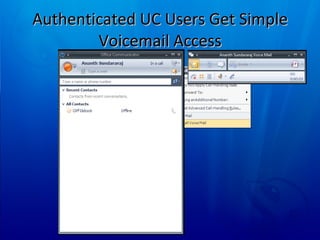
Authenticated UC Users Get Simple Voicemail Access
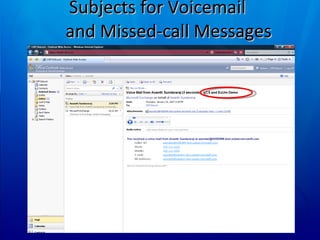
Subjects for Voicemail  and Missed-call Messages
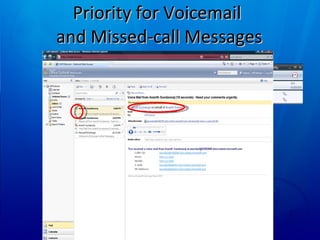
Priority for Voicemail  and Missed-call Messages
Questions ?
 

Microsoft Vision Unified Communications

  • 1.
    The Microsoftvision for Unified communications Anthony Howlett Senior Account Manager http://www.eneskay.com
  • 2.
    NewWorld of WorkIncreasing importance of Cross-Company Teaming
  • 3.
    Challenges of Workingtogether Disconnected Communications Communications chaos Phone tag, voice mail jail, E-mail overload Too many devices, too little time
  • 4.
    Infrastructure Challenges ParallelInvestments Voice communications through PBX E-mail communications through PCs Voice communications through E-
  • 5.
    Traditional Network Componentscirca 1980  today External phone Phone company’s Central Office Traditional PBX Internal phones Voice Mail Exchange Servers Active Directory Internal phones LCS 2005 - IM Exchange 2003 Email/Calendar/Contacts LCS Servers Communicator IM ActiveSync/Outlook/OWA
  • 6.
    Unified MessagingCommunications are either synchronous Voice conversations, Video Conferencing, IM Or Asynchronous Faxes, e-mail, voice mail UM – about bring all the synch to one place. Major investment in Exchange 2007 Voice mail and fax into [Outlook] inbox Listen to e-mail when you call in for messages
  • 7.
    Unified Communications Wecommunicate with people, not addresses We have a huge choice of media The best medium varies: Would you phone someone you knew to be out ? Would a chat save a long e-mail exchange Ever ask “is this a good time for a call” Choice of medium driven by presence
  • 8.
    How would youconnect if The person you wanted was... On Holiday for the next week In a meeting for the next 30 mins Around, but not at their PC At their PC but with a “do not disturb” sign Available ... Wouldn’t it be good to know ?
  • 9.
    The first goalof UC. Wherever I see a name, I see also see presence.
  • 10.
    Demo Presence inMicrosoft apps.
  • 11.
    “ Real-Time” inMicrosoft Office Enabling Contextual Collaboration
  • 12.
    When you havepresence ... If you can see presence you can choose your mode of communication. 1:1 or multi-party Voice, Video, data-conference, IM, Mail .... Let the computer place the call To speak to one of my contacts , why must I key in their address on the voice Network ?
  • 13.
    If the computercontrols the call... Click to call ... Every phone number can (should) be a tel: URI Richer call management What is today’s protocol for call transfer Can you set up a conference call easily ? Information about inbound call Caller ID on “Toast” Why shouldn’t voice calls have a subject
  • 14.
    Demo Voiceintegration
  • 15.
    Voice calls isone of many “modalities” Easy to move between them IM ... “ Are you free for a call ” [Click] Voice ... “ Hey James .... If you could see ”. [Click] Data conference... “ We need Dave... ” [Click] Develop new conferencing experiences ...
  • 16.
    Microsoft Unified CommunicationsInnovative Meeting Experience Immersive virtual meetings Active speaker and panorama views Views synchronized with data Revolutionary experience Record and playback meetings Suitable for every meeting room
  • 17.
    Network Components – Introducing Exchange 2007 UM External phone External phone Phone company’s Central Office Traditional PBX Internal phones Exchange 2007 Servers - Mailbox - CAS - Hub Transport Active Directory Internal phones LCS 2005 - IM LCS Servers Office Communicator (OC) UM VoIP Gateway(s) Circuit-switched protocols Unified Messaging Server(s) Exchange 2007 - Email/Cal/Contacts - Voicemail/Fax/ Speech Access ActiveSync/Outlook/OWA
  • 18.
    The second ruleof UC Remember Where I see a name I see presence I want to communicate with people so... Where I see presence, I should be able to start a conversation (in the right medium)
  • 19.
    Developer action Makeany phone number you display a tel: uri Presence enable applications Web applications have easy code sample code SDK for forms applications Think about demand for customer contact in more media than phone / e-mail
  • 20.
    Microsoft Unified CommunicationsInnovative Phone Experience “Tanjay” Extending Communicator experience Today: PCs, web, mobile devices Tomorrow: Dedicated communications devices Software for innovative IP phones Implementation design with embedded software Partners will deliver production devices
  • 21.
    Network Components – Introducing OCS 2007 External phone Phone company’s Central Office Traditional PBX Internal phones Exchange 2007 Servers - Mailbox - CAS - Hub Transport Active Directory OCS 2007 - IM - VoIP - MCU OCS 2007 Servers - FE Servers - BE Servers - MCU OC UM VoIP Gateway(s) Circuit-switched protocols Unified Messaging Server(s) Exchange 2007 - Email/Cal/Contacts - Voicemail/Fax/ Speech Access OCS 2007 Basic GW OCS 2007 Advanced GW OCS 2007 Mediation Server Tanjay Phones ActiveSync/Outlook/OWA
  • 22.
    Full UC DeploymentExternal phone Phone company’s Central Office Exchange 2007 Servers - Mailbox - CAS - Hub Transport Active Directory OCS 2007 - IM - VoIP - MCU OCS 2007 Servers - FE Servers - BE Servers - MCU OC Unified Messaging Server(s) Exchange 2007 - Email/Cal/Contacts - Voicemail/Fax/ Speech Access Advanced GW Tanjay Phones OCS/UM VoIP Gateway ActiveSync/Outlook/OWA
  • 23.
    Authenticated UC UsersGet Simple Voicemail Access
  • 24.
    Subjects for Voicemail and Missed-call Messages
  • 25.
    Priority for Voicemail and Missed-call Messages
  • 26.
  • 27.

Editor's Notes

  • #3 03/21/10 15:07
  • #21 03/21/10 15:07
  • #24 03/21/10 15:07 MICROSOFT CONFIDENTIAL © 2006 Microsoft Corporation. All rights reserved. Microsoft, Windows, Windows Vista and other product names are or may be registered trademarks and/or trademarks in the U.S. and/or other countries. The information herein is for informational purposes only and represents the current view of Microsoft Corporation as of the date of this presentation. Because Microsoft must respond to changing market conditions, it should not be interpreted to be a commitment on the part of Microsoft, and Microsoft cannot guarantee the accuracy of any information provided after the date of this presentation. MICROSOFT MAKES NO WARRANTIES, EXPRESS, IMPLIED OR STATUTORY, AS TO THE INFORMATION IN THIS PRESENTATION.
  • #25 03/21/10 15:07 MICROSOFT CONFIDENTIAL © 2006 Microsoft Corporation. All rights reserved. Microsoft, Windows, Windows Vista and other product names are or may be registered trademarks and/or trademarks in the U.S. and/or other countries. The information herein is for informational purposes only and represents the current view of Microsoft Corporation as of the date of this presentation. Because Microsoft must respond to changing market conditions, it should not be interpreted to be a commitment on the part of Microsoft, and Microsoft cannot guarantee the accuracy of any information provided after the date of this presentation. MICROSOFT MAKES NO WARRANTIES, EXPRESS, IMPLIED OR STATUTORY, AS TO THE INFORMATION IN THIS PRESENTATION.
  • #26 03/21/10 15:07 MICROSOFT CONFIDENTIAL © 2006 Microsoft Corporation. All rights reserved. Microsoft, Windows, Windows Vista and other product names are or may be registered trademarks and/or trademarks in the U.S. and/or other countries. The information herein is for informational purposes only and represents the current view of Microsoft Corporation as of the date of this presentation. Because Microsoft must respond to changing market conditions, it should not be interpreted to be a commitment on the part of Microsoft, and Microsoft cannot guarantee the accuracy of any information provided after the date of this presentation. MICROSOFT MAKES NO WARRANTIES, EXPRESS, IMPLIED OR STATUTORY, AS TO THE INFORMATION IN THIS PRESENTATION.