Ubuntu Terminal for pre-beginners
Terminal - Ubuntu This is an easy start with Terminal for those who are clueless.
Coders can working with amazing ease at the command prompt.
The rest of us are clueless and no amount of beginners' help will move us on
We need pre-beginners' help...
Start here: $
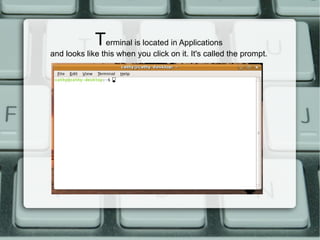
T erminal is located in Applications and looks like this when you click on it. It's called the prompt.
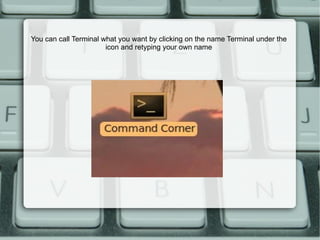
You can call Terminal what you want by clicking on the name Terminal under the icon and retyping your own name
Here are a few things to type at the prompt. Press enter after you have typed each one:
ls ls will tell you what is in the folder/directory you are in ls -a
This command will list the folder/directory files including the hidden ones
cal Type cal at the prompt and press enter. You will get a calendar for this month. Type cal 2010 and press enter. You will get a calendar for this year.
clear Type clear at the prompt and press enter.  It clears everything you have typed in!
date/time Type date at the prompt and press enter. It will display the date. Type time at the prompt and press enter. It will show you the time.
cd cd will change you to another folder/ directory.
Type ls and you will see what is in the folder/directory. Assuming you have a folder/directory called SlideShows, type cd SlideShows at the prompt and press enter.
Type cd and press enter and you will be back home.
q Q will take you out of a screen you may have entered and back to the prompt. Type info cal

Ubuntu Terminal

  • 1.
    Ubuntu Terminal forpre-beginners
  • 2.
    Terminal - UbuntuThis is an easy start with Terminal for those who are clueless.
  • 3.
    Coders can workingwith amazing ease at the command prompt.
  • 4.
    The rest ofus are clueless and no amount of beginners' help will move us on
  • 5.
  • 6.
  • 7.
    T erminal islocated in Applications and looks like this when you click on it. It's called the prompt.
  • 8.
    You can callTerminal what you want by clicking on the name Terminal under the icon and retyping your own name
  • 9.
    Here are afew things to type at the prompt. Press enter after you have typed each one:
  • 10.
    ls ls willtell you what is in the folder/directory you are in ls -a
  • 11.
    This command willlist the folder/directory files including the hidden ones
  • 12.
    cal Type calat the prompt and press enter. You will get a calendar for this month. Type cal 2010 and press enter. You will get a calendar for this year.
  • 13.
    clear Type clearat the prompt and press enter. It clears everything you have typed in!
  • 14.
    date/time Type dateat the prompt and press enter. It will display the date. Type time at the prompt and press enter. It will show you the time.
  • 15.
    cd cd willchange you to another folder/ directory.
  • 16.
    Type ls andyou will see what is in the folder/directory. Assuming you have a folder/directory called SlideShows, type cd SlideShows at the prompt and press enter.
  • 17.
    Type cd andpress enter and you will be back home.
  • 18.
    q Q willtake you out of a screen you may have entered and back to the prompt. Type info cal