Introduction
• As we introduce and use digital media in our
  classrooms we need to pay attention to design
  principles
• as we create media
• when we select media
• when we use media

• It is all about CLARITY.
Scott McCloud
• Scott McCloud is a comic artist
• He has written books to teach others how to
  create successful comics
• He was the comic artist for Google when his
  comics prepared the way for the new browser
  Chrome.
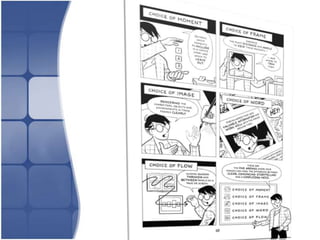
• He believes good design comes down to 5
  choices: Focus,Frame,Image, Word, Flow
Focus
• What exactly do you want to teach?
• What is the focus of the lesson, the image, the
  text, the presentation?
• What do you want your students to know at
  the end of the session? The presentation?
• Is your message clear at the start?
• What can you leave out?
Frame
• What is your angle?
• Are you focussing on detail and complexity or
  is it a general overview and contextualisation?
• Is it inclusive?
• Where are the boundaries for today?
• Where does this lesson fit in with the rest of
  your narrative?
Image

•   Are your images inclusive?
•   Do you want your images to teach a subtext?
•   Are the images crystal clear?
•   What kind of atmosphere are you setting?
•   Are your images able to contribute to visual
    literacy?
Word
• What register are you using and why?
• Are you using words which will convey
  meaning to students?
• Do you need to include clarification of terms?
• Are you preventing misconceptions?
• Are you captioning when and where you can?
Flow
• Are you showing how one thing leads to
  another?
• Are you showing how this connects to prior
  knowledge, life, the world, other subjects?
• Have you explained which part of the picture
  you are in at the moment and where that can
  lead?
• Are you making connections with what you
  have taught and what comes next?
Resources
• A photographer’s frame of mind

• Literacy Today

• A rhetoric of sequential art

• 30 graphic novels in 30 days
Acknowledgements

• Microsoft Office 2010
• Templateswise.com
• Scott McCloud


• @sally07 January 2013

Design principles - Technology in the classroom

  • 2.
    Introduction • As weintroduce and use digital media in our classrooms we need to pay attention to design principles • as we create media • when we select media • when we use media • It is all about CLARITY.
  • 3.
    Scott McCloud • ScottMcCloud is a comic artist • He has written books to teach others how to create successful comics • He was the comic artist for Google when his comics prepared the way for the new browser Chrome. • He believes good design comes down to 5 choices: Focus,Frame,Image, Word, Flow
  • 4.
    Focus • What exactlydo you want to teach? • What is the focus of the lesson, the image, the text, the presentation? • What do you want your students to know at the end of the session? The presentation? • Is your message clear at the start? • What can you leave out?
  • 5.
    Frame • What isyour angle? • Are you focussing on detail and complexity or is it a general overview and contextualisation? • Is it inclusive? • Where are the boundaries for today? • Where does this lesson fit in with the rest of your narrative?
  • 6.
    Image • Are your images inclusive? • Do you want your images to teach a subtext? • Are the images crystal clear? • What kind of atmosphere are you setting? • Are your images able to contribute to visual literacy?
  • 7.
    Word • What registerare you using and why? • Are you using words which will convey meaning to students? • Do you need to include clarification of terms? • Are you preventing misconceptions? • Are you captioning when and where you can?
  • 8.
    Flow • Are youshowing how one thing leads to another? • Are you showing how this connects to prior knowledge, life, the world, other subjects? • Have you explained which part of the picture you are in at the moment and where that can lead? • Are you making connections with what you have taught and what comes next?
  • 10.
    Resources • A photographer’sframe of mind • Literacy Today • A rhetoric of sequential art • 30 graphic novels in 30 days
  • 11.
    Acknowledgements • Microsoft Office2010 • Templateswise.com • Scott McCloud • @sally07 January 2013