typography
     is the
     art and technique
     of arranging type
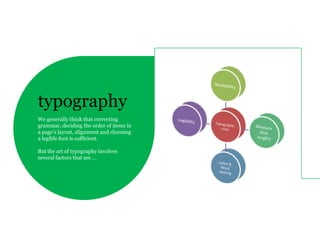
typography
We generally think that correcting
grammar, deciding the order of items in
a page’s layout, alignment and choosing
a legible font is sufficient.

But the art of typography involves
several factors that are …
Readability is our chief concern as designer. It is
                                            influenced by layout, the placement of blocks of
                                            content and the presentation of individual items. We
                                            can do many things to ensure readability, many of

readability                                 which are influenced by reader's behavior.

                                            Fundamentally, people “read” the Web differently
                                            than printed material. Understanding and designing
is the ease in which text can be read and   for this behavior – which is the point of user
understood.                                 experience design – is crucial. Web typography
                                            brings key considerations.
When it comes to legibility, many designers agree on
                                            certain conventions, heuristics and typographic
                                            techniques.

                                            For instance, uppercase letters are considered more

legibility                                  difficult to scan than lowercase letters, while regular type
                                            is more legible than italics. Good contrast between the
                                            body copy and background increases legibility, as does
                                            an appropriate line length and line height.
is the degree to which glyphs (individual
characters) in text are understandable or   The upper half of letters are relied on more for scanning
recognizable based on appearance and it     than the lower half, while the height of ascenders and
is affected by typeface design, screen      descenders play an important role in the reader’s
                                            recognition of letters.
optimization.
                                            Many consider serifs more legible for this reason.
The optimal length will depend on the context, but
                                             somewhere between 45 and 75 characters (including
                                             punctuation and spaces) is recommended for
                                             substantial blocks of text set flush left, ragged right. 66
                                             characters is regarded as optimal: this line length allows

measure                                      for comfortable reading and doesn’t require the eye to
                                             travel too far from the end of one line to the
                                             beginning of the next.

is the length of individual lines of text.   One shouldn’t make lines too short, either, because
                                             having to jump too frequently to the next line tires out the
                                             eye as well.

                                             line height - Leading is the vertical space
                                             of an individual line of text. It is the space between two
                                             consecutive lines of text or, in other words, the distance
                                             between the baselines of two lines of text.
When experimenting with tracking, make sure that
                                            “AV”, “ft” and “co” are clearly readable, and check that
                                            “vv” and “w” are distinguishable: the smallest inaccuracy
                                            can make text completely unreadable.


letter &                                    The negative letter spacing of pairs of characters is also
                                            called kerning; it may be necessary to adjust character
                                            pairs such as “ff”, “fl” and “ffl” that actually should be set

word spacing                                as ligatures. In some situations, kerning may be useful
                                            for improving the appearance of type; for instance, to
                                            move a “T” and small “e” closer together.
the space between letters, or the density
of blocks of text, can also be adjusted
relative to the measure.
A block of text should have a uniform tone if you squint
                                             and look at it on the screen. Nothing should jump out. If it
                                             does, then reading the text will be interrupted and the
                                             flow broken. This should only be done deliberately to call
                                             attention to something. Color can also be affected by

color                                        kerning.


is not pigmentation or hue, but rather the
consistency of glyphs on the page.
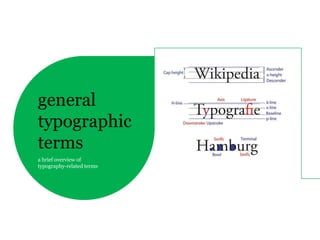
general
typographic
terms
a brief overview of
typography-related terms
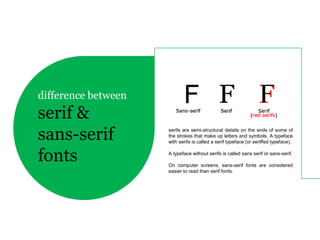
difference between
serif &
sans-serif           serifs are semi-structural details on the ends of some of
                     the strokes that make up letters and symbols. A typeface
                     with serifs is called a serif typeface (or seriffed typeface).


fonts                A typeface without serifs is called sans serif or sans-serif.

                     On computer screens, sans-serif fonts are considered
                     easier to read than serif fonts.
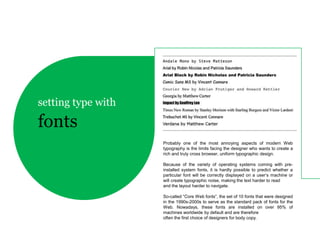
setting type with

fonts
                    Probably one of the most annoying aspects of modern Web
                    typography is the limits facing the designer who wants to create a
                    rich and truly cross browser, uniform typographic design.

                    Because of the variety of operating systems coming with pre-
                    installed system fonts, it is hardly possible to predict whether a
                    particular font will be correctly displayed on a user’s machine or
                    will create typographic noise, making the text harder to read
                    and the layout harder to navigate.

                    So-called “Core Web fonts”, the set of 10 fonts that were designed
                    in the 1990s-2000s to serve as the standard pack of fonts for the
                    Web. Nowadays, these fonts are installed on over 95% of
                    machines worldwide by default and are therefore
                    often the first choice of designers for body copy.
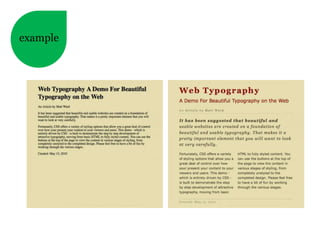
example
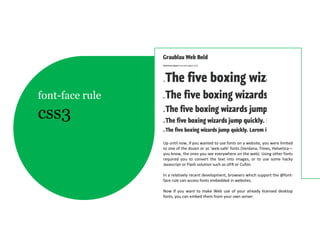
font-face rule
css3
                 Up until now, if you wanted to use fonts on a website, you were limited
                 to one of the dozen or so ‘web-safe’ fonts (Verdana, Times, Helvetica—
                 you know, the ones you see everywhere on the web). Using other fonts
                 required you to convert the text into images, or to use some hacky
                 Javascript or Flash solution such as sIFR or Cufón.

                 In a relatively recent development, browsers which support the @font-
                 face rule can access fonts embedded in websites.

                 Now If you want to make Web use of your already licensed desktop
                 fonts, you can embed them from your own server.
web
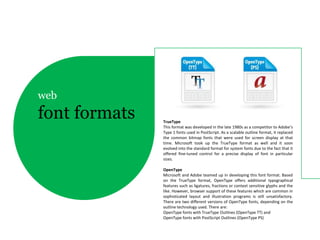
font formats   TrueType
               This format was developed in the late 1980s as a competitor to Adobe’s
               Type 1 fonts used in PostScript. As a scalable outline format, it replaced
               the common bitmap fonts that were used for screen display at that
               time. Microsoft took up the TrueType format as well and it soon
               evolved into the standard format for system fonts due to the fact that it
               offered fine-tuned control for a precise display of font in particular
               sizes.

               OpenType
               Microsoft and Adobe teamed up in developing this font format. Based
               on the TrueType format, OpenType offers additional typographical
               features such as ligatures, fractions or context sensitive glyphs and the
               like. However, browser support of these features which are common in
               sophisticated layout and illustration programs is still unsatisfactory.
               There are two different versions of OpenType fonts, depending on the
               outline technology used. There are:
               OpenType fonts with TrueType Outlines (OpenType TT) and
               OpenType fonts with PostScript Outlines (OpenType PS)
Reading Behavior
    People search for things and read that they want to know. People read what is most
    important to them. Our most important job is to find , understand, connect with the
    words, ideas and information they seek.

People read in 3 ways:
1. Casually – scanning over headlines, paragraphs here and there to get the sense of what it
   says. ( example : User behavior on online new s portals looking for their articles of interest )
2. Scan with purpose - Jumping from place to place on a page looking for specific information
   , they may only read the first item or character of that particular article ( for example : user
   behavior searching for contact email on contact us page will be looking only for a word that
   starts with letter “c”)
3. Engaged – People read in a engaged manner whet they find the article of their interest
   , focusing deeply on that particular article.

    Good Typography promotes reading. Font choice in size keep text legible and meaningful.
    Good line length and line height can help guide the readers eye. Vertical
    spacing, hierarchy, break up text into meaningful and manageable chunk of information
    makes the information more readable.
more on typo in next tech-talk

typography

Typography

  • 1.
    typography is the art and technique of arranging type
  • 2.
    typography We generally thinkthat correcting grammar, deciding the order of items in a page’s layout, alignment and choosing a legible font is sufficient. But the art of typography involves several factors that are …
  • 3.
    Readability is ourchief concern as designer. It is influenced by layout, the placement of blocks of content and the presentation of individual items. We can do many things to ensure readability, many of readability which are influenced by reader's behavior. Fundamentally, people “read” the Web differently than printed material. Understanding and designing is the ease in which text can be read and for this behavior – which is the point of user understood. experience design – is crucial. Web typography brings key considerations.
  • 4.
    When it comesto legibility, many designers agree on certain conventions, heuristics and typographic techniques. For instance, uppercase letters are considered more legibility difficult to scan than lowercase letters, while regular type is more legible than italics. Good contrast between the body copy and background increases legibility, as does an appropriate line length and line height. is the degree to which glyphs (individual characters) in text are understandable or The upper half of letters are relied on more for scanning recognizable based on appearance and it than the lower half, while the height of ascenders and is affected by typeface design, screen descenders play an important role in the reader’s recognition of letters. optimization. Many consider serifs more legible for this reason.
  • 5.
    The optimal lengthwill depend on the context, but somewhere between 45 and 75 characters (including punctuation and spaces) is recommended for substantial blocks of text set flush left, ragged right. 66 characters is regarded as optimal: this line length allows measure for comfortable reading and doesn’t require the eye to travel too far from the end of one line to the beginning of the next. is the length of individual lines of text. One shouldn’t make lines too short, either, because having to jump too frequently to the next line tires out the eye as well. line height - Leading is the vertical space of an individual line of text. It is the space between two consecutive lines of text or, in other words, the distance between the baselines of two lines of text.
  • 6.
    When experimenting withtracking, make sure that “AV”, “ft” and “co” are clearly readable, and check that “vv” and “w” are distinguishable: the smallest inaccuracy can make text completely unreadable. letter & The negative letter spacing of pairs of characters is also called kerning; it may be necessary to adjust character pairs such as “ff”, “fl” and “ffl” that actually should be set word spacing as ligatures. In some situations, kerning may be useful for improving the appearance of type; for instance, to move a “T” and small “e” closer together. the space between letters, or the density of blocks of text, can also be adjusted relative to the measure.
  • 7.
    A block oftext should have a uniform tone if you squint and look at it on the screen. Nothing should jump out. If it does, then reading the text will be interrupted and the flow broken. This should only be done deliberately to call attention to something. Color can also be affected by color kerning. is not pigmentation or hue, but rather the consistency of glyphs on the page.
  • 8.
    general typographic terms a brief overviewof typography-related terms
  • 9.
    difference between serif & sans-serif serifs are semi-structural details on the ends of some of the strokes that make up letters and symbols. A typeface with serifs is called a serif typeface (or seriffed typeface). fonts A typeface without serifs is called sans serif or sans-serif. On computer screens, sans-serif fonts are considered easier to read than serif fonts.
  • 11.
    setting type with fonts Probably one of the most annoying aspects of modern Web typography is the limits facing the designer who wants to create a rich and truly cross browser, uniform typographic design. Because of the variety of operating systems coming with pre- installed system fonts, it is hardly possible to predict whether a particular font will be correctly displayed on a user’s machine or will create typographic noise, making the text harder to read and the layout harder to navigate. So-called “Core Web fonts”, the set of 10 fonts that were designed in the 1990s-2000s to serve as the standard pack of fonts for the Web. Nowadays, these fonts are installed on over 95% of machines worldwide by default and are therefore often the first choice of designers for body copy.
  • 12.
  • 13.
    font-face rule css3 Up until now, if you wanted to use fonts on a website, you were limited to one of the dozen or so ‘web-safe’ fonts (Verdana, Times, Helvetica— you know, the ones you see everywhere on the web). Using other fonts required you to convert the text into images, or to use some hacky Javascript or Flash solution such as sIFR or Cufón. In a relatively recent development, browsers which support the @font- face rule can access fonts embedded in websites. Now If you want to make Web use of your already licensed desktop fonts, you can embed them from your own server.
  • 14.
    web font formats TrueType This format was developed in the late 1980s as a competitor to Adobe’s Type 1 fonts used in PostScript. As a scalable outline format, it replaced the common bitmap fonts that were used for screen display at that time. Microsoft took up the TrueType format as well and it soon evolved into the standard format for system fonts due to the fact that it offered fine-tuned control for a precise display of font in particular sizes. OpenType Microsoft and Adobe teamed up in developing this font format. Based on the TrueType format, OpenType offers additional typographical features such as ligatures, fractions or context sensitive glyphs and the like. However, browser support of these features which are common in sophisticated layout and illustration programs is still unsatisfactory. There are two different versions of OpenType fonts, depending on the outline technology used. There are: OpenType fonts with TrueType Outlines (OpenType TT) and OpenType fonts with PostScript Outlines (OpenType PS)
  • 15.
    Reading Behavior People search for things and read that they want to know. People read what is most important to them. Our most important job is to find , understand, connect with the words, ideas and information they seek. People read in 3 ways: 1. Casually – scanning over headlines, paragraphs here and there to get the sense of what it says. ( example : User behavior on online new s portals looking for their articles of interest ) 2. Scan with purpose - Jumping from place to place on a page looking for specific information , they may only read the first item or character of that particular article ( for example : user behavior searching for contact email on contact us page will be looking only for a word that starts with letter “c”) 3. Engaged – People read in a engaged manner whet they find the article of their interest , focusing deeply on that particular article. Good Typography promotes reading. Font choice in size keep text legible and meaningful. Good line length and line height can help guide the readers eye. Vertical spacing, hierarchy, break up text into meaningful and manageable chunk of information makes the information more readable.
  • 16.
    more on typoin next tech-talk typography