OpenShift & SELinux


Dan Walsh
Twitter: #rhatdan
Blog: danwalsh.livejournal.com
Email: dwalsh@redhat.com
SELinux is a LABELING System
●   Everything has a label
    –   Process,file,dir, chr_file, blk_file, port, node.
●   SELinux Policy defines that access between
    process labels and all other labels.
●   The Kernel controls the access.
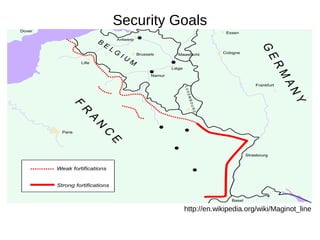
Security Goals


          http://en.wikipedia.org/wiki/Maginot_line
SELinux is Type Enforcement
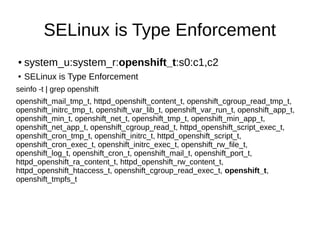
●   system_u:system_r:openshift_t:s0:c1,c2
●   SELinux is Type Enforcement
seinfo -t | grep openshift
openshift_mail_tmp_t, httpd_openshift_content_t, openshift_cgroup_read_tmp_t,
openshift_initrc_tmp_t, openshift_var_lib_t, openshift_var_run_t, openshift_app_t,
openshift_min_t, openshift_net_t, openshift_tmp_t, openshift_min_app_t,
openshift_net_app_t, openshift_cgroup_read_t, httpd_openshift_script_exec_t,
openshift_cron_tmp_t, openshift_initrc_t, httpd_openshift_script_t,
openshift_cron_exec_t, openshift_initrc_exec_t, openshift_rw_file_t,
openshift_log_t, openshift_cron_t, openshift_mail_t, openshift_port_t,
httpd_openshift_ra_content_t, httpd_openshift_rw_content_t,
httpd_openshift_htaccess_t, openshift_cgroup_read_exec_t, openshift_t,
openshift_tmpfs_t
SELinux is Type Enforcement
●   Process Labels can be on Files
●   File Labels can not on Processes
●   openshift_t -> Process
●   openshift_var_lib_t -> File
SELinux is MCS
●   system_u:system_r:openshift_t:s0:c1,c2
●   Multi Category System
●   MCS Separation is for like types, but totally separated
●   openshift_t:s0:c1,c2 -> openshift_var_lib_t:s0:c1,c2
●   openshift_t:s0:c3,c4 -> openshift_var_lib_t:s0:c3,c4
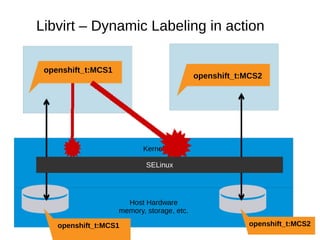
Libvirt – Dynamic Labeling in action

 openshift_t:MCS1
                                            openshift_t:MCS2


                           Kernel

                            SELinux


                      Host Hardware
                    memory, storage, etc.

    openshift_t:MCS1                                    openshift_t:MCS2
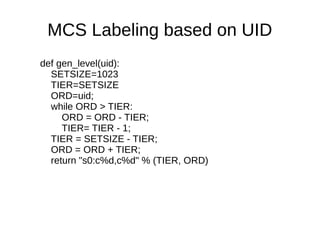
MCS Labeling based on UID
def gen_level(uid):
  SETSIZE=1023
  TIER=SETSIZE
  ORD=uid;
  while ORD > TIER:
     ORD = ORD - TIER;
     TIER= TIER - 1;
  TIER = SETSIZE - TIER;
  ORD = ORD + TIER;
  return "s0:c%d,c%d" % (TIER, ORD)
How do the labels get on gears
●   Host receives packet for a gear
    –   OpenShift server
        ●   launches application with correct SELinux label.
        ●   Sends packet to application
●   If connection comes in via git or ssh
    –   Ssh uses pam_openshift
        ●   Launch sh with correct context
        ●   Launch git with correct context
DEMO
Monitoring Logs
Problems with OpenShift Security
●   Gear Application == Administrator of Gear
    –   Same UID
    –   Same SELinux Label openshift_t
●   Solution:
    –   openshift_t
        ●   Administrator of gear
    –   openshift_app_t
        ●   Type of the application
    –   openshift_var_lib_t
        ●   openshift_t can read/write/execute
        ●   openshift_app_t can read/execute
    –   openshift_rw_file_t
        ●   openshift_t & openshift_app_t can read/write/execute
Problem with OpenShift Security
●   All gears run as openhift_t
    –   All have same network access.
        ●   openshift_t/openshift_app_t
        ●   openshift_net_t/openshift_net -app_t
        ●   openshift_min_t/openshift_min_app_t
What about trust between nodes.
●   IPTables not enough
●   Node1:Gear1 can not attack Node1:gear2
●   Node1:Gear1 can attack Node2:gear2
●   Labeled Networking between Nodes
    –   Based on MLS CIPSO Labels
●   Labeled Networking SELinux rules
    –   Node1:Gear1 can use Node2:gear1
    –   Node1:Gear1 attacking Node2:gear2 blocked
●   Requires UID being the same between nodes.
Problems with SELinux
                   Confinement
●   Node Separation
    –   127.0.0.1 blocked to all.
    –   We do not want multiple Domains binding to
        127.0.0.1:8080
        ●   First one wins
●   Apps trying to do SELinux stuff
●   SELinux blocks access to processes but it
    knows they are there.
Secure Linux Containers
Containers != Security
●   Running root in a container, machine pwned
●   Local Privilege Escalation, machine pwned
●   Much of the system is not containerized.
    –   Audit
    –   /sys
        ●   selinuxfs, cgroupfs, sysfs
    –   Need to block mount
    –   Need to block mknod
Linux Namespaces
●   Mount : mounting/unmounting filesystems
    –   Currently used by Openshift for /tmp, /var/tmp and /dev/shm
●   UTS : hostname, domainname
●   IPC : SysV message queues, semaphore/shared memory
    segments
●   Network: IPv4/IPv6 stacks, routing, firewall, proc/net
    /sys/class/net directory trees, sock
    –   Critical to fix localhost problem
●   Pid: Private /proc, multiple pid 1's
●   UID: Just showing up in the Kernel now..
Libvirt-lxc
●   Boot “init” binary
●   SELinux Types + MCS
●   Firewall ebtables/ip[6]tables
●   Host FS passthrough bind mounts
●   CGroups resource control
●   Available in RHEL6.4
    –   But your on your own...
virt-sandbox
●   Package to help managing Linux Containers
DEMO

OpenShift & SELinux with Dan Walsh @rhatdan

  • 1.
    OpenShift & SELinux DanWalsh Twitter: #rhatdan Blog: danwalsh.livejournal.com Email: dwalsh@redhat.com
  • 2.
    SELinux is aLABELING System ● Everything has a label – Process,file,dir, chr_file, blk_file, port, node. ● SELinux Policy defines that access between process labels and all other labels. ● The Kernel controls the access.
  • 3.
    Security Goals http://en.wikipedia.org/wiki/Maginot_line
  • 4.
    SELinux is TypeEnforcement ● system_u:system_r:openshift_t:s0:c1,c2 ● SELinux is Type Enforcement seinfo -t | grep openshift openshift_mail_tmp_t, httpd_openshift_content_t, openshift_cgroup_read_tmp_t, openshift_initrc_tmp_t, openshift_var_lib_t, openshift_var_run_t, openshift_app_t, openshift_min_t, openshift_net_t, openshift_tmp_t, openshift_min_app_t, openshift_net_app_t, openshift_cgroup_read_t, httpd_openshift_script_exec_t, openshift_cron_tmp_t, openshift_initrc_t, httpd_openshift_script_t, openshift_cron_exec_t, openshift_initrc_exec_t, openshift_rw_file_t, openshift_log_t, openshift_cron_t, openshift_mail_t, openshift_port_t, httpd_openshift_ra_content_t, httpd_openshift_rw_content_t, httpd_openshift_htaccess_t, openshift_cgroup_read_exec_t, openshift_t, openshift_tmpfs_t
  • 5.
    SELinux is TypeEnforcement ● Process Labels can be on Files ● File Labels can not on Processes ● openshift_t -> Process ● openshift_var_lib_t -> File
  • 6.
    SELinux is MCS ● system_u:system_r:openshift_t:s0:c1,c2 ● Multi Category System ● MCS Separation is for like types, but totally separated ● openshift_t:s0:c1,c2 -> openshift_var_lib_t:s0:c1,c2 ● openshift_t:s0:c3,c4 -> openshift_var_lib_t:s0:c3,c4
  • 7.
    Libvirt – DynamicLabeling in action openshift_t:MCS1 openshift_t:MCS2 Kernel SELinux Host Hardware memory, storage, etc. openshift_t:MCS1 openshift_t:MCS2
  • 8.
    MCS Labeling basedon UID def gen_level(uid): SETSIZE=1023 TIER=SETSIZE ORD=uid; while ORD > TIER: ORD = ORD - TIER; TIER= TIER - 1; TIER = SETSIZE - TIER; ORD = ORD + TIER; return "s0:c%d,c%d" % (TIER, ORD)
  • 9.
    How do thelabels get on gears ● Host receives packet for a gear – OpenShift server ● launches application with correct SELinux label. ● Sends packet to application ● If connection comes in via git or ssh – Ssh uses pam_openshift ● Launch sh with correct context ● Launch git with correct context
  • 10.
  • 11.
  • 12.
    Problems with OpenShiftSecurity ● Gear Application == Administrator of Gear – Same UID – Same SELinux Label openshift_t ● Solution: – openshift_t ● Administrator of gear – openshift_app_t ● Type of the application – openshift_var_lib_t ● openshift_t can read/write/execute ● openshift_app_t can read/execute – openshift_rw_file_t ● openshift_t & openshift_app_t can read/write/execute
  • 13.
    Problem with OpenShiftSecurity ● All gears run as openhift_t – All have same network access. ● openshift_t/openshift_app_t ● openshift_net_t/openshift_net -app_t ● openshift_min_t/openshift_min_app_t
  • 14.
    What about trustbetween nodes. ● IPTables not enough ● Node1:Gear1 can not attack Node1:gear2 ● Node1:Gear1 can attack Node2:gear2 ● Labeled Networking between Nodes – Based on MLS CIPSO Labels ● Labeled Networking SELinux rules – Node1:Gear1 can use Node2:gear1 – Node1:Gear1 attacking Node2:gear2 blocked ● Requires UID being the same between nodes.
  • 15.
    Problems with SELinux Confinement ● Node Separation – 127.0.0.1 blocked to all. – We do not want multiple Domains binding to 127.0.0.1:8080 ● First one wins ● Apps trying to do SELinux stuff ● SELinux blocks access to processes but it knows they are there.
  • 16.
  • 17.
    Containers != Security ● Running root in a container, machine pwned ● Local Privilege Escalation, machine pwned ● Much of the system is not containerized. – Audit – /sys ● selinuxfs, cgroupfs, sysfs – Need to block mount – Need to block mknod
  • 18.
    Linux Namespaces ● Mount : mounting/unmounting filesystems – Currently used by Openshift for /tmp, /var/tmp and /dev/shm ● UTS : hostname, domainname ● IPC : SysV message queues, semaphore/shared memory segments ● Network: IPv4/IPv6 stacks, routing, firewall, proc/net /sys/class/net directory trees, sock – Critical to fix localhost problem ● Pid: Private /proc, multiple pid 1's ● UID: Just showing up in the Kernel now..
  • 19.
    Libvirt-lxc ● Boot “init” binary ● SELinux Types + MCS ● Firewall ebtables/ip[6]tables ● Host FS passthrough bind mounts ● CGroups resource control ● Available in RHEL6.4 – But your on your own...
  • 20.
    virt-sandbox ● Package to help managing Linux Containers
  • 21.

Editor's Notes

  • #4 When writing SELinux policy, the first thing to understand, what is your security goal. For most people the security goal is to get to as close as minimal access to allow the confined application to get its job done and prevent its ability to effect other applications. For a lot of applications, you can configure the application to run in different Ways. Ftp for example can be configured to allow anonymous access to files, or access to users home directories, or access to the entire system. When you have an application like this, you can use booleans to allow administrators to reconfigure the policy, for their environment. When you are writing policy it is always good to ask experts about the policy you have written to see if you are allowing more access then necessary or if they know a better way to write the policy.
  • #8 This slide shows one Virtual machine running as svirt_t:MCS1 and the other virtual machine running as svirt_t:MCS2. Which their image files labeled as svirt_image_t:MCS1 and svirt_image_t:MCS2. The same attack we saw before is being blocked by SELinux in the host kernel, and this protects Host as well as all virtual machines from attacking each other.