1
Bringing Some Spatial Love to
your Application
Marek Jelen
PaaS Evangelist, Red Hat
2
Agenda
• Learn a bit of spatial
• See the code
• Use it on server
• MAKE YOU A ROCKSTAR!!
3
i. familiar with the command line
ii. familiar with MongoDB command line
iii. Questions are not good!
iv. Questions are awesome!
Expectations
4
What is OpenShift?
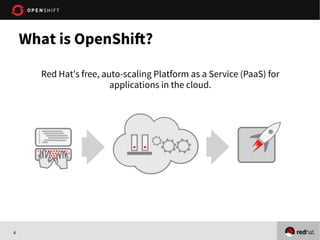
Red Hat's free, auto-scaling Platform as a Service (PaaS) for
applications in the cloud.
5
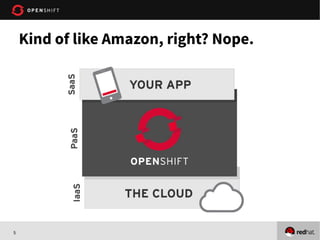
Kind of like Amazon, right? Nope.
6
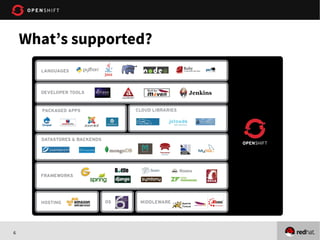
What’s supported?
7
Looks great, but what’s the catch?
• OpenShift is free-as-in-beer & free-as-in-freedom
• Three times 0.5GB RAM/1GB storage
• Need more resources, just ask!
• We are in Developer Preview
• Sign up at openshift.com
• Promo code: MongoDBBerlin
8
On to Spatial and MongoDBOn to Spatial and MongoDB
9
The spatial functionality MongoDB provides
1) near
2) within
All of it is laid out on one page:
http://www.mongodb.org/display/DOCS/Geospatial+Indexing
First link on Google for “MongoDB spatial indexing”
Spatial is fun!
10
1) Put your coordinates into the document
{ loc : [ 50 , 30 ] } //SUGGESTED OPTION
{ loc : { x : 50 , y : 30 } }
{ loc : { foo : 50 , y : 30 } }
{ loc : { lon : 40.739037, lat: 73.992964 } }
2) Make a 2d index
db.places.ensureIndex( { loc : "2d" } )
How to make it work
11
1. Demo MongoDB command line
2. Demo the expected result
3. Create an OpenShift application
4. Import the code from Github
• https://github.com/openshift-quickstart/spatial-ruby-openshift-quickstart
5. Demo the deployed application
Demo
12
1. Spatial is easy and fun on MongoDB!
2. You can now build your own FourSquare
3. You can build and deploy your application quickly
without having to think about infrastructure.
4. Sign up for OpenShift with “MongoDBBerlin” promo
code
5. Come to talk to the table
Conclusion
13
Thanks
mjelen@redhat.com
@marek_jelen
http://openshift.redhat.com
https://github.com/openshift-quickstart/spatial-ruby-openshift-quickstart

Bringing Some Spatial Love to your Application with OpenShift - Mongo Berlin Presentation by Marek Jelen

  • 1.
    1 Bringing Some SpatialLove to your Application Marek Jelen PaaS Evangelist, Red Hat
  • 2.
    2 Agenda • Learn abit of spatial • See the code • Use it on server • MAKE YOU A ROCKSTAR!!
  • 3.
    3 i. familiar withthe command line ii. familiar with MongoDB command line iii. Questions are not good! iv. Questions are awesome! Expectations
  • 4.
    4 What is OpenShift? RedHat's free, auto-scaling Platform as a Service (PaaS) for applications in the cloud.
  • 5.
    5 Kind of likeAmazon, right? Nope.
  • 6.
  • 7.
    7 Looks great, butwhat’s the catch? • OpenShift is free-as-in-beer & free-as-in-freedom • Three times 0.5GB RAM/1GB storage • Need more resources, just ask! • We are in Developer Preview • Sign up at openshift.com • Promo code: MongoDBBerlin
  • 8.
    8 On to Spatialand MongoDBOn to Spatial and MongoDB
  • 9.
    9 The spatial functionalityMongoDB provides 1) near 2) within All of it is laid out on one page: http://www.mongodb.org/display/DOCS/Geospatial+Indexing First link on Google for “MongoDB spatial indexing” Spatial is fun!
  • 10.
    10 1) Put yourcoordinates into the document { loc : [ 50 , 30 ] } //SUGGESTED OPTION { loc : { x : 50 , y : 30 } } { loc : { foo : 50 , y : 30 } } { loc : { lon : 40.739037, lat: 73.992964 } } 2) Make a 2d index db.places.ensureIndex( { loc : "2d" } ) How to make it work
  • 11.
    11 1. Demo MongoDBcommand line 2. Demo the expected result 3. Create an OpenShift application 4. Import the code from Github • https://github.com/openshift-quickstart/spatial-ruby-openshift-quickstart 5. Demo the deployed application Demo
  • 12.
    12 1. Spatial iseasy and fun on MongoDB! 2. You can now build your own FourSquare 3. You can build and deploy your application quickly without having to think about infrastructure. 4. Sign up for OpenShift with “MongoDBBerlin” promo code 5. Come to talk to the table Conclusion
  • 13.