Turning Large-Lecture Lemons into Lemonade: Effectively
Transforming the Large-Lecture Format into an Active,
Engaging, Collaborative Learning Environment!
Rutgers Online and Hybrid Learning Conference – January 2015 1
Presented By:
Denise Kreiger, Instructional Design and Technology Specialist, denise.kreiger@rutgers.edu
Sharon Stoerger, Ph.D., ITI Program Director, sharon.stoerger@rutgers.edu
Introductions . . .
2
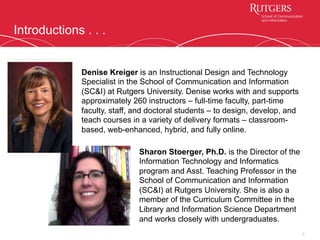
Denise Kreiger is an Instructional Design and Technology
Specialist in the School of Communication and Information
(SC&I) at Rutgers University. Denise works with and supports
approximately 260 instructors – full-time faculty, part-time
faculty, staff, and doctoral students – to design, develop, and
teach courses in a variety of delivery formats – classroom-
based, web-enhanced, hybrid, and fully online.
Sharon Stoerger, Ph.D. is the Director of the
Information Technology and Informatics
program and Asst. Teaching Professor in the
School of Communication and Information
(SC&I) at Rutgers University. She is also a
member of the Curriculum Committee in the
Library and Information Science Department
and works closely with undergraduates.
Transforming the Recipe . . .
3
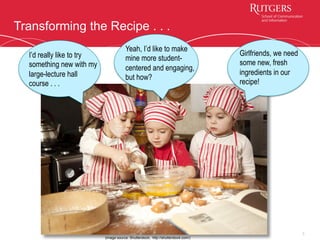
I’d really like to try
something new with my
large-lecture hall
course . . .
Yeah, I’d like to make
mine more student-
centered and engaging,
but how?
Girlfriends, we need
some new, fresh
ingredients in our
recipe!
(image source: Shutterstock, http://shutterstock.com/)
Existing Course Model . . .
4
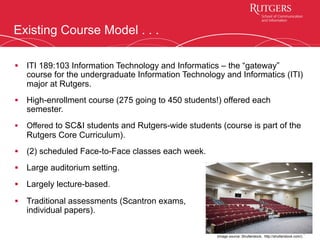
§  ITI 189:103 Information Technology and Informatics – the “gateway”
course for the undergraduate Information Technology and Informatics (ITI)
major at Rutgers.
§  High-enrollment course (275 going to 450 students!) offered each
semester.
§  Offered to SC&I students and Rutgers-wide students (course is part of the
Rutgers Core Curriculum).
§  (2) scheduled Face-to-Face classes each week.
§  Large auditorium setting.
§  Largely lecture-based.
§  Traditional assessments (Scantron exams,
individual papers).
(image source: Shutterstock, http://shutterstock.com/)
Why Transform the Large-Lecture Hall Course?
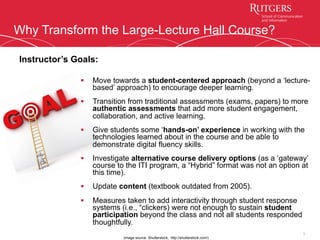
§  Move towards a student-centered approach (beyond a ‘lecture-
based’ approach) to encourage deeper learning.
§  Transition from traditional assessments (exams, papers) to more
authentic assessments that add more student engagement,
collaboration, and active learning.
§  Give students some ‘hands-on’ experience in working with the
technologies learned about in the course and be able to
demonstrate digital fluency skills.
§  Investigate alternative course delivery options (as a ‘gateway’
course to the ITI program, a “Hybrid” format was not an option at
this time).
§  Update content (textbook outdated from 2005).
§  Measures taken to add interactivity through student response
systems (i.e., “clickers) were not enough to sustain student
participation beyond the class and not all students responded
thoughtfully.
5
Instructor’s Goals:
(image source: Shutterstock, http://shutterstock.com/)
Collaborative Partnership
§  Course instructor/ITI Program Director
(Sharon) and SC&I’s instructional
designer/technologist (Denise) partnered
to redesign the course in a new direction.
§  6-month intensive course redesign/
development project in Spring-Summer
2014.
§  New redesign was launched in Fall 2014.
§  IRB Research Study was approved in
September 2014; data evaluation in
Spring 2015.
6
(image source: Shutterstock, http://shutterstock.com/)
New Course Model is Informed By . . .
7
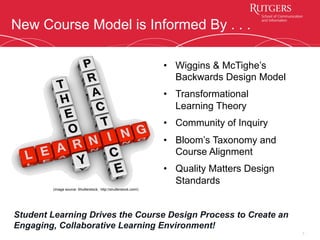
•  Wiggins & McTighe’s
Backwards Design Model
•  Transformational
Learning Theory
•  Community of Inquiry
•  Bloom’s Taxonomy and
Course Alignment
•  Quality Matters Design
Standards
Student Learning Drives the Course Design Process to Create an
Engaging, Collaborative Learning Environment!
(image source: Shutterstock, http://shutterstock.com/)
New Course Model . . .
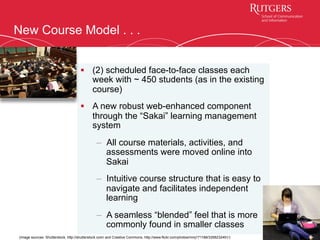
§  (2) scheduled face-to-face classes each
week with ~ 450 students (as in the existing
course)
§  A new robust web-enhanced component
through the “Sakai” learning management
system
–  All course materials, activities, and
assessments were moved online into
Sakai
–  Intuitive course structure that is easy to
navigate and facilitates independent
learning
–  A seamless “blended” feel that is more
commonly found in smaller classes
8
(image sources: Shutterstock, http://shutterstock.com/ and Creative Commons, http://www.flickr.com/photos/mmj171188/3358232491/)
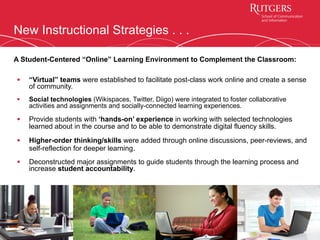
New Instructional Strategies . . .
§  “Virtual” teams were established to facilitate post-class work online and create a sense
of community.
§  Social technologies (Wikispaces, Twitter, Diigo) were integrated to foster collaborative
activities and assignments and socially-connected learning experiences.
§  Provide students with ‘hands-on’ experience in working with selected technologies
learned about in the course and to be able to demonstrate digital fluency skills.
§  Higher-order thinking/skills were added through online discussions, peer-reviews, and
self-reflection for deeper learning.
§  Deconstructed major assignments to guide students through the learning process and
increase student accountability.
9
A Student-Centered “Online” Learning Environment to Complement the Classroom:
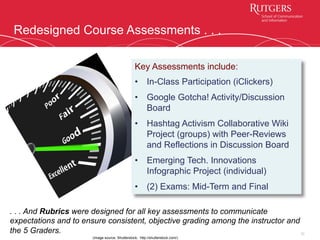
Redesigned Course Assessments . . .
10
Key Assessments include:
•  In-Class Participation (iClickers)
•  Google Gotcha! Activity/Discussion
Board
•  Hashtag Activism Collaborative Wiki
Project (groups) with Peer-Reviews
and Reflections in Discussion Board
•  Emerging Tech. Innovations
Infographic Project (individual)
•  (2) Exams: Mid-Term and Final
(image source: Shutterstock, http://shutterstock.com/)
. . . And Rubrics were designed for all key assessments to communicate
expectations and to ensure consistent, objective grading among the instructor and
the 5 Graders.
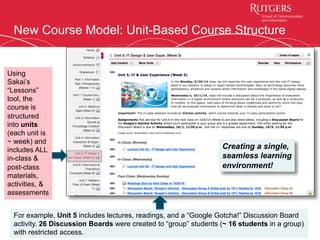
New Course Model: Unit-Based Course Structure
11
Using
Sakai’s
“Lessons”
tool, the
course is
structured
into units
(each unit is
~ week) and
includes ALL
in-class &
post-class
materials,
activities, &
assessments
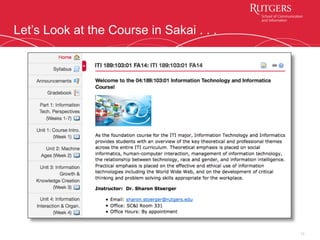
For example, Unit 5 includes lectures, readings, and a “Google Gotcha!” Discussion Board
activity. 26 Discussion Boards were created to “group” students (~ 16 students in a group)
with restricted access.
Creating a single,
seamless learning
environment!
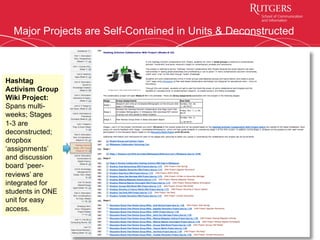
Major Projects are Self-Contained in Units & Deconstructed
12
Hashtag
Activism Group
Wiki Project:
Spans multi-
weeks; Stages
1-3 are
deconstructed;
dropbox
‘assignments’
and discussion
board ‘peer-
reviews’ are
integrated for
students in ONE
unit for easy
access.
Let’s Look at the Course in Sakai . . .
13
14
(image source: http://www.scientificamerican.com/article/psychologists-getting-liberals-to-agree-really-is-like-herding-cats/
Lessons Learned & Outcomes – Instructor Perspective . . .
•  Logistics/sheer numbers created a “herding cats”
phenomenon.
•  Myth of large-lecture hall & students’ mindset – expecting
a passive transfer of information with traditional
assessments.
•  Growing pains (“birthing”) in becoming co-constructors of
knowledge & co-owners of learning.
•  Myth of the ‘tech-savvy’ student - social media use does
not equate to technology use for academic work.
•  Steep learning curve - training “graders” in the key
assignments and applying rubrics for grading.
•  New assessments were valuable and relevant designed
for real-world experiences, technology use, &
collaboration.
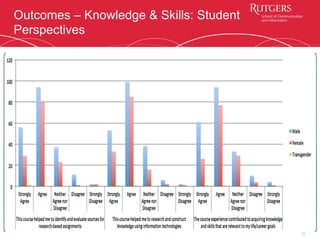
Lessons Learned & Outcomes – Student Perspectives . . .
15
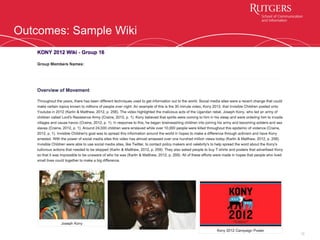
•  Mixed student reactions ‘in the moment’ –
ranging from ‘love it’ to ‘hate it.’
•  Collaborative Wiki project – was a
challenge for some (although final projects
were impressive!).
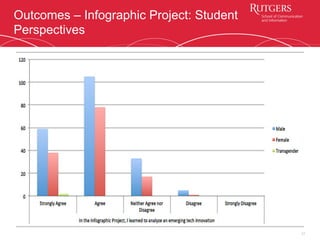
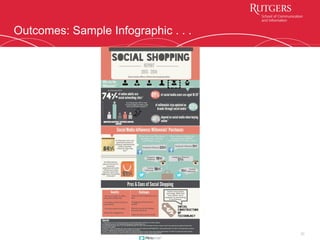
•  Individual Infographic project – was
embraced by most (final projects
exceeded expectations!).
•  Students (esp. young women) showed an
increased interest in learning about
technology and the ITI program.
•  Student feedback from end-of-course
Survey were favorable (upon reflection).
(image source: Shutterstock, http://shutterstock.com/)
Outcomes – Wiki Project: Student Perspectives
16
Outcomes – Infographic Project: Student
Perspectives
17
Outcomes – Knowledge & Skills: Student
Perspectives
18
Outcomes: Sample Wiki
19
Outcomes: Sample Infographic . . .
20
Future Direction . . .
21
(image source: Shutterstock, http://shutterstock.com/)
•  Redesigned the collaborative Wiki project
(Hashtag Activism) into “chunked”
Discussion Boards for same project –
retained research, collaboration, knowledge
sharing, and communication with smoother
logistics (all in the LMS)
•  Discussion Boards (4) are now key
assessments and provide collaboration and
community-building experiences.
•  Keep the Infographic Project!
Any Questions? . . .
22
(image source: Shutterstock, http://shutterstock.com/)
23
Feel free to contact us at:
Denise Kreiger: dkreiger@rutgers.edu
Sharon Stoerger: sharon.stoerger@rutgers.edu
24

transform_large_lecture_course_COHLIT_DKreiger_SStoerger_final

  • 1.
    Turning Large-Lecture Lemonsinto Lemonade: Effectively Transforming the Large-Lecture Format into an Active, Engaging, Collaborative Learning Environment! Rutgers Online and Hybrid Learning Conference – January 2015 1 Presented By: Denise Kreiger, Instructional Design and Technology Specialist, denise.kreiger@rutgers.edu Sharon Stoerger, Ph.D., ITI Program Director, sharon.stoerger@rutgers.edu
  • 2.
    Introductions . .. 2 Denise Kreiger is an Instructional Design and Technology Specialist in the School of Communication and Information (SC&I) at Rutgers University. Denise works with and supports approximately 260 instructors – full-time faculty, part-time faculty, staff, and doctoral students – to design, develop, and teach courses in a variety of delivery formats – classroom- based, web-enhanced, hybrid, and fully online. Sharon Stoerger, Ph.D. is the Director of the Information Technology and Informatics program and Asst. Teaching Professor in the School of Communication and Information (SC&I) at Rutgers University. She is also a member of the Curriculum Committee in the Library and Information Science Department and works closely with undergraduates.
  • 3.
    Transforming the Recipe. . . 3 I’d really like to try something new with my large-lecture hall course . . . Yeah, I’d like to make mine more student- centered and engaging, but how? Girlfriends, we need some new, fresh ingredients in our recipe! (image source: Shutterstock, http://shutterstock.com/)
  • 4.
    Existing Course Model. . . 4 §  ITI 189:103 Information Technology and Informatics – the “gateway” course for the undergraduate Information Technology and Informatics (ITI) major at Rutgers. §  High-enrollment course (275 going to 450 students!) offered each semester. §  Offered to SC&I students and Rutgers-wide students (course is part of the Rutgers Core Curriculum). §  (2) scheduled Face-to-Face classes each week. §  Large auditorium setting. §  Largely lecture-based. §  Traditional assessments (Scantron exams, individual papers). (image source: Shutterstock, http://shutterstock.com/)
  • 5.
    Why Transform theLarge-Lecture Hall Course? §  Move towards a student-centered approach (beyond a ‘lecture- based’ approach) to encourage deeper learning. §  Transition from traditional assessments (exams, papers) to more authentic assessments that add more student engagement, collaboration, and active learning. §  Give students some ‘hands-on’ experience in working with the technologies learned about in the course and be able to demonstrate digital fluency skills. §  Investigate alternative course delivery options (as a ‘gateway’ course to the ITI program, a “Hybrid” format was not an option at this time). §  Update content (textbook outdated from 2005). §  Measures taken to add interactivity through student response systems (i.e., “clickers) were not enough to sustain student participation beyond the class and not all students responded thoughtfully. 5 Instructor’s Goals: (image source: Shutterstock, http://shutterstock.com/)
  • 6.
    Collaborative Partnership §  Courseinstructor/ITI Program Director (Sharon) and SC&I’s instructional designer/technologist (Denise) partnered to redesign the course in a new direction. §  6-month intensive course redesign/ development project in Spring-Summer 2014. §  New redesign was launched in Fall 2014. §  IRB Research Study was approved in September 2014; data evaluation in Spring 2015. 6 (image source: Shutterstock, http://shutterstock.com/)
  • 7.
    New Course Modelis Informed By . . . 7 •  Wiggins & McTighe’s Backwards Design Model •  Transformational Learning Theory •  Community of Inquiry •  Bloom’s Taxonomy and Course Alignment •  Quality Matters Design Standards Student Learning Drives the Course Design Process to Create an Engaging, Collaborative Learning Environment! (image source: Shutterstock, http://shutterstock.com/)
  • 8.
    New Course Model. . . §  (2) scheduled face-to-face classes each week with ~ 450 students (as in the existing course) §  A new robust web-enhanced component through the “Sakai” learning management system –  All course materials, activities, and assessments were moved online into Sakai –  Intuitive course structure that is easy to navigate and facilitates independent learning –  A seamless “blended” feel that is more commonly found in smaller classes 8 (image sources: Shutterstock, http://shutterstock.com/ and Creative Commons, http://www.flickr.com/photos/mmj171188/3358232491/)
  • 9.
    New Instructional Strategies. . . §  “Virtual” teams were established to facilitate post-class work online and create a sense of community. §  Social technologies (Wikispaces, Twitter, Diigo) were integrated to foster collaborative activities and assignments and socially-connected learning experiences. §  Provide students with ‘hands-on’ experience in working with selected technologies learned about in the course and to be able to demonstrate digital fluency skills. §  Higher-order thinking/skills were added through online discussions, peer-reviews, and self-reflection for deeper learning. §  Deconstructed major assignments to guide students through the learning process and increase student accountability. 9 A Student-Centered “Online” Learning Environment to Complement the Classroom:
  • 10.
    Redesigned Course Assessments. . . 10 Key Assessments include: •  In-Class Participation (iClickers) •  Google Gotcha! Activity/Discussion Board •  Hashtag Activism Collaborative Wiki Project (groups) with Peer-Reviews and Reflections in Discussion Board •  Emerging Tech. Innovations Infographic Project (individual) •  (2) Exams: Mid-Term and Final (image source: Shutterstock, http://shutterstock.com/) . . . And Rubrics were designed for all key assessments to communicate expectations and to ensure consistent, objective grading among the instructor and the 5 Graders.
  • 11.
    New Course Model:Unit-Based Course Structure 11 Using Sakai’s “Lessons” tool, the course is structured into units (each unit is ~ week) and includes ALL in-class & post-class materials, activities, & assessments For example, Unit 5 includes lectures, readings, and a “Google Gotcha!” Discussion Board activity. 26 Discussion Boards were created to “group” students (~ 16 students in a group) with restricted access. Creating a single, seamless learning environment!
  • 12.
    Major Projects areSelf-Contained in Units & Deconstructed 12 Hashtag Activism Group Wiki Project: Spans multi- weeks; Stages 1-3 are deconstructed; dropbox ‘assignments’ and discussion board ‘peer- reviews’ are integrated for students in ONE unit for easy access.
  • 13.
    Let’s Look atthe Course in Sakai . . . 13
  • 14.
    14 (image source: http://www.scientificamerican.com/article/psychologists-getting-liberals-to-agree-really-is-like-herding-cats/ LessonsLearned & Outcomes – Instructor Perspective . . . •  Logistics/sheer numbers created a “herding cats” phenomenon. •  Myth of large-lecture hall & students’ mindset – expecting a passive transfer of information with traditional assessments. •  Growing pains (“birthing”) in becoming co-constructors of knowledge & co-owners of learning. •  Myth of the ‘tech-savvy’ student - social media use does not equate to technology use for academic work. •  Steep learning curve - training “graders” in the key assignments and applying rubrics for grading. •  New assessments were valuable and relevant designed for real-world experiences, technology use, & collaboration.
  • 15.
    Lessons Learned &Outcomes – Student Perspectives . . . 15 •  Mixed student reactions ‘in the moment’ – ranging from ‘love it’ to ‘hate it.’ •  Collaborative Wiki project – was a challenge for some (although final projects were impressive!). •  Individual Infographic project – was embraced by most (final projects exceeded expectations!). •  Students (esp. young women) showed an increased interest in learning about technology and the ITI program. •  Student feedback from end-of-course Survey were favorable (upon reflection). (image source: Shutterstock, http://shutterstock.com/)
  • 16.
    Outcomes – WikiProject: Student Perspectives 16
  • 17.
    Outcomes – InfographicProject: Student Perspectives 17
  • 18.
    Outcomes – Knowledge& Skills: Student Perspectives 18
  • 19.
  • 20.
  • 21.
    Future Direction .. . 21 (image source: Shutterstock, http://shutterstock.com/) •  Redesigned the collaborative Wiki project (Hashtag Activism) into “chunked” Discussion Boards for same project – retained research, collaboration, knowledge sharing, and communication with smoother logistics (all in the LMS) •  Discussion Boards (4) are now key assessments and provide collaboration and community-building experiences. •  Keep the Infographic Project!
  • 22.
    Any Questions? .. . 22 (image source: Shutterstock, http://shutterstock.com/)
  • 23.
    23 Feel free tocontact us at: Denise Kreiger: dkreiger@rutgers.edu Sharon Stoerger: sharon.stoerger@rutgers.edu
  • 24.