Use of ICT: designing supplementary materials and
conducting virtual classrooms
A Workshop
Kshema Jose
kshema@efluniversity.ac.in
ACTIVITY BASED LANGUAGE TEACHING,
JNTU, Kakinada
“If we are educating our children to live and thrive in their world, we
cannot limit them to what we were limited to in our world. As things
change and evolve, so must education. As educators we have a
professional obligation to change as well. We must retain a sense of
relevance and that requires effort… Educators need to employ the very
skills they are passing along to their students. They need to: curate,
collaborate, communicate, critically think, and create. All of this is best
accomplished through the use of tools of technology. An education
without technology does not prepare our students with the skills that
their world will require.” Tom Whitby
So how do this generation learn?
Learning preferences of the digital
natives include:
teamwork
flexibility in the learning environment,
student based projects that incorporate
challenging assignments,
and most importantly, respect for
student voices.
• use resources to support
communication
• use resources to build digital literacy
skills
• Use resources to develop critical
thinking
• Use web based projects
• Develop student created media
• Collaborate
• Socially engage
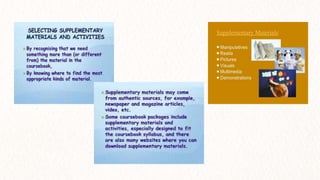
Supplementary materials
a. to provide a wide range of input materials appropriate for all learners
b. to stimulate growth in all aspects of learning
c. to provide a background of information and extensive information
d. to deliver additional practice
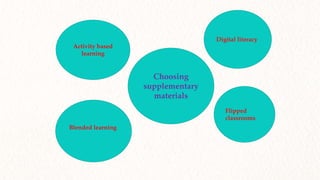
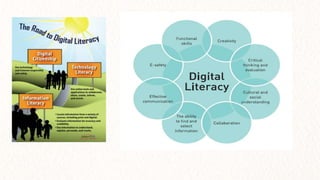
Digital literacy
Flipped
classrooms
Activity based
learning
Blended learning
Choosing
supplementary
materials
Activity based language teaching
• interactive atmosphere
• use of variety of tasks
• problem solving
• exchange personal views
• critically evaluate others’ views and ideas
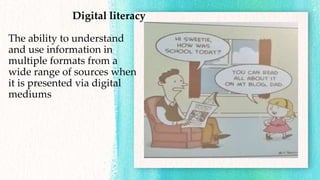
Digital literacy
The ability to understand
and use information in
multiple formats from a
wide range of sources when
it is presented via digital
mediums
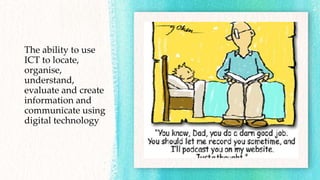
The ability to use
ICT to locate,
organise,
understand,
evaluate and create
information and
communicate using
digital technology
Blended learning
Part delivery of content and instruction via digital and online
media with some element of student control over time, place, path,
or pace.
• Personalisation
• Accessibility
• Flexibility
• Interactivity
• Multimodal
Are these examples of blended learning?
• Classroom with learners sitting in groups, taking notes on laptops, and
teacher/trainer presenting a new procedure using a set of slides with bullet
points.
• Team of learners working together from home on separate computers to prepare
for a group presentation.
• A learner sitting on a bus, browsing the web via a smartphone to get some help to
better understand a concept just taught in class.
• A learner using their smartphone to record data in a workplace to present as a
graph in a project report.
• Learners learning from a virtual simulation of an equipment to prepare for a
lecture and lab session on using the same equipment.
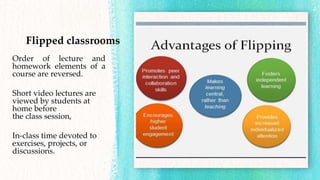
Flipped classrooms
Order of lecture and
homework elements of a
course are reversed.
Short video lectures are
viewed by students at
home before
the class session,
In-class time devoted to
exercises, projects, or
discussions.
Typing papers (research, opinion or narrative stories) on a computer or
using search engines only to find information.
Understanding how to use web browsers, search engines, email, text, wiki,
blogs, Photoshop, Powerpoint, video creation/editing software , etc.
Choosing appropriate media to showcase learning choosing a platforms
that will best illustrate your message and learning to peers and educators.
Copy and paste information from websites onto a powerpoint and
presenting that in class discussion
Choose content, collaborate, scaffold their learning, gain background
knowledge, achieve deeper conceptual understanding, and create
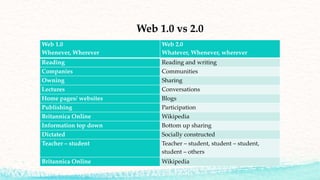
Web 1.0 vs 2.0
Web 1.0
Whenever, Wherever
Web 2.0
Whatever, Whenever, wherever
Reading Reading and writing
Companies Communities
Owning Sharing
Lectures Conversations
Home pages/ websites Blogs
Publishing Participation
Britannica Online Wikipedia
Information top down Bottom up sharing
Dictated Socially constructed
Teacher – student Teacher – student, student – student,
student – others
Britannica Online Wikipedia
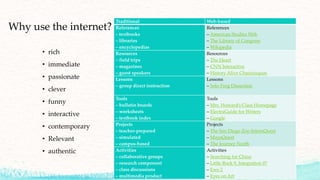
Why use the internet?
• rich
• immediate
• passionate
• clever
• funny
• interactive
• contemporary
• Relevant
• authentic
Traditional Web-based
References
– textbooks
– libraries
– encyclopedias
References
– American Studies Web
– The Library of Congress
– Wikipedia
Resources
– field trips
– magazines
– guest speakers
Resources
– The Heart
– CNN Interactive
– History Alive Chautauquas
Lessons
– group direct instruction
Lessons
– Solo Frog Dissection
Tools
– bulletin boards
– worksheets
– textbook index
Tools
– Mrs. Howard’s Class Homepage
– ElectraGuide for Writers
– Google
Projects
– teacher-prepared
– simulated
– campus-based
Projects
– The San Diego Zoo InternQuest
– MayaQuest
– The Journey North
Activities
– collaborative groups
– research component
– class discussions
– multimedia product
Activities
– Searching for China
– Little Rock 9, Integration 0?
– Ewe 2
– Eyes on Art
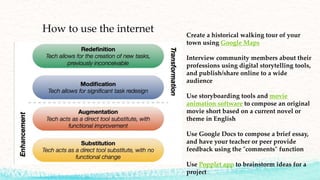
How to use the internet Create a historical walking tour of your
town using Google Maps
Interview community members about their
professions using digital storytelling tools,
and publish/share online to a wide
audience
Use storyboarding tools and movie
animation software to compose an original
movie short based on a current novel or
theme in English
Use Google Docs to compose a brief essay,
and have your teacher or peer provide
feedback using the "comments" function
Use Popplet app to brainstorm ideas for a
project
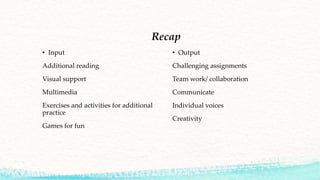
Recap
• Input
Additional reading
Visual support
Multimedia
Exercises and activities for additional
practice
Games for fun
• Output
Challenging assignments
Team work/ collaboration
Communicate
Individual voices
Creativity
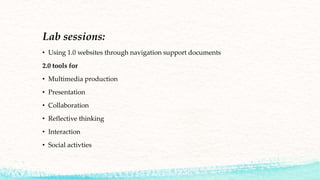
Lab sessions:
• Using 1.0 websites through navigation support documents
2.0 tools for
• Multimedia production
• Presentation
• Collaboration
• Reflective thinking
• Interaction
• Social activties
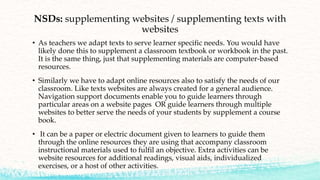
NSDs: supplementing websites / supplementing texts with
websites
• As teachers we adapt texts to serve learner specific needs. You would have
likely done this to supplement a classroom textbook or workbook in the past.
It is the same thing, just that supplementing materials are computer-based
resources.
• Similarly we have to adapt online resources also to satisfy the needs of our
classroom. Like texts websites are always created for a general audience.
Navigation support documents enable you to guide learners through
particular areas on a website pages OR guide learners through multiple
websites to better serve the needs of your students by supplement a course
book.
• It can be a paper or electric document given to learners to guide them
through the online resources they are using that accompany classroom
instructional materials used to fulfil an objective. Extra activities can be
website resources for additional readings, visual aids, individualized
exercises, or a host of other activities.
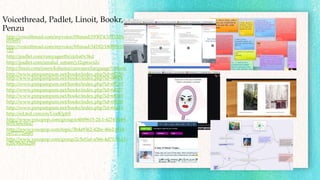
Voicethread, Padlet, Linoit, Bookr,
Penzu
http://voicethread.com/myvoice/#thread/193074/1021528/1
055695
http://voicethread.com/myvoice/#thread/34182/180809/181
722
http://padlet.com/ramyageethi/rjzba0v3kd
http://padlet.com/amalul_umam/yf2qmxcs2s
http://linoit.com/users/kshema/canvases/language%20arts
http://www.pimpampum.net/bookr/index.php?id=68250
http://www.pimpampum.net/bookr/index.php?id=68876
http://www.pimpampum.net/bookr/index.php?id=68335
http://www.pimpampum.net/bookr/index.php?id=68337
http://www.pimpampum.net/bookr/index.php?id=68345
http://www.pimpampum.net/bookr/index.php?id=68280
http://www.pimpampum.net/bookr/index.php?id=68114
http://ed.ted.com/on/UorKlphS
http://www.voxopop.com/group/e4b09615-2fc1-4274-8f49-
605f3e6c6ba7
http://www.voxopop.com/topic/3b4a9362-42be-46e2-8f18-
cef72772e685
http://www.voxopop.com/group/2c5ef1ef-a566-4d71-91d1-
e2bc98d6d288
Links for tasks
NSD resources
• http://www.linguarama.com/ps/business-communication-themed-
english/prepositions.htm
• https://www.wyzant.com/resources/lessons/english/esl/prepositions
• https://www.ego4u.com/en/cram-up/grammar/prepositions
• http://www.bbc.co.uk/learningenglish/english/course/intermediate/unit-2/session-1
• http://www.onestopenglish.com/grammar/grammar-reference/nouns-and-
phrases/prepositions-of-time-and-place-article/152825.article
• https://www.youtube.com/watch?v=A1CwIeieqLY
• https://www.youtube.com/watch?v=H-zgZsZUHyI
Do these tasks
• http://padlet.com/kshemajose/y2877s3mnubc
• https://voicethread.com/share/7769347/
• http://www.spiderscribe.net/app/?73340ba71b4aa10a221cad4d70452db9
Exploring web 2.0 tools sites
• http://www.voxopop.com/
• http://www.listen-and-write.com/
• http://www.dvolver.com/moviemake
r/make.html
• http://www.linoit.com
• http://eyeplorer.com/show/
• http://www.eslvideo.com/index.php
• https://mind42.com/
• https://ed.ted.com
• http://voicethread.com
• http://www.padlet.com
• http://www.spiderscribe.net
• http://www.makebeliefscomix.com/C
omix/
• http://www.pimpampum.net/bookr/
• https://storybird.com/
• http://www.penzu.com/
Website links
www.esl.about.com
www.usingenglish.com
www.eslcafe.com
www.englishclub.com
www.eflnet.com
http://englishlearner.com/index.shtml
http://learnenglish.britishcouncil.org/en
http://www.multimedia-english.com/
www.onestopenglish.com
http://www.breakingnewsenglish.com/
http://www.headsupenglish.com/
www.eslflow.com
www.dailygrammar.com/archive.html
http://www.berlitz.com
http://www.bizenglish.com
http://www.study.com
http://www.englishpage.com
http://www.learnenglish.org.uk
http://www.chompchomp.com/exercises.htm
http://www.bbc.co.uk/skillswise/0/
http://www.learn-english-online.org/
http://www.elllo.org/
http://www.world-english.org/
http://www.rong-chang.com/
http://www.englishmedialab.com/
http://www.literacyworks.org/learningresources/
http://english-zone.com/index.php
http://a4esl.org/
http://www.linguarama.com/ps/index.html
http://tewt.org/index.php/lessons-
activities/grammar-exercises/13-adjectives-adverbs
http://www.multimedia-english.com/
http://www.english-course.com/
http://www.englishpage.com/
http://learnenglish.britishcouncil.org/en/
http://www.talkenglish.com/
https://www.englishlistening.com/
http://www.elok.com
http://literacynet.org/cnnsf/week.html
http://www.english-zone.com/reading/spider.html
http://www.breakingnewsenglish.com/1601/160127-bananas.html
http://www.onestopenglish.com/%E2%80%A6/reading-
less%E2%80%A6/146279.article
http://www.newsinlevels.com/products/about-a-tiger-and-a-goat-
level-3/
http://www.elllo.org/
http://www.breakingnewsenglish.com/

JNTUK workshop

  • 1.
    Use of ICT:designing supplementary materials and conducting virtual classrooms A Workshop Kshema Jose kshema@efluniversity.ac.in ACTIVITY BASED LANGUAGE TEACHING, JNTU, Kakinada
  • 2.
    “If we areeducating our children to live and thrive in their world, we cannot limit them to what we were limited to in our world. As things change and evolve, so must education. As educators we have a professional obligation to change as well. We must retain a sense of relevance and that requires effort… Educators need to employ the very skills they are passing along to their students. They need to: curate, collaborate, communicate, critically think, and create. All of this is best accomplished through the use of tools of technology. An education without technology does not prepare our students with the skills that their world will require.” Tom Whitby
  • 3.
    So how dothis generation learn? Learning preferences of the digital natives include: teamwork flexibility in the learning environment, student based projects that incorporate challenging assignments, and most importantly, respect for student voices. • use resources to support communication • use resources to build digital literacy skills • Use resources to develop critical thinking • Use web based projects • Develop student created media • Collaborate • Socially engage
  • 4.
    Supplementary materials a. toprovide a wide range of input materials appropriate for all learners b. to stimulate growth in all aspects of learning c. to provide a background of information and extensive information d. to deliver additional practice
  • 6.
  • 7.
    Activity based languageteaching • interactive atmosphere • use of variety of tasks • problem solving • exchange personal views • critically evaluate others’ views and ideas
  • 8.
    Digital literacy The abilityto understand and use information in multiple formats from a wide range of sources when it is presented via digital mediums
  • 9.
    The ability touse ICT to locate, organise, understand, evaluate and create information and communicate using digital technology
  • 10.
    Blended learning Part deliveryof content and instruction via digital and online media with some element of student control over time, place, path, or pace. • Personalisation • Accessibility • Flexibility • Interactivity • Multimodal
  • 11.
    Are these examplesof blended learning? • Classroom with learners sitting in groups, taking notes on laptops, and teacher/trainer presenting a new procedure using a set of slides with bullet points. • Team of learners working together from home on separate computers to prepare for a group presentation. • A learner sitting on a bus, browsing the web via a smartphone to get some help to better understand a concept just taught in class. • A learner using their smartphone to record data in a workplace to present as a graph in a project report. • Learners learning from a virtual simulation of an equipment to prepare for a lecture and lab session on using the same equipment.
  • 12.
    Flipped classrooms Order oflecture and homework elements of a course are reversed. Short video lectures are viewed by students at home before the class session, In-class time devoted to exercises, projects, or discussions.
  • 14.
    Typing papers (research,opinion or narrative stories) on a computer or using search engines only to find information. Understanding how to use web browsers, search engines, email, text, wiki, blogs, Photoshop, Powerpoint, video creation/editing software , etc. Choosing appropriate media to showcase learning choosing a platforms that will best illustrate your message and learning to peers and educators. Copy and paste information from websites onto a powerpoint and presenting that in class discussion Choose content, collaborate, scaffold their learning, gain background knowledge, achieve deeper conceptual understanding, and create
  • 15.
    Web 1.0 vs2.0 Web 1.0 Whenever, Wherever Web 2.0 Whatever, Whenever, wherever Reading Reading and writing Companies Communities Owning Sharing Lectures Conversations Home pages/ websites Blogs Publishing Participation Britannica Online Wikipedia Information top down Bottom up sharing Dictated Socially constructed Teacher – student Teacher – student, student – student, student – others Britannica Online Wikipedia
  • 16.
    Why use theinternet? • rich • immediate • passionate • clever • funny • interactive • contemporary • Relevant • authentic Traditional Web-based References – textbooks – libraries – encyclopedias References – American Studies Web – The Library of Congress – Wikipedia Resources – field trips – magazines – guest speakers Resources – The Heart – CNN Interactive – History Alive Chautauquas Lessons – group direct instruction Lessons – Solo Frog Dissection Tools – bulletin boards – worksheets – textbook index Tools – Mrs. Howard’s Class Homepage – ElectraGuide for Writers – Google Projects – teacher-prepared – simulated – campus-based Projects – The San Diego Zoo InternQuest – MayaQuest – The Journey North Activities – collaborative groups – research component – class discussions – multimedia product Activities – Searching for China – Little Rock 9, Integration 0? – Ewe 2 – Eyes on Art
  • 17.
    How to usethe internet Create a historical walking tour of your town using Google Maps Interview community members about their professions using digital storytelling tools, and publish/share online to a wide audience Use storyboarding tools and movie animation software to compose an original movie short based on a current novel or theme in English Use Google Docs to compose a brief essay, and have your teacher or peer provide feedback using the "comments" function Use Popplet app to brainstorm ideas for a project
  • 18.
    Recap • Input Additional reading Visualsupport Multimedia Exercises and activities for additional practice Games for fun • Output Challenging assignments Team work/ collaboration Communicate Individual voices Creativity
  • 19.
    Lab sessions: • Using1.0 websites through navigation support documents 2.0 tools for • Multimedia production • Presentation • Collaboration • Reflective thinking • Interaction • Social activties
  • 20.
    NSDs: supplementing websites/ supplementing texts with websites • As teachers we adapt texts to serve learner specific needs. You would have likely done this to supplement a classroom textbook or workbook in the past. It is the same thing, just that supplementing materials are computer-based resources. • Similarly we have to adapt online resources also to satisfy the needs of our classroom. Like texts websites are always created for a general audience. Navigation support documents enable you to guide learners through particular areas on a website pages OR guide learners through multiple websites to better serve the needs of your students by supplement a course book. • It can be a paper or electric document given to learners to guide them through the online resources they are using that accompany classroom instructional materials used to fulfil an objective. Extra activities can be website resources for additional readings, visual aids, individualized exercises, or a host of other activities.
  • 21.
    Voicethread, Padlet, Linoit,Bookr, Penzu http://voicethread.com/myvoice/#thread/193074/1021528/1 055695 http://voicethread.com/myvoice/#thread/34182/180809/181 722 http://padlet.com/ramyageethi/rjzba0v3kd http://padlet.com/amalul_umam/yf2qmxcs2s http://linoit.com/users/kshema/canvases/language%20arts http://www.pimpampum.net/bookr/index.php?id=68250 http://www.pimpampum.net/bookr/index.php?id=68876 http://www.pimpampum.net/bookr/index.php?id=68335 http://www.pimpampum.net/bookr/index.php?id=68337 http://www.pimpampum.net/bookr/index.php?id=68345 http://www.pimpampum.net/bookr/index.php?id=68280 http://www.pimpampum.net/bookr/index.php?id=68114 http://ed.ted.com/on/UorKlphS http://www.voxopop.com/group/e4b09615-2fc1-4274-8f49- 605f3e6c6ba7 http://www.voxopop.com/topic/3b4a9362-42be-46e2-8f18- cef72772e685 http://www.voxopop.com/group/2c5ef1ef-a566-4d71-91d1- e2bc98d6d288
  • 22.
    Links for tasks NSDresources • http://www.linguarama.com/ps/business-communication-themed- english/prepositions.htm • https://www.wyzant.com/resources/lessons/english/esl/prepositions • https://www.ego4u.com/en/cram-up/grammar/prepositions • http://www.bbc.co.uk/learningenglish/english/course/intermediate/unit-2/session-1 • http://www.onestopenglish.com/grammar/grammar-reference/nouns-and- phrases/prepositions-of-time-and-place-article/152825.article • https://www.youtube.com/watch?v=A1CwIeieqLY • https://www.youtube.com/watch?v=H-zgZsZUHyI
  • 23.
    Do these tasks •http://padlet.com/kshemajose/y2877s3mnubc • https://voicethread.com/share/7769347/ • http://www.spiderscribe.net/app/?73340ba71b4aa10a221cad4d70452db9
  • 24.
    Exploring web 2.0tools sites • http://www.voxopop.com/ • http://www.listen-and-write.com/ • http://www.dvolver.com/moviemake r/make.html • http://www.linoit.com • http://eyeplorer.com/show/ • http://www.eslvideo.com/index.php • https://mind42.com/ • https://ed.ted.com • http://voicethread.com • http://www.padlet.com • http://www.spiderscribe.net • http://www.makebeliefscomix.com/C omix/ • http://www.pimpampum.net/bookr/ • https://storybird.com/ • http://www.penzu.com/
  • 25.
    Website links www.esl.about.com www.usingenglish.com www.eslcafe.com www.englishclub.com www.eflnet.com http://englishlearner.com/index.shtml http://learnenglish.britishcouncil.org/en http://www.multimedia-english.com/ www.onestopenglish.com http://www.breakingnewsenglish.com/ http://www.headsupenglish.com/ www.eslflow.com www.dailygrammar.com/archive.html http://www.berlitz.com http://www.bizenglish.com http://www.study.com http://www.englishpage.com http://www.learnenglish.org.uk http://www.chompchomp.com/exercises.htm http://www.bbc.co.uk/skillswise/0/ http://www.learn-english-online.org/ http://www.elllo.org/ http://www.world-english.org/ http://www.rong-chang.com/ http://www.englishmedialab.com/ http://www.literacyworks.org/learningresources/ http://english-zone.com/index.php http://a4esl.org/ http://www.linguarama.com/ps/index.html http://tewt.org/index.php/lessons- activities/grammar-exercises/13-adjectives-adverbs http://www.multimedia-english.com/ http://www.english-course.com/ http://www.englishpage.com/ http://learnenglish.britishcouncil.org/en/ http://www.talkenglish.com/ https://www.englishlistening.com/ http://www.elok.com
  • 26.