All trademarks and registered trademarks are the property of their respective owners.© HelpSystems LLC. All rights reserved.
Harnessing the Power of Modern Solutions
Transformation through
Automation
Insert Your Presentation Title Here (via Master Slide)
Today’s Presenters
Pat Cameron
Director of Automation Technology,
HelpSystems
Richard Schoen
Director of Document Management,
HelpSystems
Insert Your Presentation Title Here (via Master Slide)
• The evolution of IT automation
• Polling questions and discussion
– Automation benefits
– Automation challenges
– Smart automation
• Getting started with IT automation
• Use cases
• Special offer to attendees!
Agenda
Insert Your Presentation Title Here (via Master Slide)
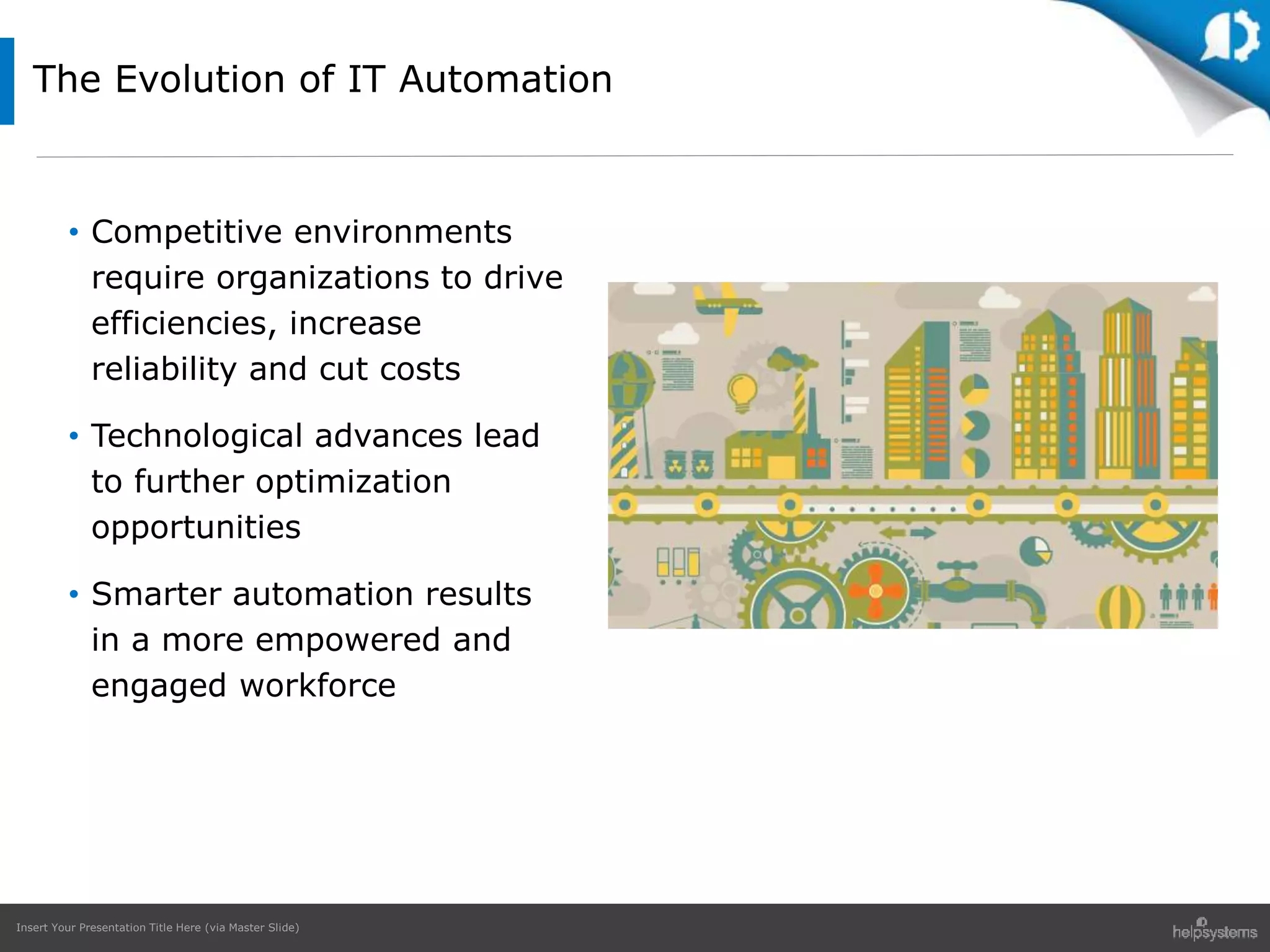
• Competitive environments
require organizations to drive
efficiencies, increase
reliability and cut costs
• Technological advances lead
to further optimization
opportunities
• Smarter automation results
in a more empowered and
engaged workforce
The Evolution of IT Automation
Insert Your Presentation Title Here (via Master Slide)
Polling Questions
Insert Your Presentation Title Here (via Master Slide)
Polling Question #1
What are the primary
drivers for automating IT
and business processes in
your organization?
Insert Your Presentation Title Here (via Master Slide)
69%
66%
52%
47%
35% 34%
26% 26%
22% 9% 9%
2%
Costreduction
Increasedproductivity
Easiermanagement/control
Increasedreliability
Increasedbusinessagility
Easieraudit/compliance
Improvedrelationshipwith
customersandpartners
Happieremployeesthrough
removalofrepetitivetasks
Lessdowntime
Morerationaldecision
making
Keepingupwiththe
competition
N/A
Survey Results: Question #1
What are the primary drivers for automating IT and business
processes in your organization?
Insert Your Presentation Title Here (via Master Slide)
Polling Question #2
Which tasks in your
organization could be
usefully automated?
Insert Your Presentation Title Here (via Master Slide)
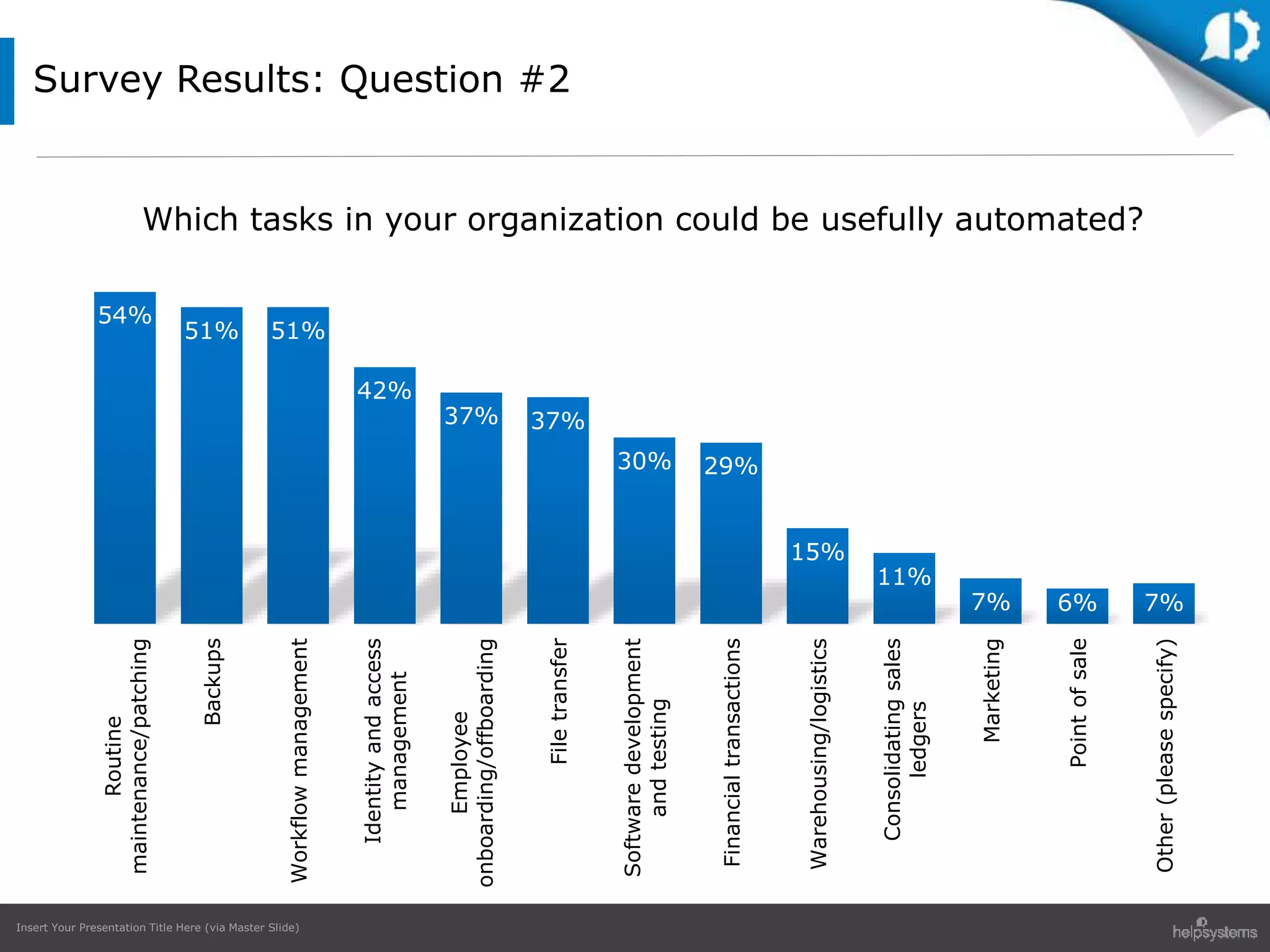
Survey Results: Question #2
54%
51% 51%
42%
37% 37%
30% 29%
15%
11%
7% 6% 7%
Routine
maintenance/patching
Backups
Workflowmanagement
Identityandaccess
management
Employee
onboarding/offboarding
Filetransfer
Softwaredevelopment
andtesting
Financialtransactions
Warehousing/logistics
Consolidatingsales
ledgers
Marketing
Pointofsale
Other(pleasespecify)
Which tasks in your organization could be usefully automated?
Insert Your Presentation Title Here (via Master Slide)
Polling Question #3
What are the challenges
around increased
IT/workplace automation?
Insert Your Presentation Title Here (via Master Slide)
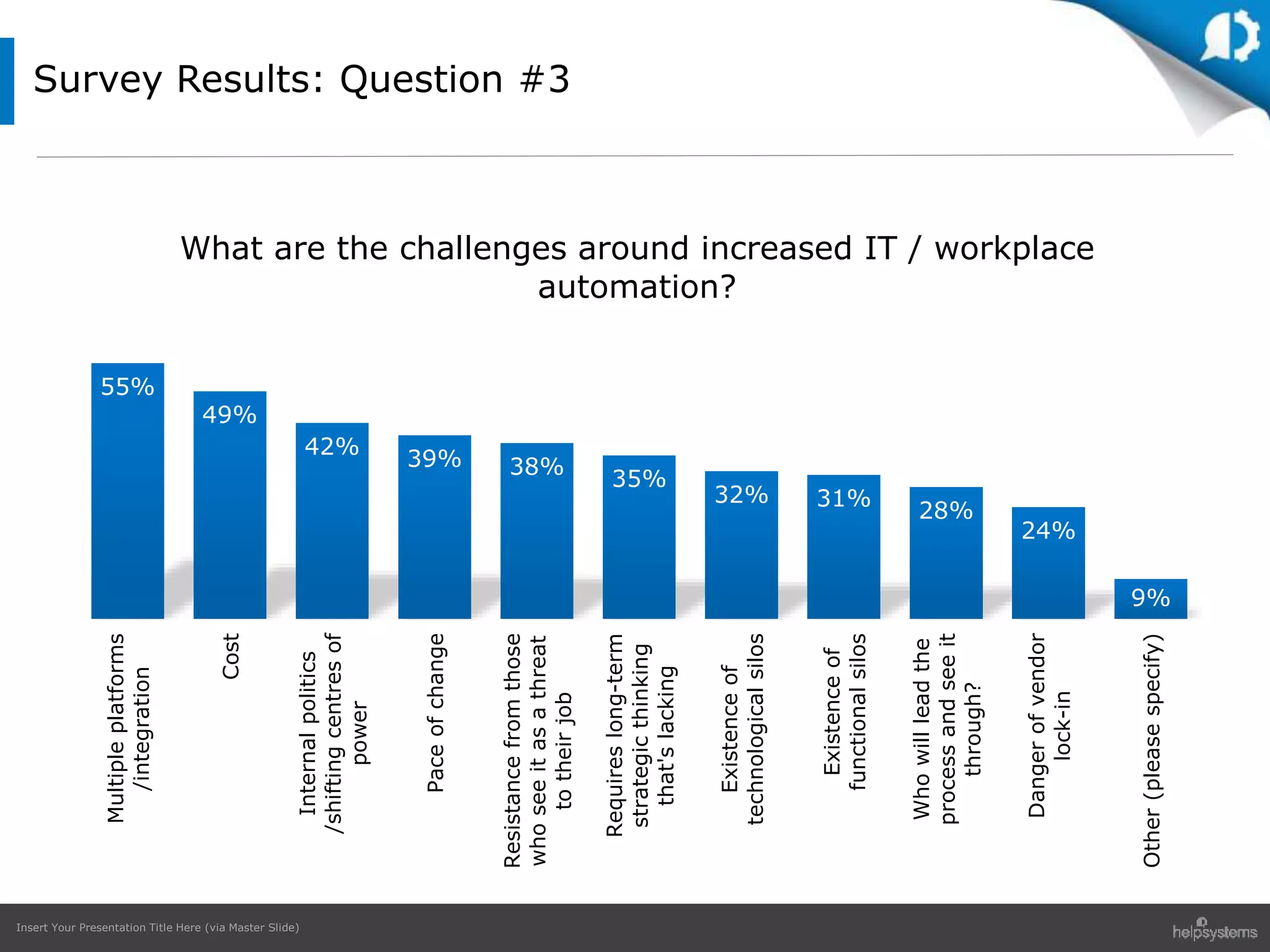
Survey Results: Question #3
55%
49%
42%
39% 38%
35%
32% 31%
28%
24%
9%
Multipleplatforms
/integration
Cost
Internalpolitics
/shiftingcentresof
power
Paceofchange
Resistancefromthose
whoseeitasathreat
totheirjob
Requireslong-term
strategicthinking
that'slacking
Existenceof
technologicalsilos
Existenceof
functionalsilos
Whowillleadthe
processandseeit
through?
Dangerofvendor
lock-in
Other(pleasespecify)
What are the challenges around increased IT / workplace
automation?
Insert Your Presentation Title Here (via Master Slide)
Polling Question #4
For your IT team, which of
the following have been true
over the last 18 months?
Insert Your Presentation Title Here (via Master Slide)
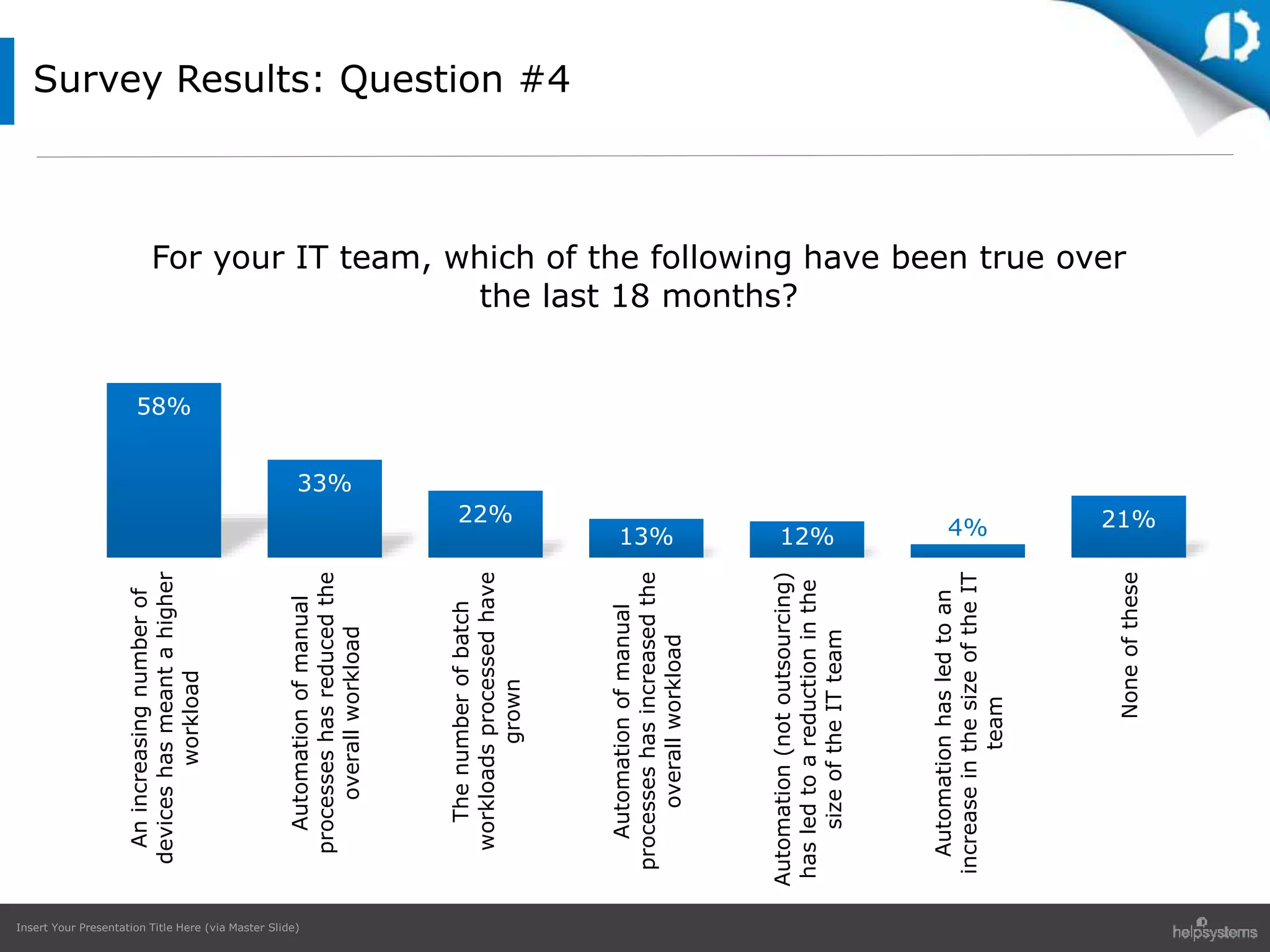
Survey Results: Question #4
58%
33%
22%
13% 12% 4% 21%
Anincreasingnumberof
deviceshasmeantahigher
workload
Automationofmanual
processeshasreducedthe
overallworkload
Thenumberofbatch
workloadsprocessedhave
grown
Automationofmanual
processeshasincreasedthe
overallworkload
Automation(notoutsourcing)
hasledtoareductioninthe
sizeoftheITteam
Automationhasledtoan
increaseinthesizeoftheIT
team
Noneofthese
For your IT team, which of the following have been true over
the last 18 months?
Insert Your Presentation Title Here (via Master Slide)
Polling Question #5
What type of IT automation
do you have in place?
Insert Your Presentation Title Here (via Master Slide)
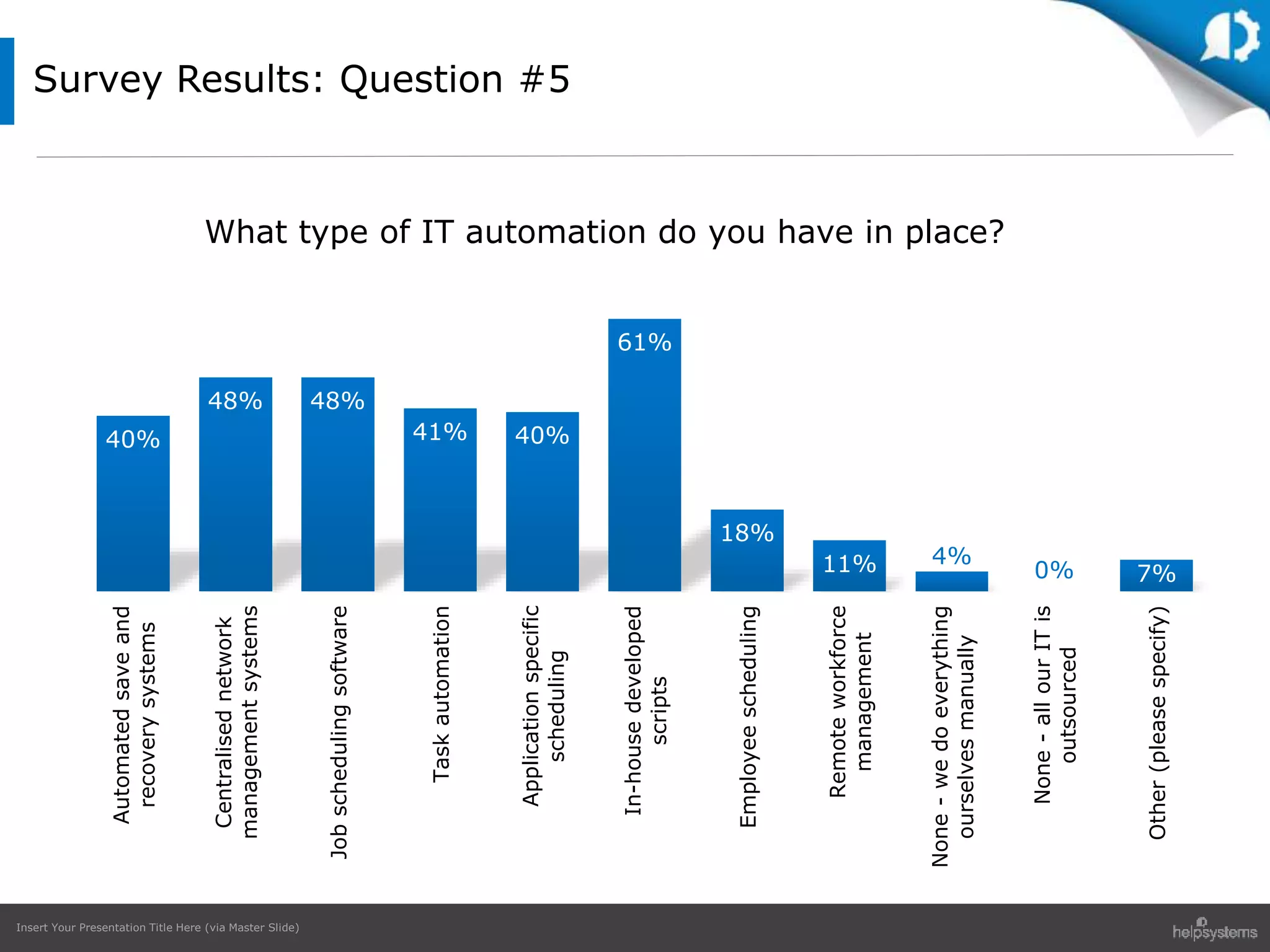
Survey Results: Question #5
40%
48% 48%
41% 40%
61%
18%
11% 4%
0% 7%
Automatedsaveand
recoverysystems
Centralisednetwork
managementsystems
Jobschedulingsoftware
Taskautomation
Applicationspecific
scheduling
In-housedeveloped
scripts
Employeescheduling
Remoteworkforce
management
None-wedoeverything
ourselvesmanually
None-allourITis
outsourced
Other(pleasespecify)
What type of IT automation do you have in place?
Insert Your Presentation Title Here (via Master Slide)
Polling Question #6
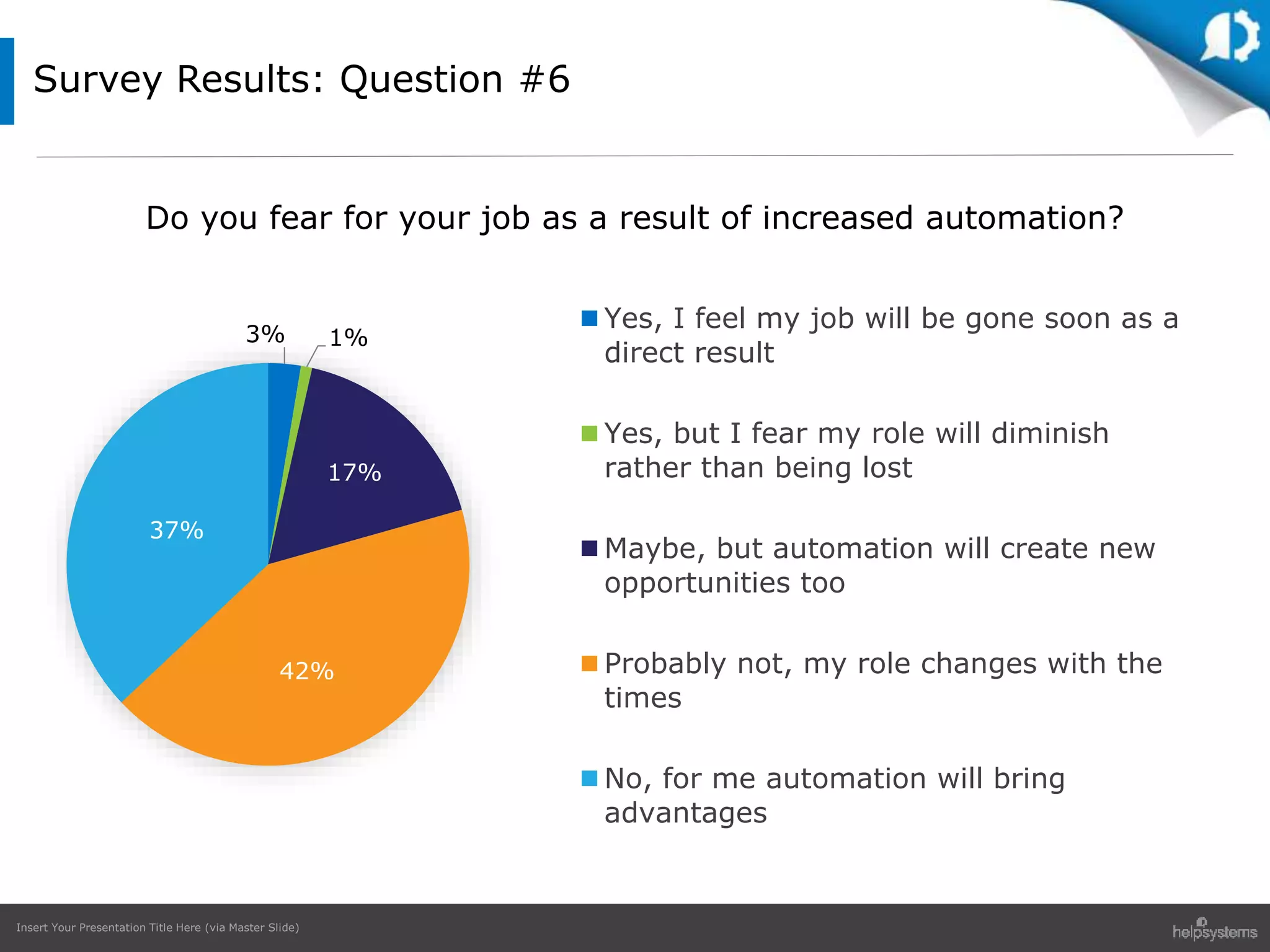
Do you fear for your job as a
result of increased
automation?
Insert Your Presentation Title Here (via Master Slide)
3% 1%
17%
42%
37%
Yes, I feel my job will be gone soon as a
direct result
Yes, but I fear my role will diminish
rather than being lost
Maybe, but automation will create new
opportunities too
Probably not, my role changes with the
times
No, for me automation will bring
advantages
Survey Results: Question #6
Do you fear for your job as a result of increased automation?
Insert Your Presentation Title Here (via Master Slide)
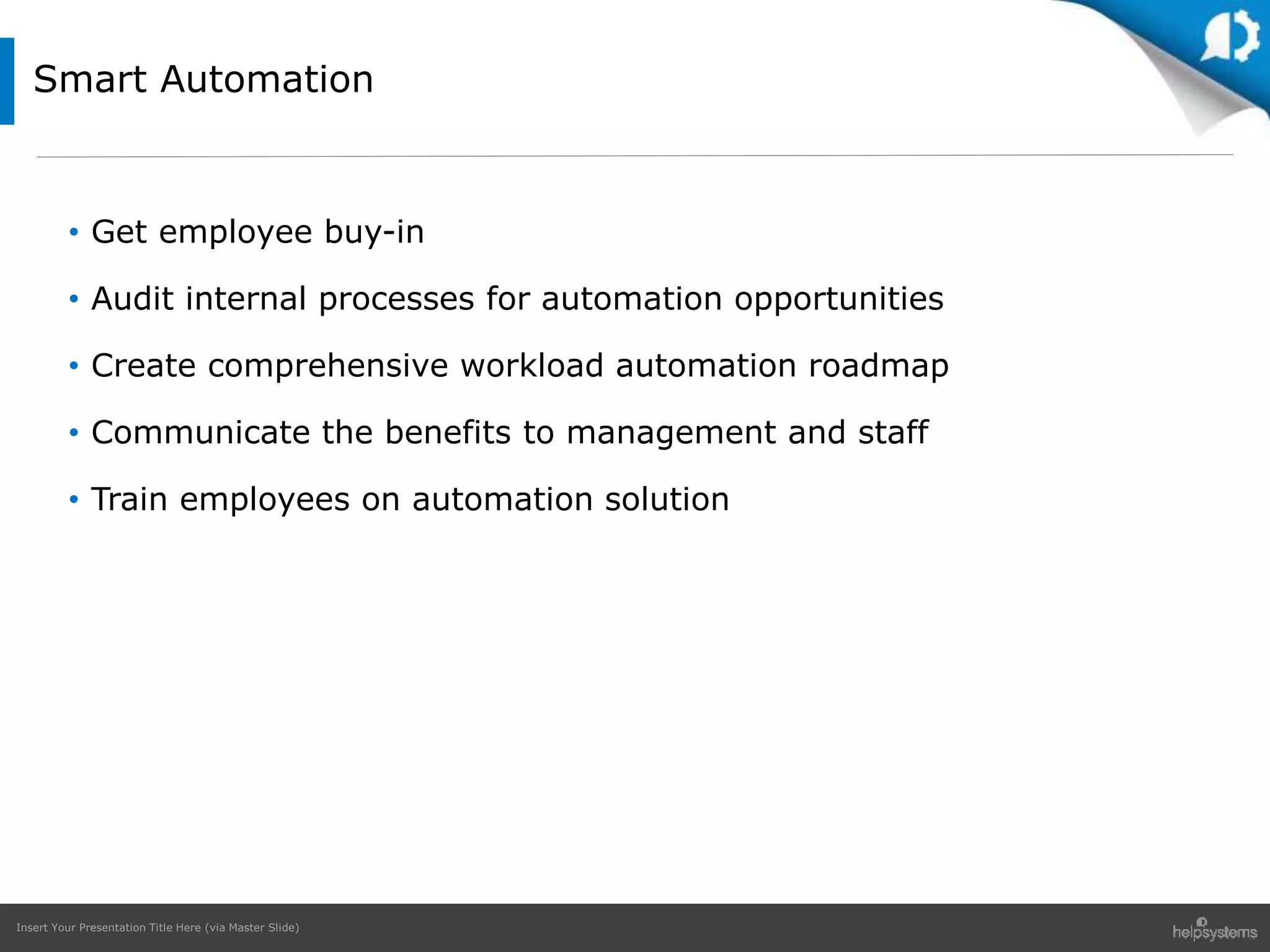
• Get employee buy-in
• Audit internal processes for automation opportunities
• Create comprehensive workload automation roadmap
• Communicate the benefits to management and staff
• Train employees on automation solution
Smart Automation
Insert Your Presentation Title Here (via Master Slide)
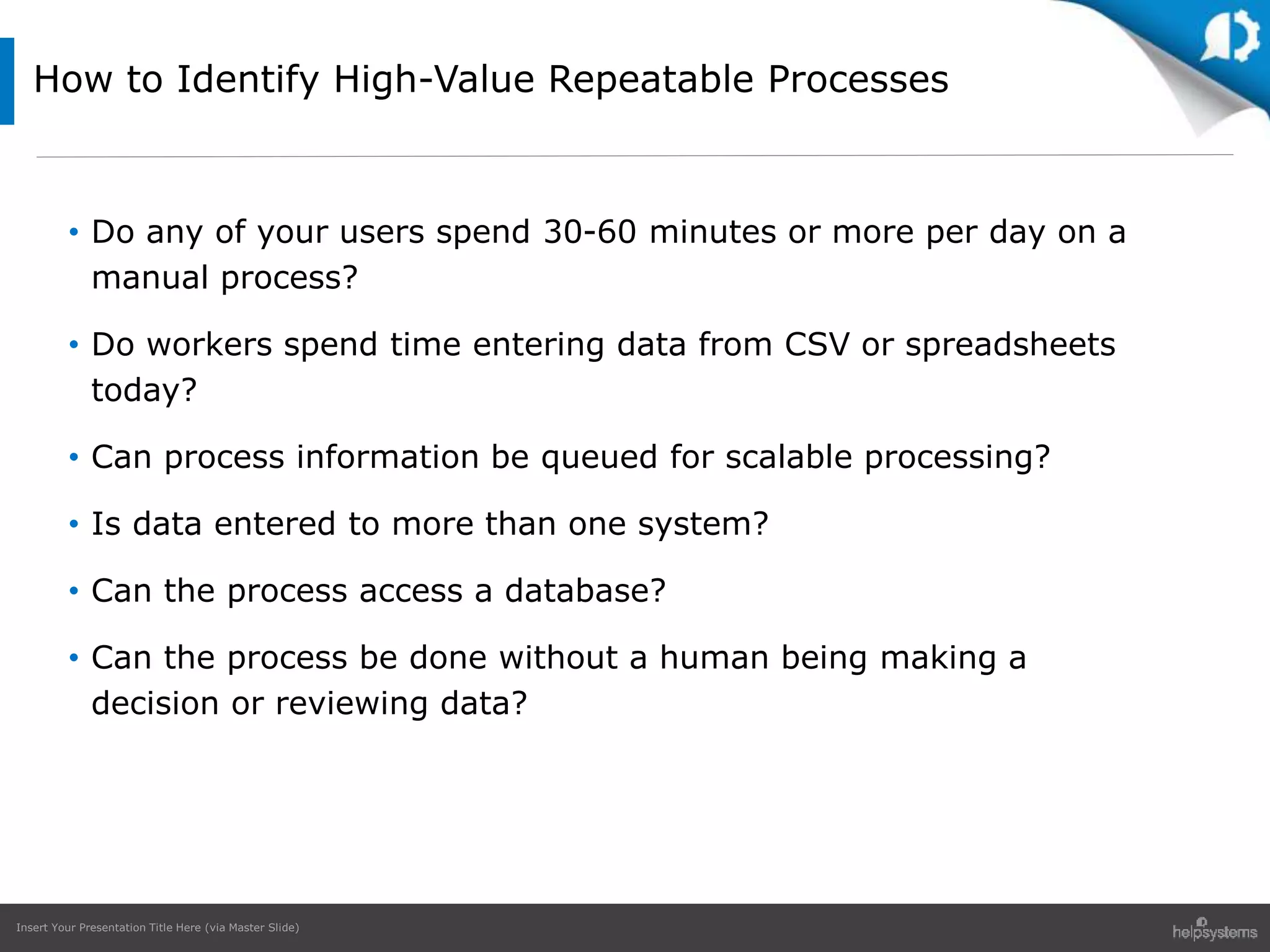
• Do any of your users spend 30-60 minutes or more per day on a
manual process?
• Do workers spend time entering data from CSV or spreadsheets
today?
• Can process information be queued for scalable processing?
• Is data entered to more than one system?
• Can the process access a database?
• Can the process be done without a human being making a
decision or reviewing data?
How to Identify High-Value Repeatable Processes
Insert Your Presentation Title Here (via Master Slide)
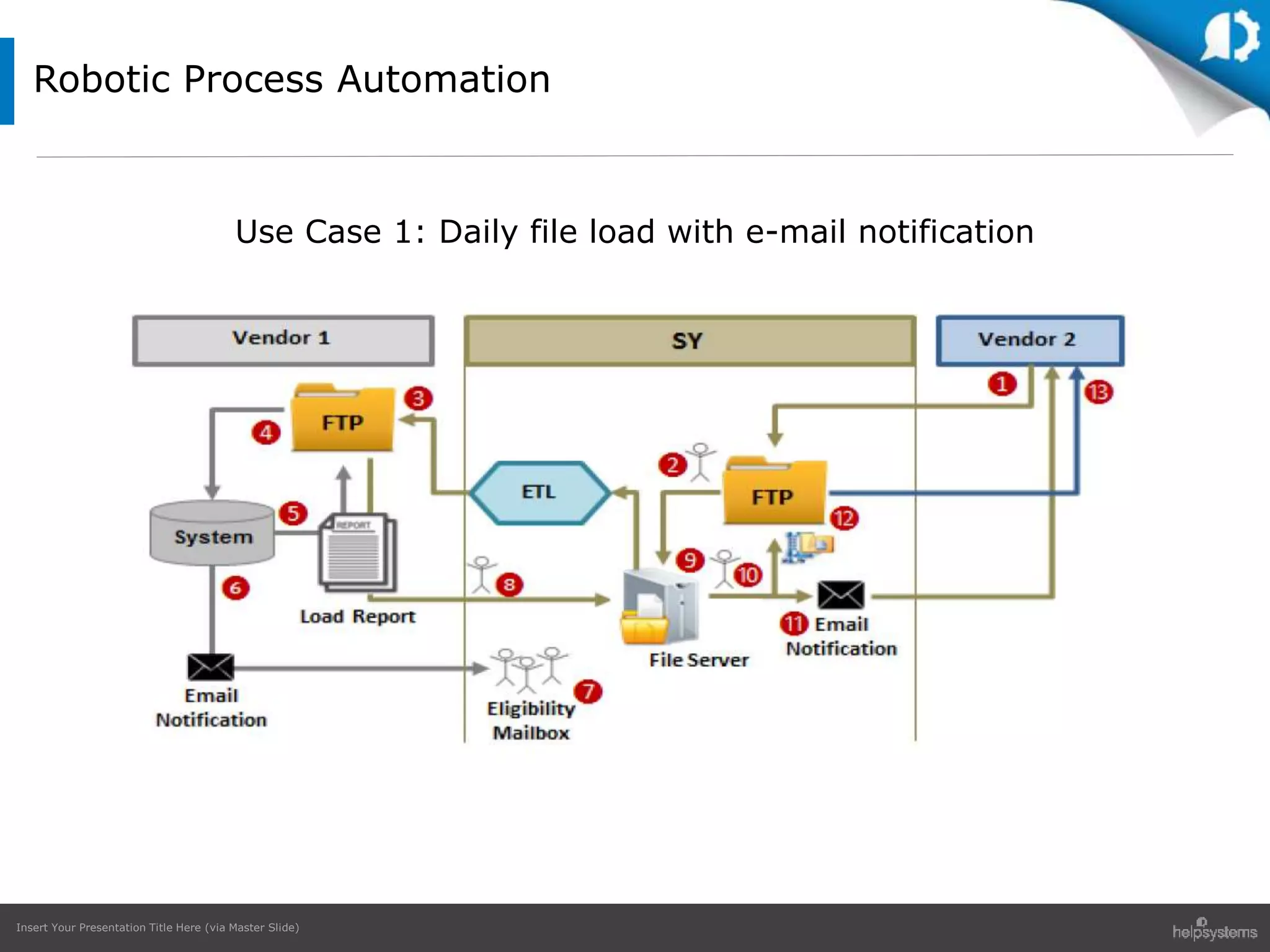
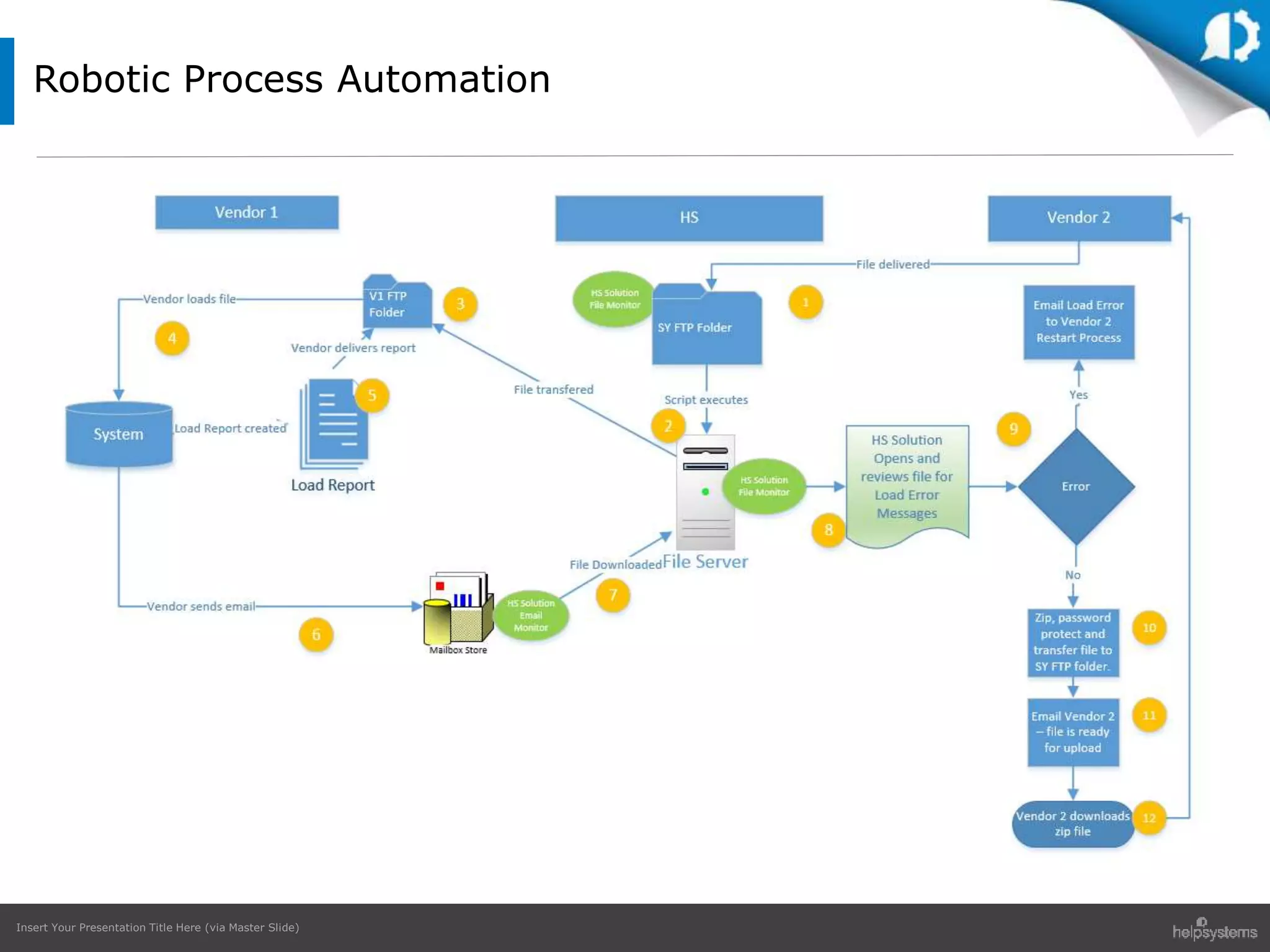
Robotic Process Automation
Use Case 1: Daily file load with e-mail notification
Insert Your Presentation Title Here (via Master Slide)
Robotic Process Automation
Insert Your Presentation Title Here (via Master Slide)
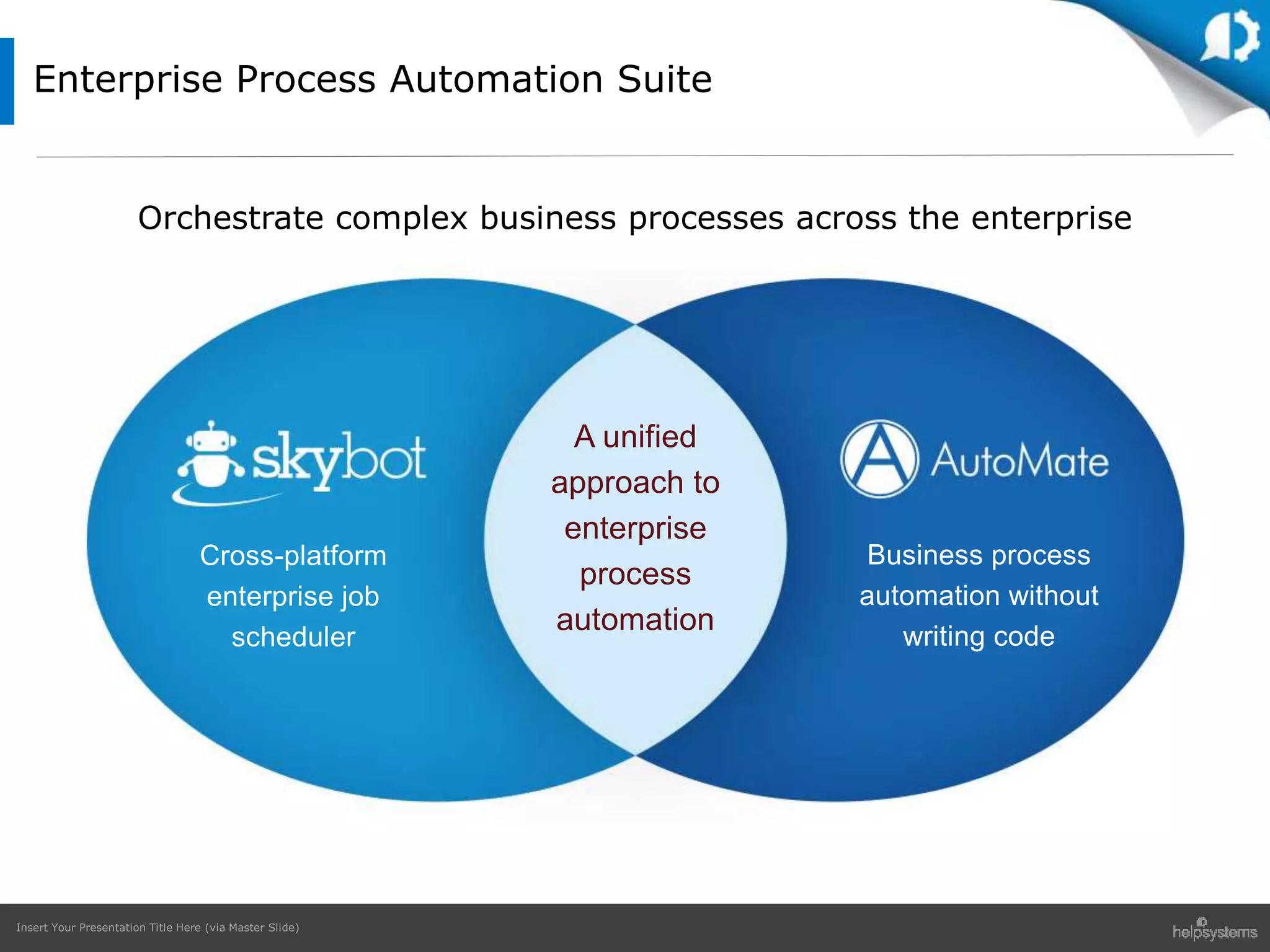
Business process
automation without
writing code
Cross-platform
enterprise job
scheduler
Business process
automation without
writing code
Cross-platform
enterprise job
scheduler
A unified
approach to
enterprise
process
automation
Orchestrate complex business processes across the enterprise
Enterprise Process Automation Suite
Insert Your Presentation Title Here (via Master Slide)
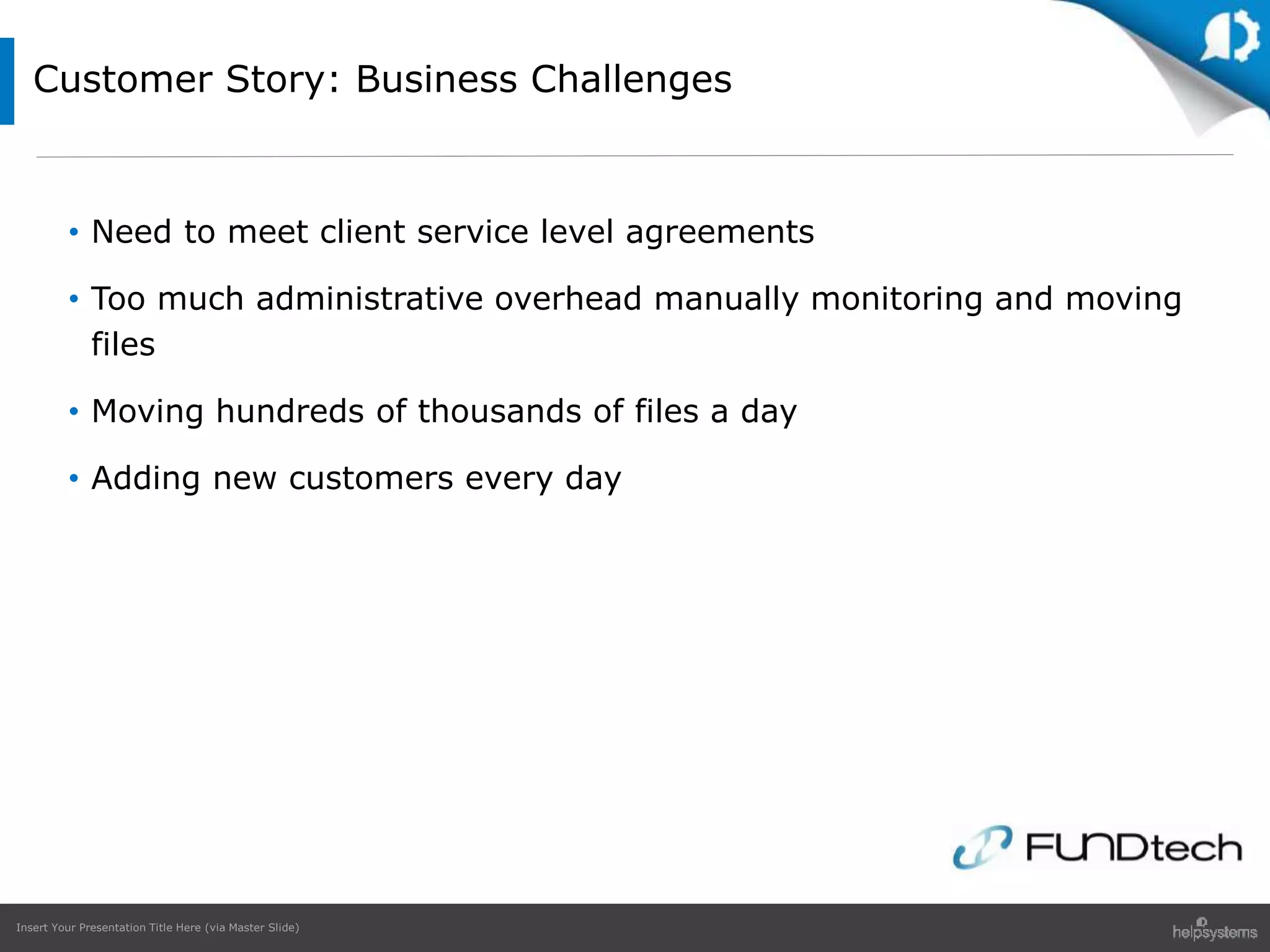
Customer Story: Business Challenges
• Need to meet client service level agreements
• Too much administrative overhead manually monitoring and moving
files
• Moving hundreds of thousands of files a day
• Adding new customers every day
Insert Your Presentation Title Here (via Master Slide)
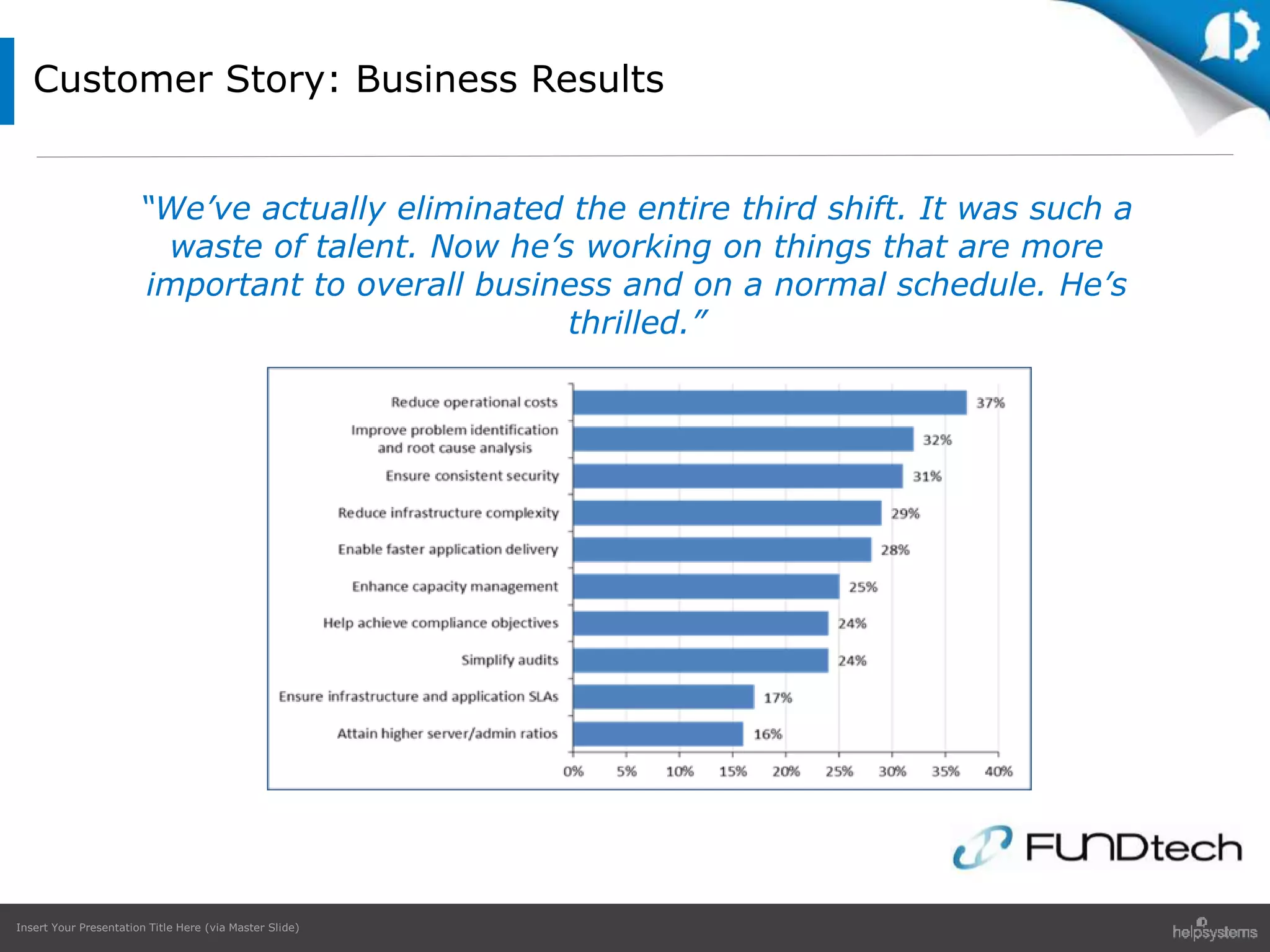
Customer Story: Business Results
“We’ve actually eliminated the entire third shift. It was such a
waste of talent. Now he’s working on things that are more
important to overall business and on a normal schedule. He’s
thrilled.”
Insert Your Presentation Title Here (via Master Slide)
Automation brings benefits
• Cuts costs
• Delivers efficiencies
• Improves reliability
Companies are struggling
• Facing internal opposition
• Unprepared for challenges
Automation requires planning
• Change to the status quo
• Take your people with you
Conclusion
Insert Your Presentation Title Here (via Master Slide)
Questions and Answers
Insert Your Presentation Title Here (via Master Slide)
Special Offer for Attendees:
End-of-Year Free 30 Minute Automation Review
https://www.helpsystems.com/30-minute-review
Telephone
Sales: 800-328-1000
Support: 952-933-0609
Technical Experts
richard.schoen@helpsystems.com
pat.cameron@helpsytems.com
Thanks for Joining Us!

Transformation Through Automation: Harnessing the Power of Modern Solutions

  • 1.
    All trademarks andregistered trademarks are the property of their respective owners.© HelpSystems LLC. All rights reserved. Harnessing the Power of Modern Solutions Transformation through Automation
  • 2.
    Insert Your PresentationTitle Here (via Master Slide) Today’s Presenters Pat Cameron Director of Automation Technology, HelpSystems Richard Schoen Director of Document Management, HelpSystems
  • 3.
    Insert Your PresentationTitle Here (via Master Slide) • The evolution of IT automation • Polling questions and discussion – Automation benefits – Automation challenges – Smart automation • Getting started with IT automation • Use cases • Special offer to attendees! Agenda
  • 4.
    Insert Your PresentationTitle Here (via Master Slide) • Competitive environments require organizations to drive efficiencies, increase reliability and cut costs • Technological advances lead to further optimization opportunities • Smarter automation results in a more empowered and engaged workforce The Evolution of IT Automation
  • 5.
    Insert Your PresentationTitle Here (via Master Slide) Polling Questions
  • 6.
    Insert Your PresentationTitle Here (via Master Slide) Polling Question #1 What are the primary drivers for automating IT and business processes in your organization?
  • 7.
    Insert Your PresentationTitle Here (via Master Slide) 69% 66% 52% 47% 35% 34% 26% 26% 22% 9% 9% 2% Costreduction Increasedproductivity Easiermanagement/control Increasedreliability Increasedbusinessagility Easieraudit/compliance Improvedrelationshipwith customersandpartners Happieremployeesthrough removalofrepetitivetasks Lessdowntime Morerationaldecision making Keepingupwiththe competition N/A Survey Results: Question #1 What are the primary drivers for automating IT and business processes in your organization?
  • 8.
    Insert Your PresentationTitle Here (via Master Slide) Polling Question #2 Which tasks in your organization could be usefully automated?
  • 9.
    Insert Your PresentationTitle Here (via Master Slide) Survey Results: Question #2 54% 51% 51% 42% 37% 37% 30% 29% 15% 11% 7% 6% 7% Routine maintenance/patching Backups Workflowmanagement Identityandaccess management Employee onboarding/offboarding Filetransfer Softwaredevelopment andtesting Financialtransactions Warehousing/logistics Consolidatingsales ledgers Marketing Pointofsale Other(pleasespecify) Which tasks in your organization could be usefully automated?
  • 10.
    Insert Your PresentationTitle Here (via Master Slide) Polling Question #3 What are the challenges around increased IT/workplace automation?
  • 11.
    Insert Your PresentationTitle Here (via Master Slide) Survey Results: Question #3 55% 49% 42% 39% 38% 35% 32% 31% 28% 24% 9% Multipleplatforms /integration Cost Internalpolitics /shiftingcentresof power Paceofchange Resistancefromthose whoseeitasathreat totheirjob Requireslong-term strategicthinking that'slacking Existenceof technologicalsilos Existenceof functionalsilos Whowillleadthe processandseeit through? Dangerofvendor lock-in Other(pleasespecify) What are the challenges around increased IT / workplace automation?
  • 12.
    Insert Your PresentationTitle Here (via Master Slide) Polling Question #4 For your IT team, which of the following have been true over the last 18 months?
  • 13.
    Insert Your PresentationTitle Here (via Master Slide) Survey Results: Question #4 58% 33% 22% 13% 12% 4% 21% Anincreasingnumberof deviceshasmeantahigher workload Automationofmanual processeshasreducedthe overallworkload Thenumberofbatch workloadsprocessedhave grown Automationofmanual processeshasincreasedthe overallworkload Automation(notoutsourcing) hasledtoareductioninthe sizeoftheITteam Automationhasledtoan increaseinthesizeoftheIT team Noneofthese For your IT team, which of the following have been true over the last 18 months?
  • 14.
    Insert Your PresentationTitle Here (via Master Slide) Polling Question #5 What type of IT automation do you have in place?
  • 15.
    Insert Your PresentationTitle Here (via Master Slide) Survey Results: Question #5 40% 48% 48% 41% 40% 61% 18% 11% 4% 0% 7% Automatedsaveand recoverysystems Centralisednetwork managementsystems Jobschedulingsoftware Taskautomation Applicationspecific scheduling In-housedeveloped scripts Employeescheduling Remoteworkforce management None-wedoeverything ourselvesmanually None-allourITis outsourced Other(pleasespecify) What type of IT automation do you have in place?
  • 16.
    Insert Your PresentationTitle Here (via Master Slide) Polling Question #6 Do you fear for your job as a result of increased automation?
  • 17.
    Insert Your PresentationTitle Here (via Master Slide) 3% 1% 17% 42% 37% Yes, I feel my job will be gone soon as a direct result Yes, but I fear my role will diminish rather than being lost Maybe, but automation will create new opportunities too Probably not, my role changes with the times No, for me automation will bring advantages Survey Results: Question #6 Do you fear for your job as a result of increased automation?
  • 18.
    Insert Your PresentationTitle Here (via Master Slide) • Get employee buy-in • Audit internal processes for automation opportunities • Create comprehensive workload automation roadmap • Communicate the benefits to management and staff • Train employees on automation solution Smart Automation
  • 19.
    Insert Your PresentationTitle Here (via Master Slide) • Do any of your users spend 30-60 minutes or more per day on a manual process? • Do workers spend time entering data from CSV or spreadsheets today? • Can process information be queued for scalable processing? • Is data entered to more than one system? • Can the process access a database? • Can the process be done without a human being making a decision or reviewing data? How to Identify High-Value Repeatable Processes
  • 20.
    Insert Your PresentationTitle Here (via Master Slide) Robotic Process Automation Use Case 1: Daily file load with e-mail notification
  • 21.
    Insert Your PresentationTitle Here (via Master Slide) Robotic Process Automation
  • 22.
    Insert Your PresentationTitle Here (via Master Slide) Business process automation without writing code Cross-platform enterprise job scheduler Business process automation without writing code Cross-platform enterprise job scheduler A unified approach to enterprise process automation Orchestrate complex business processes across the enterprise Enterprise Process Automation Suite
  • 23.
    Insert Your PresentationTitle Here (via Master Slide) Customer Story: Business Challenges • Need to meet client service level agreements • Too much administrative overhead manually monitoring and moving files • Moving hundreds of thousands of files a day • Adding new customers every day
  • 24.
    Insert Your PresentationTitle Here (via Master Slide) Customer Story: Business Results “We’ve actually eliminated the entire third shift. It was such a waste of talent. Now he’s working on things that are more important to overall business and on a normal schedule. He’s thrilled.”
  • 25.
    Insert Your PresentationTitle Here (via Master Slide) Automation brings benefits • Cuts costs • Delivers efficiencies • Improves reliability Companies are struggling • Facing internal opposition • Unprepared for challenges Automation requires planning • Change to the status quo • Take your people with you Conclusion
  • 26.
    Insert Your PresentationTitle Here (via Master Slide) Questions and Answers
  • 27.
    Insert Your PresentationTitle Here (via Master Slide) Special Offer for Attendees: End-of-Year Free 30 Minute Automation Review https://www.helpsystems.com/30-minute-review Telephone Sales: 800-328-1000 Support: 952-933-0609 Technical Experts richard.schoen@helpsystems.com pat.cameron@helpsytems.com Thanks for Joining Us!

Editor's Notes

  • #3 2
  • #4  Automation has the potential to transform the way in which we work. It allows organisations to cut costs, deliver greater efficiencies and improve reliability. If introduced correctly and sensitively, automation also has the ability to address fundamental business challenges and free up immense resources. But there is another side to automation – one that frankly scares most people. It is a picture of a Brave New World where jobs are scarce and virtually all activities are carried out by robots and computers. Today we’ll discuss both sides of automation in the IT world. Earlier this year, we sponsored a survey on Automation without Alienation. Today we will review and discuss the results of that survey.
  • #5 Pat: The history of technological advance is really the history of automation. From the first Benz car to the mass produced Model T Ford to today’s automotive production lines staffed almost entirely by robots the journey from manual, i.e., performed by human hands to automatic has been an entirely one way street. There’s no going back, as drivers of horse-drawn carriages would testify Automating manual processes is the way that organizations drive efficiencies, increase reliability and cut costs, and it’s a continual process. Manual tasks such as writing figures into a paper ledger become automated by data entry into a spreadsheet, which is then further automated using macros, then batch processing, then event-driven machine to machine transactions. As technology advances the smart becomes smarter and new opportunities emerge. It’s not just daily tasks, but also those repetitive batch jobs that can be made far more palatable. In the IT environment, ‘on-boarding’ new staff, setting them up with an email account, secure access to networked drives, logins and passwords, payroll and pension, etc., is repetitive and ripe for automation. Likewise, when people leave for pastures, new accounts need to be shut down swiftly and securely. So far so good. But while computers are supposed to do the work for us, in reality, many of us spend our lives working for computers. And while on a personal level, automation offers massive potential to remove drudgery, and ultimately creates more jobs than it displaces, it can be tough on those who are forced to make changes in their day to day work life. Any such changes must be introduced with sensitivity and thought must be given to helping staff to adapt to workplace automations. A compelling case needs to be made to employees about how automation will actually help them learn, grow and advance. During this webinar Richard and I will discuss which IT and business processes can and really should be automated, and how to go about his in practice, while taking people with you. After all, the best organizations to work for combine a willingness to make the most of technological change with a desire to do well by their employees.  
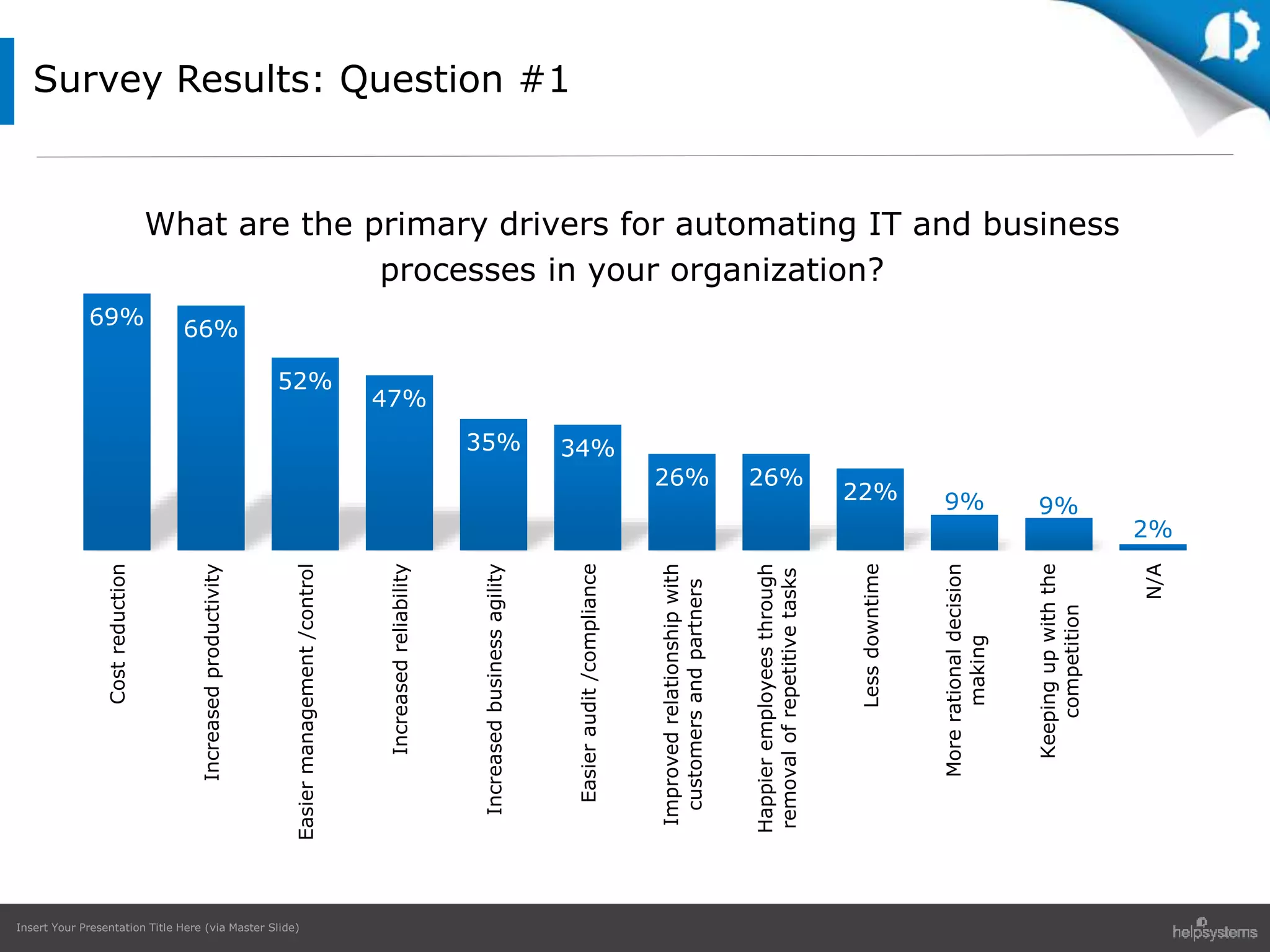
  • #8 We looked first at the primary drivers for automating IT and business processes within their organisations. Almost two thirds (69%) said that they were interested in cutting costs. Almost as many (66%) told us that they wanted to improve productivity. Other reasons for embracing automation included easier management (52%), increased reliability (47%) and improved business agility (35%).
  • #10 There are some tasks that it makes more sense to automate than others. Just over half of the respondents (54%) thought that routine maintenance and patching could be automated, followed closely by backups (51%) and workflow management (51%). Other areas that were identified as suitable for automation included identity and access management (42%), employee on-boarding and off-boarding (37%), file transfer (37%) and software development and testing (30%), see Fig. 1. Repetitive batch jobs can be made more palatable and more efficient by automation. In the IT environment, ‘on-boarding’ new staff, setting them up with an email account and providing logins and passwords is repetitive and ripe for automation. Likewise, when people leave for pastures new accounts need to be shut down swiftly and securely. While automation has an established home in the office, it is also spreading into law courts, surgeries, classrooms and even churches, taking over tasks previously limited to trained professionals. IBM’s Watson computer, which won the US quiz show Jeopardy, is now being used to diagnose cancer patients. In fact, automation has become such a pervasive feature of our lives that we don’t even think about it. We think nothing of paying for groceries using a scanner or transferring money electronically without visiting a bank.
  • #12 Next, we asked respondents about the challenges that they faced in automating their IT and business processes (Fig. 2). Just over half (55%) mentioned integrating multiple platforms as their biggest challenge. A sizeable percentage (49%) listed cost as the biggest challenge. Other respondents identified internal politics (42%), the pace of change (39%), internal resistance from employees worried about losing their jobs (38%); and a lack of long term strategic thinking (35%) as major hurdles to overcome.
  • #14 Process automation is often introduced in response to an increasing workload. More than half of our respondents (58%) told us that they had struggled with the amount of work brought about by an increasing number of devices. Just over one in ten (13%) told us that automation of manual processes had increased their workloads. Encouragingly, 33 per cent of interviewees told us that they had been able to reduce their overall workloads over the period in question by automating manual processes (Fig. 3). Businesses today use lots of different solutions to automate their IT and business practices.
  • #16 We were interested to find out what systems our interviewees employed. A large proportion (60%) used in-house developed scripts to handle automation. Sizeable numbers were also found to use job scheduling software (48%) and centralised network management systems (48%). In-house scripts are perfectly adequate for small individual tasks, but for typical office automation tasks an overview over multiple systems is required. After all, enterprise IT infrastructure consists of a mixture of hardware, operating systems, virtualised and bare metal machines. For more complex tasks you need a simple overview of the whole so that you can build an eventdriven schedule across all platform and also tie in cron jobs, notifications and monitoring.
  • #18 Some analysts believe that greater automation will result in increased unemployment for IT staff. We wanted to see if our interviewees agreed with this proposition (Fig. 5). Strikingly, by a large margin, they disagreed – 42 per cent said that they thought that their role would change with the times and 37 per cent actually thought that automation would bring advantages to their position. Although 17 per cent said that they might lose their job as a result of greater automation, they also thought that automation would open up new opportunities for them as well. Only 3 per cent thought that they would lose their job as a direct result of increased automation (Fig. 5). In November 2015 McKinsey published a report on workplace automation. The results of the report suggest that a focus on occupations is misleading. McKinsey believes that very few occupations will be automated in their entirety in the near or medium term. Rather, certain activities are more likely to be automated, requiring entire business processes to be transformed, and jobs performed by people to be re-defined, much like the bank teller’s job was changed with the advent of the ATM. Our exclusive research appears to back up these assertions. When we asked our respondents whether they were worried about losing their jobs as a result of automation, the answer was an emphatic ‘No’. The survey also threw up another interesting finding – by a large margin, respondents were enthusiastic about the potential of automation and quick to identify areas where automation could make a difference. Labour-intensive tasks like routine maintenance and patching, backups, identity and access management and employee on-boarding and off-boarding were listed by many of our interviewees as being prime targets for automation. However, it was clear that many respondents were struggling to make automation work for their businesses. For more than half the issue was integrating multiple platforms. A sizeable percentage reported running up against opposition from management and fellow employees.
  • #19 Getting employee buy-in These findings were not altogether surprising – while automation can deliver undoubted benefits to organisations overall, it can cause disruption in the short term to employees. Organisations that are contemplating going down the automation route must take their own people into account. So what practical steps should companies take? In the first place, they should carry out an internal audit of their internal processes to determine where automation might make a difference. As part of this exercise, they should identify which activities are relationship-driven and therefore dependent upon human agency, and which processes can be safely managed by an automated solution. Secondly, they should put in place a comprehensive workload automation roadmap. The more information an organisation has about its people, processes and business issues, the more likely its automation programme will be a success. In tandem with this, organisations should make a concerted effort to communicate the benefits of automation to management and staff. After all, automation is in part about freeing up talented employees to focus on higher order tasks. To prevent misunderstandings, key stakeholders should take a lead in explaining to employees how automation will improve their jobs. Lastly, businesses should put in place a plan to train employees on whatever automated solution they end up choosing. Not only does this ensure greater employee buy-in, but it also ensures that the solution will deliver the results that are expected from it.
  • #20 There is one main question to ask that can quickly help identify areas for robotic process automation in any department within your business. “Do any of your users spend 30-60 minutes or more today directly interacting with any applications or web sites to download or process information or are they doing lots of copy and paste data manipulation ?” If the answer is yes then you’ve taken your first steps to start identifying key processes ready for automation. Now the trick is to articulate the process on paper and start thinking about how to automate the process.
  • #21 Use case from customer – typical of most customer we’ve worked with
  • #22 Automation of that process Frees up those staff who are just monitoring email inboxes or folders for files. Compresses amount of time it takes to run the process – no gaps, delays, errors
  • #23 These two products can stand on their own or work together to orchestrate entire business processes from desktop or web site to servers and enterprise applications. As I mentioned, Skybot is a cross-platform enterprise job scheduler. It consolidates the management of your servers or vm’s into one interface that you can use to automate any batch type process. Automate works along with Skybot to automate those processes that you can’t or don’t want to write scripts for. You can create Automate tasks that include pulling files from email, looping through spreadsheets for data, logging into a web site and entering or downloading data. Many of our customers use it for FTP’ing files. Let’s look at some examples of how this suite of products can make your days easier.
  • #24 Let’s look for a minute at a current customer of HS. Fundtech is a financial transaction company with over 500 clients – and growing every day. They had many of the same requirements that you have: Secure FTP of financial transactions, service level agreements to meet, manual monitoring of their file movement They looked at Skybot for some of the same reasons that you are looking at it today.
  • #25 Additional quote: “We’re moving hundreds of thousands of files a day and will be adding to that…We couldn’t afford a solution that would slow down if it tried to handle more than 10,000 files.”
  • #28 Review Polling Results Thanks for attending our webinar today. We hope you learned some interesting information about our ongoing AutoMate and BPA Server product roadmap and the potential for enhancing your Automate environments by considering using the BPA Server software along with the new BPA Server Ops console to provide mobile workflow automation for your enterprise. We’d like to take a minute to tell you about a special offer for attendees. Right now we’re offering a end-of-year 30 minute automation review. What is a 30 minute review? The review is a streamlined version of our full automation audit. During the 30-minute call, one of our automation experts will walk through: Your IT environment and automation setup What applications you run Automation project plans for the next 6 to 18 months Any existing pain points Future automation goals Automation capabilities you may not already be using in Automate. In version 10 currently have over 600 automation actions available in BPA server. The automation audit is designed to help business maximize ROI by using automation best practices and helping you discover additional automation opportunities you may not have thought of. This is ideal for prospective, new and seasoned users to take greater advantage of their workflow automation software. Follow the registration link above to sign up today. We anticipate slots will fill up quickly. If you have any additional questions, input on features you would like to see or anything else, feel free to reach out to our sales team, me or the Automate support team and we will be happy to address your questions and input or provide a more in-depth technical demo or implementation assistance. You will also receive a link to this recording so you can share this webinar with those in your company who could not attend today’s session. We look forward to working with your teams in the upcoming year to continue your automation success. Again thanks for attending todays webinar. Have a great day and enjoy the rest of your week. Pause for a moment. Stop screen sharing Save polling answers.