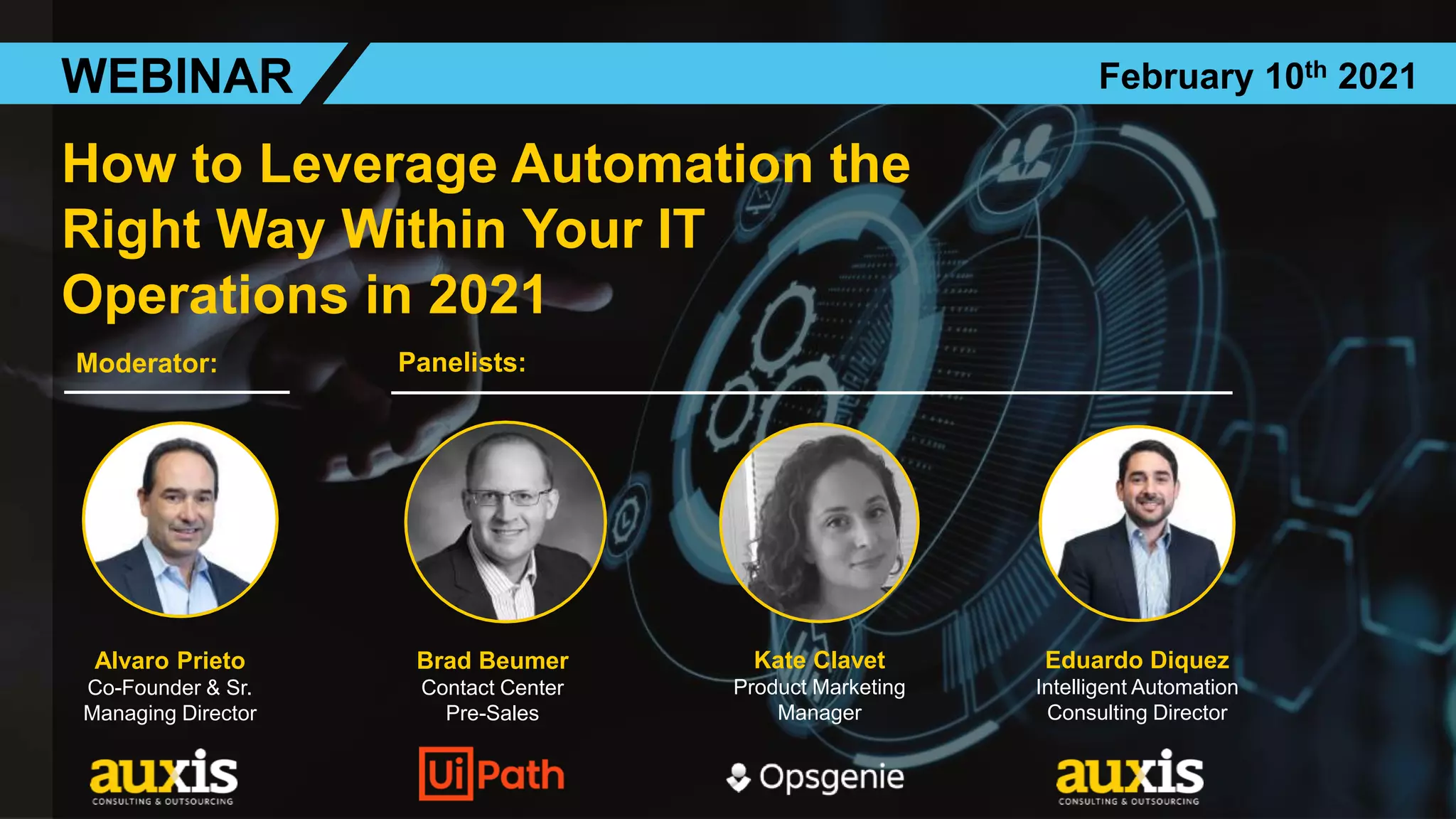
How to Leverage Automation the
Right Way Within Your IT
Operations in 2021
Alvaro Prieto
Co-Founder & Sr.
Managing Director
Brad Beumer
Contact Center
Pre-Sales
Kate Clavet
Product Marketing
Manager
WEBINAR February 10th 2021
Eduardo Diquez
Intelligent Automation
Consulting Director
Moderator: Panelists:
Sources:
- Gartner
- Tanium Survey Report 2020
- McAfee, The Hidden Cost of Cybercrime
- State of Service, Salesforce research May 2020
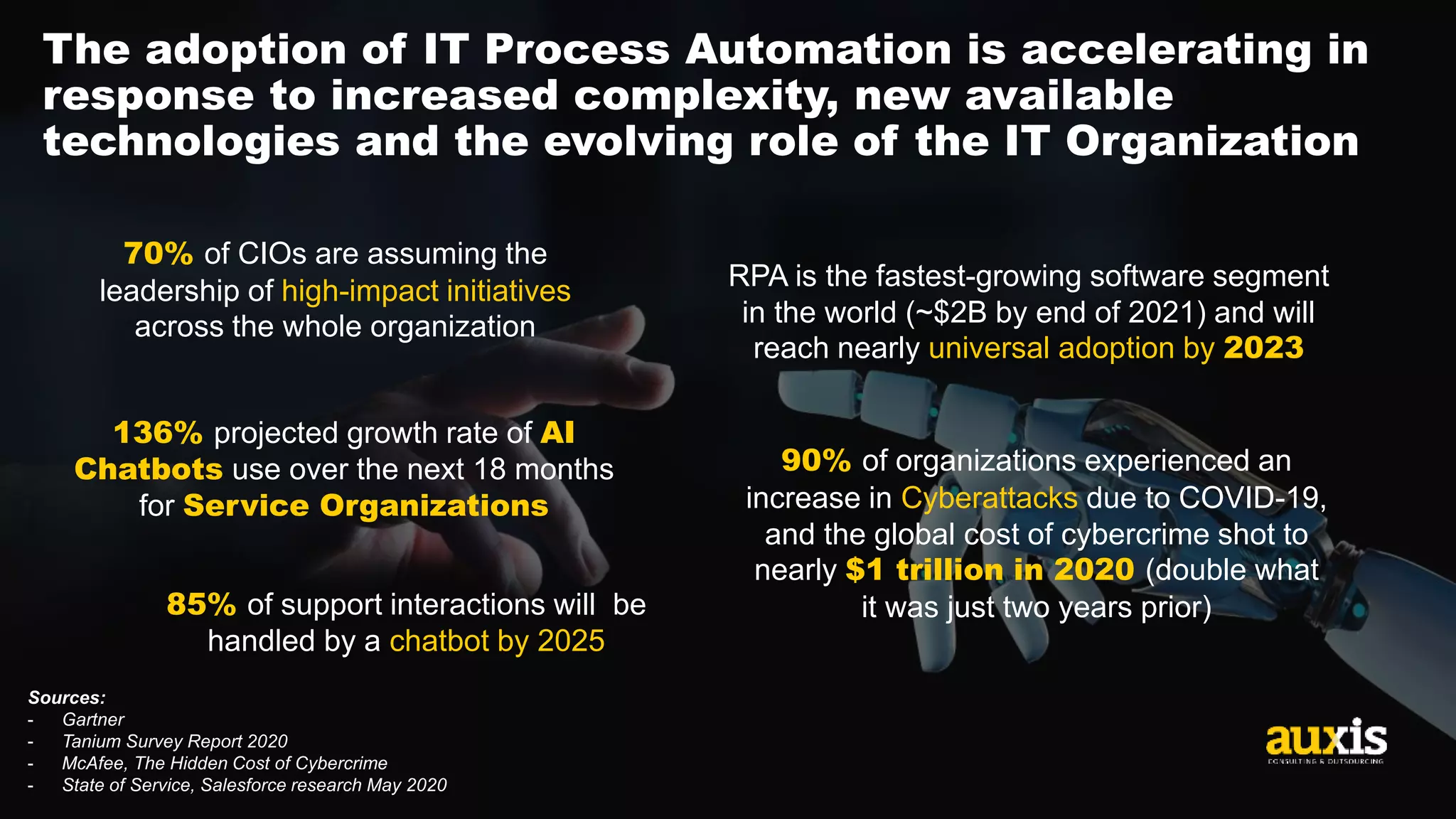
The adoption of IT Process Automation is accelerating in
response to increased complexity, new available
technologies and the evolving role of the IT Organization
RPA is the fastest-growing software segment
in the world (~$2B by end of 2021) and will
reach nearly universal adoption by 2023
85% of support interactions will be
handled by a chatbot by 2025
136% projected growth rate of AI
Chatbots use over the next 18 months
for Service Organizations
70% of CIOs are assuming the
leadership of high-impact initiatives
across the whole organization
90% of organizations experienced an
increase in Cyberattacks due to COVID-19,
and the global cost of cybercrime shot to
nearly $1 trillion in 2020 (double what
it was just two years prior)
3
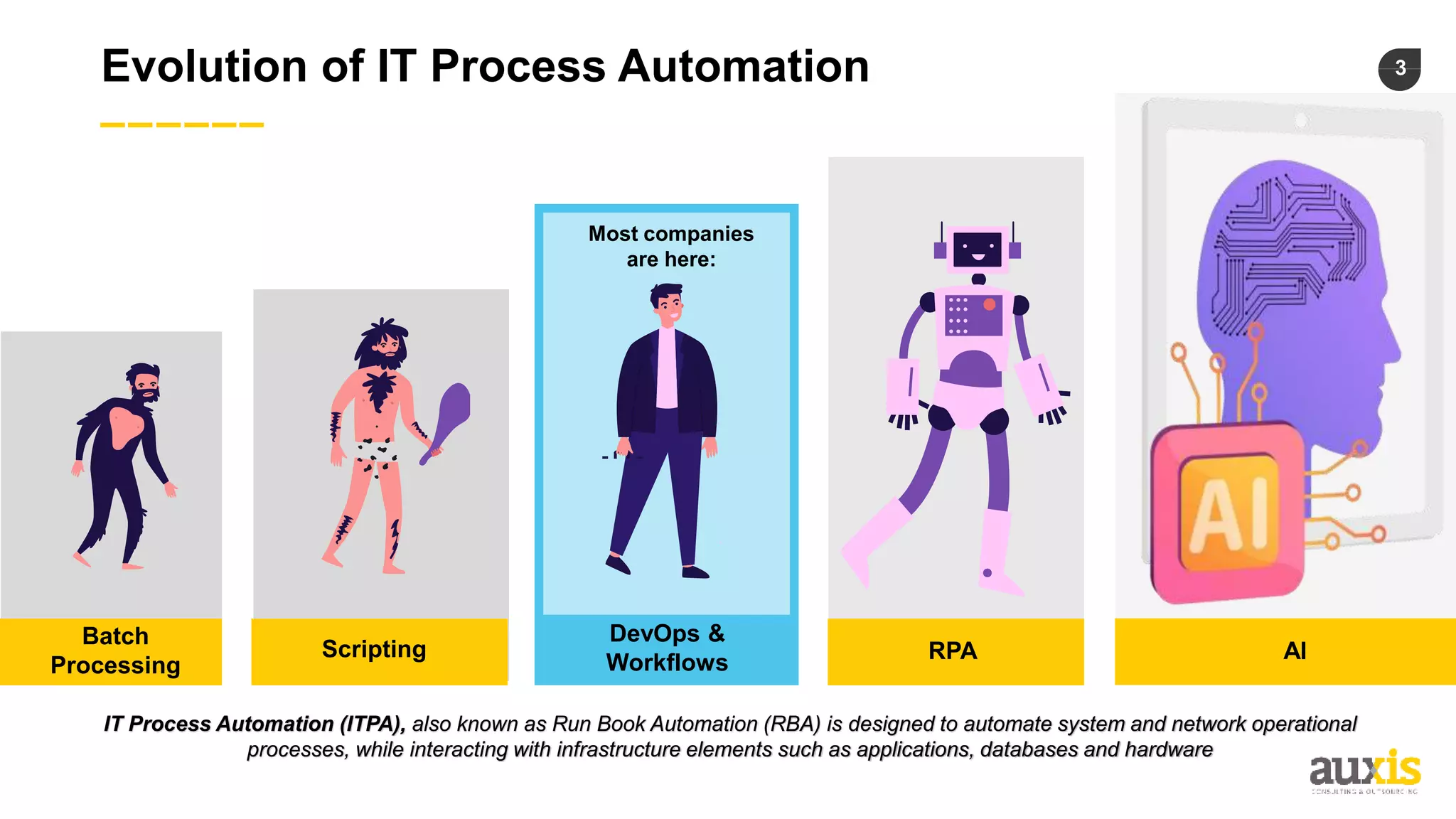
Evolution of IT Process Automation
IT Process Automation (ITPA), also known as Run Book Automation (RBA) is designed to automate system and network operational
processes, while interacting with infrastructure elements such as applications, databases and hardware
Most companies
are here:
Batch
Processing
Scripting
DevOps &
Workflows RPA AI
4
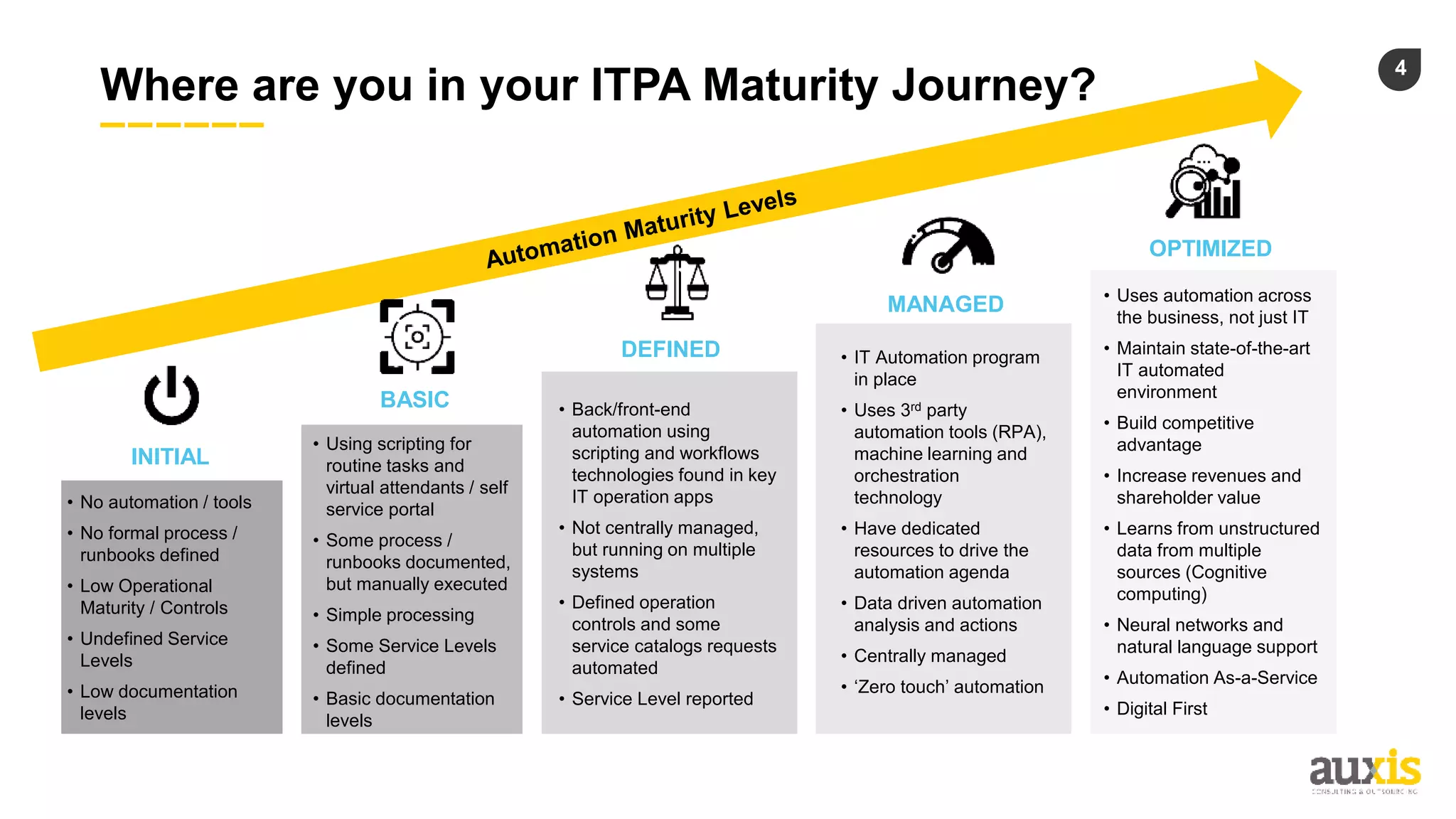
Where are you in your ITPA Maturity Journey?
• No automation / tools
• No formal process /
runbooks defined
• Low Operational
Maturity / Controls
• Undefined Service
Levels
• Low documentation
levels
INITIAL
• Back/front-end
automation using
scripting and workflows
technologies found in key
IT operation apps
• Not centrally managed,
but running on multiple
systems
• Defined operation
controls and some
service catalogs requests
automated
• Service Level reported
DEFINED • IT Automation program
in place
• Uses 3rd party
automation tools (RPA),
machine learning and
orchestration
technology
• Have dedicated
resources to drive the
automation agenda
• Data driven automation
analysis and actions
• Centrally managed
• ‘Zero touch’ automation
MANAGED
OPTIMIZED
• Uses automation across
the business, not just IT
• Maintain state-of-the-art
IT automated
environment
• Build competitive
advantage
• Increase revenues and
shareholder value
• Learns from unstructured
data from multiple
sources (Cognitive
computing)
• Neural networks and
natural language support
• Automation As-a-Service
• Digital First
• Using scripting for
routine tasks and
virtual attendants / self
service portal
• Some process /
runbooks documented,
but manually executed
• Simple processing
• Some Service Levels
defined
• Basic documentation
levels
BASIC
5
Where are you in your ITPA Maturity Journey?
• No automation / tools
• No formal process /
runbooks defined
• Low Operational
Maturity / Controls
• Undefined Service
Levels
• Low documentation
levels
INITIAL
• Back/front-end
automation using
scripting and workflows
technologies found in key
IT operation apps
• Not centrally managed,
but running on multiple
systems
• Defined operation
controls and some
service catalogs requests
automated
• Service Level reported
DEFINED • IT Automation program
in place
• Uses 3rd party
automation tools (RPA),
machine learning and
orchestration
technology
• Have dedicated
resources to drive the
automation agenda
• Data driven automation
analysis and actions
• Centrally managed
• ‘Zero touch’ automation
MANAGED
OPTIMIZED
• Uses automation across
the business, not just IT
• Maintain state-of-the-art
IT automated
environment
• Build competitive
advantage
• Increase revenues and
shareholder value
• Learns from unstructured
data from multiple
sources (Cognitive
computing)
• Neural networks and
natural language support
• Automation As-a-Service
• Digital First
• Using scripting for
routine tasks and
virtual attendants / self
service portal
• Some process /
runbooks documented,
but manually executed
• Simple processing
• Some Service Levels
defined
• Basic documentation
levels
BASIC
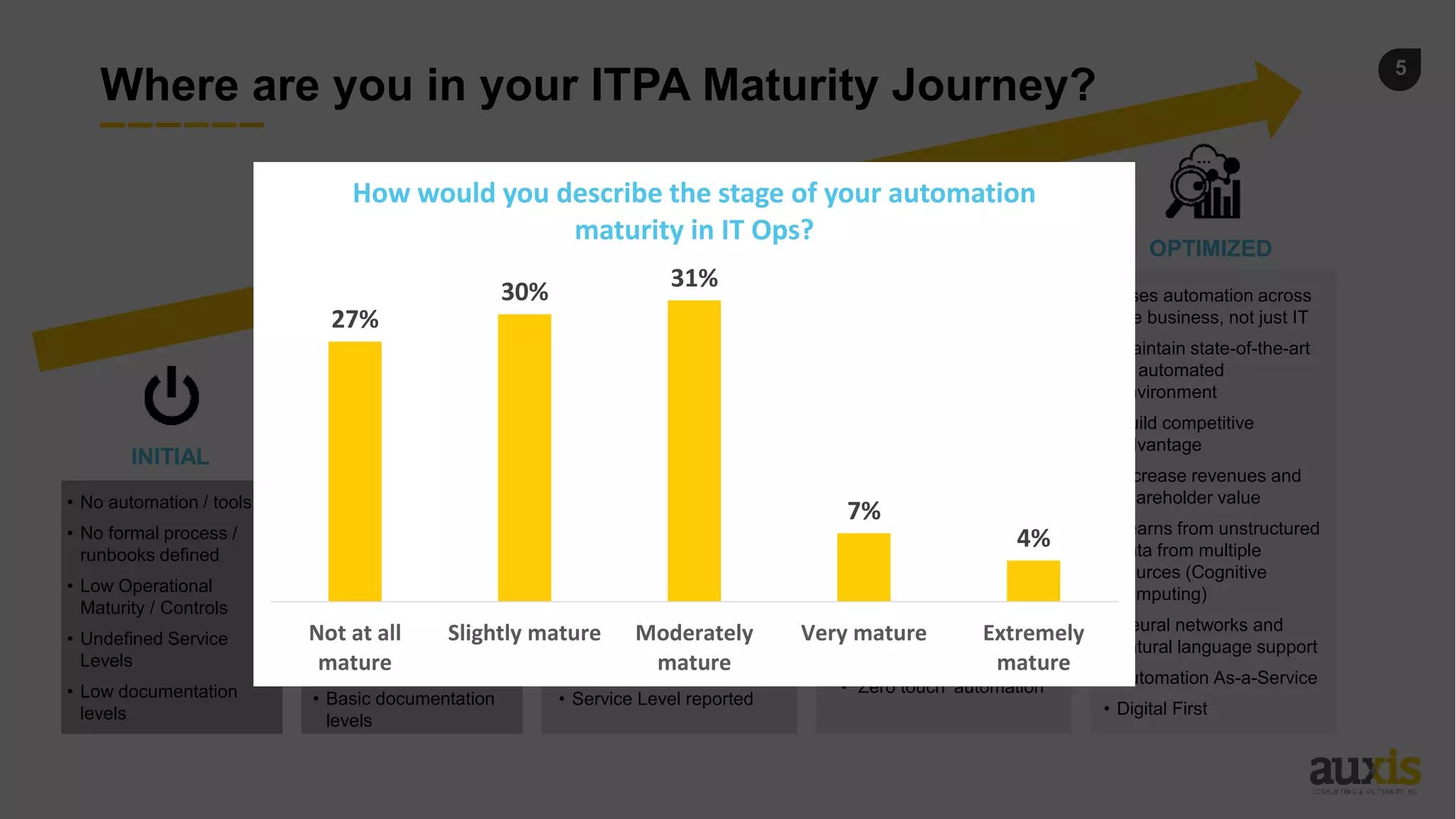
27%
30%
31%
7%
4%
Not at all
mature
Slightly mature Moderately
mature
Very mature Extremely
mature
How would you describe the stage of your automation
maturity in IT Ops?
6
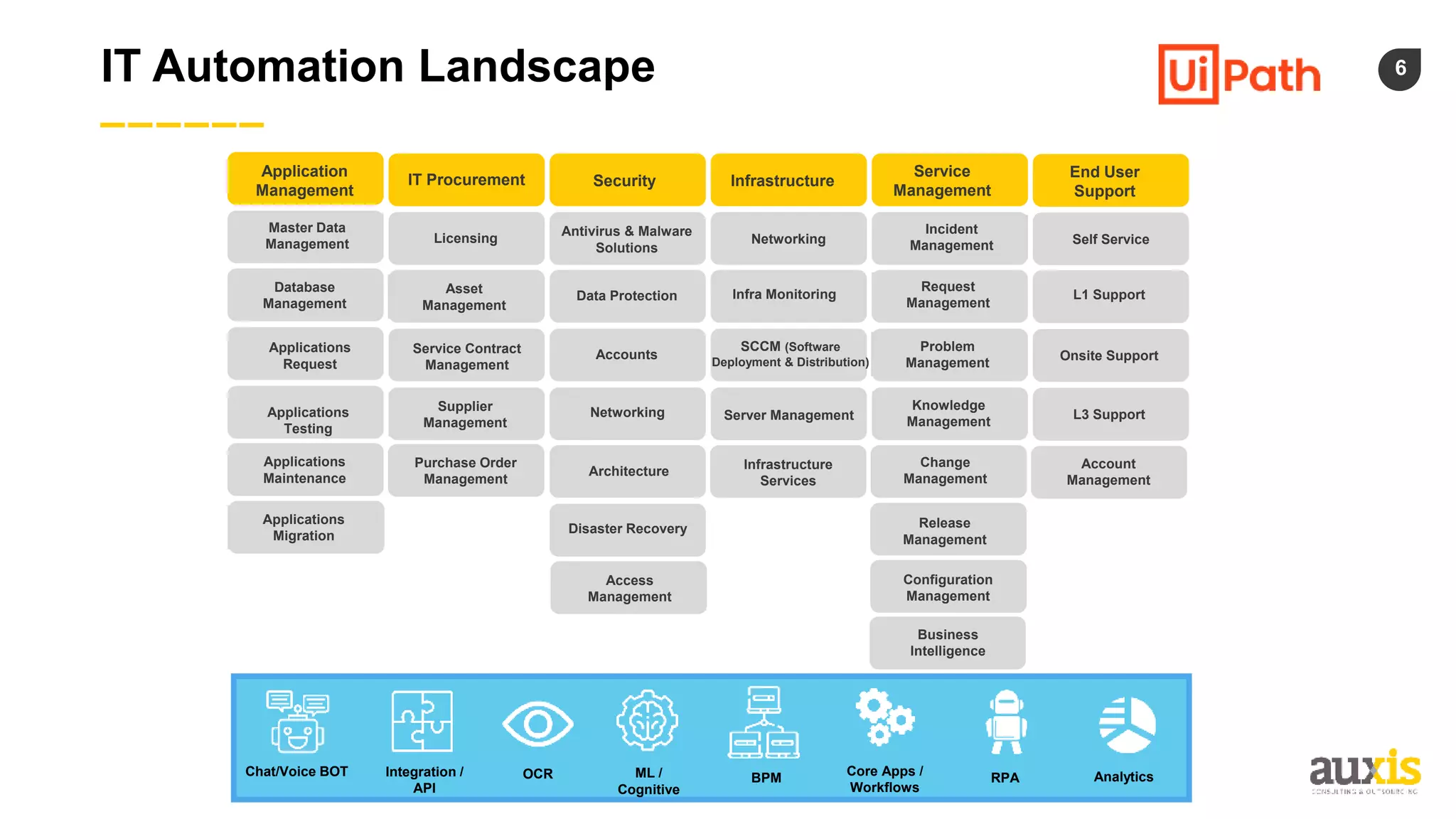
IT Automation Landscape
Application
Management
IT Procurement Security Infrastructure
Service
Management
End User
Support
Master Data
Management Licensing
Antivirus & Malware
Solutions
Networking
Incident
Management Self Service
Database
Management
Asset
Management
Data Protection Infra Monitoring
Request
Management
L1 Support
Onsite Support
L3 Support
Account
Management
Problem
Management
Knowledge
Management
Change
Management
Release
Management
Configuration
Management
Business
Intelligence
SCCM (Software
Deployment & Distribution)
Server Management
Infrastructure
Services
Access
Management
Disaster Recovery
Architecture
Networking
Accounts
Service Contract
Management
Supplier
Management
Purchase Order
Management
Applications
Migration
Applications
Maintenance
Applications
Testing
Applications
Request
Chat/Voice BOT Integration /
API
OCR ML /
Cognitive
BPM
Core Apps /
Workflows
RPA Analytics
7
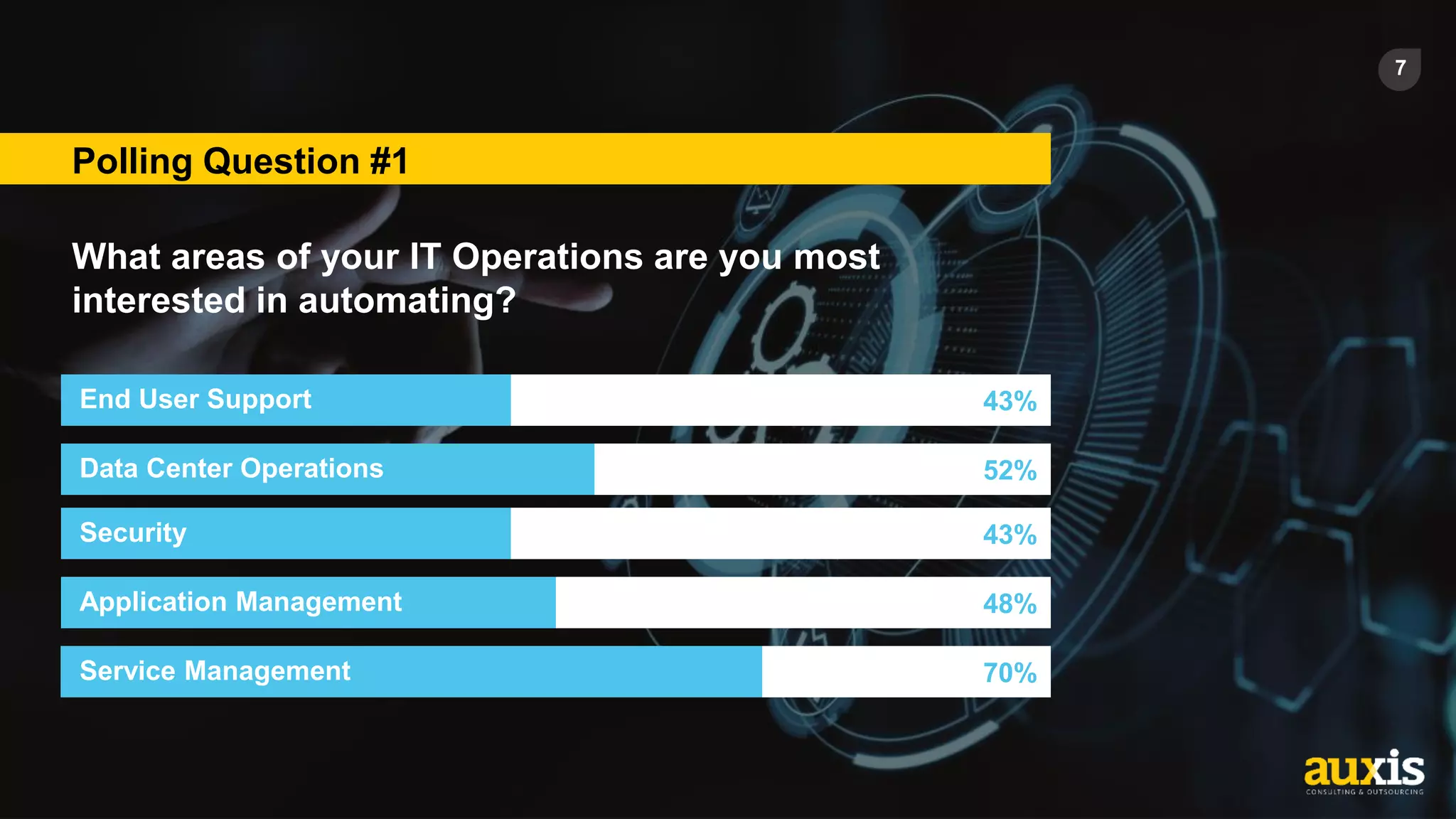
Polling Question #1
What areas of your IT Operations are you most
interested in automating?
End User Support 43%
Data Center Operations 52%
Security 43%
Application Management 48%
Service Management 70%
8
OpsGenie & UiPath Overview
Most Common Use Cases in IT Ops
9
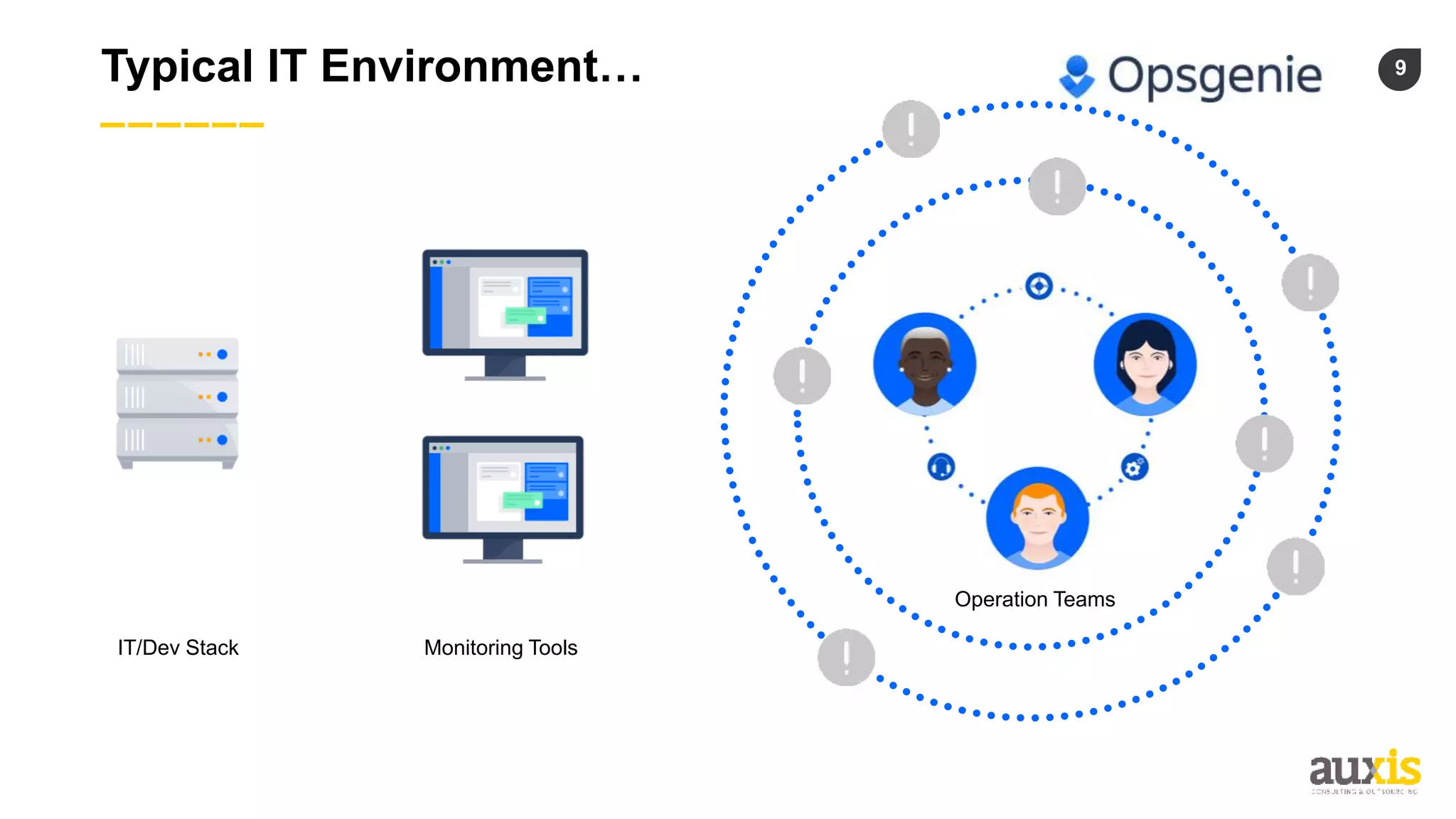
Typical IT Environment…
Operation Teams
Monitoring Tools
IT/Dev Stack
10
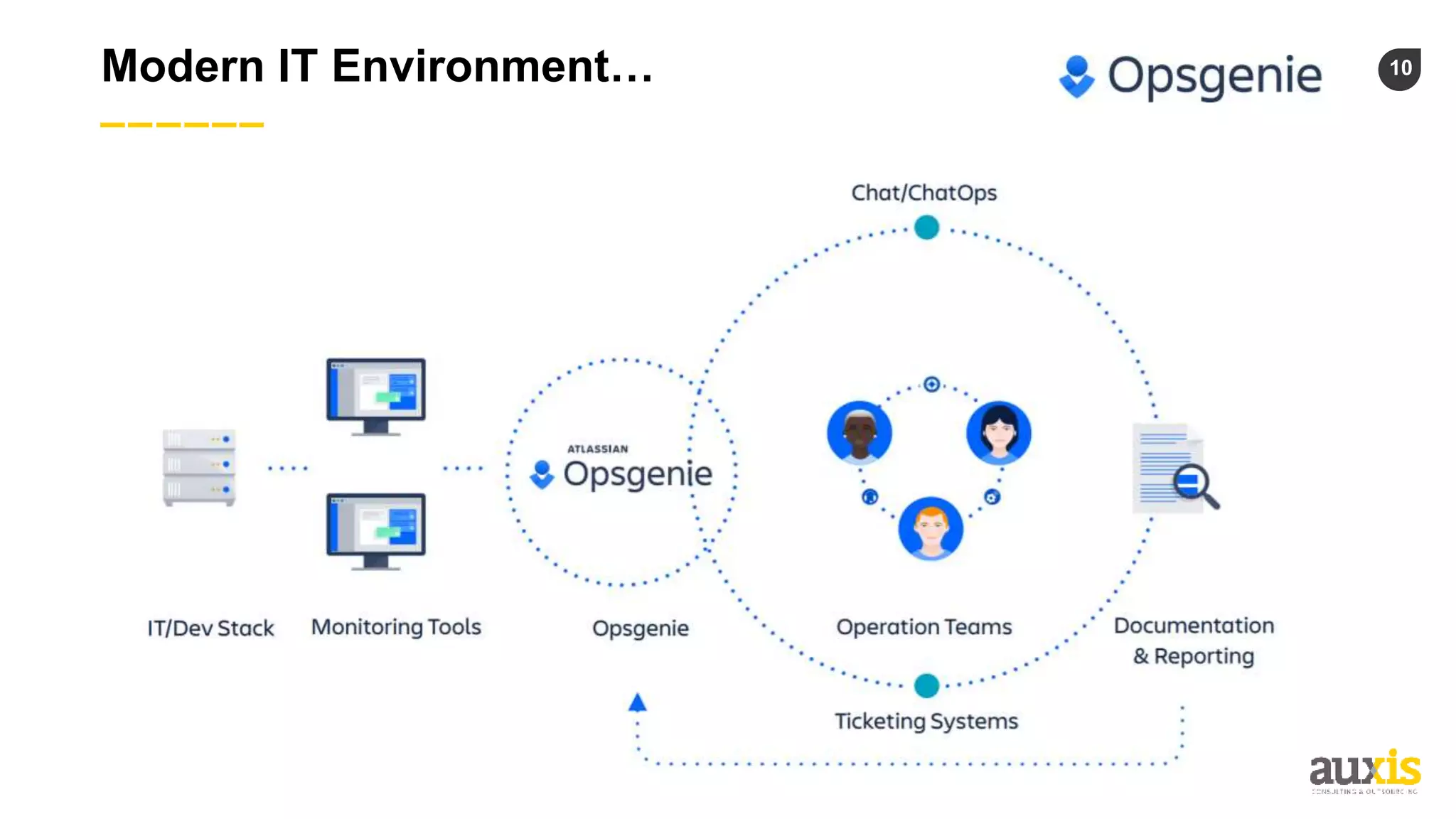
Modern IT Environment…
11
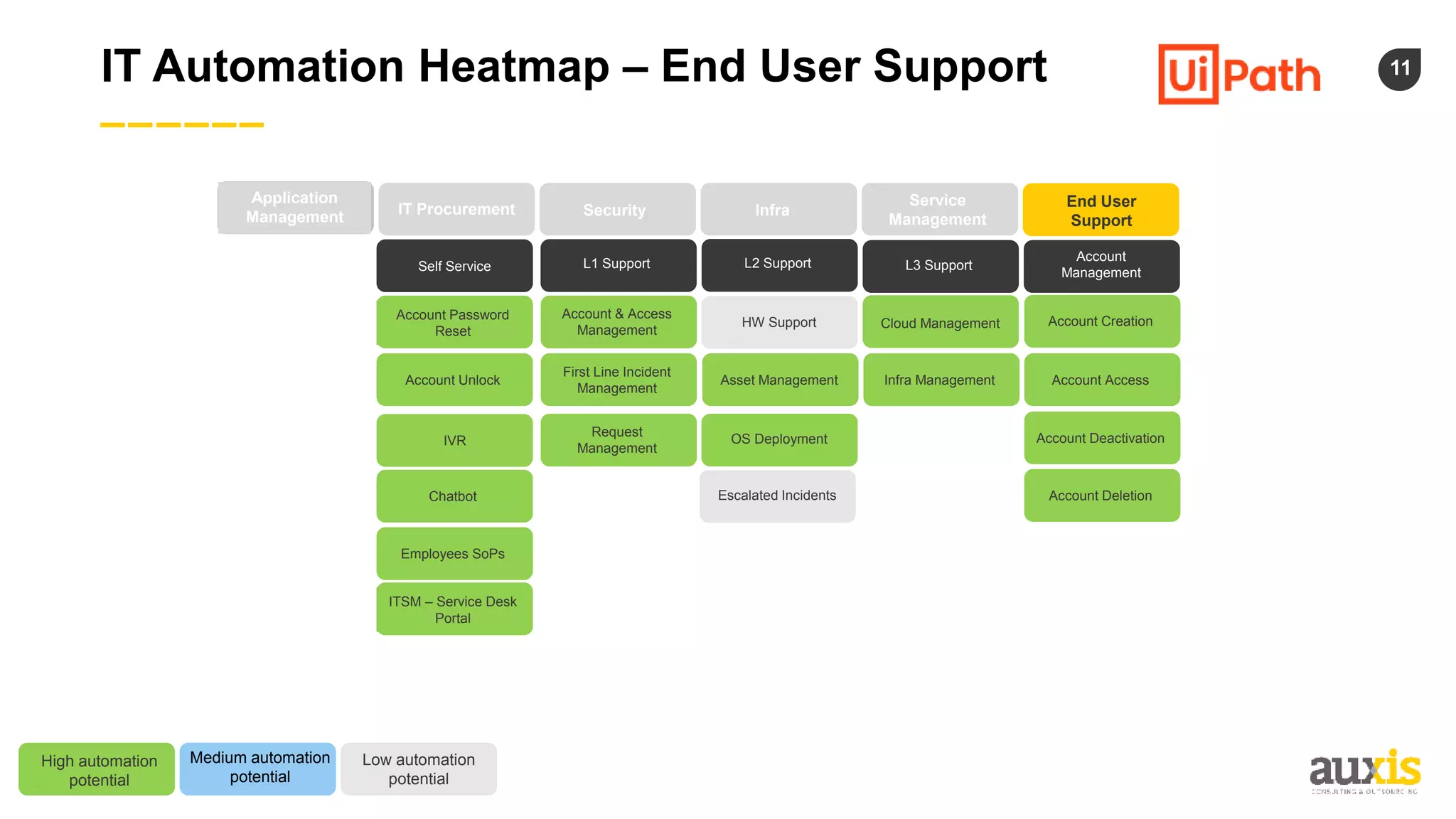
IT Automation Heatmap – End User Support
Application
Management IT Procurement Security Infra
Service
Management
End User
Support
Self Service L1 Support L3 Support
Account
Management
L2 Support
HW Support
Escalated Incidents
High automation
potential
Medium automation
potential
Low automation
potential
Account & Access
Management
Request
Management
Account Password
Reset
IVR
Chatbot
Employees SoPs
ITSM – Service Desk
Portal
OS Deployment
Account Creation
Account Deactivation
Account Deletion
Cloud Management
First Line Incident
Management
Account Unlock Asset Management Account Access
Infra Management
12
UiPath Demo
13
Positioning the Benefits and
Business Case of Automation in IT
14
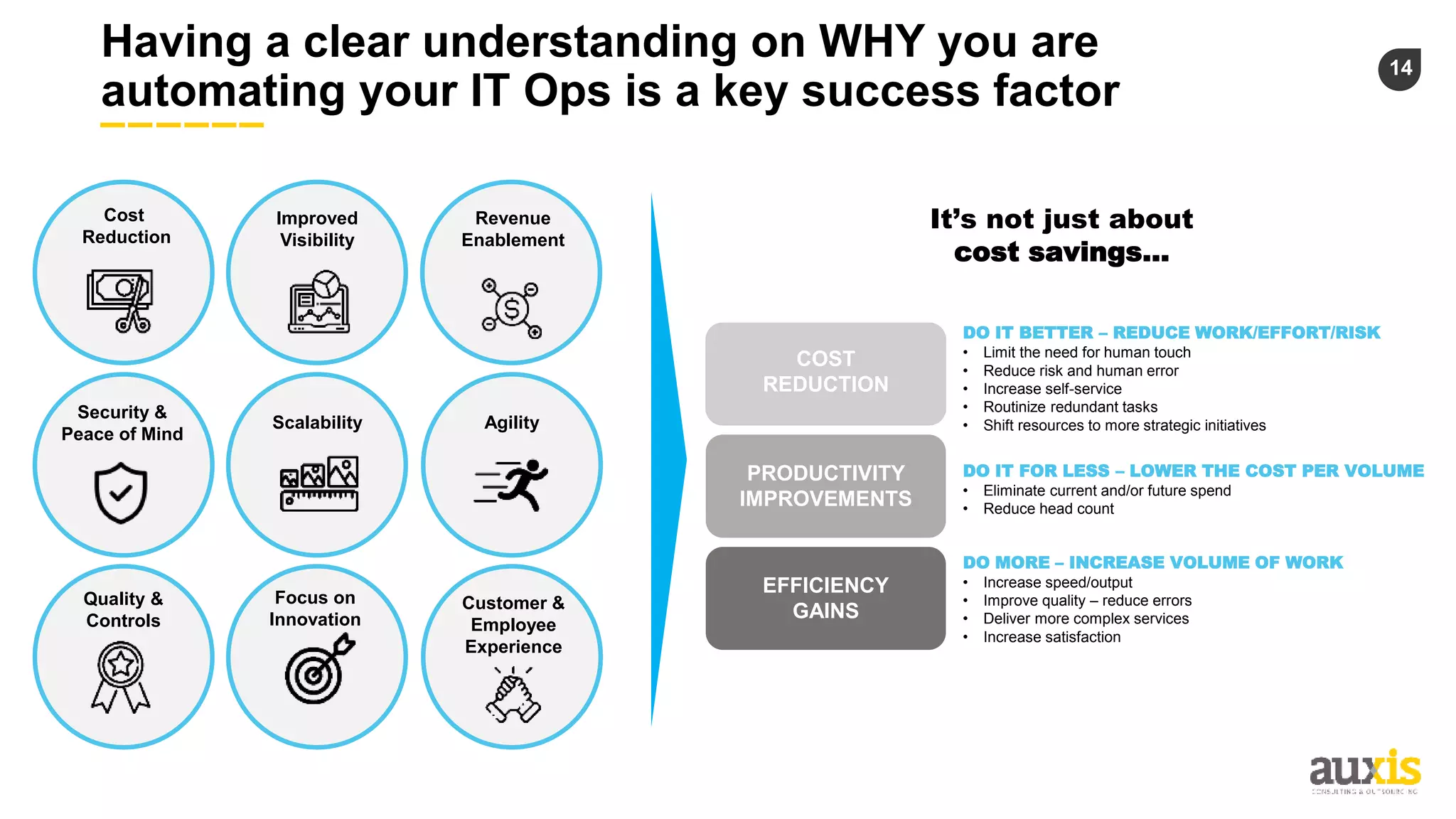
Having a clear understanding on WHY you are
automating your IT Ops is a key success factor
Improved
Visibility
Revenue
Enablement
Cost
Reduction
Scalability Agility
Quality &
Controls
Focus on
Innovation
Customer &
Employee
Experience
Security &
Peace of Mind
It’s not just about
cost savings…
COST
REDUCTION
PRODUCTIVITY
IMPROVEMENTS
EFFICIENCY
GAINS
DO IT FOR LESS – LOWER THE COST PER VOLUME
• Eliminate current and/or future spend
• Reduce head count
DO MORE – INCREASE VOLUME OF WORK
• Increase speed/output
• Improve quality – reduce errors
• Deliver more complex services
• Increase satisfaction
DO IT BETTER – REDUCE WORK/EFFORT/RISK
• Limit the need for human touch
• Reduce risk and human error
• Increase self-service
• Routinize redundant tasks
• Shift resources to more strategic initiatives
15
Having a clear understanding on WHY you are
automating your IT Ops is a key success factor
Improved
Visibility
Revenue
Enablement
Cost
Reduction
Scalability Agility
Quality &
Controls
Focus on
Innovation
Customer &
Employee
Experience
Security &
Peace of Mind
It’s not just about
cost savings…
COST
REDUCTION
PRODUCTIVITY
IMPROVEMENTS
EFFICIENCY
GAINS
DO IT FOR LESS – LOWER THE COST PER VOLUME
• Eliminate current and/or future spend
• Reduce head count
DO MORE – INCREASE VOLUME OF WORK
• Increase speed/output
• Improve quality – reduce errors
• Deliver more complex services
• Increase satisfaction
DO IT BETTER – REDUCE WORK/EFFORT/RISK
• Limit the need for human touch
• Reduce risk and human error
• Increase self-service
• Routinize redundant tasks
• Shift resources to more strategic initiatives
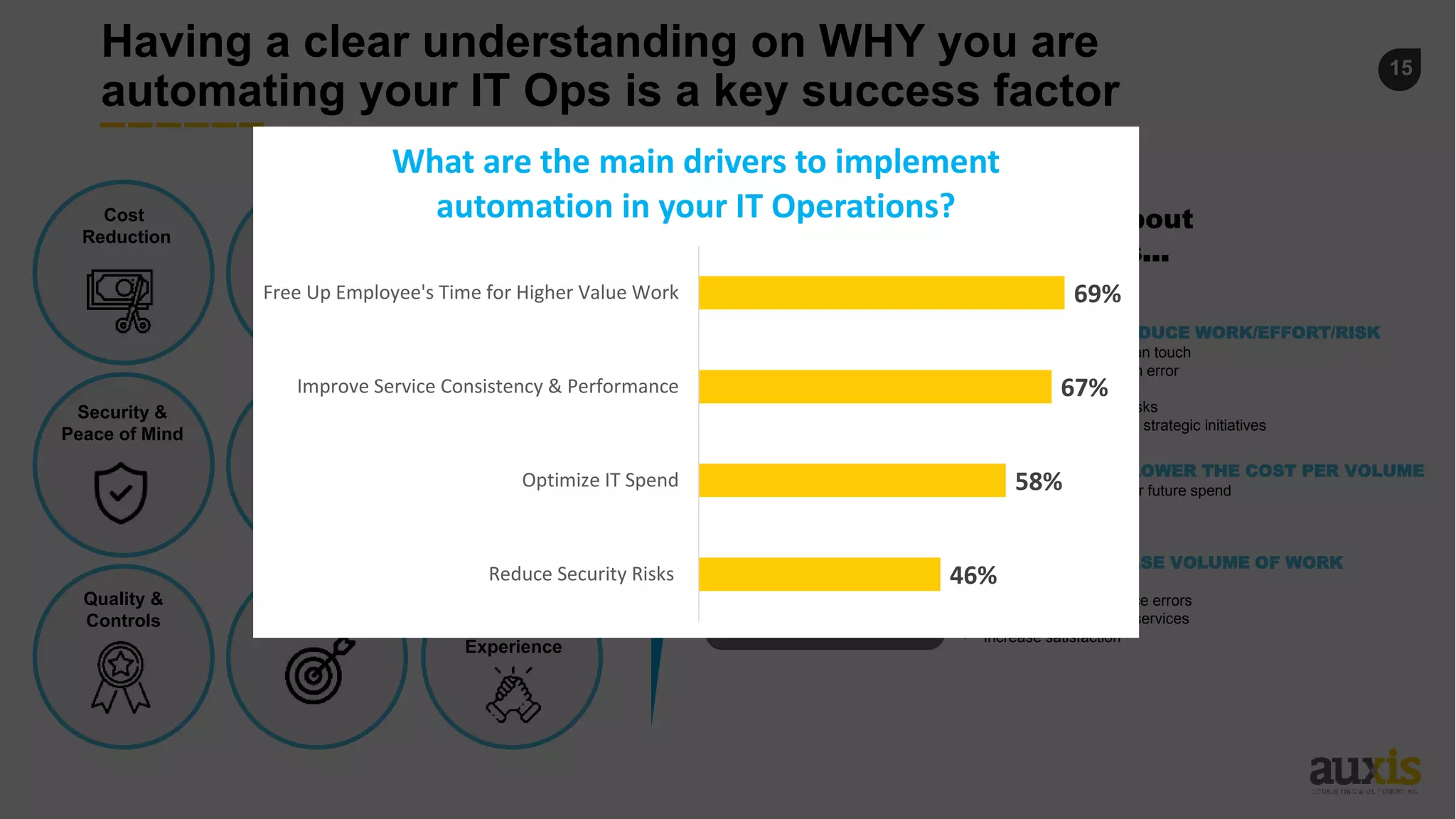
46%
58%
67%
69%
Reduce Security Risks
Optimize IT Spend
Improve Service Consistency & Performance
Free Up Employee's Time for Higher Value Work
What are the main drivers to implement
automation in your IT Operations?
16
Keys for a Successful Implementation
Most Common Pitfalls & Lessons Learned
17
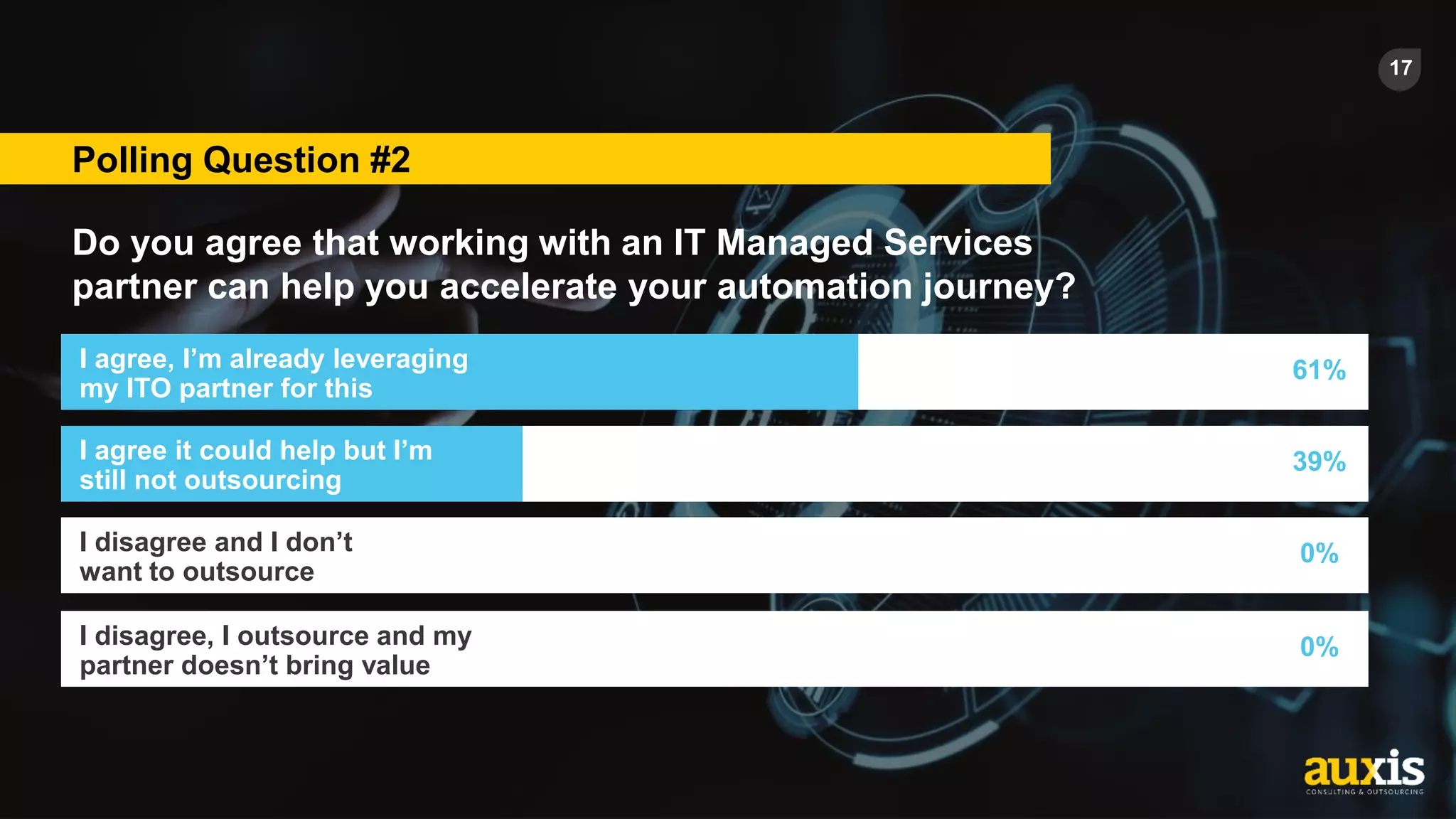
Polling Question #2
Do you agree that working with an IT Managed Services
partner can help you accelerate your automation journey?
I agree, I’m already leveraging
my ITO partner for this
61%
I agree it could help but I’m
still not outsourcing
39%
I disagree and I don’t
want to outsource
0%
I disagree, I outsource and my
partner doesn’t bring value
0%
18
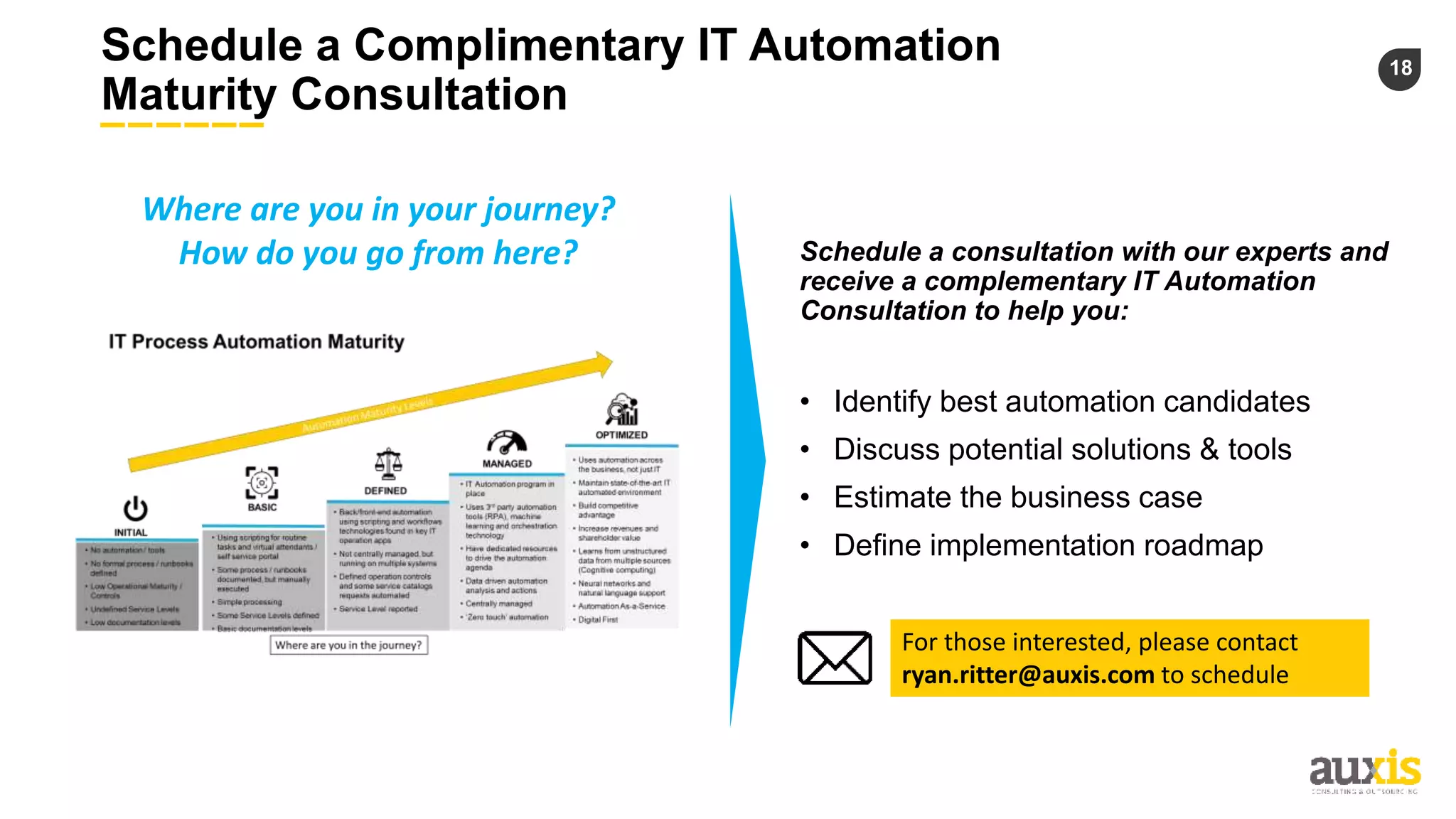
Schedule a Complimentary IT Automation
Maturity Consultation
Where are you in your journey?
How do you go from here? Schedule a consultation with our experts and
receive a complementary IT Automation
Consultation to help you:
• Identify best automation candidates
• Discuss potential solutions & tools
• Estimate the business case
• Define implementation roadmap
For those interested, please contact
ryan.ritter@auxis.com to schedule
19
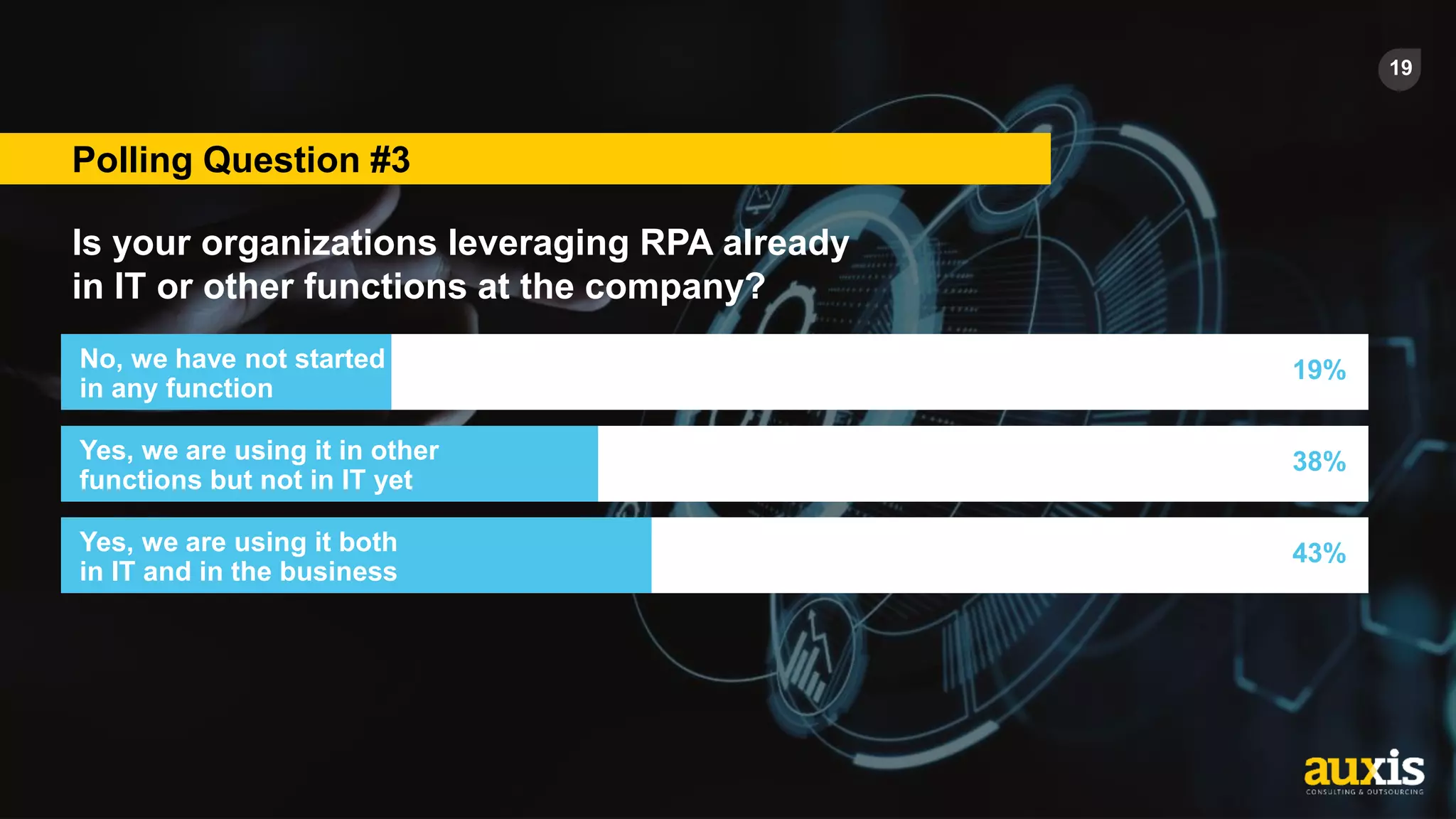
Polling Question #3
Is your organizations leveraging RPA already
in IT or other functions at the company?
No, we have not started
in any function
19%
Yes, we are using it in other
functions but not in IT yet
38%
43%
Yes, we are using it both
in IT and in the business
We’re looking forward to
speaking with you!
Alvaro Prieto
Co-Founder & Sr. Managing
Director
Alvaro.Prieto@auxis.com
Brad Beumer
Contact Center Pre-Sales
Brad.beumer@uipath.com
Kate Clavet
Product Marketing Manager
kclavet@atlassian.com
Eduardo Diquez
Intelligent Automation
Consulting Director
Eduardo.Diquez@auxis.com

It automation webinar presentation

  • 1.
    How to LeverageAutomation the Right Way Within Your IT Operations in 2021 Alvaro Prieto Co-Founder & Sr. Managing Director Brad Beumer Contact Center Pre-Sales Kate Clavet Product Marketing Manager WEBINAR February 10th 2021 Eduardo Diquez Intelligent Automation Consulting Director Moderator: Panelists:
  • 2.
    Sources: - Gartner - TaniumSurvey Report 2020 - McAfee, The Hidden Cost of Cybercrime - State of Service, Salesforce research May 2020 The adoption of IT Process Automation is accelerating in response to increased complexity, new available technologies and the evolving role of the IT Organization RPA is the fastest-growing software segment in the world (~$2B by end of 2021) and will reach nearly universal adoption by 2023 85% of support interactions will be handled by a chatbot by 2025 136% projected growth rate of AI Chatbots use over the next 18 months for Service Organizations 70% of CIOs are assuming the leadership of high-impact initiatives across the whole organization 90% of organizations experienced an increase in Cyberattacks due to COVID-19, and the global cost of cybercrime shot to nearly $1 trillion in 2020 (double what it was just two years prior)
  • 3.
    3 Evolution of ITProcess Automation IT Process Automation (ITPA), also known as Run Book Automation (RBA) is designed to automate system and network operational processes, while interacting with infrastructure elements such as applications, databases and hardware Most companies are here: Batch Processing Scripting DevOps & Workflows RPA AI
  • 4.
    4 Where are youin your ITPA Maturity Journey? • No automation / tools • No formal process / runbooks defined • Low Operational Maturity / Controls • Undefined Service Levels • Low documentation levels INITIAL • Back/front-end automation using scripting and workflows technologies found in key IT operation apps • Not centrally managed, but running on multiple systems • Defined operation controls and some service catalogs requests automated • Service Level reported DEFINED • IT Automation program in place • Uses 3rd party automation tools (RPA), machine learning and orchestration technology • Have dedicated resources to drive the automation agenda • Data driven automation analysis and actions • Centrally managed • ‘Zero touch’ automation MANAGED OPTIMIZED • Uses automation across the business, not just IT • Maintain state-of-the-art IT automated environment • Build competitive advantage • Increase revenues and shareholder value • Learns from unstructured data from multiple sources (Cognitive computing) • Neural networks and natural language support • Automation As-a-Service • Digital First • Using scripting for routine tasks and virtual attendants / self service portal • Some process / runbooks documented, but manually executed • Simple processing • Some Service Levels defined • Basic documentation levels BASIC
  • 5.
    5 Where are youin your ITPA Maturity Journey? • No automation / tools • No formal process / runbooks defined • Low Operational Maturity / Controls • Undefined Service Levels • Low documentation levels INITIAL • Back/front-end automation using scripting and workflows technologies found in key IT operation apps • Not centrally managed, but running on multiple systems • Defined operation controls and some service catalogs requests automated • Service Level reported DEFINED • IT Automation program in place • Uses 3rd party automation tools (RPA), machine learning and orchestration technology • Have dedicated resources to drive the automation agenda • Data driven automation analysis and actions • Centrally managed • ‘Zero touch’ automation MANAGED OPTIMIZED • Uses automation across the business, not just IT • Maintain state-of-the-art IT automated environment • Build competitive advantage • Increase revenues and shareholder value • Learns from unstructured data from multiple sources (Cognitive computing) • Neural networks and natural language support • Automation As-a-Service • Digital First • Using scripting for routine tasks and virtual attendants / self service portal • Some process / runbooks documented, but manually executed • Simple processing • Some Service Levels defined • Basic documentation levels BASIC 27% 30% 31% 7% 4% Not at all mature Slightly mature Moderately mature Very mature Extremely mature How would you describe the stage of your automation maturity in IT Ops?
  • 6.
    6 IT Automation Landscape Application Management ITProcurement Security Infrastructure Service Management End User Support Master Data Management Licensing Antivirus & Malware Solutions Networking Incident Management Self Service Database Management Asset Management Data Protection Infra Monitoring Request Management L1 Support Onsite Support L3 Support Account Management Problem Management Knowledge Management Change Management Release Management Configuration Management Business Intelligence SCCM (Software Deployment & Distribution) Server Management Infrastructure Services Access Management Disaster Recovery Architecture Networking Accounts Service Contract Management Supplier Management Purchase Order Management Applications Migration Applications Maintenance Applications Testing Applications Request Chat/Voice BOT Integration / API OCR ML / Cognitive BPM Core Apps / Workflows RPA Analytics
  • 7.
    7 Polling Question #1 Whatareas of your IT Operations are you most interested in automating? End User Support 43% Data Center Operations 52% Security 43% Application Management 48% Service Management 70%
  • 8.
    8 OpsGenie & UiPathOverview Most Common Use Cases in IT Ops
  • 9.
    9 Typical IT Environment… OperationTeams Monitoring Tools IT/Dev Stack
  • 10.
  • 11.
    11 IT Automation Heatmap– End User Support Application Management IT Procurement Security Infra Service Management End User Support Self Service L1 Support L3 Support Account Management L2 Support HW Support Escalated Incidents High automation potential Medium automation potential Low automation potential Account & Access Management Request Management Account Password Reset IVR Chatbot Employees SoPs ITSM – Service Desk Portal OS Deployment Account Creation Account Deactivation Account Deletion Cloud Management First Line Incident Management Account Unlock Asset Management Account Access Infra Management
  • 12.
  • 13.
    13 Positioning the Benefitsand Business Case of Automation in IT
  • 14.
    14 Having a clearunderstanding on WHY you are automating your IT Ops is a key success factor Improved Visibility Revenue Enablement Cost Reduction Scalability Agility Quality & Controls Focus on Innovation Customer & Employee Experience Security & Peace of Mind It’s not just about cost savings… COST REDUCTION PRODUCTIVITY IMPROVEMENTS EFFICIENCY GAINS DO IT FOR LESS – LOWER THE COST PER VOLUME • Eliminate current and/or future spend • Reduce head count DO MORE – INCREASE VOLUME OF WORK • Increase speed/output • Improve quality – reduce errors • Deliver more complex services • Increase satisfaction DO IT BETTER – REDUCE WORK/EFFORT/RISK • Limit the need for human touch • Reduce risk and human error • Increase self-service • Routinize redundant tasks • Shift resources to more strategic initiatives
  • 15.
    15 Having a clearunderstanding on WHY you are automating your IT Ops is a key success factor Improved Visibility Revenue Enablement Cost Reduction Scalability Agility Quality & Controls Focus on Innovation Customer & Employee Experience Security & Peace of Mind It’s not just about cost savings… COST REDUCTION PRODUCTIVITY IMPROVEMENTS EFFICIENCY GAINS DO IT FOR LESS – LOWER THE COST PER VOLUME • Eliminate current and/or future spend • Reduce head count DO MORE – INCREASE VOLUME OF WORK • Increase speed/output • Improve quality – reduce errors • Deliver more complex services • Increase satisfaction DO IT BETTER – REDUCE WORK/EFFORT/RISK • Limit the need for human touch • Reduce risk and human error • Increase self-service • Routinize redundant tasks • Shift resources to more strategic initiatives 46% 58% 67% 69% Reduce Security Risks Optimize IT Spend Improve Service Consistency & Performance Free Up Employee's Time for Higher Value Work What are the main drivers to implement automation in your IT Operations?
  • 16.
    16 Keys for aSuccessful Implementation Most Common Pitfalls & Lessons Learned
  • 17.
    17 Polling Question #2 Doyou agree that working with an IT Managed Services partner can help you accelerate your automation journey? I agree, I’m already leveraging my ITO partner for this 61% I agree it could help but I’m still not outsourcing 39% I disagree and I don’t want to outsource 0% I disagree, I outsource and my partner doesn’t bring value 0%
  • 18.
    18 Schedule a ComplimentaryIT Automation Maturity Consultation Where are you in your journey? How do you go from here? Schedule a consultation with our experts and receive a complementary IT Automation Consultation to help you: • Identify best automation candidates • Discuss potential solutions & tools • Estimate the business case • Define implementation roadmap For those interested, please contact ryan.ritter@auxis.com to schedule
  • 19.
    19 Polling Question #3 Isyour organizations leveraging RPA already in IT or other functions at the company? No, we have not started in any function 19% Yes, we are using it in other functions but not in IT yet 38% 43% Yes, we are using it both in IT and in the business
  • 20.
    We’re looking forwardto speaking with you! Alvaro Prieto Co-Founder & Sr. Managing Director Alvaro.Prieto@auxis.com Brad Beumer Contact Center Pre-Sales Brad.beumer@uipath.com Kate Clavet Product Marketing Manager kclavet@atlassian.com Eduardo Diquez Intelligent Automation Consulting Director Eduardo.Diquez@auxis.com

Editor's Notes

  • #4 Registration results
  • #5  Many IT organizations use scripting to automate tasks. This may work well for well defined tasks, such as provisioning a server. Yet scripting has its drawbacks, particularly for more complex IT workflows that cross processes and domains. With scripting, the lack of built-in integration with IT management and orchestration systems reduces your flexibility and ability to manage the processes end-to-end – from triggering or scheduling and up to closing tickets. Another problem with scripting is your ability to keep an audit trail, review and analyze events.
  • #6  Many IT organizations use scripting to automate tasks. This may work well for well defined tasks, such as provisioning a server. Yet scripting has its drawbacks, particularly for more complex IT workflows that cross processes and domains. With scripting, the lack of built-in integration with IT management and orchestration systems reduces your flexibility and ability to manage the processes end-to-end – from triggering or scheduling and up to closing tickets. Another problem with scripting is your ability to keep an audit trail, review and analyze events.
  • #9 Quick intro about yourself and tell us about how your particular technology helps IT organizations with automation? Kate 2-3 min Brad 2-3 min
  • #14 Quick intro about yourself and tell us about how your particular technology helps IT organizations with automation? Kate 2-3 min Brad 2-3 min
  • #17 Quick intro about yourself and tell us about how your particular technology helps IT organizations with automation? Kate 2-3 min Brad 2-3 min