Wireless Workshop:
MAC Layer
Presentation
Shawn G. Rainbolt
February 22, 2015
Intro to W-LAN Technologies
(IT/241)
Gregory Ellis
University of Phoenix
Summary of Presentation
O WLAN Configurations
O Peer-to-Peer
O Example Layout
O Advantages &
Disadvantages
O Security Risks
O LAN
O Example Layout
O Advantages &
Disadvantages
O Security Risks
O Hotspots
O Example Layout
O Advantages &
Disadvantages
O Security Risks
O WLAN Authentication
Methods
O How it Works
O Security Risks Methods
O Recommended Method
WLAN Configurations
O Peer-to-Peer
O Direct connections are usually temporary (Coleman & Westcock,
2012). Considered an “independent basic service set” (IBSS)
(DeLaet, 2004).
O Each PC or device is equal to the other on the network. This
“democracy” has no centralized computer monitoring or
controlling the communication on the network (Wolf, 2002)
O LAN
O Connections are more long-term and are established with
stronger authentication methods.
O Exchange of data packets without connection to the Internet.
O Hotspots
O Multiple-point access grants easily accessible connection to the
Internet.
O Considered an “infrastructure basic service set”
WLAN: Peer-to-Peer
O Direct Connection
O Temporary or short-term
O No centralized computer
O Network resources are readily shared
O Printers, Fax machines, and Shared files are not
restricted to the used by one computer or device.
Peer-to-Peer
Advantages Disadvantages
O Out-of-box Ready
O Easy to setup
O Low cost
O Short range, temporary
connection
O Almost no security
features
O One PTP session at a
time permitted with
shared resources (e.i.
printer)
O One down PC will break
all network connections
O Network speed can be
diminished by one
“hungry” computer.
WLAN: LAN
O Connections are more long-term.
O Begins with attaching an access-point (AP)
O Usually the “edge” of a wired network
O Stronger authentication methods.
O Wired Equivalent Privacy (WEP)
O No Internet connection needed.
O LAN can be established for business intranet or at-
home file-sharing network.
LAN
Advantages Disadvantages
O WEP Security
encryption
O Inexpensive
medium of data
transmission
O High-data
transmission rate
O Shared resources
O Wired line failure
breaks down the
wireless LAN
O Limit to devices
connected on one
access point
O Bandwidth diminishes
as more devices
connect to AP
WLAN: Hotspots
O Multiple-point access points
O Required wireless (Wi-Fi) connection.
O “Free” service is not for file sharing with others on
network.
O Smartphone can act as hotspots or tethering
O Commonly compared to “ad-hoc” networking
O Considered an “infrastructure basic service set” (IBS),
though an AP is not required.
O Based on hardware installed, where on the network its
placed, and its available resources it lends
O Becomes a node that forwards data to a destination
Hotspots
Advantages Disadvantages
O Free access to a
network
O Quick access
O Portability
O Scalability
O Limited, shared
network resources
O Security
vulnerability
O Hotspot fails, entire
network fails
Authentication Methods
O WLAN Authentication Methods
O Open System Authentication
O Shared Key Authentication
How Authentication Works
(Open System)
“Exchange of Hellos” Only
(Shared Key)
1. Device sends request to
AP, AP sends cleartext
back
2. Device encrypts the
cleartext and sends back
to AP
3. AP decrypts the device
message, compares to
original challenge
4. If messages match then
AP sends confirmation
O Security Risks Methods
O Open System has only
“handshakes” where other
devices can “listen” and
capture data exchange.
O Shared Key uses WEP key
and each data frame is
encrypted. As long as the
AP’s cleartext and device’s
cleartext response is not
captured by a would-be
hacker, the data exchanges
will stay private.
O New 802.11 devices have
“fragmentation of frames”
that serves as another layer
of protection.
Recommended Method
O It is my observation that it is best to have
a newer wireless device that complies
with the IEEE 802.11-2007 standard
O Uses WEP
O Shared Key
O Authentication & Associations states
O Fragmentation
References
Coleman, D. D., & Westcott, D. A. (2012). CWNA certified wireless network administrator
official study guide: Exam PW0-104. (3rd ed.) Indianapolis, IN: Wiley
Publishing.
DeLaet, Gert. (December 30, 2004). “Cisco Network Security Fundamentals: Wireless
Security.” Retrieved from:
http://www.ciscopress.com/articles/article.asp?p=360065
Wolf, Michael. (April 19, 2002). “Home Networking: What Type is Best?”
Retrieved from:
http://www.informit.com/articles/article.aspx?p=26437&seqNum=3

shawn.rainbolt.it241.week7.3

  • 1.
    Wireless Workshop: MAC Layer Presentation ShawnG. Rainbolt February 22, 2015 Intro to W-LAN Technologies (IT/241) Gregory Ellis University of Phoenix
  • 2.
    Summary of Presentation OWLAN Configurations O Peer-to-Peer O Example Layout O Advantages & Disadvantages O Security Risks O LAN O Example Layout O Advantages & Disadvantages O Security Risks O Hotspots O Example Layout O Advantages & Disadvantages O Security Risks O WLAN Authentication Methods O How it Works O Security Risks Methods O Recommended Method
  • 3.
    WLAN Configurations O Peer-to-Peer ODirect connections are usually temporary (Coleman & Westcock, 2012). Considered an “independent basic service set” (IBSS) (DeLaet, 2004). O Each PC or device is equal to the other on the network. This “democracy” has no centralized computer monitoring or controlling the communication on the network (Wolf, 2002) O LAN O Connections are more long-term and are established with stronger authentication methods. O Exchange of data packets without connection to the Internet. O Hotspots O Multiple-point access grants easily accessible connection to the Internet. O Considered an “infrastructure basic service set”
  • 4.
    WLAN: Peer-to-Peer O DirectConnection O Temporary or short-term O No centralized computer O Network resources are readily shared O Printers, Fax machines, and Shared files are not restricted to the used by one computer or device.
  • 6.
    Peer-to-Peer Advantages Disadvantages O Out-of-boxReady O Easy to setup O Low cost O Short range, temporary connection O Almost no security features O One PTP session at a time permitted with shared resources (e.i. printer) O One down PC will break all network connections O Network speed can be diminished by one “hungry” computer.
  • 7.
    WLAN: LAN O Connectionsare more long-term. O Begins with attaching an access-point (AP) O Usually the “edge” of a wired network O Stronger authentication methods. O Wired Equivalent Privacy (WEP) O No Internet connection needed. O LAN can be established for business intranet or at- home file-sharing network.
  • 9.
    LAN Advantages Disadvantages O WEPSecurity encryption O Inexpensive medium of data transmission O High-data transmission rate O Shared resources O Wired line failure breaks down the wireless LAN O Limit to devices connected on one access point O Bandwidth diminishes as more devices connect to AP
  • 10.
    WLAN: Hotspots O Multiple-pointaccess points O Required wireless (Wi-Fi) connection. O “Free” service is not for file sharing with others on network. O Smartphone can act as hotspots or tethering O Commonly compared to “ad-hoc” networking O Considered an “infrastructure basic service set” (IBS), though an AP is not required. O Based on hardware installed, where on the network its placed, and its available resources it lends O Becomes a node that forwards data to a destination
  • 12.
    Hotspots Advantages Disadvantages O Freeaccess to a network O Quick access O Portability O Scalability O Limited, shared network resources O Security vulnerability O Hotspot fails, entire network fails
  • 13.
    Authentication Methods O WLANAuthentication Methods O Open System Authentication O Shared Key Authentication
  • 14.
    How Authentication Works (OpenSystem) “Exchange of Hellos” Only (Shared Key) 1. Device sends request to AP, AP sends cleartext back 2. Device encrypts the cleartext and sends back to AP 3. AP decrypts the device message, compares to original challenge 4. If messages match then AP sends confirmation O Security Risks Methods O Open System has only “handshakes” where other devices can “listen” and capture data exchange. O Shared Key uses WEP key and each data frame is encrypted. As long as the AP’s cleartext and device’s cleartext response is not captured by a would-be hacker, the data exchanges will stay private. O New 802.11 devices have “fragmentation of frames” that serves as another layer of protection.
  • 15.
    Recommended Method O Itis my observation that it is best to have a newer wireless device that complies with the IEEE 802.11-2007 standard O Uses WEP O Shared Key O Authentication & Associations states O Fragmentation
  • 16.
    References Coleman, D. D.,& Westcott, D. A. (2012). CWNA certified wireless network administrator official study guide: Exam PW0-104. (3rd ed.) Indianapolis, IN: Wiley Publishing. DeLaet, Gert. (December 30, 2004). “Cisco Network Security Fundamentals: Wireless Security.” Retrieved from: http://www.ciscopress.com/articles/article.asp?p=360065 Wolf, Michael. (April 19, 2002). “Home Networking: What Type is Best?” Retrieved from: http://www.informit.com/articles/article.aspx?p=26437&seqNum=3

Editor's Notes

  • #2 MAC Layer Presentation Shawn G. Rainbolt February 22, 2015 Intro to W-LAN Technologies (IT/241) Gregory Ellis University of Phoenix
  • #3 Summary of Presentation WLAN Configurations Peer-to-Peer Example Layout Advantages & Disadvantages Security Risks LAN Example Layout Advantages & Disadvantages Security Risks Hotspots Example Layout Advantages & Disadvantages Security Risks WLAN Authentication Methods How it Works Security Risks Methods Recommended Method (image credit: ecvv.com)
  • #4 There are three WLAN configurations in “end-user” networking: Peer-to-Peer (PTP), LAN, and Hotspots (DeLaet, 2004). The first form of WLAN is a “multiple-segment” WLAN that extends coverage through the use of overlapping “cell” zones. There is no governing computer that monitors the exchange of data packets beside what is embedded in the operating system. An example of a common PTP is Bluetooth technology (such as a wireless headset to a smartphone). The second form of end-use networking is LAN. The network is established to pass data packets through a medium before reaching its destination, such as a hub, switch, or wireless router. The router, for example, has some built in security features and each computer on the network will have a firewall (to deal with only trusted computers inside the LAN). A common LAN configuration would be that of a home wireless network that connects 4 devices (for example). Within these more long-term connections, files can be shared immediately with those on the at-home network without an outside connection to the Internet. A third WLAN configuration would be Hotspot. Hotspot is referred to as “the infrastructure basic service set.” These networks are mostly public, such as schools, cafes, and small businesses. These multiple-point access areas grant easily accessible connection to the Internet without wires.
  • #5 Direct connections are usually temporary (Coleman & Westcock, 2012). Considered an “independent basic service set” (IBSS) (DeLaet, 2004). Each PC or device is equal to the other on the network. This “democracy” has no centralized computer monitoring or controlling the communication on the network (Wolf, 2002)
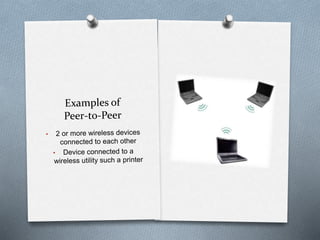
  • #6 (image credit: technologyuk.net) Examples of Peer-to-Peer network are 2 or more wireless devices connected to each other, or a device connected to a wireless utility such as a printer.
  • #7 Peer-to Peer networks have advantages and disadvantages. Depending on the need, a user may prefer the use of PTP networking. Advantages include that it is ready to set (right from the store box), easy to setup with a few clicks, and generally low cost. Most often the operating systems come with the feature of listening for available network connections and with a simple password can establish the PTP connection. Too, many devices (such as smartphones or tablets) have this capability already available – so no new software needs to be purchased. With every network connection, there are disadvantages. PTP is limited to short-range and temporary connection (often the connection ends with a successful transmission of a file). There are no security features with this connection besides what is already included with the operating system. If a printer is being used by another device it cannot be used by another PTP connection until it is finished. If one PC or device goes down the network connection ends.
  • #8 Connections are more long-term than compared to Peer-to-Peer or Hotspot. When a wireless access point is added to a network it creates a Local Area Network (LAN). Since, most access points are wired to a service provider, they are considered the “edge” of the wired network (the point were Internet connections become wireless). Within the LAN the authentication methods become stronger (more secure) starting with the Wired Equivalent Privacy (WEP). This security code system allows the group of devices to exchange encoded messages. This hides contents of the message from outsiders. When devices agree to the terms of use, and matching up the WEP keys the wireless routers grant access to the network. Often, it is the network administrator the sets up the hexadecimal digits used for WEP keys. Though most wireless LANs are used for the edge of a wired network to access the Internet, having a connection to the Internet is not required to setup and use a LAN. Some business intranets mimic the features of the Internet but do not allow all users full access to the Internet. Some at-home networks are setup just to exchange project files or other files to share between devices.
  • #9 (image credit: wildpackets.com) Examples of a wireless LAN start with at least one device connected to an access point that provides resources. This may include a business intranet that mimics elements of the Internet but not provide full internet access to all users. Another example would be an at-home network (SOHO).
  • #10 Like other WLAN configurations, there are advantages and disadvantages to a LAN. First: disadvantages to a LAN. Since, wireless LAN is the edge of a wired network, if the wire is cut or service is interrupted the entire wireless LAN breaks down. If only one access point (AP) is available for the wireless LAN, only a maximum number of devices can connect to it. Depending on the specifications from the manufacturer of the AP and bandwidth available on the network, perhaps only 10 devices can be connected to the AP at any given time. Each connected device will be given half of the bandwidth available, and as other devices are added they get half of that. Certain files are given priority decrease throughput, such as audio, voice and streaming. When this happens available bandwidth is tapped while other devices have to wait until these transmissions are complete. Advantages to the LAN often outweigh the disadvantages since, first, WEP security encryption is available. WEP keys are hexadecimal digits that provide encryption to contents exchanged between devices on the network. This is a basic layer of protection on a LAN. Now, the devices’ operating system and installed security software (such as firewall) provide further security. Devices on the network can lease resources to other devices (such as printers, scanners, applications, and storage).
  • #11 The third WLAN configuration is called “hotspots,” according to DaLaet from Cisco Systems. Hotspots are “free” nodes that provide access to the Internet or a LAN by collecting data and forwards to the a destination. The hotspot required a wireless (Wi-Fi) connection and limits or restricts file sharing with other devices on network. The hotspot extends the wired network to wireless users (or customers) for free. The owner of the hotspot manages the network. A common node that provides a hotspot or ad hoc connection is a smartphone. A smartphone can act as a wireless card to establish an internet connection directly to the service provider, a wireless connection to a hotspot available, or create a hotspot for nearby devices. This is where WLAN becomes a blended form of LAN and Hotspots.
  • #12 (Image credits: apple.com) There are many examples of Hotspots. The varied examples depend on the hardware used. For Wi-Fi, many businesses (such as doctors offices, hotels, fast-food restaurants, and other small businesses) provide wireless access to the Internet (as long as the device to be connected has a wireless NIC). Smartphone users often have an additional feature called “personal hotspot” or “teethering.” The smartphone will act as a forwarding node.
  • #13 As mentioned, like any WLAN configuration there are advantages and disadvantages that a user has to weigh before using. Hotspots provide free access to a network. Many businesses provide easy and quick access to their network from their wireless router at no extra charge. The user, once connected, may route from room-to-room with several hundred feet. The hotspot network can grow as other devices are connected. Devices must pass simple questions to gain short or long-term connection. The disadvantages can be alarming. Not only is access to the network limited and generally there are no sharing of data between other devices on the network, there are security risks. Sometimes fake access points, disguised as real business hotspots, can be set up by hackers. Once a device is granted access, a hacker (posing as a network administrator) can view files saved on the device and steal private information such as credit card numbers or bank account passwords. As other wireless-based network connections, if the wired side of the hotspot fails, then the entire wireless hotspot goes down. Same thing can occur if the wireless hardware itself fails.
  • #14 (image credit: i-sight.com) WLAN Authentication Methods There are two types of authentication: Open System, and Shared Key. After the device scans for a network, an authentication prompt will ask the user for credentials. Passive scanning is one of two methods of scanning that leads to authentication. This is where the device (or client station) listens for the beacon sent by an access point (AP). The second method is active scanning. The device, at this time, will scan for a network by transmitting probe requests to any AP in listening area. When either of these scans are made, credentials are needed to join a network.
  • #15 How does authentication work? In order to connect to a 802.11 device, authentication and association occurs. Authentication can be considered the “physical connection” the wireless device must make with an AP, much like an Ethernet cable and a wall jack. When the device and AP pass the authentication then their wireless connection is an association. There are two types of authentication: Open System, and Shared Key. In Open System Authentication a simple “exchange of hellos” is all that is needed to begin exchanging data frames between the device and AP. In this method, the Wired Equivalent Privacy (WEP) is used in the encapsulation process and encrypts the message. The difference between Open System and Shared Key is there is, in fact, an exchange of a “four-way authentication” (challenge and response from both device and AP) . Shared Key can include a password or biometric password (such as a fingerprint or eye ball). (Coleman & Westcott, 2012). Shared Key, in more detail, has four steps: Device sends request to AP, AP sends cleartext back Device encrypts the cleartext and sends back to AP AP decrypts the device message, compares to original challenge If messages match then AP sends confirmation Security Risks Methods Open System has only “handshakes” where other devices can “listen” and capture data exchange. Shared Key uses WEP key and each data frame is encrypted. As long as the AP’s cleartext and device’s cleartext response is not captured by a would-be hacker, the data exchanges will stay private. New 802.11 devices have “fragmentation of frames” that serves as another layer of protection.
  • #16 It is my observation that it is best to have a newer wireless device that complies with the IEEE 802.11-2007 standard because these devices use WEP, Shared Key, Authentication & Association states, and Fragmentation. According to the IEEE 802.11-2007 standard, it is mandated that new devices have “fragmentation of frames.” (Coleman & Westcott, 2012). The encrypted frame breaks into smaller pieces and adds header information to each fragment and transmits the frames individually. Though the mean purpose is to speed up retransmission of corrupted frames, this serves as another layer of security. If a would-be hacker listens and captures part of a complete frame, then he has only stolen partial information that otherwise wouldn’t make sense without the entire frame. WEP and Shared Key has already been discussed at length. These methods further encrypt the encapsulated data frames and exchanged through a trusted medium. Authentication and Association states by themselves was designed to lease network resources to users “on the network” and to disassociate those that are idle for a long time. This frees up resources to be used by others that join the networks. The three states authenticate and associate, and re-authenticate and re-associate connected devices. This provides security similar for those that “forget” to sign-out of their banking account from a public computer. After some lapsed time, the system signs you off the network.